How to Unlock iPhone 7/7 Plus AT&T [Clean Out of Contract IMEI]

The distant unlock AT&T iPhone 7/7 Plus service is the easiest, fastest and safest way to become SIM free when you have clean IMEI out of contract number. Factory unlocking supports all Apple mobile firmwares including the iOS 9 and is perfect for the most recent generation iPhone. The iPhone AT&T unlock package can help you get permanent unlock that lasts for a lifetime.

Apple allows factory unlocking. This service is also legal in the U.S. It is possible to unlock iPhone 7/7 Plus AT&T from the comfort of your home. Everything is done online however you should first make sure you are eligible for the service and meet all the requirements.

If in case your iPhone is blacklisted you can unlock it using our special service for AT&T iPhone 7, 7Plus if IMEi is blocked, in contract, fraud reported or you just got Not Found.

Legal iPhone 7/7 Plus AT&T Unlock: Am I Eligible?

In order to order online factory unlock for your iPhone 6s AT&T you should be sure that:

1) Your iPhone is locked to AT&T

2) You have iPhone 7/7 Plus model

Note: If your model is lower you can follow these linkks to unlock iPhone SE, 6S, 6 and iPhone 5S, 5C to use any other SIM card worldwide.

3) Your IMEI is clean

4) Your are not blacklisted / not barred / not blocked

5) Your iPhone is activated with AT&T network

6) Your are off contract with AT&T

7) Your iPhone is not reported as stolen or lost

The service supports all basebands.

How to Unlock iPhone 7 AT&T Out of Contract with Clean IMEI

Who fails to become unlocked:

– Users whose IMEI is not clean

– Your IMEI is not found

– Your iPhone is locked to a different carrier, not AT&T

– Your iPhone is not activated

– Your iPhone is lost / stolen / blocked / barred

– Your iPhoen is blacklisted

– You have clean IMEI but your are on contract

– Your iPhone is being replaced at the moment or you sent it to Technical Service / Apple Care

Please note that only about 60% of all unlocking orders with clean IMEI out of contract numbers are successful. There is no refund for users who place their order while they don’t meet the requirements for unlocking iPhone 7 from AT&T. You can check the status of your IMEI using blacklist checker.

Here is how to place your order for permanent iPhone unlock:

Step 1. Choose the right unlock service [make sure your IMEI is clean and you are out of contract].

Step 2. Double check that you are eligible for unlock.

Step 3. Provide IMEI number, email and name.

Step 4. Place your order by clicking on Buy Now button.

Step 5. Pay for the order via PayPal or other payment methods [Google Wallet, credit card].

Step 6. We start working on your order once you provide the payment. It is impossible to cancel the order once it is paid for.

Step 7. Check your email. We’ll provide a guide on how to activate SIM unlock through iTunes. It takes a few minutes to complete and you’ll be permanently unlocked from AT&T carrier.

Useful Tips

You can always use iPhone IMEI network checker to make sure you are locked to AT&T, activated and get information about your blacklist / contract statuses.

If you get no email with order confirmation after you placed your order with us and paid for it – please check in your junk / spam folder. You are welcome to contact us if you cannot find this email.

You should disable Find My iPhone option along with Activation Lock before ordering factory unlock. Please use Find My iPhone status checker to make sure it is turned off.

Delivery Times

We are available online 24/7 however we deliver unlock results Monday through Friday, on business hours from 9am to 6pm PST. Please note that the weekend unlock delivery time can be delayed until Monday.
How to Unlock Blacklisted / Barred iPhone 6S/6S Plus/SE AT&T

Is there a way how to unlock blacklisted iPhone 6S/6S Plus/SE AT&T? Of course. Users who purchased the new 2015 Apple smartphone model and wish to become SIM free can get the factory SIM card unlock service that is safe, popular, affordable and officially allowed in the U.S.

Notes

The American carrier AT&T changed its unlocking policy back in 2014. Those changes often cause unlock delays to consumers however this doesn’t happen always. Our company doesn’t guarantee turnaround time for delivering unlock AT&T iPhone 6S, 6S Plus, SE blacklisted result. Right now we deliver unlocks from 9 am to 6 pm PST. We are open Monday through Friday. Users who wish to become SIM free should please consider these facts before placing their order online.

Special Offer: Get unlock for blacklisted AT&T iPhone 7 or 7 Plus only here!

Important!

Please note that when you unlock blacklisted AT&T iPhone 6S/6S Plus/SE you do not unblock it. Unlock has nothing to do with unblocking service. The barred / blacklisted device’s status will remain the same and you will not be able to use it in the United Stated. However the SIM free gadget will be usable outside the U.S. with other worldwide networks.

Unlock AT&T iPhone 6s Barred Package Details

The blacklisted iPhone 6, 5S or SE AT&T unlock package works for AT&T iPhone 6s, 6s Plus and SE that are blocked / barred / blacklisted only. It doesn’t work for gadgets with clean IMEI. Remember that this service doesn’t unblock your device and doesn’t make it clean. It will stay blacklisted within AT&T network and inside the United States. You’ll be able to use your smartphone elsewhere outside the U.S.

Eligibility Requirements

AT&T iPhone users can order this package only if they meet the following requirements:

* You have iPhone 6S, 6S Plus, SE

* Your iPhone is locked to AT&T network

* Your iPhone 6S, 6S Plus, SE is blacklisted, barred, blocked, in contract, fraud reported by AT&T

* The iPhone has to be activated within AT&T

Users who have a lower iPhone model can order unlock packages for other AT&T iPhones.

In case your iPhone is not supported and you are not eligible for the unlock – there will be no refund made as we consider this malicious and unwelcome purchase. Please double check that you meet all the requirements prior to purchase.

Unlock Barred AT&T iPhone 6s Checker

It is best if you can first run iPhone IMEI network checker to make sure your iPhone 6S/6S Plus/SE is locked and activated within AT&T, blacklisted, blocked or barred. There are no refunds to users who order service for a different iPhone model or the iPhone 6s that is not activated, has clean IMEI or is locked to a different network.

Please don’t order factory SIM card unlock if you are replacing your iPhone model or have sent it to Apple Technical / Care Service.

How to Unlock Barred iPhone 6S/6S Plus/SE AT&T

Step 1. Disable both Activation Lock feature and Find My iPhone program on the iPhone 6S/6S Plus/SE before you order its factory unlock.

Step 2. Find the IMEI number of your device. Do this by dialing *#06# and get the code in your Settings app.

Step 3. Select your iPhone unlock packaging after double checking that you are eligible for the service and provide the IMEI code.

Step 4. Enter your email address where the order confirmation and further instructions will be sent to.

Step 5. Choose the correct iPhone version and read / agree to our Terms and Conditions.

Step 6. Press on Buy Now and provide the payment.

Step 7. Please check in your junk / spam folder if there is no email confirmation from us. If you can’t find the email that confirms your iPhone 6S/6S Plus/SE AT&T unlock order you should please add our email [contact@geo-location.site] to your contacts.

Once the order is submitted online it is impossible to cancel it.

AT&T Blacklisted iPhone 6S, 6S Plus, SE Unlock Service

The results are official and permanent. We’ll unlock your blacklisted AT&T iPhone 6S/6S Plus/SE and you’ll be able to use your smartphone with other networks except in the USA. The service supports iOS 10 platform and the most recent Apple handsets iPhone 6s and iPhone 6s Plus that are activated and locked to AT&T.

Unlock is not hacking, jailbreaking or unblocking. This service only makes you SIM free from AT&T carrier by adding the iPhone unique IMEI number to the official Apple iTunes database of unlocked IMEIs.

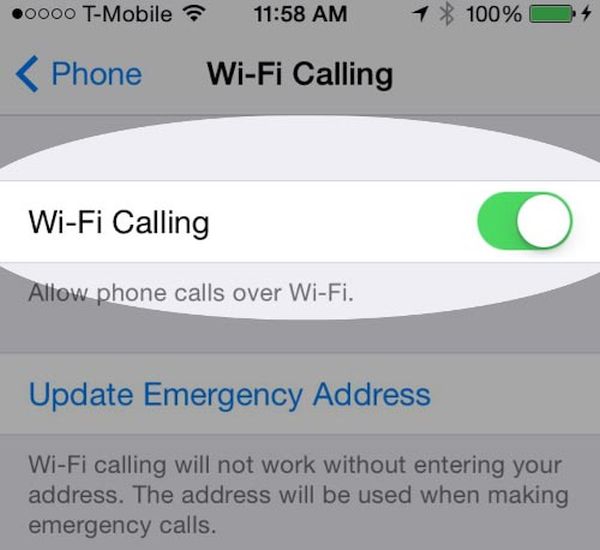
Does AT&T iPhone Support WiFi Calling Feature on iOS 9?

It’s not a secret that many AT&T iPhone 6s and iPhone 6s Plus subscribers purchased this new Apple device from this particular carrier because it promised soon AT&T WiFi calling launch date [learn how you can decrease your data usage on iPhone 6s]. The Cupertino-based giant updated its iOS 9 platform however AT&T is still not supporting the feature.

While other companies, including Sprint and T-Mobile iPhone carriers, already offer the support for WiFi Calling, AT&T WiFi calling release has been postponed. At first, the mobile operator reported that it wouldn’t launch the service unless the FCC regulator confirms everything is within the law. Well, the FCC approved the option however AT&T hasn’t schedule the launch date yet.

WiFi Calling iPhone 6s iOS 9 Feature

Does AT&T iPhone support WiFi calling on iOS 9? No, it does not and it doesn’t say when it is planning to rollout this option in the United States. The regulations related to the FCC are now settled down but users still cannot access the option.

It is worth to mention that AT&T also blasted both Sprint and T-Mobile for not offering TTY feature along with WiFi Calling and such rules are set by the FCC. If you wish to use both cellular and WiFi calling on your iPhone 6s you might even want to unlock AT&T iPhone on iOS 9 and switch to a different network that is supporting this option.

Since you can install iOS 9 firmware on your AT&T iPhone or Apple handset locked to other U.S. carrier – you might also want to use all the iOS 9 options and features right away. This isn’t always possible due to different issues with carriers and other things. If you are using a different carrier that supports the WiFi calls you might have already tested this option. How does it work? Do you like it when your phone is always connected even when your cellular signal is poor or absent for any reasons?

Apple Watch Brazil Launch Planned for Mid October

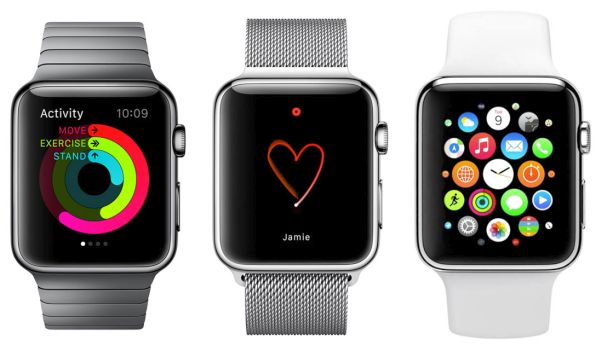
If you are looking for the Apple Watch Brazil release date, get prepared. The popular Apple smartwatch is coming to this country in October. September was the month of the iPhone 6s and iPhone 6s Plus in the U.S., Canada and other countries. The famous ‘fruit’ giant is planning to unveil its new generation iPhone in India and other countries this October and Apple Watch is coming to Brazil.

Besides, the reports mention that customers would be able to buy Apple Watch in Brazil and Colombia as soon as on October 16th. This is the official release date of the iWatch in both countries. The gadgets should appear on the loca Apple sites in the middle of the month.

Apple Watch Brazil Launch Date

Apple Watch Brazil Price

Users who live in Brazil and are planning to get the watch from the Cupertino-based company would probably like to know the pricing policy. The basic 38mm Sport model will be offered at over $730. The price should start at 2.899,00 reals. The company will soon update the Colombian site to reveal the cost of its Watch.

Earlier this month the well-known iPhone maker is planning to release its Apple Watch first generation models in a number of countries. Customers from Poland, Belgium, Norway, Finland and Luxembourg will get a chance to purchase this device in their local stores.

The Watch was officially unveiled in spring 2015. Apple offers several versions of its smartwatches. Sport model is the most affordable. The most expensive gadgets reach the price of $10,000 and more.

It is curious that in just half a year Apple made its Watch available in the most popular U.S. retail stores and is now coming to international markets.

asd asd2 sad
asd sad asd

How to Turn Live Photos on iPhone 6s Into Still Images

A lot of users have already got the most recent smartphone from Apple. The company offered iPhone 6s release [have you tried to identify your iPhone 6s A9 chip?] on September 25th and if you have also purchased this new generation device – learn about iPhone 6s Live Photos feature that makes it possible to create still images from your live photographs.

It is pretty fun to capture still image with iPhone Live Photos [it is also possible to simply disable Live Photos feature on iPhone 6s] however not everyone understands how exactly this works. When you take a Live picture your camera records for 3 seconds and the image can be animated as a result. If you would like to turn this .MOV file into a still picture you are able to do so. We have a short guide that should be helpful.

iPhone 6s Live Photos Turn to Still Image

How to Turn Live Photos into Still Images on iPhone 6s

Step 1. Launch your Photos program on the iPhone 6s.

Step 2. Click on the Live Photo. Choose the photograph that you wish to turn into a normal image. Please keep in mind that you are able to switch between live and still images at anytime. These fun options work great as well as other impressive iOS 9 features Apple introduced this fall.

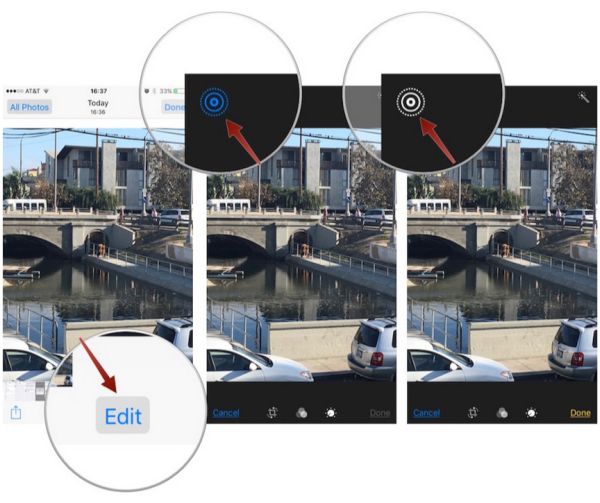
Step 3. You should now click on Edit option.

Step 4. There is an icon of ringed circles you want to use. It turns blue each time you make Live Photo active. When you click on this icon its color will change to gray and this means you have successfully turned your live image into a regular one.

iphone-6s-live-photos-feature

Step 5. Remember to press on Done option to confirm the changes on the iPhone 6s [Apple hopes to set up a new sales record by selling its ‘s’ lineup of handsets this year].

Step 6. The still image will be saved to Photos and you can share it with your friends just like with live photographs.

Hopefully you enjoyed learning how to convert any live photo taken with iPhone 6s or 6s Plus into the regular still photograph.

Cheaper iPhone Release Date in 2016

When can Apple offer cheap iPhone 6c model? Some experts thought the company would release this device along with more expensive iPhone 6s and iPhone 6s Plus in the fall. However it turns out that Apple didn’t even talk about any cheaper iPhone release date.

Now analysts suggest the famous ‘fruit’ giant could wait for the spring 2016 and present the upgrade then. Would customers be happy when they get iPhone 6c release date and be able to buy the more affordable smartphone? The previous similar experiment was held by Apple a couple of years ago. The company released iPhone 5s and cheaper 5c however the most affordable model didn’t succeed as much as its more expensive ‘family members.’

iPhone 6c Release Date Rumors

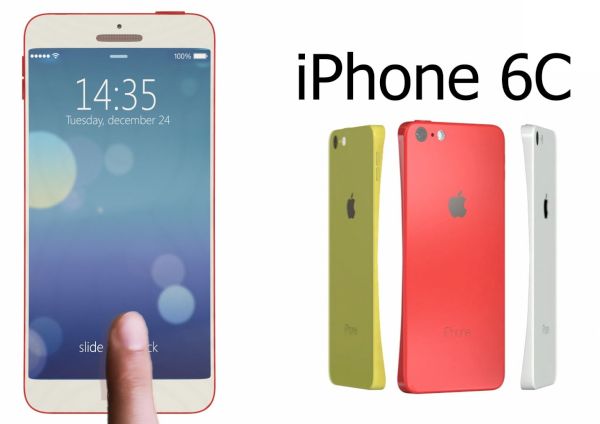
At the same time if Apple decides to unveil cheap iPhone 6c that could be a ‘skinny’ handset similar in size with iPhone 6 version. The company could make it affordable for the emerging markets and attrack more customers who are price sensitive. This is what experts think.

There are not many rumors on the new phone. We don’t know any specs and features that could follow in a few months from now. Could it support some of the options supported by the most recent generation iPhone 6s or iPhone 6s Plus? Will it get Force Touch [3D Touch screen], improved Siri and other impressive things customers like about the ‘s’ lineup of will it be just another copy of previous gen iPhone 6?

Will Apple make its next handset out of plastic or metal? What will be the size and weight? How do you imaging the future device?

It could possibly arrive in the colorful plastic bodies, with a 4-inch screen and other ideas Apple seemed to already drop. Still rumors are rumors and it’s always interesting to see what really arrives in the market and is offered to millions of consumers from all over the world. Especially, if the device is created by Apple.

How to Prepare iPhone 6 for Sale [Instruction]

Are you getting ready for iPhone 6s official release date with iOS 9 features? You might want to learn how to prepare iPhone 6 for sale and sell it in time Apple launches the upgrade. This way you can save money on updating to the most recent gen device and get rid of your older generation model. There are a lot of customers who are happy to get the pre-owned older Apple version if it is in good shape, unlocked and ready-to-use.

We’ll explain how to sell iPhone with Flappy Birds or without this popular game. It actually doesn’t matter that much how many games or apps you have installed on the device. Of course, when you have some rare apps [for example, Flappy Birds] you can resell your phone at a higher price. You can still get much for your device without rare games if you follow our instruction. Remember to buy iPhone 6s with Force Touch or iPhone 7 after you resell your older generation version.

How to Prepare iPhone 6 for Sale AT&T Guide

How to Prepare iPhone for Sale [AT&T Owner’s Guide]

Step 1. If you are locked to AT&T you should definitely make your smartphone SIM free before reselling it. This way you’ll get more money for it. You can order distant AT&T iPhone 6 unlock service that is affordable and fast and become permanently unlocked within 1-2 days.

Step 2. Since you don’t want to lose your information [images, applications, games etc.] you should create a backup copy of your iPhone 6 that you are planning to resell. You’ll be able to transfer all your games, apps and files to the new iPhone 6s or 6s Plus you are planning to purchase this fall. You can back up through iTunes or iCloud.

Step 3. Turn off Find My iPhone application through Settings – iCloud menu. You have to delete your account [if you are running iOS 7 or older OS version] or sign out of iOS 8 firmware and choose option called Delete from My iPhone. It is important to turn off Activation Lock feature since the new iPhone owner might have issues with the gadget if you don’t disable this security option.

Step 4. If you don’t have Flappy Birds game you should definitely erase your smartphone. Do this by going to Settings – General menu and choosing Reset – Erase All Content and Settings option.

Step 5. Create an ad on different websites [eBay, Gazelle, Amazon, BestBuy, Craigslist etc.] offering your used but unlocked iPhone 6 and wait for your customer.

T Mobile Data Breach Steals iPhone Users Personal Information

Some iPhone users experience T Mobile data breach lately. The company has already informed its U.S. subscribers about the problem. What causes the new breach? Is there a way to fix the issues right here right now?

The most recent iPhone T-Mobile data breach 2015 is caused by Experian. This is a company the well-known mobile operator gathers data from. When iPhone 6s owners and other smartphone owners subscribe to the carrier they often have to pay for their contract with a credit check. And this is where the issue comes from as all the payment data is gathered from Experian and similar companies.

T-Mobile iPhone Data Breach 2015

The company’s CEO John Legere already confirmed that T Mobile iPhone data breach results in the gathering users’ information. The issue is being investigated now. It is believed that the data of about 15 million users was gathered between 2013 and 2015. Not all of them are subscribed to T-Mobile though.

The U.S. carrier doesn’t name the exact number of users who information was gathered because of the breach. Those users who have the iPhone T-Mobile [along with the new iPhone 6s T-Mobile model] and are now affected by the breach used their credit card to check out and this is the reason why they face these problems. They could have paid for their smartphone or service.

As news mentions, information that was stolen due to the breach includes users’ names, birthdays and addresses. The stolen data also includes encrypted ID numbers and SSN. According to Experian, the encryption might be compromised so if you purchased anything from T-Mobile in the last two years you might want to double check with the U.S. carrier.

AT&T WiFi Calling Release Date Delayed

A lot of U.S users who purchased AT&T iPhone 6s or iPhone 6s Plus wished to also get the announced AT&T WiFi calling 2015 option. However this feature hasn’t been released yet. It is being delayed and millions of subscribers are now upset.

While AT&T WiFi calling iPhone 6s option is not working because the mobile operator is awaiting for the FCC to approve this feature, users who are subscribed to Sprint or T-Mobile can enjoy the wonderful calling iOS 9 option. You might even want to unlock AT&T iPhone 6s or 6s Plus right away and become SIM free to use the feature with a different network provider while waiting for your original carrier to get the approval.

AT&T WiFi Calling Feature Delayed

AT&T WiFi calling release date was expected right after the ‘s’ lineup launch. The company was testing this option together with Apple in the end of the summer. This made a lot of users believe that they would get iOS 9 WiFi calling right after this firmware update. Apple indeed upgraded its mobile operating system and has already launched two versions: iOS 9 and minor iOS 9.0.1 update. At the same time, AT&T is still holding back on releasing the WiFi calling on its network.

AT&T hoped to release its WiFi calling service without offering TTY support for hard-of-hearing and deaf people. It has to get the FCC approval to make this happen. It is curious that both Sprint and T-Mobile that launched iOS 9 WiFi calling feature support do not offer TTY support as well.

Originally AT&T WiFi calling launch was planned on September 25th or 26th. The company is not going to offer the service unless it gets the approval. Are you going to wait for the option to be launched or do you plan to factory unlock iPhone from AT&T in order to use the option on a different network?

AT&T LTE Problem or No iPhone App Downloads

A number of iPhone AT&T users have issues with Apple Music service. Some people cannot download applications. The AT&T LTE issues are reported by a lot of U.S. subscribers. It is interesting that the new Apple smartphones were released in the end of September and more and more customers are getting their hands on the new generation iDevice.

AT&T LTE problem is not common yet but some users do report issues. When some Americans are connecting to LTE network from AT&T they cannot download applications and Apple Music doesn’t stream. Some of the users also report about being throttled by the mobile network.

iPhone AT&T LTE Issues

It is interesting that the same iPhone owners assure that they have no issues with both Apple Music and app downloading when they are connected to WiFi network. There is also a report about iOS 9.0.1 update with VPN configurations and on this platform everything works just great.

The problems are reported with AT&T LTE connection only. At the same time the speed test shows no problems. Users note that the issues might be regional as they are not experienced by people from across the U.S.

It looks like the bug is related to AT&T iPhone carrier only. Users who are subscribed to T-Mobile and Verizon don’t suffer from any LTE issues. What models could be affected by the unknown AT&T issue? There are users with the iPhone 6s model which was released on September 25th who have this problem as well as older smartphone and tablet owners, including iPhone 4S and different iPad versions.

AT&T promises to release the fix. The company thinks that the bug is caused by iOS 9 and 9.0.1 upgrade so if you are using this carrier and are still running iOS 8 platform – you might want to wait with updating to the most recent version.