Pre Order iPhone 6s in Indian: Service Available Already

The upcoming release of India iPhone 6s and iPhone 6s Plus with a lot of new features makes millions of customers impatient and if you wish to pre order iPhone 6s in India you can already do so. The first pre-orders are already taken by local retailers since October 2nd. The official release date is planned for the middle of the month.

Where can you pre-order your iPhone 6s / 6s Plus in India? Reports assure that MobileStore is one of the retailers that has already launched pre orders on its website. Another company, UniverCell, is already eager to take your pre-order for the 2015 Apple smartphone model. How many consumers are soon to own the new device?
iPhone 6s India Pre Order

Rumors state that customers place minimum 100 pre-orders for iPhone 6s in India. You might also wonder about iPhone 6s India price and pre-order cost. The pricing are starting at Rs. 2,000 [this is the start cost for pre-ordering this year’s generation handsets]. The new iPhone 6s will be sold at Rs. 62,000 and the iPhone 6s Plus price will start at Rs. 72,000 for the smallest capacity 16GB model. The more storage you wish to get – the more you’ll have to pay.

You can place your pre-order until October 13th. There is still enough time to get to the list and get your new phone on its official launch date which is scheduled for October 15th and 16th.

Customers from U.S. and a number of other countries have been purchasing the iPhone 6s and iPhone 6s Plus since September 25th.
iOS 9 Flaws Fixes with iOS 9.0.2 Firmware Update

A lot of users with iPhone 6s and other models are looking for iOS repair. Their iOS 9 flaws are frustrating to a many new customers. Apple is aware of the problems and is trying to present solutions as soon as possible. The company has just upgraded its mobile OS to bring the fix to millions of its fans from all over the world.

The number of issues with both new iPhone 6s and 6s Plus as well as iOS 9 is growing fast. The models have been around for about a week and consumers keep reporting more and more problems. Apple is also offering some iOS 9 fixes and you can already solve one major issue.

iOS 9 Flaws Fix

First Big iOS 9 Problems Fix

Experts found a big issues in iOS 9 code. It allowed bypassing the lock screen and access some application the iPhone without having to enter the passcode. This could be a major problem if you happen to lose your iDevice or have it stolen.

It turned out that you could enter the passcode incorrectly a couple of times. The last try should help you access the device if you access Siri which in its turn allows using Contacts and Photos app. This issue was discovered on September 24th however it took Apple several days to update the firmware and present the solution.

The company unveiled iOS 9.0.2 upgrade on September 30. You can already download it and fix the lock screen bypass bug. This security flaw might be dangerous so it is better to either downgrade from iOS 9 to iOS 8.4.1 or update to the most recent version. Remember that downgrading will be possible until Apple stops signing that older operating system version for iPhone, iPad and iPod touch.

How to Identify iPhone 6s A9 Chip: Samsung / TSMC Guide

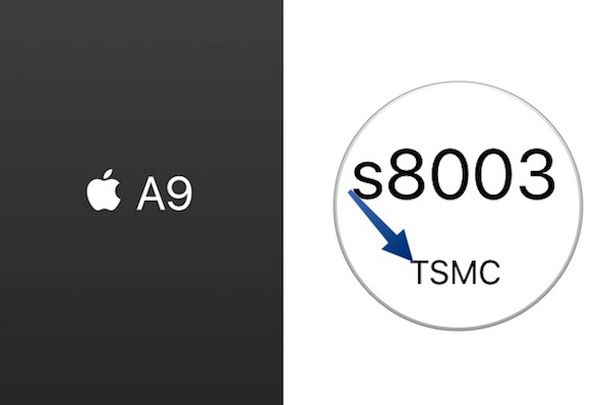
The new Apple lineup of mobile devices have different A9 chips. Some iPhone 6s and iPhone 6s Plus models are delivered with A9 chip Samsung and other get the A9 chip TSMC. So which one do you have?

Customers who have already purchased their new generation smartphone from Apple [the official release of iPhone 6s was on September 25th] can now get A9 chip Apple specs and learn what company manufactured processor for their gadget. It is believed that the new A9 processor is the most advanced one created for smartphones ever. This is the main reason why users are so interested in learning more about it.

iPhone 6s A9 Chip Specs Apple

How to Identify iPhone Chip A9 [Samsung or TSMC]

Step 1. You’ll need to use the special program created by Hiraku Wang. This well-known developer released his CPU Identifier tool that you can download and install on your device using Safari or other mobile browser. You can delete it after you learn which chip you have.

Step 2. Once the tool is installed on your iDevice you should see the app that appears on your iPhone 6s or iPhone 6s Plus Home screen. Open Settings and go to General menu to select Profile option. You should trust the Guangzhou Huimei Electronic Co. Ltd. Profile in order to use the tool.

Step 3. Launch the application. It will now tell you either TSMC A9 chip or Samsung A9 chip and answer your main question.

Step 4. Now that you know who produced your A9 processor for iPhone 6s Plus or 6s model you should delete the program. To do this, launch Settings again and choose General – Profile where you can select the option Delete App.

The new Apple mobile processor is definitely better than A8 chips. The company ships some gadgets with the smaller chip by Samsung [14-nanometers] and others with the bigger processor by TSMC [16-nanometers].

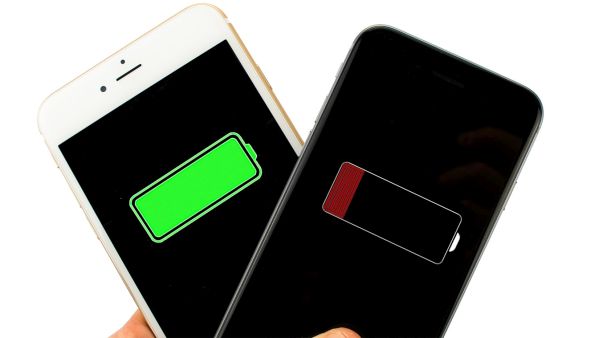
Fix Battery Life on iPhone 6s Plus and iPhone 6s

The new iPhones have smaller battery than previous generation models. Still Apple added the more powerful A9 processor and other improvements that should not affect your battery life [you can check your AT&T iPhone 6s order status]. If you are having any iPhone 6s battery issues you might want to fix everything using the guide below. Hopefully it will solve your problems.

For example, the new iPhone 6s comes with the 1,715 mAh battery with 3.82 V and 6.55 Whr. The second 2015 smartphone model iPhone 6s Plus has the 2,759 mAh battery that is rated at 10.45 Whr and 3.82 volts. These specs are better on the iPhones 6 / 6 Plus.

Some users complain about their short battery life on iPhone 6s Plus and iPhone 6s. How can you troubleshoot and fix this situation? Keep on reading and follow the simple tricks that should change everything for good.

iPhone 6s Battery Issues

iPhone 6s Battery Life Fix Instruction

Step 1. The new iOS 9 platform can show you your battery usage breakdown by applications. This is a handy feature that gives you an opportunity to figure out the apps that are draining the most battery life and remove them from running in the background, make them stop downloading extra content or completely delete if you don’t need the program. You can go to Settings – Battery and get the list of all the apps that are consuming battery.

Step 2. You might also want to turn off your Background App Refresh feature. You can do this through Settings – General menu called Background App Refresh. Some tools as Facebook can be disabled as you don’t really want them to update every hour, right?

Step 3. You can also turn off location services through Settings – Privacy menu. Do this for all applications and you’ll see that your battery life lasts longer.

Step 4. Users who spend much time in areas with poor LTE coverage might want to disable the 4G / LTE feature in Settings – General – Cellular / Mobile menu. This way your battery life won’t be drained by constantly checking o your cell signal.

Step 5. If you see that the problems with your iPhone 6s battery life are getting wroth you might want to hard reset the gadget. You should also reset your network settings and this might help to maintain your battery.

Step 6. iPhone 6s owners could use Low Power mode when they need their battery to last longer. Do this through Settings – Battery.

Step 7. If this also doesn’t help you might need to restore your iPhone as new through iTunes.

How to Take Selfies with iPhone 6s and iPhone 6s Plus

Selvies are so popular nowadays that Apple added iPhone 6s Live Selfies feature to its new smartphone lineup. iPhone Selfies Flash option is available through Retina Flash and you can easily learn how to use this iOS 9 addition on your new gen smartphone from the famous ‘fruit’ company.

Millions of users take selfies every day.When you launch iOS 9 Photos app you’ll find the Selfie album inside. The company introduced some fun ‘Live’ options and Live Selfies along with Live Photos are present.

How to Take Live Selfies on iPhone 6s

How to Take Selfies with iPhone 6s

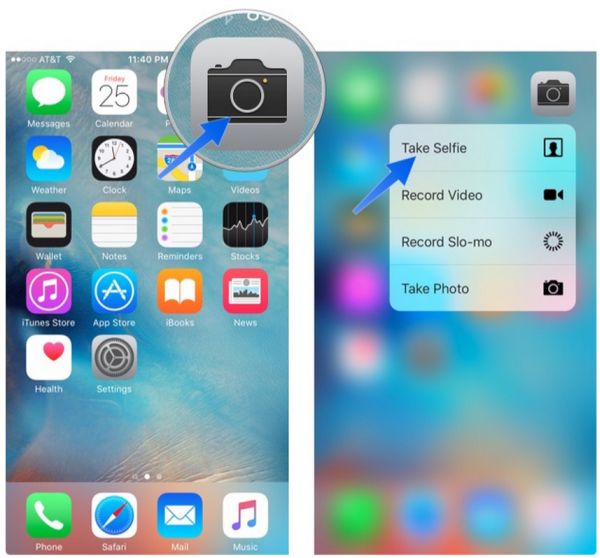
Step 1. If you need to quickly get to your Camera on iPhone 6s you can slide up from your Lock Screen. You an also use Quick Actions with 3D Force Touch feature or ask Siri to help you create the quick selfie. Remember to turn on Live Photo option. When your front camera is on you can start taking the Live Selfie on your iPhone. Don’t stay still as the animation always looks better when you wink, smile or do something else.

Step 2. When your Selfie has been taken you might want to view it. Since your Live Selfie if your Live Photo you should launch Photos application and search for the image you want.

Step 3. You can animate your Live Selfie by pressing firmly on the photograph. This is not only possible on the phones that support 3D Touch feature: iPhone 6s and iPhone 6s Plus – but is also available on some earlier models where you have to click-hold the image to animate it [remember to update to iOS 9 as this feature is not supported by iOS 8 or iOS 7].

Step 4. It is possible to share your selfies through Share option.

Now you know how to take and share iOS 9 Live Selfies on iPhone 6s and iPhone 6s Plus. This is fun, fast and awesome!

How to Disable Live Photos on iPhone 6s

When you are taking low-light pictures with your iPhone 6s or iPhone 6s Plus you might want to disable Live Photos iPhone 6s feature. Why? The main reason to turn off this option is to improve the quality of your images.

The Live Photos was introduced on the new generation smartphones. When you are taking such a picture on iOS 9 firmware you also create a three-second short video which you can share with your friends and family. It’s a fun option however sometimes you need it to be disabled so that other features work better.

iPhone 6s Live Photos Disable

iPhone 6s Live Photos Feature Disable Guide

Step 1. So how exactly can you turn off your Live Photos on iPhone? This is so simple! You should take your iDevice and use Home Screen.

Step 2. Launch your Camera program.

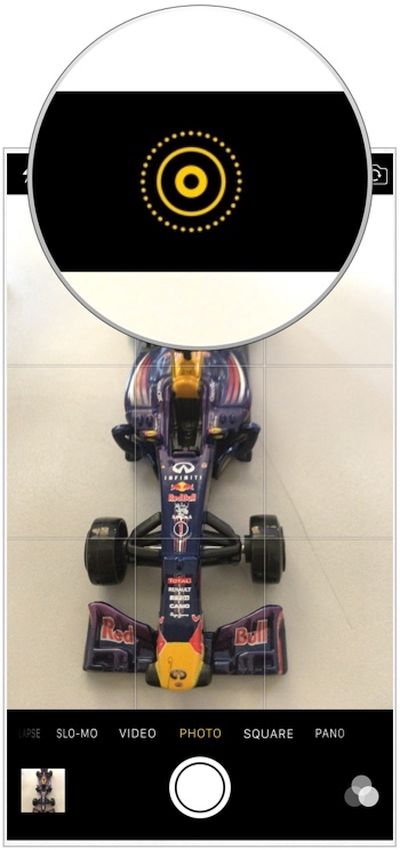
Step 3. Select the Live Photos icon. You can find it at the top.

Step 4. You will disable the feature. The icon should be white which means the option is off.
When you only get the new iPhone 6s your Live Photos are already enabled. You should turn them of when you are not using the option and when you wish to improve the quality of your low-light camera.

Just don’t expect the smartphone to take DSLR or similar images afterwards. The enhancements won’t be that astonishing.

The thing is: Live Photos recording doesn’t allow your iPhone shutter speed to stay open for a long while. The sensor cannot absorb enough light because IOS levels can’t be increase. When the feature is off – your low-light shots should be better.

Fun Trackpad Kyeboard iOS 9 iPhone 6s Instruction

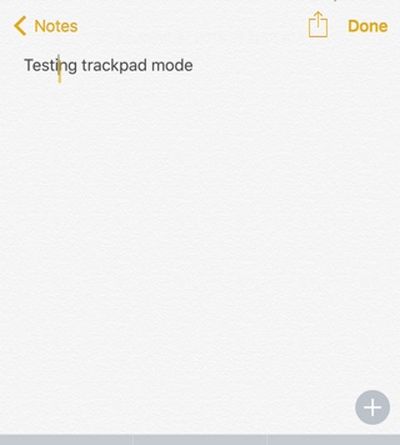
Users who got the most recent Apple smartphones [iPhone 6s or iPhone 6s Plus] can easier edit and select text thanks to trackpad keyboard iOS 9 feature. Learn how to use this option with your 3D Touch that is also present in the new generation smartphones.

There is the fun iPhone trackpad keyboard feature that can be used on 3D Touch gadget with iOS 9 firmware pre-installed. For example, iPad users can do similar thing on their tables and edit text and move it like this: just place your two fingers on your iDevice display and move them directing your cursor to letter / word that requires editing.

While the iPhone option is a bit different it is pretty comfortable and nice to have.

Turn iPhone 6s Keyboard into Trackpad

How to Turn iPhone 6s Keyboard into Trackpad

Step 1. Take the iPhone 6s Plus or iPhone 6s model. We’ll be using the 3D Touch feature so turn it on in case you have already disabled it.

Step 2. Press firmly on your iOS 9 keyboard. Remember that the 3D Touch is sensitive to your touch.

Step 3. Once your iOS 9 keyboard is turned into trackpad on iPhone 6s you are able to launch applications using it [learn more about iPhone 6s AT&T coverage compared to Sprint carrier’s opportunities].

Step 4. The cursor can be moved with your finger. Swipe around and edit text just as you normally do on your computer trackpad.

Step 5. It is possible to move a finger around the display. The feature still works even when you are not working within the keyboard area.

Step 6. Users who need to select the text can press deeper and continue moving the cursor to get more of text selected. You can then copy it or delete, cut etc.

Does the feature look neat to you? Have you give the iPhone 6s keyboard a chance to work as your trackpad?

How to Unlock iPhone Sprint Bad ESN Using IMEI Number Only

Now we are able to unlock Sprint iPhone with bad ESN such models as 5S, 5C, 5, 4S. Use this simple guide to make a purchase and get iPhone unlocked. This is the best choice for those whose iPhone is in the blacklist. No matter if it is has unpaid bills, or reported as lost or stolen or any other reason of blocked status this package will help you to unlock your device.

How to Unlock Sprint iPhone Blacklist IMEI

  1. You should fill in the unlocking form and choose correct iPhone model, enter your IMEI, working email and real name.
  2. Click on ‘Buy Now’ option.
  3. Pay for the service through PayPal or with your credit/debit card [for this select ‘Don’t have PayPal account’ option].
  4. The unlock blacklisted Sprint iPhone 6/ 6 Plus is proceeded after payment is received. The request for unlock is sent to Sprint and it is no longer possible to cancel the order.
  5. You will receive email with Order ID.
  6. Once you become unlocked there will be another email with the instruction on how to activate this status using iTunes. Unlocks are delivered from 9 am till 6 pm PST Monday through Friday.
  7. You are welcome to contact us in case you have any questions about your order or unlock. You can also visit our FAQ page to find answer there.

Notes! If your device is not blacklisted you can easily unlock Sprint with clean ESN. You are eligible for unlock Sprint iPhone with blacklisted IMEI service if:

  • You have iPhone that is locked and activated with U.S. Sprint network. Run iPhone network checker to double check your mobile operator.
  • You have blacklisted IMEI, bad esn.
  • Your iPhone is not blocked. Run iPhone blacklist check service to figure this out.
  • You paid for unlocking service.
  • You have read and agreed to the Terms and Conditions prior to placing your order with us.

Refunds We do not give refunds for customers who make a mistake and provide the wrong information about their smartphone. In case your iPhone hasn’t been activated with Sprint when you placed your order, it cannot be cancelled and there is no refund in this case. Refund is only guaranteed when the customer provides correct information and is eligible for unlock but we fail to deliver unlock to your iPhone. You are also welcome to start your own official business and offer SIM unlocks to others. If you have your own phone store and a wholesaler, please register at digitalunlocking.net and begin your unlock business at the lowest prices on the web.

Reasons to Unlock Sprint iPhone with Bad ESN

Becoming SIM free has a lot of benefits. Firstly, this is permanent and you’ll never be locked again. Secondly, you will be able to connect to a huge number of carriers from all over the world. Thirdly, you can check your carrier and data package based on your desires and wishes. Besides, factory unlock doesn’t void Apple warranty and doesn’t harm your smartphone. It is performed distantly and supports all versions of iOS, basebands and Apple handsets. Once being unlocked you can install newer firmwares or downgrade to previous ones, run any apps and games just like you used to, restore, update through iTunes and sync without losing unlock status.

How to Decrease Mobile Data Usage on iOS 9 iPhone

With iOS 9 official upgrade iPhone and iPad users report the unpleasant iOS 9 increase data usage problem. The gadgets can now automatically switch between your cellular network and WiFi and this could cause you using more data than in the past. We’ll explain how you can fix the issue if it bothers you and you prefer using less data as it was on iOS 8 firmware version.

Apple made sure its users get the best connection all the time. This is why iOS 9 is switching between your WiFi and cellular networks. It is trying to provide you with the better experience. If this is a problem for you – solve it using the guide below.

How to Decrease Mobile Data Usage on iOS 9

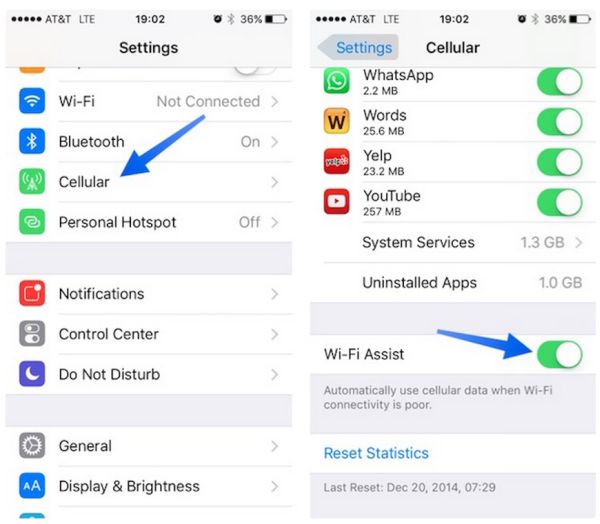
Step 1. You should work with your WiFi Assist feature if you want to stop consuming too much data because of the network switching on iOS 9 firmware version.

Step 2. Go to Setting. This is probably the app you are using the most when changes are needed.

Step 3. Select the Mobile Data / Cellular menu.

Step 4. You should now get to the page’s bottom. Scroll down.

WiFi Assist iOS 9

Step 5. Find the WiFi Assist option and disable it. Once it is off your iPhone 6s or iPad will stop jumping from 3G to 4G without asking you. You will not have the unexpected data usage issue any more.

Step 6. It is still possible to use the 3G / 4G network so don’t worry about it.

Step 7. If you need to track your mobile data usage on iOS 9 you can select Settings and choose Cellular menu where you are able to get to Cellular Data Usage.

This instruction could help users whose data usage increased significantly after iOS 9 installation. Some iPhone owners report that they used to get around 1-2GB of data and they are now getting about 7GB for performing the same tasks.

iPhone 6s Repair Cost: When Your New iPhone Is Out Of Warranty

A lot of Apple fans already purchased the company’s new iPhone 6s and 6s Plus. Do you have the 1 year warranty or have you extended it to two years? No matter, what your plan is you should know iPhone 6s repair cost for when your handset gets our of warranty status. It’s pretty much the same as for the previous generation iPhone 6 and 6 Plus. However there are some differences in the price.

If you visit the official Apple site you will find the Other Repair menu. It is devoted to iPhone 6s out of warranty repair and provides the pricing for customers who’ll need such services.

iPhone 6s Repair Cost Out of Warranty

Users who’ll need to replace their iPhone 6s screen will have to pay $129 for iPhone 6s and $149 for iPhone 6s Plus.

iPhone 6s out or warranty repair will cost you $299. The same service for iPhone 6s Plus model is more expensive and costs $329. This pricing for general repairs haven’t changed that much as it costs $299 to repair previous generation iPhone 6 device.

Users who will need to replace iPhone 6s battery will have to pay $79 for any model if they are out of warranty.

If you wish to purchase AppleCare+ for your new handset, prepare to pay $99.99-$129.99 plus the $79.99-$99.99 service fee for iPhone 6s / iPhone 6s Plus. These prices are higher for the ‘s’ lineup compared to previous Apple smartphones, maybe 3D Touch option is the main reason for increasing the cost.

Do you own the iPhone 6s? Did you buy the insurance for your handset? Users who have any Apple device are advised to use the case and use the gadget carefully. This is the only method how you can avoid high iPhone repair costs.