How to Get Refund for AppleCare Plan You Don’t Use

Many customers purchase the warranty plans and never use them. Does unused Apple Care expire? This is one of the questions asked by ‘fruit’ users along with ‘how to prepare AT&T iPhone 6 for sale‘- however it is better to search for ‘how to get refund for AppleCare’ if you didn’t use it. This is possible and you should do this since the plan has expiration date.

It is surely great when you have AppleCare plan and need to repair your gadget since such a plan offers lower fees. However if you are careful and take good care of your iPhone or other device – you might want to get unused AppleCare refund. We’ll explain what you should do and when it is possible to request your money back.
How to Get Refund for AppleCare iPhone Plan You Don't Use

How to Get Refund for AppleCare You Don’t Use

When you sign up for any plan you can learn details about it. However in stores when we are offered to pay extra for 2-year care plan or other additional options we don’t have time to get into details and often agree to pay even when we don’t really need this service.

If you accidentally purchased AppleCare plan with your iPhone, Mac or other device you can cancel it within 30 days of purchase date. The ‘fruit’ company should give you the full refund if you didn’t use any service. Or it will minus the value of the service you got. If you also experience any AT&T LTE problems with your iPhone 6s you can fix them yourself.

Users who think about cancelling their plan after 30 days from the moment of purchase can get the refund based on the percentage of the coverage that hasn’t expired. The value of additional services you used would be minused, of course.

It has sense to cancel your plan even after a year in case you got the 2-year option. You will not get all the money back but you could easily return nearly 50% of what you paid. This is a nice bonus if you truly don’t need this service.

For example, if you buy the 2015 model iPhone 6s [Apple released iPhone 6s in September] and pay $129 for your AppleCare plan (just an example) – you’ll be able to get the refund of nearly $60 in a year. Is it worth contacting Apple and learning about your options? Of course, give it a try and you’ll be surprised at the possible refund you can get if your plan hasn’t expired yet.
WiFi Assist iPhone iOS 9 Feature Not Working [Reasons]

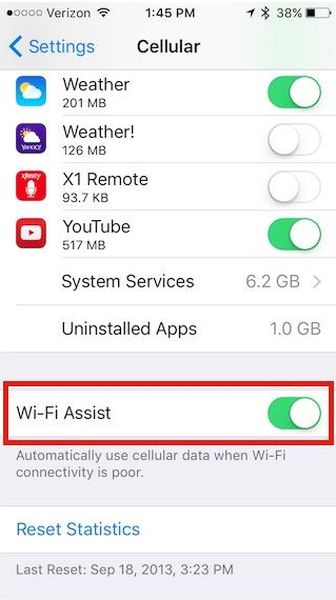
Sometimes you get spotty WiFi connection and need something that is more reliable [AT&T is bringing support for iOS 9 WiFi calls]. If you update to the most recent mobile firmware offered by Apple you can get iOS 9 WiFi Assist feature that is exactly what you need to get reliable Internet connection.

The new option is very curious. All users know that it makes connections more reliable however this cool WiFi iOS 9 setting is firstly not available to all iPhone owners and secondly has other facts you must hear about.

iOS 9 WiFi Assist Not Working Fix Guide Reasons

WiFi Assist iPhone iOS 9 Secrets and Tips

* Updated to iOS 9 but have no WiFi Assist?

Unfortunately Apple made its new feature available on particular models only. Even if you upgrade to iOS 9.0.1, new iOS 9.0.2 or download iOS 9 direct ipsw file – you have no guarantee that the cool option would work for you. Apple restricted the models that can get this addition. Thus, iPhone 4s users are out of luck. Customers who have the original iPad mini, iPad 2 or iPad 3 will also find WiFi Assist not working on their devices.

* WiFi Assist is supported by my iPhone but doesn’t work

You might be using third-party applications and Apple restricts third-party programs support for its WiFi Assist option. This happens to avoid large amounts of data used by you. The company is trying to protect users from huge data bills. If you are using file downloaders, video streaming or music programs you might notice that your iOS 9 feature stops working.

* Why iOS WiFi Assist stops working in the background?

Apple made sure you cannot run its new iOS 9 feature in the background. It works only with foreground programs. If you are trying to download something in the background the option will stop working.

* No WiFi Assist while roaming?

Apple made sure its users who are traveling abroad do not get expensive data bills because of the WiFi Assist iOS 9 feature. This option becomes not available when you are using data roaming service.

We hope that this information is useful to iOS 9 users.

New App Store Outage 2015 Experienced This Week

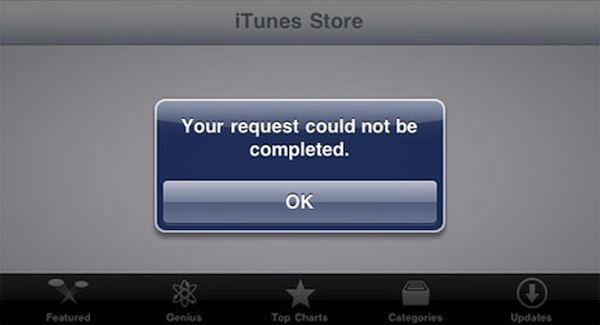
A lot of AT&T iPhone owners who get AT&T WiFi calling release delayed by the carrier this week have issues with iTunes. They are unable to connect to App Store and this has nothing to do with U.S. carrier. Other network users get the same problem. They report iTunes connect fail.

Don’t hurry to order SIM unlock for AT&T iPhone 6s as once if you get issues with your iTunes App store. This year there are a lot of problems with Apple services that surface once in a while. Usually when the company is updating its product line or software versions a lot of customers are not able to download apps and use iTunes / App Store just as they ordinary do.

App Store iTunes Outage 2015

The new App Store outage 2015 however is not caused by updates because the latest iOS 9.0.2 was offered much earlier. Apple is now working on iOS 9.1 version and testing it along with developers and public beta testers and other users get brief outage. The problems are surely fixed and the famous Cupertino-based company is trying to solve issue as quickly as possible. This time users had experienced the outage for a couple of hours.

Apple was fast to fix the issue however a lot of users kept complaining as the new outage appeared [do you know when Apple is expected to release cheaper iPhone 6c?]. According to reports, iPhone and iPad users got ‘cannot complete your request’ error while trying to connect to App Store through iTunes. Of course, the system status page Apple has didn’t reflect the outage at once and kept showing the green marks meaning everything was all right.

The issue wasn’t common however the ‘fruit’ giant still updated its system status page and confirmed the outage. The company took some time to solve the issue and everything should return to back to normal by now.

Compare Samsung and TSMC A9 Chip Performance on iPhone 6s / 6s Plus

Have you already purchased the new iPhone 6s or iPhone 6s Plus? It is possible to easily identify your A9 processor manufacture (Samsung or TSMC) using a simple guide we shared earlier. Once you know the company that manufactured your chip you can also compare Samsung and TSMC A9 chip to learn which one is faster and better.

A9 processor performance tsmc and samsung iphone 6s

Firstly, let’s not that the two processors are different from each other. They are available in two different sizes [here are more iPhone 6s specs]. The A9 chip comparison shows that Samsung creates smaller chips than processors manufactured by TSMC company. In other words, your iPhone 6s has either smaller A9 chip by Samsung or bigger A9 processor by TSMC.

Secondly, A9 chip Samsung vs TSMC comparison shows that it is hard to predict which chip size your iPhone model gets as both iPhone 6s and iPhone 6s Plus arrive with TSMC or Samsung parts.

It looks like the size of the chip doesn’t affect the gadget’s performance that much. However there is a huge difference in the two products. According to reports and tests, the A9 processor can influence your battery performance and life.

TSMC vs Samsung A9 Processor

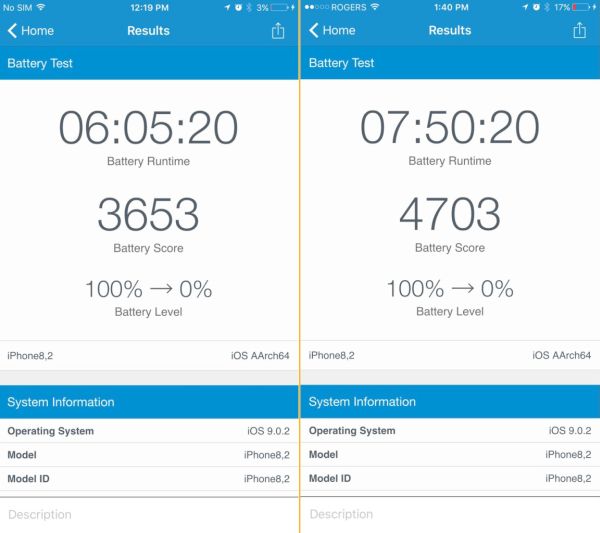
Users who performed benchmarks of iPhone 6s / 6s Plus found one interesting detail. The phones that get TSMC bigger chip also getmore battery life. The tests show that Samsung A9 chip causes the battery life last up to two hours less than the same models that get TSMC A9 model.

A9-chip-tsmc-samsung-battery-life-comparison

Customers who are only looking for the ‘s’ Apple smartphone might want to purchase the version with the chip that extends the battery life by up to two hours. The tests were performed by different users and it is curious that such a huge difference exists.

When you come to the Apple Store to get the new phone you might want to try and figure out the A9 manufacturer before you make your purchase.

SIM Unlock T-Mobile iPhone 7, 6S, SE Service by IMEI Code [Blacklisted & Clean]

[meta_info]

Tips Before Purchase:

  • T-Mobile locked iPhone only [Check it]

*Use network checker if you are not sure what carrier your iPhone is locked to.

  • Clean and Blacklisted) iPhone [Check it]

*Use blacklist checker if you are not sure if your iPhone IMEI is clean or barred / blocked / blacklisted.

  • Activated iPhone only

*Your iPhone has to be activated within T-Mobile network meaning you have to connect to T-Mobile using its SIM card at least once.

  • Unlock Success Rate: 100%

*Unlock success rate depends on T-Mobile account status of each device.

[/meta_info]

[content_tab]

The simple and highly demanded SIM unlock T-Mobile iPhone 7, 6s, SE package is affordable and convenient way to unlock your SIM even if blocked without any additional software programs. This is not hardware unlock. You can become free from T-Mobile distantly. All orders are placed online and your iPhone stays with you.

Before Ordering Make Sure That:

  • Your iPhone is ACTIVATED with T-Mobile in U.S.
  • Provide Correct IMEI code
  • You choose correct unlock package
  • You DID NOT send your iPhone to Apple Care or Technical Service or are trying to replace it during unlock

Note: This package supports clean and blacklisted, blocked T-Mobile iPhone 7, SE, 6S, 6S plus

The iPhone SE T-Mobile IMEI unlock is successful when you provide correct information. We are not responsible for your mistakes, errors and mistypes.

Please be very attentive while confirming your order. We cannot cancel your order once it is placed by you.

The unlock is delivered Monday through Friday, from 9am to 6pm PST.

[/content_tab]

[details_tab]

Users who purchased the new model of Apple smartphone from T-Mobile might want to order unlock iPhone SE, 6S T-Mobile service. This is the best method for becoming permanently unlocked from all carriers at once without paying the full price for Apple new gadget.

How Unlock Works

We provide IMEI unlock blocked iPhone 6s T-Mobile by adding your unique IMEI number to the official databased that contains only unlocked Apple smartphones. As soon as your IMEI is added to this list you will be able to activate unlock using iTunes. This status is permanent and will not change after you upgrade your iOS or baseband, choose to sync, restore or backup. It’s a great remote service that allows you using different SIMs from various carriers from all over the globe.

When you wish to get your T-Mobile iPhone SE unlock code you should carefully read the Terms and Conditions and make sure you meet the requirements. Firstly, your device is locked to T-Mobile. Secondly, you have correct IMEI number and you have activated iPhone with T-Mobile U.S. network.

[/details_tab]

How to Factory Unlock Blacklisted iPhone SE, 6S, 6S Plus, 6, 6Plus, 5S, 5C, 5, 4S Plus from AT&T by IMEI

[meta_info]

Tips Before Purchase:

*Use network checker if you are not sure what carrier your iPhone is locked to.

  • Activated iPhone only

*Your iPhone has to be activated within AT&T network meaning you have to connect to AT&T using its SIM card at least once.

  • Unlock Success Rate: 100%

*Unlock success rate depends on AT&T account status of each device.

[/meta_info]

[content_tab]

This is totally legal and official in the U.S. Learn how to unlock blacklisted iPhone SE AT&T as the whole thing is simple, fast and affordable. While you cannot unblacklist the phone you can make it SIM free. The device will not be usable in the United States however you’ll be able to insert foreign SIM cards and connect to foreign networks outside the U.S.

The AT&T blacklist iPhone 6s unlock package supports only iPhone 6s or iPhone 6s Plus or lower that is locked to AT&T. There will be no refund if you provide incorrect information or not meet the requirements.

It is also important to provide your correct email address where you’ll get order confirmation and further instructions and correct IMEI code. Please don’t order iPhone IMEI unlock if you sent your smartphone to Technical Service / Apple Care or are trying to replace it. There are no refunds for orders with incorrect IMEIs.

Please add our email to your contact list so that emails from us don’t appear in your junk or spam folder.

We deliver unlocks from 9 am to 6 pm PST, Monday through Friday. Please double check all your information to avoid errors, mistype and mistakes before you place your order and pay for it. We cannot cancel the order once it is submitted.

[/content_tab]

[details_tab]
All Apple customers who have the newest smartphone models can unlock AT&T iPhone 6s blacklisted and barred versions. The factory IMEI unlocking service is using IMEI code to add this unique identifier to the official Apple database of IMEIs as unlocked.

There are other unlocking package for clean AT&T iPhone 6S, 6S Plus but device can’t be blacklisted and in contract for less than 60-90 days.

It is possible to unlock blacklisted AT&T iPhone SE and 6s online. It is extremely simple. You need to find your IMEI code that is unique for each smartphone and can be found in Settings app. The distant service guarantees the cheapest price and the delivery of unlock AT&T iPhone 6s barred or blacklisted solution is pretty quick. The permanent unlock makes sure you will not get relocked after updating to newer iOS versions, backing up or restoring, downloading apps etc.

It is great that you can be either on or off contract to order the service. It is important to understand how to unlock barred iPhone SE AT&T. Firstly, you need to be locked to AT&T. Secondly, your smartphone has to be barred or blacklisted or you got Not Found after using Regular service. Thirdly, it has to be activated with this network.

Please note that the blacklist / barred status will remain after you successfully unlock blacklisted AT&T iPhone 6s. It is highly important to understand this when you are planning to place your order online for becoming SIM free.

[/details_tab]

iPhone 6s Video Quality: Opinion of Professional Photographer

The new line of iPhone updated by Apple this fall allows users shooting incredible videos. According to different customers who already purchased iPhone 6s or iPhone 6s Plus [here is more information about iOS 9 bugs] – they enjoy taking 4K videos and live photos. How good is iPhone 6s camera? It’s best to let experts answer this question.

No one expects the smartphone to compete with professional cameras. When you need to make outstanding and wonderful photos it is better to use an expensive camera. However iPhone 6s video quality is already amazing, as noted by photographer Lee Morris.

iPhone 6s Shootage Video Quality

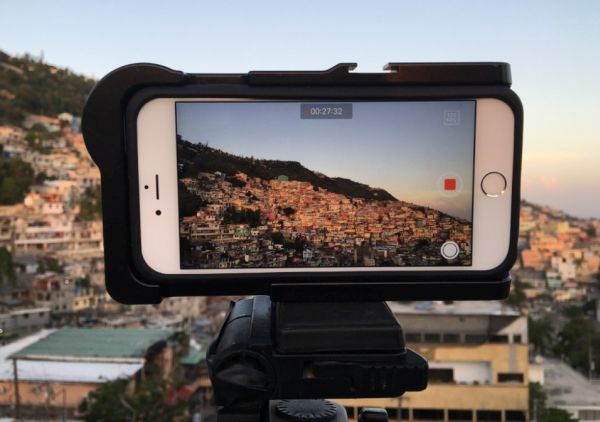
As expert notes, the new iPhone 6s can easily compete with some DSLRs that cost around $3,000 [if you orders your new AT&T iPhone 6s you can check on your order status here]. The Apple device can even beat some current DSLR if talking about videos and not stills. There are some circumstances you have to meet in order to get better videos taken with iPhone 6s than with the DSLR. For example, you need enough light however this fact is surprising.

Morris reports that he did color and contrast tests and got similar results but sometimes the 4K footage made by the smartphone looked even bettern than footage created by Nikon camera. The 6s handset model surely cannot outperform all DSLRs but it does create similar 4K videos to some of modern cameras in bright light environment.

It is also worth to note that not DSLR models can let you shoot 4K videos while the iPhone 6s and 6s Plus can make it happen [if you experience any problems with battery life you can fix iPhone 6s battery issues]. Learn how to record 4K videos on iPhone 6s. This is not difficult and the results can really impress you.

Have you tried taking photos and recording videos with the iPhone 6s or 6s Plus camera? What are your impressions about this latest generation smartpone released in 2015?

New Apple Store in India to Open in Mumbai and Bengaluru

The number of Apple Stores in India will grow this fall. The famous iOS giant is planning to open six more locations so that Indian customers can purchase the older iPhone 6, 6 Plus and most recent iPhone 6s and iPhone 6s Plus in India through retail stores.

Local users are searching for India Apple Store where to buy the highly demanded iPhones. It is possible to order old and new ‘fruit’ smartphones online however some consumers prefer visiting the physical store and purchase gadgets this way.

Apple Stores in India new Locations List

Apple Stores in Mumbai list will get new locations in Oberoi Mall, Malad, Ghatkopar, Juhu and Phoenix Mall. Customers from Bengaluru will be able to buy Apple devices and accessories in Jayanagar. All these stores should open in October and November 2015 [meanwhile a lot of iOS 8 apps get lower price in India, lower than $1].

The new iPhone stores in India will be opened inside some local stores. Apple and Croma have become partners. The iDevices will be sold in locations already used by the leading Indian retail network.

Right now there is no Apple-owned retail store in India because of local laws that don’t allow Apple or any other major company to open their own retail stores here. The iPhone 6 and all other iPhones can be purchased from a big chain or retail stores and online. The new stores should get the global design of other Apple Stores opened across the world. The famous Cupertino-based giant will train sales staff that will be working in the new locations and sell a big variety of Apple products.

In 2014 and 2015 Apple is expanding its retail presence in China and India. The company continues to open up new stores. Indians who wish to purchase the most recent iPhone 6s and discover all the new specs and features offered by the iPhone 6s lineup will be able to get these models starting on October 16th. This is the official 6s and 6s Plus launch date in India.

How to Unlock Blocked TMobile iPhone 7, 7Plus, SE, 6s Permanently

If you are looking for iPhone 7 T Mobile unlock – you have come to the right place. We offer factory distant unlock service that can make you SIM free from T-Mobile at the most affordable price in the market. You should have the iPhone SE purchased from T-Mobile network in the U.S. to be eligible for this service.

There are several requirements you have to meet in order to unlock T Mobile iPhone SE or 6s model. For example, this service supports clean as well as blocked, barred or blacklisted.

How to Unlock TMobile iPhone 7, 7Plus, 6S, SE Blacklisted or Clean IMEI

All users who wish to become free from their network are highly advised to use special iPhone T-Mobile blacklist check service to get the information about iPhone SE IMEI stats [clean or blacklisted].

Those users who have T-Mobile iPhone model different from iPhone 7 Plus and 6s can use different IMEI unlock service to become SIM free.

Not Eligible for T-Mobile iPhone 6S Unlock

Please note that factory unlock is not jailbreaking, hacking or unblocking. This is the legal service that makes you free from your original network and allows using different SIM cards with your iPhone. Not all iPhones can be SIM unlocked.

  • You are locked to different network [not T-Mobile U.S. carrier]
  • iPhone is not activated with T-Mobile

Eligible for iPhone SE T-Mobile Unlock Service

  1. iPhone 7, 7 Plus, 6s or 6s Plus you have is locked to T-Mobile network in the USA
  2. Your IMEI is clean or blocked
  3. iPhone is activated with T-Mobile carrier in the U.S.

Double check the details about your IMEI status and original network using iPhone network check and iPhone blacklist checker services.

There is no refund for incorrect network, wrong iPhone model, bad or incorrect IMEI. It is impossible to cancel the order once it is placed so there is no refund if your iPhone is not locked to T-Mobile or not activated.

iPhone IMEI Number: How to Find

There are several methods you can try. Firstly, launch Settings app where your unique code should be located under General- About section. This is the 15-digit number.

Secondly, dial *#06# to see the 15 digits of IMEI on your screen.

Note: Wholesalers and smartphone shop owners can register on digitalunlocking.net to

How to Unlock Blocked iPhone 6s / SE / 6 / 5S / 5 AT&T [Not Found Result Supported]

It has become possible to unlock blocked AT&T iPhone 6s. The new generation handsets were released by Apple in fall 2015 and users who purchased the 6s model and have been already blocked by AT&T network can SIM unlock the device. The service is officially allowed in the United States. It is the fast and simple procedure that is affordable and easy-to-order.

We are doing our best to provide the fast delivery of the unlock however the new AT&T unlocking policy that was changed in 2014 sometimes causes delivery delays. If you need to become SIM unlocked within an hour, please do not order from us.

Our company is open Monday through Friday. We deliver results from 9 am to 6 pm PST. The online service is available for you 24/7.

How to Unlock Blocked iPhone 6s AT&T: Requirements

Before you place your order online you have to make sure you meet the following requirements:

  • Your iPhone is eligible for unlock [you have iPhone 6s that is locked to AT&T].
  • The AT&T iPhone 6s is activated within AT&T carrier. Please use IMEI checker to make sure you are locked and activated with AT&T network.
  • You are planning to unlock AT&T iPhone 6s blocked so make sure your iPhone is blocked by AT&T carrier.
  • You understand that your blocked AT&T iPhone will remain blocked after it is factory unlocked. You won’t be able to use the blocked device in the USA however it will be usable in other countries across the world with different networks.
  • Your iPhone 6s is not being replaced when you place your order for unlock.
  • You haven’t sent your iPhones 6s to Technical Service / Apple Care.
  • You understand that it is impossible to cancel or change your order after you submit it online and pay for the service.

There are no refund to users who order unlock AT&T iPhone 6s not found / blacklisted when they are originally locked to a different network, have not-activated smartphones or are not eligible for the service. All such orders are considered malicious purchases and are not eligible for the refund.

How to Unlock Not Found iPhone 6s AT&T

Sometimes when you meet all the requirements and order AT&T iPhone 6s blacklisted unlock service you get the error ‘unlock code not found’. This can happen for numerous reasons: wrong IMEI number, iPhone that is blocked by carrier, wrong network submission etc.

Please double check the information about your smartphone and place the new order to unlock not found AT&T iPhone 6s. Our company will send your IMEI number for unlock directly to AT&T carrier and hopefully the problem will be fixed and you’ll become SIM free.

Guide on iPhone 6s AT&T Unlocking [Blacklisted / Not Found]

Step 1. Once you checked your information and are sure that you own iPhone 6s that is locked to AT&T, activated within this network and is blacklisted by AT&T you can place your order with us.

Step 2. Turn off Find My iPhone program. You should also disable Activation Lock as these two tools can be a big problem when you activate your SIM unlock.

Step 3. Learn your IMEI. This number is located in Settings or you can get it on your screen when you dial *#06# on iPhone.

Step 4. Choose your SIM unlock package for your particular model, status and carrier and fill in the unlocking form.

Step 5. After you enter your IMEI code, email address and your name you should read and agree to Terms and Conditions.

Step 6. You confirm your order by pressing on Buy Now option.

Step 7. Pay for your unlock and check email for the order confirmation. If there is no email from us, please double check in your spam / junk folder. You can also add our email to your contacts list.

Step 8. Wait for instruction on how to activate unlock via iTunes and complete activation.

Factory SIM unlock for blacklisted iPhone 6s AT&T and AT&T iPhone 6s with Not Found result provides permanent SIM unlocking solution. It supports current iOS 9 firmware however it doesn’t unblacklist your iPhone. You’ll be able to use the gadget outside the United States once it is permanently unlocked.

If you want to start iPhone unlock business with us – you are welcome to register at digitalunlocking.net. This deal is perfect for resellers, wholesalers and store owners who wish to provide factory IMEI unlocks to their iPhone customers.