Is Activation Lock On or Off on My iOS 7 iPhone?

Question: Hi, I have purchased a used iPhone with iOS 6 and now I am planning to update it to iOS 7. How can I know for sure if its Activation Lock is off or on along with Find My iPhone application? Is it safe to install the latest Apple firmware or should I stay on version 6?

Answer: Hello, thank you for your question. The new iOS 7 can truly bring you some problems making you not happy about your used device. This firmware has Activation Lock option that blocks the smartphone from being used by third-party people if Find My iPhone application is turned on. It doesn’t matter if you simply wish to update to iOS 7 or unlock your gadget and upgrade later on.
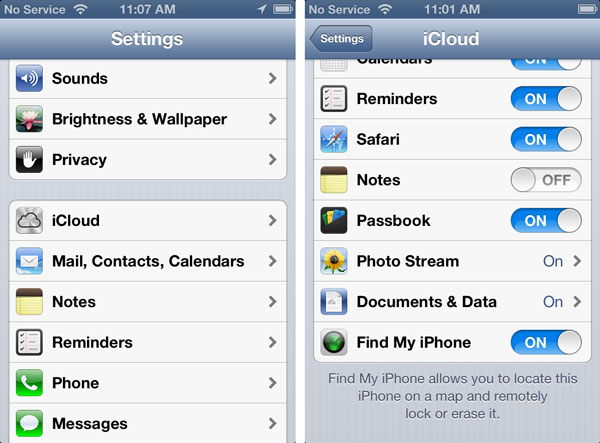
check find my iphone

Even if you know the ID / passcode you might forget it one day and, according to Apple, it is impossible to recover this password so you’ll simply get a non-active gadget. Is there a way how to solve possible future problems?

Luckily, iOS 7 Activation lock check service can tell if you this feature is turned on or off. Just check your handset before unlock, restoration, update etc. There is also a solution to users who updated to iOS 7 with Activation lock on and now can’t use their device. Try the distant service and get past Find My iPhone Activation Lock option to enjoy all the benefits of your device.

If the program is on, you get into problem. It is great if you can contact the original gadget owner and get his ID and passcode to unlock the gadget and turn Activation Lock off. This is often difficult to achieve in reality because previous owners vanish when you purchase a problematic device online.

You should be sure that Find My iPhone is off before installing to iOS 7. Otherwise you can get a piece of metal that doesn’t perform. It will be impossible to resell such a device on Craglist, eBay and other sites. You will not be able to unlock it because such a procedure requires restoration through iTunes and you will get stuck on the Activation message without ID and passcode.
How to Unlock iOS 7 Devices: Popular Methods

It is always cheaper to purchase a locked device from Apple and order its unlock. If you happen to own Apple smartphone you can use different methods to unlock iOS 7. Users who had iOS 5 and iOS 6 gadgets remember R-SIM, Gevey, SAM and UltraSn0w methods that helped to become free from one network and get a chance to use any SIM card across the world.

Do these tools work for iOS 7.0.3 iPhones? Is it possible to unlock for free? We are sure there are a lot of curious customers who got their locked handset from Apple or resellers and now want to get rid of being locked to a single carrier.

How to Unlock iOS 7

Gevey Unlock for iOS 7.x

If you remember this method you sadly can’t use it because there is no Gevey unlock for iOS 7 firmware. You can’t perform such unlock so keep looking for other tools. You can use R-SIM but it is not tested yet.

SAM and UltraSn0w Unlocks for iOS 7.x

No matter how good these tools are you can’t use them for iOS 7 gadgets yet because there is no iOS 7 jailbreak. And SAM activation tool and Ultrasnow methods depend on jailbreaking. You have to wait till hackers present a program capable of tethering or untethering the newest operating system so try to use it later.

iOS 7.x Unlock by IMEI Code

Unlike some unlocking methods that were free to use with iOS 6, IMEI unlock tool works for iOS 7.0.3 / 7.1 devices but it is paid for. The service is still affordable so you can easily order it and have your AT&T iPhone iOS 7 unlocked within several days. IMEI unlocking service supports all iPhone models / basebands.

factory unlock at&t iphone

Is it safe to unlock AT&T iPhone on iOS 7 by IMEI? Yes, it is safe and reliable. You need to have a clean IMEI code and an activated smartphone with the network it is locked to. Your status will be changed to “unlocked” in the official Apple database preserving your warranty and allowing you to update to next iOS 7 without losing the status.

AT&T iPhone Unlocking Orders Are Delayed

Dear Consumers, every unlocking service worldwide faced with AT&T iPhone unlock problem. AT&T US service provider is now changing its unlocking policy and many orders are postponed indefinitely.

We are very sorry for such inconveniences but we depend on the carrier’s respond after sending unlocking requests. But don’t worry because there are only two ways: or your iPhone will be unlocked or you will receive full refund.

Also we have to remove overnight package and left only fast and expensive unlocking packaged for AT&T iPhones. However the delay in delivery can be with expensive package as well.

You can always contact us if any questions regarding unlock: support@att-iphone-unlock.info

Sorry for inconveniences and thank you for understanding.

Regards,

ATT iPhone Unlock support team

How to Fix Activation Lock on iPhone Running iOS 7

Apple introduced Activation Lock feature when it released iOS 7 version for iPhone users this fall. The new option is tricky. From one hand, it is designed to protect unknown people from accessing your personal information. From the other hand, it gives headache to users who wish to unlock the device they purchased from other people.

Turn Find My iPhone Off Beforehand

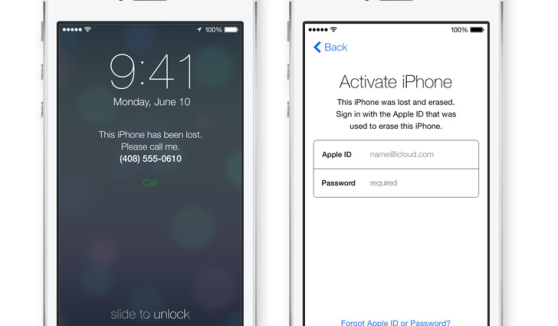
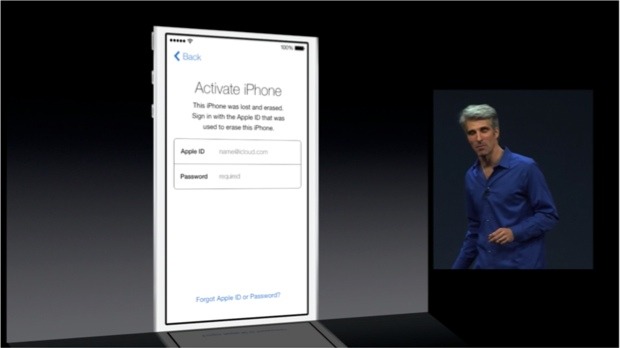
The introduction of iOS 7 has changed the rules for iPhone users. Now if the Find My iPhone app is turned on, you are not able to update to new iOS version or unlock your handset without knowing the Apple ID and password of iPhone’s original owner.

ios 7 activation error

This ID and passcode are stored on the Cupertino-based company’s servers. It is impossible to turn off Find My iPhone, reactivate the gadget and erase information on it without entering them. This happens because of the Activation Lock feature presented in iOS version 7 and up. You turn it automatically when you enable Find My iPhone program or when you decide to install the latest firmware [updating from iOS 6 or earlier operating system].

What You Must Do Before Ordering iPhone Unlock

If this is your device purchased from Apple or official carriers you should simply turn off the application. Users who purchased their smartphone from someone on eBay or other platforms should make sure the previous owner erased all his information, settings and disabled Find My iPhone for you.

ios 7 activation lock

Only after you make everything to fix iOS 7 activation error, you can place iPhone unlock order online and have it successfully unlocked by IMEI number.

What You Must Do After Your iPhone Unlocked

Note: We make no refunds if we unlock your handset on iOS 7 and you are stuck with the Activation lock issue. Solve this problem before you order factory unlock or following this guide below if you have just unlock it and got this issue.

Fortunately there is a fix and you can use it just following steps below:

1. Go to Settings on iPhone.
2. Tap iCloud.
3. Sign in with the Owner’s Apple ID.
4. Turn OFF Find My iPhone.
5. Insert a NON accepted SIM card and RESTART the iPhone.
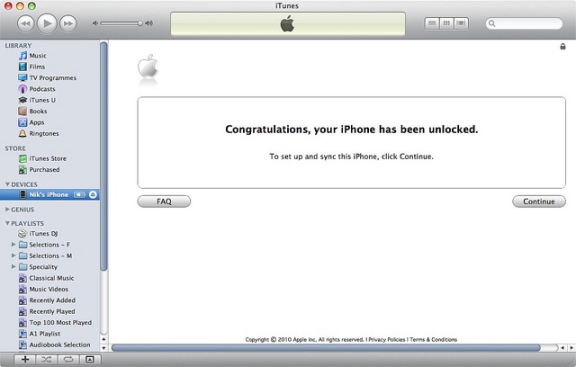
6. When phone turns on plug iPhone into iTunes.
7. (Optional) If iTunes prompts for you to RESTORE, follow the steps on screen.
8. The phone will then be unlocked!

Also you can follow this link for more info: http://support.apple.com/kb/HT5818

Why You Should Install iOS 7: Top Reasons for iPhone / iPad Users

The new iOS 7 was released on September 18. Should you update or stay on iOS 6.x version? Users who can’t live without a jailbroken device can wait till hackers present their iOS 7 jailbreak solution [the well-known Evad3rs are already working on such exploit]. Users who wish to get cool features should install iOS 7. Below there are 5 reasons why to install this firmware on your smartphone or tablet.

Apple brings a lot of changes to its iDevices. The latest operating system will come with a new design and options not available for iOS 6 gadgets. Do you like to take pictures? Do you often use Siri? Do you love music? If you answer “yes” make sure to upgrade on Wednesday.

reasons to install ios 7

Reasons to Install iOS 7

Reason 1. The Cupertino-based company has improved its assistant making Siri smarter and adding female / male voice options. Your personal assistant is capable of answering phone calls, getting different information for you [from web and our device] etc. It can also control another new option called iTunes Radio. iOS 6 version brought us beta Siri and iOS 7 takes it out of beta testing so the program should perform just great.

Reason 2. The notification center comes with a lot of interesting and useful tabs such as “All,” “Missed” and “Today.” The last one offers weather forecast, information about upcoming events, reminders etc.

Reason 3. The Control Center is a fast way to access Wi-Fi, flashlight, Airplane mode and various controls. It allows users to get into search with a swipe of a finger in the middle of home screen. This is handy and must-use.

Reason 4. Free iTunes Radio is a great music service that might remind of Pandora but comes as a built-in option. It comes with different stations for music fans and you don’t have to pay to use it! Listen to your favorite songs on-the-go with the new iOS 7 service.

Reason 5. Do you take bunch of images every day? Use Photos app and the new iOS 7 burst mode [press on the shutter button and your iPhone will take multiple pictures] to create the best photographs. This application allows you organizing images in groups making it much easier to view what you wish to see.

Download iOS 7

It’s almost here. Don’t forget to download iOS 7 on Wednesday, September 18 to enjoy all the goodies created by Apple.

Digital Life Home Management System from AT&T

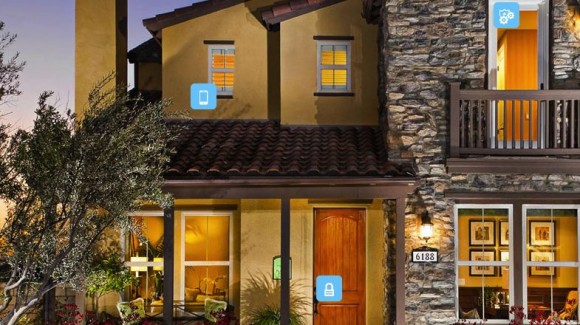
How much would you like to control security and automation at your home with the help of one smartphone, for example, the iPhone? AT&T introduces a new service. The company starts to offer its new AT&T Digital Life home security system. It is already available in 15 cities across the U.S. and will be available to additional 50 cities by the end of 2013.

Where is home security service from AT&T available? When was AT&T Digital Life launch date? What does it offer U.S. customers with iPhone and other smartphones?

at&t digital life home security

The home security system is available 24/7. AT&T Digital Life is monitored, but this is not its main benefit. The carrier lets its consumers control their home security from web browsers, iOS applications or apps for Windows Phone and Android gadgets.

You can install cameras to control the security. You can turn lights off and on, lock the doors and even change various appliances with the iOS smartphone and other handsets. Living in wirelessly controlled home should be much fun. But this fun costs money and you have to pay for it each month.

You are able to select which alerts you wish to get and how. All the emergencies and alerts will be responded by experts who are working at AT&T-owned monitoring centers.

Right now the company has two pricing packages. One basis package is “Simple” and the other one is “Smart” with additional features available with both offers. You can get 5 more options at an extra cost, including ability to save energy, detect and control water, add live video, etc.

Everything depends on how much you want to get from AT&T offer and how much you are willing to pay for your comfort and automation. Digital Life home security from AT&T starts at $29.99 [this is monthly payment], and you’ll have to pay another $149.99 for system installation and its equipment.

The service is now available to people in San Francisco, Chicago, Los Angeles, Seattle, particular areas in New Jersey and New York City, Miami and other cities. What do you think about this system?

New Cities on AT&T LTE Coverage Area

AT&T is doing everything to offer its LTE 4G connection to more customers. It has already expanded its LTE radio technology to 4 major cities and 15 new markets in the U.S. The growth continues and now iPhone users from 5 new markets can enjoy better speeds. AT&T LTE coverage now includes Kansas, Warrensburg, Sedalia, Manhattan and Missouri.

If you live or work in these areas get prepared to see LTE network from AT&T on your handset that supports LTE connection, of course. How better has AT&T LTE Missouri connection become? How much would you enjoy connecting to AT&T LTE coverage on Manhattan? We will tell you more about the new service.

AT&T LTE Kansas City and Other Areas

iphone at&t 4g lte manhattan

If you live in Texas, Missouri or New York City and spend some time in Jacksonville, Palestine (Texas), Warrensburg, Sedalia (Missouri) or Manhattan (New York), you can connect to LTE network from one of the biggest U.S. carriers. Unlike the 3G speeds the 4G connection has more functionality. For example, you can download data about 10 times quicker and surf the web while talking on the phone.

According to the company, its better connections cover about 200 million people. This number should increase by 100 million in 2013-2014. The 4G LTE is supported by iPad mini, iPhone 5 and iPad 3 and 4 models. Besides, some latest models of Samsung, LG and HTC gadgets are also LTE-enabled. This means that if you own these devices and happen to live or visit AT&T LTE coverage area, you will get greater speeds and more features.

AT&T Plans

While the company continues to expand its 4G service in the U.S. it also plans to offer AT&T Beam. This USB modem has a built-in LCD screen and it supports 4G LTE network. You can get it from the carrier for $19.99.

If iPhone Unlock Code Is Not Found

Sometimes you can get Not Found code after buying iPhone unlock or ordering IMEI network check. What should you do if you face an iPhone message not found error? Is it possible to solve the iPhone unlock code not working problem? Let’s see what we can do and what is impossible to achieve.

We’ll shortly describe each problem [we will pay attention at the most common issues, of course] and tell you what the solution is.

iphone message not found

Issue 1. iPhone Unlock Code Not Working

It sometimes happens that iOS users come across their code “not found” problem. Is there anything you can do to change this situation?

The iPhone unlock code “not found” message appears when your IMEI is incorrect. This means you should verify your IMEI number by typing *#06#. The correct code will be displayed on your smartphone’s screen. Also you can check it going to Settings – General – About and scroll down till you see the 15 digits of IME #.

This is very common issue, so please check twice if you typed the right IMEI.

Issue 2. Unlock Code Not Found While IMEI Is Correct

Are you 100% sure that you know your IMEI number and it still appears at “not found?” This can happen when your unlock code is blocked by the mobile operator or left blank. It exists in Apple IMEI database but the unlock code next to it is lost.

Apple servers give Not Found because iPhone may be blacklisted. Unfortunately we don’t provide service to check if IMEI is blacklisted/barred/blocked/lost/stolen. To check it you can use checkmend.com and get all info about blocked or not status of your device.

Issue 3. Wrong Carrier Submission

Very often some iPhone owners purchase unlock for the wrong carrier. For example, if your iPhone is locked to Rogers Canada and you bought unlock for AT&T US you would 100% receive Not Found code.

In this case you can use IMEI carrier checker first and only after you will receive results with the carrier you can contact us and will help you to free your device from the locked network.

How to Unlock iPhone if You Got Not Found

Here is what you can do to solve the IMEI “not found” problem. It is still possible to order iPhone unlock as your device’s IMEI code can be sent directly to the manufacturer in order to receive an unlock or we can submit your unlock request to the carrier and unlock it.

There is no free solution to iPhone message “not found” problem mostly experienced by AT&T users [exclusive AT&T phones are not longer included in the database]. Sometimes the issue can be experienced by customers whose smartphones are less than a month old.

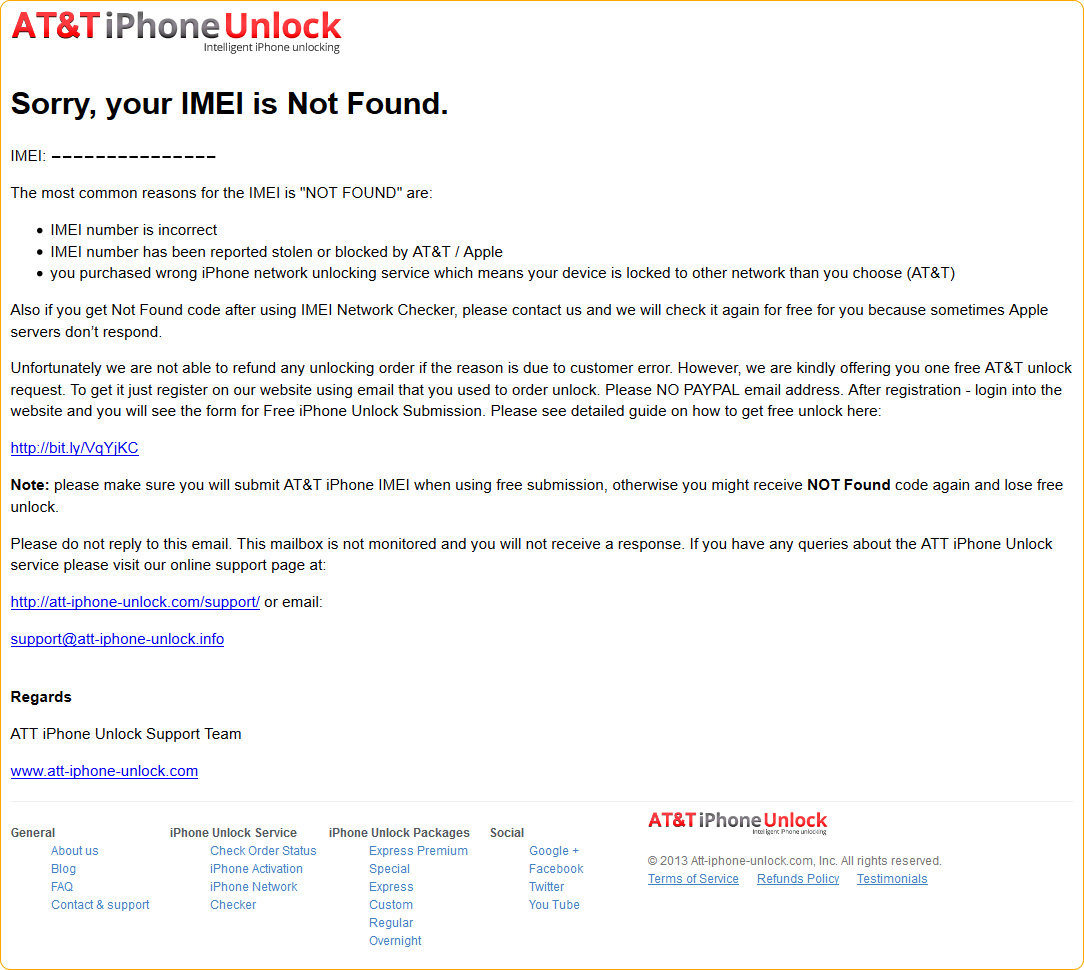
So, in this case every our consumer who gets Not Found email after ordering unlock, have one free unlock submission but only for AT&T iPhone. To use this free method check if the IMEI is correct, not blacklisted and locked only to AT&T network. Just follow instructions in the email you receive that your code is Not Found (like on the screenshot above).

As to IMEI network checker – contact us and we will check it again for free as well.

All In One Prepaid Service from AT&T

We will see an interesting offer from AT&T this summer. The mobile operator is about to release its new “All In One” brand with prepaid options of $35, $50 and $70 per month. How good is this offer? Will smartphone users get an affordable service with much data?

The predictions you will find inside this post have not been commented by AT&T spokesman yet. At the same time we have heard that the company has plans to test its new offers in Texas and Florida in May. The nationwide service’s release is expected starting June 15.


According to rumors, the U.S. AT&T carrier palns to introduce $35 and $50 monthly service for iOS devices. The new brand is expected to present unlimited texting and talking plan for different phones worth $35 monthly. You will be able to get 2GB of HSPA data for $50 per month and 5GB of data for $70 per month.

Users who consume more data than they have paid for will get slower data speeds. Of course, these details might not be accurate and AT&T might offer other plans when it launches the new service in June. Right now we can only share the rumors with you.

The new service can be a good strategy against plans of other prepaid U.S. carriers. Some companies have already introduced similar plans. For example, Verizon offers its customers a prepaid service worth $35 per month. It comes with unlimited texting and web. It also offers users 500 calling minutes. Another company, T-Mobile US, will offer consumers unlimited $60 per month texting and voice plan with 2GB of data.

The idea of AT&T to release pre-paid “All In One” service is not a surprise. The carrier wants to increase sales of handsets it is selling. It reports it has lost over 180,000 prepaid subscribers during January-March period.

iPhone Activation and Sales by AT&T and Other U.S. Carriers in January-March

AT&T has activated a lot of iPhones this year. According to its most recent report, the second-biggest mobile operator in the U.S. trailed another company [Verizon] in consumers added. How many customers chose AT&T to activate iPhone 5 / 4S and other models?

The iOS smartphone is still a hot seller in the U.S. and across the world. Different American carriers offer iPhone to customers, still the sales for rival companies are not the same.

at&t iphone activation

March quarter brought 4.8 million Apple smartphoneshad no problems with iPhone activation by AT&T. At the same time the company slipped behind Verizon in terms of sales/growth. As the second-largest operator reported earlier this week, it activated about 80 percent of iPhones [4.8 million of 6 million devices]. These results are not as great as the ones shown by rival Verizon which activated over 7 million handsets during this period.

If you follow AT&T news you should remember that the holiday quarter was much better for this US carrier as the operator activated about 8 million iOS smartphones. At the same time, the March quarter results are better than the quarter prior to the holiday season when AT&T managed to sell only 4.7 millions gadgets [everyone was waiting for iPhone 5 release back then].

What else do we have here? In the last quarter were added over 670 thousand contract subscribers to Verizon and AT&T added over 290 thousands new contract subscribers and lost about 70 thousand phone consumers  in the same quarter.

According to Sprint, its results are not as good as the company sold about 1.5 million Apple handsets and lost about 560 thousand consumers in the last three months.

In all, the three U.S. mobile operators sold over 10 million iOS smartphones while Apple reached over 35 million units sales during this March quarter period. According to the Cupertino-based company Chief Executive Tim Cook, he wishes to see Apple do better.