Facebook Messenger Tricks iPhone Hidden Chess Gameplay

Did you know about Facebook Messengers tricks iPhone you can find and use? If you are running iOS 9 you can play chess game that is hidden inside of this application [also learn about next iPhone 7 Plus features]. Popular Apple smartphone can let you chat with friends and also discover some nice secrets. Isn’t it cute?

The little secret you can get is a simple command you have to learn about. There is no need to install any additional programs or tools. This should work on AT&T iPhone 6s and other models as well as the iPad. You’ll need to be connected to the Internet because the secret built-in chess game is used in your browser.

Facebook Messenger iOS 9 Hidden Game Tricks iPhone

Users who are locked to AT&T network but wish to use T-Mobile or other carriers with their smartphone can perform SIM AT&T iPhone 6s unlock. This is permanent option that results in your ability to connect to all networks from all over the world by changing the SIM cards. It supports all versions of iOS and all iPhone models. You can be still be on contract and become unlocked.

Here is how to play the Facebook Messenger hidden game when you are bored or have some free time. Enter @fbchess play plus name of the person you would like to play with [for example, the command will look like @fbchess play Kris]. If you don’t enter one name you’ll be starting a group conversation.

Your friend will make the first move. Colors are chosen at random. Enter @fbchess command followed by letter + position [to select and move pieces]. This command would look like @fbchess Pd6 [use K for King, P for Pawn, Q for Queen, N for Knight, B for Bishop and R for Rook].

If you wish to get all available commands you can use @fbchess help option. That’s it. You can now play chess on iOS 9 AT&T iPhone 6s and other other iPad, iPhone with Facebook Messenger application installed on it.


iPhone 4S iOS 7.1 Problems with Wi-Fi Connectivity

iOS 7.1 update didn’t go as smooth as most of us hoped. Apple tried its best to release the major firmware upgrade and the first reports cam soon. People complained about battery issues. This is not the only bug, as iPhone 4S owners experience bad or not working Wi-Fi connectivity.

The operating system brought new features such as CarPlay for the iPhone 5S. Of course, this option doesn’t support the 4S smartphone but lacking one feature is one things and getting different iOS 7.1 problems is another thing.

Right now this bug isn’t common. It is faced by a small number of Apple customers, according to support forums devoted to Apple products. Wi-Fi issue on iPhone 4S after iOS 7.1 update shows the following error:

“Wi-Fi not available”

Wi-Fi no available ios 7.1

Such a problem comes because Wi-Fi somehow becomes disabled after you install iOS 7.1 on your iPhone 4S model. There is a fix to the issue shared by users. They say that you can reset your handset’s settings for network and use your WiFi connection. But this fix doesn’t help everyone. Some users note that their Wi-Fi chip has been burnt after the firmware update.

Having different iOS 7.1 bugs [previous reports mentioned fast battery drain on their smartphones and tablets] is not too nice. Apple is silent but it will most likely offer bug fixes in the next operating system update.

New File Sharing Risks for iPhone and iPad Owners

Different applications for iPhone and iPad have potential risk for Apple fans. File sharing risk exists for iOS users, according to Trustwave research. The flaws are pretty serious so it’s better to know about possible problems and protect yourself before it’s too late.

The issue is related to file sharing iOS applications. A consultant from Trustware [Bruno Goncalves de Oliveira] who researched this problem says that he was working with different apps for sharing photographs, docs and other files. He told eWEEK that various iOS file sharing applications start a Web server on the fruit gadgets and this component isn’t secured enough for safe file sharing and uploading.

apple server status

As Oliveira notes, once an iPhone / iPad user launches such a program, his or her iDevice’s file sharing program can be accessed by others [in other words, anyone is able to share files via it if he / she discovers the gadget on the network]. The programs researched by this expert turned out to lack important security feature.

They didn’t have user authentication or encryption or such options were disabled by default. Reality requires developers to secure their apps using SSL encryption to protect users during Web transactions.

Hackers can easily find iPhones and iPads that have opened file sharing programs. The task is not difficult at all, especially if they are using Multicas DNS tool. Anyone can get such mDNS program and search for devices with open ports.

Well, iOS 7 firware is better protected than iOS 6.1.3, expert assures. He was able to access just the app’s folder and nothing more even on a non-jailbroken smartphone / tablet. The programs that come with a risky flaw include the Easy File Manager and FTP Drive. These apps are named as vulnerable so users should be careful while using them.

You can protect yourself by getting programs from well-known manufacturers and avoiding programs created by unknown developers. You can also get MDM technologies as they can minimize the risk of having data leakage.

Why You Should Install iOS 7: Top Reasons for iPhone / iPad Users

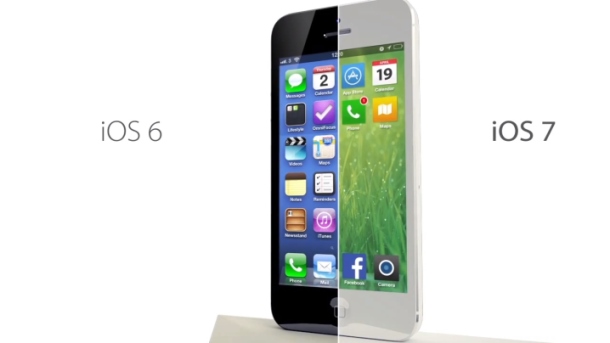
The new iOS 7 was released on September 18. Should you update or stay on iOS 6.x version? Users who can’t live without a jailbroken device can wait till hackers present their iOS 7 jailbreak solution [the well-known Evad3rs are already working on such exploit]. Users who wish to get cool features should install iOS 7. Below there are 5 reasons why to install this firmware on your smartphone or tablet.

Apple brings a lot of changes to its iDevices. The latest operating system will come with a new design and options not available for iOS 6 gadgets. Do you like to take pictures? Do you often use Siri? Do you love music? If you answer “yes” make sure to upgrade on Wednesday.

reasons to install ios 7

Reasons to Install iOS 7

Reason 1. The Cupertino-based company has improved its assistant making Siri smarter and adding female / male voice options. Your personal assistant is capable of answering phone calls, getting different information for you [from web and our device] etc. It can also control another new option called iTunes Radio. iOS 6 version brought us beta Siri and iOS 7 takes it out of beta testing so the program should perform just great.

Reason 2. The notification center comes with a lot of interesting and useful tabs such as “All,” “Missed” and “Today.” The last one offers weather forecast, information about upcoming events, reminders etc.

Reason 3. The Control Center is a fast way to access Wi-Fi, flashlight, Airplane mode and various controls. It allows users to get into search with a swipe of a finger in the middle of home screen. This is handy and must-use.

Reason 4. Free iTunes Radio is a great music service that might remind of Pandora but comes as a built-in option. It comes with different stations for music fans and you don’t have to pay to use it! Listen to your favorite songs on-the-go with the new iOS 7 service.

Reason 5. Do you take bunch of images every day? Use Photos app and the new iOS 7 burst mode [press on the shutter button and your iPhone will take multiple pictures] to create the best photographs. This application allows you organizing images in groups making it much easier to view what you wish to see.

Download iOS 7

It’s almost here. Don’t forget to download iOS 7 on Wednesday, September 18 to enjoy all the goodies created by Apple.