Perfect AT&T iPhone SIM Unlock for iOS 9.3.1 Firmware

AT&T iPhone users who have installed iOS 9.3.1 cannot downgrade back to iOS 9.3. The ‘fruit’ giant is no longer signing this previous release and keeps working on the future iOS 9.3.2 version. Still you can unlock iOS 9.3.1 iPhone as well as iOS 9.3 handset that is locked to AT&T carrier.

AT&T is one of the major American networks that are popular among customers. You can order AT&T iPhone SIM unlock iOS 9.3.1 service as this is the fastest and safest way to become SIM free once and forever.

SIM Unlock AT&T iPhone iOS 9.3.1

The service is distant. You should know your IMEI code and have a good account with AT&T. It is often possible to SIM unlock blacklisted phones as well but you have to double check regarding your iPhone model, firmware version and statuses.

Make sure the phone is activated with AT&T network beforehand because the only model that is not supported by SIM factory unlock is the iPhone that is not activated. Its IMEI number is simply absent from Apple and carrier’s databases.

How can you order factory unlock for AT&T iPhone? You can select your model from the list of supported devices, choose your network package and provide your IMEI code. You can run different IMEI checker services and make sure you are eligible for the service.

This is remote unlock. There is no need for you to leave your home. You can place your order online and wait till you are informed about successful unlocking. You’ll have to activate your new unlocked status through iTunes.

Check if iPhone IMEI is Replaced Before Ordering Factory Unlock

iPhone Replaced IMEI Check

If you received Not Found code one of the reasons can be in the replaced IMEI of iPhone. According to AT&T unlocking policy they don’t unlock replaced devices. To avoid such results we offer to use IMEI replaced checker before placing unlocking order.

If you are planing to unlock iPhone or purchase used model it is very important to check if IMEI replaced or not. Use our checker and get fast results on the way!

Notes

  • Add contact@geo-location.site to your mail contacts to be sure our emails get delivered.
  • Please read Terms and Services before clicking the Buy Now button.
  • This package DOES NOT UNLOCK or UNBLOCK iPhone.
  • Due to the fact that services sometimes are overloaded results may come longer that usual. Also there can be delays during the weekends.

Place and Order

1. Enter IMEI number:

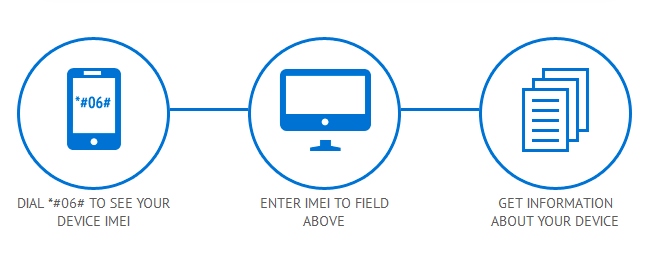
  • type *#06# on Keypad
  • Settings – General – About – IMEI

2. Enter Email address.

3. Read and agree with Terms and Services.

4. Click the Buy Now button.

You will receive results if your iPhone IMEI was replaced, replaced and original data:

iPhone Replaced IMEI Check RESULTS SAMPLE:

Serial ##### IMEI #### Type | Replacement Date

ENCVSIIONDMW 012376458908346 Active | 03/07/14
EVBRTIOMPSDW 014327897500984 Replaced | 02/28/13
EYERTOMPEWMW 012879006743568 Original | 02/28/13

You can find out if iPhone was replaced by Apple or the IMEI was replaced illegally by using IMEI replaced status checker. iPhone can be replaced by Apple in case it has a hardware issue and the warranty remains valid. Other way to replace IMEI can be done if you have Apple GSX account. You can replaced locked IMEI nubmer to unlocked one. But this method is illegal and iPhone can’t be unlocked using official factory unlocking method we offer here.

iPhone IMEI Information and Unlock Checker Tool

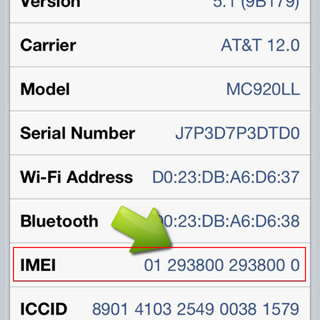
IMEI is an exclusive [unique] code given to each Apple smartphone. It is a shorten form for International Mobile Station Equipment that is important to the manufacturers, carriers and users. You can learn a lot about your handset if you know its IMEI number because it gives you access to interesting iPhone IMEI info. This number is like a fingerprint.

iphone imei details

iPhone IMEI Details

You can use iPhone unlock checker here and learn more about the gadget you have. It is possible to figure out your unique number by dialing *#06# on the phone’s digital keyboard. You can also see it in Settings – General – About. Why is it so important?

find imei

Firstly, the code helps companies to identify iPhones. Secondly, it allows stopping a lost or stolen handset from being used on the network it is locked to. In case someone steals your fruit gadget you can simply call your carrier and ask it to list your IMEI as barred / blacklisted [in other words, to block it]. This way whoever has your device will not be able to use it on your network or any other network [even if the SIM is replaced]. By the way, you can also use IMEI blacklist checker to find out if your device is clean or not network checker doesn’t shows such info.

Other iPhone Details IMEI

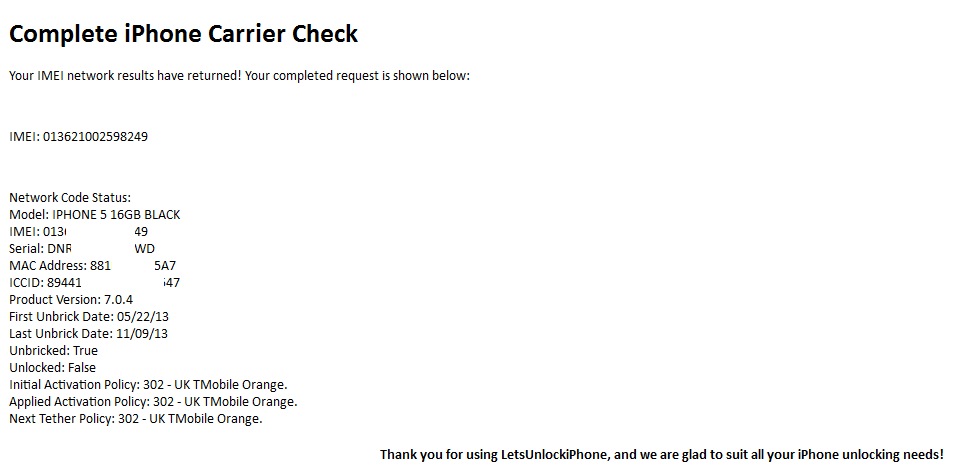
Users who purchase their handset from other users can run iPhone IMEI checker to learn which carrier this phone is originally locked to [or find whether it has never-locked status]. After purchasing our service you will get such results:

iphone details imei

iPhone IMEI Info Check

It is highly recommended for insurers, security professionals, sellers and customers to check IMEI iPhone for any suspicious device. There are a lot of platforms that have a full database with information about phone’s models, maker and its status that are linked to the official reporting agency and rightful owners.

Such services is available to anyone. Don’t wait till someone starts using your lost or stolen device. Report its IMEI to your carrier and protect yourself.

AT&T iPhone Blacklist Checker Service [Must-Use Before Unlock]

Check Blacklist iPhone AT&T Status

Blacklisted AT&T iPhones can’t be unlocked. Most companies that offer unlocking service for iPhone users do not accept barred / blocked / lost / stolen IMEIs. If you place an order for factory iPhone unlock with blacklisted IMEI you will lose your money because no refunds are made for such orders. You can run our iPhone blacklist checker to make sure everything is ok / not ok with your device beforehand.

A lot of iPhones are in the blacklist in the U.S., UK, Australia and other countries across the world. You can’t make phones / send messages / connect to the internet on such smartphones as they are blocked within the country they are in. It is impossible to unlock such iPhones but particular service can unlock blocked iPhone to work with networks outside their original country. But if you have blocked AT&T iPhone we can’t unlock it.

AT&T iPhone 6 blacklist check gives important answers for other models like 6S, 5S, 5C, 5, 4S, 4 too. You will know whether the iPhone is blacklisted or not, whether it is stolen / lost [if the police got such a report you will know about it] and other useful facts about the handset.

The procedure of running iPhone blacklist checker is simple. You need to know your IMEI code. Get it through Settings menu [look under General – About section] or by typing *#06# to have it shown on your iOS display.

Here is How to Place Your Order.

Step 1: Provide the correct IMEI code and your valid email address. This is important. We’ll email you the results to this mailbox address.

Step 2: Press on Buy Now option.

Step 3: Pay for your order via PayPal or other method [select “I don’t have PayPal account” to enter your credit card information].

Step 4: Once we get the payment we will send the request to the carrier. It is impossible to cancel or refund your order at this point.

Step 5: We will email you the results as soon as your request is completed.

Step 6: In case there is no email from us you can either contact us or look in your spam / junk folder.

After using this service you will receive results like:

RESULTS SAMPLE:

CLEAN

IMEI: 35799305249XXXX

Model: Apple iPhone 5S (A1453)

Status: CLEAN

BLACKLISTED

IMEI: 35445206161XXXX

Model: Apple iPhone 6 Plus (A1522)

Country: United States

Status: BLACKLISTED

Blacklisted By: Verizon Wireless

Blacklisted On: 2015-06-09 03:08:02.0

Blacklisted Country: United States

BLACKLIST HISTORY

IMEI: 99000284880XXXX

Model: Apple iPhone 5 (A1429)

Status: CLEAN

Blacklisted By: Sprint

Blacklisted On: 2014-01-24 06:05:55.0

Blacklisted Country: United States

Blst. Removed By: Sprint

Blst. Removed On: 2014-01-27 06:09:30.0

Blst. Removed Country: United States

Note: This is not unlocking package. This service checks IMEI only.

Important Notes

  • Agree to our Terms and Services [read them carefully] before you order the checking service.
  • Run our iPhone checker for blacklisted IMEI codes in U.S., UK and other countries. if your iPhone is clean and locked to AT&T you can unlock it here.
  • It doesn’t matter to what carrier your iPhone is locked.
  • Your iPhone must be activated with the carrier it is locked to. If it is not activated the checker will fail to provide you the information about your blacklist IMEI.

We hope you now know the information about your iPhone and it satisfied your expectations. Note that our support team is always happy to assist you in case you have any further questions.

How to Check if iPhone Contract Status With AT&T Was Ended or Still Active

Finally AT&T iPhone out of contract checker is up and running! Here you can check AT&T iPhone contract status if it is off or still active. Before you could check such info contacting AT&T only and only if you had an account in AT&T until now!

Why It Is So Important to Get Such Info?

Last year in the late October AT&T company changed their unlocking policy which became more strict, delayed and much expensive as it had been before. Now the cheapest price for unlock is for out of contract AT&T iPhones only. So why pay double price for unlock if your iPhone is off contract?

How to Place an Order

This service is remote and we don’t need your iPhone. All we need is the IMEI number and email to send you results.

Where to Get IMEI

There are two best and fast ways to get the IMEI number of the iPhone you try to check contract status:

  1. Open Settings and go to General – About, scroll down until you will see 15-digits number of IMEI number.
  2. The second method is to open Phone app and type *#06# on the Keypad to see IMEI immediately.

After you will have IMEI use the order form providing:

  • IMEI
  • Email
  • Agree with Terms
  • Click Buy Now

You will receive results after we check your iPhone contract status. You will receive such info:

  • iPhone is Out of Contract

or

  • iPhone is In contract

Attention

This service will not unlock your iPhone. This is not unlocking package. This service will check AT&T iPhone contract status only. If you need to unlock iPhone and know if your device is out of contract or in contract select from the unlocking packages below.

Use AT&T Contract checker and find out the iPhone status to choose from unlocking packages:

Before ordering read the important notes below to get fast and correct results.

Important Notes

  • Make sure that iPhone is not blacklisted / barred / blocked otherwise you will receive Not Found code.
  • Make sure that iPhone was not replaced or refurbished otherwise you will receive Not Found code.
  • There is no refund if Not Found code results.
  • This is not an instant checker. The average delivery time is 1-24 business hrs. All orders are made manually.
  • This service does not unlock iPhone.
  • Read Terms and Conditions before placing an order.
  • Check spam/junk folder if you don’t see email with the results or add contact@geo-location.site to your safe mail list.

RESULTS SAMPLE:

Contract ON: 163 days from purchase. (Which means that iPhone is in contract for 163 days.)

Contract OFF: means device is out of contract.

This service DOES NOT unlock or unblock iPhones. You will see only if your device is out of contract or in contract.

Is Activation Lock On or Off on My iOS 7 iPhone?

Question: Hi, I have purchased a used iPhone with iOS 6 and now I am planning to update it to iOS 7. How can I know for sure if its Activation Lock is off or on along with Find My iPhone application? Is it safe to install the latest Apple firmware or should I stay on version 6?

Answer: Hello, thank you for your question. The new iOS 7 can truly bring you some problems making you not happy about your used device. This firmware has Activation Lock option that blocks the smartphone from being used by third-party people if Find My iPhone application is turned on. It doesn’t matter if you simply wish to update to iOS 7 or unlock your gadget and upgrade later on.

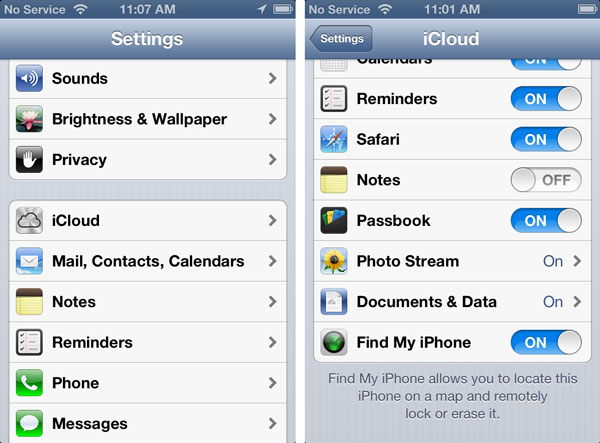
check find my iphone

Even if you know the ID / passcode you might forget it one day and, according to Apple, it is impossible to recover this password so you’ll simply get a non-active gadget. Is there a way how to solve possible future problems?

Luckily, iOS 7 Activation lock check service can tell if you this feature is turned on or off. Just check your handset before unlock, restoration, update etc. There is also a solution to users who updated to iOS 7 with Activation lock on and now can’t use their device. Try the distant service and get past Find My iPhone Activation Lock option to enjoy all the benefits of your device.

If the program is on, you get into problem. It is great if you can contact the original gadget owner and get his ID and passcode to unlock the gadget and turn Activation Lock off. This is often difficult to achieve in reality because previous owners vanish when you purchase a problematic device online.

You should be sure that Find My iPhone is off before installing to iOS 7. Otherwise you can get a piece of metal that doesn’t perform. It will be impossible to resell such a device on Craglist, eBay and other sites. You will not be able to unlock it because such a procedure requires restoration through iTunes and you will get stuck on the Activation message without ID and passcode.

Service to Remove iOS 7 Activation Lock / Find my iPhone Feature

Service to Remove iOS 7 Activation Lock / Find my iPhone Feature

The most recent iOS 7 was presented in September 2013. It comes with Activation lock feature that is turned on automatically if Find My iPhone feature is on. It is impossible to turn off this option manually or via some hacking programs. Only the original device owner can turn it off by entering Apple ID and passcode.

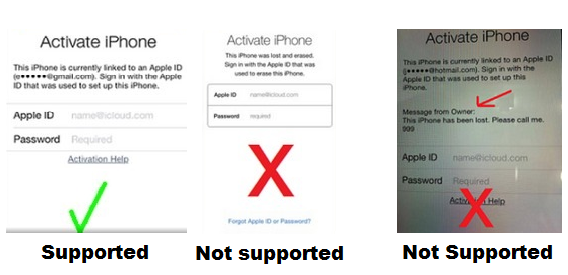
Some users first order iPhone unlock and then start thinking about iOS 7 option once they come up with Activation lock problem that doesn’t allow accessing their Home screen. If you haven’t run Find My iPhone disabled or enabled checker to figure out whether you will face the activation issues or not and now you can’t pass it, we will help you to bypass Activation lock offered by iOS firmware.

icloud-activation-remove

Important Notes

  • This package DOES NOT UNLOCK or UNBLOCK iPhone.
  • Make sure your issue fits the screenshot above.
  • This package doesn’t work for blacklisted iPhones. Only clean IMEI. No refund if iPhone is blacklisted.
  • This package supports iPhone and iPad
  • Add contact@geo-location.site to your contacts to be sure our emails get delivered.
  • Please read Terms and Services before clicking the Buy Now button.
  • Delivery times only apply during business hours, not guaranteed turnaround time. (Business time is 9 am – 6 pm PST, Monday-Friday).

Order our service and you will be able to use the iPhone after upgrading to iOS 7 or restoring via iTunes as usual!

How to Check Find my iPhone by IMEI On Any Apple Devices Before Unlock

Use iPhone IMEI Check if Find My Phone Disabled

Users who are thinking about purchasing, restoring, unlocking or reselling their iPhone should be very attentive. Now, as Apple launched its iOS 7, 8, 9 with Activation lock option, it is important to check Find My iPhone with IMEI using special checker before you get your smartphone from someone or plan on giving your handset away.

However if you stuck on activation screen that asks you to enter Apple ID and passcode use our new package to remove iOS 7 activation lock and turn off Find My iPhone feature remotely.

Use this checker to check IMEI for Find My iPhone feature if it is turned off or on before buying, selling or factory unlocking / restoring iPhone. But first read important notes below.

Important

  • Please read Terms and Services before clicking the Buy Now button.
  • This service doesn’t work for blacklisted iPhones.
  • This package DOES NOT UNLOCK or UNBLOCK iPhone.
  • Due to the fact that services sometimes are overloaded results may come longer that usual. Also there can be delays during the weekends.
  • Add contact@geo-location.site to your mail contacts to be sure our emails get delivered.

RESULTS SAMPLE:

Find My iPhone: On

or

Find my iPhone: Off

The ID and passcode chosen for iCloud account are stored on “Albert” activation server run by the Cupertino-based company. Your device is connected to this server and you must enter the original Apple ID and password each time you wish to erase information on the iOS handset, reactivate it or turn Find My iPhone off. If this application is on, Activation lock is turned on automatically on iOS 7 requesting the passcode even if you have just upgraded to the version 7 from previous iOS 6.

IMEI Can Be Blocked by AT&T If iPhone Is Stolen

If someone stole your iPhone, AT&T can help you: mobile operator released a new system in July 2012, which was be able to block any stolen iPhone. So the thief will not be able to use any network on your iPhone. Also it is very hard to unlock IMEI of AT&T iPhone when it is blacklisted.

The journalists reports with reference to some unnamed sources, that the AT&T block voice calls, data transfer, and the transfer of SMS-messages to devices that have been stolen. Thus the subscriber’s account will not be closed to prevent blocking the SIM-card.

at&t block stolen iphone imei

According to sources, the company allegedly sent a message to some government services that support consumers, which interlock system will be introduced some changes. According to the new message AT&T will introduce a special block list of stolen devices that service will be suspended.

To add a device to the list, you will have direct contact with the client. In addition, the company will require its customers that they remotely delete all of your data from the device, if this feature is supported on their device. AT&T give the ability to subsequently remove a device from the list of blocked devices if the users will want this.