iPhone IMEI Information and Unlock Checker Tool

IMEI is an exclusive [unique] code given to each Apple smartphone. It is a shorten form for International Mobile Station Equipment that is important to the manufacturers, carriers and users. You can learn a lot about your handset if you know its IMEI number because it gives you access to interesting iPhone IMEI info. This number is like a fingerprint.
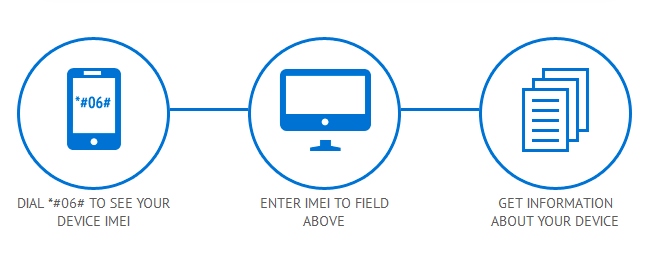
iphone imei details

iPhone IMEI Details

You can use iPhone unlock checker here and learn more about the gadget you have. It is possible to figure out your unique number by dialing *#06# on the phone’s digital keyboard. You can also see it in Settings – General – About. Why is it so important?
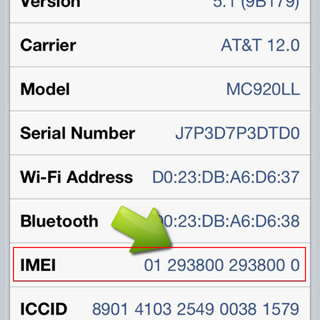
find imei

Firstly, the code helps companies to identify iPhones. Secondly, it allows stopping a lost or stolen handset from being used on the network it is locked to. In case someone steals your fruit gadget you can simply call your carrier and ask it to list your IMEI as barred / blacklisted [in other words, to block it]. This way whoever has your device will not be able to use it on your network or any other network [even if the SIM is replaced]. By the way, you can also use IMEI blacklist checker to find out if your device is clean or not network checker doesn’t shows such info.

Other iPhone Details IMEI

Users who purchase their handset from other users can run iPhone IMEI checker to learn which carrier this phone is originally locked to [or find whether it has never-locked status]. After purchasing our service you will get such results:
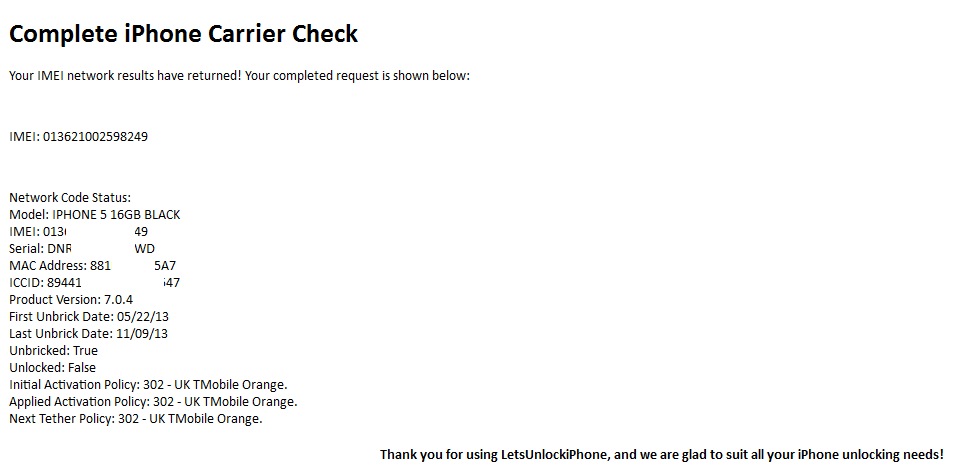
iphone details imei

iPhone IMEI Info Check

It is highly recommended for insurers, security professionals, sellers and customers to check IMEI iPhone for any suspicious device. There are a lot of platforms that have a full database with information about phone’s models, maker and its status that are linked to the official reporting agency and rightful owners.

Such services is available to anyone. Don’t wait till someone starts using your lost or stolen device. Report its IMEI to your carrier and protect yourself.

iPhone 4S iOS 7.1 Problems with Wi-Fi Connectivity

iOS 7.1 update didn’t go as smooth as most of us hoped. Apple tried its best to release the major firmware upgrade and the first reports cam soon. People complained about battery issues. This is not the only bug, as iPhone 4S owners experience bad or not working Wi-Fi connectivity.

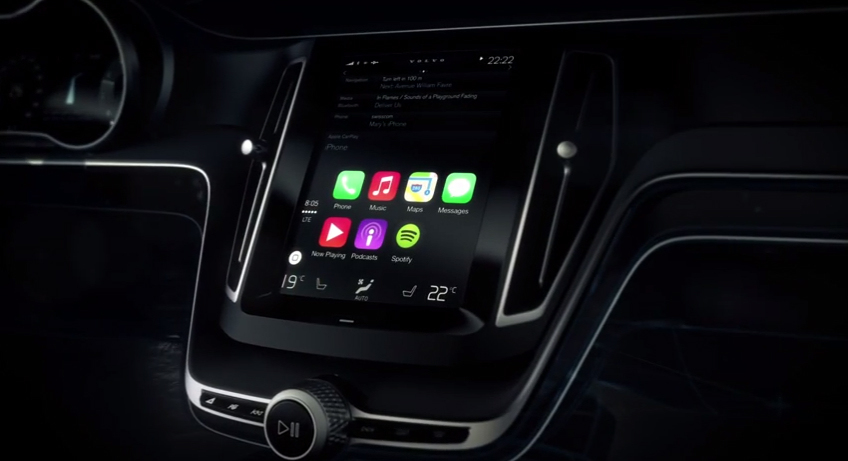
The operating system brought new features such as CarPlay for the iPhone 5S. Of course, this option doesn’t support the 4S smartphone but lacking one feature is one things and getting different iOS 7.1 problems is another thing.

Right now this bug isn’t common. It is faced by a small number of Apple customers, according to support forums devoted to Apple products. Wi-Fi issue on iPhone 4S after iOS 7.1 update shows the following error:

“Wi-Fi not available”

Wi-Fi no available ios 7.1

Such a problem comes because Wi-Fi somehow becomes disabled after you install iOS 7.1 on your iPhone 4S model. There is a fix to the issue shared by users. They say that you can reset your handset’s settings for network and use your WiFi connection. But this fix doesn’t help everyone. Some users note that their Wi-Fi chip has been burnt after the firmware update.

Having different iOS 7.1 bugs [previous reports mentioned fast battery drain on their smartphones and tablets] is not too nice. Apple is silent but it will most likely offer bug fixes in the next operating system update.

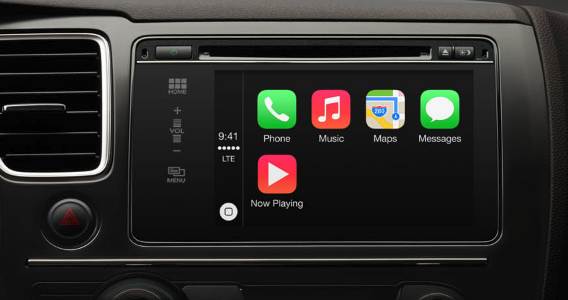
Apple iOS in the Car Integration Released in CarPlay Update for iPhone 5S / 5c / 5

iOS 6 car integration was long awaited from Apple, and now with iOS 7 introduction and high popularity a lot of drivers keep waiting for iOS in the car feature official presentation. You get an ability to drive safely since you are able to use Apple Maps while holding the steering wheel. You can do this with CarPlay.

This new Apple technology was introduced earlier this week. The Cupertino-based company showed the opportunities of its iOS CarPlay feature at the Geneva International Motor show. Different firmware users, including iOS 7 future updates, will get a chance to have iOS software on the car dashboard.

iOS CarPlay feature

Being able to control your vehicle and use iOS options at the same time is really interesting. This is something that will be loved by most “fruit” device fans with vehicles. iOS in the car makes it easy to control your apps with a word. You can also activated different options with fast touch.

Car and navigation bar in iOS 7 and further operating system updates will be a great feature to introduce during WWDC 2014.

iOS CarPlay

CarPlay brings your iPhone content at your fingertips. The new option offers minimum distraction from the road. You can get all the news, Maps directions, Siri help and other things on-the-go.

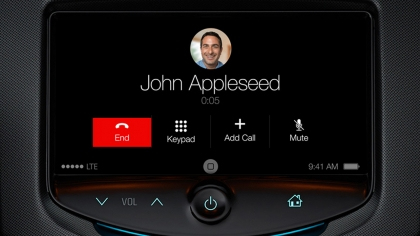
You have to connect your smartphone with CarPlay. This will give you control over different iOS features through your vehicle’s interface. Siri can be enabled with the click on your steering wheel. This personal assistant can make iPhone calls, let you hear your voicemails, get to your contacts list and much more.

apple CarPlay

The new iPhone in the car feature let’s you hear your songs, iTunes Radio, hear your messages etc. The first vehicles to get CarPlay support include some Mercedes, Volvo and Ferrari models. They will be sold this year. The next cars to get iOS car option should be Honda, Toyota, Nissan and General Motors.

iPhone 5S in the car option works together with iOS 7 and two more handsets, iPhone 5 and iPhone 5c.

iPhone Battery Drain Fix After iOS 7.0.6 Update

iOS 7.0.6 release is the latest iOS 7 firmware version that can downloaded today. Apple presented it as the fix to SSL network verification. A lot of people were fast to adopt this operating system to get rid of iOS 7 problems with the build 11B651. New reports suggest that iOS 7.0.6 update brings iPhone battery bug.

The file that people can download via OTA-upgrade or through iTunes is not too heavy. For instance, iPhone 5S iOS 7.0.6 upgrade weighs at 35.5MB. This is not too much, but even such light files can bring new problems on your iPhone.

ios 7.0 6 battery drain

How to fix fast battery drain on iPhone

Hackers provided a way on how to solve SSL problems on iOS 7.0.5 and iOS 6.1.3 without installing iOS 7.0.6 and 6.1.6 released by Apple. At the same time, a lot of people had time to upgrade and are now facing another issue.

The huge battery drain is experienced by iPhone owners who are now running iOS 7.0.6. Some people assure their iPhone battery can jump from 20% to 17% within seconds. This is really fast and not comfortable at all. You can’t have a charger with you 24/7. Is there a way to solve this new problem with a warm smartphone and short battery life?

There is a good fix that can make iPhone battery last longer. It also solves the problem with warm gadget.

Firstly, you should close all the applications you have in the background. Multitasking is a good feature but it can eat much of your iPhone battery life. To quit iOS apps you can click twice on your Home button and swipe up each program you wish to close. This doesn’t take much time but it does extend battery life on the iDevice.

Secondly, it is necessary to reboot your handset by pressing both Power and Home buttons. Your device will reboot and the problem will be gone.

iOS 7 Calculator with Bunch of Cool Options for iPhone / iPad

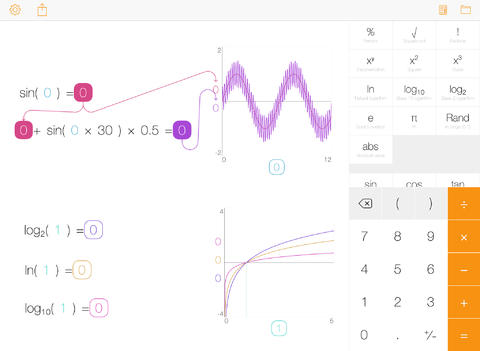
iOS 7 calculator with a lot of features can be installed on your iDevice with Tydlig app. This program has been re-imagined for the new firmware and its latest update brings a number of cool options that are not available in your built-in app.

The interface is easy-to-use. It is adjusted for the firmware 7 devices and offers flat design and different options. What does it offer to users who count a lot? By paying $3.99 or updating for free [if you already had the earlier version of this iOS 7 application], you get cool graphing, linked numbers, fast results, left-handed mode, progressive calculation engine, number annotation and freeform canvas.

Tydlig app ios 7 calculator

The calculator now supports both iPhone and iPad though the original program was released for iOS tablet only.

The app comes with over 30 languages. It has slider for all numbers, text size you can adjust to your taste, separators you can turn on and off, EE function and many other features.

This calculator is probably one of the best and must have for you if you work with numbers. It doesn’t require jailbreak so it is available to any Apple fan.

Lower-Cost AT&T iPhone Data Plans for Families

It should be cheaper to make calls and use data with the next AT&T data plans. The U.S. carrier has reported that it will allow its customers to save money on monthly conversations and data uploads. The mobile company offers Mobile Share Value data plans for American families starting February 2014.

The costs can be reduced by anyone who is already using AT&T service or is planning to connect to this network. Existing and new consumers who need 10GB+ data plan each month can now save their finances. The family plans offered by the carrier give 2 lines along with 10GB data. The package’s price begins at $130.

What can you get for $130 a month? iOS smartphone and other device users can get unlimited text, talk and 10GB of data for this cost. If you wish to use more than two lines, you can increase their number by paying extra $15 for each one.

att video bill

If you are using the required limit of data per month, you can easily switch to this new data plan. If you don’t use such amount of data, you should get to this limit in order to be eligible for the family package. New customers who wish to subscribe to this plan have to purchase AT&T iPhone or other AT&T handset via the company’s early update program.

If you get a device at its full price or bring your personal handset you can also start using this data plan. The promotion can be combined with other offers from AT&T. For example, iOS users or other customers can get $100 bill credit when wishing to add another line to the package.

What do you think about the latest offer? Will it become really cheaper to use AT&T iPhone on such a plan or are T-Mobile offers better? The marketing war between American mobile operators is getting hotter.

AT&T iPhone 5S / 5C Unlock for Clean IMEI

Attention: Because of the new AT&T unlock policy this service might be delayed. Delivery times only apply during business hours, not guaranteed turnaround time. All unlocks will be provided during business days( 9 am – 6 pm PST, Monday-Friday) 

So please don't submit your order if you need it earlier or simply can't wait.


Only buy an unlock service if your device can meet the service requirements. If you purchase the unlock service not supported for your device and don’t meet the service requirements, we consider that unwelcome and malicious buying with no refund available.

Factory AT&T unlocking for all iPhone models including 5S and 5C is working great. Now everyone can unlock iPhone 5S / 5C from AT&T and use SIM cards of other carriers worldwide. This unlock package supports iPhone 5S / 5C models as well as in and out of contract iPhone.

In case you are looking for faster service for blacklisted iPhone 7, 7Plus unlocking you can follow this link and unlock your device in several business days! If your iPhone is blacklisted and you can wait more than 7 days unlock Not Found AT&T iPhone 7 and get successful results.

Benefits of AT&T iPhone 5S / 5C Unlocking

  • It is permanent unlock [you can’t lose it]
  • We offer unlock at affordable prices
  • It doesn’t void Apple warranty
  • You can freely upgrade to new iOS / baseband
  • You can jailbreak your iPhone
  • Factory unlock works for any iOS version / baseband

To start unlocking process you need to provide your IMEI only because it is a remote service. In case your iPhone is out of contract you can unlock it using the cheapest package.

IMEI:

It is easy to get your IMEI number:

* Open Settings – General – About and look for IMEI code.

* Type *#06# on iPhone keyboard to have IMEI number displayed on the screen.

Notes:

  • This package is for iPhone 5S / 5C locked to AT&T US carrier.
  •  No cancellation can be proceed after iPhone unlock request was accepted.
  •  Read Conditions and Terms and agree to them before you place your order.
  • We unlock only clean IMEI number and DO NOT refund money for blacklisted IMEI/iPhone. You can use iPhone blacklist checker to find out if your device is clean or not.
  • If you use or plan to use iOS 7 be sure Find My iPhone is off.
  • iPhone has to be activated before placing an order.
  • Please do not order if your device is replaced or has ever been sent to Apple Care / Technical Service. No refund for such orders.
  • In case email from us doesn’t appear in your mailbox check SPAM or add contact@geo-location.site to your safe contact list.

*Our deliveries take place from 9 am till 6 pm PST, Monday through Friday.

How to Order AT&T iPhone 5S / 5C Unlock

  • Provide IMEI number and carrier’s name
  • Pay for your order
  • Wait till the status is changed to “unlocked”
  • Finish the procedure by following instructions emailed to you

iOS 7 Conversation: How to Delete Particular Text Messages Guide

iOS 7 has a lot of new features interesting to iPhone and iPad users. A lot of options haven’t been presented in previous iOS 6 firmware thus it takes some time to learn everything Apple introduced in the latest update. Now you can delete iPhone conversation in iOS 7. You are most likely familiar with the multitasking, Parallax effect, Camera app update and other options. The new changes have come to iOS 7 Conversation also and you can learn how to easily delete particular text message in it which can be handy in many situations.

support-px-png

It is never too late to learn something new. For example, my friend has been updating to iOS 7 since summer. He installed all the betas manually trying to explore the new firmware and was fast to install the first public release. He likes being updated and he is always eager to share some tips with me.

iOS 7 Delete iPhone Text Message

Previously it was simple to delete the messages through Edit option [icon] located in the top right corner of the message. The new version of iPhone operating system has replaced this option with Contact icon. If you wish to delete the entire iPhone conversation in iOS 7 you should swipe it to the left.

If you need to delete a specific message located in the conversation you should follow these steps.

Step 1. Open the conversation you want to apply changes to.

Step 2. Click and hold on the message bubble [choose any you like]. This will bring up “copy” and “more” options. Select “More.”

Step 3. You will see a blue circle next to all the messages within the conversation.

Step 4. Check the particular messages you wish to delete [one or more] and click on Trash icon located in the low left. The “Delete” option will appear and you will successfully get rid of all the chosen messages.

Note. The message you clicked on in Step 2 is automatically checked for being deleted. You can uncheck it if you don’t want to move it to Trash with other messages you have selected in Step 4.

New File Sharing Risks for iPhone and iPad Owners

Different applications for iPhone and iPad have potential risk for Apple fans. File sharing risk exists for iOS users, according to Trustwave research. The flaws are pretty serious so it’s better to know about possible problems and protect yourself before it’s too late.

The issue is related to file sharing iOS applications. A consultant from Trustware [Bruno Goncalves de Oliveira] who researched this problem says that he was working with different apps for sharing photographs, docs and other files. He told eWEEK that various iOS file sharing applications start a Web server on the fruit gadgets and this component isn’t secured enough for safe file sharing and uploading.

apple server status

As Oliveira notes, once an iPhone / iPad user launches such a program, his or her iDevice’s file sharing program can be accessed by others [in other words, anyone is able to share files via it if he / she discovers the gadget on the network]. The programs researched by this expert turned out to lack important security feature.

They didn’t have user authentication or encryption or such options were disabled by default. Reality requires developers to secure their apps using SSL encryption to protect users during Web transactions.

Hackers can easily find iPhones and iPads that have opened file sharing programs. The task is not difficult at all, especially if they are using Multicas DNS tool. Anyone can get such mDNS program and search for devices with open ports.

Well, iOS 7 firware is better protected than iOS 6.1.3, expert assures. He was able to access just the app’s folder and nothing more even on a non-jailbroken smartphone / tablet. The programs that come with a risky flaw include the Easy File Manager and FTP Drive. These apps are named as vulnerable so users should be careful while using them.

You can protect yourself by getting programs from well-known manufacturers and avoiding programs created by unknown developers. You can also get MDM technologies as they can minimize the risk of having data leakage.

Happy Thanksgiving!

Today is a special holiday. It is the day to rejoice and be thankful to your family and friends. It is the time when you can spend a nice dinner in a family circle eating tasty turkey, mash potatoes and having fun. It is a great evening to play interesting games on iPad, watch movies on Apple TV and making many phone calls via your unlocked iPhone to let all your friends know you remember about them and wish them a Happy Thanksgiving!

happy-thanksgiving

Get enough strength tonight for tomorrow’s Black Friday event if you participate. It’s the day to buy cheap Christmas gifts to the ones you love and care about!

Happy Thanksgiving!