Use iSpeed-Dial for Creating Visual Speed Dial iCons on the iPhone

You can often get what you want without hacking your iPhone and without jailbreaking it. Some features can’t be received this way, but there are a lot of applications that serve interesting purposes allowing users get more out of their iDevice with little effort.

It was previously possible to create speed dial icon on the iPhone using once hack. Now the procedure is simple because developers created a program called iSpeed-Dial. The web program was developed by Unreal Apps.

ios-7-1-1-download

The application is available at $0.99. iSpeed-Dial download should not be a problem. Use it for making speed dial iPhone icons to the contacts you are calling often. There will be no need to search the address book as all your favorite number will appear as icons on your Home screen.

The speed dial icons can be made for text messaging as well as email.

Icons can be created through your camera or images. There are also some standard icons you can use in case you don’t want to upload photos.

Do you think such method of creating visual speed dial icons on iPhone 5, iPod touch and iPad can save you time? Is it worth paying for such service without hacking and jailbreaking or is it better to jailbreak and use the free long and painful method of making icons?

U.S. Apple Customers Get Free Shipping Until May 29

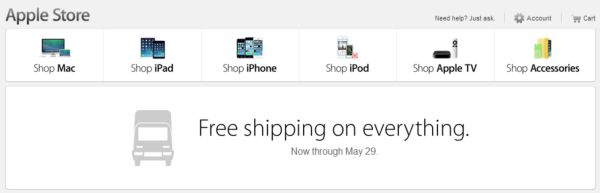
Apple free shipping time is extended through May 29. If you wanted to buy a new iPhone, Mac, iPad or other product accessories from the company’s online stores you might wanna do this now while the iPhone maker offers free shipping for all customers who place their orders online.

apple-free-shipping-time

The promotion lasts through Thursday. You can get things priced below $50 and still get free shipping on your order. Normally the company offers free shipping for orders $50+ but this promotion is different and nice for accessories. There is no need to enter Apple coupon codes to get the offer. Just place your order for $10, $15, $25 etc. below $50 and enjoy it being shipped to you at no additional cost.

This is Apple’s Father’s Day deal. What do you think about this offer? Is it worth purchasing accessories online now? Would you rather go to the physical store or order sometime from the company’s website? It is true that the ‘fruit’ giant is turning its attention to e-commerce. It is trying to boost online sales using different promotions.

New Problem with iOS App Updating and Apple ID

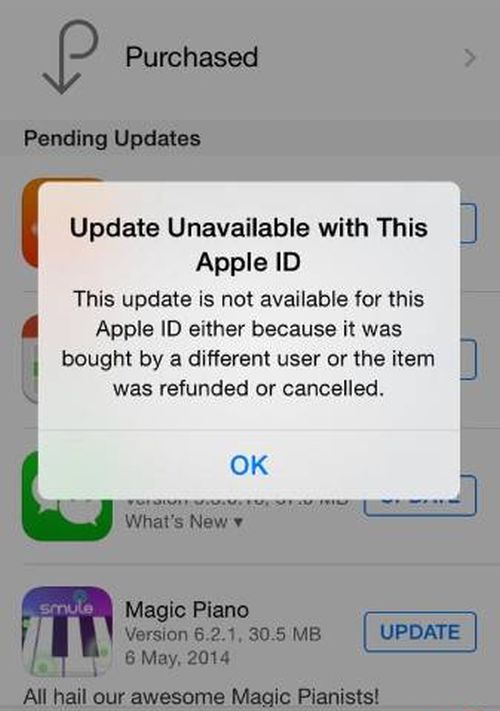
A lot of Apple customers get the same iOS app updates error. This new issue is faced by mostly international users who report problems on Apple official support forums and via Twitter. As people say, they are not able to update their iOS applications. This process fails to be successful and they receive Apple ID error while trying to upgrade.

apple-id-error-app-updating

Users describe the situation as follows: when they start to update iPhone and iPad apps in the official App Store, the store warns them that “the update is not available for this Apple ID.” The message provides two possible reasons for this: either someone else purchased the program or it was cancelled / refunded.

As one user wrote on forums for MacRumors, the attempt to update four applications failed and the App Store showed the problematic message with the reasons described above. The users assures she has only one account for the iPhone 5S and such Apple ID problems never surfaced in the past.

iDevice owners who got the issue say they even haven’t logout from their account. Some have even lost all their applications. Apple Support knows about the problem and iOS app update error. They said there was a problem with the server that affected updating your programs on iPad and iPhone. Apple is said to be working on the fix. It is not known when the issue should be gone.

Feel free to share your experience with app updating with us. Do you get this error or not? If not, what your current iPhone model is? It is impossible to fix the problem once you got it, at least, at the moment. It could be resolved at any time now.

iPhone Guide: Use Flash as Led Notification

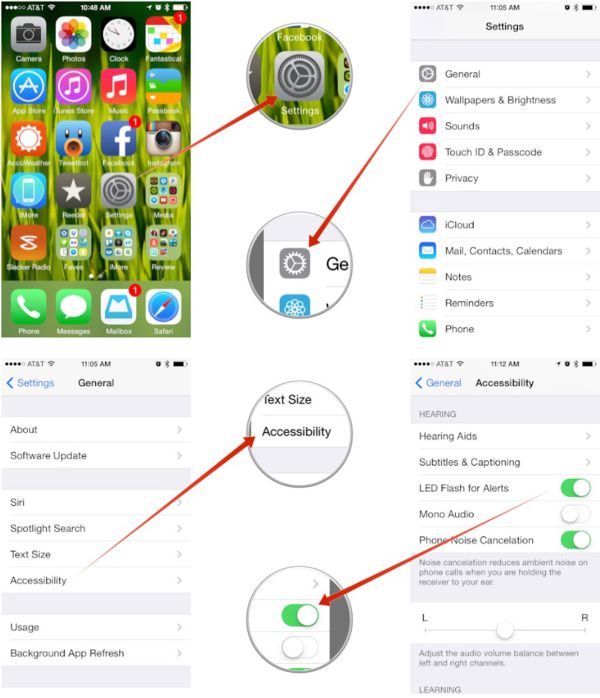
If you want to add some extra options to your iPhone, you can use this guide and make your iPhone use flash as LED notification. It is simple to add these changes with the help of different Accessibility features. This can turn your smartphone into a device with the LED notification light.

Follow this simple guide and get flash LED phone in a few steps. Once you complete this instruction, your fruit device will light up whenever you get a notification alert. This is handy, especially if your sound is turned off but you are waiting for an important message from someone.

iphone-led-flash-notification-on

Step 1. Open Settings application. This program has a lot of different options for various changes.

Step 2. Go to General menu.

Step 3. Now you need to get to Accessibility menu.

Step 4. We are almost done. Scroll down till you find the Hearing option.

Step 5. Go to this Hearing section and make your camera LED flash notification work by enabling LED Flash for Alerts. Just toggle it on.

Step 6. You have successfully asked your iPhone to light its LED flash up for different notifications.

Apple’s handset offers various options to users even if it is not jailbroken. Some users who wish to get more features prefer jailbreaking their cell phone as this adds Cydia store to your Home screen where you can download different apps and jailbreak tweaks.

New AT&T WiFi Plans for Air-to-Ground LTE Service

One of the biggest iPhone carriers in the U.S., AT&T has big plans for the next year. The company is going to extend its AT&T LTE coverage air-to-ground.  The in-flight service is the battle against Gogo. The new service should be available in late 2015.

International flights will be omitted. This AT&T Wifi plans will cover only local flights in America providing air-to-ground communication. The connection will work between ground LTE service and planes. Passengers who are flying in the United States will be entertained over in-fight Wi-Fi.

at-t-wifi-plans

The so-called AT&T LTE Wifi hotspot on the planes should offer reliable connection and high-speed Internet on-the-go. The service should work on the height of up to 35,000 feet above the ground.

There is no such technology in the U.S. these days. This will be the first powerful and strong connection based on 4G LTE network. According to AT&T, its LTE coverage will provide passengers a better experience in the air.

The mobile operator doesn’t mention airlines that will provide the air internet service in 2015. We can only wait till the next year to learn more and see how the connection will improve for all Americans who travel over the air with the iPhones and other mobile devices.

For now users are looking for the next iPhone 6 and iOS 8 update that might be officially introduced in early June at WWDC conference and released in fall. Apple has big plans for this year and so does AT&T.

Official AT&T iPhone Unlock for iOS 7.1.1 Models

Apple presented its new iOS 7.1.1 and some AT&T iPhone users have already updated to this firmware. You can easily unlock iOS 7.1.1 iPhone from AT&T in case you are still locked and limited to your 2-year contract or out of contract by now. AT&T official iPhone unlock is a simple, popular, safe, guaranteed, permanent and top-quality service that will satisfied all your desires within 24 hours or a few days.

unlock AT&T iphone ios 7.1.1

Unlock for iPhone 5 / 5S / 5c / 4S / 4 AT&T is official because it is provided by listing your unique IMEI number [each smartphone has this number to be identified by the manufacturer] in the real Apple database of all IMEIs. Once your code appears in the unlocked section of this database you are officially unlocked.

You cannot do this on your own because you are unable to access this database. The companies that offer official unlock for AT&T iPhone models have this access as they work in partnership with carriers and Apple.

Unlocking needs IMEI which you can see after you call this simple number *#06# or search in Settings app – General menu – About section. If you want to be successful at the first attempt you should also use iPhone blacklist check and network checker. These two great services will tell you the original name of your carrier, activation and lock status along with blacklist status. After you make sure that your iOS 7.1.1 handset is really locked to AT&T, activated and not blacklisted / blocked you can order its factory AT&T IMEI iPhone unlock.

att-iphone-ios-7-1-1-unlock

This is even easier to do.

Step 1. Enter IMEI number in the special field of the online order form.

Step 2. Enter email address as you are asked to do.

Step 3. Click Buy after you agree to Terms and Services.

Step 4. Pay for the service.

Step 5. Wait till you receive an email with a guide how to plug the smartphone to your computer, launch iTunes and complete the procedure.

This last step is required because iTunes also contacts Apple servers each time you connect. It will see that your new status is unlocked and finish unlock for your iPhone. From this moment you can insert different SIMs, including AT&T, Verizon, O2, Orange, Sprint, Vodafone and others.

iDevice Users Get iOS 7.1.1 Update Links from Apple

Just like experts predicted, Apple launched its new iOS 7.1.1 for public use. It solves some problems experienced by users and improves the firmware performance along with Touch ID option and keyboard response.

There are two main methods on how you can get iOS 7.1.1 update. One way is using OTA upgrade option. The other one is through download links.

ios-7-1-1-download

Method 1

iOS 7.1.1 install process can be done this way. Firstly, you should backup your iPhone or other gadget through iCloud program or iTunes. Secondly you need to connect the smartphone or tablet to your computer and open Settings application. Then you have to select General menu and Software Update menu where Install Update is available.

Method 2

This is also simple. You need to download iOS 7.1.1 file depending on your device model and version.

If you have iPod touch 5 generation you can install update from here.

If you have iPad Air, you can download IPSW for Wi-Fi + Cellular and Wi-Fi.

If you own iPad 4 gen, use these links: CDMA, GSM or Wi-Fi.

If you have iPad 3 generation, upgrade from here: Wi-Fi model, AT&T Wi-Fi + Cellular and Verizon Wi-Fi + Cellular.

iPad 2 users get four links to choose from: Wi-Fi (Rev A and regular Wi-Fi, Wi-Fi + 3G GSM and Wi-Fi + 3G CDMA version.

iPad mini CDMA, GSM and Wi-Fi links and iPad mini 2 Wi-Fi + Cellular and Wi-Fi model.

iPhone links for iOS 7.1.1 download are available below:

iPhone 5 CDMA and GSM

iPhone 5c CDMA and GSM

iPhone 5S CDMA and GSM

iPhone 4S

iPhone 4 GSM Rev A, GSM and CDMA

Can You Unlock AT&T iPhone for T-Mobile? Cheap Solution for iPhone 5S iOS 7.1

Here is a chance to use your AT&T iPhone with T-Mobile SIM card whenever you are. Forget about roaming and other staff like that. Just insert SIM and enjoy calls!

Some users have already installed the most recent iOS 7.1 firmware on the iPhone 5S which brings new features, including CarPlay app and new YouTube Audio in background feature. While jailbreak is not available for this operating system you can still unlock AT&T iPhone 5S iOS 7.1 device for T-Mobile at an affordable price.
unlock iphone 5s at&t

Sadly, AT&T will not unlock the device for free because there are no out of contract smartphones 5S yet. There are no other unofficial unlocking ways for iPhone 5S. Even jailbreak won’t help. Why? The answer is simple. Apple patched the exploits and Evasi0n7 cannot jailbreak iDevices.

Factory Unlock AT&T iPhone 5S for T-Mobile and Other Networks

We all know that IMEI unlocking is official service that supports all versions of iOS, including the new iOS 7.1, all iPhone models and most carriers. It can help you to unlock iPhone T-Mobile, Verizon, Sprint, O2, Orange and a lot of other mobile companies with ease and with 100% guarantee. But here you can unlock iPhone locked to AT&T US carrier.

Millions of Apple customers have tried this service and become happy being able to insert not only T-Moble but different other SIM cards. This is not the only advantage brought by this unlocking method.

Benefits of AT&T Official Unlock

  • You are SIM-free just like never-locked iPhone users
  • Safe update to iOS 8 etc. / restore [never re-locked]
  • Price on the unlocked iPhone is higher than on a locked smartphone
  • You can connect to T-Mobile or any other network even abroad and safe money on roaming fees
  • Apple warranty is preserved
  • Support for all iOS versions, iPhone models and basebands
unlock at&t to tmobile

How to Unlock iPhone 5S / 5c / 5 /  4S / 4 AT&T to T-Mobile

You need to find your IMEI. Do this by dialing *#06#. It is also best to run iPhone network checker and blacklist check service to be sure your IMEI is clean, your original carrier is AT&T and your smartphone is activated with AT&T network.

Step 1. Once you’ve done all the preparations and your iPhone is clean choose this package to order unlock to T-Mobile SIM card.

Note: If your iPhone is blacklisted contact us.

Step 2. Provide IMEI number and your email.

Step 3. Use PayPal or credit/debit card to pay the affordable price for the official service.

Step 4. You will get an email with unlock confirmation and instructions on what to do next after iPhone will be unlocked.

Step 5. Insert a T-Mobile SIM card and connect your iPhone 5S to iTunes to see that you are finally unlocked once and forever. You can use any other non AT&T Sim card to complete the process.
iOS 7.1 Features: YouTube Audio in Background How to Play

iPhone users who have installed iOS 7.1 get a small problem. Each time they are listening to YouTube music or watch videos they hear the music stop playing once they are trying to do other things on the smartphone. There is cool iOS 7.1 feature you must know about.

Download Jasmine for iOS 7

There is a good application called Jasmine. You can find it in the App Store. It can fix the issue and allow you playing YouTube audio files in the background on the iOS 7.1 iPhone 4S and iPad. This is a walk around you will like.

First you download this application. Then you should do small trick and get music playing in the background.

Step 1. Download Jasmine for iOS 7 gadgets.

Step 2. Launch YouTube video you wish to watch. Click on the home button. You will hear no music now as it stops playing.

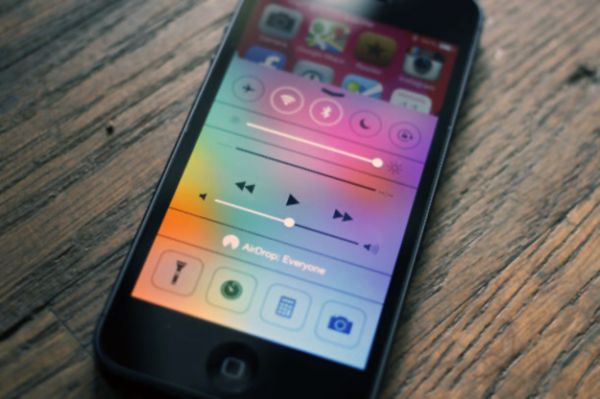
Step 3. Swipe upward from the bottom of the screen and you will open Control Center.

Step 4. There will be a triangle Play option. Click on it. It will show your audio file played last.

Jasmine for iOS 7

Step 5. Now you can have iOS 7.1 YouTube video play in your background.

We hope that iPhone and iPad users enjoy using this little tip and discover other great iOS 7.1 features.

iOS 7.1 Problems with Slow Keyboard: How to Fix

Most users know how to update to iOS 7.1 through OTA option or via direct links to this firmware. iTunes can also help you with the updating however there are some problems you need to know about before you install the latest Apple operating system for its iPhone, iPad and iPod touch.

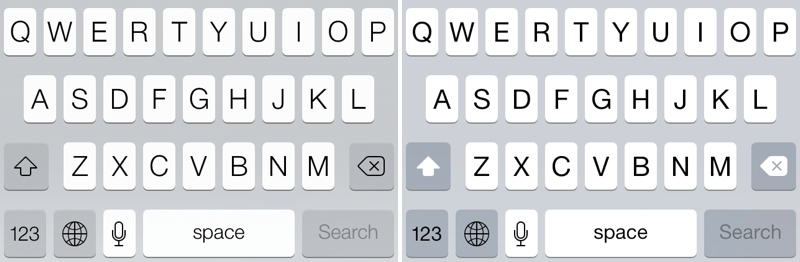
iPhone keyboard problem has surfaced in addition to battery and Wi-Fi issues some users complain about on Apple support forums. Luckily, there is a fix to this bug and we’ll explain how exactly you can make your slow keyboard faster after installing iOS 7.1.

The new keyboard bug appeared after the first reboot that followed firmware update. As users note, their screen registered passcode taps for a long while, and usually this procedure takes less than a second. It takes key taps long time to register which makes typing kind of difficult. The bug is actually frustrating especially if you are in a rush.

iOS 7.1 Problems with Keyboard

How to Fix iOS 7.1 Keyboard Problem on iPhone

If you get the issue, here is what you need to do to solve it.

Step 1. Launch Settings.

Step 2. Select General tab.

Step 3. Click on Reset option.

Step 4. Select Reset Keyboard Dictionary.

Step 5. You will have to enter a passcode when you are asked to do so.

Step 6. Now the problem should be gone however you need to add custom words again if you had them before because resetting deletes all the words.