Guide on How to Turn On WiFi Calling iOS 9 on iPhone 6s, 5, 5s, 6

When your mobile operator supports the most recent feature you should take full advantage of it. If you are using AT&T, Sprint or T-Mobile you should enable iPhone WiFi calling. This option was introduced with iOS 8 release and is present on the most recent iOS 9 platform. However you must enable it in order to enjoy.

You can save on your monthly iPhone bills as soon as you turn on WiFi calling iPhone 6s option. However you should note that if you have bad signals in your area this feature will drain your battery pretty fast [here is iOS 9 feature that can extend battery life on iPhone]. In other words, just like many other useful iOS 9 specs this option has pros and cons at the same time. The main disadvantage is the shorter battery life. The main advantage is the ability to received phone calls and text messages through WiFi when your cellular signal is not available.

How to Enable WiFi Calling on iPhone 5, 6s

Step 1. You need your iPhone for sure. All the settings can be changed directly on the smartphone.

Step 2. Open Settings.
How to Enable WiFi Calling iPhone iOS 9 ATT Sprint T Mobile

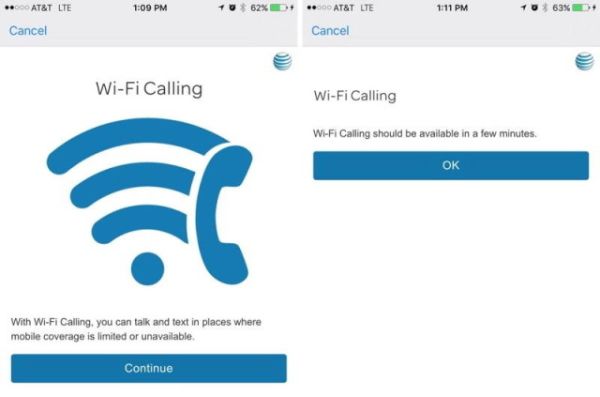
Step 3. Choose Phone – WiFi calling menu. U.S. users who are turning on the option for the first time will be asked to enter an address where emergency responders are able to find you if you ever place 911 call. This is required in U.S. and maybe some other foreign countries.

Step 4. Enable WiFi calling on iOS 9 for Sprint and other carriers and you will stay connected even when you have no cellular signal as long as WiFi network is available.

This is a well-ordered feature that is supported by different carriers from all over the world. It’s cool that you don’t have to download any third-party apps to turn on the great option. The feature is supported by Vodafone, Bell, EE, Rogers, SmarTone and a lot of other mobile operators.

T Mobile Jump On Demand iPad Pro Deals

T Mobile iPad Pro will be officially offered by the U.S. carrier starting next week. It is curious that Apple and AT&T are already selling the new tablet even though the official device shipments are expected in some AT&T stores only for Friday, November 13th [learn more about iPhone 6s Black Friday deals]. If you are looking for the plans from T-Mobile, we have some interesting information you might want to learn.

T Mobile iPad Pro Jump on Demand Plan 2015

As noted by carried, the long awaited iPad Pro 2015 release date will take place on November 18th. Customers will be able to get the Apple tablet through the network’s data plan. The mobile operator will be offering T Mobile Jump On Demand iPad Pro models and the pricing will start from $34 per month.

Users who wish to purchase the new tablet earlier and don’t want to wait until November 18th to get the deal from T-Mobile [here is more information about T Mobile unlock iPhone service if you also have the smartphone] can grab their model from AT&T. The carrier is already selling the device online and will get in-store models by end of the week.

If you wish to get the deal from the Magenta network you’ll have to pay $199.99 or more up front and then use your tablet while paying $34 per month. It’s a good deal since the full retail price on the 2015 iPad Pro model is over $1000.

The carrier is eager to email you once the device is in-stock. You can visit their site and sign up for such an alert.

iPhone 6s O2 Deals Include Unlimited Plan Options

Before you decide to get iPhone 6s O2 unlock [distant service that guarantees freedom from your network] you should learn about the new deals announced by this carrier for European subscribers.

Right now it is possible to get iPhone 6s O2 unlimited plan from Modeo. This is a promotion and it has an interesting price for europeans. For example, if you decide to subscribe to the O2 Blue All In XL data plan you will get unlimited SMS message and unlimited call package plus 5GB of data per month plus the company is offering the 16GB new iPhone 6s device for just EUR 1. This is a great deal since you’ll have to pay EUR 49.99 per month for this package.

iPhone 6s O2 Unlimited Data Plan 1 Dollar iPhone

Of course, such offer is available for limited time only. Modeo doesn’t specify when the deal is over so you don’t know if you can get O2 LTE data plan along with the latest generation Apple iPhone 6s for EUR 50 per month in December, for example.

Isn’t it cool to own the iPhone 6s for just EUR 1? We believe that millions of U.S. customers would be happy if Apple, AT&T, Verizon or T-Mobile offered iPhone 6s for 1 dollar on Black Friday or as Christmas sale. This could be an incredible deal but it won’t happen.

European O2 iPhone 6s users who get the deal will be able to purchase additional 750 MB of monthly data for additional EUR 5 [big iPhone 6s discount is now offered in India as well]. This actually happens automatically so if you are not planning to pay extra for more allowance you will have to cancel the option through O2 hotline. The mobile operator also promises to throttle speeds for users who use up their data allowance.

The new plan allows placing and receiving phone calls from Germany and other EU countries.
It is also cool that the new plan supports two SIM cards.

Make Siri Silent iOS 9 Guide and Disable iPhone Audio Feedback

It is too easy to activate Siri on iOS 9 and sometimes this could happen during an important meeting or in a class [you can always SIM factory unlock AT&T iPhone 6s and other models if you want to use different networks without restrictions]. Users who like to check on their smartphone once in a while and don’t want to become red because their personal assistant is suddenly activated can use Siri silent mode iOS 9 or simply make it silent.

We’ll tell you how to disable Siri on iOS 9 and this is probably the best solution which makes sure the assistant will stay silent and not be awoken during an intense conference or other event you are attending. We’ll also explain how to turn off your audio feedback just in case.

Disable Siri iOS 9 Audio Feedback Turn Off How to

Make Siri Silent iOS 9 Instruction

Step 1. Firstly take your iPhone and launch Settings app.

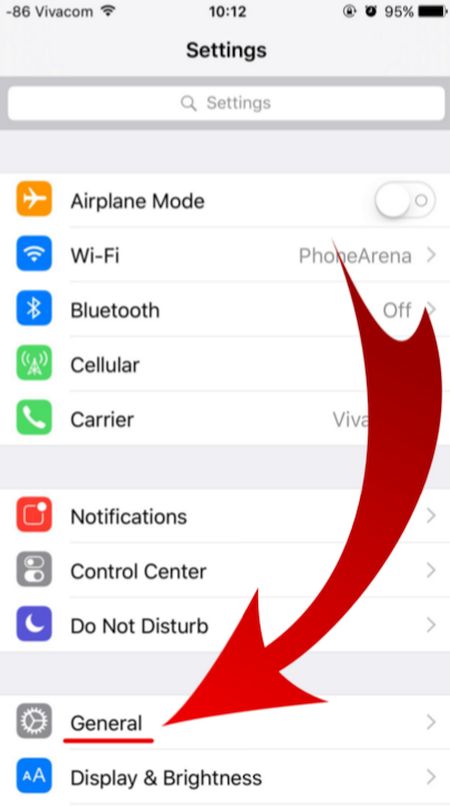
Step 2. In General menu you will find Siri option.

iOS 9 iPhone Settings General menu

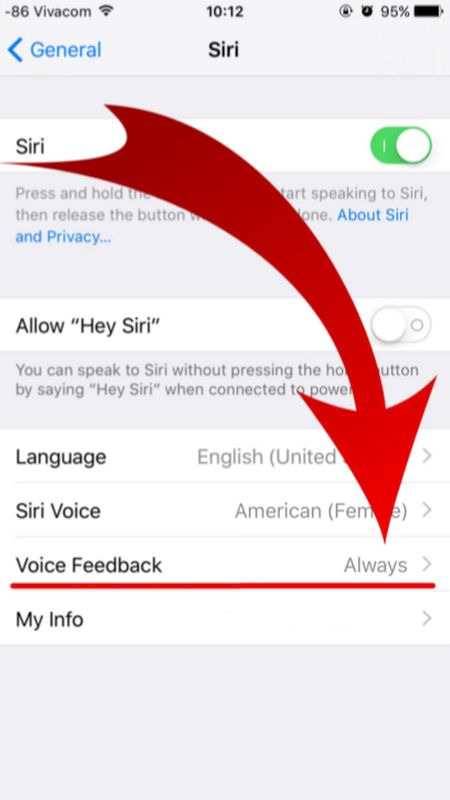
Step 3. There are several options under Siri menu. Look up for Voice Feedback feature as we are here to learn how to turn off audio feedback on iPhone that is updated to one of iOS 9 firmware versions [Apple released iOS 9, updated it to iOS 9.0.1, 9.0.2 and 9.1 which is the most recent release and the only firmware signed in by the company right now. Some users report AT&T iOS 9.1 Touch ID not working issue on their smartphone after upgrade].

iOS 9 Voice Feedback Siri Disable iPhone

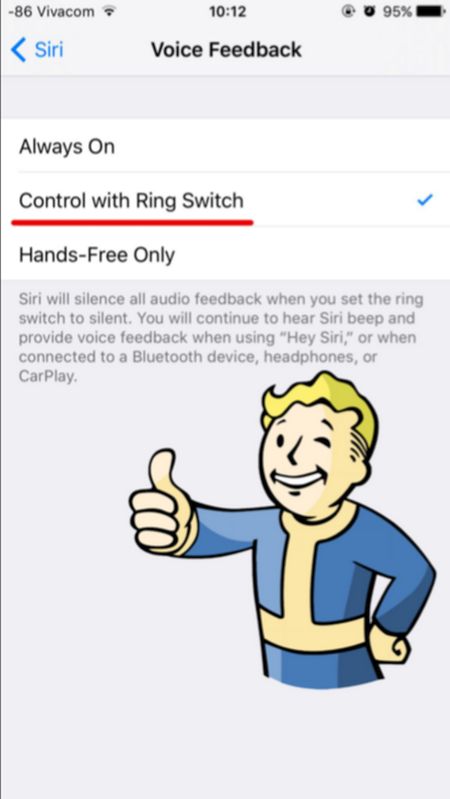
Step 4. You don’t need the Siri Voice Feedback being always on so disable it and you will complete Siri silent iOS 9 guide. How can you turn it off? Just select a different option. For example, tap on Control with Ring Switch. Why not? This is very simple but unfortunately Apple doesn’t set this feature this way by default.

Turn off Voide Feedback Siri iOS 9 Feature

Your personal assistant Siri will never surprise you after you go through the guide above and change the settings for iOS 9 Siri. You can use it but it will remain silent letting you attend meetings and other events without having to worry whether you awake Siri unexpectedly or not.

iPhone 6s Black Friday 2015 Deals and Sales

There are only three weeks till the most popular annual sales day called Black Friday. Should we expect some amazing iPhone 6s Black Friday 2015 deals from major U.S. carriers and retailers [you can already order factory unlock for Verizon iPhone 6s]? Will it be possible to purchase the most recent iPhone 6s and iPhone 6s Plus with a big discount this year? These are questions that already trouble the minds of millions of users from all over the world.

While you shouldn’t expert high Black Friday iPhone sales [each year different companies and networks offer only minor discounts because this device is extremely popular as Christmas gift and customers purchase it even if there are not deals at all], there are some interesting handset deals already available as presale day offers from Verizon, Sprint and other American mobile operators.

iPhone 6s Black Friday 2015 Deals

For example, iPhone 6s deals Black Friday are to be expected on November 27th, 2015 [Black Friday day] or November 30th, 2015 [Cyber Monday day]. At the same time if you really want to save your money you should start looking for discounts beginning this week. Thus, on November 14th it will be possible to get the most recent iPhone 6s device from U.S. Cellular, Sprint and Verizon for $99 [here is some information about iPhone 6s chip identification]. This is a great price though it ties you to the contract plan. Fans of Samsung smartphones will be able to buy the contract Galaxy Note S6 at $1. Unfortunately, there will be no iPhone 6s or iPhone 6s Plus at $1.

The same U.S. networks will sell the 16GB iPhone 6s Plus model at $199 if you agree to the contract. The 128GB model should cost $399.

Users who don’t like contracts and prefer getting an iPhone through installment plan will get the $200 gift card for Sam’s Club shopping if they choose the iPhone 6s from Veizon, U.S. Cellular or Sprint the upcoming weekend. You’ll have to get the smartphone in-store to get the deal.

iOS 9.1 Issues or Should I Update to New Firmware?

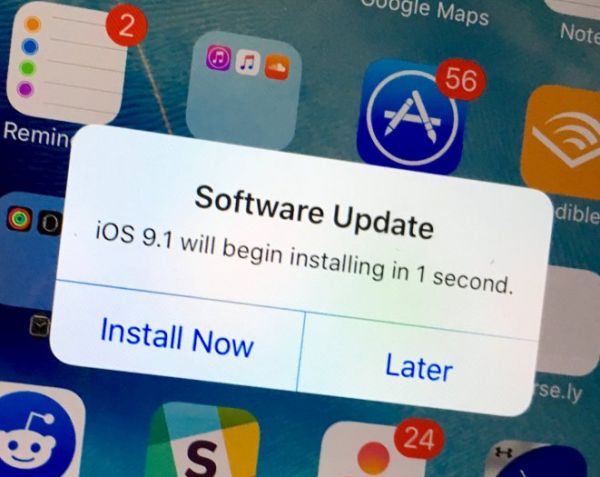
The number of different iOS 9.1 issues make users wonder why such an update was offered by Apple. The company reported that its new iOS 9.1 platform fixes the issues, problems and bugs found on the previous iOS 9.0.2 firmware version. At the same time Apple stopped signing the 9.0.2 platform making it impossible to downgrade from 9.1 to 9.0.2. Users who installed the new mobile OS are now stuck on it with similar issues they used to have.

Firstly, a number of users experiences can’t connect to App Store iPhone problem on iOS9.1 Secondly, a lot of people complain about iOS 9.1 Apple Music problems. Thirdly, there are unexplained issues with Touch ID that stops working after update.

Should I Update to iOS 9.1

Should I update to iOS 9.1? It’s your decision however you are advised to learn what other people think about this firmware. They are sure that the platform brings the same bugs and problems as were present in iOS 9.0.2 [if you are trying to SIM unlock iPhone 6s or iPhone 6 here is how to fix iOS 9 iPhone no service response]. In other words, if you are still running iOS 9.0.2, 9.0.1 or the original iOS 9 you might want to avoid updating until Apple releases the next version iOS 9.2. This should happen soon because the Cupertino-based company is already testings iOS 9.2 beta versions together with registered developers and public beta testers.

This year the issues with Apple services and App Store surface once in a while. The company agrees with some problems and doesn’t mention others while users always know when something is wrong with the company’s services. It was possible to fix can’t connect to App Store iPhone problem by signing out and signing back in. But with iOS 9.1 upgrade this solution doesn’t work any longer. The similar bug was present on 9.0.2 so experts start to believe something is wrong with App Store and the mobile platform.

You can try to reboot, reset your iPhone however this doesn’t guarantee you will not have problems with App Store or Apple Music on iOS 9.1 so you are advised to postpone your upgrade and wait for a more stable mobile firmware to arrive.

Touch ID Not Working After iOS 9.1 Update

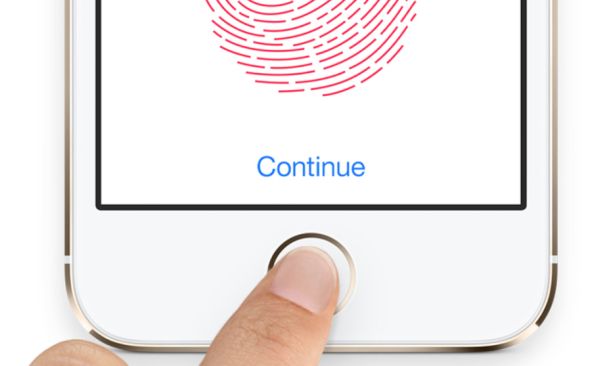
A number of iPhone users report they experience iOS 9.1 Touch ID issues are updating to this firmware [it is possible to download iOS 9.1 ipsw or update via OTA; you can also SIM unlock AT&T iPhone on iOS 9.1]. According to different Apple customers, their Touch ID does not work, becomes too slow or is not responding at all. This happens right after you install the new platform firmware but the problem is not common yet.

Only some iDevice owners assure their Touch ID not working after iOS 9.1 update [if you expeirence battery life issues you can also fix battery drain on iPhone 6s]. It is also curious that Apple released the iOS 9.1 upgrade in the end of October however the first problems surface in November, according to complaints. Users who have updated and started using the latest mobile OS assure that their Touch ID slow in iOS 9.1 or stops working at all.

iPhone iOS 9.1 Touch ID Not Working Slow Not Responding

The reports about unreliable Touch ID option are not rare. Previously it was possible to downgrade iOS 9.1 to iOS 9.0.2 however now this doesn’t work because Apple is not signing the previous firmware version any more. Lucky users who got a chance to downgrade have no problems with their smartphones but users who didn’t downgrade complain about the issues on the company’s Support Forums.

iOS 9.1 Touch ID Not Responding Bug

As noted by Apple fans who have installed version 9.1, their iPhone Touch ID becomes useless and they have to input the passcode. This happens on iPhone 6, iPhone 5s and even the new iPhone 6s that was officially realeased this fall [the problems also affect the App Store]. Before the update, users assure there were no issues with their Touch ID work. Everything started to happen only after the upgrade, using low power mode or other actions.

Apple doesn’t explain what happened and when it is planning to fix Touch ID not working iOS 9.1 problem. Maybe the company will offer the solution in iOS 9.2 release that is being tested now by developers and public beta testers. You can try to reboot if you have the bug as well however this is only a temporary fix and the problem will return pretty soon.

AT&T WiFi Calling iOS 9.2 Beta 2 Support for iPhone / Mac

iOS 9.2 will become public sometime this fall. Apple already released two betas for developers and one public beta and the most recent version available for testing is iOS 9.2 beta 2 public beta. This is an interesting release. Even though most users cannot check the new features yet because millions of users are not public testers or devs – you should know some of the changes this next firmware should bring to AT&T subscribers.

iOS 9.2 AT&T iPhone WiFi Call Support for Mac

There is no need to SIM unlock your AT&T iPhone 6 or 6s right now because of the issues with WiFi Calling support. The iOS 9.2 beta 2 update proves that Apple has enabled AT&T NumberSync option and this means that all Mac users who have the AT&T smartphone will be able to answer phone calls through WiFi right from their computer.

The previous beta solved some issues and bugs, and the second update brings some enhancements and improvements to the system. Apple is reportedly solving some issues with Safari View Controller, updates the Safari window and adds some minor changes along with supporting the AT&T NumberSync option useful for iPhone users who also have Mac or iPad and wish to receive phone calls right from the tablet or computer without connecting their smartphone [Verizon is also trying to bring WiFi calls on iOS 9 devices].

All iDevices that are supported by iOS 9 will be able to update to iOS 9.2. This includes AT&T iPhone 6s and 6s Plus which can be distantly unlocked to use SIM cards of other networks. Once being permanently unlocked you’ll be able to use T-Mobile, O2, Verizon and other U.S. and foreign carriers.

Different mobile companies are already supporting iOS 9 WiFi Calls along with AT&T, T-Mobile and other networks. This is a great option that makes it possible to stay connect and receive phone calls even if your cellular signal is poor or absent while WiFi connection is available.

Set Video as Your Facebook Profile Pic on iPhone: How to

Did you know that you can use video as Facebook profile pic which you can make / set using your iOS 9 iPhone [there are many problems with iOS 9 update]? This popular social network connects millions of people from all over the world. Still images are not as fun as video profiles that are becoming popular lately and you can follow this trend as well and create your own outstanding video profile to surprise your friends, family and people who are visiting your page.

The feature is available since September. It might be not work for all users who want to use iPhone Facebook profile video picture. If you cannot use it – wait some time as this new option will soon support all devices and platforms.

Set Facebook Video Profile on iPhone

How to Set Facebook Profile Video on iPhone

Step 1. Launch iOS 9 Facebook application on the smartphone.

Step 2. Find the More menu. You’ll see it at the bottom.

Step 3. Choose Profile Name and look at the bottom of the profile page.

Step 4. If you see the the camera icon under the profile image you can switch between camera / video.

Step 5. Tap the profile image to get the menu that allows Uploading Video or Photo / Taking a New Profile Video [here is how to fix Facebook battery drain problem on iPhone if you have it]. Choose the option you would like to use. If you don’t have a saved video on Photos you can create one using your iPhone camera.

Step 6. It is possible to create a 7-second video profile and set it as your Facebook profile video. Just remember to choose the thumbnail that will be used when your profile video becomes unavailable.

Step 7. That’s it. View your profile and enjoy the video as your profile icon on Facebook.

Isn’t it a nice idea?

iOS 9 WiFi Calling AT&T iPhone 6 Set Up Guide for Mac

There were some problems with iOS 9 WiFi Calling AT&T option as the U.S. carrier was waiting for the approval from the FCC before it was ready to finally launch the announced service. The latest news state that users will be able to enjoy iPhone AT&T WiFi Calling on Mac once Apple officially updates iOS 9.2 version.

The Cupertino company started to test iOS 9.2. Developers got the first and second beta already and this latest OS makes it possible to answer your AT&T iPhone calls from Mac through WiFi connection. You just have to make sure that your computer and smartphone are both connected to the same network.

iPhone ATT WiFi Calling Mac Support

iOS 9.2 beta 2 supports AT&T NumberSync technology. Previous releases didn’t offer such support so you cannot answer phone WiFi calls from Mac right now. You’ll be able to do this when iOS 9.2 is launched for public use or if you are a public tester. Apple will definitely release iOS 9.2 public beta with support for AT&T NumberSync option.

How to Set Up WiFi Calling on iPhone 6 iOS 9.2

Step 1. Firstly you should install iOS 9.2 beta on iPhone [you can also SIM unlock AT&T iPhone 6s at any time].

Step 2. Now you can launch Settings on the phone.

Step 3. Select Phone – WiFi Calling menu.

Step 4. You need to Add WiFi Calling for Other Devices. This option is exactly what activates the feature on your computer.

Step 5. Follow the on-screen guide until you activate the iOS 9.2 WiFi Call support for AT&T.

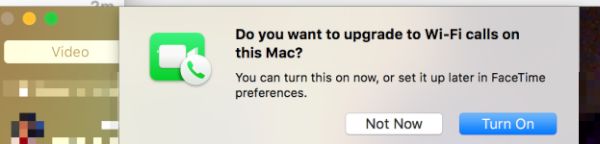
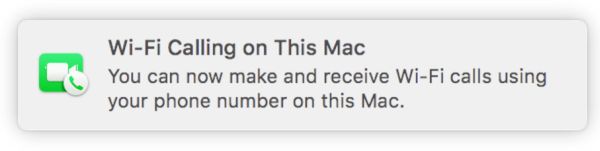
Step 6. If both Mac and iPhone are connected to the same WiFi network you will see a pop-up message from FaceTime that confirms everything is working.

AT&T WiFi Calls Mac

Step 7. On your Mac launch FaceTime and agree to enable WiFi Calling feature for Mac. The computer will provide you with the code. Enter it into your iPhone.

Step 8. When someone calls your iPhone via WiFi AT&T Calling you’ll be able to answer the call from Mac.

What do you think about such feature?