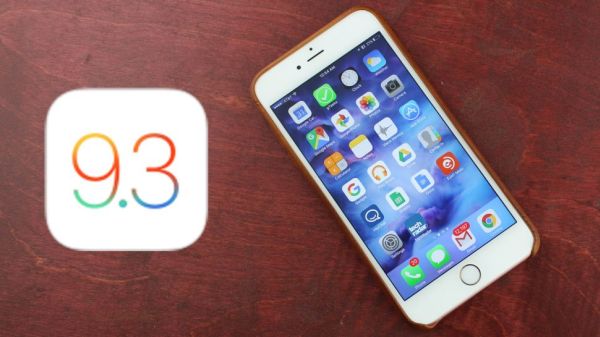
Can I Downgrade iOS 9.3.1 to iOS 9.3 on iPhone?

Apple released iOS 9.3.1 and a lot of iPhone and iPad users wonder how to downgrade iOS 9.3.1 and get back to the previous firmware versions. We’ll tell you if it possible to achieve this goal and how.

You have probably heard that Apple always stops signing previous iOS version once it presents a newer one. This has already happened to iOS 9.3 release that has no impact on battery life. In other words you cannot downgrade iOS 9.3.1 to iOS 9.3 because older operating system is no longer signed.
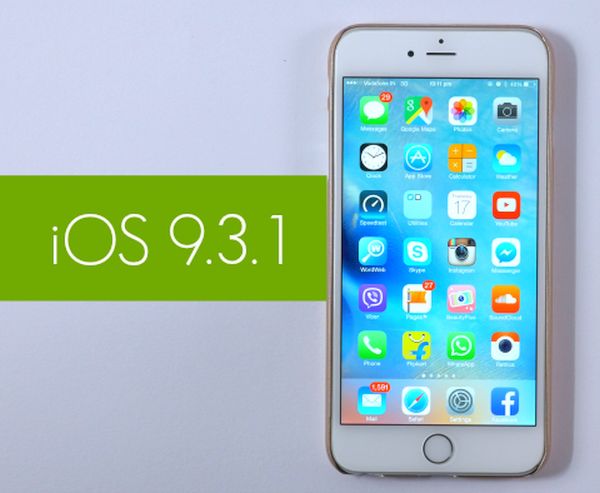
Downrade from iOS 9.3.1 to iOS 9.3 signing status

Why does it happen? The Cupertino-based giant is preventing its customers from downgrading. It’s curious that it took Apple less than 3 weeks to stop signing iOS 9.3 after iOS 9.3.1 update became available to public with numerous fixed to iOS 9.3 problems, bugs and issues.

Before you try to downgrade iOS 9.3.1 to 9.3 or any other future iPhone platform you should check the popular free site IPSW.me that shows the signing statuses for all Apple mobile firmware in real-time. All the changes are quickly reflected here so you will always know when the well-known ‘fruit’ giant stops signing another platform.

What will happen if you still try to downgrade from iOS 9.3.1 to iOS 9.3? You will get an error message [learn more about iPhone lock screen bypass issue]. You should also note that Apple could continue to sign some versions if they were meant to fix a previously known bug. This information can be also found on that special website.

Hopefully we have explained you some facts about downgrading. Remember that you cannot downgrade if you have installed iOS 9.3.1 on your iDevice. However once Apple releases iOS 9.3.2 you’ll be able to revert back to 9.3.1 until the company stops signing it as well.
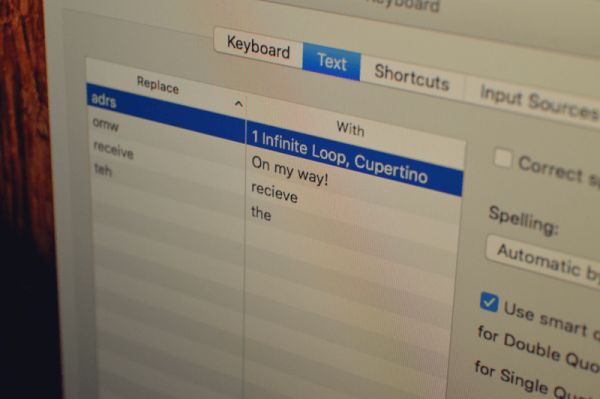
Learn to Type Faster on Mac using Text Replacement Option

Computer users who type a lot during the day might want to learn how to type faster on Mac. There is OS X option you can use as it can really improve your typing speed and save some time [you can also play PS4 games on your Mac]. How is it possible to do? There is always information you are using over and over again, right?

For example, you often enter your address, using email templates or other information, simple or complicated. OS X Mac text replacement is a cool option you can take full advantage of. It is present under Text menu. It allows you creating a shortcut / snippet that converts into the piece of text by your operating system. Just create shortcuts to help it automatically change into something you meant.

Mac OS X Text Replacement Feature How to Type Faster

Let’s imagine you need to type your email address in every letter you create. Add your email address to the shortcut and name it ‘@@@’ – when you type @@@ your computer will automatically replace it with your full email address.

How to Use Mac Text Replacement Feature

Step 1. Press on Apple in menu.

Step 2. Go to System Preferences – Keyboard.

Step 3. Select Text.

Step 4. There are two sections on the left that say ‘Replace’ and ‘With’ – you’ll also find the ‘+’ which allows adding a new shortcut. Learn what you have to do next [users who suffer from Mac issues can learn how to fix Mac Startup disk full error].

Step 5. Enter your shortcut or snippet into ‘Replace’ section. Enter the full text or what you wish the shortcut to transform into the ‘With’ section. Create as many snippets as you need.

Step 6. You can now launch TextEdit or similar program and try to type faster on Mac using your new shortcuts.

What Does T-Mobile Offer to iPhone Subscribers in 2016?

Are you a fan of baseball games and curious to see new T Mobile iPhone deals in 2016? A lot of iPhone users who are subscribed to this U.S. carrier might be interested in the free MLB.TV subscription. The company has such a deal.

T Mobile offers for subscribers include the free subscription to MLB.TV for one year. T-Mobile has officially confirmed that it is the official sponsor for the Major League Baseball in 2016 [Apple is expected to release iPhone Pro this fall]. All subscribers will celebrate along with baseball fans because the un-carrier company gives each users a 1-year free subscription to MLB.TV. Yes, this is no-charge deal.

T Mobile Free Baseball Game Subscription 2016

The interesting T Mobile iPhone deals 2016 will allow all T-Mobile iPhone users watching baseball games on their handset. You can save your money since the MLB.TV subscription usually costs $109.99 per year and you’ll get it for free if you are subscribed to the main un-carrier company.

It’s also cool if you are taking advantage of Binge On service since this way you’ll be able to watch all the season games without exceeding your monthly data allowance. Does it sound interesting and worth switching to T-Mobile from other U.S. network such as AT&T, Verizon or Sprint with 2 year contract.

If you are not interested in all the sweet 2016 deals – you can SIM unlock T-Mobile iPhone 6s or other model and switch to a different network. This is a simple procedure that makes you free in your carrier’s choice and allows selecting your preferred data plan, best service and best price.

iPhone SE Users Report Bluetooth Call and Audio Problems

Even though Apple only presented iPhone SE in March users keep getting issues with both iOS 9.3 update and their new 4-inch smartphone [Apple has already fixed iPhone lock screen bypass issue]. The most recent reports mention iPhone SE audio issues. These are not common problems and they are only experienced when you are trying to make a phone call via Bluetooth.

If you are trying to use Bluetooth headset or take a phone call in your vehicle you can come across iPhone SE Bluetooth problems. You might also get issues with GPS voice navigation. At the same time, it seems that the music streaming option works perfectly well and is not affected by the same bug as Bluetooth support.

iPhone SE Bluetooth Problems

It also looks like firmare version cannot fix your problem since both iOS 9.3 and iOS 9.3.1 iPhone SE users have the same bug. Since reports come from different countries including the UK, the U.S., Australia and other places – the bug is not a carrier specific problem. It is most likely related to Apple software or other issues.

It is curious that iOS 9.3.2 beta testers also get this issue so this is something Apple will have to fix on its end [compare new iPhone SE vs iPhone 6s]. The number of complaints keeps growing and this should be something the Cupertino-based giant has to consider and address.

You might try to reconnect your Bluetooth equipment or turn on / off Airplane Mode but this wouldn’t solve the bug. Even if you try to change your SIM card you won’t get away from the issue. The good news is Apple is aware of this situation and is working on a fix.

You Can Now Play PS4 Games on Mac

Are you a fan of PS4 games? Would you like to play PS4 games on Mac? This is already possible [by the way you can also save Google Maps to use on iPhone offline]. Just as Sony announced a while ago, it had plans to release big update for PlayStation 4 users and introduce Remote Play option to support computer gamers.

What can you do no? You can take advantage of PS4 Remote Play Mac feature and stream your PS4 games on your computer. There is no need to stay in front of your console any more because the option works distantly. You should definitely have your playstation working along with Mac however you are able to play games right on your computer now.

Play PS4 Games on Mac 2016

Does it sound like some fun? The update is introduced to all PS4 users who have the physical console. The streaming won’t work if you don’t have playstation from Sony. This feature was beta tested for about a month however it only got Mac support just now. Previously you couldn’t stream your games to your Mac as this feature was missing.

There are many fans of Japanese games and PS4 so many users would be happy to install Remote Play feature and play games right on the Mac [learn how to fix Mac startup disk full error]. You should download and install PS4 software upgrade. Search for v3.50 and once you update you’ll enjoy the new changes.

There is one more requirement you have to meet in order to stream your PS4 games on Mac. Make sure you are running OS X 10.10 or version 10.11 as earlier software versions are not supported.

Remember to connect DualShock 4 controlled to your computer through USB cable.

Apple Finally Fixes iPhone Bypass Passcode Bug

Users who updated to iOS 9.3.1 which is the most recent Apple mobile operating system update were shocked to learn about iPhone bypass passcode bug. It allowed getting full access to contacts and photos on the smartphone that was running buggy firmware. Apple is believed to solve the problem by now.

If you are looking for Lockscreen bug fix on iOS 9 – it is here. The ‘fruit’ company released the fix through server-side upgrade. No one can access your files now as Siri don’t do the Twitter search without the passcode and contact information won’t come up. In other words, if you have installed iOS 9.3.1 no one can access your images or contact data.

iOS 9.3.1 iPhone Bypass Passcode Bug Fix

iPhone lock screen bypass on iOS 9.3.1 was patched by the Cupertino-based company. It only affected the two models iPhone 6s / iPhone 6s Plus. It works through 3D Touch option to get fast access to some files. When you try to ask Siri show you contacts or photos your personal assistant will remind you that it is necessary to unlock iPhone first.

There were mutliple issues with iOS 9 update. It is reported that the problem with Night Shift / Low Power Modes has also been resolved. When you turn on Low Power Mode you won’t be able to enable Night Shift option unless you turn off Low Power Mode at first.

Apple has also stopped signing iOS 9.2.1 so you can either update to iOS 9.3 or install iOS 9.3.1 version.

iPhone SE vs iPhone 6s Popularity: How Popular Is iPhone SE

Apple introduced the smaller 4-inch iPhone SE [find out how iOS 9.3 battery performance changed]. There were many users who wished to get a cheaper version of the popular ‘fruit’ smartphone. Still how popular is iPhone SE? Can it win over iPhone 6s that was released in the fall 2015 or not? Could it be more popular than the future iPhone 7 that should be unveiled later this year?

It is now impossible to compare iPhone SE model and iPhone 7 because the next generation model is not officially presented yet. Still we can look at the shipments of the iPhone 6s and see how popular iPhone SE is compared to those figures.

iPhone SE vs iPhone 6s How Popular iPhone Is

According to experts, the new iPhone SE order are ‘relatively slow’ is compared with the same time in previous years. For example, in Quarter 2, 2015 Apple sold more smartphones than in Quarter 2, 2016. This is rather curious because this year Apple is selling three new iPhones: iPhone 6s, 6s Plus and smaller iPhone SE while a year ago it was only offering two new devices: iPhone 6 and iPhone 6 Plus.

Experts are also sure that the demand for 4-inch iPhone SE is not that high compared to the fall demand for new company’s devices. The latest 4-inch gadget is believed to reach 4-5 million unit sales in Q2. There shouldn’t be any growth in orders till the launch of iPhone 7. This is what different sources say. Later, when Apple introduces new Mac iPad Pro and iPhone 7 – the situation could change.

There are different ideas about iPhone 7 specs and features. Some people think this gadget could be water-resistant, arrive with OLED display and get wireless charging option. We’ll surely hear more about the next-gen handset soon.

iOS 9.3 Battery Performance: Has It Changed After Update?

Many users have installed iOS 9.3 update with bugs. Apple presented this new firmware in March and a lot of iPhone and iPad owners hurried to give it a try. Many older device users were upset because of the multiple problems, issues and bugs that came along with the new iOS. How is iOS 9.3 iPhone battery life? This is another question to ask.

How is your iOS 9.3 battery performance after update? Have you noticed any differences compared to previous operating system version? According to news, the latest platform doesn’t impact battery life that much. It comes with some new features however this doesn’t make battery drain faster than it used to.

iOS 9.3 Battery Performance iPhone

The upgrade arrives with Touch ID secure protection that work with Notes, new Night Shift mode that is comfortable for reaching at any time of the day and other changes. For example, Verizon subscribers should finally get support for WiFi calling.

Users with old iPads and iPhones got stuck on the activation screen after iOS 9.3 update. Apple fixed this bug with the iOS 9.3.1 release however there were other issues as well not related to battery life. Safari kept freezing for many users and the Cupertino-based giant promised to fix this problem soon.

The battery seems to be great on iPhone 6s, iPhone SE and other models [compare iPhone SE to iPhone 5s]. It could work not as good on older iPhone 5, 4s however these users were the one who couldn’t complete installation at all because they say only the frozen Activation screen on iOS 9.3 and nothing more. We’ll probably hear more about all the changes brought by the new OS as Apple continues to roll out iOS 9.3 updates with fixes to previous issues. iOS 9.3.1 is one of such versions available for download.

How to Fix Activation Server Unavailable iOS 9.3 Bug

Have you tried to update to iOS 9.3? Have you failed? A number of users experience different ‘unable to activate’ errors and we’ll be happy to help you fix this situation and successfully install the spring Apple update for iPhone and iPad.

If you try to install iOS 9.3 update and get stuck on activation screen – you’ll be surprised at how easy the fix iOS 9.3 issues guide is. You can simply and quickly solve known activation iOS 9.3 error if you follow this step by step guide.

iOS 9.3 Update

Activation Sever Unavailable iOS 9.3 Fix

Step 1. Take your iPhone and go to Settings.

Step 2. Choose General menu.

Step 3. Go to Software Update menu.

Step 4. You should be prompted to install Software Update so follow the installation guide on your screen.

Step 5. If you don’t have the prompt to update you should launch Setting and go to General – Storage & iCloud Usage and Manage Storage where you can delete iOS 9.3 listing. Return to Software Update menu and install iOS 9.3 build 13E237.

You should note that this update supports only iPod Touch 5G, iPhone 5c, 5s, 4 and 4s, iPad mini and iPad mini 2, iPad 2 / 3 4 and iPad Air / iPad Air 2. There should be no problems with iPhone SE – new 2016 Apple phone.

If you can’t get to Settings because you are already stuck on Activation screen you need to take a USB cable and connect to your computer, launch iTunes and download iOS 9.3 by following this guide:

Step 1. Once you launch iTunes you should force restart iPhone.

Step 2. When iTunes asks if you need to Update or Restore you should select Update option.

Step 3. Wait till iTunes downloads iOS 9.3 update and install it by following the on-screen guide.

There should be no activation issues.

Apple Pay List of Chinese and U.S. Banks Gets New Titles

Apple Pay China release makes users curious what banks are supported. When you travel to China or live in this country – you can pay for goods and services with your iPhone via Apple Pay mobile payment system [compare iPhone 6s and LG G5]. It is fully supported in 2016.

The long Apple Pay banks list gets more titles. This system supports a big number of U.S. and Chinese banks. This list is growing since the fall 2014. Apple officially presented Apple Pay in the United Statesin October 2014. At first some companies were skeptic and didn’t believe another mobile service could become popular. Still later on the number of supported stores and banks is only getting bigger and this means the service is popular.

Apple Pay Bank List U.S. China

Millions of iPhone users are paying via Apple Pay. For example, the list ha Bank of Internet USA, Ally Bank, CNB Bank and many others. It is really long and we’ll mention some other names. If you are using Banco do Brasil Americas, Advantage One Credit Union, Darien Rowayton Bank and Amalgamated Bank [new iPhone SE also supports Apple Pay].

The new titles are Huaxia Bank, China Everbright Bank and Ping An Bank. The U.S. list is surely longer as you have already noticed. It has Citizens National Bank, America First Federal Credit Union and Envista Credit Union. It would take forever to list each title so iPhone users who are interested in checking if their credit card is supported can visit Apple site and look up the list of all the banks.

Apple is expanding its Apple Pay service to foreign countries. The list already includes over 1,000 banks and it will keep grow.