Can’t Update Apps App Store Issues Today with iOS 9

Do you experience can’t update apps App Store problem? A lot of AT&T iPhone and iPad owners come across App Store issues today and assure they cannot upgrade programs using iOS application store so popular among millions of Apple fans from all over the world. They keep getting the same message ‘Temporarily Unavailable’ from the store with suggestion to ‘try again later.’

Different sources mention App Store problems iOS 9 [if you have issues with extreme data usage you can reduce data usage on iOS 9 iPhone 6] and while this is usually not common, a lot of people cannot use the store and its options once in a while. The 2015 fall problem is not the first outage experienced this season. Different Apple services become unavailable while there are no indications of outage on the company’s System Status page.
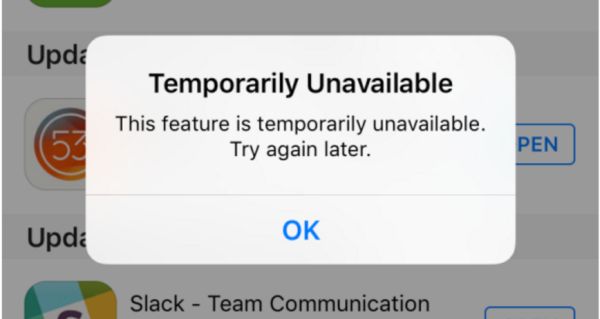
App Store Can't Update App Temporary Unavailable

A number of reports and tips from different users suggest that they can’t update apps via App Store while all the processes are ‘green’ on the System Status site meaning everything is ok and working just as normally as usual.

Did you have any issues with updated your iOS 9 applications lately [by the way you can get more AT&T iPhone data for free]? Apple will absolutely fix the issues and there might not be any problems when you try to update a program the next time. Sadly, the company often prefers fixing issues silently without mentioning there was a real problem for a number of its users.

If you have problems with upgrading programs [maybe particular apps and not all applications you are trying to update for iOS 9 device] – you should know that the problem could be with Apple servers even though the company doesn’t indicate this. When several tips suggest the issue exists – it means a lot of users are struggling like you do and waiting for the Cupertino-based company to fix the problem.

Mobile Privacy in USA to Be Invaded by CISA Privacy Act

Will all U.S. companies get a legal right to invade your privacy? Mobile privacy in USA is one of the top concerns of iPhone and other mobile device users as well as people who are using any other tech products [you can order SIM unlock for A&T iPhone 6s already]. Major American technology companies believe that it is highly important to protect privacy, but lately Senate passed the CISA bill that gives any company a free pass to invade privacy.

We should note that Apple and some other firms are opposed to CISA privacy act. CISA stands for Cybersecurity Information Sharing Act. It is not legal and officially approved yet. Once the U.S. Senate passes the bill it has to be passed in the White House.

CISA Bill iPhone Users Privacy USA

According to the bill, US companies invading privacy option will let them share cybersecurity threats with government agencies and other companies. Customers will not be happy with such invasion on their privacy, that’s for sure.

A lot of experts and analysts are sure that CISA bill can be used by government and not private companies to spy on millions of users. A lot of companies and advocates are planning to oppose the CISA privacy act / bill. For example, Yelp, Twitter, Apple, Reddit, Wikipedia, Facebook, Amazon, Google and Microsoft don’t like the idea and are against it – the Senate thinks differently and supports the document.

iPhone AT&T and iPhone Verizon, T-Mobile, Sprint users, what do you think about the CISA and your privacy? Apple states it doesn’t support the ‘current CISA proposal’ and this is the support for all customers from across the world. Privacy is the top priority. Will President Obama also support customer and not the bill?

How to Get More Data on iPhone AT&T for Free

Who wouldn’t like AT&T get more data option for their iPhone especially if it is possible to net some of your allowance without truly paying more [you can also reduce your data usage]? The new AT&T Data Perks is the new program the U.S. carrier introduced to its iPhone 6, iPhone 6s, iPhone 5s and other phone subscribers. It is possible to use the feature on both iOS gadgets and Android devices so more Americans can benefit from it.

We’ll explain how to get more data on iPhone free of charge and you can decide if this is something you would really like to use nowadays. The program got the name Data Perks. This is how the Big Blue network calls the 2015 plan.

Surely there are some requirements users will have to meet in order to earn more monthly data. This will happen through interactions.

AT&T Data Perks iPhone Program

How to Get More Data on AT&T iPhone for Free

Step 1. Firstly you should have iPhone locked to AT&T [you can run IMEI network checker to double check the name of your original carrier] or you just have to be subscribed to AT&T with unlocked iPhone model. If you want you can also factory unlock your AT&T iPhone 6s or other version without issues.

Step 2. You need to take part in filling different AT&T surveys. To do this you’ll have to install the free application AT&T Data Perks [download link]. This program is the way of communication between the subscriber and carrier.

Step 3. You should also take part in other activities offered by the program and earn some amounts of MB to use for free. You can also shop through the iOS application.

Step 4. It is possible to get from 25MB to 1000MB of data per month through Data Perks option.

Step 5. Unfortunately you will also have to spend all your earned data otherwise it will expire when the billing cycle is over.

The new program is not a part of the rollover option offered by AT&T network in the U.S.

How to Fix Facebook Battery Drain on iPhone 6, 6s

A lot of users get the same issue while using one popular social network program on their iPhone 6, 6s and other models [if you have iOS 9 flaws you can fix them]. Facebook battery drain iPhone 6 became a problem and it had to be fixed since millions of people from all over the world wish to preserve their battery life while still accessing their social network accounts.

Firstly, Facebook app battery drain was finally explained after numerous complaints from users. Secondly, when too many people report the same problem – it is indeed a big issue that must be addressed by a company.

iPhone Battery Drain Facebook Fix

Here is the best Facebook battery drain iPhone fix that should help you when you face the bug. There is an update you can download and install. It addresses iOS 9 battery concerns and is meant to solve the issue for most users who experienced it. You know that Apple rolled out iOS 9 firmware and upgraded it to iOS 9.1 you can download using direct links. There are also versions 9.0.1 and 9.0.2.

So what could cause the problem with fast iPhone battery drain when you were using Facebook app? The company thinks the issue was related to CPU spin. As noted by Facebook, its mobile program kept sending requests to the CPU to do ‘something’ even when the program wasn’t being in use. This was a problem in the network code and it is fixed in the update.

Once you install the most recent version of iOS 9 application the problem will be gone and Facebook will stop asking your iPhone for something and ‘eating’ its battery life that much. The improvements should help you out.

The more fixes are coming soon since the iOS 9 program has another issue the company is aware of. It continues to play audio if you were watching a video while the program was active and then put in the background.

How to Unlock iPhone iOS 9.1 from AT&T Network

As soon as Apple upgraded its mobile firmware version to iOS 9.1 a lot of AT&T iPhone users started to wonder whether it is possible or not to SIM unlock their smartphone. Great news, yay! You can already order iOS 9.1 SIM unlock for your handset if you are locked to U.S. network AT&T and are not satisfied with the service.

Why wouldn’t you be satisfied? Well, you know that AT&T iPhone unlimited data plan users are often throttled by this carrier. Besides, the data plan’s cost can be more expensive compared to smaller American carriers.

Unlock AT&T iPhone iOS 9.1

If you decide to factory unlock iPhone iOS 9.1 model you can use our service. We offer the top quality service at the most affordable price on the web. You can be on contract or off contract with AT&T and meet some other requirements if you wish to get SIM free starts once and forever.

How to Unlock iPhone iOS 9.1

Step 1. Use iPhone network check service to make sure you are activated with AT&T, locked to AT&T in U.S., have clean IMEI and your phone is not reported as lost or stolen.

Step 2. Select the unlock package for your AT&T iPhone model.

Step 3. Provide your IMEI number. You can look it up in Settings on the smartphone.

Step 4. Order and pay for the service.

Step 5. Wait for email confirmation for your order and once you are unlocked – for an email with instruction on how to insert a non-supported SIM and connect via iTunes to activate your SIM unlock.

Step 6. Enjoy using different networks and stay unlocked permanently.

This iOS 9.1 SIM unlock guide for iPhone AT&T is a great way to get a locked smartphone cheaper and spend minimum on making it never-locked. The full price of the iPhone is always higher than the subsidized + unlock cost.

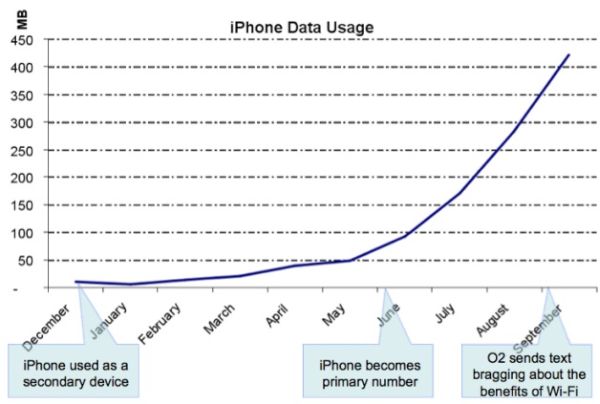
How to Reduce Data Usage on iPhone iOS 9 Guide

It is sometimes necessary to find useful minimize data usage iPhone 6 iOS 9 instruction asap and when such importance comes you start searching for guides on how to reduce data usage on your iPhone and get tons of solutions. We will talk about the most important steps you should take in order to reach your goal.

The tips and tricks you’ll discover below will make sure you don’t go over your monthly data limit. Even if you have the unlimited data plan for AT&T iPhone you can be throttled for using more data than the carrier allows you to – so keeping an eye on your usage and controlling / reducing your data limits is highly important.

Reduce iPhone High Data Usage iOS 9 AT&T iPhone

How to Reduce iPhone High Data Usage on iOS 9

Step 1. The new iPhone has WiFi Assist feature and you would like to disable it in order to stop using cellular data each time you get no signal or the service is bad. Launch Settings and choose Cellular – WiFi Assist to turn it off.

Step 2. Disable cellular data usage when you are using iCloud. Launch iCloud and choose Settings where you can turn off your Use Cellular Data option to save some data.

Step 3. iPhone background data usage also can eat your data. Turn off background app refresh option. Go to Settings and select General menu. You can turn off Background App Refresh feature.

Step 4. You should also turn off all automatic downloads when you are using cellular connection. Go to Settings on iPhone and disable cellular data for both iTunes Stores and Apps.

Step 5. You are advised to also turn off High Quality music streaming on cellular. You can go to Settings – Music and disable this option. This way you’ll be able to stream Apple Music files using WiFi connection only.

Step 6. Don’t use your cellular data if you are limited to 2GB of data per month. You better disable it in Settings – Cellular and use WiFi applications instead.

Step 7. Turn off applications that consume much data. This way you can also control your data usage even if you are limited to AT&T iPhone data plan.

Apple Assures It Is Impossible to Unlock iPhone

A lot of users are familiar with unlock iPhone iOS 9 options. There are two types of unlock you most likely know. One is the factory IMEI unlock from AT&T or other carrier and the other one is unlocking the phone to access your personal information.

Well, Apple started to say that it was impossible to unlock iPhone with iOS 8 release. This year the company officially launched iOS 9, updated it to iOS 9.0.1 and 9.0.2. The Cupertino-based giant still assures that it is impossible to unlock the gadgets if they are running of these platforms.

iPhone Unlock Impossible

The well-known iPhone maker believes that unlocking is not possible and when the judge asked Tim Cook [the company’s CEO] to unlock iPhone and access data stored on it – Cook assured it wasn’t possible for Apple to accomplish.

The iOS giant simply doesn’t store encryption keys for iPhone and iPad that is updated to iOS 8 or iOS 9. Passcode is required to access a locked screen. Still there are services that can bypass this restriction and find the correct passcode by tricking the system.

If you wish to learn how to unlock iPhone iOS 8 or iOS 9 to become SIM free [this is the different type of unlock as we already mentioned] you are welcome to select the corresponding unlocking package for your iPhone model and mobile network. You’ll become fully unlocked pretty soon and get the chance to use different SIM cards from various networks from all over the world.

There is no iOS 9 unlock code or iOS 8 unlock passcode to use with factory unlock. All you need to know is your IMEI number and your iPhone statuses as well as original carrier you are locked to. Use iPhone IMEI network check online to get this information about your handset.

AT&T Sues Its Employees for Unlocking AT&T Contract iPhone and Other Phones

How legal is it to unlock ATT contract iPhone in and outside the U.S.? The American government as well as governments in other countries are mostly supporting the opportunity of customers to choose their networks. Still carriers are against such a service. For example, recently AT&T has sued its former employees who offered unlock contract AT&T iPhone 6s, 6, 5s and other models / phones service to users.

AT&T accused its three former workers from Washington state in making thousands of AT&T contract phone unlocked. All the gadgets had to be bound to the networks’ contract however were successfully unlocked and could be used with any other mobile company across the world.

AT&T unlock iPhone contract issues

When you choose to become SIM free [while you are off contract or still on contract] – you have a big variety of choices where to order the special factory SIM free service. Is it safe to unlock iPhone online? If you are customer who is looking for the company to unlock your phone – you are safe. If you are working for AT&T – you could also sued by the network just like it already happened to several ex-employees who are accused of allegedly unlocking gadgets for using with different wireless operators.

According to the lawsuit, employees were able to unlock AT&T contract iPhone models by installing malicious software into their work computers [learn more about AT&T throttling its iPhone subscribers]. They were providing the service right in the AT&T store where they worked and generated automated unlock requests. They worked together with Swift Unlocks company, according to report, and could have been unlocking devices in order to resell them at lower cost than the price of the never-locked iPhone.

The accused workers didn’t cover their tracks and thus AT&T was able to learn about this group, catch them while doing the act and sue them. The lawsuit doesn’t mention any criminal fraud but the employees who were unlocking AT&T phones at their work place in AT&T store might be arrested and forced to pay all the lost profits of the carrier.

How to Get Refund for AppleCare Plan You Don’t Use

Many customers purchase the warranty plans and never use them. Does unused Apple Care expire? This is one of the questions asked by ‘fruit’ users along with ‘how to prepare AT&T iPhone 6 for sale‘- however it is better to search for ‘how to get refund for AppleCare’ if you didn’t use it. This is possible and you should do this since the plan has expiration date.

It is surely great when you have AppleCare plan and need to repair your gadget since such a plan offers lower fees. However if you are careful and take good care of your iPhone or other device – you might want to get unused AppleCare refund. We’ll explain what you should do and when it is possible to request your money back.

How to Get Refund for AppleCare iPhone Plan You Don't Use

How to Get Refund for AppleCare You Don’t Use

When you sign up for any plan you can learn details about it. However in stores when we are offered to pay extra for 2-year care plan or other additional options we don’t have time to get into details and often agree to pay even when we don’t really need this service.

If you accidentally purchased AppleCare plan with your iPhone, Mac or other device you can cancel it within 30 days of purchase date. The ‘fruit’ company should give you the full refund if you didn’t use any service. Or it will minus the value of the service you got. If you also experience any AT&T LTE problems with your iPhone 6s you can fix them yourself.

Users who think about cancelling their plan after 30 days from the moment of purchase can get the refund based on the percentage of the coverage that hasn’t expired. The value of additional services you used would be minused, of course.

It has sense to cancel your plan even after a year in case you got the 2-year option. You will not get all the money back but you could easily return nearly 50% of what you paid. This is a nice bonus if you truly don’t need this service.

For example, if you buy the 2015 model iPhone 6s [Apple released iPhone 6s in September] and pay $129 for your AppleCare plan (just an example) – you’ll be able to get the refund of nearly $60 in a year. Is it worth contacting Apple and learning about your options? Of course, give it a try and you’ll be surprised at the possible refund you can get if your plan hasn’t expired yet.

New App Store Outage 2015 Experienced This Week

A lot of AT&T iPhone owners who get AT&T WiFi calling release delayed by the carrier this week have issues with iTunes. They are unable to connect to App Store and this has nothing to do with U.S. carrier. Other network users get the same problem. They report iTunes connect fail.

Don’t hurry to order SIM unlock for AT&T iPhone 6s as once if you get issues with your iTunes App store. This year there are a lot of problems with Apple services that surface once in a while. Usually when the company is updating its product line or software versions a lot of customers are not able to download apps and use iTunes / App Store just as they ordinary do.

App Store iTunes Outage 2015

The new App Store outage 2015 however is not caused by updates because the latest iOS 9.0.2 was offered much earlier. Apple is now working on iOS 9.1 version and testing it along with developers and public beta testers and other users get brief outage. The problems are surely fixed and the famous Cupertino-based company is trying to solve issue as quickly as possible. This time users had experienced the outage for a couple of hours.

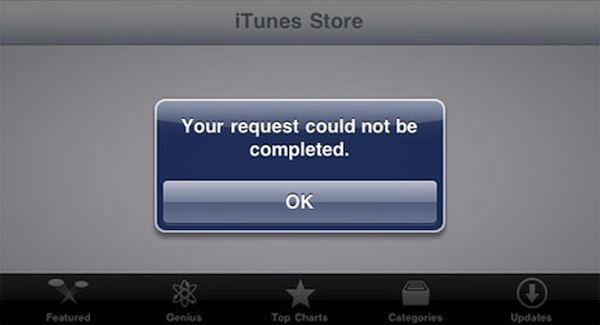
Apple was fast to fix the issue however a lot of users kept complaining as the new outage appeared [do you know when Apple is expected to release cheaper iPhone 6c?]. According to reports, iPhone and iPad users got ‘cannot complete your request’ error while trying to connect to App Store through iTunes. Of course, the system status page Apple has didn’t reflect the outage at once and kept showing the green marks meaning everything was all right.

The issue wasn’t common however the ‘fruit’ giant still updated its system status page and confirmed the outage. The company took some time to solve the issue and everything should return to back to normal by now.