Will My Cricket iPhone 6 Work on AT&T without Unlock?

Some users who purchase their iPhone 6 directly from Cricket carrier or buy used smartphone online and happen to be locked to this U.S. network have the same question: “Will Cricket iPhone work on AT&T or not?” Do you have to SIM unlock your smartphone before it can be used with ‘parent’ carrier or does everything work by default?

Why is Cricket associated with AT&T in the first place? How can you make your popular Apple device SIM free to use on any mobile operator of your choice? We’ll answer all these questions below and hope to solve your problem.
AT&T Cricket Purchase U.S. Networks News

About ATT and Cricket Wireless U.S. Networks

Not all users who are locked to AT&T and order unlock AT T iPhone service know that Cricket Wireless used to be a small American network that was originally founded in 1999. The company was created by Leap Wireless International, Inc. and had about 5 million subscribers by 2011. One day AT&T thought it would be a good idea to absorb this smaller network so it acted, according to Wikipedia.

The Big Blue network purchased Cricket in 2014. It spent over a year on shutting down the original CDMA and rolling subscribers to GSM network. Cricket has officially become the prepaid brand used by AT&T.

So here comes the question. Do you have to unlock Cricket iPhone for AT&T or does this smartphone support the same GSM network by default?
Cricket iPhone 6 iPhone 5s iPhone 4 SIM Card USA Network

Some Facts About Cricket iPhone 6, 6s, 5s

There is a number of users who got a used or even new iPhone with Cricket Wireless subscription and believe that their device would work on a different carrier, particularly on AT&T since it’s the ‘parent’ company of Cricket network. Still this isn’t going to work.

Just like any other locked gadget your phone will only work with Cricket SIM card. You can give it a try and insert AT&T SIM [it is easy to find out if you have contract or off contract AT&T phone] or any other card into your model in hopes to get the signal. But you won’t.

Most smartphones you buy from network arrive SIM locked. You have to unlock Cricket phone in order to connect to other operators. Only those who get the phone at the full price from Apple can be sure that they can switch SIMs without problems. Still even in such situation customers are advised to make sure they are free to connect to different networks.
How to Unlock Cricket iPhone 6 SIM IMEI Unlocking Service Free

How to Get Cricket iPhone Unlocking Code for Free

Before you search for paid solutions on how to get rid of network limitations you should try the free method. Since you have Cricket device you need to contact this network and ask if you are eligible to use their service at no cost. Here is how to request your unlock code:

Step 1. Use best IMEI checker to make sure you are locked to Cricket Wireless [dial *#06# and your IMEI number will appear on the screen]. Run other checking services to double check that your used handset is not reported as stolen or lost, not blacklisted and not associated with any fraudulent accounts.

Stesp 2. Call 611 from your iPhone to make sure this handset is active with carrier and was used for at least half a year with services being paid. If you are not a fan of phone calls use the chat.

Step 3. If you have an account in good standing you will easily have Cricket unlock your iPhone for free. Isn’t it great?

You should understand that sometimes carriers could deny your request for unlock. This mostly happens when your iPhone is blacklisted or there are any other problems with your account or smartphone.
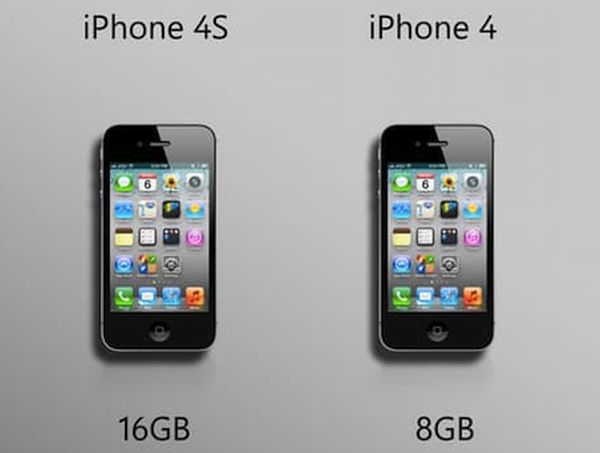
iPhone 4 Model vs iPhone 4s Cricket Carrier Network Unlock for AT T

Cricket iPhone 4 Users

If you have an old iPhone 4 still tied to Cricket you should contact AT&T and try to exchange your device to the newer model locked to the Big Blue network. If you wish to be able to use your iPhone with just any network in and outside the U.S. you might want to wait for iPhone 7 release and purchase it with never-locked status at the full price directly from the Cupertino-based giant. This way you will be free to connect to prepaid and contract operators whenever you want. No limits. No locks. Never.

P.S. Some users assure that their AT&T locked iPhone works just well with Cricket network. However this doesn’t happen vice versa.
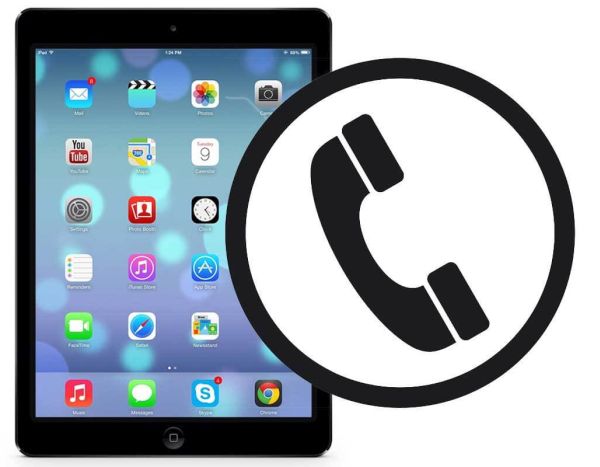
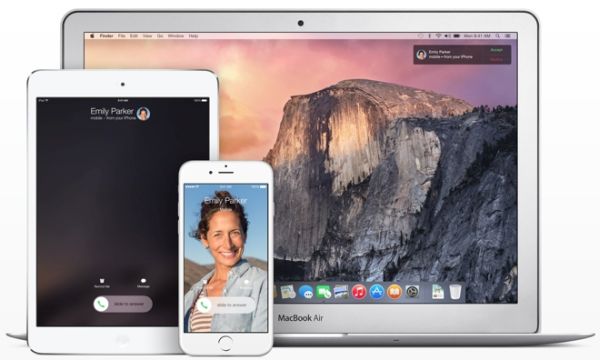
Is Your iPad Getting Calls? Learn How to Stop It from Ringing

Why does my iPhone ring on my iPad? Why all of a sudden the entire room begins to noise with the smartphone, tablet and even computer announcing the phone call? Apple continues to improve the options and wants users be able to answer the calls on any of the ‘fruit’ gadgets. Still this ‘symphony’ doesn’t sound pleasing to all.

Have you noticed that your iPad rings when iPhone does? Apple tablet has a nice big screen that is fun for web surfing and searching however it is easier to answer the calls on your smartphone. Thus it could drive you crazy if the iPad is getting your iPhone cal. Right?

Users who are running iOS 9 experience the problem just like it happened on iOS 8. If you are new to ‘fruit’ devices you need to know the simple trick that will let you solve this ‘issue’ which is not really a big deal.

iPad Rings as iPhone How to Stop on iOS 8 iOS 9

When My iPad Rings

Apple made its tablets ring with the release of iOS 8 back in 2014 and OS X Yosemite. This was a new and unexpected feature that surprised many users. The iOS 9 got the same option [the future iOS 10 is expected to arrive in September or October 2016].

The tool responsible for tablet rings is called Continuity. It allows you making and receiving phone calls not only on the iPhone [as you would normally do] but also on the iPad. It sounds fun but not everyone is happy to experience this option over and over again.

Both iOS 8  and iOS 9 [here is how to remove activation lock on iPhone for both operating systems] make sure your smartphone call is automatically transferred to the iPad. This only happens when the handset is nearby [you hear your tablet ringing and wonder how to stop it].

The option is enabled by default when you install iOS 8 or newer firmware. It turns on only if you are using the same Apple ID and phone number on both devices. By the way, you can actually answer the call right on the tablet as it will turn into your speakerphone.

iPad rings when iPhone does

How Do I Stop My iPad from Ringing When My iPhone Rings

You’ll laugh at how simple everything is. The guides for different operating system versions are a bit different. So here is what you should do.

iOS 8 Instruction

Here is how to stop getting calls on iPad with older iOS 8 platform:

Step 1. Take your iOS 8 iPhone and select Settings.

Step 2. Make sure both iPhone and iPad are using the same iOS 8 firmware and connected to the same WiFi network.

Step 3. Go to FaceTime menu.

iPhone iOS 8 Settings FaceTime iPhone Cellular Calls Feature On Off

Step 4. Do you see iPhone Cellular Calls?

Step 5. Disable those calls. Repeat the same guide on your iPad.

iOS 9 Instruction

Guide on how to stop my iPad from receiving calls for the newer iOS 9 which is actually the most recet version of Apple mobile software. The next iOS 10 designs for new iPhone 7 and 7 Plus hasn’t been officially released yet. Developers and public beta testers are currently testing it and learning all the new features that would be available to public in the fall.

Step 1. Take your iPhone running iOS 9.

Step 2. Both iPad and iPhone have to run the same firmware and connected to WiFi network.

Step 3. Select Settings menu.

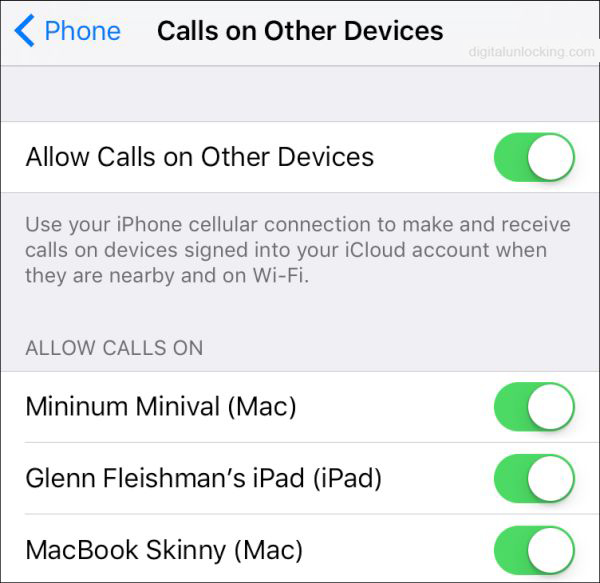
Step 4. Choose Phone.

iOS 9 iPhone Settings Phone Allow Calls on Other Devices

Step 5. Turn off Allow Calls on Other Devices and you should be ok. Repeat the same steps on your iPad.

Some users wonder ‘why does my iPad ring like a phone’ even though the feature ‘Calls from iPhones’ is turned off? It’s curious that your iPad will truly continue to ring when you get incoming phone call with this feature disabled [use best iPhone network checker if you need]. In such situations all you can do is shut down the whole iOS 8 or iOS 9 option for good which is possible via the instructions above.

For Macs, you should launch FaceTime application on the computer and choose Preferences fro the top left menu. There will be iPhone Cellular Calls option with check box. Uncheck and you’ll disable the ringing option on your Mac.

It’s nice that the fix to the issue is so simple and quick. There is no need to hate it when everything rings at the same moment. If you ever decide to give it a try you can enable Continuity option on all your devices and make sure you don’t miss another call.

My iPad Pro Keeps Crashing on iOS 9.3.2: Is There a Fix?

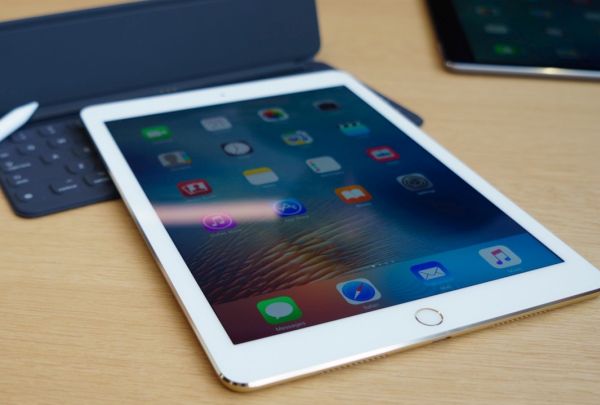
Users who noticed iPad Pro crashing problems on iOS 9 hoped to fix iPad problems by installing the new iOS 9.3.2 version [learn more about iPhone SE Bluetooth issues]. This sadly didn’t happen to many 9.7-inch iPad Pro owners. The same bug occurs on the latest mobile firmware version that was supposed to solve previous issues and problems.

Why iPad Pro crashes? Apple cannot answer this question right now. The company was hoping to fix all the bugs with 9.3.2 firmware release. Luckily the bug doesn’t affect all iPad Pro models but there are people out there who are not happy with the ‘fruit’ giant.

iPad Pro 9.7-inch Crash iOS 9.3.2 Update

Is your iPad Pro restarts on its own? Are you running iOS 9.3.2 or older firmware version? The 9.7-inch model along with iPhone SE was officially released in the end of March. No matter what color you choose, what your storage option is – you might be affected by the unpleasant unexpected crashing bug.

If you gadget reboots or crashes and can’t reboot – you might have to press Home + Power buttons to have it restart. Most reports state that the tablet device crashes while users are surfing Safari browser or switching from / to this program. Still it doesn’t look like the browser causes issues.

The problem seems to affect many people. Apple might have to release new iOS 9.3.x update to solve new iPad Pro Error 56 bug and unexpected crashes of the 9.7-inch tablet 2016 model.

Learn What’s New in iOS 9.3.2 Public Release

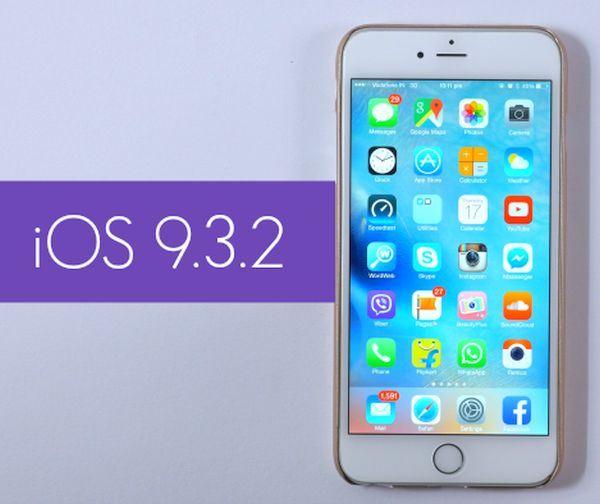
Have you been waiting for iOS 9.3.2 release date? This iPhone and iPad firmware update is finally here and you are welcome to download it and explore all the minor changes the iOS giant has to offer. The Cupertino-based company was testing iOS 9.3.2 this spring and presented the official download links before the WWDC 2016 event which is incredible.

Don’t expect any major new iOS 9.3.2 features and improvements. This is not a big upgrade like iOS 10 will be [the next iPhone 7 model will get iOS 10 pre-installed]. By the way we’ll learn more about iOS 10 firmware version this June because Apple will unveil its next firmware beta during WWDC and allow developers to test it during the summertime.

iOS 9.3.2 Release Update Download for iPhone iPad Apple

Before we’ll get into iOS 9.3.2 what’s new details we should note that this operating system version got only four betas before it became pubic. Beta testers and devs were exploring it before anyone else got a chance to download and install this update. The firmware fixes some previous bugs, offers some security enhancement and other changes.

Firstly, if you had any Bluetooth issues on iPhone SE they will be gone once you upgrade to iOS 9.3.2. Secondly, users who need Japanese Kana keyboard while checking their Mail / Messages programs won’t have problems with typing their email because the bug is gone with 9.3.2 release. Thirdly, Apple fixed dictionary, VoiceOver and other issues.

You can get iOS 9.3.2 for free for any iDevice that supports iOS 9 using OTA-update. This is simple, fast and easy to do. Remember that you will soon get iOS 10 firmware but this would only happen in the fall.

iPhone 7 Could Feature Flush Camera and No Antenna Bands

We still should wait for a couple of months before we’ll learn more about the next Apple smartphone. iPhone 7 release date is expected in September 2016. The company is already working on this handset upgrade, new iOS 10 which will be announced this June and other new products the Cupertino-based giant has up its sleeve.

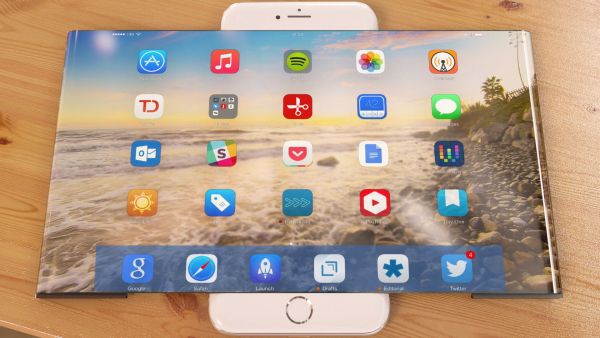
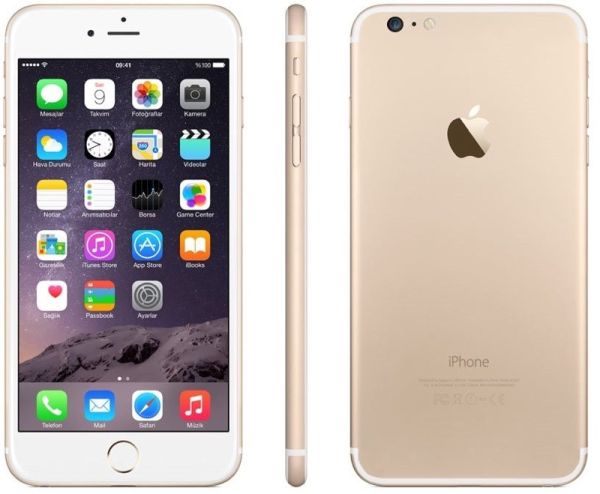
There are different iPhone 7 rumors and concepts. So it’s hard to say how the real model would look like. There are many ‘leaked’ images of the future iPhone but no one knows if any of the picture really showcases the real iPhone 7. One of the latest leaks shows iPhone 7 being very similar to current iPhone 6s with slight changes. What are the differences?

iPhone 7 Concept Rumors

Firstly, iPhone 7 camera would be a flush rear camera while iPhone 7 Plus could get the exclusive dual camera system on its back.

Seconly, the next gen model has no antenna bands. Different rumors promise the missing bands which could be moved on botton or top edge of the smartphone. In other words, the iPhone 7 edges could be extended just a bit.

Thirdly, the next generation Apple iPhone 7 could arrive with Smart Connector that would be capable of transferring data and maybe even wirelessly charging your device. It should be located near the iPhone bottom. It’s curious that there were reports about no Smart Connector in the next iOS smartphone [you can upgrade to new Apple iPhone online with Apple] however such big change could be postponed until iPhone 8 release in 2017.

What do you expect to see in the fall? How do you imagine iPhone 7 and iPhone 7 Plus?

Learn How You Can Save iPhone Email Attachments to Your iCloud Drive

Do you know that you can save your iPhone email attachments to iCloud Drive? This can be done on iOS 9 platform [learn more about future iPhone 7 that should be released in the fall 2016]. There is no need to search for any third-party tools because your default iOS Mail application supports this feature.

All you have to do is enable your iCloud Drive. In other words, you should make sure it is installed on your iDevice. Follow our simple instruction and learn more about iOS Mail attachment iCloud Drive ‘partnership’ and your new opportunities offered by Apple to all iPhone users.

Save iOS 9 Mail Attachment iPhone to iCloud Drive

How to Save Email Attachments to iCloud Drive: iPhone Guide

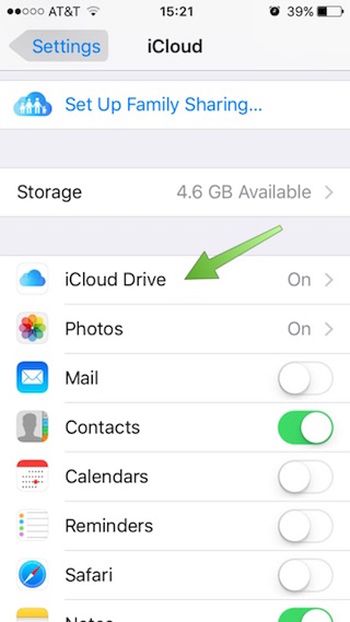
Step 1. Once you download and install iCloud Drive application on iPhone you should launch Settings app.

Step 2. Choose iCloud – iCloud Drive and use your login / password to log into the iCloud account. Do this right from your smartphone.

Login to iCloud Drive on iPhone

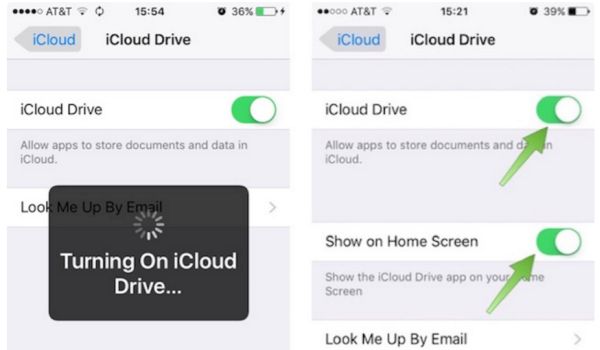
Step 3. With iCloud Drive being turned on you should also choose ‘Show’ option for Home Screen. Look for the iCloud Drive icon which appears on iPhone Home Screen [this can be done on popular iPhone SE and other Apple handset models]. Do you see it?

Turn On iCloud Drive on iPhone

Step 4. Go to Mail program.

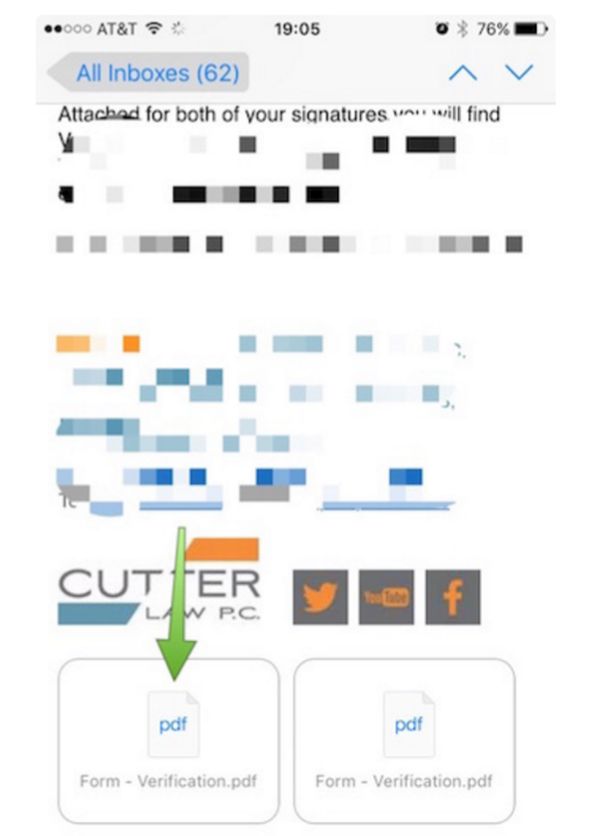
Step 5. You need to select email with any attachments.

Step 6. Click on icon to download the attachment.

Download iOS 9 Mail Attachment

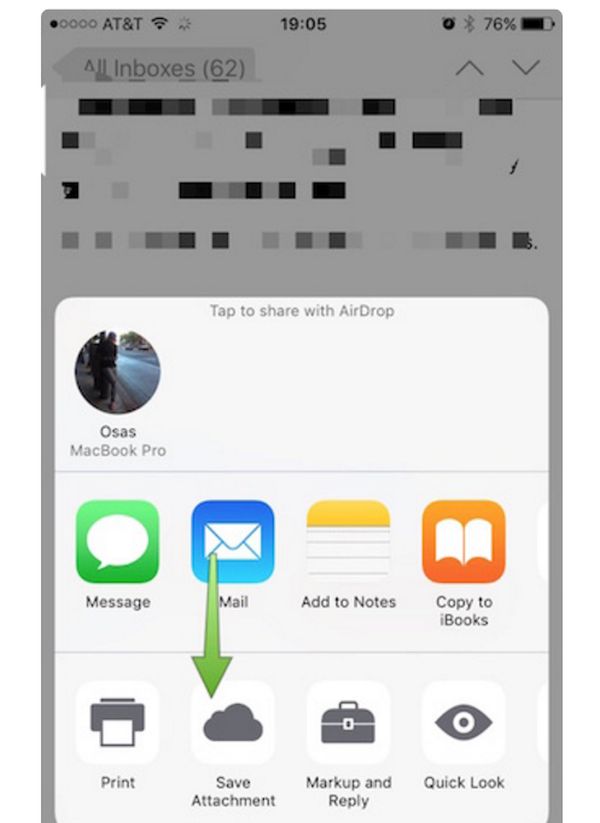
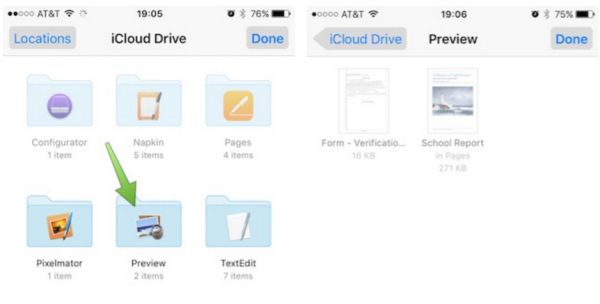
Step 7. You need to click-hold your attachment to see Share sheet option.

Step 8. Swipe in Share sheet to get to Save Attachment feature. You’ll see this icon so click on it to get to iCloud Drive.

Save iPhone Mail Attachment to iCloud Drive

Step 9. Choose the folder where your file will be saved. Remember to click ‘Export to this location’ option in order to save your file and press on Done.

How to Save iPhone Mail Attachments on iOS 9 to iCloud Drive Guide

That’s it. You have successfully saved iOS 9 Mail app attachment to your iPhone iCloud Drive.

Unbelievable iPhone 7 and 7 Plus Features

Looking for more iPhone 7 rumors? Wanna hear what experts say about the upcoming Apple smartphone? There are design concepts and predictions about this next generation ‘fruit’ device. It is expected to be better than iPhone 6s or similar to this model. Different experts share different opinions.

What iPhone 7 options could the Cupertino-based giant really offer? We’ve heard about smart connector, dual camera system and even edge to edge screen. Designers create their own concepts and show ideas that could inspire Apple fans and make them wait for something unbelievable.

iPhone 7 Rumors Features Options Specs

Apple knows how to surprise and make its customers fall in love with the new flagship model. Could iPhone 7 and 7 Plus features be as good as it was with iPhone 6? This was an incredible financial year for the company as millions of users from all over the world were willing to upgrade or purchase iPhone 6 and 6 Plus models.

The 2015 iPhone 6s and 6s Plus updates weren’t as successful and Apple Q2, 2016 earnings report proves this. The iPhone SE is a minor update compared to bigger models because the 4-inch model is mainly meant for fast emerging markets as China and India. This is the update to iPhone 5 lineup. iPhone 7 release should be much bigger and really attract more ‘fruit’ customers.

This update could feature 3.5mm headphone jack or Apple might drop it. There are opposite opinions. It could also get dual camera system and smart connector. Would it really get wireless charging feature or not?

Will iPhone 7 or iPhone 8 be better than iPhone 6s? What do you expect from Apple this year?

New $2.8 Billion Lawsuit Filed Against Apple

Have you heard about new lawsuit against Apple? The famous ‘fruit’ company is well-known for numerous lawsuits over patent infringement. This time the iPhone maker faces $2.8 billion Apple patent lawsuit [the ‘fruit’ company offers Apple iPhone upgrade program online for millions of users].

Voip-Pal filed lawsuit against Apple being sure the company infringed its VoIP technologies patent. The company brought official charges against the Cupertino-based giant and wants to get nearly $3 billion in damages. How curious does it sound to you?

Apple Lawsuit Patent VoIP 2016

According to the company that filed the lawsuit against iPhone maker, the price it wants Apple to pay is based on the ‘fruit’ company’s estimated historical profit from different products. Its calculations include all popular devices: iPhone, iPad and Mac.

Voip-Pal has many different patents that are related to VoIP technologies. It believes that the iPhone maker infringes on some of these documents. The company mentions FaceTime and iMessage products as those that are infringing on its own patents.

As noted in reports, the company had the VoiP related allegations against Apple for quiet a while. It was trying to talk with Apple [learn more about future iPhone 7 model] outside of the court system but it seems that the iPhone giant didn’t want to settle down everything the way Voip-Pal wanted. So the lawsuit was officially filed against the ‘fruit’ company.

Would Apple be forced to pay nearly $3 billion? We really doubt this. Apple and Samsung have been arguing in courts for a long time. By the way, it’s not the first time the VoiP company is trying to get money by filing lawsuit against well-known companies. Similar patent infringement lawsuits were filed against Verizon and AT&T U.S. carriers.

Learn How to Adjust Netflix Video Quality on iPhone

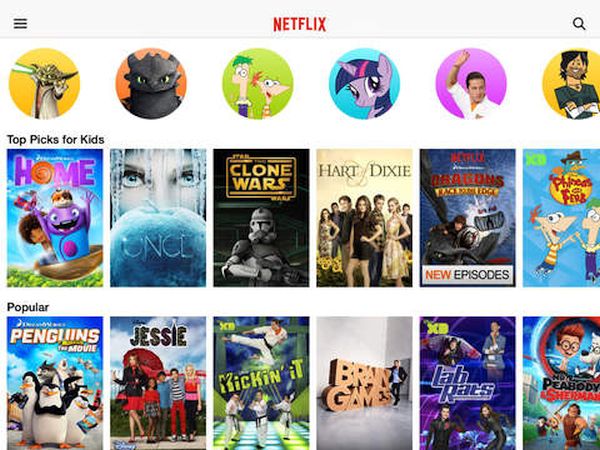
iPhone users who are using different U.S. carriers can adjust Netflix video quality and get other controls over this service. Why would you need to control your data usage? Firstly, you can save some money if you get this control. Secondly, you can improve or reduce the quality of videos on-the-go.

Netflix data usage can be controlled via special application. You can download it on the App Store and install on any iPhone that is running iOS 9. You can use iPhone T-Mobile, Sprint, AT&T, Verizon or any other American network and avoid extra charges from your cellular data network. This can be pretty handy, can’t it?

Adjust Netflix Video Quality Cellular Data Usage on iPhone

Once you install the app you can get full Netflix cellular data control with its help. At the same time you will get the bets video consumption per GB as the settings make it possible for you to choose and change this figure.

You can choose to use only WiFi network to save your cellular data completely. You are able to select Low quality option to get 4 hours of videos for each GB you consume. There are also other settings that go up to Unlimited.

If you are not happy with your carrier data plan but you are locked to its network – you can order SIM factory iPhone unlock for Sprint, T-Mobile or other carrier. This is fast, safe and affordable. Becoming SIM free is permanent. You will be able to select your data plans by switching SIM cards and using the best U.S. carrier you can find.

Download the free Netflix iPhone app and enjoy the changes.

WWDC 2016 to Bring Music App Update

The popular developer conference is approaching and different WWDC 2016 news surface. This event is extremely popular as it allows developers to get inside view in the future Apple productions. For example, this year the ‘fruit’ giant will announced iOS 10 and other changes.

Apple announcement WWDC 2016 could also include Apple Music app redesign. This should be one of many changes and improvements the Cupertino-based giant has to offer in 2016. The company already released iPhone SE which is the 4-inch screen smartphone that experiences strong demand in China and India. Experts suggest the iPhone 7 and iPhone 7 Plus models would be introduced in the fall.

Apple WWDC 2016 News Rumors Apple Music Redesign

The company wants to attract more users to its Apple Music service. It’s not free and there are many Apple Music subscribers already [just think of the 13 million subscribers reported by Apple]. Still the subscription is not free. You have to pay $9.99 or $14.99 per month to subscribe [the cost depends on individual or family plan].

There will be other announcements during WWDC as well. We won’t hear anything about the next generation smartphones, tablet and Mac updates because such reports become available only a couple of weeks before the official launch.

What is the company doing now? It is testing iOS 9.3.2 betas with developers and public beta testers. The iOS 9.3 release was too buggy and Apple had to offer updates to iPhone and iPad users. Firmware version iOS 9.3.1 didn’t solve all the issues so the next minor update will soon follow.

Future iOS 10 will offer some major changes and exclusive features and we’ll know more about all these changes in early June.