Dear geo-location.site Consumers!

Easter is coming. This is a great day to celebrate because it brings a new life clean from sins to all of us! We do believe that while your children enjoy chocolate bunnies along with Easter eggs this weekend, you can order AT&T unlock as a gift to your friends, relatives and beloved ones, especially if they a big iOS fans who don’t want to stay always locked to one U.S. carrier and follow strict Apple policy.

Enjoy the beautiful day. A Good Friday will be followed by Easter Sunday and there is still time to prepare your iDevice for the weekend fun. Load new games and apps that you can check out in your family circle during the weekend.

happy easter

Have a blessed iEaster! geo-location.site team


T-Mobile Attacks AT&T: New Must-See Ads

The confrontation between T-Mobile and AT&T continues. If you remember, not so long ago the U.S. carrier AT&T published newspaper ads attacking its competitor T-Mobile, and now we see how T-Mobile attacks AT&T in its advertisements trying to protect itself.

The set of ads hit back at the well-known mobile operator that recently mentioned the poor quality of T-Mobile’s network it is own ad campaign. The offender could hardly assume what happened next…

T-Mobile vs. AT&T Ads

This conflict started a couple of years ago when AT&T wanted to spend nearly $40 billion on T-Mobile. This purchase didn’t take place, and the failed acquisition resulted in future attacks we now witness in printed mass media.

Redactor Note: If you have No Service isue with T-Mobile Sim card after factory unlock here is a fixes.

While the advertisements of AT&T were actually published, the ads created by T-Mobile are now awaiting approval. They aren’t in the newspapers yet, but you can take a look at what will soon surely appear published. Why are we so sure in this? Well, if T-Mobile CEO has enough nerve to call the network of its competitor “crap,” there will be nothing strange when these three ads attack AT&T coverage.

T-Mobile vs AT&T Coverage

Black Humor

Surely, the new advertisements are brilliant, but this is still black humor. The war has begun, and since the two enemies have decided to fight in public, we can get some laughs long before April Fool day arrives.

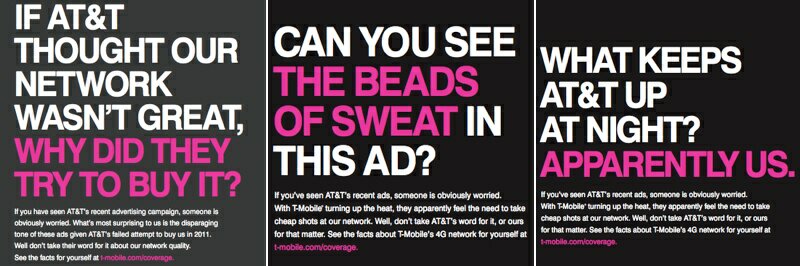
The 3 new ads read:

“What Keeps AT&T Up At Night? Apparently Us.”

“Can You See The Beads of Sweat In These Ads?”

“If AT&T Thought Our Network Wasn’t Great, Why Did They Try To Buy It?”

The heat is turned up, and I believe the war will not be over soon. AT&T vs T-Mobile conflict will most likely result in more brilliant messages. How will public react to such cheap shots? Do you think any of the two carriers can win this fight? Wouldn’t they both just lose?

New Large AT&T Data Plan 2013 Packages

Are you looking for AT&T data plans for iPad and iPhone? The company has just announced their upcoming AT&T data plan for 2013. It wants to offer you from 30GB to 50GB of mobile data for $500 a month. How does it sound?

The carrier will charge you extra $30 monthly for each additional device. While these fees might sound crazy for ordinary users, they can be interesting to businesses that would pay so much since while most of people pay $30 for 3GB per month, they will be ok paying $300 for 30GB. It’s just strange that the carrier gives no discount to its customers who consume so much data.

steve jobs at&t deal

AT&T Data Plan Price

The company creates their new 2013 AT&T data package choices for businesses and AT&T roaming deal that wish to get up to 50GB of data with 15-25 gadgets feeding from this plan each month. The two data plans offered are called Mobile Share and Pooled.

These are just expanded choices of the carrier’s shared data packages offered in the past. According to the mobile operator, it will help other companies to “raise the productivity bar” by consuming 30GB, 40GB and 50GB of data.

Mobile Share and Business Pooled Nation Packages by AT&T

You can get the new offers starting March 22nd. It will be possible to download files on-the-go, control inventory and perform your tasks via iPhone and iPad. The unlimited text messages and calls are also included, so customers and businesses might actually like these huge packages of data.

You can choose the amount of data you need to get per month and choose how many gadgets will be included in your shared plan. According to AT&T, the smartphone must be one of the devices. Also if you don’t want to pay AT&T money no more you can always free the iPhone from this carrier and enjoy any other GSM Sim card or look at the plan cost:

  • 30GB plan will cost you $300/month,
  • 40GB data plan will cost $400/month
  • 50GB package is the most expensive – $500/month.

You will have to pay extra $15 for each additional GB of data consumed and up to $30 for each additional device included.

iPhone No Service After Factory Unlock Troubleshooting Guide

If you get No Service on iPhone after factory unlocking you can fix it here. I used info here from different forums, websites and from my own experience and notes from our clients.

You can also see the scheme created to solve the problem as well. But if you need detailed guide keep on reading.

There is a part of our customers who are facing No Service problem on their iPhone, especially 3GS owners with iPad Baseband or after using Ultrasn0w unlock. Also there can be on iPhone No Service after restore or update, activation or deactivation with Redsn0w or SAM tool, even after jailbreak.

As to activation and activation you can read separate guide on how to fix activation problems on iPhone after factory unlock.

The problem is not in unlocking. In other words it is better that your iPhone shows No Service than Invalid Sim card or Sim card is not supported.
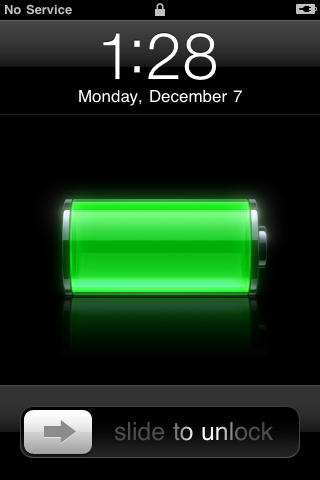
fix iphone no service unlocked

If iPhone is still locked to AT&T it will never accept other Sim. If you see No Service that means that iPhone accepted the Sim and there are can be tons of other reasons but not in unlocking and here I’ll try to describe most of them.

Most Common iPhone No Service Errors and How To Fix Them

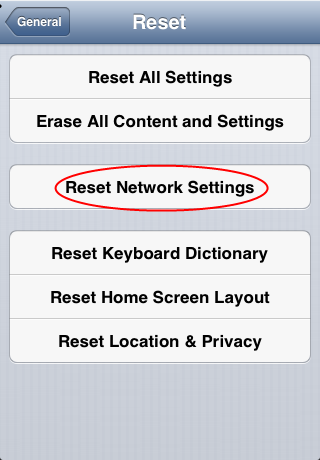
1. The easiest method, and I can confirm that it works in most cases, to reset network settings:

  • Insert unsupported Sim card, open Settings on iPhone, go to General -> Reset -> Reset Network Settings.
  • Also some say you can try to Erase All Content and Settings but before it do a backup and I heard that it could harm your device.
reset network settings iphone

2. In Setting you will see AirPlane mode which you can also use to fix No Service on iPhone as well:

  • Insert Sim card and turn on/off Airplane mode several time while it will pick the signal.

3. Also while your iPhone is on, pop the Sim card out and turn off the power. Insert Sim card and turn iPhone On. Or, turn iPhone on, pop up the Sim card, turn iPhone on and insert Sim card. It worked for many.

4. Go to Settings – General – Cellular/Network and turn on Cellular Data, Enable 3G, Data Roaming and wait for the signal. If they already on – turn it off and wait for the signal.

Note: Some say that you need just reboot iPhone holding two buttons and you will get service.

5. No Service iPhone problem can be after activating and deactivating iPhone using just app as SAMPrefs (SAM unlock tool) or Redsn0w. In this case follow steps in method 6.

6. If methods above don’t work to fix No Service on iPhone, you can try the third method which is the best because it works in 90% cases:

1). Insert non-AT&T Sim card in iPhone and connect it to iTunes using USB.

2). When iTunes detects your device perform a backup and after backup just click Restore.

Note: First try just Restore, without holding Shift/Option. Also you can try to restore putting iPhone first into DFU mode.

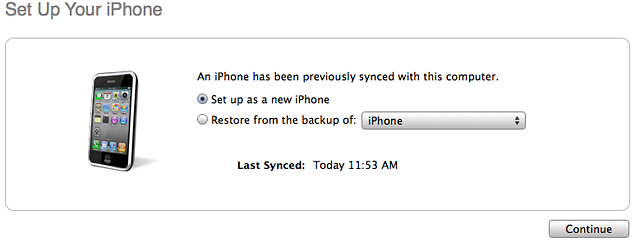
3). Wait till the program finish restore and you will see two options in iTunes:

  • Restore from a backup;
  • Set up iPhone as a new phone.

unlock at&t iphone

so choose Set up as a new.

4). After installing iPhone as a new you will need to pass activation steps, so do it with non-AT&T Sim card inserted and wait for the Signal.

If nothing, read and perform methods (1,2,3,4) described above.

7. iPad baseband. There are many iPhones 3GS still running iPad baseband (06.15.00) which you or previous user installed on iPhone for Ultrasn0w unlock. That could be the reason of No Service as well.

First check the baseband of your iPhone: Settings – General – About- Modem Firmware and if you see 06.15.00 – this is iPad baseband and you need to downgrade it. You need redsn0w tool for this. Do steps below:

  1. Download Redsn0w (blog.iphone-dev.org) and run it as Administrator if on Windows.
  2. Use Redsn0w to enter DFU mode: in redsn0w go to Extras – Just Boot and follow on screen instructions to put the device into DFU mode.
  3. When your device will successfully enter DFU launch iTunes and restore iPhone in iTunes.
  4. Enter DFU again.
  5. Now download the latest iOS version (getios.com).
  6. In redsn0w go to Extras – Select IPSW and choose the iOS file you downloaded.
  7. Go back to the main window of redsn0w and click Jailbreak.
  8. Choose Downgrade from iPad baseband and uncheck Install Cydia and click Next.

That’s it. After the process you will have service and can make calls.

8. Very often when you try to cut the Sim card yourself many do it wrong and iPhone can’t detect the Sim. You better order the Sim of the carrier you want to use on iPhone.

9. Sometimes there is really no service of the carrier you want to use in the area you are. There can be just no coverage. Or the Sim you try to use is not active anymore. In these case you need to contact the carrier.

10. Other reason of No Service on factory unlocked iPhone is the antenna of your device. Yes, it could also be a hardware issue and your iPhone has a bad antenna and it can’t catch the signal. In this case just contact or go to the Apple Store and ask them to check it for you. If it would be antenna they would give you the new iPhone.

That’s it. All this info was found on different forums, blogs and from the own experience of our clients. Just try every of them and read every no service fix very carefully. Also you can always contact Apple care or the carrier of the Sim card you need to use.

And remember, if iPhone got No Service issue it doesn’t mean that it is not unlocked. If device would still be locked it never accept and activate iPhone with other Sim card.

AT&T Attack on T-Mobile Network

AT&T attack on T-Mobile has surfaced in newspaper ads. The two U.S. carriers that could have merged in the past have now become voiceless enemies and the AT&T vs. T-Mobile war continues on the pages of USA Today, The Wall Street Journal and the New York Times.

The latest AT&T advertising is a direct hit at the network performance of T-Mobile. It clearly demonstrates the rivalry between the U.S. carriers. According to one company, this is the response to unspecified claims by the other firm. The counterattack is taking a full page in three American newspapers. Wanna see these AT&T attack ads?

The New AT&T Advertising Solution

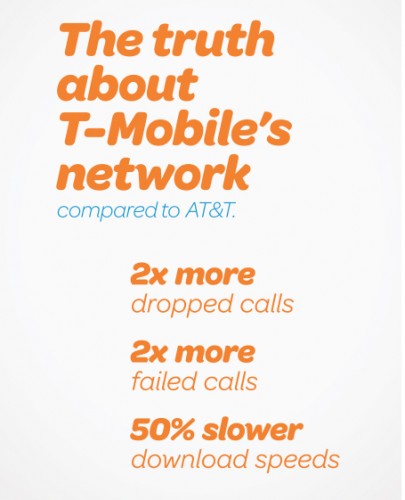
What does the attacking carrier say in its advertisements? Firstly,  according to Bloomberg, the ads you can read in newspapers say that T-Mobile drops twice as many calls as AT&T. Secondly, the carrier assures that the network speeds of T-Mobile are half as fast as its own.

at&t attack ads on t-mobile

It is not difficult to see that the tension between the mobile operators is getting tenser. It started over a month ago at the Consumer Electronics Show. The AT&T network was called “crap” by John Legere from T-Mobile.

Now we see the answer to these words. It is public, yet voiceless as the advertisements are published in the newspapers.

Update: Read about T-mobile respond to AT&T about its covarege and other stuff.

Some Facts and Opinions

As AT&T’s spokesman Mark Siegel noticed, the ads from T-Mobile are “plain wrong” and their strategy misguides customers. So the company decided to remind its consumers about its faster speeds. The abstract number of dropped calls is also “just a friendly reminder” and nothing more.

Do you use the network of one of these two carriers? What do you think about AT&T attack ads campaign? Do you believe it is ok for one company to accuse the other network in such a way? We hope to hear your opinion.

AT&T LTE Service Comes to Gainesville and New Counties

AT&T LTE coverage map has expanded to some of the new counties and this service is now available in Gainesville. If you live in Boise, Nassau, Denver or Suffolk and if you travel to these places you should know that they are included to the AT&T coverage area plan.

The well-known U.S. mobile operator has plans to expand its AT&T coverage map across USA and offer 4G LTE connection to as many customers as possible. This week the company made an announcement that its services are coming to more counties as LTE technology becomes available in Gainesville.

AT&T LTE covarage map

The carrier spends billions of dollars into its coverage map and right now over 280 million U.S. consumers can enjoy getting the 4th-gen Long-Term Evolution radio service in different cities and states across the country.

Boise was added to 4G coverage map in December. Since then LTE service has been expanded to Caldwell and Nampa, including Denver-metro area and Westminster. The two counties Suffolk and Nassau also offer AT&T LTE coverage in Long Island and western Nassau. The carrier provides its services and signal across the metropolitan area in New York.

The list of places that receive 4G LTE for iPhone and iPad is pretty large. You can find Seaford, Melville, Bellmore, East Meadow in it as well as Deer Park, Plainview, North Bay Shore and Wantagn. The service is extended along Wantagn Parkway, Route 110, Long Island Expressway and many other areas.

You’ll be able to connect to the carrier’s 4G in Hempstead Turnpike, West Islip, Farmingdale, Sunrise Highway, Copiague, etc. We can continue this AT&T LTE coverage map as it continues to get new names and the mobile operator will add new areas to it in 2013.

It is interesting that the carrier spend about $98 billion in the past 5 years. Besides, this public company’s investments into the economy of the USA are much bigger than the ones of other firms since 2008.

1GB of Data for Free: AT&T Roaming Deal Offer

The 4G LTE service from AT&T carrier is now offered for free to users who travel to the U.K. This AT&T roaming deal might sound exciting for iPhone owners who hope to get free data to be used while in the United Kingdom, still its taste is a bit sour. We’ll explain why inside this story. Also remember AT&T deal with Alltel but this is another story.

The company signed its AT&T roaming deal with provider The Cloud to offer customers 1GB of free data abroad. If you are planning to visit the UK you’ll be able to access any of 16 thousand + Wi-Fi spots across the country.

AT&T roaming deal in UK

How to Get Your Free Data

What do you think about free roaming data offer? I think it could be a nice offer for those iPhone and iPad users who travel to the UK regularly. Of course, 1GB is not that much if you got used to checking emails, reading news and playing games online during your trip.

Those who wish to use this free data in the UK will have to subscribe to a data add-on. Also AT&T plans to expand in Europe. You can guess that this subscription is not free itself. The package costs some money. And this add-on leaves a sour taste. Don’t you agree?

To get this offer you have to download Wi-Fi International application from AT&T. It is free to get, and it is available in the App Store.

Your Benefits

In case you happen to go to the UK all the time on business trips, you might like to get the new feature from your U.S. carrier and enjoy the benefits of this new AT&T roaming deal. You’ll be able to make free Skype calls to your friends and family. You’ll be also able to download some files over 4G LTE network coverage.

AT&T travelers should get the free application and use their free 1GB of data whenever they can.

Hackers Attack Apple Server And Sometimes It’s Status Down

An unusual Apple server status appeared after it was attacked by hackers from Eastern Europe, though some rumors also mention China as the country where Apple server attack comes from. These are just investigations, and nothing is known for sure for now. We only know that Apple server down was being witnessed by a lot of people worldwide as they read the news about this crime.

That’s why there are problems with activation after factory unlock. In the previous post you can see how to fix iPhone activation problems after IMEI unlock. But this methods don’t sometimes because of cyber attacks.

Who would think that we could see the message saying “Apple server not available” and “..try again later“after similar attacks on Facebook and Twitter? Would you ever believe it was possible to let Apple server down? Personally I thought it was fantastic, still it has happened.

apple server status

Criminals or hackers attack Apple server on purpose. It’s understood. And they are linked to folks from Eastern Europe, according to Bloomberg. Investigators even mention Russia and Ukraine as countries where hackers who let Apple server down 2013 might be located.

China is also linked to the attacks. Thus it’s difficult to say for sure who is responsible for the unbelievable Apple server status.

So what exactly happened? How did hackers Apple server down making it “not available” and “not responding?”

As the Cupertino-based company reports, its workers’ laptops were infected by unknown malware that got past Java vulnerability. We do know that Java plug-in for web browsers isn’t perfect and it can truly let the malware pass through.

Of course, the infected machines are now isolated from the company’s network, as no one wants bad guys steal data or do other things. Even though Apple believes no data left it, there is no evidence it didn’t happen during DDoS attacks on Apple server and iPhone activation problems. The source of this malware hasn’t been found yet.

There are rumors that the attacks came through site devoted to iPhone developer community. And Apple server status  It is believed to have been hosting the infected code that could make the way onto computers of iOS company employees.

The exploit on OS X machines is patched by Apple, and the Java Web applet is removed in the new upgrade released on Tuesday.

AT&T Wants to Buy Verizon Spectrum: What Worries Customers

The news about AT&T Verizon spectrum purchase is worth hearing. AT&T is willing to pay Verizon Wireless $1.9 billion to use its spectrum across 18 U.S. states and reach 300 million customers with this LTE network by 2015.

Right now all iPad users in the U.S. know that the 4G LTE networks of AT&T and Verizon are not compatible. Why has it happened? Can it ever change? Is this the main reason for customers looking for iPad Wi-Fi only models and ignoring the more expensive 4G LTE models? Being unable to switch mobile operators, iPad owners have to choose between the two carriers all the time.

AT&T Verizon spectrum purchase

Being locked to one carrier is not too great. Still U.S. customers who want to have Apple tablet computer have no choice as their AT&T device will not work on Verizon and vice versa. We’ll try to explain the main differences between the carriers’ networks and discuss the AT&T Verizon spectrum purchase event. You will also learn some other interesting facts.

The New iPad and Carriers

It is true that the new model of iPad is built for two carriers, AT&T and Verizon, differently. So you should choose which carrier you wish to use before you make a purchase. You must also know that your AT&T or Verizon tablet will not work on Sprint or MetroPCS.
This is very frustrating and sad when you are unable to roam onto another operator’s network. Verizon got the 700 MHz spectrum and promised the FCC to keep its network “open” yet this doesn’t mean that you are able to freely use any iPad on it. AT&T has the same spectrum while Sprint uses 1900 MHz and partly 800 MHz.

The question is why the two operators with the same spectrum cannot interoperate. The case is that 700 MHz band has a lot of band-classes and two portions (upper and lower) used by different carriers that are unable to interoperate. Verizon uses the upper block while AT&T has got the lower portion.

What to Expect Tomorrow?

Will this situation ever change? The FCC, of course, is trying to make different carriers that share the same band to interoperate. Even if this happens, mobile operators are able to “close” their network and lock gadgets to their service only.

If the AT&T purchase deal of Verizon spectrum becomes a reality the competition between the two carriers will get tougher, still it doesn’t mean that iOS customers will win as we have no idea whether it will be possible to use the same gadget within two carrier’s networks or not.

Why I Can’t Activate iPhone After Factory Unlock?

Sometimes we receive such question from our consumers. We decided to provide you with more details about AT&T iPhone activation problem and how to fix it if it cannot be used to unlock this iPhone.

The problem is in iPhone activation and it is clear. Apple try to secure its products from any kind of fraud and accepts iPhones only with suitable data.

Note: To get factory unlocked iPhone successfully you need to activate your iPhone with the original carrier. Otherwise Apple may block your iPhone when you connect it to iTunes.

Attention: Unlocking and activation are two different things. And if you can’t activate iPhone after factory unlock this is not service’s fault. The reason isn’t in unlocking, the problem is in activation.

So, let’s find out what you should do if you will get such messages as:

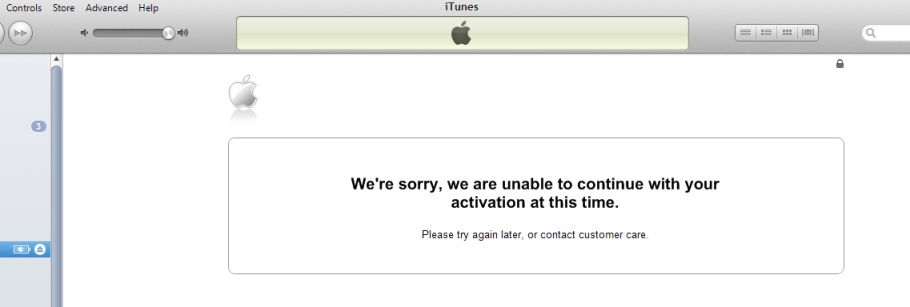
“We’re sorry, we are unable to continue with your activation at this time. Please try again later, or contact customer care”

at&t iphone activation problems


or

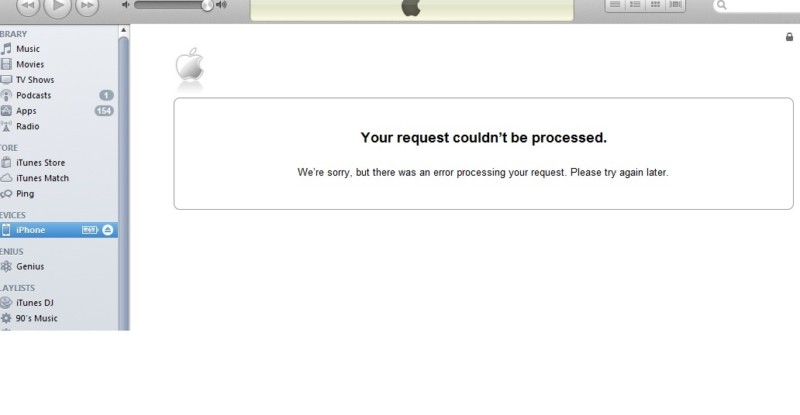
” Your request couldn’t be processed. We’re sorry, but there was an error processing your request. Please try again later.”

how to activate iPhone at&t
If you get one of these messages or AT&T iPhone activation No Service error even after factory unlock you may perform some actions. Very often No Service status may be caused by problems or inaccessibility of the following network.

Generally this is a good sign when you get No Service except unsupported Sim because you can be sure that iPhone accepted Sim which means unlocked.

Note: Follow the link to fix No Service on iPhone after factory unlock.

So, let’s find out how to fix that issues with activation.

Common AT&T iPhone Activation Errors [Reasons and Fixes]

1.Very often Apple servers are under DDoS attack and iPhone activation failed and it cannot be used to unlock this iPhone. Also Apple server may down due to millions of users activating their iPhones. In this case – take some time and try again later as Apple asks you in the message.

2. iPhone was bought on eBay or other seller and now you need Billing ZIP Code and Social Security number (last 4 digits) to activate iPhone. Sometimes previous owner didn’t activate device so you need to find the solution for that.

To fix that problem we have 100% working service which helps you to activate iPhone without zip code and SSN for the cheapest price on the web.

3.Your iPhone may be blocked by Apple. This can be after:

  • Your iPhone was not activated and you order factory unlock using IMEI service. Never buy factory iPhone unlocking services before you can activate your item with original network. Apple doesn’t always block iPhones but you better remember it.

In this case you will need to activate iPhone with any AT&T SIM card.

Note: If you have ordered factory unlock and it doesn’t work restore iPhone and activate it with AT&T; then restore again and activate with any other SIM card (except AT&T).

Attention: Only after SAM activation unlock you will need to use original SIM card with original phone number to successfully activate iPhone. Only then order factory unlock.

  • Jailbreaking / Downgrading / Updating / Hacked by such tools as Redsn0w, Evasi0n, Absinthe, Sn0wbreeze, TinyUmbrella.

If you used TinyUmbrella or Sn0wbreeze you hosts file on computer was changed. In this case just reset file on Windows and activate iPhone. Or, once again, update and activate iPhone with AT&T Sim card on other computer and only then order permanent unlock.

  • The iPhone was hacked or hacktivated using Redsn0w or SAM app.

If you haven’t ordered permanent unlock just update iPhone to the latest iOS and activate it with AT&T Sim card.

But if you have already ordered unlock and receive that your request was successfully completed, to fix that try to restore iPhone and activate it with AT&T; then restore again and activate with any other SIM card (except AT&T).

  • Refurbished and IMEI # couldn’t be authorized by Apple activation server.

Contact with the carrier or find other service because we don’t unlock these types of iPhones.

Also you can always to contact with Apple support for help. Or perform clean restore with non-AT&T Sim card while iPhone is in DFU mode.

You need remember these reasons and solution if you have AT&T iPhone activation problems and errors. We hope these tips & tricks will help you to successfully complete factory AT&T iPhone unlock and never have activation issues.