New Apple Store in India to Open in Mumbai and Bengaluru

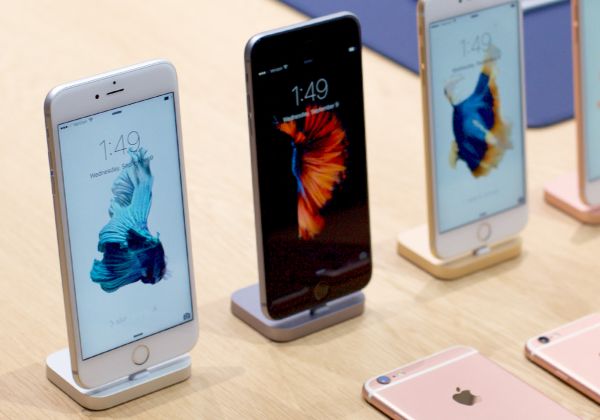
The number of Apple Stores in India will grow this fall. The famous iOS giant is planning to open six more locations so that Indian customers can purchase the older iPhone 6, 6 Plus and most recent iPhone 6s and iPhone 6s Plus in India through retail stores.

Local users are searching for India Apple Store where to buy the highly demanded iPhones. It is possible to order old and new ‘fruit’ smartphones online however some consumers prefer visiting the physical store and purchase gadgets this way.

Apple Stores in India new Locations List

Apple Stores in Mumbai list will get new locations in Oberoi Mall, Malad, Ghatkopar, Juhu and Phoenix Mall. Customers from Bengaluru will be able to buy Apple devices and accessories in Jayanagar. All these stores should open in October and November 2015 [meanwhile a lot of iOS 8 apps get lower price in India, lower than $1].

The new iPhone stores in India will be opened inside some local stores. Apple and Croma have become partners. The iDevices will be sold in locations already used by the leading Indian retail network.

Right now there is no Apple-owned retail store in India because of local laws that don’t allow Apple or any other major company to open their own retail stores here. The iPhone 6 and all other iPhones can be purchased from a big chain or retail stores and online. The new stores should get the global design of other Apple Stores opened across the world. The famous Cupertino-based giant will train sales staff that will be working in the new locations and sell a big variety of Apple products.

In 2014 and 2015 Apple is expanding its retail presence in China and India. The company continues to open up new stores. Indians who wish to purchase the most recent iPhone 6s and discover all the new specs and features offered by the iPhone 6s lineup will be able to get these models starting on October 16th. This is the official 6s and 6s Plus launch date in India.
Does AT&T iPhone Support WiFi Calling Feature on iOS 9?

It’s not a secret that many AT&T iPhone 6s and iPhone 6s Plus subscribers purchased this new Apple device from this particular carrier because it promised soon AT&T WiFi calling launch date [learn how you can decrease your data usage on iPhone 6s]. The Cupertino-based giant updated its iOS 9 platform however AT&T is still not supporting the feature.

While other companies, including Sprint and T-Mobile iPhone carriers, already offer the support for WiFi Calling, AT&T WiFi calling release has been postponed. At first, the mobile operator reported that it wouldn’t launch the service unless the FCC regulator confirms everything is within the law. Well, the FCC approved the option however AT&T hasn’t schedule the launch date yet.

WiFi Calling iPhone 6s iOS 9 Feature

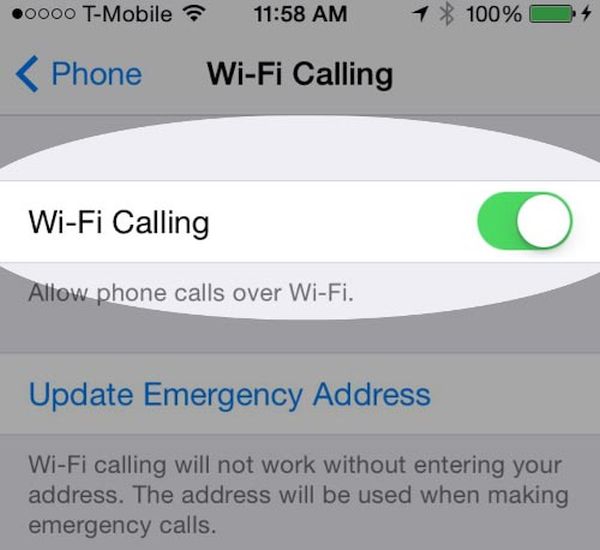
Does AT&T iPhone support WiFi calling on iOS 9? No, it does not and it doesn’t say when it is planning to rollout this option in the United States. The regulations related to the FCC are now settled down but users still cannot access the option.

It is worth to mention that AT&T also blasted both Sprint and T-Mobile for not offering TTY feature along with WiFi Calling and such rules are set by the FCC. If you wish to use both cellular and WiFi calling on your iPhone 6s you might even want to unlock AT&T iPhone on iOS 9 and switch to a different network that is supporting this option.

Since you can install iOS 9 firmware on your AT&T iPhone or Apple handset locked to other U.S. carrier – you might also want to use all the iOS 9 options and features right away. This isn’t always possible due to different issues with carriers and other things. If you are using a different carrier that supports the WiFi calls you might have already tested this option. How does it work? Do you like it when your phone is always connected even when your cellular signal is poor or absent for any reasons?

Apple Watch Brazil Launch Planned for Mid October

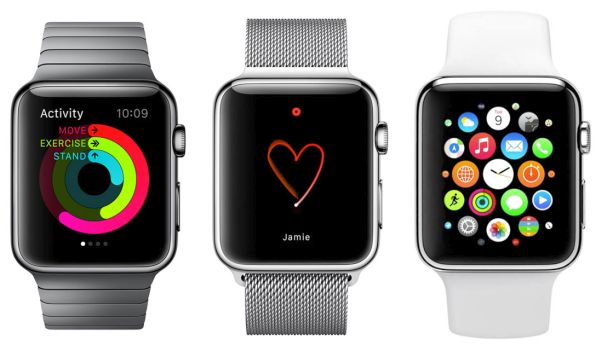
If you are looking for the Apple Watch Brazil release date, get prepared. The popular Apple smartwatch is coming to this country in October. September was the month of the iPhone 6s and iPhone 6s Plus in the U.S., Canada and other countries. The famous ‘fruit’ giant is planning to unveil its new generation iPhone in India and other countries this October and Apple Watch is coming to Brazil.

Besides, the reports mention that customers would be able to buy Apple Watch in Brazil and Colombia as soon as on October 16th. This is the official release date of the iWatch in both countries. The gadgets should appear on the loca Apple sites in the middle of the month.

Apple Watch Brazil Launch Date

Apple Watch Brazil Price

Users who live in Brazil and are planning to get the watch from the Cupertino-based company would probably like to know the pricing policy. The basic 38mm Sport model will be offered at over $730. The price should start at 2.899,00 reals. The company will soon update the Colombian site to reveal the cost of its Watch.

Earlier this month the well-known iPhone maker is planning to release its Apple Watch first generation models in a number of countries. Customers from Poland, Belgium, Norway, Finland and Luxembourg will get a chance to purchase this device in their local stores.

The Watch was officially unveiled in spring 2015. Apple offers several versions of its smartwatches. Sport model is the most affordable. The most expensive gadgets reach the price of $10,000 and more.

It is curious that in just half a year Apple made its Watch available in the most popular U.S. retail stores and is now coming to international markets.

asd asd2 sad
asd sad asd

How to Turn Live Photos on iPhone 6s Into Still Images

A lot of users have already got the most recent smartphone from Apple. The company offered iPhone 6s release [have you tried to identify your iPhone 6s A9 chip?] on September 25th and if you have also purchased this new generation device – learn about iPhone 6s Live Photos feature that makes it possible to create still images from your live photographs.

It is pretty fun to capture still image with iPhone Live Photos [it is also possible to simply disable Live Photos feature on iPhone 6s] however not everyone understands how exactly this works. When you take a Live picture your camera records for 3 seconds and the image can be animated as a result. If you would like to turn this .MOV file into a still picture you are able to do so. We have a short guide that should be helpful.

iPhone 6s Live Photos Turn to Still Image

How to Turn Live Photos into Still Images on iPhone 6s

Step 1. Launch your Photos program on the iPhone 6s.

Step 2. Click on the Live Photo. Choose the photograph that you wish to turn into a normal image. Please keep in mind that you are able to switch between live and still images at anytime. These fun options work great as well as other impressive iOS 9 features Apple introduced this fall.

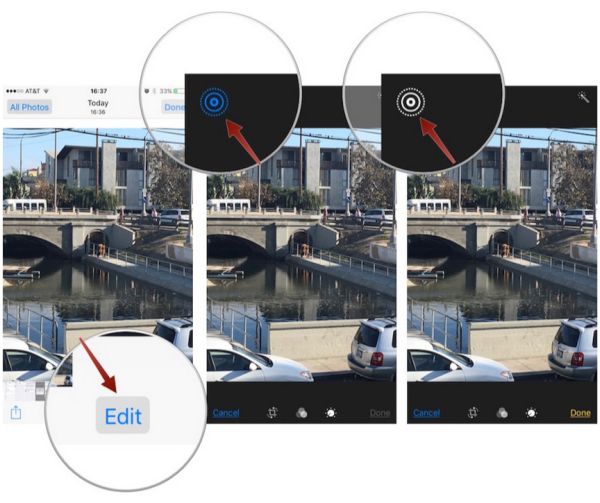
Step 3. You should now click on Edit option.

Step 4. There is an icon of ringed circles you want to use. It turns blue each time you make Live Photo active. When you click on this icon its color will change to gray and this means you have successfully turned your live image into a regular one.

iphone-6s-live-photos-feature

Step 5. Remember to press on Done option to confirm the changes on the iPhone 6s [Apple hopes to set up a new sales record by selling its ‘s’ lineup of handsets this year].

Step 6. The still image will be saved to Photos and you can share it with your friends just like with live photographs.

Hopefully you enjoyed learning how to convert any live photo taken with iPhone 6s or 6s Plus into the regular still photograph.

T Mobile Data Breach Steals iPhone Users Personal Information

Some iPhone users experience T Mobile data breach lately. The company has already informed its U.S. subscribers about the problem. What causes the new breach? Is there a way to fix the issues right here right now?

The most recent iPhone T-Mobile data breach 2015 is caused by Experian. This is a company the well-known mobile operator gathers data from. When iPhone 6s owners and other smartphone owners subscribe to the carrier they often have to pay for their contract with a credit check. And this is where the issue comes from as all the payment data is gathered from Experian and similar companies.

T-Mobile iPhone Data Breach 2015

The company’s CEO John Legere already confirmed that T Mobile iPhone data breach results in the gathering users’ information. The issue is being investigated now. It is believed that the data of about 15 million users was gathered between 2013 and 2015. Not all of them are subscribed to T-Mobile though.

The U.S. carrier doesn’t name the exact number of users who information was gathered because of the breach. Those users who have the iPhone T-Mobile [along with the new iPhone 6s T-Mobile model] and are now affected by the breach used their credit card to check out and this is the reason why they face these problems. They could have paid for their smartphone or service.

As news mentions, information that was stolen due to the breach includes users’ names, birthdays and addresses. The stolen data also includes encrypted ID numbers and SSN. According to Experian, the encryption might be compromised so if you purchased anything from T-Mobile in the last two years you might want to double check with the U.S. carrier.

Pre Order iPhone 6s in Indian: Service Available Already

The upcoming release of India iPhone 6s and iPhone 6s Plus with a lot of new features makes millions of customers impatient and if you wish to pre order iPhone 6s in India you can already do so. The first pre-orders are already taken by local retailers since October 2nd. The official release date is planned for the middle of the month.

Where can you pre-order your iPhone 6s / 6s Plus in India? Reports assure that MobileStore is one of the retailers that has already launched pre orders on its website. Another company, UniverCell, is already eager to take your pre-order for the 2015 Apple smartphone model. How many consumers are soon to own the new device?

iPhone 6s India Pre Order

Rumors state that customers place minimum 100 pre-orders for iPhone 6s in India. You might also wonder about iPhone 6s India price and pre-order cost. The pricing are starting at Rs. 2,000 [this is the start cost for pre-ordering this year’s generation handsets]. The new iPhone 6s will be sold at Rs. 62,000 and the iPhone 6s Plus price will start at Rs. 72,000 for the smallest capacity 16GB model. The more storage you wish to get – the more you’ll have to pay.

You can place your pre-order until October 13th. There is still enough time to get to the list and get your new phone on its official launch date which is scheduled for October 15th and 16th.

Customers from U.S. and a number of other countries have been purchasing the iPhone 6s and iPhone 6s Plus since September 25th.

How to Identify iPhone 6s A9 Chip: Samsung / TSMC Guide

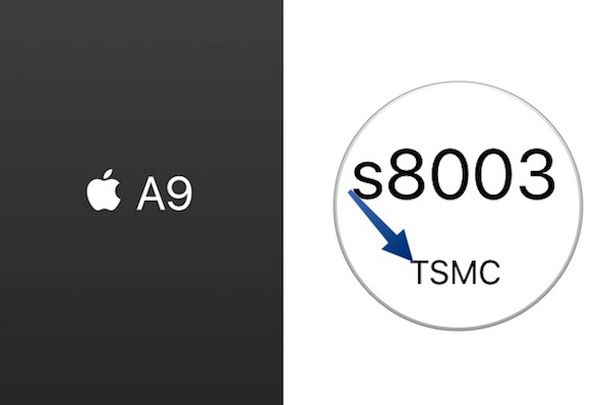
The new Apple lineup of mobile devices have different A9 chips. Some iPhone 6s and iPhone 6s Plus models are delivered with A9 chip Samsung and other get the A9 chip TSMC. So which one do you have?

Customers who have already purchased their new generation smartphone from Apple [the official release of iPhone 6s was on September 25th] can now get A9 chip Apple specs and learn what company manufactured processor for their gadget. It is believed that the new A9 processor is the most advanced one created for smartphones ever. This is the main reason why users are so interested in learning more about it.

iPhone 6s A9 Chip Specs Apple

How to Identify iPhone Chip A9 [Samsung or TSMC]

Step 1. You’ll need to use the special program created by Hiraku Wang. This well-known developer released his CPU Identifier tool that you can download and install on your device using Safari or other mobile browser. You can delete it after you learn which chip you have.

Step 2. Once the tool is installed on your iDevice you should see the app that appears on your iPhone 6s or iPhone 6s Plus Home screen. Open Settings and go to General menu to select Profile option. You should trust the Guangzhou Huimei Electronic Co. Ltd. Profile in order to use the tool.

Step 3. Launch the application. It will now tell you either TSMC A9 chip or Samsung A9 chip and answer your main question.

Step 4. Now that you know who produced your A9 processor for iPhone 6s Plus or 6s model you should delete the program. To do this, launch Settings again and choose General – Profile where you can select the option Delete App.

The new Apple mobile processor is definitely better than A8 chips. The company ships some gadgets with the smaller chip by Samsung [14-nanometers] and others with the bigger processor by TSMC [16-nanometers].

How to Take Selfies with iPhone 6s and iPhone 6s Plus

Selvies are so popular nowadays that Apple added iPhone 6s Live Selfies feature to its new smartphone lineup. iPhone Selfies Flash option is available through Retina Flash and you can easily learn how to use this iOS 9 addition on your new gen smartphone from the famous ‘fruit’ company.

Millions of users take selfies every day.When you launch iOS 9 Photos app you’ll find the Selfie album inside. The company introduced some fun ‘Live’ options and Live Selfies along with Live Photos are present.

How to Take Live Selfies on iPhone 6s

How to Take Selfies with iPhone 6s

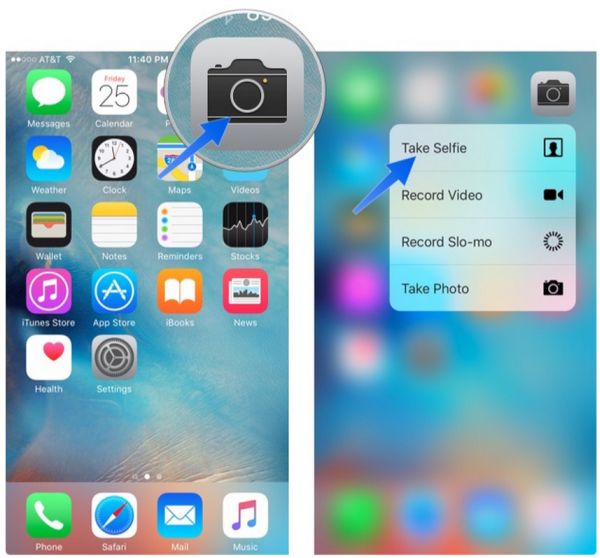
Step 1. If you need to quickly get to your Camera on iPhone 6s you can slide up from your Lock Screen. You an also use Quick Actions with 3D Force Touch feature or ask Siri to help you create the quick selfie. Remember to turn on Live Photo option. When your front camera is on you can start taking the Live Selfie on your iPhone. Don’t stay still as the animation always looks better when you wink, smile or do something else.

Step 2. When your Selfie has been taken you might want to view it. Since your Live Selfie if your Live Photo you should launch Photos application and search for the image you want.

Step 3. You can animate your Live Selfie by pressing firmly on the photograph. This is not only possible on the phones that support 3D Touch feature: iPhone 6s and iPhone 6s Plus – but is also available on some earlier models where you have to click-hold the image to animate it [remember to update to iOS 9 as this feature is not supported by iOS 8 or iOS 7].

Step 4. It is possible to share your selfies through Share option.

Now you know how to take and share iOS 9 Live Selfies on iPhone 6s and iPhone 6s Plus. This is fun, fast and awesome!

How to Disable Live Photos on iPhone 6s

When you are taking low-light pictures with your iPhone 6s or iPhone 6s Plus you might want to disable Live Photos iPhone 6s feature. Why? The main reason to turn off this option is to improve the quality of your images.

The Live Photos was introduced on the new generation smartphones. When you are taking such a picture on iOS 9 firmware you also create a three-second short video which you can share with your friends and family. It’s a fun option however sometimes you need it to be disabled so that other features work better.

iPhone 6s Live Photos Disable

iPhone 6s Live Photos Feature Disable Guide

Step 1. So how exactly can you turn off your Live Photos on iPhone? This is so simple! You should take your iDevice and use Home Screen.

Step 2. Launch your Camera program.

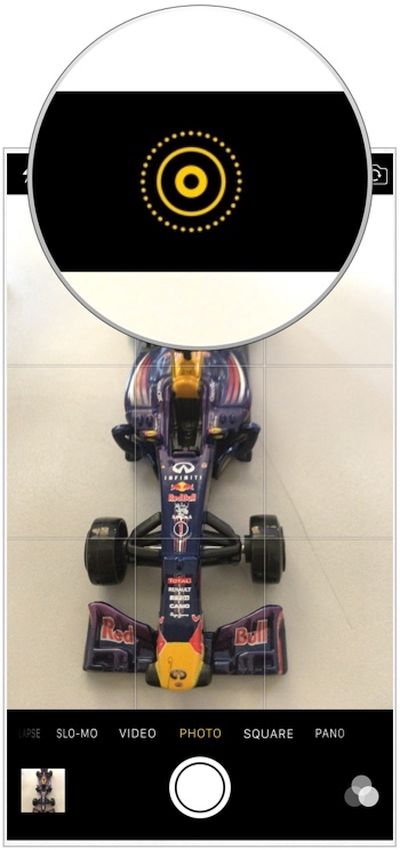
Step 3. Select the Live Photos icon. You can find it at the top.

Step 4. You will disable the feature. The icon should be white which means the option is off.
When you only get the new iPhone 6s your Live Photos are already enabled. You should turn them of when you are not using the option and when you wish to improve the quality of your low-light camera.

Just don’t expect the smartphone to take DSLR or similar images afterwards. The enhancements won’t be that astonishing.

The thing is: Live Photos recording doesn’t allow your iPhone shutter speed to stay open for a long while. The sensor cannot absorb enough light because IOS levels can’t be increase. When the feature is off – your low-light shots should be better.

How to Decrease Mobile Data Usage on iOS 9 iPhone

With iOS 9 official upgrade iPhone and iPad users report the unpleasant iOS 9 increase data usage problem. The gadgets can now automatically switch between your cellular network and WiFi and this could cause you using more data than in the past. We’ll explain how you can fix the issue if it bothers you and you prefer using less data as it was on iOS 8 firmware version.

Apple made sure its users get the best connection all the time. This is why iOS 9 is switching between your WiFi and cellular networks. It is trying to provide you with the better experience. If this is a problem for you – solve it using the guide below.

How to Decrease Mobile Data Usage on iOS 9

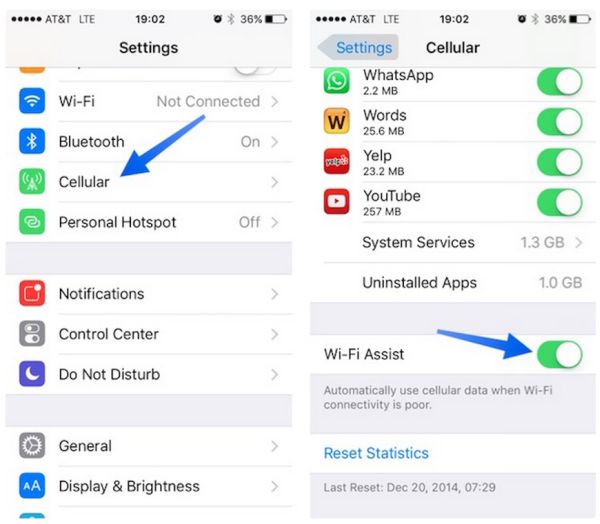
Step 1. You should work with your WiFi Assist feature if you want to stop consuming too much data because of the network switching on iOS 9 firmware version.

Step 2. Go to Setting. This is probably the app you are using the most when changes are needed.

Step 3. Select the Mobile Data / Cellular menu.

Step 4. You should now get to the page’s bottom. Scroll down.

WiFi Assist iOS 9

Step 5. Find the WiFi Assist option and disable it. Once it is off your iPhone 6s or iPad will stop jumping from 3G to 4G without asking you. You will not have the unexpected data usage issue any more.

Step 6. It is still possible to use the 3G / 4G network so don’t worry about it.

Step 7. If you need to track your mobile data usage on iOS 9 you can select Settings and choose Cellular menu where you are able to get to Cellular Data Usage.

This instruction could help users whose data usage increased significantly after iOS 9 installation. Some iPhone owners report that they used to get around 1-2GB of data and they are now getting about 7GB for performing the same tasks.