iPhone No Service Fix Guide for iOS 9, iOS 8 [Six Methods]

Sometimes when you wish to become SIM unlocked you get ‘iPhone no service’ problem which doesn’t let you insert different SIM cards and use them. Is there a way how to fix this unpleasant error? We know at least six methods you can use in order to resolve the issue when your iPhone says no service while you want your handset to connect to any network across the world after factory unlocking it.

Who gets the issue? We can note that mostly this problem occurs to iPhone 5S and iPhone 6 users who tried to unlock their phone with Ultrasn0w program, activate the smartphone via Redsn0w or SAM tool and users who tried to jailbreak their smartphone running iOS 8 or iOS 9, restore it or upgrade to newer firmware version [for example, there is new Verizon iPhone upgrade program]. You can surely fix everything.
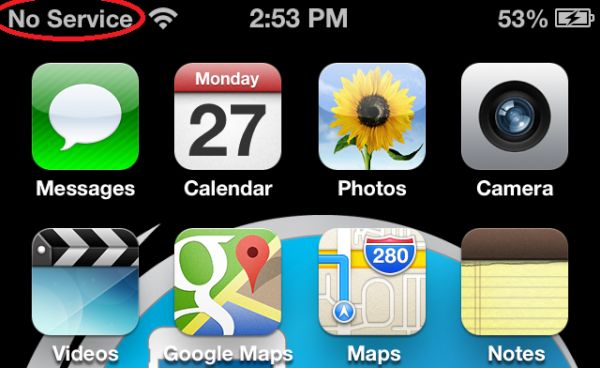
iPhone No Service Problem fix iOS 9 iOS 8 iPhone 5s iPhone 6

How to Fix No Service on iPhone Bug

  • You can try to hard reboot your iPhone 6 or iPhone 5s
  • You can trick with your Airplane Mode [enable / disable it]
  • Trick your Network Settings
  • You can play some tricks with the SIM card
  • You can try to play with 3G data and roaming
  • You can try different activation and deactivation tools [learn how to activate your iPhone after factory IMEI unlock service]

iPhone No Service Problem Fix. Method 1

The first thing you can try to do reboot your iPhone 6 / 5s. Do the hard reboot. Here is what exactly you should do: click-hold your Home + Power buttons simultaneously and count for 3-5 seconds. Release them to find Apple logo on your screen and iPhone booting. Hopefully after you do this and turn your device back on you’ll be able to use any SIM card and get the signal from the carrier.
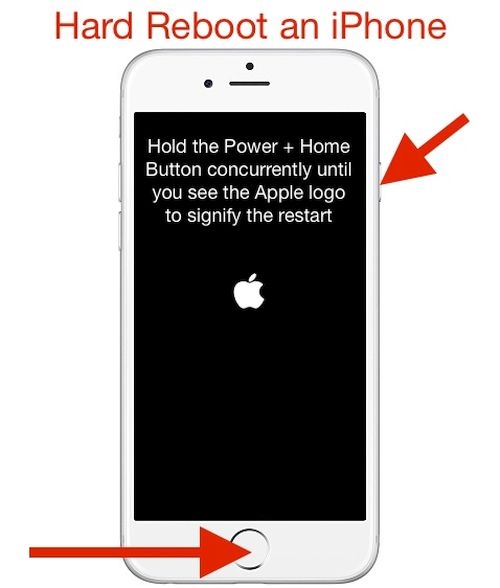
iPhone-Hard-Reboot-How-To


iPhone No Service Solution. Method 2

With the new SIM inserted after iPhone unlock you can enable and disable AirPlane mode on the iOS 9 or iOS 8 iPhone. Hopefully a couple of tries can bring back your signal.

Fix to iPhone No Service Bug. Method 3

When you reset your network settings you might fix the problem with absent service on iOS 9, iOS 8 iPhone 5S and 6 models. It is simple to complete this procedure. You should make sure that the SIM that doesn’t bring the signal is inserted into your phone SIM tray. Now launch Settings menu, select General tab and choose Reset. It’s time to also click on Reset Network Settings option.
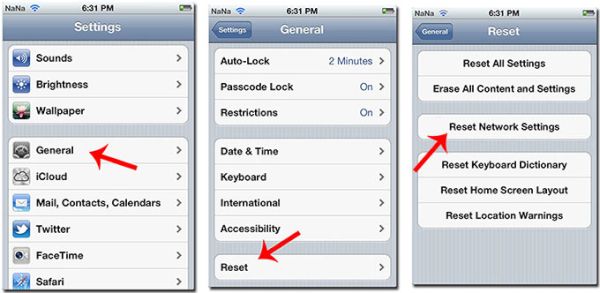
iPhone Reset Network Settings How to

iPhone No Service SIM Card Trick. Method 4

While the iPhone 6 or iPhone 5s is still on you should take away the SIM card that shows no signal. Turn off your smartphone. Now with the smartphone being off insert the SIM card back in. Turn on your device. It can return the service.

If the first attempt didn’t help you to fix the bug you can first turn off the phone, then take the SIM card out, turn on your iPhone and insert the SIM card. Maybe this solution works better.

3D On / Off Trick. Method 5

When you have no service on iOS 9 or iOS 8 iPhone that is unlocked you can launch Settings and go to General – Cellular menu where you can select Network tab. Here you are able to turn on and turn off your 3G. You can also enable and disable Data Roaming feature and turn on / turn off your Cellular Data.

All these manipulations should bring back the service on your iPhone 6 or iPhone 5s.
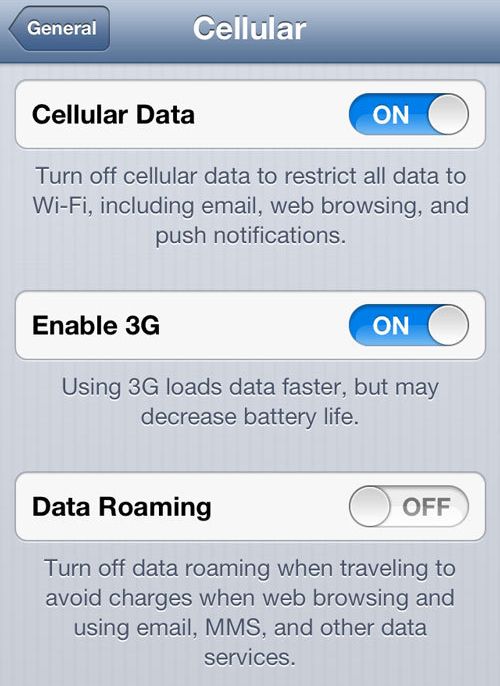
Enable 3G Data Roaming on iPhone How to

Activation No Service Solution. Method 6

Users who factory unlocked their smartphone and then tried to activate or deactivate their iPhone with SAMPrefs or Redsn0w or similar tool – can try to insert any SIM into the gadget, connect to iTunes using USB cable and create a back up copy of the smartphone. You can do simple restore or enter DFU mode [either way is good] and Restore afterwards.

Set up the iPhone 5S / 6 as a new phone. Do not restore from backup when you are prompted to choose the next step by iTunes. You will see the activated guide for the SIM that is inserted into your tray. Follow it and you will most likely get the signal.

Why Do I Get No Service After iPhone Unlock?

Reason 1. Maybe your iPhone is barred, blocked or blacklisted by your network. The gadget might be also listed as stolen or lost or the previous owner [if you got the used model] didn’t pay the bills to carrier. If this is the reason you can easily find everything out by using IMEI blacklist checker. You can also try to contact the original carrier and try to fix everything on your own.

Reason 2. The iPhone 6 and iPhone 5s are both using Nano SIM. If you are trying to insert the Micro SIM or regular SIM card you will not succeed because your handset can’t detect it. Try different SIM [maybe from a different network] and better find Nano SIM to successfully get the service.

Reason 3. Any iPhone model, including the iPhone 6 and 5S, can break if it falls. This could also be the reason that causes No Service message. If the issue is with your hardware you can only take the phone to repair center and have it fixed.

Reason 4. The network you are trying to connect to after unlock might not even be covering your area. If this is the issue you have to find a different carrier SIM.

Readon 5. The issue can be with the SIM card. It might need to fix. If you insert a different SIM card and get the signal you might need to contact your network [the one for which the SIM card is not working properly] and find a solution.
iPhone Antenna Bug

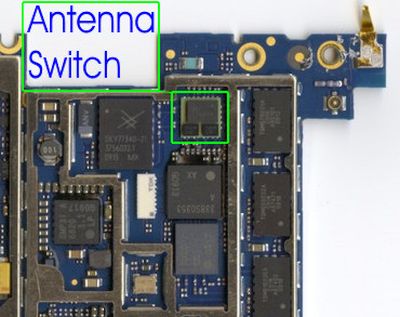
Reason 6. If you have issues with antenna you might not get the signal. Take the iPhone to the service center to have it fixed or better take it to Apple and get the replace.

Factory unlock always guarantees the permanent result if your iPhone is not broken, blacklisted and has no other issues with network or hardware.
Sprint Rolls Out iPhone WiFi Calling

All American major networks are now offering iOS 9 WiFi calling for their iPhone users. Sprint WiFi calling feature is officially rolled out now. It was presented alongside the new firmware update since Apple upgraded its new platform to version iOS 9.1. If you own the Sprint phone you can test the feature and see how great it is to stay connected even when your cellular signal is poor.

Sprint iPhone WiFi calling feature is available only to users who update to iOS 9.1. Without this latest operating system the option won’t work. So if you are not planning to upgrade for various reasons – you won’t be able to enjoy the wonderful feature.

Sprint WiFi Calling iOS 9.1 Feature Release

We should say that AT&T iPhone users had problems with WiFi calling not being available to them because of the company’s policy. T-Mobile and Verizon released the option long time ago so users who have subscribed to these two networks enjoy getting all the benefits of getting WiFi calls.

It’s probably not the time to SIM unlock Sprint iPhone when you can get the WiFi Calling directly from this network if this is what you were looking for. According to the mobile operator, its technology makes it possible for iPhone, iPad, Apple Watch and Mac users to answer phone calls on any of the devices as long as they using the same Apple ID as on the smartphone.

You can also enjoy this feature after iOS 9.1 upgrade. To do so, follow the simple guide on how to enable WiFi Calling from Sprint on the iDevice:

Step 1. Launch Settings on the Sprint iPhone.

Step 2. Select Phone menu.

Step 3. Go to WiFi Calling and enable this iOS 9.1 option.

That’s it. The option offered by Sprint is improved compared to the similar WiFi Calling offered by AT&T and other U.S. networks.

Experts See No Difference in Apple A9 Chip from Samsung and TSMC

Are there any real difference in Apple A9 chip speed and specs? You know that the iPhone 6s and iPhone 6s Plus get different processors. Some are manufactured by Samsung. Others are manufactured by TSMC. As experts note, there are no major differences but Apple assures that the difference exists.

This year’s iPhone A9 processor can arrive from any of the two companies mentioned above. Learn how you can distinguish between the two A9 chip manufacturers using the simple instruction.

Apple iPhone 6s A9 Chip Processor Difference

Some users believe there is significant differences between the two processors. One chip is smaller than the other and this is what troubles the minds of potential customers. It is true that the TSMC processor is a big bigger than the chip made by Samsung.

Users started to think that the chip created by TSMC outperforms the one manufactured by Samsung affecting the battery life mainly. There were different tests that make it clear that the iPhone 6s or 6s Plus gets up to 2 hours of battery life additionally if it has the TSMC processor.

According to Consumer Reports, there is no major difference between the two chips. They compared the two smartphones with A9 processors from Samsung and TSMC and the same settings and assure that there is no difference between the battery life and thus users have nothing to worry about when they are choosing their ‘s’ handset.

Apple also states that the difference is not noticeable, only reaching about 2-3 percent and thus it doesn’t affect the end users if they are doing normal things on their gadget. Do you also believe that it doesn’t matter what company produced your iPhone 6s processor?

iPhone 6s and 6s Plus Sold Out in South Korea in Just 5 Minutes

The upcoming iPhone 6s South Korea release date only warms up the high demand for the new gadget by local customers. This country set up its own record on how quick iPhone 6s sold out can be expected. Consumers were so willing to purchase the new generation Apple handsets that they pre-ordered all available devices in half an hour.

iPhone 6s Pre Order Release Date South Korea

The iPhone 6s and iPhone 6s Plus sold out phenomenon is impressive. While the release of iPhone 6s in India turned out to be unenthusiastic – the situation is completely opposite in South Korea when the new-gen smartphones haven’t officially arrived yet. They were only available for pre-orders and sold out in 5-30 minutes.

As reports state, one local iPhone 6s South Korea KT carrier received ten thousand pre-orders within the first minute! The KT network had to close down its pre-orders within 10 minutes from the moment they went live becaused the company received 50,000 pre-orders from consumers. Another company, LG Uplus, was forced to stop taking pre-orders within 5 minutes due to extremely high demand from users. This firm however doesn’t share the exact number of orders it received.

Another mobile operator SK Telecom left pre-orders live for 30 minutes. It doesn’t report the number of orders taken within half an hour but experts think the number could reach 50,000 just like with KT carrier.

It is worth to note that consumers were aware of the pre-order date and waiting impatiently for it. The original kickoff of iPhone 6s pre-orders in South Korea was planned for the past week however it was delayed. The results are still overwhelming. Users who didn’t get a chance to pre-order their smartphone will be able to buy it officially on October 23rd.

Sprint Unlimited Data Throttle Officially Announced by iPhone Carrier

Does Sprint throttle data users just like AT&T iPhone carrier does to its unlimited data subscribers? The official changes announced by the U.S. mobile operator state that the Sprint throttling has also begun. Those iPhone owners who are locked to Sprint and subscribed to its unlimited data plan will notice slow speeds in congested areas.

It might be better to factory unlock Sprint iPhone 5, 6, 6s or other model you have if you are using unlimited data plan and don’t want to be throttled by your network. The new policy is out since October 16th so you have to be attentive with how much data you consume even if your plan is officially unlimited.

Sprint iPhone Unlimited Data Throttle

Sprint unlimited data throttle means that all unlimited plans in the United States are actually limited. Subscribers are forced to change their data plan or network and keep an eye on the data they use per month. You can surely reduce your data usage on iOS 9 iPhone using our guide however this method will not guarantee that Sprint will nto throttle you when you are in its congested area.

You can read the Quality of Service policy. According to this document, Sprint is planning to slow speeds for users who get over 23GB of data while being on unlimited plan. Similar steps are taken by AT&T and T-Mobile so Sprint is not the only network in the U.S. that doesn’t fully offer the unlimited plans to iPhone subscribers.

Have you ever been throttled by your carrier? It is worth to note that the new Sprint throttling policy will affect only new subscribers and those users who upgrade the iPhone and choose to stay with their unlimited plan.

iPhone 6s or Galaxy S6? Which Smartphone Is Best to Buy?

As soon as Apple released its new lineup of smartphones users got a new question ‘iPhone 6s or Galaxy S6’ – which model is better to purchase? If you haven’t upgraded your phone this year you might really want to first compare the two gadgets as they both have some pros and cons.

Why iPhone 6s vs Samsung S6 [also compare the Samsung and TSMC A9 chip used in the iPhone 6s and 6s Plus lineup]? Well, firstly the iPhone 6s is the most recent Apple device with tons of new features and cool options. Secondly, Galaxy S6 is Samsung’s flagship smartphone at the moment. It is fair to compare them both when you are making your choice.

iPhone 6s vs Galaxy S6 Compare

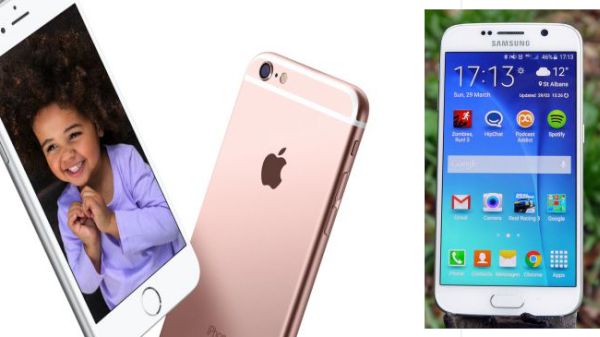
iPhone 6s vs Samsung Galaxy S6

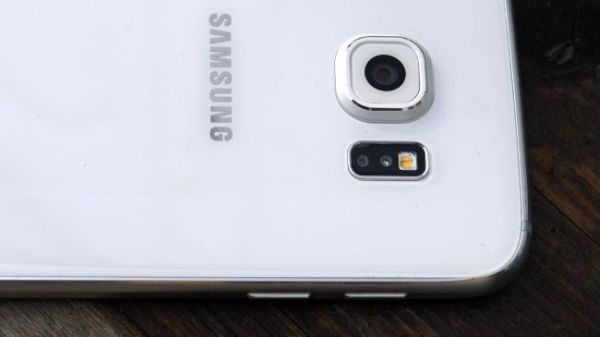
While Apple didn’t change the design of its new iPhone models, Samsung did big job while creating its S6 smartphones. The company chose to work with metal frame, back panel made of glass and went away from cheap plastic parts. When you look at the iPhone 6s you see the same iPhone 6 design but Apple added the new color option for its ‘s’ handsets: rose gold.

When you compare the specs of iPhone 6s and Galaxy S6 you can see that both gadgets allow recording 4K videos. Samsung added the 16 megapixel camera and Apple decided to go with the 12 megapixel camera and bigger aperture. Thus the iPhone 6s allows taking better low-light images and use optical image stabilization. The iOS devise definitely wins over Android in terms of camera features. Besides, you can enjoy taking Live Photos on iPhone 6s and this option isn’t available on other smartphones right now.

Samsung Galaxy S6 vs iPhone 6s

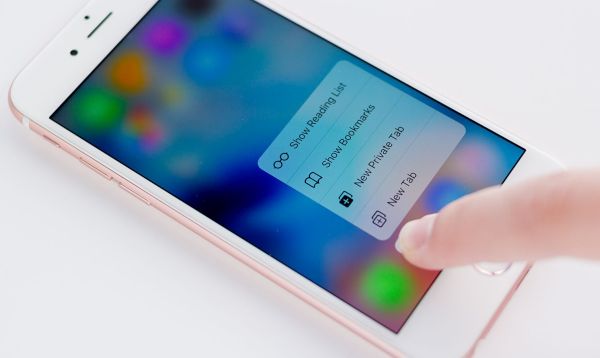
Apple offers 3D Touch feature and 4.7-inch screen with 1334 x 740 resolution while Samsung offers the 5.1-inch display with 2560 x 1440 resolution.

The 6s smartphone gets the newest 1.85 GHz A9 processor and 2GB RAM. S6 device gets the Samsung’s chip with 1.5 GHz Cortex-A53 and 2.1 GHz Cortex-A57. Once again, the new 2015 Apple iPhone 6s is performing better than Samsung Galaxy S6, according to benchmark tests. While iPhone scores 2488, the S6 models gets only the score of 1213.

iPhone 6s vs Galaxy S6

The iPhone has smaller battery capacity compared to Galaxy device. Apple released the 1715 mAH battery for iPhone 6s and Samsung launched the 2550 mAH battery for Galaxy S6. At the same time, it looks like users are not that happy with their Galaxy battery life time.

The Galaxy model costs less than iPhone and you get enjoy more storage space for your money if you choose S6 over 6s. Still if you wish to get 3D Touch, better performance, Live Photos you should better get the iPhone 6s.

WiFi Assist iPhone iOS 9 Feature Not Working [Reasons]

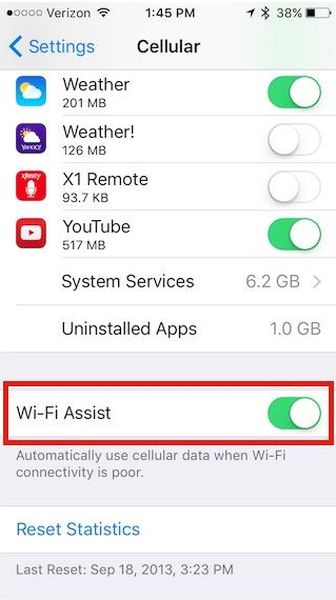
Sometimes you get spotty WiFi connection and need something that is more reliable [AT&T is bringing support for iOS 9 WiFi calls]. If you update to the most recent mobile firmware offered by Apple you can get iOS 9 WiFi Assist feature that is exactly what you need to get reliable Internet connection.

The new option is very curious. All users know that it makes connections more reliable however this cool WiFi iOS 9 setting is firstly not available to all iPhone owners and secondly has other facts you must hear about.

iOS 9 WiFi Assist Not Working Fix Guide Reasons

WiFi Assist iPhone iOS 9 Secrets and Tips

* Updated to iOS 9 but have no WiFi Assist?

Unfortunately Apple made its new feature available on particular models only. Even if you upgrade to iOS 9.0.1, new iOS 9.0.2 or download iOS 9 direct ipsw file – you have no guarantee that the cool option would work for you. Apple restricted the models that can get this addition. Thus, iPhone 4s users are out of luck. Customers who have the original iPad mini, iPad 2 or iPad 3 will also find WiFi Assist not working on their devices.

* WiFi Assist is supported by my iPhone but doesn’t work

You might be using third-party applications and Apple restricts third-party programs support for its WiFi Assist option. This happens to avoid large amounts of data used by you. The company is trying to protect users from huge data bills. If you are using file downloaders, video streaming or music programs you might notice that your iOS 9 feature stops working.

* Why iOS WiFi Assist stops working in the background?

Apple made sure you cannot run its new iOS 9 feature in the background. It works only with foreground programs. If you are trying to download something in the background the option will stop working.

* No WiFi Assist while roaming?

Apple made sure its users who are traveling abroad do not get expensive data bills because of the WiFi Assist iOS 9 feature. This option becomes not available when you are using data roaming service.

We hope that this information is useful to iOS 9 users.

Compare Samsung and TSMC A9 Chip Performance on iPhone 6s / 6s Plus

Have you already purchased the new iPhone 6s or iPhone 6s Plus? It is possible to easily identify your A9 processor manufacture (Samsung or TSMC) using a simple guide we shared earlier. Once you know the company that manufactured your chip you can also compare Samsung and TSMC A9 chip to learn which one is faster and better.

A9 processor performance tsmc and samsung iphone 6s

Firstly, let’s not that the two processors are different from each other. They are available in two different sizes [here are more iPhone 6s specs]. The A9 chip comparison shows that Samsung creates smaller chips than processors manufactured by TSMC company. In other words, your iPhone 6s has either smaller A9 chip by Samsung or bigger A9 processor by TSMC.

Secondly, A9 chip Samsung vs TSMC comparison shows that it is hard to predict which chip size your iPhone model gets as both iPhone 6s and iPhone 6s Plus arrive with TSMC or Samsung parts.

It looks like the size of the chip doesn’t affect the gadget’s performance that much. However there is a huge difference in the two products. According to reports and tests, the A9 processor can influence your battery performance and life.

TSMC vs Samsung A9 Processor

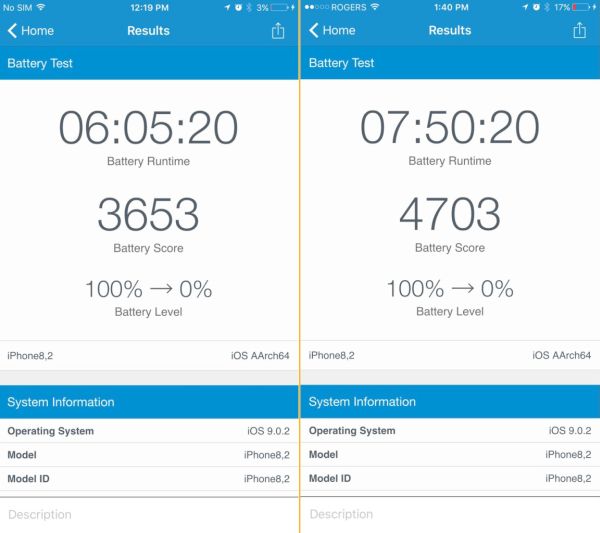
Users who performed benchmarks of iPhone 6s / 6s Plus found one interesting detail. The phones that get TSMC bigger chip also getmore battery life. The tests show that Samsung A9 chip causes the battery life last up to two hours less than the same models that get TSMC A9 model.

A9-chip-tsmc-samsung-battery-life-comparison

Customers who are only looking for the ‘s’ Apple smartphone might want to purchase the version with the chip that extends the battery life by up to two hours. The tests were performed by different users and it is curious that such a huge difference exists.

When you come to the Apple Store to get the new phone you might want to try and figure out the A9 manufacturer before you make your purchase.

SIM Unlock T-Mobile iPhone 7, 6S, SE Service by IMEI Code [Blacklisted & Clean]

[meta_info]

Tips Before Purchase:

  • T-Mobile locked iPhone only [Check it]

*Use network checker if you are not sure what carrier your iPhone is locked to.

  • Clean and Blacklisted) iPhone [Check it]

*Use blacklist checker if you are not sure if your iPhone IMEI is clean or barred / blocked / blacklisted.

  • Activated iPhone only

*Your iPhone has to be activated within T-Mobile network meaning you have to connect to T-Mobile using its SIM card at least once.

  • Unlock Success Rate: 100%

*Unlock success rate depends on T-Mobile account status of each device.

[/meta_info]

[content_tab]

The simple and highly demanded SIM unlock T-Mobile iPhone 7, 6s, SE package is affordable and convenient way to unlock your SIM even if blocked without any additional software programs. This is not hardware unlock. You can become free from T-Mobile distantly. All orders are placed online and your iPhone stays with you.

Before Ordering Make Sure That:

  • Your iPhone is ACTIVATED with T-Mobile in U.S.
  • Provide Correct IMEI code
  • You choose correct unlock package
  • You DID NOT send your iPhone to Apple Care or Technical Service or are trying to replace it during unlock

Note: This package supports clean and blacklisted, blocked T-Mobile iPhone 7, SE, 6S, 6S plus

The iPhone SE T-Mobile IMEI unlock is successful when you provide correct information. We are not responsible for your mistakes, errors and mistypes.

Please be very attentive while confirming your order. We cannot cancel your order once it is placed by you.

The unlock is delivered Monday through Friday, from 9am to 6pm PST.

[/content_tab]

[details_tab]

Users who purchased the new model of Apple smartphone from T-Mobile might want to order unlock iPhone SE, 6S T-Mobile service. This is the best method for becoming permanently unlocked from all carriers at once without paying the full price for Apple new gadget.

How Unlock Works

We provide IMEI unlock blocked iPhone 6s T-Mobile by adding your unique IMEI number to the official databased that contains only unlocked Apple smartphones. As soon as your IMEI is added to this list you will be able to activate unlock using iTunes. This status is permanent and will not change after you upgrade your iOS or baseband, choose to sync, restore or backup. It’s a great remote service that allows you using different SIMs from various carriers from all over the globe.

When you wish to get your T-Mobile iPhone SE unlock code you should carefully read the Terms and Conditions and make sure you meet the requirements. Firstly, your device is locked to T-Mobile. Secondly, you have correct IMEI number and you have activated iPhone with T-Mobile U.S. network.

[/details_tab]

How to Factory Unlock Blacklisted iPhone SE, 6S, 6S Plus, 6, 6Plus, 5S, 5C, 5, 4S Plus from AT&T by IMEI

[meta_info]

Tips Before Purchase:

*Use network checker if you are not sure what carrier your iPhone is locked to.

  • Activated iPhone only

*Your iPhone has to be activated within AT&T network meaning you have to connect to AT&T using its SIM card at least once.

  • Unlock Success Rate: 100%

*Unlock success rate depends on AT&T account status of each device.

[/meta_info]

[content_tab]

This is totally legal and official in the U.S. Learn how to unlock blacklisted iPhone SE AT&T as the whole thing is simple, fast and affordable. While you cannot unblacklist the phone you can make it SIM free. The device will not be usable in the United States however you’ll be able to insert foreign SIM cards and connect to foreign networks outside the U.S.

The AT&T blacklist iPhone 6s unlock package supports only iPhone 6s or iPhone 6s Plus or lower that is locked to AT&T. There will be no refund if you provide incorrect information or not meet the requirements.

It is also important to provide your correct email address where you’ll get order confirmation and further instructions and correct IMEI code. Please don’t order iPhone IMEI unlock if you sent your smartphone to Technical Service / Apple Care or are trying to replace it. There are no refunds for orders with incorrect IMEIs.

Please add our email to your contact list so that emails from us don’t appear in your junk or spam folder.

We deliver unlocks from 9 am to 6 pm PST, Monday through Friday. Please double check all your information to avoid errors, mistype and mistakes before you place your order and pay for it. We cannot cancel the order once it is submitted.

[/content_tab]

[details_tab]
All Apple customers who have the newest smartphone models can unlock AT&T iPhone 6s blacklisted and barred versions. The factory IMEI unlocking service is using IMEI code to add this unique identifier to the official Apple database of IMEIs as unlocked.

There are other unlocking package for clean AT&T iPhone 6S, 6S Plus but device can’t be blacklisted and in contract for less than 60-90 days.

It is possible to unlock blacklisted AT&T iPhone SE and 6s online. It is extremely simple. You need to find your IMEI code that is unique for each smartphone and can be found in Settings app. The distant service guarantees the cheapest price and the delivery of unlock AT&T iPhone 6s barred or blacklisted solution is pretty quick. The permanent unlock makes sure you will not get relocked after updating to newer iOS versions, backing up or restoring, downloading apps etc.

It is great that you can be either on or off contract to order the service. It is important to understand how to unlock barred iPhone SE AT&T. Firstly, you need to be locked to AT&T. Secondly, your smartphone has to be barred or blacklisted or you got Not Found after using Regular service. Thirdly, it has to be activated with this network.

Please note that the blacklist / barred status will remain after you successfully unlock blacklisted AT&T iPhone 6s. It is highly important to understand this when you are planning to place your order online for becoming SIM free.

[/details_tab]