Apple Loses Exclusive Rights to iPhone Trademark in China

Apple presented iPhone in China market and expanded the popularity of this smartphone across the world. Customers knew that iPhone was created and released by Apple [the ‘fruit’ giant shared its Q2, 2016 earnigs report]. However there are reports that say the ‘fruit’ giant loses its exclusive rights to iPhone trademark in China.

Apple tried to appeal to local court to keep the iPhone trademark China option however the court rejected this request. It happened in the end of March. In other words, you can find iPhone in the Chinese market that is not manufactured by Apple. We are mainly talking about non-smartphone products offered to local customers.
iPhone Trademark China Apple

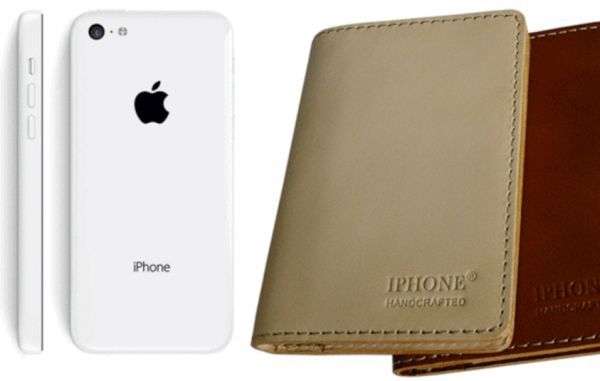
There is a Chinese company that has been selling iPhone products ever since 2007. It was offering wallets, handset cases and other accessories. This is the year when Apple introduced its first iPhone to U.S. market. The company brought its iPhone to China in 2009. It also tried to get exclusive trademark rights in the local market stating that iPhone is the product of Apple and not Tiandi.

Apple cannot prove that its iPhone word was popular before Tiandi registered this name as its accessory products [Apple has issues with iTunes and iBooks Store in China these days]. Customers, as court believes, couldn’t link iPhone to Apple smartphones only back then and this is the reason why Apple lost this case and couldn’t keep the exclusive rights to the name of its extremely popular smartphone.

If you visit China and see iPhone case or other accessory you should keep in mind that the products are manufactured by Tiandi and not Apple. Still the iPhone as smartphone is the only original Apple handset you can officially find in Asia while there are many fake iPhones offered here as well.

Apple Maps Transit Support Comes to Rio de Janeiro

The list of Apple Maps transit cities gets expanded to Brazil. Rio de Janeiro is one of the most populated cities in this country and users who arrive to this city can now enjoy some extra options right on the iPhone.

iPhone iOS 9 Apple Maps Rio de Janeiro transit info can be handy for both travelers and iPhone owners who live in Brazil. It’s nice to get information about bus stops, metro system, trains, and ferries while visiting different countries. The ‘fruit’ giant is pretty quick on bringing new cities support to its application.

Rio De Janeiro Apple Maps Transit 2016 Support

A lot of users enjoy both Apple Maps and Google Maps on iPhone. Bringing Apple Maps transit directions to Rio de Janeiro is an interesting step. With more cities and countries on the list it becomes more interesting to use Maps on the go.

Are you planning to get to Summer Olympics? Take your iPhone with you and Apple Maps will provide you with all the information you need. Make your trip to Brazil brighter and easier with Rio de Janeiro transit info available on the handset.

Maps app transit information covers different places and areas in and outside the U.S. It is available in Mexico City, Chicago, Los Angeles, Sydney, London, Berlin, NYC, Baltimore and many more cities. The ‘fruit’ giant could bring the option to even more locations in 2016.

Are you using Apple Maps or do you prefer other iOS applications for getting transit information? Do you think that changes Apple offers enhance this program and make it more attractive to users?

Simple Fix to iTunes Error 3194 on iPhone

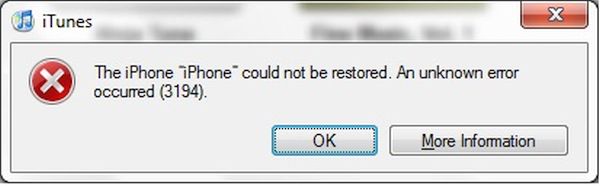
Do you get iTunes error 3194 while trying to update or restore your Apple device? It is simple to solve this problem [find out if it’s possible to downgrade iOS 9.3.1 to 9.3]. This method works for different problems. For example, you can fix Error 17 and 1639. This guide is good for Errors 3000 – 3020 and is great for iTunes errors 3100 – 3999.

Yay, there are multiple bugs and problems that can be resolved. It happens because iTunes doesn’t ‘talk’ to update server so you should check hosts file. If you are using Mac you can fix error 3194 iTunes through Terminal command. Simply enter:

sudo nano /private/etc/hosts

Click on Enter and you’ll see the hosts file where you should search for gs.apple.com entry. If it exists you need to remove or comment it by adding # with ‘space’ at the beginning of entry. Save the file and restart your Mac machine.

Error 3194 iTunes iPhone Fix

Windows users can fix error Can’t Restore 3194 iTunes problem [learn more about Apple online iPhone upgrade program] by getting to Search and typing Run to click on Run icon. You should type the following into Open window:

%WinDir%\System32\Drivers\Etc

When Etc folder is launched you can double press on Hosts file. It is necessary to edit it by removing gs.apple.com entry and saving the file.

The issue should be fixed after restore.

There are predictions that say iTunes error 3194 mostly appears on previously jailbroken devices where jailbreak caused the appearance of new entry hosts file that you have to remove in order to fix the problem. It can be solved on both Macs and Windows computers and this is nice. No matter if you have iPhone or iPad you can still fix the bug without issues.

Did Steve Jobs Know About Apple Watch Product?

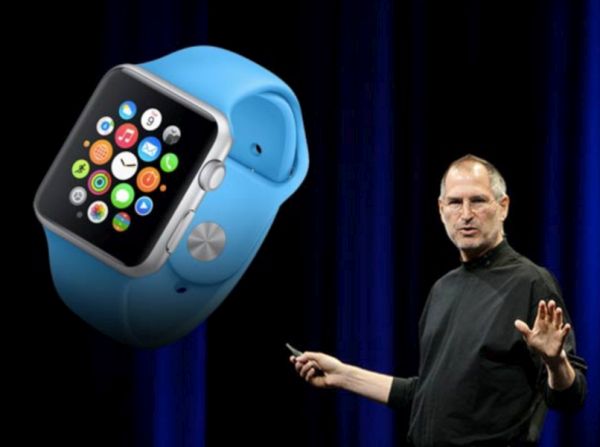
Was Apple Watch Steve Jobs’ idea or not? It took the ‘fruit’ company three years to present this gadget after its famous co-founder passed away [you can easily SIM unlock iOS 9 iPhone from AT&T or other network]. Apple is still associated with Steve Jobs. He did so much to create recognized and popular mobile devices that millions of users would remember him forever.

Jobs inspired Apple to move forward. He died in October 2011 after fighting with pancreatic cancer. He spent much time with healthcare system and got a new dream to create a product that offers better healthcare to all iPhone owners. Apple Watch just continues Jobs’ mission. It’s a good device that offers patients data about their health.

Steve Jobs Apple Watch

Different Apple products offer healthcare tools. For example, users can get HealthKit, Apple Watch device, CareKit and ResearchKit for iPhone and iPad. This way you can participate in different surveys and provide better and more information to healthcare professionals.

While Apple Watch itself hasn’t become as popular as iPhone because it mostly relies on Apple smartphone and cannot offer many mobile features on its own – users can track their steps, health data and live a healthier lifestyle. The Watch can motivate you to stay active and will be always there when you need it the most.

Jobs wanted to make Apple customers healthier and this mission continues even after his death. Maybe his vision of how to make this happen was different from what Watch delivers. We don’t know. No one clears it if Jobs knew about smartwatch coming or not.

We also don’t know how Apple Watch could be different if it was created while Steve Jobs was Apple CEO.

Imagine Apple Watch Running Windows 95

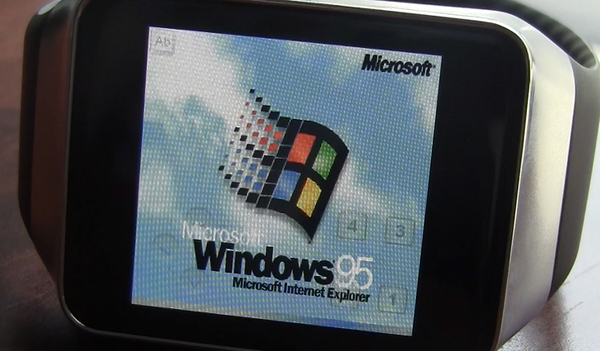
Apple Watch is usually running watchOS firmware version however you can imaging Apple Watch running Windows 95. Is it really possibly? Developers prove that nothing is impossible when it comes to popular ‘fruit’ devices.

We’ll tell you how to install Windows on Apple Watch without or with unlock. There is no detailed instruction but there are tips shared by dev Nick Lee. He is the one who is already running the old Microsoft OS on the new Apple Watch model.

Apple Watch Running Windows 95

Why would anyone wish to install Windows 95 on Apple Watch? This is another question to ask. Some users might want to surprise their friends or play a prank on someone. There are some things to consider before attempting to run old Windows OS on new Apple smartwatch.

Firstly, your gadget would take approximately one hour to boot up. Secondly, the Windows platform would be extremely slow on the Apple Watch. Thirdly, you do risk because you can easily void Apple warranty.

The small smartwatch is way more powerful than old computers that were running Windows 95 version. This is why it can technically run Windows. Still this firmware was never meant for Apple gadgets and the 2015 Apple Watch is surely not the gadget Microsoft built its Windows 95 platform for.

Developer who managed to run the old operating system on the Watch was using Windows 95 as Watch app and emulator that helped the OS functioning. Lee also created a motorized tube that as rotated the Crown all the time to prevent Watch display from shutting down when the gadget is not in use. You cannot just install Windows on Apple Watch. You have to be a developer and modify Apple software in ‘unorthodox’ way meaning you have to build your own platform without Lee’s help since the developer shares no step by step instruction on how to run Windows on Watch.

Wonderful Yet Hidden iOS 9.3 Features for iPhone Users

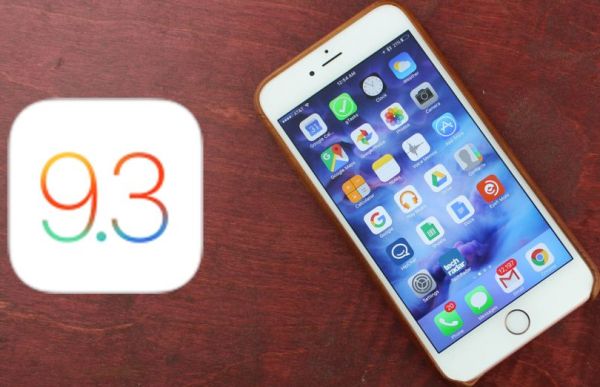
Apple presented iOS 9.3 firmware version this spring with new iOS 9.3 features and interesting options. There are hidden and new updates you should learn about to get better experience until Apple introduces iOS 9.3.1 or iOS 10 upgrade.

It is no longer possible to downgrade iOS 9.3.1 to 9.3 but there are still users who are using this firmware version. Night Shift mode is probably the top option that arrives in iOS 9.3, 9.3.1 and will be present in upcoming iOS 9.3.2 version.

iOS 9.3 Hidden Features

There are numerous iPhone Night Shift guides and jailbreak tweaks that make it easier to use this option. For example, you can enable both Night Shift and Low Power modes at once and save your battery life while reading comfortably from the screen at any time of the day.

The quickest way to access Night Shift mode is to swipe up from iPhone display bottom in Control Center and tap on the iOS 9.3 Night Shift icon.

It si possible to see how much WiFi data you are using you can take advantage of WiFi Assist usage data [here is how to fix iOS 9.3.1 crashing issues]. There is no need to guess how much data you have used and save on your cellular data bill. You can protect Notes with password.

In News you can Save, Mute and do other actions by simply swiping right / left. You can sync iBooks and PDFs to Apple cloud. You can duplicate Live Photos as still images. Improved Education applications and CarPlay should make the full experience better. Siri starts to support Malay and Finnish. Notes got checklist option you can use to quickly make new lists.
You can watch videos, enjoy stories in iOS 9.3 landscape mode. It is possible to long tap on the picture and get thumbnail of the bigger image.

You can navigate through Safari / Mail / Spotlight lists using arrow keys. You can also use space bar forscrolling in Mail and Safari. Have you discovered all hidden features on iOS 9.3?

Apple Maps Improved with More Traffic and Flyover Locations

Apple Maps traffic gets some improvements along with Apple Maps flyover iOS 9 locations. iPhone users get more options from the famous ‘fruit’ company while Apple is working on the future gen iPhone 7 and enhancing its own Maps tools with extra features.

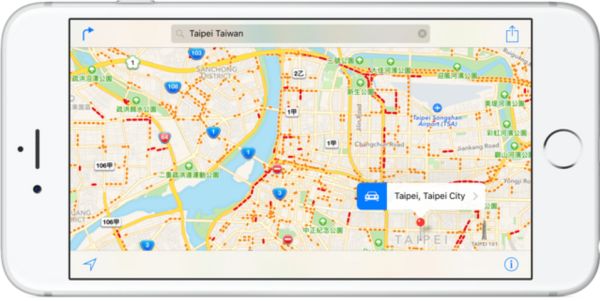
Apple Maps Thailand traffic information is finally added. You can visit more countries across the world and get detailed traffic data for easier travelling. Besides, Apple Maps flyover cities are now supported in the U.S. (Ohio) and Mexico allowing amazing 3D Views of the location. Right now this option is only available in Akron (Ohio) and Puerto Vallarta (Mexico) but more cities support should be available soon.

Apple Maps Traffic Flyover Cities

iPhone users have two Maps choices with Apple Maps and Google Maps. You can use both programs on the same phone for better results. Apple is doing its best to improve the program and compete with Google [the company is already offering new Apple iPhone Upgrade Program online]. There were different problems and issues with Apple Maps however the company didn’t give in and continues to update the tool.

Apple Maps traffic information is added for many locations. Apple is bringing the option to more countries. It’s a cool option for all iPhone users who travel a lot and need to get metro or bus schedule on-the-go. This is exactly what Maps Traffic option brings to your iDevice. As time goes by Apple adds more and more cities to the list of supports Traffic cities and makes it easier and simpler to travel with the ‘fruit’ device.

Users Troubled by App Store Search Issues

Is App Store not working properly? You are not alone. A lot of users report different App Store search issues and can’t get to different titles that are showed in the search results [luckily there are no issues with iOS 9.3.1 AT&T iPhone SIM unlock service]. This happens all across the world and is not an issue in the U.S. only.

In other words, App Store search issues today is a commonly reported problem and bug that troubles many iPhone and iPad customers. The widespread issue is not the first time when ‘fruit’ customers have problems with Apple services.

App Store Search Bug April 2016 iPhone

It’s curious that App Store search issues are noticed in Google, Tumblr, Spotify and other applications. Some games are also affected by the unknown bug. iPhone, iPad and even iPod touch users from Europe, the United States, Canada and other places mention the very same App Store not working bug. The problems occur on different smartphone models including newest iPhone SE that is strongly demanded in China.

Apple System Status page at first said nothing about the problem. There were still users who were affected by the issue and wished it to be solved as soon as possible – so the company soon updated the website to show that the issue was real and truly experienced by a number of users.

Have you had any issues with the App Store or were you lucky to get past all the problems? With big companies and big projects it’s hard to avoid bugs and issues. Apple users often come across bugs but the ‘fruit’ giant always fixes the problems.

You’ll Know If iPhone Message Autocorrect Was Used

There are millions of hilarious iPhone message autocorrect mistakes and this keeps happening when Apple fans are seeing text messages to each other. There are special sites that chronicle such mistakes and let other have some fun moments while reading the autocorrected messages [learn how to unlink iPhone number from iMessage]. Still it seems that Apple has some interesting changes coming out.

The company is believed to introduce the system that lets users know if text message autocorrect option was used. Right now these are just rumors and predictions which are based on new patent app details.
If this happens it could be possible to avoid misunderstanding as iPhone users will always know if autocorrect mangled the message or not. Millions of people are using autocorrect option every day and some changes are so unexpected that the conversation becomes easily messed up.

iPhone Autocorrect Message Issues

How could the new system work? Apple is planning to highlight the iPhone message autocorrect words to help the recipient get the correct meaning of the text message.

Right now the system is using faint blue line under the autocorrected work to help sender avoid any mistakes before sending the message however iOS 9.3.1 iPhone users often don’t read what they type so the problems keep occurring once in a while.

If the recipient of the message knows what words were changed by the system they would understand if something is wrong with the text. The patent app has been filed by Apple. It promises to highlight the words that were corrected automatically. Do you think this new method could solve the problem with autocorrect on iPhone?

iPhone Named Most Influential Electronic Device of All Time

The list of most influential dadgets got iPhone this year. It has been named this way by TIME. It’s curious that while Tim Cook is not one of the most influential people of all time – Apple CEO is still listed as one of the 100 most influential people by the same source.

TIME created a list of 50 most influential electronic devices with phones, TVs, music players and other gadgets. Seeing iPhone as the top influential gadget of all time is very prestigious [no wonder users unlock iPhone 80 times a day] and customers should be happy to own such a device.

iPhone Most Influential Device of All Time 2016

The release of iPhone back in 2007 was a great one. Millions of users fell in love with the ‘fruit’ smartphone at once. It had amazing simple yet very attractive design, only one button and incredible flat touchscreen. Apple also released its mobile application store with different titles and possibilities. Hackers were quick to jailbreak the gadget and users got a chance to customize the iPhone to their needs using Cydia Store tweaks.

No matter how expensive iPhone always as compared to other smartphones millions of customers were happy to buy it. It quickly conquered the world and today the iPhone is known by most users in the U.S., China, Europe and other countries.

Apple reported inclused sales of its iPhones year after year. 2016 is the first year when the financial results are not as high as expected. Still Apple reports that its new smaller iPhone SE with 4 inch display got strong demand in China and other emerging markets.

It’s curious that the top 10 of the most influential gadgets of all times also includes Macintosh and iPod. They are ranked number 3 and number 9 respectively.