iPhone 6s 16GB Price or Apple’s Biggest Mistake Ever

While a number of customers is searching for iPhone 6s 16GB price in India, U.S. and other countries, other potential consumers think that Apple is making a strategic mistake by releasing this particular smartphone model in 2015 [here are some tips for selling old iPhone 6 and 6 Plus before getting the most recent iPhone 6s / 6s Plus versions].

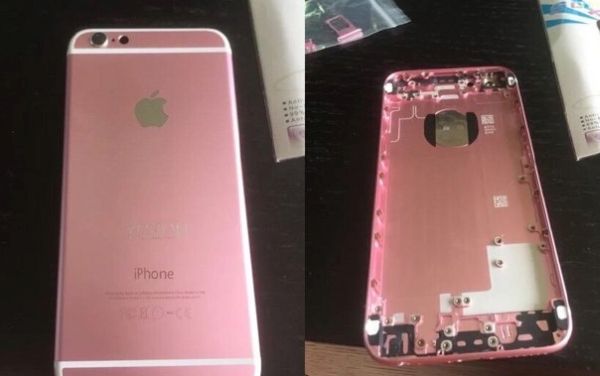
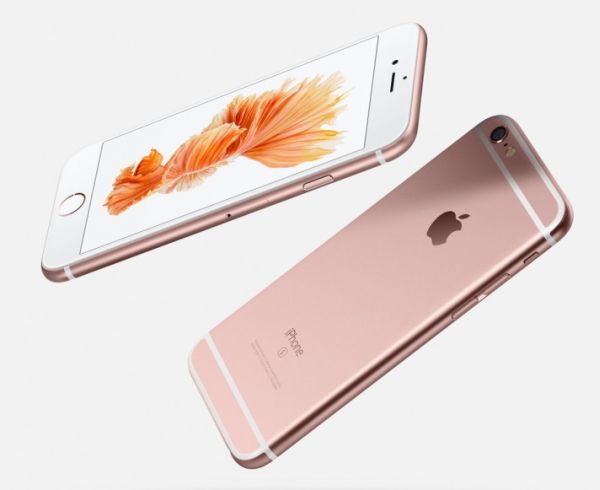
You’ll be able to purchase iPhone 6s 16GB gold, space gray, silver and pink gold version in the end of September. Still analysts, consumers and experts don’t understand why the famous Cupertino-based giant is bringing this particular model to the market. Both iPhone 6s and 6s Plus will be offered in three storage space capacity: 16GB, 64GB and 128GB.
iPhone 6s 16GB Gold Price

Surely, iPhone 6s 16GB price will be lower compared to the 64GB / 128GB versions but the new gadgets will get quicker WiFi connections, improved cameras that make 4K video shooting possible, 3D Touch technology and other interesting features that require much space.

It’s a big disappointment to millions of users to see iPhone 6s 16GB model as it is impossible to add extra storage space to Apple phones like it happens with other smartphones. You can surely store some of your files on iCloud however it might not be the most comfortable solution.

Before Apple unveiled its 9th generation phones on September 9, 2015 there were rumors that the company would drop the 16GB version and offer 32GB model instead. Nope, this never happened and you’ll see the lowest storage space [basic phone] in the market this year.

If you are still planning to buy iPhone 6s 16GB in India or other country, you might definitely want to get the locked model at the lowest price possible [$199 or around it] and order affordable factory SIM unlock for iOS 9 iPhone 6s from your network. This will be way cheaper than paying up to $650 for the unlocked version.

Apple might offer more storage space the next year if iPhone 6s 16GB sales are too low. Those of you who want to use Live Photos option or record 4k videos should not purchase the base model. You’ll need the 64GB or even 128GB iPhone since the 1-minute 4K video takes nearly 400MB of space.
How to Update to iOS 9 on iPhone Guide

Are you ready for iOS 9 download ipsw links? Apple has rolled out the long-awaited firmware upgrade that had been tested by public beta testers and developers in June, July, August and early September. Finally all iPhone, iPod touch and iPad users who would like to see all the new features on their devices can download and install this software version.

There are a couple of ways how to install iOS 9 on iPhone 6, 6s, 6s Plus. You might want to check the OTA update option right on your gadget or ask iTunes to download the new file. Besides, you can use direct iOS 9 links and manually update through iTunes.

iOS 9 Direct Download Links

How to Update to iOS 9 on iPhone: Download Links

Step 1. Create a backup copy of the iDevice. This will save all your information for future use.

Step 2. Use the links below to download your iOS 9 version:

Direct Download Links for iOS 9 for iPhone:

iPhone 6

iPhone 6 Plus

iPhone 5s (Models A1453, A1533)

iPhone 5s (Models A1457, A1518, A1528, A1530)

iPhone 5c (Models A1456, A1532)

iPhone 5c (Models A1507, A1516, A1526, A1529)

iPhone 5 (A1428)

iPhone 5 (A1429)

iPhone 4s

Direct iOS 9 IPSW Download Links for iPad

iPad Air 2 A1566

iPad Air 2 A1567

iPad Air A1474

iPad Air A1475

iPad Air A1476

iPad (4 generation Model A1458)

iPad (4 generation Model A1459)

iPad (4 generation Model A1460)

iPad Wi-Fi (3 generation)

iPad Wi-Fi + Cellular (model for AT&T)

iPad Wi-Fi + Cellular (model for Verizon)

iPad 2 Wi-Fi (Rev A)

iPad 2 Wi-Fi

iPad 2 Wi-Fi + 3G (GSM)

iPad 2 Wi-Fi + 3G (CDMA)

iPad mini A1432

iPad mini A1454

iPad mini A1455

iPad mini 2 A1489

iPad mini 2 A1490

iPad mini 2 A1491

iPad mini 3 A1599

iPad mini 3 A1600

iPad mini 3 A1601

iOS 9 IPSW Download Links for iPod touch

iPod touch 5G

iPod touch 6G

Step 3. Launch iTunes on your computer.

Step 4. Click on Option or Shift [depending on your computer, Mac or Windows PC] and at the same time press the Check for Update option in iTunes.

Step 5. Point to the ipsw file you have downloaded and install iOS 9 through Update option.

Step 6. Wait till the new operating system is installed and start exploring all the great features, options and specs you get.

iOS 9 Update Failed Fix Guide for ‘Software Update Failed’ Error

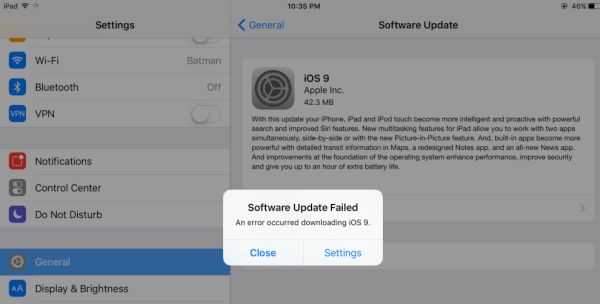
A number of Apple users experience iOS 9 update error while trying to install this new 2015 firmware version the company released in mid September. If your iOS 9 update failed you can also follow the guide below and solve the problems.

The famous Cupertion-based company brings a lot of new features and specs to its iDevices through the most recent iOS 9 version that was officially released to public on September 16th. Some users have no problems iOS 9 update and are already running this platform. However there are iPhone and other users who keep getting the same ‘Software Update Failed’ error message. If you have this problem as well – learn what to do in order to avoid or bypass it.

iOS 9 Update Error Software Update Failed Fix

How to Fix iOS 9 Update Error

Step 1. If you are planning to get the update from iTunes you might get the message about software update failed. Don’t worry since a lot of people are trying to download the new iOS 9 firmware at once and Apple servers experience extremely high traffic.

Step 2. If iTunes doesn’t want to check for the update yet you should try another installation method. For example, try the OTA update option. It could work better and you will not see the error message.

Step 3. If the error occurs when you are downloading the 2015 firmware version you should either wait for a while [the high traffic won’t last forever and everything should calm down within a couple of days] or download direct iOS 9 ipsw file for your iPhone and manually install the firmware through iTunes.

As you can see there are several solutions you can try to use. One will definitely work and you will successfully upgrade to iOS 9 platform. If you get the ‘Update Requested’ or error message while using one of the methods, just try another way and something will work.

iOS 9 Direct Download Link for iPhone, iPod Touch and iPad IPSW

The new 2015 version of Apple mobile firmware is out with iOS 9 release links for all supported devices. Users who don’t care much about jailbreak can already upgrade to this most recent operating system and get hands on a lot of new features and specs that were previously not available on iPhone, iPod touch and iPad.

You can download iOS 9 ipsw free update using direct links or via OTA-update option. Any method is great and should successfully install the new firmware with improved Notes, News, Map and other apps, Low Power mode, smart Siri and other things Apple offers this fall.

It is possible to install the latest iOS 9 ipsw on iPhone 4s or newer smartphone, iPod touch 5G or 6G, all iPad mini models, all iPad Air versions, iPad 2 or newer iPad.

Direct iOS 9 Download Links ipsw free

iOS 9 Direct Download Link List

If you are not a fan of OTA updates you can either install the firmware through iTunes or update manually via iTunes by getting the ipsw file for your particular iPhone, iPod touch or iPad. The version you’ll need is the build 13A5344. Select your gadget from the list below and download the free iOS 9 ipsw file to install it through iTunes.

Direct iOS 9 Links for iPhone 4S – 6 Plus:

iOS 9 for iPhone 6

iOS 9 for iPhone 6 Plus

iOS 9 for iPhone 5S (A1453, A1533)

iOS 9 for iPhone 5S (A1457, A1518, A1528, A1530)

iOS 9 for iPhone 5c (A1456, A1532)

iOS 9 for iPhone 5c (A1507, A1516, A1526, A1529)

iOS 9 for iPhone 5 (A1428)

iOS 9 for iPhone 5 (A1429)

iOS 9 for iPhone 4S

Download iOS 9 ipsw for iPad tablets:

iOS 9 for iPad Air

iPad Air 2 (Model A1566)

iPad Air 2 (Model A1567)

iPad Air (Model A1474)

iPad Air (Model A1475)

iPad Air (Model A1476)

iOS 9 for iPad mini

iPad mini 3 (Model A1599)

iPad mini 3 (Model A1600)

iPad mini 3 (Model A1601)

iPad mini 2 (Model A1489)

iPad mini 2 (Model A1490)

iPad mini 2 (Model A1491)

iPad mini (Model A1432)

iPad mini (Model A1454)

iPad mini (Model A1455)

iOS 9 for iPad 2, 3 and 4

iPad (4 gen version A1458)

iPad (4 gen version A1459)

iPad (4 gen version A1460)

iPad Wi-Fi (3 gen)

iPad Wi-Fi + Cellular (AT&T)

iPad Wi-Fi + Cellular (Verizon)

iPad 2 Wi-Fi (Rev A)

iPad 2 Wi-Fi

iPad 2 Wi-Fi + 3G GSM

iPad 2 Wi-Fi + 3G CDMA

iPod Touch iOS 9 Direct Download Links:

iOS 9 for iPod touch 5 gen

iOS 9 for iPod touch 6 gen

Have you already updated to this firmware?

AT&T iPhone 6s Upgrade Issues Through Next Data Plan

Be attentive when you pre order iPhone 6s AT&T through the carrier’s Next Plan with ‘Hey Siri’ feature. For some reason a number of customers who have already placed their pre-order through this installment plan see the different cost for their smartphone on the Apple Store. The issue is not widespread but it could be a problem if everything is not fixed by the time Apple charges your credit card.

AT&T iPhone 6s upgrade glitch displays the full charge for your upcoming handset. Still it shouldn’t because the full retail price is what you usually pay for the unlocked iPhone model. The installment plan allows users paying off their iDevice within two years or other time period previously confirmed with the mobile operator.

iPhone 6s AT&T Next Plan Pre Order

The pre ordering problem surfaced on the weekend and continues this week. Apple is officially taking iPhone 6s pre orders from customers beginning on September 12th. A lot of users are already waiting for theirgadgets to be shipped and delivered which should happen in the end of the months. Some are frustrated because of the full price they see instead of iPhone 6s AT&T Next installment options.

Remember that Apple charges credit cards a couple of days before the product is shipped. This means that the company has to solve the issues right away otherwise some AT&T consumers might be fully charged for their new generation iPhone. If you contact Apple customer service you will be assured that they are working on the fix.

It is curious that only AT&T Next subscribers seem to be affected by the glitch. Other network customers see the correct pricing for the iPhone 6s or 6s Plus they have chosen. You are advised to contact Apple support in case you also see the incorrect charge for your pre-ordered iOS 9 smartphone. You will be asked to check back later this week but you will definitely know that you reported on the problem.

iPhone Unlock Leads to False iOS 9 Update Alert Messages

Public beta testers, some developers and users who like to test new Apple firmware versions and installed the iOS 9 beta keep getting false iOS 9 update alerts. Apple is officially rolling out its new mobile firmware version this week. However the upgrade is not available to public yet while a number of users get the alert that is false.

iOS 9 update free links will be published on September 16th. This is a major ‘fruit’ firmware upgrade from Apple. The platform was tested in the summer and last week the last iOS 9 GM version was seeded to make sure all the bugs are fixed and problems are solved.

iPhone 6 Unlock iOS 9 Update False Alert

It might be annoying to get iOS 9 update alert messages 2015 on your iPhone or iPad, especially since the problem affects every time you unlock iPhone 6, 5s, 6 Plus or other model that is still running the beta version of this operating system.

The ‘new iOS 9 update is now available’ message sounds reassuring however there is no iOS 9 presented to public yet. You might want to either update to iOS 9 Golden Master version to fix this bug or downgrade to iOS 8.4.1 and wait for the public introduction of the final firmware version that will be followed by iPhone 6s release on September 25.

We don’t know what causes the false message to appear. But we know another method that kills the bug. Since Apple already presented the next iOS 9.1 beta 1 you might want to download this version and continue testing the company’s betas without the false ‘update’ alerts.

So there are three main solutions you could go with: upgrade to iOS 9.1 beta, downgrade to iOS 8.4.1 public version or wait for the official iOS 9 release this week. Some users also believe that the problem is gone after you force restart the iPhone or iPad. Just click on your Power and Home buttons at the sametime and wait for the issue to disappear.

T Mobile iPhone 6s Discount Offered: Take $125 Off the iPhone 6s Price

T-Mobile iPhone 6s upgrade option might sound interesting to U.S customers who are looking for great iPhone 6s discount and plan to purchase this brand new smartphone once it is officially revealed on September 25.

T Mobile iPhone 6s pre order day is not what you are looking for because the company has some special options for particular models. For example, if you wish to get the 16GB iPhone 6s with LTE [this device supports 700MHz spectrum] the U.S. Magenta network is eager to offer discount of $125. The company will charge subscribers $524 if they choose 16GB version and T-Mobile JUMP! plan for 18 months. In other words, you’ll have to pay $20 for the next year and a half.

T-Mobile CEO Legere speaks during a company event in New York

Once you pay off T-Mobile iPhone 6s in 18 months you’ll be able to turn it in, get a new iPhone or keep the iPhone 6s [you’ll have to pay $164 for this last option though].

The iPhone 6s discount announced by T-Mobile won’t last forever. The deal is limited in time however the mobile operator doesn’t say when exactly it will be over. The 700MHz spectrum that is supported by iPhone 6s LTE model promises faster and better connections outside and inside the buildings.

Other U.S. carriers haven’t voiced their iPhone 6s deals and discounts yet. Apple already promised to offer installment plans for the purchase of its unlocked iPhone 6S Plus and 6s models in 2015. This could be challenging for mobile networks as the monthly payments for the SIM unlocked models are not that high compared to what U.S. mobile operators are usually charging.

Official iPhone 6s Release Date and iPhone 6s Pre-Orders

The official iPhone 6s release date is set for the end of September. Customers in the U.S. who cannot wait for a few weeks should learn how to pre order iPhone 6s Plus and 6s and not stand in lines or go from retail store to retail store on the launch date. Your brand new generation smartphone will be shipped by Apple to your doorstep.

iPhone 6s Pre Orders Release Date September 25

The final confirmed iPhone 6s and iPhone 6s Plus release date is September 25th with iOS 9 launch on September 16th. This is when this gadget will appear on the store shelves and online. Apple and U.S. carriers will offer their deals for consumers. 2015 is the first year when you are able to purchase the unlocked iPhone 6s directly from Apple with 24 months installment payments. Could the networks outbit such an option offered by the Cupertino-based company?

A lot of users are still searching for ‘when Apple release new iPhone 6s’ and we’ll once again mention this particular date – September 25, 2015. There is no need to wait if you are planning to purchase the device and want to get your hands on it as soon as possible.

We’ll tell you how to pre order iPhone 6s Plus and 6s. Apple begins taking pre-orders on September 12th. So on Saturday, September 12, you can place your pre-order for the new ‘fruit’ handset from Apple. This device gets the wow 12MP camera, 2GB of RAM, improved and powerful A9 processor, Force Touch option that makes its display 3D Touch screen and many more enhancements.

It is cool that people outside the U.S. will also be able to pre-order their iPhone 6s on September 12. According to Apple, it will roll out the pre-order campaign in a number of countries across the world.

You can get the 16GB model, 64GB version or 128GB iPhone 6s / 6s Plus in four colors: gold, silver, pink gold and space gray.

When iOS 9 Is Coming to U.S., India and Other Countries

When can you download iOS 9 ipsw files for your iPhone, iPod touch and iPad? Apple has already released all the possible iOS 9 betas to developers and public beta testers and this means the soon public launch of the new iPhone, iPod touch and iPad mobile firware version in 2015.

When iOS 9 is coming? We already know the official iOS 9 release date in India, U.S. and all other countries. It is September 16th. The next week, on September 16, Apple is officially rolling out a lot of new features, options and tricks the operating system 9 offers to users.

iOS 9 Release Date in India and US

What does this mean? It means that you can easily update to iOS 9 when iOS 9 will release on Wednesday, September 16. This upgrade will be major. Unlike iOS 8 platform that is available throughout 2014 and 2015, the new version iOS 9 should bring new split-view multitasking to iPad users, better Apple Maps with transit directions and other cool features, improved Notes, Siri and many more great additions users should enjoy.

It is curious that Apple brings a lot of things that were previously not available on its iOS firmware. It will be easy to search throughout the system, make great photos, get better interface and simpler navigation.

Remember that you can unlock iOS 9 iPhone from AT&T, Sprint, T-Mobile and Verizon as soon as you purchase your new phone. Apple starts to offer never locked [fully SIM unlocked] iPhone 6s and iPhone 6s Plus this year with the 24 months installment plan. This is an interesting option you might want to consider instead of buying AT&T iPhone 6s and ordering its factory unlock online.

The new generation phones will boast better security, Proactive feature that comes with iOS 9 upgrade, Apple Pay system, low power battery mode that should extend the battery life and other great options.

Smaller Battery Capacity of iPhone 6s Confirmed by Apple

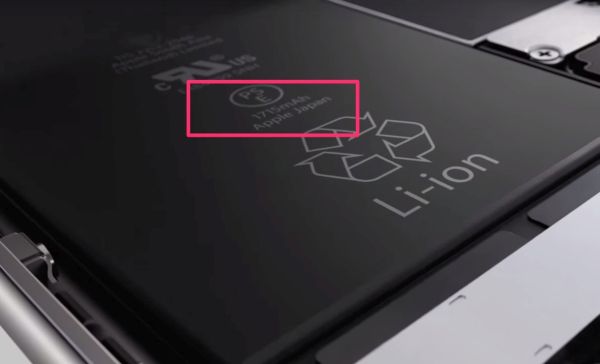
Just like recent rumors mention, the iPhone 6s battery capacity would most likely upset a lot of Apple fans. The company officially confirms what battery has iPhone 6s this year. The official introduction of the upcoming smartphone lineup was held on September 9th. The Cupertino-based giant talked about different projects and revealed the new battery in the special 3D Touch video.

iPhone 6s Battery Capacity

According to the famous iOS creator, its battery capacity of iPhone 6s is 1715mAh. Apple said nothing directly about this detail however the 3D Touch video it created points to the battery smaller capacity. If you were watching ‘Hey Siri’ event this Wednesday you might have also seen the video with the new ‘s’ handset feature 3D Touch that uses the Force Touch technology. This very same video also gives you a glimpse at the upcoming battery.

It is sad that Apple decided to decrease the battery capacity by 95mAh. The previous generation iPhone 6 can boast the 1810mAh battery while the newest iPhone 6s that should be more powerful as it gets more features also gets the 1715mAh battery.

Does Apple also decrease the battery capacity of iPhone 6s Plus? According to previous rumors and suggestions, this model should get 2750mAh battery while the iPhone 6 Plus boasts the 2910mAh one. You can see that this decrease is even bigger than on the iPhone 6 vs iPhone 6s phones.

Would you be ok with getting a brand new gadget from Apple with 3D Touch and smaller battery or not? Hopefully such changes [they can be explained by the new 3D Touch chip and Taptic Engine that are both included in the smartphones 2015] won’t affect the battery life and won’t make it die faster.

You can watch the video about Apple iPhone 6s here.