When iOS 8.2 Will Be Released by Apple for iPhone, iPad, iPod Touch

The final and official iOS 8.2 release date hasn’t been set officially yet [you can still improve your iOS 8 performance] or Apple just doesn’t mention the exact day we’ll see this update. The company’s CEO Tim Cook has already confirmed that the iOS giant will launch the Apple Watch in April, 2015. This means that iOS 8.2 launch date should be before April since this upgrade has to be installed on iDevices for better compatibility.

iOS 8.2 Release Date

When iOS 8.2 will release is not yet announced but experts think it will happen in March. It might be shepherd in the release of the new wearable. Developers and some ordinary users have already installed iOS 8.2 beta 5 which was unveiled in early February for testing.

The iOS 8.2 latest news mentions that if the Watch is on schedule [and this information was already confirmed by Mr. Cook], the timeframe for the next firmware version release has to be sometime in March.
It can even happen that the operating system can be released a month before the Watch shipping time. Some experts believe it can happen.

The rumors have sense as most software versions have their bugs and problems [experts also talk about iOS 8 encryption being an issue of public safety]. If Apple releases iOS 8.2 ahead of the Watch sales it will have time to fix the issues and improve its firmware so that the wearable customers have less complaints.

iOS 8.2 Brought Freak Security Flaw Fix

If you don’t know how to fix iOS 8.2 freak security flaw than you need to check the information below. Just a week ago a fatal “FREAK” security flaw was discovered by researchers. And now learned the source of the problem Apple company has released to public a security update to fix this issue.fix iOS 8.2 freak security flaw

The security flaw touched all Apple’s devices, including Macs, Apple TV, iPhone and the iPad. The Cupertino giant has released a fix for all these devices with the latest software update that was launched on the March, 9. The update brought new Apple Watch app support and many improvements and bug fixes for Health app and to others iOS revealed issues . While the iPad and iPhone fix is included in the iOS 8.2 update, the Apple TV security patch was tucked inside the Apple TV 7.1 update that it received today. For OS X users, the company launched security update OS X 2015-002 update to patch this device’s vulnerability.

As was reported last week in the original article, “FREAK” issue was an result of the government policies that forced companies to create “export-grade” products that made use of weaker encryption practices. While the rules were lifted by the government decades ago, although it was still used by many companies to ship out their products to public. That’s why it is not strange that many users faced with the problem on their iOS devices.

Now you have got all information how to fix iOS 8.2 freak security flaw on your device.

Simple AT&T, Verizon iPhone SIM Unlock in 2015: Sprint Out of Luck

Can I unlock my iPhone 6 in the USA [learn what unlocked iPhone means to customers]? If you are locked to AT&T, Verizon or T-Mobile you should have no problems in getting iPhone unlock in 2015 because it has become fully legal and simple to do this, but only if you are not locked to Sprint having a smartphone that was purchased before March 2015.

iPhone SIM Unlock in 2015

The procedure surely has its caveats but it is overall much easier to achieve what you want [here is the full list of new requirements for SIM unlocking]. We’ll explain how to unlock iPhone in the USA if you meet the eligibility rules which are not that hard to meet. Firstly, you have to pay off your Apple smartphone if you chose it through an installment plan [the plan term has to end]. Secondly, your contract has to be over in case you got a subsidized model with a 24-month contract.

Don’t smile yet, because there is another moment you have to pay attention at. The age of your iPhone is now highly important. For example, if you have Sprint iPhone 6 or another model locked to this network and it was sold before February 11, 2015 you will have troubles with it as Sprint will not unlock it for you that easy. This is the only tricky carrier right now.

Sprint iPhone Unlock Policy in 2015

The mobile operator is eager to unlock your handset for foreign use but it won’t do the same for older gadgets to be used on the U.S. networks. This company used CDMA standard for its smartphones which can’t work on GSM networks and all Sprint iPhone models sold in early 2015 and in the past were built to this standard.

The carrier notes that it just doesn’t have technological procedure that could unlock phones for use on different American networks.

If you purchase Sprint iPhone 6 or 6 Plus this March, you can call 888-211-4727 and request an unlock to use the cell phone with other U.S. mobile operators.

T-Mobile iPhone Unlock Rules for 2015

This carrier is eager to unlock up to 2 smartphones per line within one year period. You have to be active for at least 40 days before you are eligible for the service. You can call 1-877-746-0909 to make sure you can use the service. If you need to unlock an Android smartphone you might be able to use special T-Mobile’s app and do everything yourself. Sadly, this doesn’t work on iPhones.

AT&T iPhone SIM Unlock in the U.S.

If you are a prepaid subscriber you have to use your iPhone for a least half a year before you can order full unlock from AT&T. As always, you have to have a good account and meet all the requirements set by the carrier in order to request unlock and become SIM free in a 2-days period.

Verizon iPhone Unlocking Policy

All 4G LTE Verizon smartphones are shipped unlocked, so there is no need to specially request this service from this carrier. If you have a 3G prepaid iPhone you should contact Verizon and order the unlock.

If you have the iPhone 6 or 6 Plus and meet all the requirements you can order unlock service from your U.S. carrier and get it for free.

Ting Activates Unlocked iPhone 6 / 6 Plus Preparing to Launch GSM Service

Ting U.S. cellular is not an ordinary mobile carrier. This is virtual network operator that operates using Sprint CDMA and 4G networks. The company has big plans for March as it wants to purchase data capacity from a GSM operator. Ting GSM service will allow iPhone 6 and 6 Plus owners access LTE, 4G, 2G and 3G voice networks.

ting-iphone-6-us-virtual-carrier

The new Ting iPhone plan allows customers pay for what they use. The company can now support only particular devices, but it should soon get access to a big variety of brands with GSM support.

Ting iPhone 6 and 6 Plus activations have already begun. The virtual carrier activates unlocked models for now [read about the new phone unlocking policy in the United States], but it assures that once Samsung releases its Galaxy S6 or Google offers a new smartphone, subscribers will be able to sign up for Ting and start using its plans at once. Such a statement was made by the carrier’s VP of Marketing Michael Goldstein.

It is rumored that Ting is planning to buy capacity from T-Mobile. This will unlock Ting from being tied to old Sprint iPhones that are out of contract and unlocked. Sprint had a lot of restrictions for its MVNOs, but the carrier’s rules have recently changed and you should soon get a chance to insert a Ting SIM card into any GSM smartphone that works on T-Mobile frequency to get the signal.

The carrier will also work with Sprint and Verizon CDMA smartphones.

iOS 8.2 Firmware Is Now Available For Download

Now it is possible to download iOS 8.2 firmware, as yesterday, March 9, together with updated MacBook Air(s) and Pro, the new 12.1-inch MacBook with Retina Display, and the Apple Watch, Apple company has also launched iOS 8.2 to public.

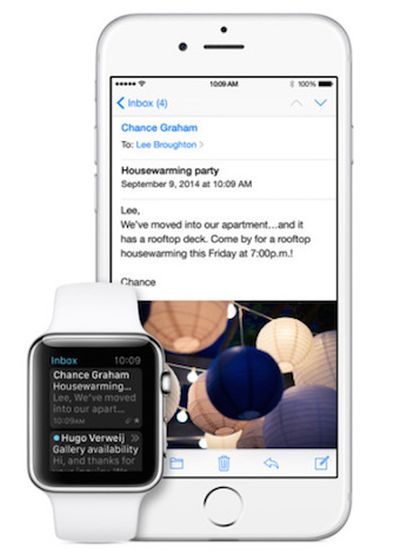
This latest iOS version comes with backend support of a new “Apple Watch app” that lets users customize and modify certain aspects of the wearable device.

download iOS 8.2 firmware

The companion Watch app brought many features to control the wearable’s software. It will let users to setup their friends and relatives, customize notifications, browse apps for it and many others.

As it was shown onstage on March 9 by CEO Tim Cook, this dedicated Apple Watch app is capable of arranging its home screen, syncing with the device, and more. This latest iOS 8.2 software update also comes with a huge amount of bug fixes for some revealed issues connected with iTunes, Music app, Siri, Bluetooth calling, Calendar. It also gained many improvements for Health app, increased the stability enhancements for Mail, Flyover in Maps, Music and improves VoiceOver reliability.

The iOS App Store is gaining a new section that highlights apps compatible with the Apple Watch for download. Some noted examples include the astronomy aid Dark Sky, transit tool Citymapper, and the Nike+ Running fitness tracker. The Apple Watch itself is settled to be released to public on April 24.

You can download iOS 8.2 firmware on your device with bug fixes and a patch for the FREAK secure transport flaw from March, 9:

iOS 8.2 for iPhone:

iOS 8.2 for iPad:

iOS 8.2 for iPod touch:

iOS 8.2 Release Notes For Launch Date

iOS 8.2 release date notes leaked few days ago into internet suggested that the new software update could be released on the first week of March.

Now that the first week of March is here and till the iOS 8.4 update will see the public eye we can look through its release notes that gains some bug fixes and improvements for the Health app and of course get users prepared for the Apple Watch launch.

ios 8.2 release date notes

According to reports the Cupertino company held back on the public launch so it could release a final beta to its carrier partners and employees. This final piece of software apparently carriers 12D508 build number, and this is the one that’s being sent out to carrier partners.

Due to the fact that Apple company will have big “Spring forward” event scheduled for March 9 it makes a bit more sense that the iOS 8.2 public launch will be on that day.

This software update should also fix a security issue that was discovered recently, called “FREAK,” that Apple has already confirmed it would be fixing soon.

iOS 8.2 gained plenty of betas launched for it over the last several weeks, and there’s not much we don’t know about the mobile operating system at this point, so a public release should very soon.

The report introduced the full changelog for iOS 8.2, which focused on Health and Fitness.

Health App improvements bring the ability to select the unit of measurement, add a privacy setting and improves stability when working with large amounts of data. The update fixes units for vitamins and minerals and brought fixes for Health data and for graphics.

iOS 8.2 brought stability enhancements for Mail, Flyover in Maps, Music and improves VoiceOver reliability.

There are also many bug fixes for some revealed issues connected with iTunes, Music app, Siri, Bluetooth calling, Calendar.

All the details of iOS 8.2 release date notes we will see on the stage on March, 9.

Steps to Activate iPhone After Factory Unlocking [Several Methods]

Sometimes you come across iPhone activation problems that you wish to fix as soon as possible. IMEI unlocking method has become very popular but it requires users to activate their smartphone using iTunes and this might cause an issue.

I’ll list a couple of methods that will help you to successfully activate iPhone factory unlocked with IMEI. Don’t worry if you get an error that iTunes can’t “continue with your activation” right now. Follow one of the solutions provided below and iTunes will finally restore your iDevice.can't activate iphone
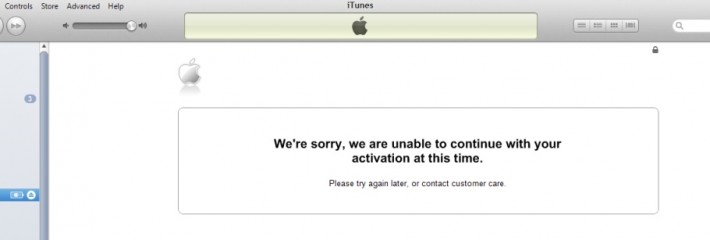
So if you see such messages:

“We’re sorry, we are unable to continue with your activation at this time. Please try again later, or contact customer care”

“ Your request couldn’t be processed. We’re sorry, but there was an error processing your request. Please try again later.”

we will try to fix them here or at least find out the reasons.

The problem can happen with anyone who has hactivated the gadget with Redsn0w / SAMPrefs, jailbroken with Absinthe, Evasi0n, Redsn0w, unlocked with different methods [SAM, Turbo SIM, Gevey SIM, Ultrasn0w], downgraded to previous firmware versions. It can also happen if the smartphone has been stolen, blocked, blacklisted, lost, etc. The error doesn’t depend on your iPhone IMEI unlock service. It’s the activation problem. This is what you can do to fix it.

Fix 1. Activate with No ZIP Code and SSN

We all know that a lot of customers like to make purchases on eBay. It can happen that you get an iPhone that requires an activation and needs your Social Security Number along with the billing ZIP code. This happens when the smartphone’s original owner hasn’t activated it after purchase. You are able to activate iPhone without SSN and zip code.

Fix 2. Refurbished or Replaced iPhone IMEI

Some refurbished smartphones get the problem when Apple activation server doesn’t recognize the IMEI code and doesn’t authorize it. You can try to put such an iPhone into DFU mode and insert the SIM card of the carrier it is locked to restore. If this also doesn’t help, you should contact the Cupertino company’s support to solve this issue as such a device can’t be unlocked and activated.

The same situation is with replaced iPhones. The IMEI of factory unlocked iPhone can be replaced with locked so Apple can’t find the correct (unlocked) IMEI and can’t activate it. In this case contact Apple.

Fix 3. DDoS Attacks

Sometimes the activation servers that belong to Apple suffer from DDoS attacks. This causes your device activation fail. Just wait a bit and try to activate iPhone factory unlocked once again. iTunes also suggest to “try again later” because of that.

Fix 4. Blocked / Barred IMEI

The smartphone might be barred / blocked by the carrier. There are a lot of reasons why this might have happened. It could have been stolen or reported as lost. You should purchase only activated iPhones in order to avoid this problem or ask its original owner to activate the handset using the SIM card of the operator it has been locked to.

If you got blacklisted iPhone you can still unlock it using packages for blocked devices.

Fix 5. SAM Activation Unlock

Here is what you should do if you wish to use SAM activation unlock method. It is important to insert the SIM card you have been locked to and activate the device, and only afterwards you can order factory IMEI unlock service.

Here is a short instruction on how it all works.

Firstly, you should jailbreak the device before you activate your factory unlocked iPhone with SAM.

Secondly, you add http://repo.bingner.com to your Cydia sources and install SAMPrefs app found in this repository.

Thirdly, you go to Springboard and find Yellow icon that says SAMPrefs. Open it and go to utilities where you are able to de-activate the handset.

Fourthly, you insert any SIM card into iPhone factory unlocked and launch iTunes to activate it.

In case you placed an order for factory unlock which fails to work, try the following thing. Restore your gadget and activate iPhone that has been factory unlocked with the original SIM card it was locked to by Apple. Restore it once again and insert any other SIM except the original one to activate it before you unlock using Gevey SIM, Turbo SIM or Ultrasn0w.

Fix 5. Blacklisted IMEI after Using Sn0wbreeze / TinyUmbrella

iPhone users who used either TinyUmbrella or program Sn0wbreeze for jailbreak / upgrade / downgrade must reset their hosts file on PC to activate the smartphone. Both tweaks change this file. When everything was reset you must update, find a different computer and insert the SIM card your handset was locked to activate successfully. You can permanently unlock the gadget once you have completed the steps above.

Fix 6. Activation via Wi-Fi

You are able to activate a factory unlocked iOS device via Wi-Fi Connection. It should be active. As soon as you got a confirmation from the company that performs factory IMEI unlock that your device has been unlocked, you must take out the SIM card the iPhone was locked to and insert any other SIM. Launch iTunes, wait till it detects your gadget and greets you with an “Activation Required” message. Connect to your Wi-Fi network and the iPhone will do everything else on its own.

Fix 7. Activation after Redsn0w Unlock

In case your iPhone has been unlocked you can try to activate it using Redsn0w. You must firstly download the latest version of this program. Secondly, you should connect the iPhone to your computer. Thirdly, you must launch Redsn0w and press “Jailbreak” which will put the device into DFU mode.

Wait till Redsn0w detects your build version and allows you deactivate [remember to un-check all features presented with this option]. Take the SIM card out after deactivation is complete and turn off your iPhone.

The last step is here. Turn your smartphone back on. Connect it to iTunes and insert the SIM card. You will be happy as your gadget should be unlocked.
How to Unlock Blacklisted or Clean IMEI of Orange Spain iPhone

Good news for all users who have iPhone locked to Orange Spain carrier. Even if your iPhone is blacklisted / blocked or barred you can use this service to get free from the locked chains.

Even if you are not in Spain right now you can use this package as we provide the remote service. We unlock all IMEI of Orange iPhone from Spain. It doesn’t matter if your iPhone is in contract or still out of contract. Just follow the guide below to find out how to correctly make the order.

Note: This package will not unblock iPhone from Orange. We provide unlocking services only.

Before placing an order first that you need to do is to find the IMEI number:

  • Take your iPhone, open Settings, go to General – About and scroll down till you find it.
  • Open Phone app and type *#06# using keypad. You will see IMEI on the screen in a second.

This unlocking solution is absolutely legal and there is nothing to be worried about. Read important information below to successfully unlock blacklisted Orange iPhone.

Important Notes and Requirements

  • This service DOES NOT unlock blacklisted Orange iPhones which were reported as stolen. It supports clean (not blacklisted) IMEI as well.
  • Make sure that your iPhone 6 Plus, 6, 5S, 5C, 5, 4, 4S, 3GS, 3G is really locked to Orange Spain. You can check iPhone carrier if you don’t have such info. There are NO REFUND if iPhone is not locked to Orange Spain.
  • Make sure that iPhone is really blacklisted in Spain by Orange carrier. You can use iPhone Europe blacklist checker and confirm the status.
  • This service doesn’t unblock iPhones. The device will be still blocked after factory unlocking. This means that iPhone can be used on any SIM card except from Spain and in Spain.
  • Only activated iPhone can be unlocked.
  • Read carefully our Terms and Services before making an order.

If your iPhone is clean or blacklisted by Orange you can make an order right now and we will do our best to deliver the results as soon as possible.

Attention: If you are a wholesaler or have a Phone shop you can register on digitalunlocking.net and run your own unlocking business.

Advantages of Unlocked Blacklisted iPhone

  • We are the fastest unlocking company and we provide professional service and cheap prices.
  • Your blocked iPhone will be unlocked permanently.
  • We offer the lowest prices for blacklisted iPhone unlock.
  • Official unlocking iPhone Orange is lifetime and your device will never be locked again.
  • We provide really fast and 100% working official unlocking solution.
  • Money back guarantee if iPhone will be still locked to Orange carrier after using our service.
  • You can switch SIM cards and enjoy any GSM carrier whenever you are in our beautiful world.
  • Forget about roaming when you are traveling. Just insert local SIM card and enjoy phone calls.
  • There is no need to go somewhere to get unlock. We offer remote service and you can finish unlock from your home (If you have internet connection).
  • The warranty and all other available services from Apple remain valid after factory unlock.
  • The process will not harm your device.
  • You don’t have to install any additional software. Only connect it to iTunes and voila.
  • It doesn’t matter what iOS version, baseband, bootloader and other stuff running on your iPhone. We unlock any.
  • You can update, sync and restore iPhone in iTunes and it will never be locked again. If Apple will release any new iOS firmware version go on and try it if you like.
  • Your apps and most preferred features as well as not most preferred will remain working as usual after unlock.

How Does the Factory iPhone Unlock Process Works

  1. Fill in the order form with required information like IMEI, email, iPhone model, and other info like serial number if necessary.
  2. Click Buy Now button and process the payment on PayPal. If you don’t have PayPal account choose the option “I don’t have PayPal account” then you will be redirected to PayPal.
  3. After the payment, your unlocking request will be automatically sent to the carrier. In this case it can’t be canceled and refunded.
  4. After the payment just do your things and wait for the good news.
  5. You will receive email with detailed instructions on how to compete factory iPhone unlock in iTunes. If you don’t see email in your inbox folder, check spam/junk folder or contact us. Our support team will be always glad to help you.
  6. Official and permanent iPhone unlock only applies during business hours (9 AM – 6 PM PST, Monday-Friday). No turnaround time guaranteed.
  7. Feel free to contact us in case you have any questions regarding factory unlock blocked iPhone Orange and our company will be always glad to help you.

Virgin Mobile No Longer Offers iPhone 6 and iPhone 6 Plus

There was talks about Virgin iPhone 6 and iPhone 6 Plus release. But unfortunately Virgin Mobile USA officially doesn’t offer any Apple’s iPhone lineup model.

The Sprint subsidiary claimed that carrier didn’t plan to offer the iPhone 6 and iPhone 6 Plus shortly after their launch. Although they used to offer iPhone 4S, the iPhone 5S and iPhone 5C. During the holiday sales the carrier didn’t show any Apple’s smartphone model, but the online store pages for the earlier Apple’s devices simply message “out of stock,” leading someone to expect their return in the near future.

Virgin-iphone-6

Previously, Virgin Mobile USA presented a dedicated webpage with details about the iPhone models it offered, including that they were available for prepaid and unsubsidized prices. Most recently, carrier offered iPhone 5s, iPhone 5c, and iPhone 4s models with prepaid plans with the using Sprint subsidiary’s network requirement. That page now merely redirects to the carrier’s full range of smartphone offerings, minus any mention of Apple’s devices.

If you will try to visit the Virgin Mobile online store’s search function, the results will still present several Apple’s smartphones listings, including the 5C and 6, that, again, the carrier never offered.

After the iPhone 6/ 6 Plus release Sprint has been offering this smartphones and continues to do it. But it is still not clear if Virgin’s dropping of the iPhone is related to Sprint’s previous limitation on subsidiaries that they wait to offer the latest smartphone models.

It is really interesting Virgin Mobile can become the first U.S. carrier that once offer the iPhone and then stop. Unfortunately for them, there are plenty of other carriers to choose from for customers are looking for iPhone plans, including those with prepaid plans. So don’t try to search Virgin iPhone 6 or iPhone 6 Plus.