How Is It Possible to Run Windows 98 on iPhone 6 Plus?

Can you imagine the new iPhone 6 Plus running Windows and not the ordinary iOS firmware? I personally thought this was just a trick of a hacker who has jailbroken his Apple smartphone to install Windows on iPhone but I was mistaken. It looks like one Chinese users was able to do the trick even without jailbreaking which sounds like much fun.

If you even consider to run Windows 98 on iPhone 6 Plus or other model of the Cupertino famous smartphone you can try to contact user xyqo58775 [he is definitely using bbs.feng.com forum and this is where you might be able to reach him] and ask him to explain the trick for you. I don’t want to have Windows on the smartphone when I have it on my laptop but it can be cool to trick someone’s friends and relatives by porting Windows system on the iPhone.
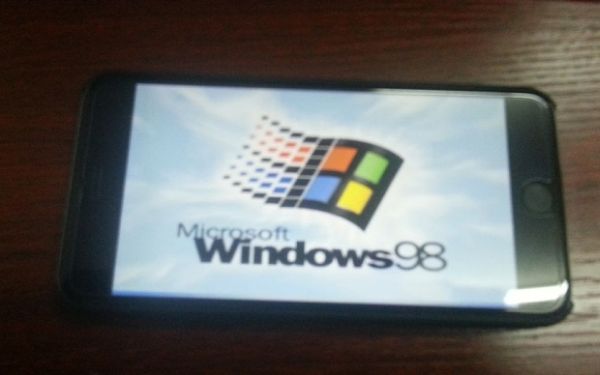
iphone 6 plus running windows
Anyways, the Chinese guy says that he also tried to install Windows XP but failed. He assures that it can be done in theory but when you try to do this in real life the installation just gets stuck at one point and it is impossible to fix the issue and complete it.

By the way, xyqo58775 has even shared the detailed installation guide for anyone who wants to run Windows 98 on iPhone 6 Plus but everything is in Chinese, so do this at your own risk only. The step-by-step instruction is posted here. Maybe someone will soon translate it into good English as Google can’t do the job perfect and can make you fail instead of succeeding.
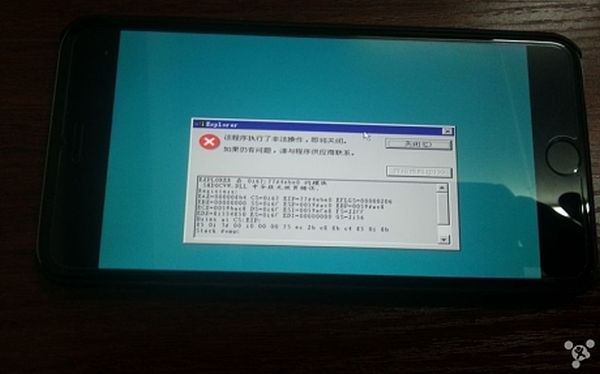
iphone-6-plus-running-windows-98
A couple of years ago hackers from Russia also installed Windows on the iPhone [it was the 3G model back then], but they jailbroke it first before being able to port Windows 95 on the smartphone.

AT&T Launches New iPhone Next 24 with Longer Instalment Plan

Have you not got the new iPhone 6 or 6 Plus yet? Since the holiday season is coming and a lot of users are dreaming about finding the new Apple smartphone under their Christmas tree, U.S. carriers continue to surprise and present new offers: lower-cost data plans and deals. The new AT&T Next 24 plan, for example, comes with a longer instalment plan.

This upcoming AT&T Next iPhone plan comes with 30-month instalment option which is longer than it was previously available. Starting on November 9, 2014 customers can get AT&T Next 30 months of instalment payments with a down payment of $0.

at&t next 24

Right now the same plan offers only 20 or 24 months of payment period which will soon be expended to 30 months. This interesting and just-in-time-for-holidays AT&T iPhone data plan suggests the payments between $10-$50 and this includes the opportunity to upgrade to the next iPhone 7 [or whatever Apple calls its next 2015 handset] after 14 months. Of course, the device will have to be in a good condition so that the user gets to use this option.

According to AT&T CMO David Christoper, consumers have enjoy the new AT&T Next plans and thanks to the big choice of instalment options Americans can select the gadget based on their budget.

Users who wish to switch to AT&T from another American mobile company can get a $150 bill credit, according to the company’s policy and current deals. So keep an eye on November 9 as this is when the new offer becomes available across the USA.

Carriers Report Huge iPhone 6 VoLTE Increase in U.S.

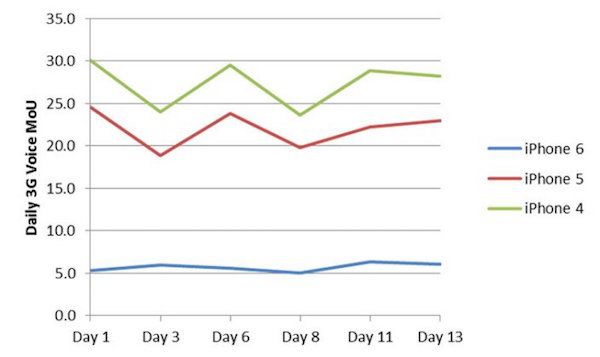
Apple’s two new smartphone models have influenced VoLTE data usage in the USA. Local carriers report that users began to use the new 4G LTE network more and make more calls over it. iPhone 6 and VoLTE seem to be closely connected as the more customers get the 7th-generation iDevice the more VoLTE usage increases across the country.

Users can play with their iPhone 6 VoLTE settings and turn the new option off in the areas where there is no 4G LTE coverage, but in the biggest cities such coverage exists so such an option is not needed that often.

iphone 6 volte settings
Thanks to VoLTE users can enjoy better call quality and such quality is even worth buying the new smartphone that is LTE-enabled. When phone calls are routed through 3G, they can’t boast the good quality. But when they are routed through LTE, the quality is so incredible that you can spend hours and hours talking to your friends and family.

As carriers note, users who are still using iPhone 4, 4S, 5 and other models that are not compatible with VoLTE have to make voice calls through 3G and 2G networks. This is, however, not the case with iPhone 6 Plus and iPhone 6 owners who enjoy all the benefits of owning their smartphone. Because of them, American mobile companies experience a surge in VoLTE phone calls and this increase has begun in September when Apple officially launched its new smartphone line.

Apple Black Friday Deals 2014

Unlike huge retail stores, Apple doesn’t like to release its own Black Friday ad and each year the Cupertino-based tech giant offers its Apple Black Friday discount not even a day or couple of days before the event, but a few hours before the stores open.

Apple Black Friday 2014 date is the same as in other stores across the United States. It is November 28 and this year, according to some sources, the iPhone maker is going to open its retail stores an hour or two hours before its regular operating hours.

black Friday 2014 apple store

Black Friday 2014 Apple Store schedule sounds like 8-9 am across the country. A year ago, Apple also opened the stores earlier than usual. We don’t know about Apple Black Friday deals for 2014 yet as the company won’t publish the ad and name the pricing. It can offer some discounts to customers through gift cards or store pricing. Back in 2013, the company offered $50-$150 gift cards to its American consumers. Maybe this year the situation will repeat and users will get the gift cards and not direct discounts.

Black Friday 2014 Apple offers are to come soon as the main shopping holiday is coming in a couple of weeks from now.

Do you believe this year’s holiday season can offer nice discounts on Apple hardware or only gift cards in the U.S.? What would you like the company to offer you, as a customer, on Black Friday, November 28?

AT&T and Verizon Plan to Introduce VoLTE Interoperability in 2015

iPhone and other smartphone users in the U.S. should know about the upcoming VoLTE AT&T Verizon project. The two carriers are going to claim VoLTE interoperability somewhere in 2015. Even though everyone knows that AT&T and Verizon use different technologies in their work, GSM and CDMA, but this doesn’t look to be a problem in the future as they are getting ready to move forward.

at&t Verizon volte interoperability
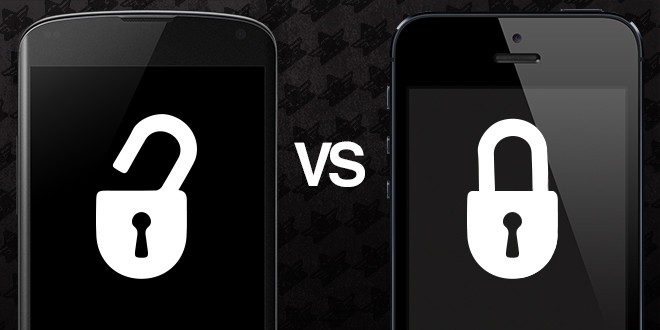
We have heard about the possible AT&T and Verizon merge in the past, but this didn’t happen. AT&T Verizon VoLTE interoperability is surely an interesting news to their current and future subscribers. Right now when you buy an AT&T iPhone 6 or Verizon iPhone 6 Plus [or any other smartphone model] you become locked to your carrier’s network and you cannot switch to a different operator unless you order iPhone 6 AT&T factory unlock service [or unlock for any other smartphone, carrier]. Of course, users who purchase the iPhone directly from Apple and pay the full price for the device are unlocked, but most customers prefer purchasing the locked smartphone and have it either unlocked or stay locked within one network.

AT&T and Verizon VoLTE-to-VoLTE interoperability will allow AT&T customers to call Verizon customers over LTE networks and Verizon subscribers call to AT&T users. The companies haven’t announced when they are planning to launch this new service in 2015, but no matter when it becomes available it will mean the better call quality and cooler connections between the two carriers.

What do you think about such VoLTE calling options? Would you like AT&T and Verizon to merge their customers this way, at least inside VoLTE networks?

What If AT&T iPhone Locked After Factory Unlock

Factory unlocked iPhone locked after update to iOS 8 is the issue that appears with the AT&T iDevices that run iOS 7 and upgraded to iOS 8. iOS 8 was released by Apple and had several updating, the last one is 8.1 version.

For users that decided to unlock AT&T iPhone or upgrade to iOS 8 should know this important information. Not to be relocked after updating to iOS 8.1 you need to activate iPhone after unlocking via WiFi.

Here we have short guide how to activate AT&T iPhone locked after update to iOS 8. Not to get into iOS 8 update iPhone relock problem follow this steps. Please note that iOS 8 is a little bit buggy. With this issue you can use again factory iPhone unlock service but you can pay twice to resolve this problem . we will provide you with correct AT&T iPhone activation after unlocking and helps your device to stay unlocked for long time. And also never again become relocked even after iOS 8 upgrading.

Important Note: We are not responsible for such iOS 8 bug and the service can’t be refunded if factory unlocked AT&T iPhone got locked again after updating / restoring the firmware.

iphone locked after update ios 8

For those who are going to order iOS 8 AT&T iPhone factory unlock service you need:

Step 1. Before placing order for iPhone unlock please install iOS. In this case it is recommended to use WiFi update better than iTunes update.

Step 2. After running the new iOS 8 you can order factory unlock for locked AT&T iPhone .

If you have already unlocked your iPhone using factory unlocking service but still on iOS 7, please do the following :

Step 1. After receiving email that your iOS 7 iPhone has been unlocked, you should activate new unlocked status.

Step 2. Remember on this case use Wi-Fi iPhone activation guide not iTunes.

Step 3. Find an active WiFi connection.

Step 4. Take the original SIM card or remove the carrier your iDevice are locked to and insert other SIM that was not supported before.

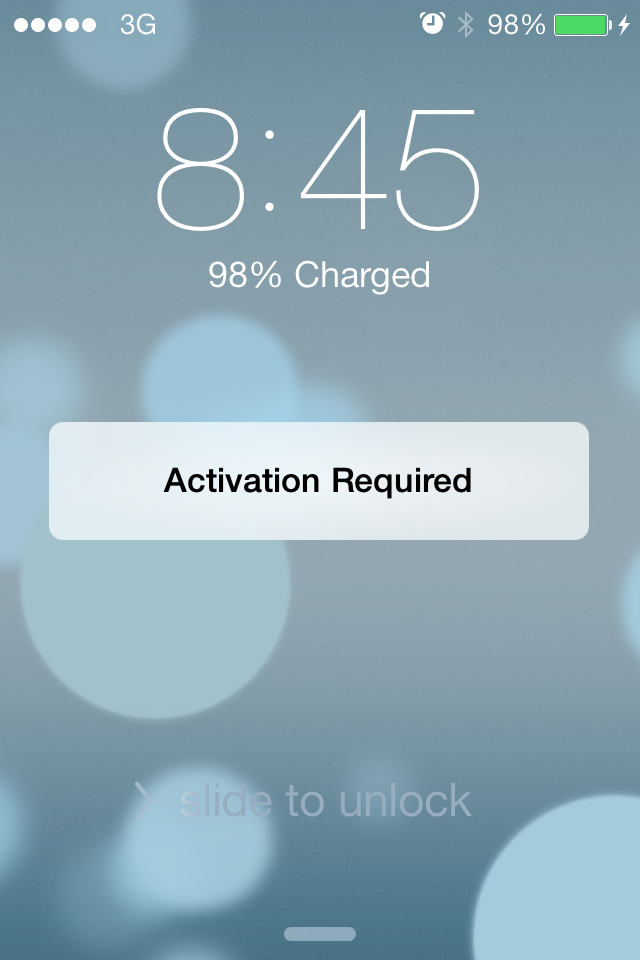
Step 5. On the screen you’ll see table “Activation Required”

Step 6. Connect your iPhone to active WiFi network and iOS system will do all the work needed and then activate your new status.

Step 7. After you iDevice has beeb activated you can install iOS 8 using WiFi or iTunes. You got rid from relocked problem.

Don't Update / Restore Unlocked iPhone to iOS 8 in iTunes After Factory Unlock

Because of the recently found bug in iOS 8 factory unlocked iPhone locked after restore or update via iTunes. We will show how to avoid such bug.

Attention: Our unlocking company doesn’t responsible for such issue as it comes from Apple’s end only and can’t be considered as uncompleted service. The company is not responsible for the iOS 8 bug and there is no refund if iPhone got locked because of iOS 8 bug.

iOS 8 update has been warmly greeted by a lot of iPhone, iPod touch and iPad users. Apple reported that over 50 percent of its active users have already installed this newest version of mobile operating system for iDevice.

unlocked iphone locked

According to the unlocking instructions in some cases the user needs to restore unlocked iPhone to the latest firmware in iTunes in order to complete unlock. But because of the iOS 8 bug unlocked iPhone can be locked after restore and here we will show you how to avoid such issue in two different ways.

If your iPhone is factory unlocked and you wish to restore or update it to iOS 8

After getting the email with instructions that follows you to complete unlock in iTunes DO NOT activate / restore / update your device via iTunes. You can do the same true WiFi:

Step 1. Find and connect to the active Wi-Fi connection. Make sure that the battery of your iPhone is fully charged.

Step 2. Insert the SIM card of the carrier you try to use. Not the SIM card of the carrier to which your iPhone was previously locked.  

Step 3. When you will see the message – “Activation Required” click next and follow the activation steps.

Step 4. After activation you can install iOS 8 using WiFi and after updating the iPhone will be still unlocked.

After the steps above you can use iTunes if you need to restore unlocked iPhone and it won’t be locked again.

If you plan to order factory unlock and your iPhone is still running the lower version than iOS 8

Step 1. Restore or update your locked iPhone to iOS 8 before placing an order. But still it is better to use Wi-Fi  for that.

Step 2. After your iPhone will be running iOS 8 (8.1 / 8.1.1 and so on) you can place an order without any problem and you will get unlocking results as fast as we can.

Should I update to iOS 8?

We don’t want to diss he new firmware and it has a lot of useful features. We just pay your attention on such bug and advice how to avoid it. Apple has began to send out emails to remind smartphone and tablet users about iOS 8 upgrade. The company waited for less than two months after the official iOS 8 release and already trying to push customers who are not in a hurry to upgrade to iOS 8 to do so.

Some people are getting emails from the Cupertino-based giant where the famous iPhone maker is gently nudging its consumers to take the step and join those 50% who are already running iOS 8, 8.0.1, 8.0.2 or 8.1 while Apple itself continues testing the next iOS 8.1.1 which might be unveiled later this month.

According to Apple, once you upgrade you can enjoy a lot of interesting options not preset in iOS 7 and earlier firmware versions. For example, you can get iCloud Drive, Health app, Continuity and so on.

Verizon iPhone 6 / 6 Plus Users Get New Data Promotion and Port-in Deals

Do you have the iPhone 6 Plus locked to Verizon U.S. network? Do you own Verizon iPhone 6 or any other smartphone and use More Everything data plan? The company offers the new Verizon data promotion 2014 and also has another deal you might like to hear about.

Verizon data promotion 2014
Current and new Verizon More Everything plan users can use Verizon port-in offers and the new data. Since the American carriers continue their war for attracting new customers and keeping their current users, AT&T, Sprint, T-Mobile and Verizon Wireless have to be very creative and offer more and more deals to keep people interested and ready to benefit from their mobile operator.

Verizon port-in deal is not the only offer you can get. Beginning on November 1, activated Verizon iPhone 6 More Everything users and other mobile device users who are signed up for this plan can get more data for the same price they used to pay.

The starting data plan still costs you $80 a month but you will be served up to 10GB of data each month instead of 6GB. This won’t last forever as the offer is limited in time. The most you can get is up to 15GB of data per month for $100.

Is Verizon More Everything plan a good deal? It’s all up to you to decide as all companies have their pros and cons. Verizon offers port-in credits to users who wish to switch over to this network and customers who get the hold of this offer can receive up to $150 in credit for switching their carrier.

How to Switch Between 2G / 3G and LTE on iOS 8.1 iPhone

How can you turn off LTE on iPhone iOS 8? Is there an easy way for iPhone switching between 3G and LTE for your cellular data? Read this instruction and you’ll be ready to switch your 2G / 3G / 4G for cellular connection. There is nothing complicated about this. It is as simple as when you switch on LTE iPhone 6, 6 Plus iOS 8 – 8.1 etc.

switch on lte iphone ios 8

If you remember previous iOS 7 system and how iPhone switches between 3G and LTE, such option was gone after iOS 8 update. Apple has decided to remove it and users who liked to turn off 3G connection and use 2G slower network instead when being in the areas with poor 3G coverage couldn’t do this any more in iOS 8. Thus it became hard to preserve your battery life and use reliable connection on the new operating system introduced by the Cupertino-based giant in September 2014.

How to Change 3G to 4G LTE iPhone on iOS 8.1

Step 1. Make sure you have installed iOS 8.1 as this feature doesn’t work on earlier iOS 8 versions.

Step 2. Open Settings on your iDevice.

Step 3. Select Cellular / Mobile menu.

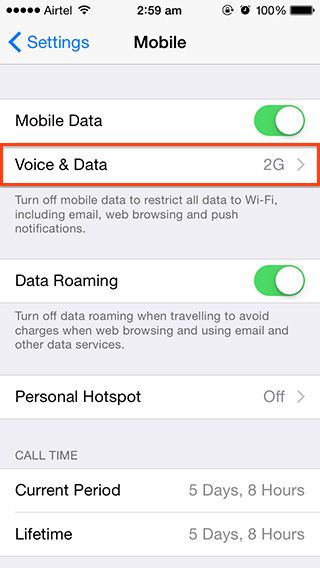
Step 4. Click on Voice & Data.

turn off lte iphone ios 8

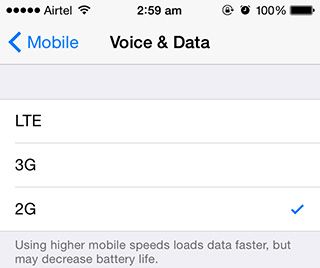
Step 5. You will see the list of available connections, including 2G, 3G and 4G LTE. Select the option you wish to use.

iphone switching between 3g and lte

Step 6. Your gadget will now use the right speed for your cellular data.

how to change 3g to 4g lte iphone

P.S. If you don’t see the menu for Voice & Data you have to connect to iTunes and choose Check for Updates to select your carrier settings. Download the most recent settings and you’ll get the option.

FTC Suing AT&T for Unfair Data Throttling

Users who complain about AT&T iPhone unlimited data throttle or other device data throttling from this carrier are not alone as this problem was noticed by the Federal Trade Commission. The result is predicted: the FTC filed AT&T data throttling lawsuit accusing the well-known American mobile company in “unfair data throttling” towards its customers.

It is true that all U.S. carriers are fighting for subscribers and each year this war is getting tougher and tougher. The companies come up with new promotions and deals trying to attract new consumers and keep their current subscribers interested in staying with the particular network.

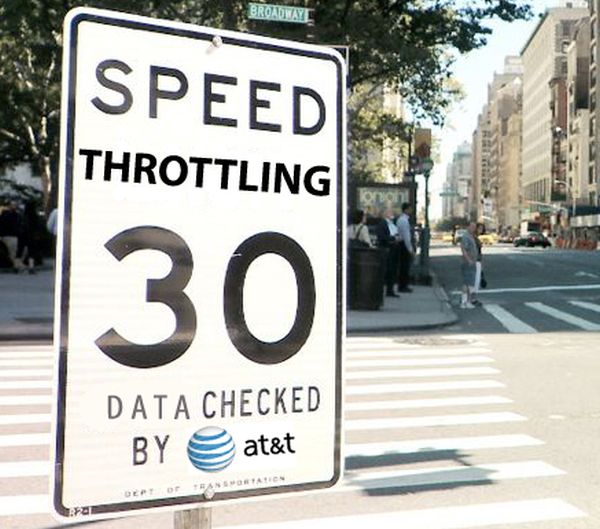
AT&T data throttling is nothing new. All carriers promise to throttle unlimited data plan users for overusing data in busy hours. Still some companies finally realize that such a plan might not serve them well.

at&t iphone unlimited data throttle

According to the FTC [the Comission posted their official announcement in Twitter and through other sources], the carrier promised users unlimited data and instead slowed speeds offering unfair data throttling.

As the FTC notes, the carrier doesn’t throttle data speeds for subscribers who are not using the unlimited data plans. As AT&T says in return, that the claims made by the FTC are “baseless” and the carrier is “transparent” with its contracts and U.S. law.

Have you suffered from AT&T iPhone unlimited data throttle issue or not? What do you think about the FTC’s claims and this lawsuit?