New File Sharing Risks for iPhone and iPad Owners

Different applications for iPhone and iPad have potential risk for Apple fans. File sharing risk exists for iOS users, according to Trustwave research. The flaws are pretty serious so it’s better to know about possible problems and protect yourself before it’s too late.

The issue is related to file sharing iOS applications. A consultant from Trustware [Bruno Goncalves de Oliveira] who researched this problem says that he was working with different apps for sharing photographs, docs and other files. He told eWEEK that various iOS file sharing applications start a Web server on the fruit gadgets and this component isn’t secured enough for safe file sharing and uploading.

apple server status

As Oliveira notes, once an iPhone / iPad user launches such a program, his or her iDevice’s file sharing program can be accessed by others [in other words, anyone is able to share files via it if he / she discovers the gadget on the network]. The programs researched by this expert turned out to lack important security feature.

They didn’t have user authentication or encryption or such options were disabled by default. Reality requires developers to secure their apps using SSL encryption to protect users during Web transactions.

Hackers can easily find iPhones and iPads that have opened file sharing programs. The task is not difficult at all, especially if they are using Multicas DNS tool. Anyone can get such mDNS program and search for devices with open ports.

Well, iOS 7 firware is better protected than iOS 6.1.3, expert assures. He was able to access just the app’s folder and nothing more even on a non-jailbroken smartphone / tablet. The programs that come with a risky flaw include the Easy File Manager and FTP Drive. These apps are named as vulnerable so users should be careful while using them.

You can protect yourself by getting programs from well-known manufacturers and avoiding programs created by unknown developers. You can also get MDM technologies as they can minimize the risk of having data leakage.
Is Activation Lock On or Off on My iOS 7 iPhone?

Question: Hi, I have purchased a used iPhone with iOS 6 and now I am planning to update it to iOS 7. How can I know for sure if its Activation Lock is off or on along with Find My iPhone application? Is it safe to install the latest Apple firmware or should I stay on version 6?

Answer: Hello, thank you for your question. The new iOS 7 can truly bring you some problems making you not happy about your used device. This firmware has Activation Lock option that blocks the smartphone from being used by third-party people if Find My iPhone application is turned on. It doesn’t matter if you simply wish to update to iOS 7 or unlock your gadget and upgrade later on.

check find my iphone

Even if you know the ID / passcode you might forget it one day and, according to Apple, it is impossible to recover this password so you’ll simply get a non-active gadget. Is there a way how to solve possible future problems?

Luckily, iOS 7 Activation lock check service can tell if you this feature is turned on or off. Just check your handset before unlock, restoration, update etc. There is also a solution to users who updated to iOS 7 with Activation lock on and now can’t use their device. Try the distant service and get past Find My iPhone Activation Lock option to enjoy all the benefits of your device.

If the program is on, you get into problem. It is great if you can contact the original gadget owner and get his ID and passcode to unlock the gadget and turn Activation Lock off. This is often difficult to achieve in reality because previous owners vanish when you purchase a problematic device online.

You should be sure that Find My iPhone is off before installing to iOS 7. Otherwise you can get a piece of metal that doesn’t perform. It will be impossible to resell such a device on Craglist, eBay and other sites. You will not be able to unlock it because such a procedure requires restoration through iTunes and you will get stuck on the Activation message without ID and passcode.

How to Unlock iOS 7 Devices: Popular Methods

It is always cheaper to purchase a locked device from Apple and order its unlock. If you happen to own Apple smartphone you can use different methods to unlock iOS 7. Users who had iOS 5 and iOS 6 gadgets remember R-SIM, Gevey, SAM and UltraSn0w methods that helped to become free from one network and get a chance to use any SIM card across the world.

Do these tools work for iOS 7.0.3 iPhones? Is it possible to unlock for free? We are sure there are a lot of curious customers who got their locked handset from Apple or resellers and now want to get rid of being locked to a single carrier.

How to Unlock iOS 7

Gevey Unlock for iOS 7.x

If you remember this method you sadly can’t use it because there is no Gevey unlock for iOS 7 firmware. You can’t perform such unlock so keep looking for other tools. You can use R-SIM but it is not tested yet.

SAM and UltraSn0w Unlocks for iOS 7.x

No matter how good these tools are you can’t use them for iOS 7 gadgets yet because there is no iOS 7 jailbreak. And SAM activation tool and Ultrasnow methods depend on jailbreaking. You have to wait till hackers present a program capable of tethering or untethering the newest operating system so try to use it later.

iOS 7.x Unlock by IMEI Code

Unlike some unlocking methods that were free to use with iOS 6, IMEI unlock tool works for iOS 7.0.3 / 7.1 devices but it is paid for. The service is still affordable so you can easily order it and have your AT&T iPhone iOS 7 unlocked within several days. IMEI unlocking service supports all iPhone models / basebands.

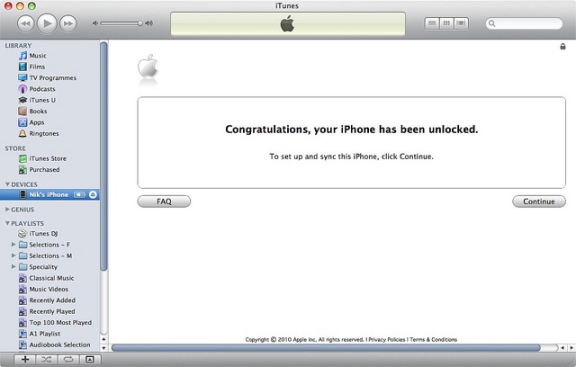
factory unlock at&t iphone

Is it safe to unlock AT&T iPhone on iOS 7 by IMEI? Yes, it is safe and reliable. You need to have a clean IMEI code and an activated smartphone with the network it is locked to. Your status will be changed to “unlocked” in the official Apple database preserving your warranty and allowing you to update to next iOS 7 without losing the status.

Service to Remove iOS 7 Activation Lock / Find my iPhone Feature

Service to Remove iOS 7 Activation Lock / Find my iPhone Feature

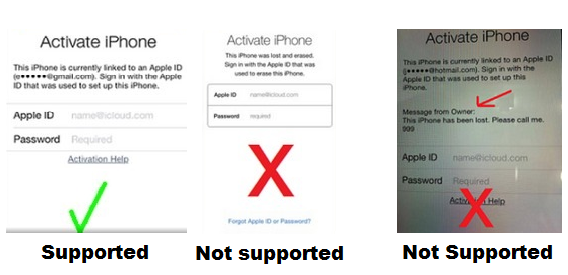
The most recent iOS 7 was presented in September 2013. It comes with Activation lock feature that is turned on automatically if Find My iPhone feature is on. It is impossible to turn off this option manually or via some hacking programs. Only the original device owner can turn it off by entering Apple ID and passcode.

Some users first order iPhone unlock and then start thinking about iOS 7 option once they come up with Activation lock problem that doesn’t allow accessing their Home screen. If you haven’t run Find My iPhone disabled or enabled checker to figure out whether you will face the activation issues or not and now you can’t pass it, we will help you to bypass Activation lock offered by iOS firmware.

icloud-activation-remove

Important Notes

  • This package DOES NOT UNLOCK or UNBLOCK iPhone.
  • Make sure your issue fits the screenshot above.
  • This package doesn’t work for blacklisted iPhones. Only clean IMEI. No refund if iPhone is blacklisted.
  • This package supports iPhone and iPad
  • Add contact@geo-location.site to your contacts to be sure our emails get delivered.
  • Please read Terms and Services before clicking the Buy Now button.
  • Delivery times only apply during business hours, not guaranteed turnaround time. (Business time is 9 am – 6 pm PST, Monday-Friday).

Order our service and you will be able to use the iPhone after upgrading to iOS 7 or restoring via iTunes as usual!

How to Check Find my iPhone by IMEI On Any Apple Devices Before Unlock

Use iPhone IMEI Check if Find My Phone Disabled

Users who are thinking about purchasing, restoring, unlocking or reselling their iPhone should be very attentive. Now, as Apple launched its iOS 7, 8, 9 with Activation lock option, it is important to check Find My iPhone with IMEI using special checker before you get your smartphone from someone or plan on giving your handset away.

However if you stuck on activation screen that asks you to enter Apple ID and passcode use our new package to remove iOS 7 activation lock and turn off Find My iPhone feature remotely.

Use this checker to check IMEI for Find My iPhone feature if it is turned off or on before buying, selling or factory unlocking / restoring iPhone. But first read important notes below.

Important

  • Please read Terms and Services before clicking the Buy Now button.
  • This service doesn’t work for blacklisted iPhones.
  • This package DOES NOT UNLOCK or UNBLOCK iPhone.
  • Due to the fact that services sometimes are overloaded results may come longer that usual. Also there can be delays during the weekends.
  • Add contact@geo-location.site to your mail contacts to be sure our emails get delivered.

RESULTS SAMPLE:

Find My iPhone: On

or

Find my iPhone: Off

The ID and passcode chosen for iCloud account are stored on “Albert” activation server run by the Cupertino-based company. Your device is connected to this server and you must enter the original Apple ID and password each time you wish to erase information on the iOS handset, reactivate it or turn Find My iPhone off. If this application is on, Activation lock is turned on automatically on iOS 7 requesting the passcode even if you have just upgraded to the version 7 from previous iOS 6.

How to Fix Activation Lock on iPhone Running iOS 7

Apple introduced Activation Lock feature when it released iOS 7 version for iPhone users this fall. The new option is tricky. From one hand, it is designed to protect unknown people from accessing your personal information. From the other hand, it gives headache to users who wish to unlock the device they purchased from other people.

Turn Find My iPhone Off Beforehand

The introduction of iOS 7 has changed the rules for iPhone users. Now if the Find My iPhone app is turned on, you are not able to update to new iOS version or unlock your handset without knowing the Apple ID and password of iPhone’s original owner.

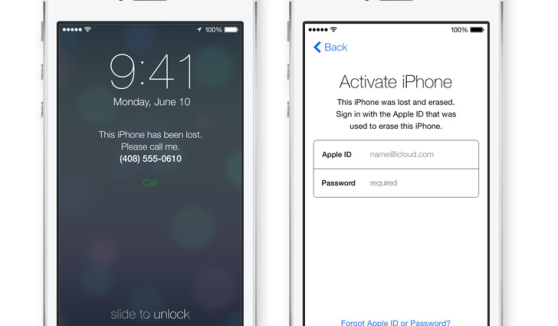
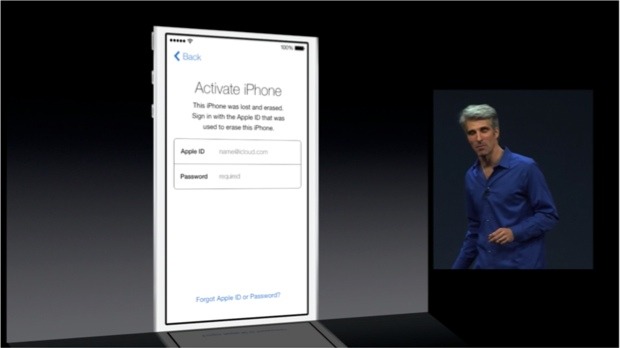
ios 7 activation error

This ID and passcode are stored on the Cupertino-based company’s servers. It is impossible to turn off Find My iPhone, reactivate the gadget and erase information on it without entering them. This happens because of the Activation Lock feature presented in iOS version 7 and up. You turn it automatically when you enable Find My iPhone program or when you decide to install the latest firmware [updating from iOS 6 or earlier operating system].

What You Must Do Before Ordering iPhone Unlock

If this is your device purchased from Apple or official carriers you should simply turn off the application. Users who purchased their smartphone from someone on eBay or other platforms should make sure the previous owner erased all his information, settings and disabled Find My iPhone for you.

ios 7 activation lock

Only after you make everything to fix iOS 7 activation error, you can place iPhone unlock order online and have it successfully unlocked by IMEI number.

What You Must Do After Your iPhone Unlocked

Note: We make no refunds if we unlock your handset on iOS 7 and you are stuck with the Activation lock issue. Solve this problem before you order factory unlock or following this guide below if you have just unlock it and got this issue.

Fortunately there is a fix and you can use it just following steps below:

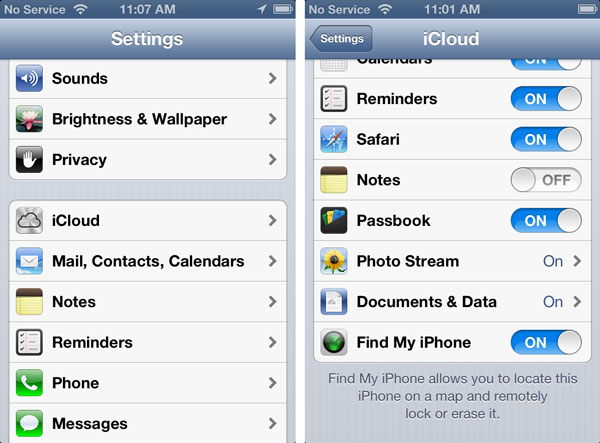
1. Go to Settings on iPhone.
2. Tap iCloud.
3. Sign in with the Owner’s Apple ID.
4. Turn OFF Find My iPhone.
5. Insert a NON accepted SIM card and RESTART the iPhone.
6. When phone turns on plug iPhone into iTunes.
7. (Optional) If iTunes prompts for you to RESTORE, follow the steps on screen.
8. The phone will then be unlocked!

Also you can follow this link for more info: http://support.apple.com/kb/HT5818

Why You Should Install iOS 7: Top Reasons for iPhone / iPad Users

The new iOS 7 was released on September 18. Should you update or stay on iOS 6.x version? Users who can’t live without a jailbroken device can wait till hackers present their iOS 7 jailbreak solution [the well-known Evad3rs are already working on such exploit]. Users who wish to get cool features should install iOS 7. Below there are 5 reasons why to install this firmware on your smartphone or tablet.

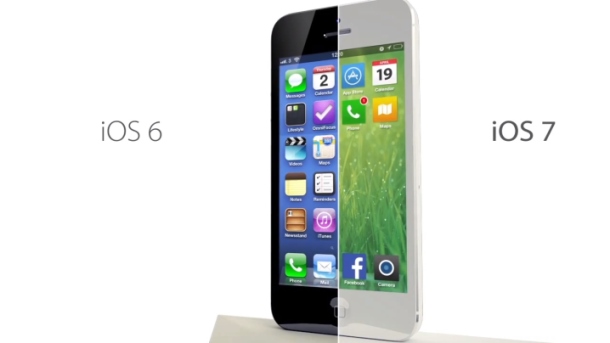
Apple brings a lot of changes to its iDevices. The latest operating system will come with a new design and options not available for iOS 6 gadgets. Do you like to take pictures? Do you often use Siri? Do you love music? If you answer “yes” make sure to upgrade on Wednesday.

reasons to install ios 7

Reasons to Install iOS 7

Reason 1. The Cupertino-based company has improved its assistant making Siri smarter and adding female / male voice options. Your personal assistant is capable of answering phone calls, getting different information for you [from web and our device] etc. It can also control another new option called iTunes Radio. iOS 6 version brought us beta Siri and iOS 7 takes it out of beta testing so the program should perform just great.

Reason 2. The notification center comes with a lot of interesting and useful tabs such as “All,” “Missed” and “Today.” The last one offers weather forecast, information about upcoming events, reminders etc.

Reason 3. The Control Center is a fast way to access Wi-Fi, flashlight, Airplane mode and various controls. It allows users to get into search with a swipe of a finger in the middle of home screen. This is handy and must-use.

Reason 4. Free iTunes Radio is a great music service that might remind of Pandora but comes as a built-in option. It comes with different stations for music fans and you don’t have to pay to use it! Listen to your favorite songs on-the-go with the new iOS 7 service.

Reason 5. Do you take bunch of images every day? Use Photos app and the new iOS 7 burst mode [press on the shutter button and your iPhone will take multiple pictures] to create the best photographs. This application allows you organizing images in groups making it much easier to view what you wish to see.

Download iOS 7

It’s almost here. Don’t forget to download iOS 7 on Wednesday, September 18 to enjoy all the goodies created by Apple.

Supported iOS For Factory AT&T Unlock

Starting from iOS 5 it became harder to unlock AT&T iPhone. With each new release of iOS from Apple becomes harder to find unlocking solution for any iPhone model. But there is the way out and every AT&T users can use it. We offer you to unlock any iOS firmware and any iPhone model.

And don’t worry about modem firmware update because we factory unlock AT&T iPhone baseband no matter what number it contains and after using our service you can forget about it forever. Continue reading Supported iOS For Factory AT&T Unlock