Can you get refunds on iTunes? Many iPhone users ask this question when it comes to various problems with the store. You might have downloaded the wrong application or made an in-purchase by mistake. Well, there is iTunes refund request option and you can take advantage of it. This is not difficult to do so take your chance and ask for your money back.
It doesn’t matter if you only use your iPhone most of the time or prefer Mac or Windows PC for getting your iOS 10 apps or iOS 9 programs [enjoy some amazing and useful iOS 10 tips and tricks]. iTunes refund policy allows getting refund for App Store and iTunes purchases on both you smartphone and computer.
How to Get a Refund from Apple App Store
It’s not a problem if you buy something you don’t need. It’s also not a big deal if the application you purchased turned out to be something you never expected. Right, when you have the wrong thing or don’t receive the item you were hoping to see you can request an Apple app refund. By the way, do you know how to send handwritten messages on iPhone 7 with ease?
Have anything like this happened to you? Were you too shy to ask for a refund? Don’t be shy. Follow our detailed guide and ask the famous Cupertino-based company to return your money. Here is what you should do if you are looking for web-solution:
Step 1. Firstly you need to follow ‘report a problem iTunes’ link so that the ‘fruit’ giant knows that something is wrong and you are not satisfied. Visit Apple issue reports website.
Step 2. Secondly you need to use your Apple ID / password to log in [make sure that this is the account that was used to purchase the wrong item]. Otherwise you cannot report the problems with programs you wish to get refund for.
Step 3. Now as you have successfully logged in you need to select the app purchase you are not happy with. Find it on the list.
Step 4. Select the app and click on Report [this option is located in to the right of the application title].
Step 5. Choose your reason for refund, add the description and submit your request online using your computer or iPhone.
How to Get Your Money Back from the App Store via Email
This method is a bit longer than the web-based solution still you are able to get your App Store refund using your email address:
Step 1. Take your newest 4.7-inch or 5.5-inch iPhone 7 or other smartphone model and make sure you have internet connection.
Step 2. Launch Mail application and find the app purchase receipt.
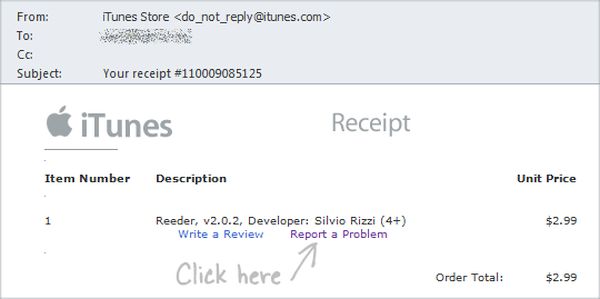
Step 3. Click on that receipt.
Step 4. You’ll be forwarded to the ‘fruit’ company’s problem report page.
Step 5. Select the reason why you want to be refunded and fill in other details.
Step 6. Complete your Apple refund request by sending the email.
How to Get Money Back on iTunes on PC or Mac
Sometimes it is easier to fix refund App Store problem using your computer. This can be done on both Macs and PCs but only if you have iTunes installed on it. You are also advised to manually backup your iPhone just in case.
Step 1. Launch iTunes program.
Step 2. Just as it happens on your smartphone you should sign into your iTunes account with Apple ID and password once you select Account section. This menu is located on the right side.
Step 3. You’ll see your Purchase History menu.
Step 4. Select the See All option.
Step 5. Find the right purchase and tap on the arrow right next to it.
Step 6. Now press on Report a Problem option so that you can request your refund by letting Apple know about your reasons [please note that you will be taken to the ‘fruit’ site].
Step 7. Leave your request and wait for Apple in app purchase refund or app refund.
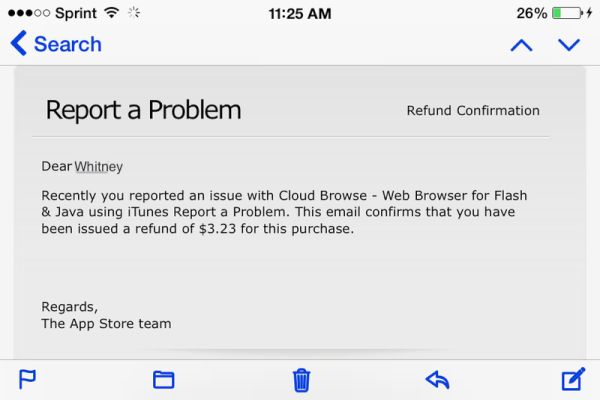
Once you complete your refund request you should wait for the company to read your explanation. It takes some time however you’ll be happy if the desire to get your money back has a good reason like an incorrect or unwanted purchase. Apple officially allows refunds for wrong purchases so this is the main reason you have to choose.
This year the Cupertino-based giant presented iPhone 7 and 7 Plus that look exactly as previous iPhone 6s / 6s Plus but boasts some nice changes. For example, you can get 256GB model in 2016 or wait a year for the bigger upgrade expected along with iPhone 8 launch. No matter what model you decide to get you can always SIM unlock iPhone from any U.S. network and worldwide carrier using safe, fast and affordable service.