Apple Pay Usage Keeps Growing and Growing

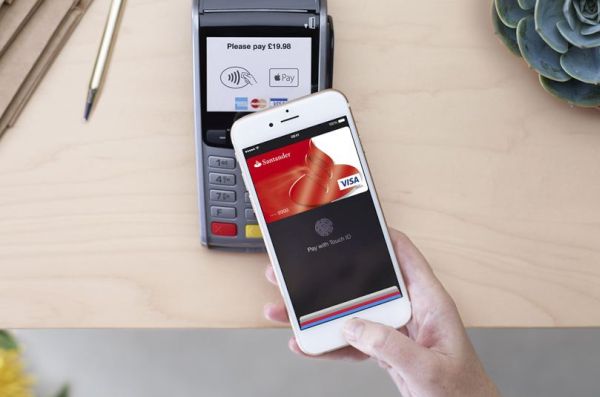
The mobile payment was offered by Apple in the fall 2014. The company managed to attract customers to this option. How popular is Apple Pay today? There are figures you should learn in order to answer this question.

Apple Pay usage has truly become popular. The company got 5 times more transactions than a year ago. This is ‘tremendous rate’ and the ‘fruit’ giant announced everything during Q2 2016 earnings call. The company’s CEO Tim Cook mentioned Apple Pay plans and assured that the mobile service gets about one million new users per week. This is huge growth and it seems that the number of Apple Pay subscribers would be even higher in Q3.
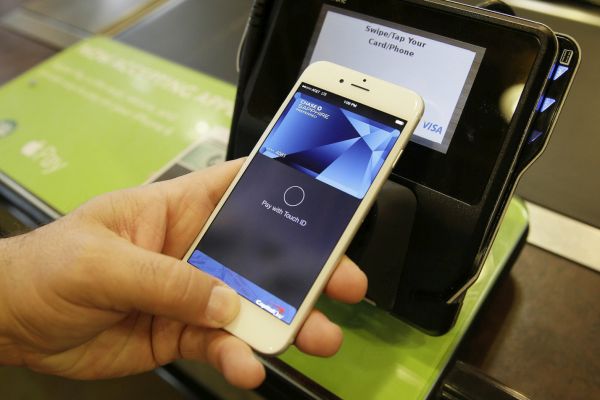
Apple Pay Mobile iPhone Payment System

Different banks, retails stores and iPhone users can take the advantage of Apple Pay not only in the United States but also outside the country. Apple brought its mobile service to Singapore, China, Canada, the UK and Australia. There are reports about possible soon Apple Pay release in France, Spain, Brazil and Hong Kong.

iPhone users who travel a lot and visit the countries that support the mobile ‘fruit’ service can easily pay with their phone. They just have to be sure that their card is supported in the country they are visiting.

The ‘fruit’ mobile payment system is supported by over one million locations in the U.S. If taking into consideration all other countries the number of stores that accept Apple Pay gets over 10 million.

It’s curious that Apple doesn’t make too much money using Apple Pay. Still this option will be developed further and extended to even more locations in 2016.
You Can Enable Replace Text Option in Different Mac OS X Apps

Mac Text Replacement is a cool features build in OS X platform that allows you using shortcuts for longer words, phrases and pieces of text [if not paying attention to different Mac login problems on OS X 10.11.4]. You can enable replace text as you type option in different applications even if this option is not enabled by default.

We’ll explain how you have to do in order to enjoy Text Replacement Mac OS X addition and create easy-to-use shortcuts for something you are typing periodically or even every day. This is cool for computer users who are working with text or write many emails / letters.

Text Replacement Mac OS X Enable in Apps

How to Enable Text Replacement in Apps on Mac

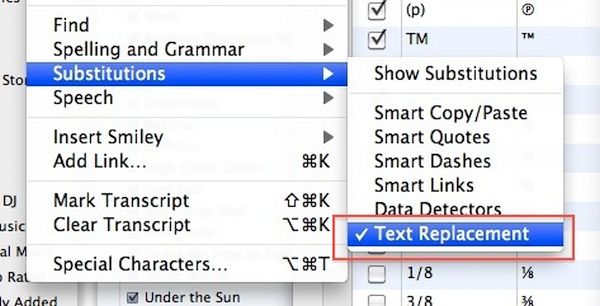
Step 1. Launch the app you wish to use along with Text Replacement on Mac from menubar.

Step 2. Choose Edit option.

Step 3. Go to Substitutions section.

Step 4. Choose Text Replacement feature. You have to turn it on.

Step 5. Repeat this guide for every application you are using for typing and enjoy faster typing with shortcuts used for Text Replacement. This is not difficult but may take some time. Remember that the Text Replacement option should be supported by the application [Apple fixed Mac security issues].

If the app doesn’t support Text Replacement feature [for example, Chrome browser wouldn’t work with OS X Text Replacement] you need to search for alternative third-party utilities that improve text expansion and make it simpler to use text shortcuts.

It is better if your shortcuts or snippets are no longer than 5 letters. This way it will be easier for you to type the snippet which will be automatically transformed into the piece of text you meant to use originally.

Apple Watch 2 to Feature Improved Processor?

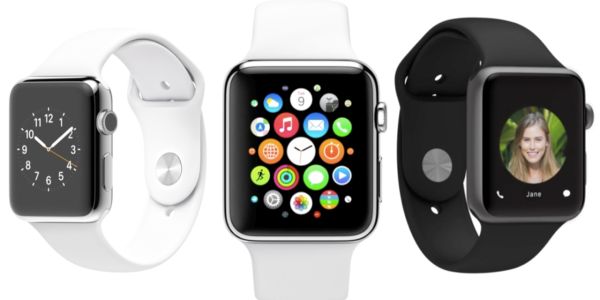
Wanna hear some new Apple Watch 2 rumors? Apple is believed to improve its next generation smartwatch. We have no idea when the company is planning to unveil this device since many experts prediction Watch update for spring 2016 which hasn’t happened yet.

Apple Watch 2 specs mentioned in the most recent reports include better processor and cellular connectivity. The Cupertino-based giant is believed to be working on its next gen model. The company could present it along with iPhone 7 in the fall or wait till spring 2017.

Apple Watch 2 rumors

Interesting Apple Watch 2 features also include a standalone modem that should make the smartwatch independent from smartphone. In other words, the second generation Watch 2 should function on its own and not completely depend on iPhone as it happens with original Apple Watch device.

The powerful Apple Watch 2 processor is needed to make the gadget independent and interesting for potential customers. The ‘fruit’ giant managed to sell around 12 million Apple Watch units in 2015 [learn why people buy Apple smartwatch]. This is pretty cool for the smartwatch and still there are many consumers who weren’t impressed by the idea. Apple wants to catch attention of its fans and is believe to be improving the device to bring it to the market in the future and make as attractive to users as possible.

The iPhone itself is an independent gadget that is extremely popular across the world. Apple’s other products [iPad and Mac lineup] are also highly demanded by customers and this is not surprising that the iOS giant wants to make its Apple Watch also interesting to masses.

Apple Pay Arrives to Singapore but Still Limited

There were many talks about Apple Pay Singapore launch which was planned to the fall 2015 [the service should come to France soon]. The ‘fruit’ giant expended its mobile payment presence outside the U.S. and is now available in a number of countries. Apple Pay in Singapore is also available but it arrives only in the spring 2016.

It is curious that no public announcements were made prior to Apple Pay arrival to Singapore. The company added all the changes silently. For example, the official website already has a list of supported documents. Still not all iPhone users who can use Apple Pay are able to do this in Singapore at the moment. The ‘fruit’ giant still has to improve this service and extend to different cardholders.

Apple Pay Singapore Launch

Right now if you live or are visiting Singapore you can pay for goods and services with Apple Pay if you have American Express credit or debit card. The iPhone maker works in partnership with American Express and this is the reason why other cards are not supported right now. If you have American Express card you can add it to your Apple Pay and use all stores that support this mobile payment system. By the way, Apple Pay should also arrive to Japan, Brazil and Hong Kong in 2016.

The iPhone creator should soon bring support for all major banks credit cards including Visa in Singapore. This is just a matter of time when this happens and customers get more payment options available to them.

The ‘fruit’ mobile payment is present on newest iPhone SE, iPhone 6s and 6s Plus, older iPhone 6 and iPhone 6 Plus. The service is working in the United States and some other countries across the world including China, Canada, the UK and Australia.

Apple Silently Solves iOS 9.3.1 iPhone Bug

Apple presented several iOS 9 versions and iOS 9.3.x is the latest one available for download. All users who have heard about 1970 date bug iPhone issues that made a brick out of a working handset within seconds should know how to fix this unpleasant problem and avoid bricking this spring.

The real 1970 iPhone bug fix is silently brought with iOS 9.3.1 update. This version automatically solves the issue with the particular date of Jan 1, 1970. If previously you were able to manually change the date and enter January 1st, 1970 and this resulted in full iPhone brick – you are no longer able to enter this date after iOS 9.3.1 installation.

Apple Fix 1970 Date Bug iOS 9.3.1 iPhone iPad

Users who wish to avoid the crazy bug you should get iOS 9.3.1 bug fix and install the firmware. Apple should soon update this version as well and hopefully solve other known issues and problems with its new iPhone SE and software. A lot of users were happy to purchase 4-inch iPhone model this March and April and they also experience various issues and bugs.

According to experts, the problem with 1970 date was caused by ‘evil’ WiFi network called ‘attwifi’ and all users who were redirected or visited the spoofing site or set their date to January 1, 1970 caused the full self-destruction of their iPhone or iPad.

Anyways it’s always better to protect yourself and install the firmware version that fixes known issues just in case. Have you ever come across the bricked iPhone?

Apple Promises to Fix iOS 9.3 Problems with Safari

Since iOS 9.3 bugs and issues trouble many people Apple will have to release an update soon. The company already presented the fix for Activation problem. Now it’s time to solve problems with Safari iOS 9.3 [the new iOS 9.3 supports Verizon WiFi calls] since this browser doesn’t work right for many users who have already installed the newest firmware release.

If you wish to fix iOS 9.3 Safari bug you’ll have to either wait or try to fix it on your own. You can also use Chrome browser for a while. Since the browser isn’t working right users can’t open links using Safari.

iOS 9.3 Activation Lock Fix

It is curious that users who haven’t updated to iOS 9.3 also seem to experience problems with Safari. They can’t launch web links from within the applications and the apps keep crashing. It could be related to third-pary tools or can be a bug with Safari.

There is no permanent solution [learn how to add bookmarklets in Safari]. If you can’t click on a link in Safari, Messages, Mail or other program and notice that your iPhone or iPad get stuck or freezes – you get the bug and there is no real fix to this yet. You might try to delete web cache but this will most likely not solve the issue.

Apple promises to release a fix to the problem. Hopefully the solution will be present soon.

T-Mobile Brings New Partners to Binge On Service

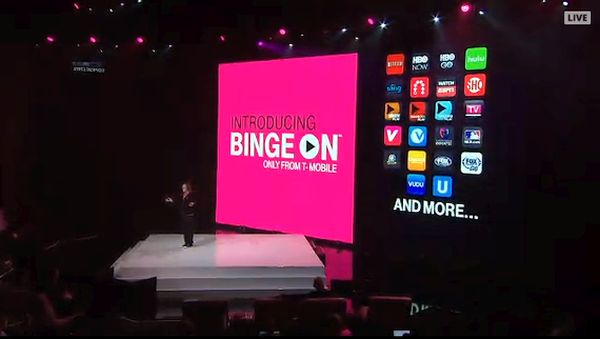
T-Mobile introduced Binge On channels to help its subscribers save data allotment while still streaming videos and music online. Some companies were suspicious about this change but even YouTube that was against this service agreed to become a part of the project later on.

T Mobile Binge On Music Freedom Service

The new list includes two new well-known names. You can now listen to Amazon Music and Nickelodeon through T-Mobile Binge On service. The U.S. network officially confirmed that it added more partners to its streaming services. Both Binge On and Music Freedom users can stream music and have no impact on their monthly high-speeed data allotment. This is pretty cool as you get access to your favorite sources such as Amazon Music, PreDanz, YouTube, DailyMotion and many others and still have your high-speed data saved for use with other services and products.

T-Mobile assures that it partners with over 40 services to improve its music streaming feature. Besides the network’s service supports video streaming for a number of sources including OVGuide, Spike TV, Viki, 120 Sports and others. Subscribers should get even more in the future as noted by the famous un-carrier Magenta Carrier.

According to reports, all T-Mobile iPhone and other subscribers are streaming over 200 million songs every day. They have no drop of their high-speed data and this is what makes Binge On option so popular. Both T Mobile music and video services have already saved over 300 petabytes of precious high-speed data. Isn’t it cool?

Verizon iPhone Users Can Reply to Texts with Pebble

Do you have Verizon iPhone? Are you subscribed to this U.S. network? According to the carrier, it released an update that lets its clients use Pebble Time to respond to text messages. It’s a good way to take advantage of Verizon and Pebble Watch and save your time.

How can you reply to texts with Pebble? Actually if you have this smartwatch you were able to messages using voice memo or canned reply as this option was introduced in the fall 2015 and was presented for AT&T customers this February. The spring 2016 expanded this feature and makes it possible for Verizon iOS customers to use it as well.

Pebble Time Verizon iPhone Reply to Text Message Update

Pebble presented the upgrade which supports Verizon users and makes it possible to reply to text messages right from the wearable. This is pretty similar to what Apple Watch and iPhone can do once paired. However this particular update version 3.11 only supports Pebble Time users. Apple has its own smartwatch features, specs and options and also allows using Apple Watch with Verizon iPhone.

If you have Time and iPhone and are using Verizon network you can check out the update and enjoy the new option. By the way, you can also get SIM unlock for Verizon iPhone 6 or other model running iOS 8 or newest iOS 9.3.1. This is a fast and simple way to become free from one carrier’s restrictions and choose your carrier by switching SIM cards.

This way you can select your desired data plans and switch plans much simpler and faster.

iPhone SE T-Mobile Deals Buy One Get One 50 Off

If you don’t want to go to Walmart and get iPhone SE with $100 off from AT&T, Verizon Wireless or Sprint – you can take advantage of the new iPhone SE T Mobile deals. This American network has its own offer and while you cannot get $100 of one handset at once you are still able to save some money.

The deal could be good for families that wish to purchase more than one device. You can buy one get one 50 off T Mobile iPhone SE and save money on two handsets. You’ll have to add a new line to your account to grab the deal. This is the requirement listed by the American network.

iPhone SE T Mobile BOGO 50 Off Deal 2016

The offer sounds nice if you already had plans to buy T-Mobile iPhone SE [learn more about iPhone SE release in India]. Getting two new models at once allows you saving 50 off one of them while getting the new number too. Just like Walmart – T-Mobile allows saving money on different handset models.

For example, you can get 50 off the second iPhone SE, iPhone 6, iPhone 6s, iPhone 6 Plus, iPhone 6s Plus, iPhone 5c iPhone 5s. It is interesting that if you have already pre-order the new 2016 iPhone SE with 4-inch screen you can take part in T-Mobile’s offer and get the second Apple smartphone at half the retail price.

The offer is absolutely limited in time however T-Mobile says nothing about the exact time when it is over. Do you think this is a good deal?

Get $100 Off iPhone SE and Other iPhone Models at Walmart

Would you like to get 100 off iPhone? Apple released new iOS smartphone this spring. The 4-inch iPhone SE gets components from both iPhone 5s and iPhone 6. This is a powerful handset if compared to older colorful iPhone 5c or iPhone 5. A lot of users prefer getting Walmart iPhone discount when such a deal is available.

Right now you can take $100 off iPhone SE. There are other Apple devices available with a nice discount these days. For example, you can get iPhone 6 / 6 Plus, iPhone 6s / 6s Plus and save $100. Isn’t it nice?

iPhone SE 100 Off Walmart Discount Deal 2016

The 100 off iPhone SE deal also works. The 16GB iPhone SE model costs $399. This is a good deal especially if you are not planning to upgrade and have a plan to buy the phone at full price. The rollback iPhone prices should be offered by Walmart for the next three months. This is pretty cool as you have time till June to save $100 when purchasing some Apple devices.

What carriers can you get? Walmart is offering iPhone locked to Verizon, AT&T and Sprint. If you prefer getting T-Mobile iPhone SE, iPhone 6s, iPhone 6, iPhone 6s Plus or iPhone 6 Plus with $100 discount – you are out of luck because this mobile operator has no such deal at Walmart. The store only works with three networks.

If you wish to get the deal and save money you will need to visit your local Walmart store. The company doesn’t offer the $100 off iPhone deal online.