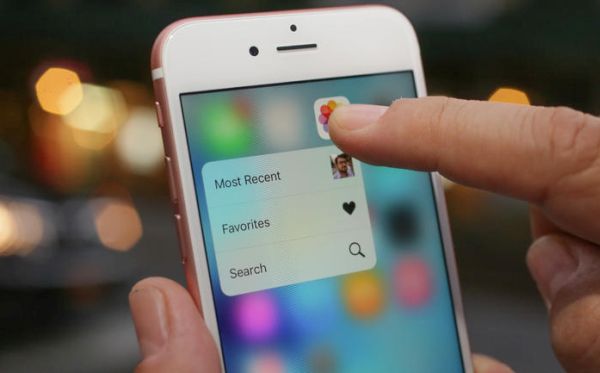
iPhone 7c Prototype News and Rumors About 4 Inch Smartphone

While the name of the most recent Apple smartphone generation is iPhone 6s / 6s Plus – we already hear new rumors about possible 4-inch handset launch sometimes in 2016. Some experts mention iPhone 6c gadgets that should be colorful and more affordable compared to the iPhone 6s. Others believe Apple has iPhone 7c prototype that could be presented the next year.

Would we really see another iPhone model release in February 2016? Most rumors say this could unlikely happen so soon. Other hope that Apple would surprise its customers and present a smaller and cheaper version of its popular iDevice.
iPhone 7c Rumors Release Date iPhone 7

There is no official iPhone 7c release date confirmed by Apple. The company indeed says nothing about the 4-inch model launch and mentions no iPhone 6c or iPhone 7c names. Rumors are so various it’s hard to understand what is exactly coming out soon. Will there be a colorful device similar to iPhone 5c in 2016 or not? Would the 4-inch handset get a metal chassis or not? Will there be an iPhone update earlier than fall 2016?

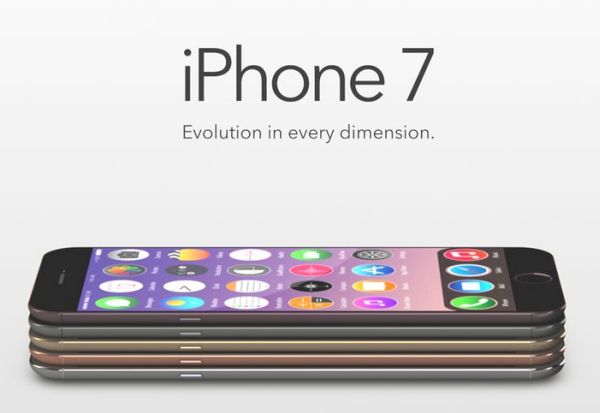
The most recent reports from China now claim that Apple would unveil the iPhone 7c [colorful 4-inch smartphone with A9 processor] in September 2016. If these rumors are true there will be no iPhone 6c at all. The 7c handset could help Apple to increase demand for iPhone 7 that should also be launched next fall.

Still it’s hard to believe that Apple would release the 4-inch handset right before major iPhone 7 upgrade. The company could more likely present a smaller gadget in sprint 2016 to bring a cheaper handset to Chinese and Indian markets where customers prefer paying less for brand.
How to Install iOS 9.2 on AT&T iPhone

iOS 9.2 OTA update is available to all AT&T iPhone users whose smartphones are supported by the most recent Apple mobile firmware version. Apple has updated its platform for iDevices. The new iOS 9.2 supports the same gadgets as iOS 9.1. You can install it on the AT&T iPhone 6s, iPhone 6s Plus, iPhone 6, 6 Plus, 5S, 5, 5c and 4S.

Make sure your handset is fully charged before you start to update to iOS 9.2. You don’t want your gadget to turn off during update as this way your iOS 9.2 OTA upgrade would fail. This is why it’s better to make sure that you have enough battery life beforehand.

iOS 9.2 How to Install OTA Update

The connection can be slow if there are too many users who are also trying to update to iOS 9.2 through over-the-air option. When Apple’s servers get overloaded or your internet connection isn’t fast enough – you might have to way for an hour or longer until the firmware is downloaded and finally installed on your iDevice.

How to Install iOS 9.2 on AT&T iPhone

Step 1. Connect to Internet. It’s best to use WiFi instead of cellular connection to save money.

Step 2. Launch Settings on iPhone [the next iPhone 7 rumors promise some curious features].

Step 3. Select General menu and the option called Software Update.

Step 4. If the connection is good your AT&T iPhone should automatically check for iOS 9.2 update and inform you that such a firmware version is available for download.

Step 5. Click Download. iPhone should now download iOS 9.2.

Step 6. After you are informed about successful download you have to go to Settings and choose General – Software Update where you can install firmware after you click Install.

Step 7. Wait till the whole procedure is finished and start using the new iOS 9.2 version on your smartphone.

iOS 9 Safari Secrets and Top Safari Tips for iPhone Users

Use iPhone Safari tips to get more out of your smartphone. It is easier to surf the web if you know some secrets as this way you can get rid of any possible frustration. iOS 9 system offers different features you can take advantage of [for example, you can hide apps to invisible folder on iPhone] but you can improve this experience even more if you follow this short guide.

iOS Safari Tips for iPhone Users

iOS 9 Safari Secrets for iPhone

*Private browsing is available to users who turn it on through Private menu. You can find it in the bottom of your iOS 9 browser.

*View recently closed tabs by clicking on the Tab icon. You will then need to hold the ‘+’ and all the tabs will appear in the list. You can now launch any link by clicking on it. This is a very useful option that comes handy once in a while.

*Our top Safari tips include the possibility to Request desktop site version which is available in iOS 9 [if you get iOS 9 iCloud error you can fix ‘backup could not be completed’ issue]. You can enable this feature through Refresh – Request Desktop Site menu in Safari browser on iPhone.

Safari iOS 9 Search Engines

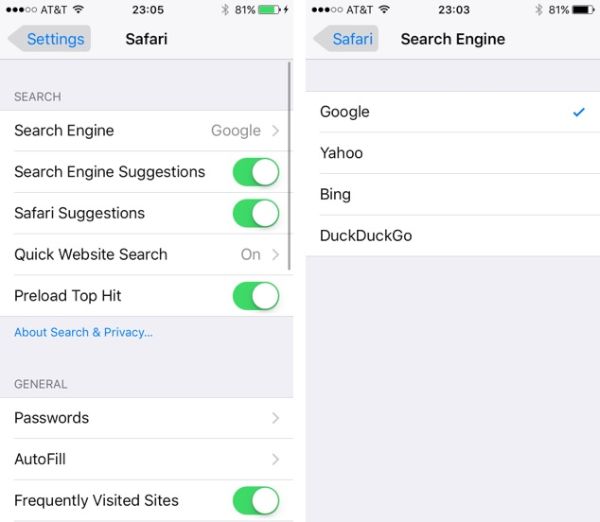
*You can select different Search Engine in Settings – Safari. Find this option under Search menu. Choose between Yahoo, Bing, Google and DuckDuckGo. It is also possible to use Smart Search option.

*Use Offline reading option or Reader view as both options are present in iOS 9 iPhone Safari.

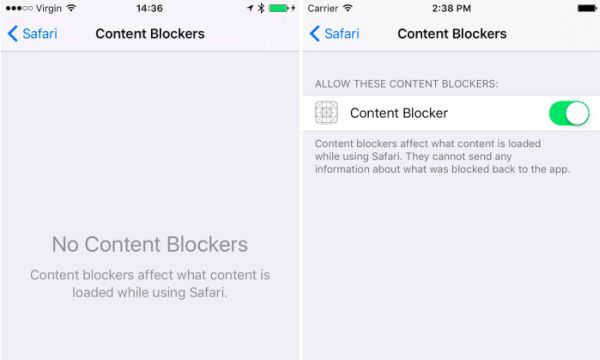
*Block ads if you are tired of mobile advertisements on iPhone. Go to Settings and choose Safari – Content Blockers to turn on this feature.

*If you wish to switch between pages – swipe right or left to go left – right. There is no need to click on the back option in the bottom every time you wish to perform this task.

AT&T iPhone Deals: Get $200 off iPhone 6s If You Choose T-Mobile

Are you still using AT&T as your carrier? AT&T iPhone 6s $200 off offer can be yours if you decide to switch your network to T-Mobile. The mobile operator is trying to get more subscribers and aims at one of its rivals.

AT&T iPhone deals have been announced for the holiday season 2015 by T-Mobile. Users who are interested in purchasing the most recent iPhone 6s model can also get the $200 off their purchase. The main requirement you have to meet is choose to subscribe to T-Mobile as you are now offered to switch from AT&T to T-Mobile with the possibility of getting the iOS 9 smartphone with a big discount.

T Mobile Switch iPhone ATT Deal for iPhone 6s

Users who were waiting for the best time for AT&T iPhone 6s upgrade can take their chance now or keep waiting for the next iPhone 7 with new features. There is one main drawback in this deal. You’ll be locked to T-Mobile but you’ll have the 128 GB iPhone 6s in your hands. Don’t worry. You can SIM unlock T Mobile iPhone 6s as soon as you get this handset since factory unlocking is the most affordable and fastest service that can make you SIM free once and forever.

Does it sound like an interesting Christmas gift? The Big Blue and Magenta networks are fighting for customers. T-Mobile announced the ‘delicious’ $200 off offer on December 4th. When you can buy the iPhone 6s 128 GB model at the price of the 16 GB version – this is a great chance you can’t miss, right?

If you are ready go get the deal – make sure you are switching to T-Mobile Simple Choice plan between December 4 and 13. The deal will be over on December 13th so hurry if this is what you really want to do. You’ll become T-Mobile subscriber and be able to pay off your AT&T early termination fees.

What do you think about such deal?

AT&T iPhone Grandfathered Unlimited Data Plan to Get Price Hike

There is no real AT&T iPhone grandfathered unlimited data plan. It exists but it is not truly unlimited. No U.S. companies are eager to offer real unlimited plans for modern iPhone owners. Still those users who are grandfathered on the ‘unlimited’ plan and get real limited data along with AT&T iPhone throttling have to prepare for another update.

AT&T unlimited iPhone data plan price is going to be increased. The Big Blue American network has plans to charge you $35 a month if you are subscribed to this particular data plan. This way the company is trying to force users to upgrade to a different data plan that is not unlimited and asks you to pay for all additional GB of data you are using.

iPhone ATT Unlimited Data Plan Price Hike

All major U.S. mobile operators don’t have true unlimited data plans. Modern users are used to such policy but older customers who grew up on such plans remember those good times and don’t want to give in their grandfathered plan. The plans to increase the price from $30 to $35 per month are rumors. The information comes from different online sources and AT&T hasn’t confirmed such decision yet. This is a small price hike but it’s still the increase in the cost a lot of customers are used to.

Users who are not happy with possible changes can always SIM unlock AT&T iPhone 6s or any other smartphone model and become SIM free. This is permanent solution that gives you a choice of networks and possibility to easily switch SIM cards whenever you want to.

Remember that all companies have their policies and like to increase prices on data plans even if you are granfathered on one of the plans. It’s simple to make your own choices when you have the unlocked smartphone.

How to Change iPhone Screen Timeout on iOS 9

It is possible to change your iOS 9 screen timeout on iPhone. If you already have the most recent Apple smartphone model iPhone 6s you might want to adjust this setting [if you have clean IMEI you can unlock AT&T iPhone 6s to use it with other SIM cards]. Everything is pretty fast and simple. Follow the instruction and you’ll learn how to deal with this option.

Your iOS 9 iPhone screen timeout if the period of time that passes until the smartphone shuts off its display after you stopped playing with your gadget. You are the one who can set up the time that passes after the last touch and before the screen shuts down automatically.

Change iPhone 6s Screen Timeout

How to Adjust Screen Timeout iPhone 6s Guide

Step 1. Take your Apple smartphone. The iPhone 6s has tons of great features [users are already looking for new iPhone 7 features and specs] but this particular setting is not that easy to find at first. Go to Settings as this is where our journey begins.

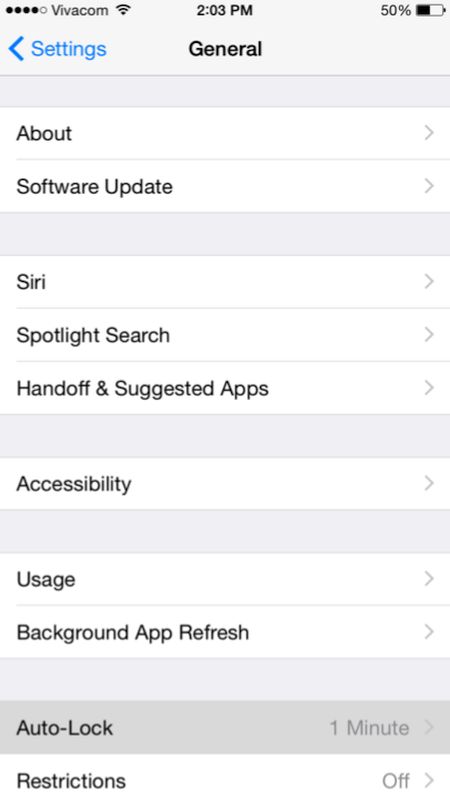
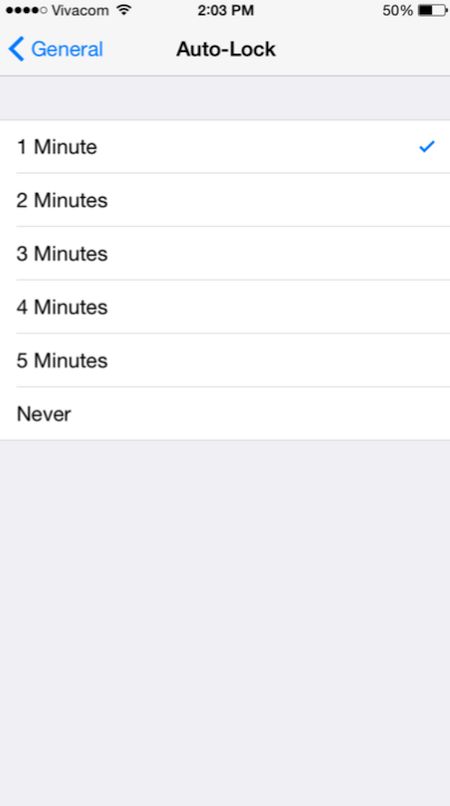
Step 2. To change iPhone screen timeout you need to launch General menu and select Auto-lock option which appears at the bottom.

step 2 Change iPhone Screen Timeout

Step 3. There will be a checkmark which you need to use in order to change the screen timeout option.

step 3 Adjust Screen Timeout iPhone

This is pretty simple once you know where to look at. Right? There are numerous great iOS 9 changes and features you might also want to use in your everyday life. The iPhone offers a lot of possibilities and is a very popular smartphone nowadays.

Cyber Monday Deals on iPhone 6s 2015

Have you purchased the new iPhone 6s with a big discount this Black Friday? If not, it’s time to look for the best Cyber Monday iPhone deals. A lot of U.S. stores are now offering discounts and other deals on the newest iPhone 6s, 6s Plus and previous generation Apple smartphones.

The list of Cyber Monday deals on iPhone 6s is long. You can visit almost any store and find out if it is offering discounted prices or gift cards with the purchase of the iOS 9 iPhone. It could be possible to get a big discount on iPhone 6 or older iPhone 5s as well as buy or lease the most recent 6s model that was released this fall.

iPhone 6s Cyber Monday deals 2015

It’s not necessary to visit AT&T iPhone store or go to Verizon, Sprint or T-Mobile place to shop. There are big retailers that are offering deals from all major American networks all at one place. For example, if you go to Best Buy you’ll be able to purchase / lease the iPhone 6s from several carriers and get $200 gift card with it.

It is also possible to trade in your older working handset. Most discounts are offered on the 2-year contract deals. Thus, you can get $100 off your new iPhone if you agree to sign a contract with Verizon or Sprint. This discount can be applied towards the purchase of iPhone 6s Sprint, for example.

Target is also eager to offer more deals on iPhone purchase. Its Cyber Monday offers are also attracting. You can also visit Walmart and other popular stores where it is possible to get incredible offers right in time for Christmas. It’s always nice to save money on buying what you really want.

Spam Text Messages Verizon and AT&T iPhone: Carriers vs Critics

iPhone text message spam is a common problem. Have you ever received spam text messages Verizon [here are some interesting holiday’s deals from Verizon and AT&T]? Or have you ever come across spam text messages AT T issue? The FCC could allow imposing common network regulations on text messaging by accepting the Twilio’s petition. The U.S. carriers are not happy that the status of SMS is unsettled. Why?

US carriers block spam – they assure they do this with text messages. They are asking the Federal Communications Commission to rejet the petition by Twilio that declares SMS to be under Title II regulation. American mobile operators believe that this petition would prevent them from blocking spam while the document is meant to stop throttling / blocking the text message traffic in the U.S.

iPhone Spam U.S. Carriers

Could millions of Verizon iPhone and AT&T iPhone users get tons of spam mobile messages eventually? T-Mobile and Sprint are also against the petition. At the same time Twilio believes that mobile operators can block text messages to boost their revenue.

The net neutrality rules offered by the FCC forbid carriers to block messages that are delivered via Internet. Still these rules do not clarify the SMS status. Companies that rely on text messaging don’t want carriers to block SMS so they are trying to convince the FCC to stop mobile operators.

Ordinary users don’t participate in the new ‘war’ between carriers and companies that want to send / receive text messages to / from their customers. What will the FCC do? Would it support U.S. companies or listen to carriers and take their side? Who will win this time?

iPhone users should not suffer from spam and at the same time they would most likely enjoy communicating with companies via SMS. What do you think about this situation?

Create iPhone Invisible Folder to Hide Apps and Shortcut [Guide]

It is possible to create iPhone invisible folder and hide your shortcuts and applications in this folder [do you already think about the possible iPhone 7 features?]. This is pretty easy and fast if you follow our trick guide. It is not required to be jailbroken as everything can be done on any iOS 9 smartphone.

The instruction explains how to use hide shortcut iPhone option though you’ll have to install some additional tools to make this happen as Apple doesn’t allow anything like this by default. What will you be using? You won’t believe it but you need the wallpaper as the trick is related to the wallpaper shadow.

iOS 9 iPhone Invisible Folder Hide Apps Shortcut Guide

How to Hide Apps on iPhone / Shortcuts on iOS 9

Step 1. You need to download gray wallpaper or get white wallpaper because our folder will blend into your new background and these two colors are just perfect for what we are planning to do. Since the solid color is required on the lock screen you can continue using other images for your home screen background.

Step 2. Go to Settings and select General – Accessibility menu. We should now Increase Contrast. Disable Reduce Transparency for white background or use Reduce Transparency for gray background.

Step 3. You need to return to Settings again and select Wallpaper – Choose a New Wallpaper. Select the gray or white image you have downloaded from All Photos option. Remember to choose Use as Wallpaper feature and Set Home Screen.

Step 4. Now return to iPhone Home Screen. You see not folders? They are there but they blend into your new background.

Step 5. Get the App Icons Free which is free on the App Store. Install it and launch. Click on Create Icon option and select Go to Link. You need to choose Photo – solid wallpaper you have downloaded – Choose and press the space bar when you are asked to enter the URL. Choose Install. You will see shortcut icon in Safari browser now so Share it – Add to your Home Screen.

Step 6. You’ll have to replace the shortcut label with a period before you Add it. There will be a new blank app icon on the iPhone. Look for the period label – it could be the last icon on your Home Screen.

Step 7. Drag any app you are planning to hide on the ‘period’ app and this way you’ll create an invisible folder. Just move these apps on the second page within your new invisible folder so that they are not present on your Home screen [you can also learn how to make Siri silent on iOS 9 device].

Step 8. You can now remove your folder’s label. Create a blank space (about 7 spaces) and copy – paste it as your folder’s label through edit option. Save the changes by clicking on your Home button.

You can now enjoy the invisible folder with the blank name.

Verizon and AT&T Black Friday Specials 2015 Revealed

Black Friday is here. Different U.S. carriers joined other retail stores and offer their deals to new customers and current subscribers and users dream about iPhone 7 features. Everyone knows how popular this shopping date and week in the world. It’s time to get your Verizon Black Friday specials and deals offered by other networks for iPhone and other smartphone users.

Some deals are already available. You can check with your particular network today if you are eligible for any deals or specials this or next week. Most iPhone mobile operators offer options that last for a couple of months.

Verizon ATT iPhone Black Friday Deals

AT&T Black Friday deals 2015 are also available both online and in-store. Thanksgiving, Black Friday and Cyber Monday are just the beginning of the holiday season. With Christmas coming soon more and more stores will bring something to remember and offer discounts and free data for their subscribers.

Is is good time to find your carrier right now? If you are planning to buy the new iPhone, iPad Pro or other Apple gadget before Christmas – you should find the network that offers the lowest price for data and best terms for purchase. You’ll be always able to SIM unlock AT&T iPhone 6s or any other smartphone / network without problems so better choose the 2-year contract option which saves you some money at the start.

Some companies are giving out different little gifts to their consumers. For example, with Verizon you can get 1GB of free data for this billing cycle. Some networks also offer free data for the next cycle as well which is pretty nice.