How to Fix Activation Lock on iPhone Running iOS 7

Apple introduced Activation Lock feature when it released iOS 7 version for iPhone users this fall. The new option is tricky. From one hand, it is designed to protect unknown people from accessing your personal information. From the other hand, it gives headache to users who wish to unlock the device they purchased from other people.

Turn Find My iPhone Off Beforehand

The introduction of iOS 7 has changed the rules for iPhone users. Now if the Find My iPhone app is turned on, you are not able to update to new iOS version or unlock your handset without knowing the Apple ID and password of iPhone’s original owner.
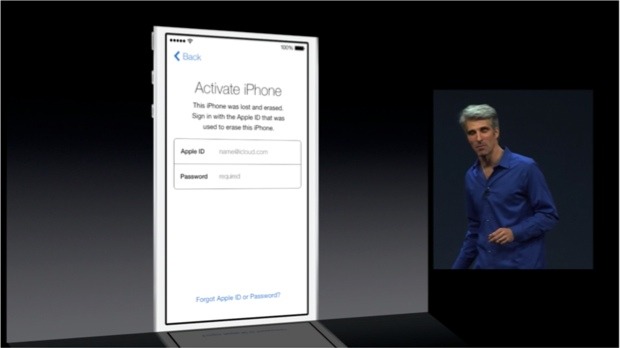
ios 7 activation error

This ID and passcode are stored on the Cupertino-based company’s servers. It is impossible to turn off Find My iPhone, reactivate the gadget and erase information on it without entering them. This happens because of the Activation Lock feature presented in iOS version 7 and up. You turn it automatically when you enable Find My iPhone program or when you decide to install the latest firmware [updating from iOS 6 or earlier operating system].

What You Must Do Before Ordering iPhone Unlock

If this is your device purchased from Apple or official carriers you should simply turn off the application. Users who purchased their smartphone from someone on eBay or other platforms should make sure the previous owner erased all his information, settings and disabled Find My iPhone for you.
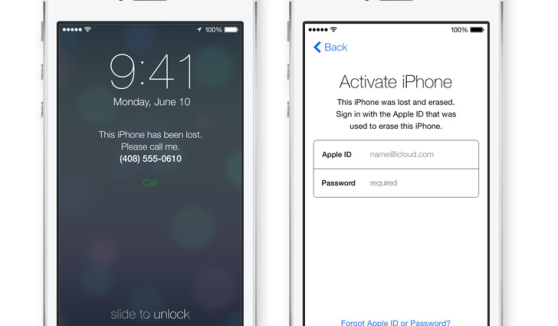
ios 7 activation lock

Only after you make everything to fix iOS 7 activation error, you can place iPhone unlock order online and have it successfully unlocked by IMEI number.

What You Must Do After Your iPhone Unlocked

Note: We make no refunds if we unlock your handset on iOS 7 and you are stuck with the Activation lock issue. Solve this problem before you order factory unlock or following this guide below if you have just unlock it and got this issue.

Fortunately there is a fix and you can use it just following steps below:

1. Go to Settings on iPhone.
2. Tap iCloud.
3. Sign in with the Owner’s Apple ID.
4. Turn OFF Find My iPhone.
5. Insert a NON accepted SIM card and RESTART the iPhone.
6. When phone turns on plug iPhone into iTunes.
7. (Optional) If iTunes prompts for you to RESTORE, follow the steps on screen.
8. The phone will then be unlocked!

Also you can follow this link for more info: http://support.apple.com/kb/HT5818

How to Unlock iOS 6.1 beta 5 (GM) Using IMEI

Yesterday late Apple released another beta version of 6.1 firmware. Here you will find out how to unlock iOS 6.1 beta 5 and be ready for iOS 6.1 update.

There are many those who have already updated their devices and found out that their iPhones became locked again. It happened because baseband was updated too, so such unlock tools as Gevey, Ultrasn0w for iOS 6.0.1, SAM and others stopped working. And that is a big problem. However this will never would happen if your iPhone was factory unlocked.

From now many iPhone users are looking for iOS 6.1 beta 5 unlock. And if you are here you have just found it.

unlock ios 6.1 beta 5

iOS 6.1 beta 5 includes minor software updates, improvements that are mainly concentrated within the interface. Key changes will enhance the search technology in Apple standard maps and also the emergence of possibilities to reserve movie tickets using voice assistant Siri in USA.

Sure you can use SAM tool but you need to have activation tickets for this. Also there is only Gevey for iPhone 4S running on iOS 6 baseband. As you see there is no way except IMEI unlock.

Factory iPhone unlock is the most popular unlocking solution in nowadays. And it is not strange. Simple because if you unlock IMEI # your iPhone will be forever unlocked (never lock device).

You can also unlock iOS 6.1 beta 5 for free now or in the future!

This means that you will be able to use any SIM card of any carrier. But what is also great is that you will forget about such iPhone hardware as baseband.

Don’t worry when Apple releases its new iOS because you will be able to upgrade your device (and baseband) and stay factory unlocked.

So, if you need it you can factory unlock iOS 6.1 beta 5 now if your iPhone is locked to AT&T. After which you will be able to enjoy any iOS update (including 6.1) and any GSM SIM card around the world.

How to Unlock iOS 6.0.1 iPhones with Ultrasn0w Fixer

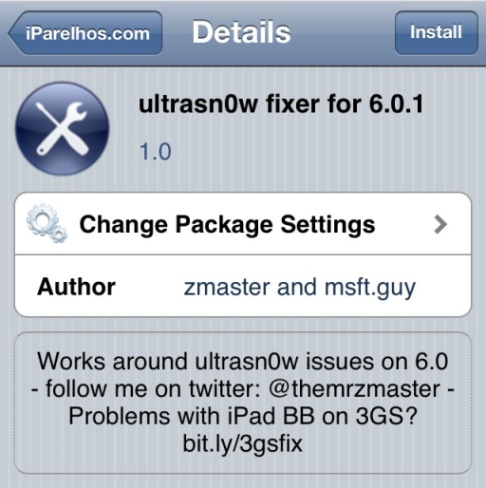
We have a couple of news for you. One is not too exciting because the iPhone Dev Team hasn’t launched its Ultrasn0w for iOS 6.0.1 yet. The other one is much better. There is unofficial Ultrasn0w fixer unlock iOS 6.0.1 program which can help you to unlock iPhone 3GS and iPhone 4 in case you have planned to upgrade these models to the firmware version 6.0.1.

This fixer has been presented by two folks you so know well. They are msft.guy and zmaster, the developers of popular Cydia tweaks. Their new project known as Ultrasn0w fixer unlock iOS 6.0.1 can really unlock Apple smartphones.

Important Notice

This tweak is easy to use if you meet all the requirements, including the iPhone models and basebands supported. Keep in mind that Ultrasn0w fixer for firmware 6.0.1 will work on iPhone 4 baseband 01.59.00 and iPhone 3GS basebands 04.26.08, 05.11.07, 05.13.01, 05.12.01 and 06.15.00. How do you know the iPhone baseband? Go to Settings – General – About and you will see it.

Now let’s speak about all the requirements you must meet. Firstly, it is important to downgrade iPhone baseband 06.15.00 before you try Ultrasn0w tweak. Secondly, if you do have one of the basebands mentioned above you must first jailbreak your iOS 6.0.1 iPhone via Redsn0w 0.9.15b3 utility [this is untethered jailbreak for owners of iPhone 3GS]. At last, you must keep your old baseband when you upgrade to iOS 6.0.1.

As you see too many requirements and restrictions. Factory unlock is much better and there is no need to be worry about those baseband, iOS, downgrade, jailbreak and other different actions. Just order unlock now and enjoy it in couple of hours.

Now we can move to the process of iOS 6.0.1 iPhone unlock via Ultrasn0w fixer.

Ultrasn0w Fixer Unlock iOS 6.0.1


Instruction for Ultrasn0w Fixer Unlock iOS 6.0.1

Note: This is instruction on how to get free unlock but can also get free factory unlock using our membership program.

In the first step we will ask you to get the latest version of Ultrasn0w and install it. You can find it at Cydia – Manage – Sources – Edit – Add and here you simply use the following repo:

 http://repo666.ultrasn0w.com

In the second step you should type the word Ultrasn0w in the Cydia search field and find the latest version 1.2.7.

In the third step you must open Cydia once again and go to Manage – Search – Edit – Add to add:

 http://repo.iparelhos.com

In the fourth step you should search for Ultrasn0w fixer for iOS 6.0.1 [use the similar way as you did in step 2] and install it on the iOS smartphone.

In the fifth step you should take the SIM card you like the most and insert it in your iPhone. Users who have iPhone 3GS can simply restart their gadget just like they normally do. Users with iPhone 4 must boot their device tethered:

  • connect their iPhone 4 to a personal computer or Mac via USB and open Redsn0w 0.9.15b3;
  • choose Extras => Just Boot;
  • get ready to see the smartphone entering DFU mode;
  • allow Redn0w to do everything and simply wait till it finishes.

The last step is the easiest one. You should hear the signal of your mobile operator after the iPhone rebooted.

This was the step by step instruction for how to unlock iOS 6.0.1 iPhone 3GS and 4 via Ultrasn0w fixer for 6.0.1. Enjoy!

How to Unlock your iPhone Locked to AT&T Network

Now it is time to get factory and permanent unlocking solution for any AT&T iPhone. There is nothing easier than that. Just provide your IMEI number and we will do everything themselves.

Here you can find instruction on how to unlock iPhone 5s AT&T  and use it with any carrier you want and in every country you live or travel.

If you still hesitate then look at the main features of factory IMEI unlock:

  • you can update your iOS and sync the iPhone with iTunes, it will still stay unlocked forever
  • chance to unlock all iPhone models
  • chance to unlock any basebands, including 06.15.00, 05.16.05, 04.11.08, 4.12.01. 4.12.02 and many others
  • chance to unlock all versions of iOS even iOS 6
  • official unlock of iPhone
  • your IMEI number stays in Apple’s whitelist database
  • it takes up 10 minutes to unlock your iPhone
  • we offer cheapest price for the service

Now you see that it is really worth it.

Attention: If you used SAM, Gevey, R-Sim, TP-Sim, Turbo SIM, CutYourSim and any other unlock exploit which spoofed your IMEI you need to activate your iPhone first with original AT&T SIM card. So your device could be recognizes be Apple database. Only than you can order iPhone unlock at our service.

Now when you decided to use our service go to how IMEI unlock works page to do everything right. And after you will receive the last email from us with instructions you will need to perform steps.

Read it carefully especially notes. Just follow our instruction to get permanent unlock for AT&T iPhone.

How to Factory Unlock iPhone Locked to AT&T

Step 1: Insert GSM SIM card of not supported carrier like T-Mobile, Orange, Vodafone and any other network in iPhone. DO NOT insert AT&T Sim card.

Step 2: Connect iPhone to the Mac or PC and open latest version of iTunes.

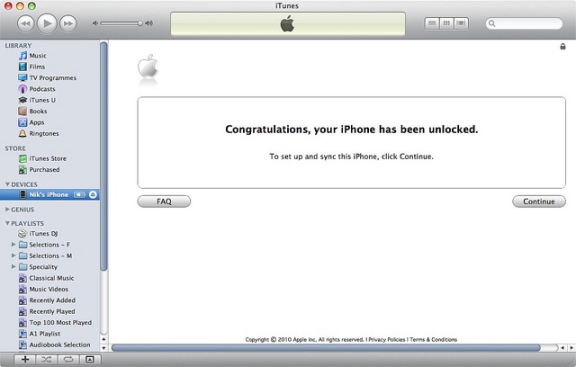
Step 3: If your iPhone is currently running iOS 6 / 6.0.1 / 6.0.2 / 6.1 disconnect device after iTunes detects it. Wait 10 seconds and connect iPhone again. Wait for Congratulation message.

factory unlock at&t iphone

Note: If something goes wrong, for example, iTunes will freeze then just disconnect your iPhone from the computer, close iTunes then connect the device again and launch iTunes. You will see that message

Note 2: Sometimes there is no Congratulations message but the network is working and iPhone is unlocked.

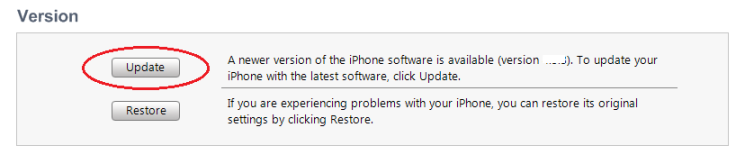
Note 3: Your iPhone still get nothing you will need to check if your iPhone is running iOS 6 or later. Only then we will successfully unlock your gadget. So if your device still running iOS 5.1.1 or lower you will need to update iPhone in iTunes first.

itunes update

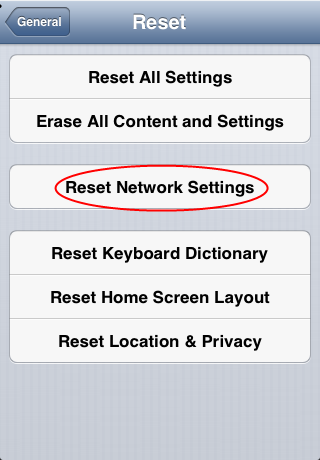
Note 4: There is one more way to complete the process. On your iPhone with NON AT&T SIM card inserted go to Settings -> General -> Reset -> Reset Network settings after which you will see your network.

reset network settings iphone

If nothing works you can try the last method to successfully complete remote iPhone unlock in iTunes. You will need to restore it.

How To Restore iPhone To Complete Remote Unlock

Step 1: Insert SIM card in iPhone (NON AT&T), connect to iTunes and Back up all your data files (contacts, photos, music and all others) using iTunes or iCloud.

Step 2: After you saved all you data click Restore button.

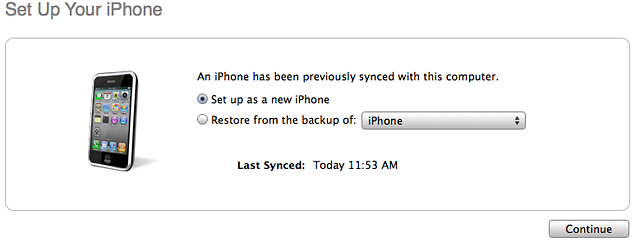
Note: Be sure that after iPhone restore you choose Set up as a new iPhone and not from a backup. This one of the most problems to complete unlock. Set up as a new.

unlock at&t iphone

Step 3. Click Continue and iTunes will activate your device. After or before which you will see Congratulations message and your iPhone will be remotely unlocked. But remember that sometimes there is no Congratulations message but the SIM card is working and iPhone is unlocked.

Note: Don’t worry about jailbreak or new iOS 6. The new iOS 6.1, 6.0.2, 6.0.1, 6 will be unlocked and you can jailbreak it any time you want.

Also If you have some issues with activation or service you can fix it using guides:

How to Activate iPhone after Factory Unlock

How to Fix No Service Issue after Factory Unlock

Contact us for any questions and factory unlock AT&T iPhone with our help and cheapest price. Also you can visit FAQs for more information.