Activate iPhone Using Zip Code and SSN

[meta_info]

Tips Before Purchase:

*Use network checker if you are not sure what carrier your iPhone is locked to.

  • Unlock Success Rate: 80-100%

*Unlock success rate depends on AT&T account status of each device.

[/meta_info]

[content_tab]

Many AT&T iPhone customers have activation problems, despite using factory unlock iPhone service you cannot activate your device without ZIP code and SSN.

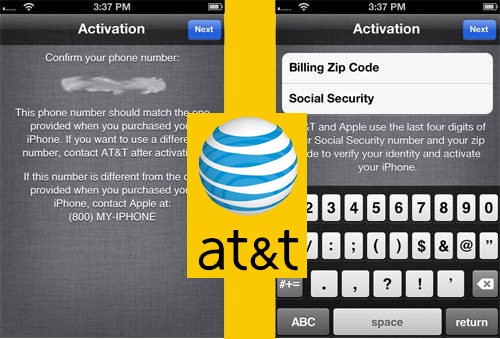
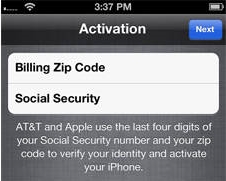
Throughout activation steps you stuck on screen which insists upon enter Billing Zip code and also the last 4 numbers of SSN (Social Security Number).

Here we will help you to activate AT&T iPhone for normal using.

You can place an order when you are sure that iPhone is locked to AT&T carrier. No refund if iPhone is not locked to AT&T.

Try to do not make mistakes and mistypes when placing an order. Check twice all info you provide to get successful results. No cancellation can be proceeded when your order was accepted for the unlock.

Delivery only throughout business hrs, not guaranteed turnaround time. (Business time is 9 am – 6 pm PST).

If you will not see email, go to the junk / junk e-mail folder or add contact@letsunlockiphone.info for your safe mail list.

[/content_tab]

[details_tab]

This task is required for identification the initial who owns iPhone locked to AT&T carrier. If you’re this individual – no problems just enter required info and click Next.
activate iPhone zip code ssn
But you will find lots who bought in-contract iPhone 5S, 5С, 5, 4S, 4, 3gS, 3G on eBay or any other third-party hands. If you’re one of these buyers and see such screen, you have to put information which signifies the initial owner.

Note: You cannot provide Zip code and SSN that differ from original info. Restore and various Sim cards don’t help too.

Sure you can get required information of the previous owner but many people don’t want to provide such information as ZIP Code and SSN (even only last 4 digits).

Important Notes

  • It is strongly recommended that you have an original Sim.  It’s not necessarily needed. But sometimes you need to insert original SIM even if we provided ZIP code and SSN.
  • We activate AT&T iPhone only that asks for Billing Zip Code and Social Security number during activation. In other case we don’t activate iPhones.
  • After you activate iPhone you can factory unlock it for other carriers.
  • Read carefully Terms & Conditions before clicking the Buy Now button.

Activate iPhone Using Zip Code and SSN Without Contacting the Original

Fortunately there’s one particular method. There’s no requirement for you to definitely search for billing zip code and last 4 numbers of SSN.

Awareness: It Is Not Find my iPhone iOS 7 activation lock service. Place an order only if the iPhone requires Billing ZIP code and SSN (last four digits). NO Reimbursement if the service was bought to avoid Find my iPhone and for gadget that isn’t locked to AT&T US carrier.

Steps to Make A Purchase

1. Enter IMEI # (General – Configurations – About).

2. Enter Email.

3. Go into the original telephone number that was tied following the first purchase.

4. Accept Conditions and terms.

5. Click Buy Now.

Once you effectively provide all needed info wait for the email from us for more instructions.

[/details_tab]
Why I Can’t Activate iPhone After Factory Unlock?

Sometimes we receive such question from our consumers. We decided to provide you with more details about AT&T iPhone activation problem and how to fix it if it cannot be used to unlock this iPhone.

The problem is in iPhone activation and it is clear. Apple try to secure its products from any kind of fraud and accepts iPhones only with suitable data.

Note: To get factory unlocked iPhone successfully you need to activate your iPhone with the original carrier. Otherwise Apple may block your iPhone when you connect it to iTunes.

Attention: Unlocking and activation are two different things. And if you can’t activate iPhone after factory unlock this is not service’s fault. The reason isn’t in unlocking, the problem is in activation.

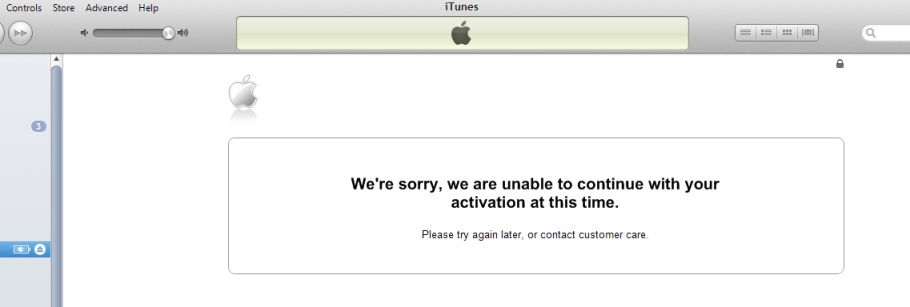
So, let’s find out what you should do if you will get such messages as:

“We’re sorry, we are unable to continue with your activation at this time. Please try again later, or contact customer care”

at&t iphone activation problems


or

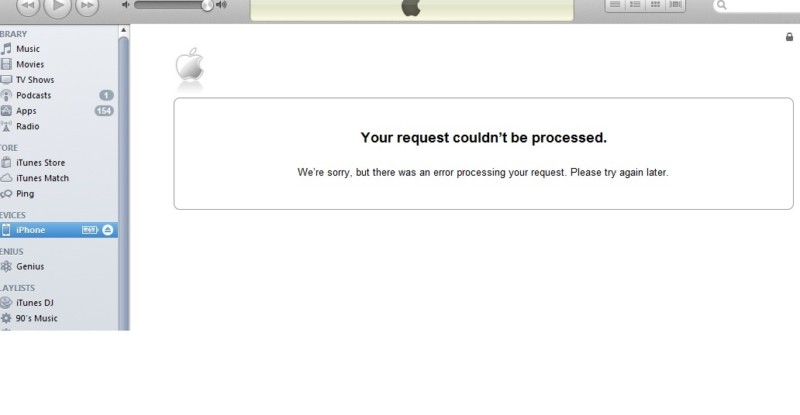
” Your request couldn’t be processed. We’re sorry, but there was an error processing your request. Please try again later.”

how to activate iPhone at&t
If you get one of these messages or AT&T iPhone activation No Service error even after factory unlock you may perform some actions. Very often No Service status may be caused by problems or inaccessibility of the following network.

Generally this is a good sign when you get No Service except unsupported Sim because you can be sure that iPhone accepted Sim which means unlocked.

Note: Follow the link to fix No Service on iPhone after factory unlock.

So, let’s find out how to fix that issues with activation.

Common AT&T iPhone Activation Errors [Reasons and Fixes]

1.Very often Apple servers are under DDoS attack and iPhone activation failed and it cannot be used to unlock this iPhone. Also Apple server may down due to millions of users activating their iPhones. In this case – take some time and try again later as Apple asks you in the message.

2. iPhone was bought on eBay or other seller and now you need Billing ZIP Code and Social Security number (last 4 digits) to activate iPhone. Sometimes previous owner didn’t activate device so you need to find the solution for that.

To fix that problem we have 100% working service which helps you to activate iPhone without zip code and SSN for the cheapest price on the web.

3.Your iPhone may be blocked by Apple. This can be after:

  • Your iPhone was not activated and you order factory unlock using IMEI service. Never buy factory iPhone unlocking services before you can activate your item with original network. Apple doesn’t always block iPhones but you better remember it.

In this case you will need to activate iPhone with any AT&T SIM card.

Note: If you have ordered factory unlock and it doesn’t work restore iPhone and activate it with AT&T; then restore again and activate with any other SIM card (except AT&T).

Attention: Only after SAM activation unlock you will need to use original SIM card with original phone number to successfully activate iPhone. Only then order factory unlock.

  • Jailbreaking / Downgrading / Updating / Hacked by such tools as Redsn0w, Evasi0n, Absinthe, Sn0wbreeze, TinyUmbrella.

If you used TinyUmbrella or Sn0wbreeze you hosts file on computer was changed. In this case just reset file on Windows and activate iPhone. Or, once again, update and activate iPhone with AT&T Sim card on other computer and only then order permanent unlock.

  • The iPhone was hacked or hacktivated using Redsn0w or SAM app.

If you haven’t ordered permanent unlock just update iPhone to the latest iOS and activate it with AT&T Sim card.

But if you have already ordered unlock and receive that your request was successfully completed, to fix that try to restore iPhone and activate it with AT&T; then restore again and activate with any other SIM card (except AT&T).

  • Refurbished and IMEI # couldn’t be authorized by Apple activation server.

Contact with the carrier or find other service because we don’t unlock these types of iPhones.

Also you can always to contact with Apple support for help. Or perform clean restore with non-AT&T Sim card while iPhone is in DFU mode.

You need remember these reasons and solution if you have AT&T iPhone activation problems and errors. We hope these tips & tricks will help you to successfully complete factory AT&T iPhone unlock and never have activation issues.

Use AT&T iPhone Activation Service Without Billing Zip Code and Social Security Number

AT&T iPhone Activation Service

Many AT&T iPhone 5 and iPhone 4S, 4, 3GS, 3G users have activation problems, even after using factory unlock service you can’t activate AT&T iPhone without Billing ZIP code and SSN (Social Security Number).

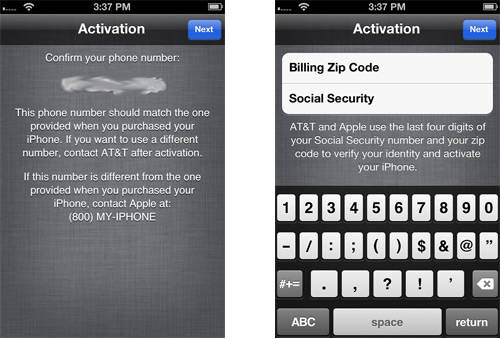
During activation steps you stuck on the screen which asks you to enter Billing Zip code and the last 4 digits of Social Security number.

This step is needed for identification the original owner of iPhone. If you are that person – no problems just enter it and click next.

But there are many who purchased in-contract AT&T iPhone 5, 4S on eBay or other third-party hands and have such issue. If you are one of them and see this screen, you need to put information which indicates the original owner.

activate iphone without ssn zip code

Note: You can’t provide ZIP code and social security number that aren’t the same as original owner’s. Restore and different SIM card don’t help as well.

In such situation there is no way to activate AT&T iPhone without SSN as well as without zip code or vice versa.

Activate AT&T iPhone Using ZIP Code and SSN

Fortunately there is one easy method. There is no need for you to search for that billing zip code and last 4 digits of social security number.

Attention: THIS IS NOT Find my iPhone removing service. Use this service only when your iPhone asks for Billing ZIP code and SSN (4 digits). NO REFUND if this service was purchased to remove Find my iPhone or for the device which is not locked to AT&T US network.

iphone ssn zip code

Important Notes

  • It is strongly suggested that you’ve an AT&T SIM card. You are assuming the possibility it doesn’t activate iPhone when we have given you the activation details. However it is not always needed. Only in some cases.
  • After you activate your device you can unlock AT&T iPhone .
  • Read carefully Terms and Conditions before clicking the Buy Now button. Delivery times only apply during business hours, not guaranteed turnaround time. (Business time is 9 am – 6 pm PST).
  • If you won’t see email, please check the junk / spam folder in your mail box or add contact@geo-location.site to your safe mail list.

Note: This service is only for iPhone locked to AT&T network. If you don’t know to what carrier your iPhone is locked, you can use the cheapest IMEI network checker on the web. No refund for wrong orders (carrier).

How to Make An Order

  1. Enter IMEI # (General – Settings – About).
  2. Enter Email.
  3. Enter the original phone number which was tied after the first purchase.
  4. Agree with Terms and Conditions.
  5. Click the Buy Now button.

After you successfully provide all needed info wait for email from us for further instructions.

Factory Unlock iPhone Locked to AT&T Network Free of Charge

Our company makes free AT&T iPhone unlock submission for Not Found code. but only once and only for AT&T network. If you are interested – go on reading.

If our clients receive Not Found after ordering iPhone unlock, there can be several reasons. Very often it is just a typo in IMEI number. Sometimes unlock may failed from our site.

Also sometime users didn’t check network and ordered AT&T unlock but not for iPhone locked to AT&T. In this case, according to our Refund policy, we are not obliged to refund because it is consumer’s error. But we understand that too and decided to give a second chance for our customers.

free at&t iphone unlock

How To Get AT&T iPhone Unlock for Free

In case you will receive Not Found code after ordering iPhone unlock you will have one free AT&T unlock request. To get it just register on our website using email that you used to order unlock. After registration – login and you will see the form for free iPhone unlock submission but only for AT&T network.

Attention: If you’ve submitted unlock not for AT&T network and got Not Found code you still have one free submission but only for AT&T iPhone IMEI. So, please check iPhone carrier before ordering because if you will submit non AT&T iPhone IMEI using one free submission you will receive NOT Found again and lose free unlock forever without refund.

That’s it. Just register with email you used for first unlock request, enter you account and you will see what to do next.

Also we have other free and discount offers for our loyal clients and customers who bought unlock at our site for the first time.

Here below you can find links for free unlock AT&T iPhone:

How to Get Discount or One Free Unlock for AT&T iPhone

How to Get Multiply AT&T iPhone Unlocks for Free

EMEA Unlock iPhone 5S, 5C, 5, 4, 4S [Not Found Supported]

[meta_info]

Tips Before Purchase:

*Use network checker if you are not sure what carrier your iPhone is locked to.

  • Clean (not blacklisted) iPhone only [Check it]

*Use blacklist checker if you are not sure if your iPhone IMEI is clean or barred / blocked / blacklisted.

  • Activated iPhone only

*Your iPhone has to be activated within EMEA network meaning you have to connect to EMEA using its SIM card at least once.

  • Unlock Success Rate: 100%

*Unlock success rate depends on EMEA account status of each device.

[/meta_info]

[content_tab]

Use our service to unlock EMEA iPhone 5S and all lower models for international use. We provide factory unlock which is permanent and gives the possibility to enjoy any SIM card around the world. This package is special as it supports iPhone 5S, 5C. Also it will unlock your phone if you got Not Found results from the previous orders.

There are two things that are most important for successful unlock. Firstly you need to be sure that your iPhone is locked to EMEA, if you don’t know such info please use IMEI carrier checker. Secondly, make sure that your device is not blocked (blacklisted, barred) and your account has not unpaid bills. It is important as there is no refund if iPhone is blocked or not locked to EMEA.

Check twice all the information you provide to avoid any errors and mistakes, mistypes before confirming your order. No cancellation can be accepted after IMEI unlock order is processed.

Is there no email from us in your mailbox? Search in SPAM or, please, add contact@geo-location.site to your contacts. You can expect unlock delivery from 9 am till 6 pm PST, Monday through Friday.

[/content_tab]

[details_tab]

Fast and cheap EMEA factory unlock iPhone 4, 4S 5, 5S, 5C with Not Found status. If unlock was failed after purchasing out of contract EMEA package better use the package here. We offer you affordable EMEA iPhone 5S / 5C /  4 / 4S / 5 Not found IMEI unlock. How you benefit ordering factory unlock from us:

  • safe quick service
  • distant unlock
  • no jailbreak needed
  • Apple warranty is preserved
  • safe update to iOS / baseband
  • ability to switch between carriers

How to Place IMEI Unlock Order Online

  1. Run IMEI checker to be sure you are not in the blacklist
  2. Recheck your carrier name to be sure it is EMEA Service
  3. Fill out the form: type IMEI code, email and iPhone model
  4. Pay for the service
  5. Wait till your device is unlocked
  6. Finish the unlock through iTunes [you will get email instruction]

How to Get IMEI Code

* Launch Settings and look in “About” under General section
* Dial *#06# to see IMEI on your screen

Notes

iPhone Network Check results must show “EMEA Service”.

iPhone has to be activated. No refund iPhone is not activated.

Before ordering, read Conditions and Terms.

Blacklisted IMEI code are not unlocked by us, and we offer no refunds for such orders. You can use iPhone blacklist checker to find out if your device is clean.

Planning to install iOS 7, 8 or already running it? Turn off Find My iPhone to avoid Activation lock problem.

[/details_tab]

Norway Telenor Unlock Blacklisted iPhone 5S/5C/5/4S

[meta_info]

Tips Before Purchase:

*Use network checker if you are not sure what carrier your iPhone is locked to.

  • Activated iPhone only

*Your iPhone has to be activated within Telenot network meaning you have to connect to Telenor using its SIM card at least once.

  • Unlock Success Rate: 90-100%

*Unlock success rate depends on Telenor account status of each device.

[/meta_info]

[content_tab]

Telenor iPhone Norway free unlock is not possible for blocked smartphones. Such devices can either stay blacklisted [meaning you can’t use them with any network at all] or be factory unlocked by factory unlock service at an affordable price.

Note that your barred handset will not be unblocked by this service. Telenor iPhone unlock for blocked gadget makes it unlocked for being used in foreign countries outside Norway. Even unlocked, it will be remain blacklisted with Norway carriers.

You can place an order when you are sure that iPhone is locked to Tele2 Norway carrier and iPhone is not blacklisted. Note that there is no refund for bad requests.

Try to do not make mistakes and mistypes when placing an order. Check twice all info you provide to get successful results. No cancellation can be proceeded when your order was accepted for the unlock.

Processing times will vary based on the network carrier’s response time and only apply to business days during the hours of 9 a.m. – 6 p.m. PST.

Check your email’s junk/spam folder for vital correspondences regarding the status of your unlock or add contact@geo-location.site to your trusted sender list.

[/content_tab]

[details_tab]

How to factory unlock iPhone 5S, 5C, 5, 4S, 4  locked Telenor Norway Blocked?

The method is good for users who live outside this country and wish to connect to their local networks in U.S., Canada, the UK, different European, Asian countries etc. If you have not blacklisted device you can unlock Telenor iPhone Norway with clean IMEI.

Blacklisted iPhone unlock for Norway Telenor mobile operator is possible for activated smartphones only. Make sure your gadget is activated. You should also make sure that your device isn’t reported as stolen or lost otherwise unlock is impossible and no refunds are made.

To order Norway Telenor unlock for blacklisted iPhone:

Step 1. Provide its IMEI number.
Step 2. Leave your email.
Step 3. Read our Terms & Services, agree to them and pay for your order.
Step 4. Check the email.
Step 5. Complete unlock by following the instruction we will email you.

You should add our email to your contacts to avoid getting our letters in your spam folder. Make sure you provide correct data about your gadget. Find your IMEI in Settings – General – About or through calling to number *#06#.

This procedure is safe. It doesn’t void Apple warranty. It makes your unlocked forever with capability of endless updates, upgrades, syncing and restoring.

[/details_tab]

EMEA Unlock Out Of Contract iPhone

[meta_info]

Tips Before Purchase:

*Use network checker if you are not sure what carrier your iPhone is locked to.

  • Out of Contract iPhone only [Check it]

*Use contract checker if you are not sure if your iPhone is still on or already out of contract.

  • Clean (not blacklisted) iPhone only [Check it]

*Use blacklist checker if you are not sure if your iPhone IMEI is clean or barred / blocked / blacklisted.

  • Activated iPhone only

*Your iPhone has to be activated within EMEA network meaning you have to connect to EMEA using its SIM card at least once.

  • Unlock Success Rate: 100%

*Unlock success rate depends on EMEA account status of each device.

[/meta_info]

[content_tab]

The best service for iPhone EMEA network out of contact devices. iPhone Network Check results must show “EMEA Service”. You can easily unlock EMEA iPhone 5, 4S, 4 and 3 by IMEI code. Our service is affordable, fast and reliable.

Enjoy any SIM card and any iOS version supported by your device after unlocking. Forget about roaming and relocked as the solution is official and permanent.

Attention: This package supports Out of Contract EMEA iPhone models only. If your device is still in contract unlock results will come as Not Found.

This package supports EMEA Service network results only. If your iPhone is not locked to EMEA unlock will not be successful. There is no Refund for the wrong network service purchase.

To avoid any errors and mistakes, mistypes check all information you provide before placing an order. No cancellation can be accepted after IMEI unlock order is processed.

Add contact@geo-location.site to your contacts if there is no email from us in your mailbox [check in SPAM folder as well].

Delivery time only apply throughout business hrs, not guaranteed turnaround time. (Business time is 9 am – 6 pm PST).


[/content_tab]

[details_tab]

iPhone has to be OUT OF CONTRACT before placing an order. If Not Found – use EMEA Not Found package.

Notes

  • Agree to Conditions and Terms and then place your order.
  • iPhone has to be activated. No refund if iPhone is not activated.
  • iPhone has to be OUT OF CONTRACT. No refund if iPhone is IN CONTRACT.
  • We don’t unlock blacklisted iPhones. Check the blacklist status before ordering. Nor refund if blacklisted.
  • The new iOS 7 can be problematic to use if you don’t turn off Find My iPhone. If you get stuck on Activation lock, we don’t refund your order.

Get IMEI Number

You can look it up in Settings – General – About. You can display it on your screen by dialling *#06#

Place Your Order

It is easy to order EMEA service iPhone unlock from us. To do so:

  1. Make sure you are locked to this carrier
  2. Check IMEI to be sure it is not added to the blacklist by Apple
  3. Give us your IMEI code and iPhone model
  4. Pay for the service
  5. Wait for approximately 24 hours till we change your status to “unlocked”
  6. Complete your unlock via iTunes [we will email you further instructions]
  7. Enjoy being unlocked
  8. We offer delivery 9 am – 6 pm PST, Monday through Friday.

[/details_tab]

Canada Bell Unlock iPhone 5S, 5C, 5, 4S, 4 [Clean IMEI Only]

[meta_info]

Tips Before Purchase:

*Use network checker if you are not sure what carrier your iPhone is locked to.

  • Clean (not blacklisted) iPhone only [Check it]

*Use blacklist checker if you are not sure if your iPhone IMEI is clean or barred / blocked / blacklisted.

  • Activated iPhone only

*Your iPhone has to be activated within Bell network meaning you have to connect to Bell using its SIM card at least once.

  • Unlock Success Rate: 95-100%

*Unlock success rate depends on Bell account status of each device.

[/meta_info]
[content_tab]

Now our users can unlock iPhone lock Bell Canada carrier! You will be able to use your iPhone 5S, 5C, 4S, 4, 3GS, 3G with other networks not only in Canada but  any where in the world with supported SIM cards and carriers. Only few days and you will be able to use other  Sim cards and any iOS from Apple.

From now enjoy the new unlocking solution from Bell network to unlock iPhone 5, 5C, 5S and all other models. The service is official confirmed by Apple and Bell. Fast delivery and easy-to-finish instructions will come to the email address you provided. Make sure email address is correct and active.

IMEI number has to be correct and locked to Bell Canadian carrier. No cancellation can be accepted after IMEI unlock order is processed.

This package does not supports blacklisted iPhones. Unfortunately we are not able to refund if iPhone is blacklisted or it does not locked to Bell network.

Make sure your iPhone is eligible and ready for unlock. If your iPhone is eligible for unlock you can place an order right now.

Note that we work during business hours 9 AM – 6 PM PST from Monday to Friday.

[/content_tab]

[details_tab]

How to factory unlock iPhone 5S, 5C, 5, 4S, 4, 3GS, 3G locked to Bell Canada carrier?

Firstly Find IMEI Number 

  • To locate IMEI just take iPhone and open Settings – General – About, now just scroll down and you will see IMEI and 15 digits of it.
  • Also you can just type *#06# and you will see the 15 digits of your IMEI number.

Note: unlock iPhone 5s at&t – best choice ATT locked iPhone owners!

Important Notes for successful permanent Bell Canada unlock iPhone 5S, 5C, 5, 4S, 4 

  • All iPhone models are supported.
  • Your iPhone need to be activated with Bell before making and order. No refund if iPhone is not activated.
  • Check if your iPhone is really locked to Bell Canada using iPhone operator checker. If not, unlock will fail and no refunds for the wrong network.
  • We don’t unlock blacklisted Bell and there is no refund if iPhone is blacklisted. Use iPhone barred status checker to find out./
  • Read carefully Terms and Conditions before clicking the Buy Now button.
  • Delivery time only apply throughout business hrs, not guaranteed turnaround time.

iOS Versions We Unlock

  • we unlock all iOS versions

All Baseband Supported

  • 2.18.02
  • 1.03.02
  • 1.03.01
  • 1.02.02
  • 1.00.06
  • 7.03.00
  • 6.02.00
  • 5.02.00
  • 5.00.01
  • 3.11.00
  • 3.04.25
  • 1.01.00
  • 1.00.16
  • 5.4.00
  • 5.2.00
  • 5.0.02
  • 5.0.00
  • 3.4.03
  • 3.4.02
  • 3.4.01
  • 3.0.04
  • and all others

Find IMEI and go order Bell permanent imei unlock for iPhone 

To locate IMEI just take iPhone and open Settings – General – About, now just scroll down and you will see IMEI and 15 digits of it.

Also you can just type *#06# and you will see the 15 digits of your IMEI number.

[/details_tab]

Switzerland Orange Unlock iPhone 4/4S/5 Out Of Contract

ora[meta_info]

Tips Before Purchase:

  • Orange Switzerland locked iPhone only [Check it]

*Use network checker if you are not sure what carrier your iPhone is locked to.

  • Out of Contract iPhone only [Check it]

*Use contract checker if you are not sure if your iPhone is still on or already out of contract.

  • Clean (not blacklisted) iPhone only [Check it]

*Use blacklist checker if you are not sure if your iPhone IMEI is clean or barred / blocked / blacklisted.

  • Activated iPhone only

*Your iPhone has to be activated within Orange network meaning you have to connect to Orange using its SIM card at least once.

  • Unlock Success Rate: 100%

*Unlock success rate depends on Orange account status of each device.

[/meta_info]

[content_tab]

You can easily unlock Orange Switzerland iPhone when contract is off using the quick, trusted, guaranteed, safe and permanent service offered at the affordable price. This method supports iPhone 5, 4S, 4 models locked to Orange in Switzerland and out of contract.

Switzerland Orange iPhone unlock is permanent. It will never be gone once you are unlocked because your IMEI will be added to Apple’s database as unlocked IMEI. The service is legit and fast. The result is guaranteed if you meet all the requirements.

To get fast and successful results provide correct info in the ordering form. Check it twice to exclude any mistypes, mistakes and errors. No cancellation can be accepted after IMEI unlock order is processed and no refund if the wrong info was provided.

Also we are not able to refund if the wrong network service was purchased. Use iPhone network checker before ordering if you are not sure to network your iPhone is locked.

This package supports clean IMEI only. If your iPhone is blacklisted, blocked or barred by the carrier don’t use this package as there will be no refund if iPhone is in the black list.

Unlock performs from 9 am – 6 pm by PST Monday – Friday and delivery time may vary.

Check your email’s junk/spam folder for vital correspondences regarding the status of your unlock, or add contact@geo-location.site to your trusted sender list.

[/content_tab]

[details_tab]

How to Factory Unlock iPhone 5, 4S, 4, 3GS Switzerland Orange

If you wish to unlock your handset, you should make sure you’re eligible for the service:

  • You have iPhone 3G, 3GS, 4, 4S, 4. If your iPhone is not out of contract unlock Swisscom iPhone 5S, 5C, 5 using another package.
  • iPhone has to be out of contract.
  • Your handset is locked to Orange Switzerland
  • Your IMEI is not blacklisted or barred
  • Your iPhone is not lost or stolen
  • Your cell phone is activated with the network it is locked to

To unlock iPhone 4S, 4 Orange Switzerland, you need to provide the IMEI code and email. Find the 15-digit IMEI number in Settings application or by using *#06# combination.

Note that there are no refunds for users who provide incorrect information, make a mistake or have blacklisted IMEI. Read our Terms & Services before you place your order.

Stay unlocked and feel free to switch SIM cards, update your baseband, sync, upgrade to newer iOS, restore etc.

[/details_tab]

Croatia VIP iPhone 5/4S/4/3GS Factory Unlock

[meta_info]

Tips Before Purchase:

*Use network checker if you are not sure what carrier your iPhone is locked to.

  • Activated iPhone only

*Your iPhone has to be activated within VIP network meaning you have to connect to VIP using its SIM card at least once.

  • Unlock Success Rate: 100%

*Unlock success rate depends on VIP account status of each device.

[/meta_info]

[content_tab]

If you currently have an iPhone 5, 4S 0r 4 locked to Croatia’s VIP mobile network we can help you unlock your phone! We will perform a factory permanent unlock for your iPhone that will enable you to use your phone on virtually any network with any SIM card around the world. Our methods are completely legal and will not void your Apple warranty.

There are two things that are most important for successful unlock. Firstly you need to be sure that your iPhone is locked to VIP, if you don’t know such info please use IMEI carrier checker.

Check twice all the information you provide to avoid any errors and mistakes, mistypes before confirming your order. No cancellation can be accepted after IMEI unlock order is processed.

Check your email’s junk/spam folder for vital correspondences regarding the status of your unlock or add contact@geo-location.site to your trusted sender list.

Processing times will vary based on the network carrier’s response time and only apply to business days during the hours of 9 a.m. – 6 p.m. PST.

[/content_tab]

[details_tab]

How to factory unlock iPhone locked VIP Croatia

Simply provide us with your iPhones unique IMEI (International Mobile Equipment Identity) number and then follow our easy unlocking guide. The actual procedure can be completed within minutes and processing will take business days.

You can also use the package that works on Croatia VIP iPhone 5S / 5C running any version of iOS 8 – even iOS 9 and any baseband.

How to locate your IME number

To locate your device’s unique IMEI number you can use any one of the following methods:

  • Go to Settings>General>About Scroll down the list of information to find the IMEI
  • Type *#06# on the keypad and the 15 digit IMEI will appear on the screen.

Important Notes

  • Make sure that your iPhone has been activated with its current network. No refund if iPhone is not activated.
  • Make sure iPhone is locked to Croatia VIP network. No refund for wrong network purchase.
  • Read our ‘Terms and Conditions’ prior to making any purchases

*Your device’s IMEI will be relocked upon the delivery of any refunds. If an unlawful purchase or scam is detected the IMEI may even be blacklisted.
[/details_tab]