iOS 8.2 Firmware Is Now Available For Download

Now it is possible to download iOS 8.2 firmware, as yesterday, March 9, together with updated MacBook Air(s) and Pro, the new 12.1-inch MacBook with Retina Display, and the Apple Watch, Apple company has also launched iOS 8.2 to public.

This latest iOS version comes with backend support of a new “Apple Watch app” that lets users customize and modify certain aspects of the wearable device.
download iOS 8.2 firmware

The companion Watch app brought many features to control the wearable’s software. It will let users to setup their friends and relatives, customize notifications, browse apps for it and many others.

As it was shown onstage on March 9 by CEO Tim Cook, this dedicated Apple Watch app is capable of arranging its home screen, syncing with the device, and more. This latest iOS 8.2 software update also comes with a huge amount of bug fixes for some revealed issues connected with iTunes, Music app, Siri, Bluetooth calling, Calendar. It also gained many improvements for Health app, increased the stability enhancements for Mail, Flyover in Maps, Music and improves VoiceOver reliability.

The iOS App Store is gaining a new section that highlights apps compatible with the Apple Watch for download. Some noted examples include the astronomy aid Dark Sky, transit tool Citymapper, and the Nike+ Running fitness tracker. The Apple Watch itself is settled to be released to public on April 24.

You can download iOS 8.2 firmware on your device with bug fixes and a patch for the FREAK secure transport flaw from March, 9:

iOS 8.2 for iPhone:

iOS 8.2 for iPad:

iOS 8.2 for iPod touch:

iOS 8.2 Release Notes For Launch Date

iOS 8.2 release date notes leaked few days ago into internet suggested that the new software update could be released on the first week of March.

Now that the first week of March is here and till the iOS 8.4 update will see the public eye we can look through its release notes that gains some bug fixes and improvements for the Health app and of course get users prepared for the Apple Watch launch.

ios 8.2 release date notes

According to reports the Cupertino company held back on the public launch so it could release a final beta to its carrier partners and employees. This final piece of software apparently carriers 12D508 build number, and this is the one that’s being sent out to carrier partners.

Due to the fact that Apple company will have big “Spring forward” event scheduled for March 9 it makes a bit more sense that the iOS 8.2 public launch will be on that day.

This software update should also fix a security issue that was discovered recently, called “FREAK,” that Apple has already confirmed it would be fixing soon.

iOS 8.2 gained plenty of betas launched for it over the last several weeks, and there’s not much we don’t know about the mobile operating system at this point, so a public release should very soon.

The report introduced the full changelog for iOS 8.2, which focused on Health and Fitness.

Health App improvements bring the ability to select the unit of measurement, add a privacy setting and improves stability when working with large amounts of data. The update fixes units for vitamins and minerals and brought fixes for Health data and for graphics.

iOS 8.2 brought stability enhancements for Mail, Flyover in Maps, Music and improves VoiceOver reliability.

There are also many bug fixes for some revealed issues connected with iTunes, Music app, Siri, Bluetooth calling, Calendar.

All the details of iOS 8.2 release date notes we will see on the stage on March, 9.

If an iPhone Is Unlocked What Does It Mean?

Some users ask the same question ‘iPhone unlocked what does it mean’ and we are happy to explain all the nuances about being SIM free from your network. By the way, the unlocking rules have changed in the U.S. in 2015. When you are locked you cannot switch the SIM and start using a different carrier as you will simply get no signal or see messages that something is wrong with the card you are inserting if it doesn’t belong to the network you are limited to.

Being unlocked means being free from any mobile operator. If an iPhone is unlocked what does it mean? It means you can insert different SIMs, choose any carrier, switch carriers at any moment and change data plans no matter what country you are in or traveling to.

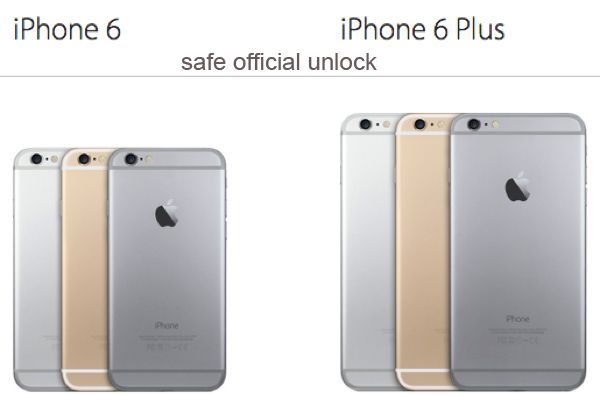
iPhone Unlocked What Does It Mean

Some U.S. and foreign mobile networks are eager to unlock iPhone subscribers at some cost or even for free. If your operator refuses to make you SIM free you can always order factory IMEI unlock for your carrier, iPhone model and blacklist / contract status and still become permanently free from any restrictions. This is safe, legal and officially allowed across the world.

What to Do with Unlocked iPhone

Step 1. After your unlock request has been processed by your carrier or an unlocking company you should get a new SIM that was previously unsupported by your gadget and take your old SIM out changing it for the new one. Remember to turn off your gadget while you are doing this.

Step 2. Turn the smartphone back on.

Step 3. Connect to your computer and launch iTunes. Backup.

Step 4. If you don’t have your original SIM card but you are already unlocked you might need to resent your cell phone. To do so, go to Settings, launch General and Reset option where you can select Erase All Content menu.

Step 5. Your information will be now wiped from the iOS device.

Step 6. Follow the setup instructions which your iPhone assistant shows on your screen and restore your unlocked iPhone from the backup you have.

Step 7. The model of yours should now support any SIM card and you can choose carriers and switch them as often as you like.

Are you ready to order iPhone official unlock by IMEI or would you rather try to get this service directly from the mobile operator you are using?

Use Makeovr To Change Homescreen On iPhone Without Jailbreaking

Do you know how change iPhone Homescreen without jailbreak. Here is how to do it. Use Makeovr.io. It cleverly utilizes some invisible icons you save to your home screen tired with wallpapers to make some nice attractive creations that you can watch below:

To create such screens all you need is to visit Makeovr.io on your iPhone 5, iPhone 6 or iPhone 6 Plus and follow the instructions. But first you need to save a Homescreen wallpaper and after that use the Makeovr website to save icons, which you then put in a new order.

Step 1. Choose the background. You can download one of Makeovr.io. background images or take an screenshot of your current background.

Step 2. Create new icons. Use Makeovr to cut icons right from your device’s background and add them to your Homescreen.

Step 3. Customize your device’s Homescreen. Shuttle these icons around and attract era attention from your friends .

You can use the video below to do all the things in right order. It gains detailed instruction how to save a Homescreen wallpaper and set new icons with Makeovr.io.

William Stoy developed Makeovr. The creator told that this piece of application was developed with his partner Gabe Whaley, formerly from BuzzFeed.

I tried this Makeovr on my device and it works as advertised. The only thing is it takes some time to rearrange the invisible icons and the Makeovr.io ones.

So if you take some adventures you can try change iPhone Homescreen without jailbreak.

AT&T Presents New iPhone Mobile Share 7GB Value Offer in February

U.S. Apple fans who have an AT&T iPhone 6 or any other smartphone model locked or connected to this network might have already heard about the new AT&T Mobile Share Value plan that was introduced in February, 2015.

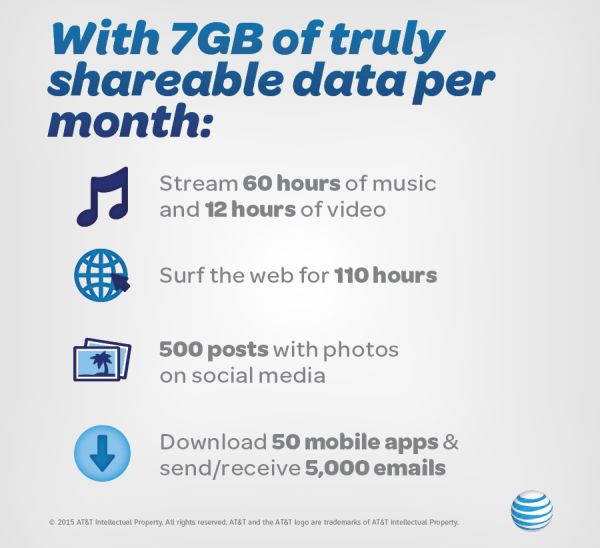
AT&T iPhone 7GB Mobile Share Value Plan

The new data plan is already official. This 7GB data option is available for a limited time for Mobile Share Value subscribers. According to AT&T iPhone data plans, the latest offer comes with unlimited text and talk and it allows sharing data allotment with other lines on the same account.

Earlier AT&T unveiled Rollover Data option that allows to bring unused data from one month to the next one for usage. This feature is also available to 7GB Mobile Share Value users.

The plan costs $75 a month. Does the U.S. carrier offer anything on top of this? As the report goes, the company has decided to include a monthly access charge for only one device on the line which usually runs $40 a month if you are on a 2-year agreement. It will now cost less, $15 a month for users who are purchasing and upgrading to AT&T Next plan that comes with installment option.

It is not clear when the option expires.

Microsoft Gaines Office iCloud Support For iOS 8 Devices

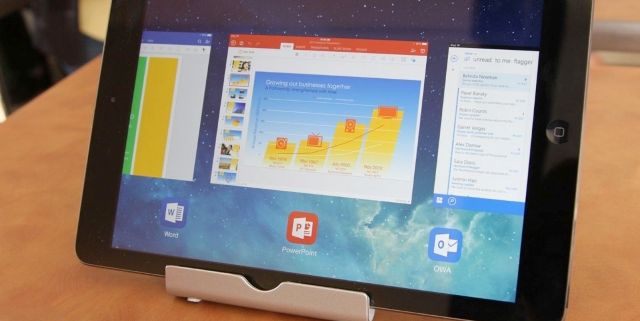
As it became known that now iOS 8 devices have got Microsoft Office iCloud support. This improved integration is available only in Office for iOS today, but Microsoft company is working on expanded cloud storage support to bring to its Android- and Windows-based Office apps.

This latest updates for Word, Excel, and PowerPoint allows users to open documents straight from services as iCloud Drive and Box, to edit and to save the documents back to Apple’s service using iOS 8 devices. This is really useful feature in case your business makes regular use of Box storage on other devices. Or you use Office on a Mac and have turned to iCloud Drive for your online storage needs.

microsoft office icloud support

Although these Microsoft’s improvements has some limitations. Using these third-party services you can open existing documents, but there is no way to save new documents to iCloud Drive or Box.

The track to your existing iCloud documents is also a little bit difficult, because you need to the Open tab, then to view iCloud files push More. In case you need to utilize other services like Box, then to enable it you must launch Locations > More. No other service shows up under the main Places menu, as Dropbox and Microsoft OneDrive both do.

powerpoint

Except Microsoft Office iCloud support, Microsoft company plans to enhance more third-party storage services support in the near future. The company will try to make users’ documents more readily available on a wide range of services.  Microsoft Word, Excel, and PowerPoint with the version 1.6 are now available for free from the App Store.

iOS 8 iPhone Facetime Data Usage: How Much Data You Consume

There are a lot of programs that let you make audio and video calls from the iPhone. This includes Hangouts, Skype and FaceTime. Most iOS device users prefer calling each other through the last program mentioned. Do you know how much data is used by FaceTime on iOS 8 firmware?

Ever since the release of iOS 7 Apple fans fell in love with FaceTime as it allows making free calls which you still have to pay your network for [if you are not using the unlimited data plan] because FaceTime data consumption takes the place with this VoIP call service.

About iPhone FaceTime Data Usage

This information can be useful to iPhone owners who are not on the unlimited data plans and make such calls on their cellular network. Since such users have to pay for their data, it is important to understand how good or bad their communication method is if judged by the amount of money you pay for it.

How Much Data Is Used by FaceTime

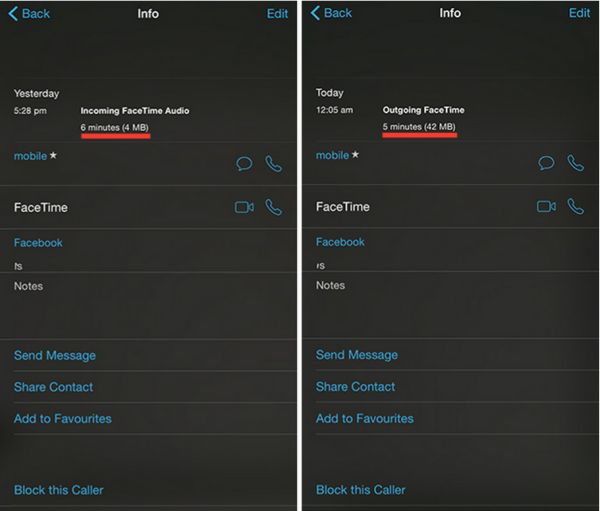
Here is an example of how much data can be used by FaceTime on iOS 8.1.3 or any earlier firmware version. A 6-minute audio call can take about 4MB data and a 5-minute video call can take about 42MB data. Based on your carrier’s data plan you can calculate how much one call can cost you.

How to Check How Much Data Your FaceTime Calls Use

Step 1. You can easily get the information on how much data your phone calls made via FaceTime consume. Apple created an improvement for iOS 8 firmware and this is what you have to do.

Step 2. Open FaceTime iOS 8 application.

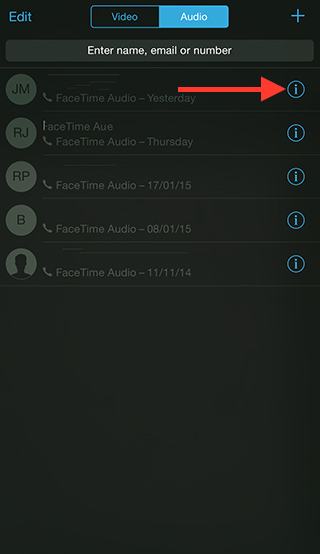
Step 3. Select Video tab or Audio menu.

Step 4. There will be an ‘i’ icon. You can find it near the Contact Name. This information screen will show the details on your calls. You can see the history for both outgoing and incoming FaceTime calls including the duration of the conversation and data that was used for it.

Check FaceTime Call Info

There is a different method you can use. Just launch your Phone application and go to Recents where you will also see everything about the FaceTime video or audio call you have just made or got.

iOS 8.4 Release Notes: New Features for iPhone Users from Apple

While developers are testing the first iOS 8.3 beta [the previous official iOS 8.1.3 can be unlocked], Apple is reportedly working on its next iOS 8.4 features trying to improve its mobile firmware for iPhone 6, 6 Plus and earlier models, iPad and iPod touch 5G.

iOS 8.4 Features Specs

There are no official iOS 8.4 release notes yet still rumors mention a lot of interesting options we might see in the future. According to different sources, the ‘fruit’ company is planning to add a new music service to its iOS 8.4 specs making the OS even better.

This next firmware version even has its codename. Some sources say Apple calls it Copper, and this operating system update should be unveiled soon after the Apple Watch official release which is planned for April 2015.

iTunes that has been also developed by Apple offers a lot of music to iPhone 6 and 6 Plus users, but since the company stopped upgrading its iPod touch line experts believe it can introduced a new music streaming service to current and new iPhone, iPad and future Watch owners.

There are no details about this project yet. We hear only rumors and suggestions. Maybe the first half of 2015 will bring something interesting and useful to all fans of music and Apple products. The time is so fast we won’t even notice it when the Cupertino-giant introduces its wearable gadget to public along with next OS updates.

Verizon Offers Lower Data Plans Prices for iPhone 6 Users

Soon after Verizon Wireless announced that it was planning to increase the activation / upgrade cost for iPhone 6 customers in the U.S., the same American carrier, the Big Red one, introduced its new Verizon iPhone 6 data plans with lower pricing.

The company has tweaked its More Everything data plans. The average price has been decreased by $10 so this fresh Verizon data plans prices look more attractive. The mobile operator has offered some other changes as well.

New Verizon iPhone 6 Data Plans

Will the new Verizon iPhone 6 data plans attract customers or act opposite making it lose its current and future subscribers? The idea about more expensive activation and upgrade policy doesn’t sound too cool. Still the company added some other options that do sound nice when you wish to use more data on your iDevice every month.

Here is more information on the updated Verizon data plan changes for U.S. customers who are to purchase iPhone 6 off contract or on contract.

If you were using the 6GB data plan and paid $80 a month for it you will be glad to pay $70 from now on. Users with 1GB-4GB plans should also be happy as their monthly cost has also dropped by $10 a month from the original price.

Those who are on the 8GB plan will pay $85 instead of $90 a month.

Only users who were on the 500MB will pay the same $20 a month.

The 10GB plan costs $100 and the 20GB plan is $140 per month. Users with the 12GB, 14GB and 16GB plan have to pay $110, $120 and $130 respectively.

All these effects are already going on. Edge plan subscribers can also get some discounts which is $5 less a month if they are on 6GB or 6GB+ plan.

New iPhone Unlock Eligibility Requirements in the USA in 2015

The new iPhone unlock USA eligibility requirements that start on February 11, 2015 should make unlocking easy, fast and simple for all customers. It was previously pretty hard to become SIM free directly from your mobile carrier, AT&T, Verizon, Sprint, T-Mobile, U.S. Cellular etc. The game is changing this year.

iPhone 6 Unlock in USA

Users who will want to unlock their iPhone out of contract from AT&T, Sprint, Verizon, T-Mobile will have to meet some requirements, but these rules are simpler than it used to be. The new standards for iOS 8 iPhone 6 unlock that also work on all other models, including iPhone 6 Plus, iPhone 5S, 5c, 5, 4S and earlier models were announced back in 2013, but only in 2015 they finally become real. The set of requirements for unlock has been made by CTIA.

This new AT&T, T-Mobile, Sprint iPhone unlocking policy works only for users who have paid the full price for their smartphone or are already out of contact. If you are still on contract, you can order factory IMEI unlock for iPhone 6 / 6 Plus and other models which is not free, but guarantees fast and reliable result that lasts forever.

If you are out of contract and your IMEI is clean you will have to call your carrier and ask it to unlock you whether by MSL or DSU type of service. The first one supports all iPhones [carriers will send special unlock code for iPhone users that should remove the restrictions]. The second method is the special auto unlock via OTA update that will support only iPhone 5S / 6 and 6 Plus models starting on February 19, 2015.

It is also must-know that only existing customers will get the free service from their network. New subscribers as well as former users will have to pay AT&T, Sprint, Verizon, T-Mobile for the chance to become SIM free even once they are out of contract and have a clean IMEI.