There are a lot of programs that let you make audio and video calls from the iPhone. This includes Hangouts, Skype and FaceTime. Most iOS device users prefer calling each other through the last program mentioned. Do you know how much data is used by FaceTime on iOS 8 firmware?
Ever since the release of iOS 7 Apple fans fell in love with FaceTime as it allows making free calls which you still have to pay your network for [if you are not using the unlimited data plan] because FaceTime data consumption takes the place with this VoIP call service.
About iPhone FaceTime Data Usage
This information can be useful to iPhone owners who are not on the unlimited data plans and make such calls on their cellular network. Since such users have to pay for their data, it is important to understand how good or bad their communication method is if judged by the amount of money you pay for it.
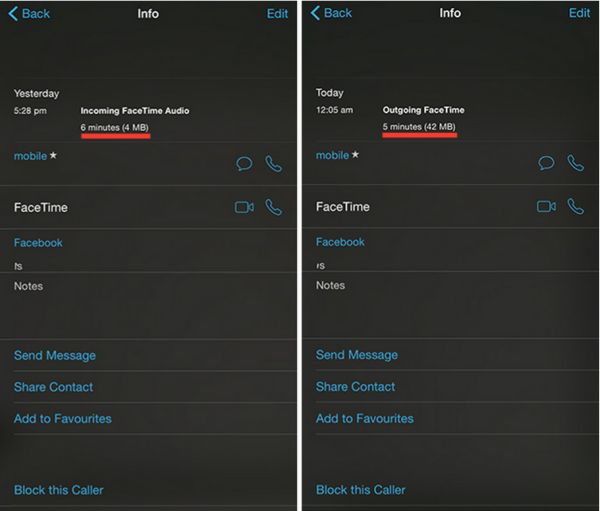
Here is an example of how much data can be used by FaceTime on iOS 8.1.3 or any earlier firmware version. A 6-minute audio call can take about 4MB data and a 5-minute video call can take about 42MB data. Based on your carrier’s data plan you can calculate how much one call can cost you.
How to Check How Much Data Your FaceTime Calls Use
Step 1. You can easily get the information on how much data your phone calls made via FaceTime consume. Apple created an improvement for iOS 8 firmware and this is what you have to do.
Step 2. Open FaceTime iOS 8 application.
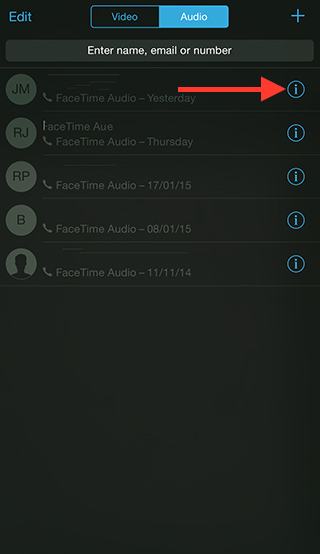
Step 3. Select Video tab or Audio menu.
Step 4. There will be an ‘i’ icon. You can find it near the Contact Name. This information screen will show the details on your calls. You can see the history for both outgoing and incoming FaceTime calls including the duration of the conversation and data that was used for it.
There is a different method you can use. Just launch your Phone application and go to Recents where you will also see everything about the FaceTime video or audio call you have just made or got.