Check if Your iPhone is Not Blacklisted By SFR France Operator

If you are going to buy SFR France iPhone check first if it is not blacklisted. If iPhone will be blacklisted it can be hard to unlock your device. However we have unlocking package for this SFR carrier as well.

After making an order you will receive email with information about blacklisted status and the date when it was blacklisted. You can see an example below:

  • Your IMEI is currently blocked by SFR France since 24.05.2012

If iPhone is clean you will receive this results:

  • Your IMEI Number is currently unblocked

Provide IMEI number and email to place an order. There are several different ways to find IMEI:

  1. Open Setting – General – About and you will see it in the list.
  2. Open Phone app and type *#06# and you will see iPhone IMEI on the screen.

It is important to provide correct IMEI because there will be no results and you never find out the carrier.

Also read important note below to everything right:

  • Make sure that your iPhone is really locked to one of Europe network such as SFR France. If you are not sure about this info, use iPhone network checker.
  • This iPhone checker is for Blacklist IMEI by SFR France only. Before placing an order make sure that your iPhone is blacklisted by SFR France carrier.
  • The iPhone has to be activated otherwise checker results will fail.
  • Read carefully our Terms and Services before making an order.

It is easy and fast to place an order. Just provide your IMEI number and email. The complete results will be delivered to you.

1.    Fill in the order form with required information like IMEI and email.
2.    Click Buy Now button and process the payment on PayPal. If you don’t have PayPal account choose the option “I don’t have PayPal account” when you will be redirected to PayPal.
3.    After the payment your unlocking request will be automatically send to the Apple server. In this case it can’t be canceled and refunded.
4. After the payment just do your things and wait for the good news.
5. You will receive email after request will be completed.

If you don’t see email in your inbox folder, check spam/junk folder or contact us. Our support team will be always glad to help you.
How to Check If iPhone is Blacklisted in Australia

There are many iPhones blocked in Australia. You can use our cheap Australia iPhone blacklist checker and get such kind of iPhone fast and for low cost.

Knowing if iPhone is blacklisted or not you can try to find unlocking solution. You can also see what Australian networks we unlock.

Check iPhone blacklist status and try to find unlocking solution. But it is more important when you are going to buy iPhone on eBay, Craigslist or any other online store. Check the IMEI first before buying iPhone and don’t buy blacklisted iPhone.

After making an order you will receive email with information about blacklisted status and the date when it was blacklisted. You can see an example below:

  • Your IMEI is currently blocked by Optus since 04.09.2011

If iPhone is clean you will receive this results:

  • Your IMEI Number is currently unblocked

Provide IMEI number and email to place an order. There are several different ways to find IMEI:

  1. Open Setting – General – About and you will see it in the list.
  2. Open Phone app and type *#06# and you will see iPhone IMEI on the screen.

It is important to provide correct IMEI because there will be no results and you never find out the carrier.

Also read important note below to everything right:

  • Make sure that your iPhone is really locked to one of Europe networks such as Optus, Telstra, Vodafone, Virgin, Three. If you are not sure about this info, use iPhone network checker.
  • This iPhone checker is for Blacklist IMEI in Australia only. Before placing an order make sure that your iPhone is blacklisted by one of Austraslian carriers.
  • If your iPhone is blacklisted you can go to our pricing category and choose from available packages to unlock blacklisted iPhones like Optus AU.
  • The iPhone has to be activated otherwise checker results will fail.
  • Read carefully our Terms and Services before making an order.

It is easy and fast to place an order. Just provide your IMEI number and email. The complete results will be delivered to you.

1.    Fill in the order form with required information like IMEI and email.
2.    Click Buy Now button and process the payment on PayPal. If you don’t have PayPal account choose the option “I don’t have PayPal account” when you will be redirected to PayPal.
3.    After the payment your unlocking request will be automatically send to the Apple server. In this case it can’t be canceled and refunded.
4. After the payment just do your things and wait for the good news.
5. You will receive email after request will be completed.

If you don’t see email in your inbox folder, check spam/junk folder or contact us. Our support team will be always glad to help you.
How to Check if iPhone is Blacklisted by European Networks

Blacklist iPhone checker will show you the status of your device. Find out if it is clean (unblocked) or blacklisted. This blacklist IMEI checker shows results for iPhones blocked in Europe only.

It is important to check iPhone blacklist status and try to find unlocking solution for it. But it is more important when you are going to buy iPhone on eBay, Craigslist or any other online store. Check the IMEI first before buying iPhone and secure from blacklist status.

After making an order you will receive email with information about blacklisted status and the date when it was blacklisted. You can see an example below:

  • Your IMEI is currently blocked by Vodafone since 23.12.2012

If iPhone is clean you will receive this results:

  • Your IMEI Number is currently unblocked

Provide IMEI number and email to place an order. There are several different ways to find IMEI:

  1. Open Phone app and type *#06# and you will see iPhone IMEI on the screen.
  2. Open Setting – General – About and you will see it in the list.

It is important to provide correct IMEI because there will be no results and you never find out the carrier.

Also read important note below to everything right:

  • Make sure that your iPhone is really locked to one of Europe networks such as Vodafone, Orange, O2, Telenor, 3 Three, Telia, Telenor, SFR France, T-Mobile and many-many more. If you are not sure about this info, use iPhone network checker.
  • This iPhone checker is for Blacklist IMEI in Europe only. Before placing an order make sure that your iPhone is blacklisted by one of European carriers.
  • If your iPhone is blacklisted you can go to our pricing category and choose from available packages to unlock blacklisted iPhones like SFR France.
  • The iPhone has to be activated otherwise checker results will fail.
  • Read carefully our Terms and Services before making an order.

It is easy and fast to place an order. Just provide your IMEI number and email. The complete results will be delivered to you.

1.    Fill in the order form with required information like IMEI and email.
2.    Click Buy Now button and process the payment on PayPal. If you don’t have PayPal account choose the option “I don’t have PayPal account” when you will be redirected to PayPal.
3.    After the payment your unlocking request will be automatically send to the Apple server. In this case it can’t be canceled and refunded.
4. After the payment just do your things and wait for the good news.
5. You will receive email after request will be completed.

If you don’t see email in your inbox folder, check spam/junk folder or contact us. Our support team will be always glad to help you.
SFR France iPhone 4 / 4S / 5 / 5S / 5C / 6 / 6 Plus Factory Unlock

Here you can unlock your iPhone locked to SFR France. Only clean IMEI supported. iPhone 5S/5C supported too!. Read description below to place an order quick and easy. First you need to find IMEI code to factory unlock SFR France iPhone.

How to Find IMEI

There are two ways to find IMEI number:

Go to Phone app and type *#06#. You will see 15 digits. That would be IMEI.

Go to Settings – General – About and scroll down till you see four big letters “IMEI” and 15 digits opposite it.

Unlock iPhone SFR France For The Cheapest Price!

This service offers official factory unlocking for iPhone SFR France. This is not jailbreak or any other hack. We are the legit service and provide only official solution.

Unlock guaranteed only if you are fine with requirements below:

  • Make sure that your iPhone 4 / 4S / 5 / 5S / 5C / 6 / 6 Plus is really locked to SFR France. If you are not sure about this info, use iPhone network checker because there are no refund for the wrong carrier.
  • If your iPhone is not SFR France we have also other packages for other carriers. Just select yours and unlock.
  • This unlocking package is for clean IMEI only. Before placing an order make sure that your iPhone is not blacklisted, barred or blocked.
  • Unfortunately our service can’t unlock blacklisted iPhone SFR France. If you are not sure about the status of your iPhone, use SFR blacklist check service. These results will give you info whenever your iMEI blacklisted (reported lost or stolen) or not. Save time and money. Also you will have info that will be useful in case you will plan to sell iPhone.
  • There are NO REFUND if iPhone is got blacklisted before or after placing an order.
  • The iPhone has to be activated with SFR France otherwise unlock will fail.
  • Read carefully our Terms and Services before making an order.

If iPhone IMEI is clean, activated and locked to SFR France you are in the right place. Let’s see what advantages you will receive after using our service.

Attention: If you have a Phone shop or a wholesaler you can register on digitalunlocking.net and run your own mobile unlocking business.

  • We are the only unlocking company in the market that provides professional and fast service for the cheapest prices.
  • We offer the lowest prices for permanent iPhone unlock.
  • Official unlocking iPhone SFR France is lifetime and your device will never be locked again.
  • We provide really fast and 100% working official unlocking solution.
  • Money back guarantee if iPhone will be still locked to SFR France carrier after using our service.
  • You can switch SIM cards and enjoy any GSM carrier whenever you are in our beautiful world.
  • Forget about roaming when you are traveling. Just insert local SIM card and enjoy phone calls.
  • There is no need to go somewhere to get unlock. We offer remote service and you can finish unlock from your home (If you have internet connection).
  • The warranty and all other available services from Apple remain valid after factory unlock.
  • The process will not harm your device.
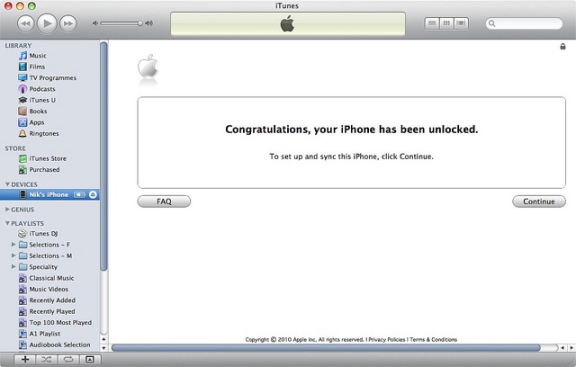
  • You don’t have to install some additional software. Only connect it to iTunes and voila.
  • It doesn’t matter what iOS version, baseband, bootloader and other stuff running on your iPhone. We unlock any.
  • You can update, sync and restore iPhone in iTunes and it will never be locked again. If Apple will release any new iOS firmware version go on and try it if you like.
  • Your apps and most preferred features as well as not most preferred will remain working as usual after unlock.

How Does the Factory iPhone Unlock Process Works

  1. Fill in the order form with required information like IMEI, email, iPhone model, and other info like serial number if necessary.
  2. Click Buy Now button and process the payment on PayPal. If you don’t have PayPal account choose the option “I don’t have PayPal account” when you will be redirected to PayPal.
  3. After the payment your unlocking request will be automatically send to the carrier. In this case it can’t be canceled and refunded.
  4. After the payment just do your things and wait for the good news.
  5. You will receive email with detailed instructions on how to compete factory iPhone unlock in iTunes. If you don’t see email in your inbox folder, check spam/junk folder or contact us. Our support team will be always glad to help you.
  6. Official and permanent iPhone unlock only apply during business hours (9 AM – 6 PM PST, Monday-Friday). No turnaround time guaranteed.
  7. Feel free to contact us in case you have any questions regarding factory unlock iPhone SFR France and our company will be always glad to help you.

UK 3 Hutchison Blacklisted iPhone 6S Plus, 6S, 6 Plus, 6, 5S, 5C, 5, 4S, 4 Unlock

[meta_info]

Tips Before Purchase:

  • 3 Hutchison locked iPhone only [Check it]

*Use network checker if you are not sure what carrier your iPhone is locked to.

  • Activated iPhone only

*Your iPhone has to be activated within 3 Hutchison network meaning you have to connect to 3 Hutchison using its SIM card at least once.

  • Unlock Success Rate: 90-100%

*Unlock success rate depends on 3 Hutchison account status of each device.

[/meta_info]

[content_tab]

One of the most popular Britain operators 3 (Three) Hutchison UK was blacklisted many iPhone 6S Plus, 6S, 6 Plus, 6, 5S, 5C, 5, 4S, 4. This package supports unlock for blacklisted / barred / blocked iPhone Three Hutchison carrier. Now you can use this unlocking package to permanent factory unlock blacklisted 3 UK iPhone and all other older models.

The iPhone will be permanently unlocked which means that you will be able to update it to any iOS and it will never re-lock again!

Attention: This service doesn’t unblock iPhone. It will still be blocked but unlocked for any network and SIM card outside UK.

iPhone should be locked to 3 Three Hutchison UK network. No refund if wrong network.

To exclude any mistypes, mistakes and errors check the information you provide before placing an order. No cancellation can be accepted after IMEI unlock order is processed.

It is advised to add contact@geo-location.site to contacts to get emails from us.

You can expect unlock delivery 9 am – 6 pm PST Monday – Friday.

[/content_tab]

[details_tab]

How to factory unlock iPhone 6S Plus, 6S, 6 Plus, 6, 5S, 5C, 5, 4S, 4 (IMEI in Blacklist) locked Three Hutchison UK carrier?

If your iPhone is not blacklisted don’t worry because we have another package which you can use to unlock Three Hutchinson UK iPhone 6S Plus, 6S, 6 Plus, 6, 5S, 5C, 5, 4S, 4 if it is clean.

But before making an order read the notes below:

  • iPhone must be activated before making an order.
  • This package is for barred / blacklisted iPhone Three Hutchison UK.
  • Read our ‘Terms and Conditions’ prior to making any purchases.
  • Check your email’s junk/spam folder for vital correspondences regarding the status of your unlock.
  • Processing times will vary based on the network carrier’s response time and only apply to business days.

If you see that your iPhone is eligible for unlock you can place an order right now. Here below you can see the steps on how to make an order:

a). Enter IMEI;

Note: you can type *#06# and see it on iPhone screen or go to Settings – General – About.

b). Enter email;

c). select the model (5S or 5C);

d). Read and agree with Terms;

e). Click the Buy Now button.

That’s it. From this moment our team will do best to deliver successful results. After using our service you will be bale to enjoy any SIM card around the world including United Kingdom’s carriers like Vodafone, T-Mobile, etc.

Fast and easy AT&T Unlock iPhone 5S – best price for unlock ATT carrier!

[/details_tab]

How to Activate and Unlock iPhone [Instruction for New Customers]

Users who purchase Apple smartphones must activate iPhone with the carrier it is locked too. This is an important step for those who are planning to resell a device or purchasing a gadget and unlock iPhone via factory IMEI unlock tool. Here is how to activate iPhone [instruction] that will save your time and let you do different things with the handset.

Here comes iPhone activation guide that will be useful to all new consumers. It is impossible to use a device without its activation.

How to Activate The New iPhone

Step 1. You should turn iPhone on. It is useless without power.

Step 2. You also need iTunes on your computer. Visit Apple website and get the app from there. Here is a direct link to where you can download iTunes.

Step 3. Install iTunes. It might take a couple of moments.

Step 4. Plug in the handset to your PC or Mac with your original SIM card inserted. Use the official Apple cable / dock that come with your smartphone. Some people like to use third-party accessories but this can be risky.

Step 5. On-screen guide will appear. Follow it to sync the gadget with iTunes.

Step 6. That’s it. Your device has been activated and you can use it with your carrier now.

If you need to port iPhone number over from another mobile operator

You should first activate iPhone. Follow the above walkthrough to do so. If you are using AT&T iPhone you should call the carrier at 1-866-499-8008 and ask them move your number to another smartphone or ask them to factory unlock your device. You will be asked the phone number you wish to port, SIM ID [you can find it on the back of the gadget’s box if you purchased the device from AT&T] and IMEI code that can be found by dialling *#06# [the number will appear on your screen]. If you will ask for the unlock they will ask for contract details so prepare it too.

What to Do to Unlock iPhone

Now when your iPhone is activated you can easily factory unlock it. If you know the carrier (mobile operator) to which your iPhone is locked just select the right package and place an order. In case you don’t know the locked carrier you can always use iPhone Network checker and quickly find out it.

The prices and delivery time depends on the carrier to which iPhone is locked and every operator has its own price for unlock.

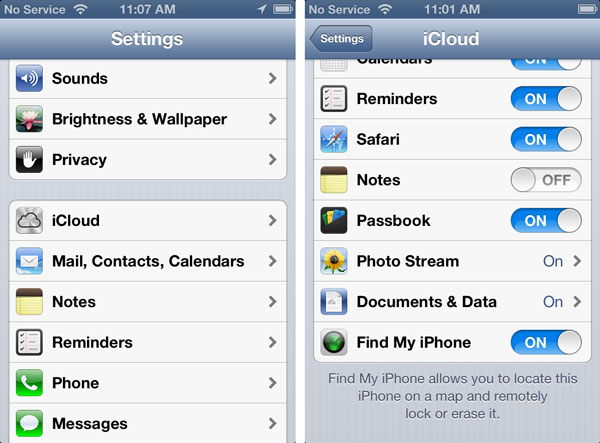
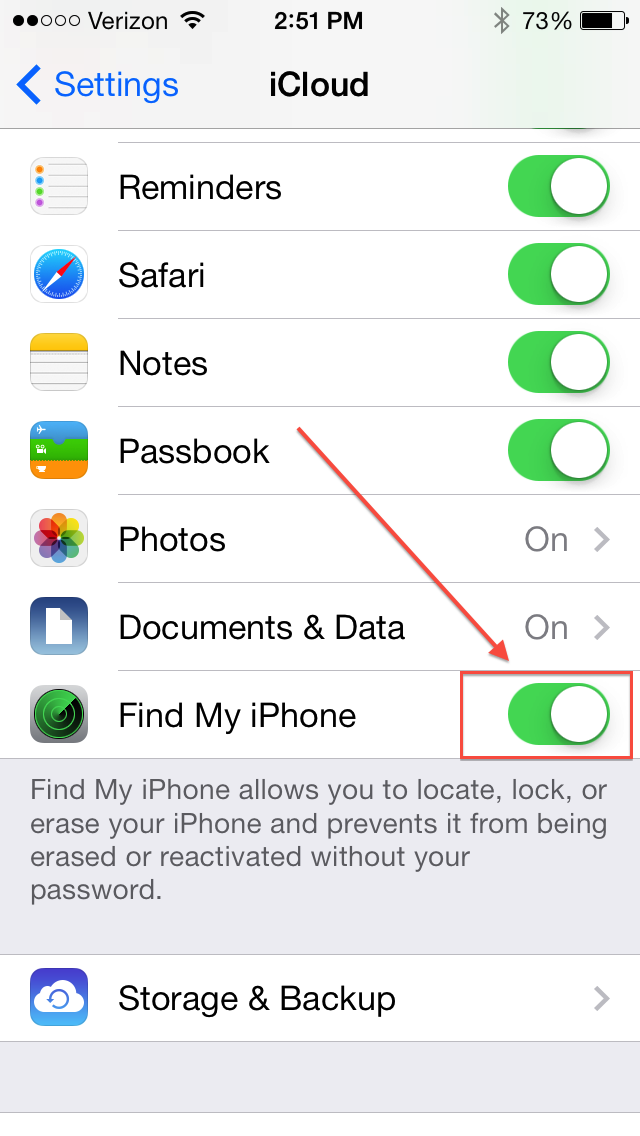
PS. With the introduction of iOS 7 all iPhone users are highly advised to download the free Find My iPhone program and install it. Turn it on and in case you lose or someone steals your device you will be able to erase your personal info distantly via this application and iCloud.

Get Fast Samsung IMEI Unlocking With Codes for Europe Carriers [All Models]

From now we are offering fast package for Samsung phone from Europe. After purchasing we will provide phone unlock code shortly. Just enter few digits and your device will be forever unlocked. But first find IMEI number and check if your phone is really locked to one of the Europe networks.

If you agree to wait a little bit more and pay less price you can go here and send a request for unlocking code for Samsung phone.

Our service offers legal unlocking for any Samsung handset locked to any Europe service provider. We will provide unlock code and after entering that code your device becomes officially and permanently unlocked. All you need to do is to send us your IMEI number and wait for the email with a code.

How to Get the IMEI Number

The best and 100% working way is to type *#06# on your phone and you will see the digits on the screen. Please send us only the first 15 digits and triple check if the IMEI number you provide is correct. If it won’t be correct the code we send will fail to unlock your Samsung phone from Europe.

How to Place an Order

  1. Enter IMEI number
  2. Enter email address
  3. Select the model of your Samsung phone (if you don’t see it contact us)
  4. Carefully read and agree with Terms and Services.

Important

This package unlocks Samsung phones locked only to European networks.

If you will get Not Found for the newer models such as Note 3, S4, don’t worry and use our other package for Not Found Samsung Phone Database 2.

Unlocking phone with a code is a legal method. We don’t provide any illegal service here.

Make sure you are providing correct IMEI number. No refund if incorrect number was provided.

Check spam/junk folder if you don’t see email from us. Also you can add our email address to your safe contact list.

Read carefully Terms&Services before buying anything.

Usually you will receive 4 different codes:

  • NETWORK CODE also known as NCK =12345678
  • SERVICE PROVIDER also known as SPCK=12345678
  • SUBPROVIDER also known as SCK=12345678
  • DEFREEZE also known as MCK or FREEZE =12345678

In most cases you will need only the first Network Code (NCK). Only if your device is hard locked you will also need MCK (freeze/defreeze).

Note: If you will receive only one code that will be Network Code (NCK) and it is normal.

After we generate code you will receive email with a code and detailed instruction on how to use it.

How to Check if Samsung Phone Is Unlocked

Sure you can insert no-supported SIM card and make a call. But also there is other way to check if your Samsung handset is unlocked:

Step 1. Type on your phone the following:

  • *#7465625#

Step 2. You will see a menu with such info:

1. [ ] Network lock

2. [ ] Subset lock

3. [ ] SP lock

Step 3. If you see that everything is OFF you can be sure that your device is completely unlocked.

Benefits of Official Unlocking and Advantages of using Our Service

  • This is not software or hardware unlocking solution. You don’t need to install something or disassemble the phone.
  • The process is completely legal and won’t harm your device.
  • After unlocking the warranty remains valid.
  • This is a remote service. Order unlock online and receive email with the results.
  • After unlocking you can use any other (non-supported before) SIM card in any country. Do you like to travel? – This is your solution, switch SIM cards and enjoy communication.
  • We offer the cheapest price for Europa Samsung phone unlocking.
  • After you enter unlock code your device will be unlocked permanently.
  • Forget about roaming or something like that. Just insert SIM card you need to use and enjoy.
  • If device is forever unlocked its selling value increases several times.
  • We have serious and really helpful customer service so you can always contact us if you will have any questions regarding unlock.

Is Activation Lock On or Off on My iOS 7 iPhone?

Question: Hi, I have purchased a used iPhone with iOS 6 and now I am planning to update it to iOS 7. How can I know for sure if its Activation Lock is off or on along with Find My iPhone application? Is it safe to install the latest Apple firmware or should I stay on version 6?

Answer: Hello, thank you for your question. The new iOS 7 can truly bring you some problems making you not happy about your used device. This firmware has Activation Lock option that blocks the smartphone from being used by third-party people if Find My iPhone application is turned on. It doesn’t matter if you simply wish to update to iOS 7 or unlock your gadget and upgrade later on.

check find my iphone

Even if you know the ID / passcode you might forget it one day and, according to Apple, it is impossible to recover this password so you’ll simply get a non-active gadget. Is there a way how to solve possible future problems?

Luckily, iOS 7 Activation lock check service can tell if you this feature is turned on or off. Just check your handset before unlock, restoration, update etc. There is also a solution to users who updated to iOS 7 with Activation lock on and now can’t use their device. Try the distant service and get past Find My iPhone Activation Lock option to enjoy all the benefits of your device.

If the program is on, you get into problem. It is great if you can contact the original gadget owner and get his ID and passcode to unlock the gadget and turn Activation Lock off. This is often difficult to achieve in reality because previous owners vanish when you purchase a problematic device online.

You should be sure that Find My iPhone is off before installing to iOS 7. Otherwise you can get a piece of metal that doesn’t perform. It will be impossible to resell such a device on Craglist, eBay and other sites. You will not be able to unlock it because such a procedure requires restoration through iTunes and you will get stuck on the Activation message without ID and passcode.

How to Buy Used iPhone: Painless Purchase Instruction

Before the release of iOS 7 it was much safer to purchase used iPhones. The situation is different from now on. Customers who are going to purchase this smartphone from resellers on eBay and similar platforms have to pay attention at whether find my iPhone turned on or off because if this option is on you can have a lot of problems with Activation lock.

This option has been introduced to low down the number of iPhone thefts. People like to steal the expensive smartphone and resell it. If you are not attentive enough while purchasing used devices you can get a smartphone stolen by someone or with Activation lock feature turned on. In other words, your device will be useless unless its original owner tells you his Apple ID / passcode to unlock and change the settings.

find my iphone checker
It is often difficult to contact previous owner and ask for the unlock. But you can always protect yourself BEFORE making a purchase. Here is what you must do in order to buy an activated iPhone with Find My iPhone app turned off.

Use iOS 7 Activation Lock Checker

Really, this service is superb as it can tell you for sure whether the iPhone you wish to get has Find My iPhone enabled or disabled. After you run this Activation Lock checker service you will know whether it is safe to purchase a particular handset or not.

By the way, don’t worry if you already purchased the iPhone with Find My iPhone and iOS 7 Activation lock turned one. You can bypass this lock distantly by using this service. Stay safe and enjoy using your Apple device.

How Find My iPhone Works on iOS 7

This application works in pair with Activation Lock option. If it is turned on you cannot activate your iPhone, restore it and reset if you don’t know the original ID and password of the person who set this feature on. You get a real “brick” instead of a smartphone and simply pay for nothing.

How to Unlock iOS 7 Devices: Popular Methods

It is always cheaper to purchase a locked device from Apple and order its unlock. If you happen to own Apple smartphone you can use different methods to unlock iOS 7. Users who had iOS 5 and iOS 6 gadgets remember R-SIM, Gevey, SAM and UltraSn0w methods that helped to become free from one network and get a chance to use any SIM card across the world.

Do these tools work for iOS 7.0.3 iPhones? Is it possible to unlock for free? We are sure there are a lot of curious customers who got their locked handset from Apple or resellers and now want to get rid of being locked to a single carrier.

How to Unlock iOS 7

Gevey Unlock for iOS 7.x

If you remember this method you sadly can’t use it because there is no Gevey unlock for iOS 7 firmware. You can’t perform such unlock so keep looking for other tools. You can use R-SIM but it is not tested yet.

SAM and UltraSn0w Unlocks for iOS 7.x

No matter how good these tools are you can’t use them for iOS 7 gadgets yet because there is no iOS 7 jailbreak. And SAM activation tool and Ultrasnow methods depend on jailbreaking. You have to wait till hackers present a program capable of tethering or untethering the newest operating system so try to use it later.

iOS 7.x Unlock by IMEI Code

Unlike some unlocking methods that were free to use with iOS 6, IMEI unlock tool works for iOS 7.0.3 / 7.1 devices but it is paid for. The service is still affordable so you can easily order it and have your AT&T iPhone iOS 7 unlocked within several days. IMEI unlocking service supports all iPhone models / basebands.

factory unlock at&t iphone

Is it safe to unlock AT&T iPhone on iOS 7 by IMEI? Yes, it is safe and reliable. You need to have a clean IMEI code and an activated smartphone with the network it is locked to. Your status will be changed to “unlocked” in the official Apple database preserving your warranty and allowing you to update to next iOS 7 without losing the status.