Why is iPhone Blacklisted?

There are some questions asked by iPhone users and people who wish to purchase factory unlock for iPhone but are afraid to get the wrong device. Why is iPhone blacklisted? What can happen to the gadget which has a barred IMEI number? Are you interested to get the answers? Continue reading, and you will find out why Apple blocks its handsets and how you should react to this policy.

It is hard to imagine modern people without a smartphone in their hands. More and more customers prefer to communicate via expensive devices. They spend bunch of money on handsets, and get smartphones for themselves and their family members. No wonder that muggers and thieves target expensive gadgets.

Find out how to unlock blacklisted iPhone and why it gets blocked in different countries.

blacklisted iphone
A lot of iPhones and other phones are stolen and resold in the black market. The new users of a stolen device might not even know their handset belongs to someone else, so they start using it. In order to protect people from having their iPhone used by third-party people, carriers and developers started to check iPhone IMEI number and then block it [IMEI is a unique 15-digit identifier of every iPhone manufactured by the Cupertino-based tech giant which can be found in Settings – General – About].

Stealing and iPhone lost are two main reasons for why iPhone gets blacklisted. There are other terms that identify this. They are barring and blocking. If the iPhone is blacklisted by a carrier, it is impossible to use this handset on this carrier’s network.

Also its IMEI can be listed in the black list if user doesn’t pay for his gadget, if there are insurance claims and not-agreed terms of used. There can be other reasons as well.

Mobile operators in some countries even share one database of registered devices, and if a gadget gets blacklisted in such a country, it will be impossible to use it with any local carrier.

And if your iPhone is not blacklisted you can find out 10 frequently asked questions about IMEI unlock and then order unlock. Also you can check the services we offer for several worldwide networks:

Check more:
iPhone IMEI unlock for 6S, 6, 5S, 5C, 5, 4S/4.

Free Press against AT&T Because of FaceTime Policy

The new AT&T FaceTime rules couldn’t please a lot of carrier’s customers and, of course, the Net Neutrality groups. Now free press against AT&T company is launched and a petition website is developed to support users who have grandfathered unlimited data plans and cannot use FaceTime feature over cellular with this American carrier. Remember that AT&T blocked FaceTime unlimited plans and now they have problems.

Users with tiered data plans probably like the latest AT&T FaceTime rules, as they are allowed using video calls over cellular connection. As for other operator’s clients, they are unhappy because the company limits their rights to use different iOS services.

at&t against free press

The website created by free press says “AT&T: Your World. Blocked,” and you can see these words in the website’s title. This source was launched so that everyone who uses AT&T service was able to comment on the company’s policy. It is easy to share your thoughts with others by submitting the comments, your name and email.

According to the group, the mobile operator violates Net Neutrality and even tries to change all the rules that protect customer’s “freedom to connect.” You know what? A lot of users agree with these statements, as the website can boast over 10 thousand comments already.

The first charge for violation net neutrality was received by AT&T in September. The company limited FaceTime usage over cellular to most iPhone customers. At that time this feature was available to users with Shared data plans only. Today the situation has improved; yet not all people are satisfied.

What does the company say about its AT&T FaceTime rules? It believes that carriers are not required to make available preloaded applications on phones. According to AT&T, the provider must do everything to help users download programs that compete with the carrier’s video and voice services.

No matter what the mobile operator’s opinion was, it still revised the FaceTime policy and changed the rules. Maybe the new free press against AT&T petition will help customers with unlimited data plans to also get FaceTime over cellular option. Let’s believe it will happen in the future! But if you want to join the petition go here and express your opinion.

FAQ on How to iPhone SE, 6S Plus, 6S, 6 Plus, 6, 5S, 5C, 5, 4S & 4 IMEI unlock

Users who haven’t tried to iphone imei unlock number have a lot of questions swirling in their heads. Since this IMEI unlock method is considerably new, we have decided to share some of the most popular questions on factory iPhone unlock iOS smartphones. Below you will find our short FAQ with the answers to ten frequently asked questions.

iPhone 6S, 6, 5S, 5C, 5, 4S & 4 IMEI unlock
1. What is a factory iPhone unlock via IMEI?

When you choose to unlock iPhone using IMEI you select an official unlock method allowed by Apple. Factory unlock will let your insert any SIM card and connect to most carriers across the world. This # is a unique identifier of every iPhone unit manufactured by Apple.You can check IMEI number and find out to which network it is locked.

2. Am I able to jailbreak iPhone after official IMEI unlock iPhone?

Of course, you are. Unlock and jailbreak are two different things. You can now unlock iPhone and later jailbreak an officially unlocked handset.

3. How long does it take to unlock imei iPhone?

It usually takes no more than two days to unlock IMEI iPhone. But mostly it depends on the carrier your iPhone is locked to. You can find your carrier in our Pricing category and find out about the time of delivering more. From the moment you get a confirmation email that your device has been unlocked, it will take you only about 7-10 minutes to finish unlock through iTunes.

4. What basebands and iOS versions does this unlock imei support?

IMEI unlock supports all iOS versions and all iPhone basebands.

5. Can I unlock iPhone with IMEI if I don’t have an official carrier SIM card for my device?

Yes, you can. As soon as your iOS handset becomes “unlocked” in database by Apple, you are able to activate your iPhone and finish unlock using any SIM card.

6. Do I lose iPhone imei unlock when I want to upgrade to another version of iOS?

No, you keep your unlock because it is official and supported by Apple. If you choose to unlock iPhone using IMEI unlock tool you will be able to upgrade to any iOS firmware any time and don’t worry about anything because your unlock will stay with you. And this one of factory unlock benefits which are even more.

7. Are all the sites and individuals who offer to imei unlock iPhone using IMEI real?

Sadly, you can meet scam sites nowadays who claim to be able to unlock iPhone but do nothing once they receive money from you. You need to find trusted company that offers factory iPhone unlock with IMEI number for a fair price.

8. What is the instruction for final iPhone unlock once it’s officially unlocked with IMEI?

The instruction is easy to follow. You have it emailed from the company you have ordered iPhone IMEI unlocking from. Here are the steps for finishing unlock.

9. Why is it more expensive to unlock iPhone imei locked to particular carriers?

The pricing on iPhone imei unlocking can vary because it is done by various unlocking servers and they all have their own cost for this service. At the same time, any iPhone unlock is affordable.
Use the link and find out how IMEI unlock works if you want to make an order.

10. Is iPhone SE, 6S Plus, 6S, 6 Plus, 6 Plus, 5S, 5C, 5, 4S Imei unlock are supported?

iPhone IMEI unlock suppot all models, include iPhone SE, 6S Plus, 6S, 6 Plus, 6, 5S, 5C, 5 and 4S/4.

11. How can I know for sure that your unlock imei service is legit?

We have been unlocking imei  iPhones for a couple of years. We know this smartphone inside out and can offer you affordable and legit service. We will unlock your device as soon as possible, still you can choose between our packages with timing and price that suits you the most. If you have any questions, you can contact us.

For more FAQ go here

AT&T Wants to Get a Counterpart in Europe

Since AT&T couldn’t get T-Mobile because of the FCC’s block like FaceTime, the company is searching for another counterpart in Europe. As WSJ reports, AT&T merger with Europe plan is announced, and the carrier is really looking to buy one in order to update its technology and come up with better pricing strategy on a new wireless market.

Right now the U.S. telecommunications company is studying targets. If it chooses to implement its AT&T merger with Europe plan, it should do so before the end of 2013. At least, this is what experts believe.

AT&T merger with Europe

Who Potential Candidates Are

So who can become AT&T in Europe? Reporters mention two companies. One is the Netherlands Royal KPN NV [America Mobil owns a part of it], and the other one is Everything Everywhere located in the United Kingdom [France Telecom SA along with Deutsche Telekom AG own it].

By trying to expand the business in Europe, AT&T hopes to escape the growing constraints in its home country. At the same time, there are over 100 local operators in the European Union, so this market has a lot of businesses already.

About AT&T

The American carrier currently has the biggest 4G network in the U.S. but it wants to expand somewhere else, and Europe might be on its business map plan. At the same time analysts thing that European expansion can be a huge risk for AT&T. Why?

The answer is simple. Considering AT&T merger with Europe also makes the company play differently because local mobile carriers operate differently, as they are more reliant on calls and text messages while American companies mostly rely on data fees.

What do you think about the new AT&T’s plan? Do you believe this company can successfully enter the new markets in Europe via a merger? Right now it is hard to say if the carrier in negotiating with any European mobile operators. I guess we need to wait for a bit until the situation clears.

Why Are Verizon iPhone 5 SIM Slots Unlocked?

According to the recent reports, users can get the new Verizon iPhone 5 with an unlocked SIM card. Thus owners of GSM micro SIMs and nano-SIM card can use other networks with their device, and are not locked to Verizon contract only.

Is it true? Why are iPhone 5 SIM slots unlocked? We can answer these questions today.

Unlocked SIM Slot Requirement

Yes, it is true that Verizon offers unlocked iPhone 5 devices. This is the requirement by FCC Network Access Regulations, and the mobile operator can do nothing about it. They are only left to leave the sixth-generation handset with SIM slots unlocked and allow device holders to trim a micro-SIM card into a nano-SIM or use an original nano-SIM card from a GSM carrier such as AT&T, for example.

verizon iphone 5 sim slot unlocked
If last year Verizon could remotely relock the gadgets, this year the company will not do so. Yes, last year the operator unlocked Verizon iPhone 4S /4 units after two months only.

As FCC requires for Block C, all companies that are using the 700 MHz spectrum must unlock their SIM card slots, and this is the spectrum used by Verizon for the LTE network. I am sure that a lot of iPhone 5 features users who got their gadget from Verizon are happy to hear this.

Let’s see what exactly the Block C paragraphs say about this requirement. As the FCC’s CFR confirms, smartphone locking is prohibited, “No licensee may disable features on handsets it provides” to users and thus they cannot do anything to prohibit the use of iPhone 5 on other operators’ networks (Title 47 Part 27.16).

Unlocked iPhone 5 and Other Networks

Even though you can get an unlocked iPhone 5 from Verizon it will not work on LTE networks of AT&T. You can use it for 3G networks only if you choose T-Mobile or AT&T and decide to transfer some information or call your friends. Still your device will support some international LTE networks. Which ones? Apple can give you the answer if you visit LTE information page on Apple’s official website. But don’t forget thatyou can unlock T-Mobile as well as unlock AT&T iPhone.

Here is the list of bands supported by different iPhone 5 models.

Sprint offers consumers SIM-locked sixth-gen iPhones that can be unlocked after 3 months to use the device while traveling to foreign countries. AT&T can unlock off-contract devices.

Just keep in mind that you and only you are to select your iPhone 5 carrier.

AT&T Restricts FaceTime Over Cellular Feature for Unlimited Plan Users

From now all most AT&T iOS customers should be able to use FaceTime over cellular. Why do we add “most” to iOS clients? Well, if previously the carrier opened up FaceTime over cellular to its users with iPhone 5 only [as well as to customers who had a Mobile Share plan with AT&T] and now any iPhone model is allowed using these features, there are still some restrictions for people who are connected to AT&T. Remember that AT&T wanted to block FaceTime calls and data sharing but it is another story.

The company announced in its blog that its testing proved there would be no problems if a lot of people start enjoying FaceTime over the cellular network. Thus it has decided to enable the feature for most customers at no extra charge. Yet, you must have one of AT&T’s tiered data plans and own a FaceTime compatible iOS gadget in order to get the new service working.

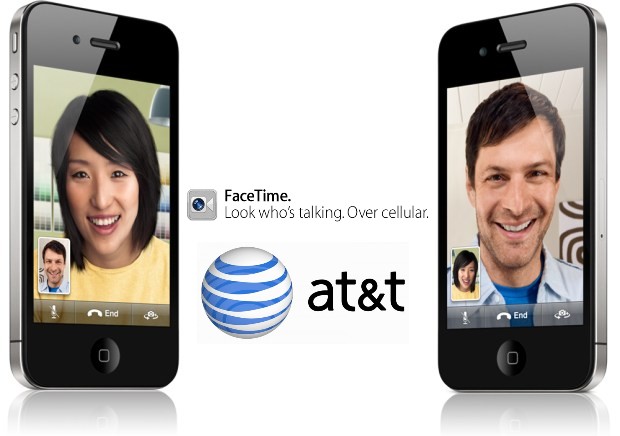
at&t facetime for unlimited plans

At the same time there will be no AT&T FaceTime over cellular support for unlimited plans holders so if you are a lucky owner of such a grandfathered plan you won’t be able to use FaceTime over cellular no matter what iPhone model you have. You can still get FaceTime working over Wi-Fi connection, so don’t be too upset about the news.

But if you have an iPhone 4S, iPhone 4, etc. and use a tiered plan with AT&T, you can start making FaceTime phone calls at any moment using the carrier’s cellular network and the company will not charge you a cent for doing so.

As the mobile operator states, its new AT&T service will roll out to clients during the next few weeks or months as the carrier has just started to update its systems. There is nothing to do but wait, as AT&T’s FaceTime for tiered plans update should start working automatically.

Which data plan do you have? What do you think about AT&T tiered plan users being able to get video calling option over cellular?

AT&T Releases Obama Inauguration Live App

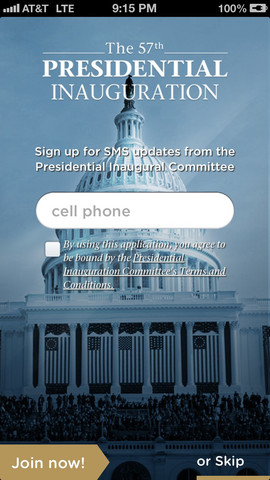
You do know that Barack Obama will be inaugurated the next week and you can watch this official inauguration live if you download AT&T Inauguration app released for iOS and Android devices this week.

The second term of Obama’s office should be interesting to observe. There is no need to fly to Washington to see this event, and in case you don’t have a TV set at your office, you can follow along the news with the new application by AT&T carrier. We will shortly describe this program and provide you a direct link for download so that you can get it at once and get ready for Monday big event.

Download AT&T Inauguration App

Free App Description

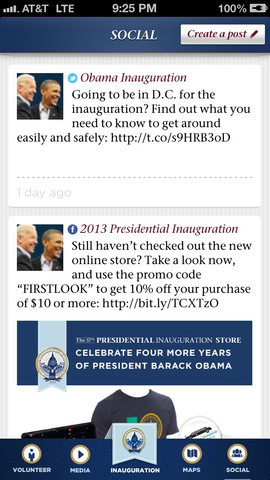
What can you watch through the application? Firstly, of course, the Inauguration live event. Secondly, AT&T has added schedules, maps and various useful info to this program so that iOS and Android users who plan on visiting Washington and watching the Inauguration have a reliable source in their pocket.

Surely, news block is also present so you can learn everything about the festivities from different media resources and bloggers.

AT&T Inauguration App

Get It for Free Now

There is nothing bad if you download AT&T Inauguration app to check it out as it is free anyway. Use this link on iTunes for iPhone or go to Google Play to get it today for Android gadget, and if you have time to watch Inauguration live you will simply know a bit more than other people who wouldn’t get such a chance.

It is always nice to be ahead of your colleagues and know more news, since you can be the source they get interesting facts from. You will need internet connection to enjoy all the benefits of the new AT&T application for iOS and Android devices.

Just don’t forget your iPhone at home next Monday. It will be your closest source with ceremonial swearing-in of the U.S. President Barack Obama. Remember, it’s January 21st you should be waiting for. In order to keep this date in mind, you can simply sign up for app’s notifications.

How to Complete Official Unlock iPhone in iTunes for Other Carriers

Here you will find out how to complete sim unlock iPhone (6S, 6, 5S, 5 or 4S, 4) in iTunes after factory unlocking. When you decide to order IMEI sim iPhone unlock using official service you will always need to complete it yourself with iTunes. The process is not difficult but there are few tips and tricks which could be right solution for some iDevices.

Permanent and factory iPhone unlocking is the most popular method to free iPhone from the carrier’s chains. As you may know there are millions iPhone models around the world locked to some local carrier. There is no free solutions for that models. Of course if your iPhone still running old iOS and you unlocked it using hack software or hardware like Gevey SIM you can’t update your phone because you will lose unlock.

Only IMEI unlocking will solve that problems, after which you’ll be abe not only use any SIM card while traveling but upgrade your iphone to any new iOS and still be unlocked. All you need to know is the carrier to which your iPhone is locked. You can always check network using our cheapest IMEI checker in case you don’t know the carrier and then make an order.

factory unlock iphone

There is nothing simpler that order at our service. We created tutorial guide to show you how it works, so you can use it before we start here.

How to unlock iPhone?

This guide answers the questions of “How to unlock iPhone?” and help you in further unlock any iPhone include 6S, 6, 5S, 5C, 5 and old models 4S, 4!

ATTENTION

If you use such unlocking solutions as Gevey SIM, R-Sim (and other SIM methods) or SAM unlock you will need to activate your iPhone with original SIM card first and only then order unlock here. The fact that these solutions spoof your iPhone IMEI and you need insert original SIM card into iPhone and connect it to iTunes, because only then your device will be recognized and returned to Apple database.

After you purchase factory IMEI sim unlock iPhone at our site wait for the last email with further instructions. These guidelines will help you to complete unlocking process in iTunes. But sometimes there are minor problems, so let’s go through them.

How to Unlock iPhone: Complete Factory unlock in iTunes

Because of iOS 8 bug iPhone can be relocked after update to this version. To avoid such issue please follow easy steps below:

Put GSM Sim of not supported carrier in iPhone. Don’t place original Sim card if you did not use SAM or Gevey (read Attention above).

1. After receiving email that your iOS 7 iPhone has been unlocked, you should activate new unlocked status.
2. Remember on this case use Wi-Fi iPhone activation guide not iTunes.
3. Find an active WiFi connection.
4. Take the original SIM card of the carrier your iDevice are locked to and insert other SIM that was not supported before.
5. On the screen you’ll see table “Activation Required”
6. Connect your iPhone to active WiFi network and iOS system will do all the work needed and then activate your new status.
7. After you iDevice has been activated you can install iOS 8 using WiFi or iTunes. You got rid from relocked problem.

There are two ways to complete the unlock process for your iOS 8 iPhone.

How to Unlock iPhone Without Restoring in iTunes

Step One: Connect iPhone to the computer and open iTunes (latest version).

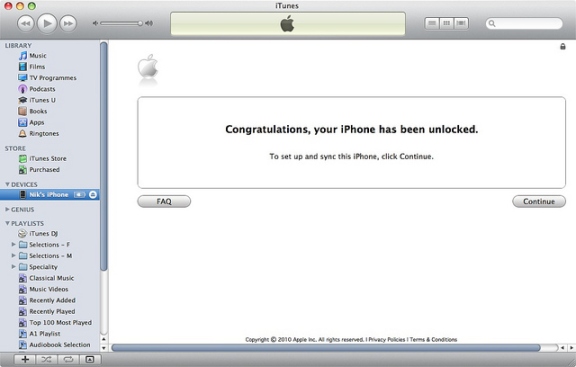
Step Two: In case your Apple iPhone presently working on iOS 8 disconnect gadget after iTunes finds it. Hang on ten seconds and connect iPhone again. You should see Congratulations message.

factory unlock iphone

Note 1: If something wrong happens, for instance, iTunes will freeze then just disconnect your iPhone from USB, close iTunes then connect the unit again and launch iTunes.

Note 2: Sometimes there’s no Congratulations message but wait for the network signal which would be mean that iPhone is factory unlocked.

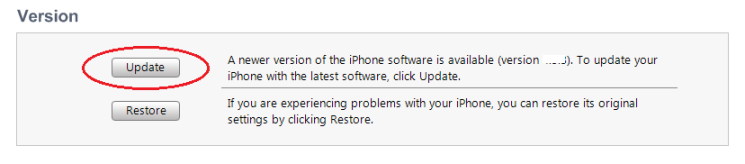
Note 3: If your gadget still running iOS 7 or lower you will have to upgrade it using WiFi first.

update iphone in iTunes
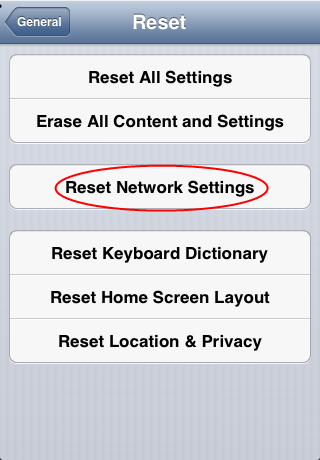
Note 4: There’s yet another method to complete the procedure. Insert SIM card of the carrier you want to use (not original) and go to Settings => general => Reset => Reset Networks. Now just wait for the signal. Also try to enable and disable Airplane mode.

reset network settings iphone
If you will fail try to restore iPhone in iTunes to complete unlock. This method almost always works.

How To Restore iPhone in iTunes to Complete Factory Unlock iPhone

Step One: Place Sim in Apple iPhone and connect it with iTunes. Backup all of your documents in iTunes or iCloud.

Step Two: After backup click Restore button.

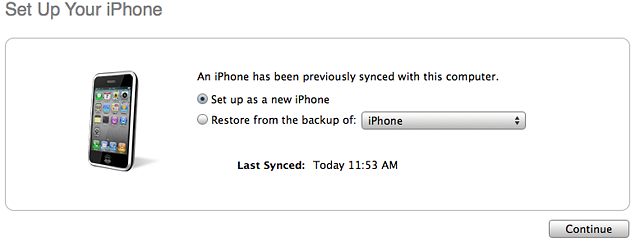
Note: Make sure that after restoring process you choose Setup as a new iPhone:

set up as a new iphone
Step Three: Click Continue and activate your gadget. You will see the Congratulations message but sometimes it is absent. Don’t worry, because when you get the signal you will be able to make calls.

Feel free to contact our support if you have any questions about how to unlock iPhone! Also visit our FAQ to get the answers.


Exclusive AT&T Sierra Wireless Update: Mobile Internet On-the-go

From now on AT&T becomes the exclusive carrier of the AT&T Unite. Such news has been reported by the carrier in the beginning of January 2013. The update from AT&T Unite is the AT&T Sierra Wireless program, or let’s put it in other words, it is the Sierra Wireless’ 4G LTE mobile hotspot presented by one of the biggest U.S. operators to its customers.

With the AT&T Unite all users of this carrier will be able to enjoy mobile internet on-the-go that is “easy to use” according to the company.

About the New Touchscreen Hotspot

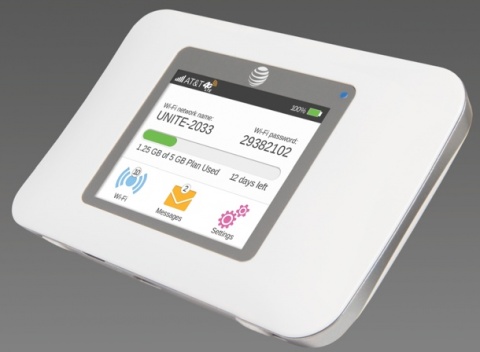
The device [AT&T Unite] has a 2.4-inch display. This touchscreen hotspot is good for LTE connections. It allows customers get the connection to 10 Wi-Fi enabled gadgets, and such an option also includes a guest hotspot available to one-time users.

AT&T Unite Sierra Wireless

The U.S. operator managed to get exclusive rights to the touchscreen hotspot from Sierra Wireless. This unit makes sure users get information about their usage allowance in-time. Besides, it provides the opportunity to change network settings with ease and control what gadgets can access and tweak these settings, what devices are not allowed joining the network, etc. Of course, no additional fiddling is necessary, which is pretty good as you can manage everything from the screen.

Pricing

The latest AT&T Sierra Wireless update program which allows 10 real-time connections at once sounds interesting. You should also know that you are able to add AT&T Unite to the Mobile Share data plan for extra monthly charge of $20, or choose any other data plan from AT&T [between individual and family].

According to the carrier, the new mobile hotspot will make it easier for families and friends to stay connected as they can communicate on any gadget that supports Wi-Fi.

While AT&T Unite allows tracking data consumption, the company hasn’t revealed the pricing on it.

FFC Will Ban AT&T’s desicion To Block FaceTime Calls and Internet Sharing

If you live in US and use your iPhone as an Wi-Fi Hotspots and FaceTime video, it’s likely you are sure to hear about special tweaks that allow you to bypass the AT&T restrictions which block FaceTime and mobile Internet share to several other devices. Latst time I wrote your about AT&T block stolen iPhone and today you can find out about more AT&T restrictions.

All subscribers who want to activate this function formally obliged to pay $ 20 per month. Now AT&T is going to impose penalties on users who have decided to unlock this feature using Cydia tweaks.

at&t block facetime calls

It can be that users will face disconnection from the current tariff plan to a more expensive, and then they will have to pay AT&T the price to cover the difference between contracts. While it is not known how long a user has time, before the company begins to impose penalties. Of course, quite interesting is the fact of how AT&T is going to find out the set of special jailbreak tweaks. Apparently, not only USA operators differ desire to monopolize the market.

The representatives of the U.S. operator AT&T told reporters that the network is going to block FaceTime video calls using the mobile Internet. Today it became known that the U.S. Federal Communications Commission (FCC) decided to investigate this AT&T limitation.

This was recently stated by FCC spokesman Julius Dzhenahovski during the interview. Unfortunately Julius could not officially informed of the progress of the investigation for obvious reasons. However, there is a possibility that the FCC ban AT&T blocking FaceTime calls.