Steps to Unlock 3.0.04 Baseband for iOS 6 iPhone 4S

Users who have either iPhone 4S or iPhone 4 CDMA smartphones are able to unlock their handsets after the upgrade to iOS 6. If you are reading this article and wish to perform unlock for 3.0.04 baseband, the steps described below are just what you need in order to have it successfully done.

Last time I wrote about how to unlock 04.12.02 baseband on iPhone 4 running iOS 6 or 6.0.1. And today is the same situation but with iPhone 4S.

Why are we talking about unlock for iPhone 4 CDMA and 4S models only? The answer is simple. Only these two smartphone models by Apple have 3.0.04 baseband. You know that the iOS upgrade also changes the baseband of the handset, don’t you? Actually, users can always find out what baseband they will get after upgrade beforehand. This information isn’t secret and you can find iOS 6 baseband list online.

unlock 3.0.04 baseband
Factory IMEI Unlock

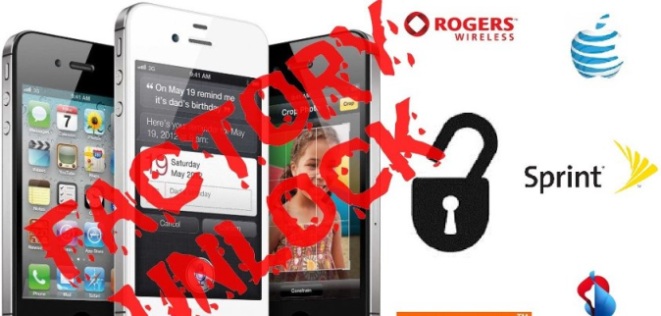
The last idea you might come up with is factory iPhone IMEI unlock service. This method is not free, but it can unlock 3.0.04 baseband gadget that is running iOS 6.1. This solution is probably the best one, because it provides you with permanent unlock. This means that you will be able to upgrade to any iOS and preserve your unlocking status.

IMEI unlock tool uses the unique iPhone IMEI number. It is designed to support all iPhone models, iOS firmwares and basebands, including iPhone 4 CDMA and iPhone 4S units and baseband 3.0.04, and iOS 6.1. read more about factory iPhone unlock benefits here and make right decision.

R-Sim or Gevey Sim Unlock

There are a couple of ways how you can try to unlock 3.0.04 baseband for iOS 6 iPhone models 4G and 4 CDMA. One of them is R-Sim or Gevey Sim unlock. Have you thought about it? Well, if you have stop thinking about it because this method doesn’t support this firmware version.

Just remember that Gevey Sim or R-Sim is not good for 3.0.04 baseband handsets because these services do not work in our situation.
Also if you think that you can downgrade iOS 6 to 5.1.1. baseband you are wrong too.

SAM Unlock for Baseband 3.0.04

There is one more solution you could have thought of. It is SAM tool. It can actually work for unlocking iOS 6.1 iPhone with 3.0.04 baseband but only if iOS smartphone user has used SAM before on his device. But if you don’t have activation tickets saved, don’t even try using SAM.

How to Downgrade to iOS 5.1.1 from iPhone with iOS 6

Sometimes when users try to get back to iOS 5.1.1 from the newest iOS 6 or 6.0.1 they come up with problems. Is it possible to avoid various issues? How to downgrade iOS 6 to iOS 5.1.1 without problems? There is one way I want to show you. This method involves the use of SHSH blobs and Redsn0w.

Also many want to downgrade iOS not only because of untethered jailbreak but also to unlock 04.12.02 baseband of iPhone 4 on iOS 6 / 6.0.1.

The instructions you will find in this guide are effortless to follow. You’ll have to have saved SHSH blobs [via Cydia or TinyUmbrella] for your iOS 5.1.1 in order to productively downgrade iOS 6 to iOS 5.1.1 and get the version 0.9.15b3 of Redsn0w utility to finish the process. This method doesn’t work for all iPhone and iPad models. Only users of iPhone 3GS and iPhone 4 are able to apply it to their devices.

iPads and other iPhone gadgets aren’t supported, while iPod touch owners can also use our guide and perform the downgrade to the previous version of Apple firmware.

DON’T WORRY if your gadget is not supported or you don’t have those SHSH blobs saved because you can always factory unlock iPhone and enjoy any new iOS firmware / baseband and SIM card. If you want to downgrade iOS 6 for iOS 6.1.1 untethered jailbreak you can wait five or more days when Apple will release iOS 6.1. After which Planetbeing and hackers’ team will present iOS 6 / 6.0.1 / 6.0.2 / 6.1 untethered jailbreak.

downgrade ios 6 to 5.1.1Downgrade iOS 6 to 5.1.1 Guide

Step 1. Firstly, please, be sure that your iOS 5.1.1 SHSH blobs have been saved properly and download Redsn0w 0.9.15b3 [here is the download link to Redsn0w], you should also backup your smartphone and download iOS 5.1.1 from here.

Step 2. Now let’s start to downgrade iOS 6 to iOS 5.1.1. Unzip Redsn0w file. Open it. If you are using Windows PC, run this utility as Administrator. If you are on Mac, just press Cntrl + Open to launch the program.

Step 3. Access Extra – Even More option and press Restore. Now click IPSW.

Step 4. When you are able to choose iOS 5.1.1 file [you have downloaded it in the first step], select it and press Open.

Step 5. Press yes when you are asked to prevent the baseband update.

Step 6. Time has come to put iPhone into Pwned DFU mode in order to downgrade iOS 6 to iOS 5.1.1. Turn the smartphone off. Connect your handset to PC or Mac.

Step 7. As soon as Redsn0w sees your iPhone, press Next. You will get on-screen guidelines that you should follow. If you are doing everything right, Redsn0w will find your SHSH blobs on Cydia. If they are saved on the PC, press Local and choose your iOS 5.1.1 SHSH blobs.

Step 8. The process of downgrading should end automatically. You will be informed by your computer that it is completed and you are using iOS 5.1.1 again.

If you wish to jailbreak your iDevice, you can do so. Just remember that your baseband will still the same as in ioS 6 which you can unlock in order to use any SIM cards. So go to our permanent unlock pricing category, choose the cautry and the carrier to which your device is locked to and make an order.

Unlock iPhone 4 Baseband 04.12.02 | Guide

When iOS 6 version was released many iPhone 4 users updated their gadgets to the new firmware and forgot about unlock. The reason is that earlier baseband could be unlocked with such software as Ultrasn0w or hardware as Gevey.

But all solutions are not working on 04.12.02 baseband in iOS 6 and iOS 6.0.1 running on iPhone 4. Also there is no way to downgrade it.

unlock 04.12.02 iphone 4

But don’t worry. There is the way out. You can always order IMEI unlock for your iPhone which have a lot of benefits. Many iPhone users effectively unlocked their phones that way and continued to be happy. Let’s take a look at advantages of IMEI unlock by legit service for worldwide carriers like AT&T, Vodafone, Orange yet others. Let’s have a look at the benefits of factory unlock iPhone 04.12.02 baseband:

  • The unlock is going to be permanent.
  •  You are able to update, restore, sync via iTune and jailbreak your iPhone not fretting about losing unlock 
  • You’re going to get official Apple iPhone unlock via iTunes.
  • After 04.12.02 unlock the warranty remains valid
  • Your IMEI is going to be putted in Apple iTunes’ whitelist database.
  •  It’ll unlock any baseband and any firmware including 04.12.02 and iOS 6 / 6.0.1.

As you can see it worthwhile. But if you are using blacklisted Apple iPhone (reported as stolen or lost etc.). However we are working on it. 

But if your IMEI is clean and white – take your chance and unlock iPhone for the cheapest price on the web. And much more benefits you’re going to get using legit IMEI unlocking service for iPhone 04.12.02 on iOS 6.

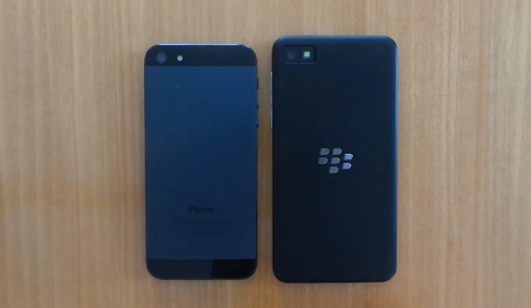
Compare iPhone 5 vs. Blackberry Z10 And Find Out Which Is The Best

No matter what company you prefer more, Apple or RIM, you can still watch the new video that compares the two gadgets, iPhone 5 and Blackberry Z10. How do the two operating systems differ? What does each smartphone offer customers? Which handset it more interesting to get? These are just a couple of things video points out to. Take a look to get your own opinion on which device to buy in case you don’t have one yet. Before continuing reading you can checkout iPhone 5 features and specs.

The insight into iPhone 5 vs. Blackberry Z10 describes the way BlackBerry 10 OS is functioning in RIM’s device compared to the iOS 6 used in the latest model of Apple’s smartphone.

iphone 5s vs blackbary z10
About the Video

Before you start watching the video we’ll say a couple of words about the new Blackberry Z10 by RIM. This phone has a 4.1-inch HD display. It is available with 16GB of storage, 2GB of RAM and other features, including the 8-megapixel rear camera, 4G LTE connection support, etc.

The BlackBerry 10 OS comes with such options as a new ecosystem and an improved program switching option. According to RIM, this system is more intuitive than the iOS firmware used in the sixth-generation Apple smartphone. And Google Maps in iPhone 5 or 5S can be better.

Surely, you might still like iPhone 5 more since the Blackberry Z10 has beta software installed on it. Still this beta trumps Apple’s handset in a lot of categories. Take a look at the video below that showcases the new touchscreen gadget before it is officially presented at the press conference in the end of January.

About the Source

How do you like what you saw and heard [if you don’t understand German language you can still understand the video as it visually compares both software and hardware]? The design of the two gadgets is similar [iPhone is thinner, but the Blackberry handset has a bigger screen] and their operating systems offer similar options and functionality, still there are differences, and they are worth discovering. The video test makes me believe there soon will be a new smartphone in the market that can become popular because of its features and performance.

The first source that had a chance to compare iPhone 5 vs. Blackberry Z10 was TelekomPresse. This German website allows you also checking out the new RIM’s OS before January 30th. Don’t miss this unique chance.

Why is iPhone Blacklisted?

There are some questions asked by iPhone users and people who wish to purchase factory unlock for iPhone but are afraid to get the wrong device. Why is iPhone blacklisted? What can happen to the gadget which has a barred IMEI number? Are you interested to get the answers? Continue reading, and you will find out why Apple blocks its handsets and how you should react to this policy.

It is hard to imagine modern people without a smartphone in their hands. More and more customers prefer to communicate via expensive devices. They spend bunch of money on handsets, and get smartphones for themselves and their family members. No wonder that muggers and thieves target expensive gadgets.

Find out how to unlock blacklisted iPhone and why it gets blocked in different countries.

blacklisted iphone
A lot of iPhones and other phones are stolen and resold in the black market. The new users of a stolen device might not even know their handset belongs to someone else, so they start using it. In order to protect people from having their iPhone used by third-party people, carriers and developers started to check iPhone IMEI number and then block it [IMEI is a unique 15-digit identifier of every iPhone manufactured by the Cupertino-based tech giant which can be found in Settings – General – About].

Stealing and iPhone lost are two main reasons for why iPhone gets blacklisted. There are other terms that identify this. They are barring and blocking. If the iPhone is blacklisted by a carrier, it is impossible to use this handset on this carrier’s network.

Also its IMEI can be listed in the black list if user doesn’t pay for his gadget, if there are insurance claims and not-agreed terms of used. There can be other reasons as well.

Mobile operators in some countries even share one database of registered devices, and if a gadget gets blacklisted in such a country, it will be impossible to use it with any local carrier.

And if your iPhone is not blacklisted you can find out 10 frequently asked questions about IMEI unlock and then order unlock. Also you can check the services we offer for several worldwide networks:

Check more:
iPhone IMEI unlock for 6S, 6, 5S, 5C, 5, 4S/4.

FAQ on How to iPhone SE, 6S Plus, 6S, 6 Plus, 6, 5S, 5C, 5, 4S & 4 IMEI unlock

Users who haven’t tried to iphone imei unlock number have a lot of questions swirling in their heads. Since this IMEI unlock method is considerably new, we have decided to share some of the most popular questions on factory iPhone unlock iOS smartphones. Below you will find our short FAQ with the answers to ten frequently asked questions.

iPhone 6S, 6, 5S, 5C, 5, 4S & 4 IMEI unlock
1. What is a factory iPhone unlock via IMEI?

When you choose to unlock iPhone using IMEI you select an official unlock method allowed by Apple. Factory unlock will let your insert any SIM card and connect to most carriers across the world. This # is a unique identifier of every iPhone unit manufactured by Apple.You can check IMEI number and find out to which network it is locked.

2. Am I able to jailbreak iPhone after official IMEI unlock iPhone?

Of course, you are. Unlock and jailbreak are two different things. You can now unlock iPhone and later jailbreak an officially unlocked handset.

3. How long does it take to unlock imei iPhone?

It usually takes no more than two days to unlock IMEI iPhone. But mostly it depends on the carrier your iPhone is locked to. You can find your carrier in our Pricing category and find out about the time of delivering more. From the moment you get a confirmation email that your device has been unlocked, it will take you only about 7-10 minutes to finish unlock through iTunes.

4. What basebands and iOS versions does this unlock imei support?

IMEI unlock supports all iOS versions and all iPhone basebands.

5. Can I unlock iPhone with IMEI if I don’t have an official carrier SIM card for my device?

Yes, you can. As soon as your iOS handset becomes “unlocked” in database by Apple, you are able to activate your iPhone and finish unlock using any SIM card.

6. Do I lose iPhone imei unlock when I want to upgrade to another version of iOS?

No, you keep your unlock because it is official and supported by Apple. If you choose to unlock iPhone using IMEI unlock tool you will be able to upgrade to any iOS firmware any time and don’t worry about anything because your unlock will stay with you. And this one of factory unlock benefits which are even more.

7. Are all the sites and individuals who offer to imei unlock iPhone using IMEI real?

Sadly, you can meet scam sites nowadays who claim to be able to unlock iPhone but do nothing once they receive money from you. You need to find trusted company that offers factory iPhone unlock with IMEI number for a fair price.

8. What is the instruction for final iPhone unlock once it’s officially unlocked with IMEI?

The instruction is easy to follow. You have it emailed from the company you have ordered iPhone IMEI unlocking from. Here are the steps for finishing unlock.

9. Why is it more expensive to unlock iPhone imei locked to particular carriers?

The pricing on iPhone imei unlocking can vary because it is done by various unlocking servers and they all have their own cost for this service. At the same time, any iPhone unlock is affordable.
Use the link and find out how IMEI unlock works if you want to make an order.

10. Is iPhone SE, 6S Plus, 6S, 6 Plus, 6 Plus, 5S, 5C, 5, 4S Imei unlock are supported?

iPhone IMEI unlock suppot all models, include iPhone SE, 6S Plus, 6S, 6 Plus, 6, 5S, 5C, 5 and 4S/4.

11. How can I know for sure that your unlock imei service is legit?

We have been unlocking imei  iPhones for a couple of years. We know this smartphone inside out and can offer you affordable and legit service. We will unlock your device as soon as possible, still you can choose between our packages with timing and price that suits you the most. If you have any questions, you can contact us.

For more FAQ go here

Why Are Verizon iPhone 5 SIM Slots Unlocked?

According to the recent reports, users can get the new Verizon iPhone 5 with an unlocked SIM card. Thus owners of GSM micro SIMs and nano-SIM card can use other networks with their device, and are not locked to Verizon contract only.

Is it true? Why are iPhone 5 SIM slots unlocked? We can answer these questions today.

Unlocked SIM Slot Requirement

Yes, it is true that Verizon offers unlocked iPhone 5 devices. This is the requirement by FCC Network Access Regulations, and the mobile operator can do nothing about it. They are only left to leave the sixth-generation handset with SIM slots unlocked and allow device holders to trim a micro-SIM card into a nano-SIM or use an original nano-SIM card from a GSM carrier such as AT&T, for example.

verizon iphone 5 sim slot unlocked
If last year Verizon could remotely relock the gadgets, this year the company will not do so. Yes, last year the operator unlocked Verizon iPhone 4S /4 units after two months only.

As FCC requires for Block C, all companies that are using the 700 MHz spectrum must unlock their SIM card slots, and this is the spectrum used by Verizon for the LTE network. I am sure that a lot of iPhone 5 features users who got their gadget from Verizon are happy to hear this.

Let’s see what exactly the Block C paragraphs say about this requirement. As the FCC’s CFR confirms, smartphone locking is prohibited, “No licensee may disable features on handsets it provides” to users and thus they cannot do anything to prohibit the use of iPhone 5 on other operators’ networks (Title 47 Part 27.16).

Unlocked iPhone 5 and Other Networks

Even though you can get an unlocked iPhone 5 from Verizon it will not work on LTE networks of AT&T. You can use it for 3G networks only if you choose T-Mobile or AT&T and decide to transfer some information or call your friends. Still your device will support some international LTE networks. Which ones? Apple can give you the answer if you visit LTE information page on Apple’s official website. But don’t forget thatyou can unlock T-Mobile as well as unlock AT&T iPhone.

Here is the list of bands supported by different iPhone 5 models.

Sprint offers consumers SIM-locked sixth-gen iPhones that can be unlocked after 3 months to use the device while traveling to foreign countries. AT&T can unlock off-contract devices.

Just keep in mind that you and only you are to select your iPhone 5 carrier.

How to Complete Official Unlock iPhone in iTunes for Other Carriers

Here you will find out how to complete sim unlock iPhone (6S, 6, 5S, 5 or 4S, 4) in iTunes after factory unlocking. When you decide to order IMEI sim iPhone unlock using official service you will always need to complete it yourself with iTunes. The process is not difficult but there are few tips and tricks which could be right solution for some iDevices.

Permanent and factory iPhone unlocking is the most popular method to free iPhone from the carrier’s chains. As you may know there are millions iPhone models around the world locked to some local carrier. There is no free solutions for that models. Of course if your iPhone still running old iOS and you unlocked it using hack software or hardware like Gevey SIM you can’t update your phone because you will lose unlock.

Only IMEI unlocking will solve that problems, after which you’ll be abe not only use any SIM card while traveling but upgrade your iphone to any new iOS and still be unlocked. All you need to know is the carrier to which your iPhone is locked. You can always check network using our cheapest IMEI checker in case you don’t know the carrier and then make an order.

factory unlock iphone

There is nothing simpler that order at our service. We created tutorial guide to show you how it works, so you can use it before we start here.

How to unlock iPhone?

This guide answers the questions of “How to unlock iPhone?” and help you in further unlock any iPhone include 6S, 6, 5S, 5C, 5 and old models 4S, 4!

ATTENTION

If you use such unlocking solutions as Gevey SIM, R-Sim (and other SIM methods) or SAM unlock you will need to activate your iPhone with original SIM card first and only then order unlock here. The fact that these solutions spoof your iPhone IMEI and you need insert original SIM card into iPhone and connect it to iTunes, because only then your device will be recognized and returned to Apple database.

After you purchase factory IMEI sim unlock iPhone at our site wait for the last email with further instructions. These guidelines will help you to complete unlocking process in iTunes. But sometimes there are minor problems, so let’s go through them.

How to Unlock iPhone: Complete Factory unlock in iTunes

Because of iOS 8 bug iPhone can be relocked after update to this version. To avoid such issue please follow easy steps below:

Put GSM Sim of not supported carrier in iPhone. Don’t place original Sim card if you did not use SAM or Gevey (read Attention above).

1. After receiving email that your iOS 7 iPhone has been unlocked, you should activate new unlocked status.
2. Remember on this case use Wi-Fi iPhone activation guide not iTunes.
3. Find an active WiFi connection.
4. Take the original SIM card of the carrier your iDevice are locked to and insert other SIM that was not supported before.
5. On the screen you’ll see table “Activation Required”
6. Connect your iPhone to active WiFi network and iOS system will do all the work needed and then activate your new status.
7. After you iDevice has been activated you can install iOS 8 using WiFi or iTunes. You got rid from relocked problem.

There are two ways to complete the unlock process for your iOS 8 iPhone.

How to Unlock iPhone Without Restoring in iTunes

Step One: Connect iPhone to the computer and open iTunes (latest version).

Step Two: In case your Apple iPhone presently working on iOS 8 disconnect gadget after iTunes finds it. Hang on ten seconds and connect iPhone again. You should see Congratulations message.
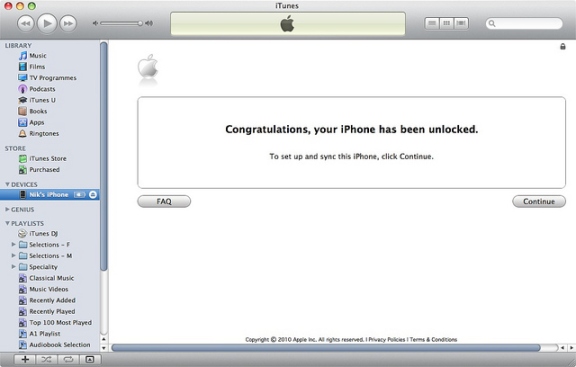
factory unlock iphone

Note 1: If something wrong happens, for instance, iTunes will freeze then just disconnect your iPhone from USB, close iTunes then connect the unit again and launch iTunes.

Note 2: Sometimes there’s no Congratulations message but wait for the network signal which would be mean that iPhone is factory unlocked.

Note 3: If your gadget still running iOS 7 or lower you will have to upgrade it using WiFi first.
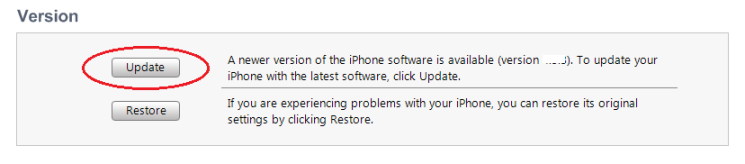
update iphone in iTunes
Note 4: There’s yet another method to complete the procedure. Insert SIM card of the carrier you want to use (not original) and go to Settings => general => Reset => Reset Networks. Now just wait for the signal. Also try to enable and disable Airplane mode.
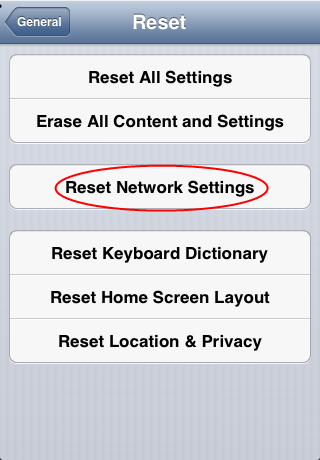
reset network settings iphone
If you will fail try to restore iPhone in iTunes to complete unlock. This method almost always works.

How To Restore iPhone in iTunes to Complete Factory Unlock iPhone

Step One: Place Sim in Apple iPhone and connect it with iTunes. Backup all of your documents in iTunes or iCloud.

Step Two: After backup click Restore button.

Note: Make sure that after restoring process you choose Setup as a new iPhone:
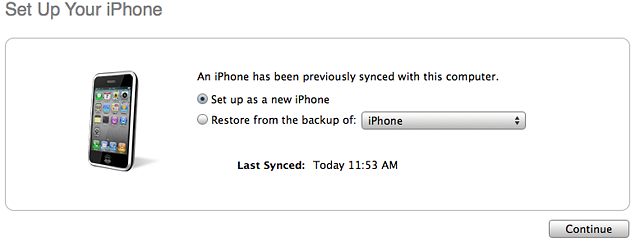
set up as a new iphone
Step Three: Click Continue and activate your gadget. You will see the Congratulations message but sometimes it is absent. Don’t worry, because when you get the signal you will be able to make calls.

Feel free to contact our support if you have any questions about how to unlock iPhone! Also visit our FAQ to get the answers.
 

No Google Maps for the iPhone 5?

It seems that the recently launched iPhone 5 will not get Google Maps as an application on the App Store. So far the company did nothing to develop Google Maps for iOS 6 and, as you remember, Apple has dropped this program in favor of its own Maps app.

According to Eric Schmidt from Google, so far there were no moves made to create and provide Google Maps for the new handset. Will there be no Maps in wings for the sixth-gen model? Who should take the first step, Apple or Google?

Continue reading No Google Maps for the iPhone 5?

iPhone 5 Features and Specs

Millions of users worldwide enjoy the sixth-generation phone and want to buy iPhone 5 by Apple. This handset is the thinnest, fastest and lightest among all previous iOS smartphone models. Let’s take a look at this iPhone 5 full review to learn more about its design, features, specs and other options.

The sixth-gen model is the most anticipated iOS smartphone release after the iPhone 4 launch, as the 4S unit had only minimum changes while the iPhone 5 was redesigned and renewed with new options. Now wonder this gadget has had 2 million preorders in the first 24 hours. This record states that you truly have to consider to buy iPhone 5 after our full review, especially if you haven’t got this handset yet. Continue reading iPhone 5 Features and Specs