Factory iPhone 6 / 6 Plus IMEI Unlocking From T-Mobile Network

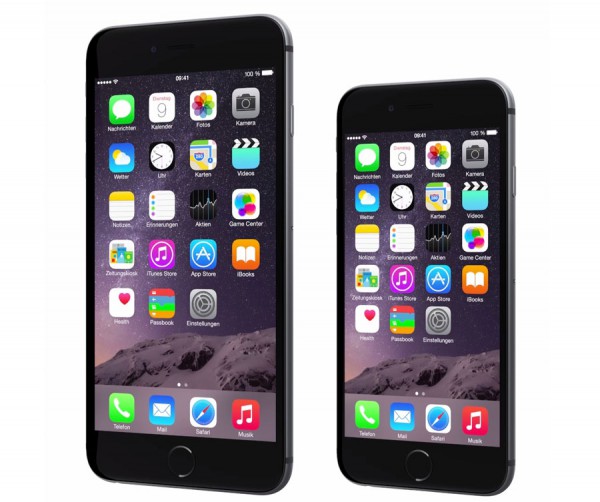
After Apple released iPhone 6 and iPhone 6 Plus and T-Mobile US network started to offer these models with two years contract. This service will unlock blacklisted T-Mobile iPhone 6 Plus and T-Mobile iPhone 6 for the best price on the market. The only thing is required, the device should be locked to T-Mobile USA network.

If you are not sure if your iPhone 6 is clean or blacklisted you can use T-Mobile blacklist checker and get 100% results. If your iPhone is not 6 or 6 Plus but locked to T-Mobile you can unlock it using other service.

How to Find IMEI

There are two ways to find IMEI number:

  • Go to Phone app and type *#06#. You will see 15 digits. That would be IMEI.
  • Go to Settings – General – About and scroll down till you see four big letters “IMEI” and 15 digits opposite it.

Unlock Blacklisted iPhone 6 T-Mobile USA Easy

This service offers official factory unlocking for iPhone 6 Plus T-Mobile USA. This is not jailbreak or any other hack. We are the legit service and provide only official solution.

Unlock guaranteed only if you are fine with requirements below:

  • Make sure that your iPhone 6 / 6 Plus is really locked to T-Mobile USA. If you are not sure about this info, use iPhone network checker because there are no refund for the wrong carrier.
  • If your iPhone 6 Plus is not T-Mobile we have also other packages for other carriers. Just select yours and unlock.
  • This unlocking package is for clean and blacklisted IMEI. Before placing an order make sure that your iPhone is not blacklisted, barred or blocked.
  • Fortunately our service can unlock blacklisted iPhone T-Mobile USA and you can use this service to check if iPhone is blacklisted by T-Mobile. If you are not sure about the status of your iPhone, use T-Mobile blacklist check service. These results will give you info whenever your iMEI blacklisted (reported lost or stolen) or not. Also you will have info that will be useful in case you will plan to sell iPhone.
  • There are NO REFUND if iPhone is not locked to T-Mobile.
  • The iPhone 6 has to be activated with T-Mobile USA otherwise unlock will fail.
  • Read carefully our Terms and Services before making an order.

Attention: If you have a Phone shop or a wholesaler you can register on digitalunlocking.net and run your own unlocking business.

How Does the Factory iPhone Unlock Process Works

  1. Fill in the order form with required information like IMEI, email, iPhone model, and other info like serial number if necessary.
  2. Click Buy Now button and process the payment on PayPal. If you don’t have PayPal account choose the option “I don’t have PayPal account” when you will be redirected to PayPal.
  3. After the payment your unlocking request will be automatically send to the carrier. In this case it can’t be canceled and refunded.
  4. After the payment just do your things and wait for the good news.
  5. You will receive email with detailed instructions on how to compete factory iPhone unlock in iTunes. If you don’t see email in your inbox folder, check spam/junk folder or contact us. Our support team will be always glad to help you.
  6. Official and permanent iPhone unlock only apply during business hours (9 AM – 6 PM PST, Monday-Friday). No turnaround time guaranteed.
  7. Feel free to contact us in case you have any questions regarding factory unlock iPhone 6 Plus T-Mobile USA and our company will be always glad to help you.

If iPhone 6 IMEI is blacklisted or clean, activated and locked to T-Mobile USA you are in the right place. Let’s see what advantages you will receive after using our service.

  • We are the only unlocking company in the market that provides professional and fast service for the cheapest prices.
  • We offer the lowest prices for permanent iPhone unlock.
  • Official unlocking iPhone T-Mobile US is lifetime and your device will never be locked again.
  • We provide really fast and 100% working official unlocking solution.
  • Money back guarantee if iPhone will be still locked to T-Mobile USA carrier after using our service.
  • You can switch SIM cards and enjoy any GSM carrier whenever you are in our beautiful world.
  • Forget about roaming when you are traveling. Just insert local SIM card and enjoy phone calls.
  • There is no need to go somewhere to get unlock. We offer remote service and you can finish unlock from your home (If you have internet connection).
  • The warranty and all other available services from Apple remain valid after factory unlock.
  • The process will not harm your device.
  • You don’t have to install some additional software. Only connect it to iTunes and voila.
  • It doesn’t matter what iOS version, baseband, bootloader and other stuff running on your iPhone. We unlock any.
  • You can update, sync and restore iPhone in iTunes and it will never be locked again. If Apple will release any new iOS firmware version go on and try it if you like.
  • Your apps and most preferred features as well as not most preferred will remain working as usual after unlock.
Unlimited Verizon 4G LTE Data Plans without Network Optimization

Verizon 4G LTE data plans that looked attractive to subscribers with access to unlimited data under Big Red’s umbrella become even more attractive now. The company started to talk about iPhone 6 Verizon network optimization and promised such “improvements” to its current unlimited 4G LTE customers who used too much data each month. The good news is here. Verizon will not throttle 4G LTE subscribers this fall.

Verizon Big Red plans won’t come true as the carrier decided not to roll out optimizations. According to the official statement, the mobile operator “greatly valued” the idea to offer network optimizations for users who are using unlimited 4G LTE data packages and would not roll it out.

Verizon 4g lte data plans

Verizon network optimization talks bothered users who used much data. Even the FCC questioned the company about such plans. At that moment, the American carrier responded that “all carriers do it” and now it changed its mind.

American companies are now fighting for their subscribers and new customers and with the iPhone 6 and 6 Plus being widely popular in the U.S. it might be better for Verizon not to optimize its network throttling some users. What do you think about this? Are you happy now as the carrier won’t do anything to customers who overuse its data on unlimited 4G LTE?

New AT&T Mobile Share Value Plans for iPhone and Other Users

If you live in the U.S. you have a lot of carriers to choose from, still there are only four major companies that offer mobile services to iPhone and other smartphone owners. AT&T is one of them. The company has a big variety of plans to choose from, and its new AT&T Mobile Share Value plans are now available to all Americans.

This new AT&T iPhone data plans promise to double your data no matter if you are an existing subscriber or only new customer. You can double the data used per month if your monthly plan is 15GB or 15GB+.

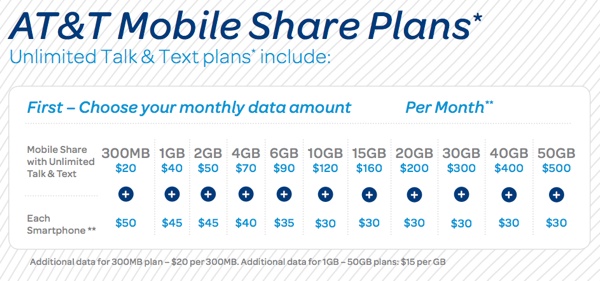
You can find detailed AT&T Mobile Share plan review at the company’s site. We’ll mention in a couple of words that if you used to get 15GB of monthly shared data plan that with this new offer you’ll get 30GB per month. The maximum amount of data you can get is 100GB and this is offered to customers who received 50GB data plans. The whole deal comes with unlimited text messages and talk. You also get international messaging option.

AT&T Mobile Share Value Plans

If you like the AT&T iPhone monthly cost for Mobile Share Value plans then you are welcome to sign up for the promotion by October 31, 2014. The pricing is $130-$375 per month depending on the amount of data you want to receive. This is the cost for the service only. Each gadget is also charged $10-$40 a month for access. And this pricing doesn’t include the price of your iPhone or other cell phone purchase cost.

All companies are now offering deals and promotions to attract new AT&T iPhone 6 and iPhone 6 Plus customers along with other cell phone users.

AT&T vs Sprint vs T-Mobile vs Verizon Coverage for iPhone 6 and 6 Plus

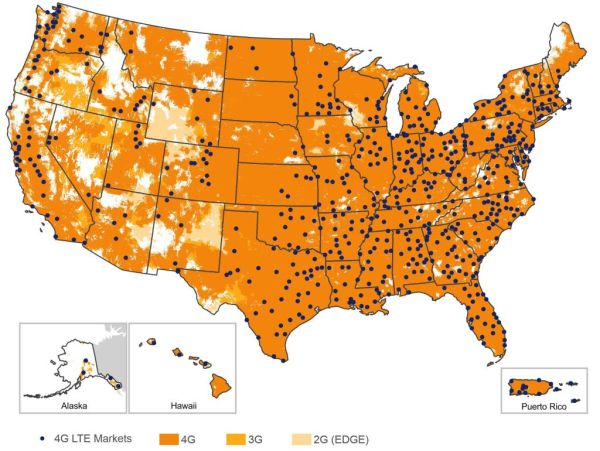
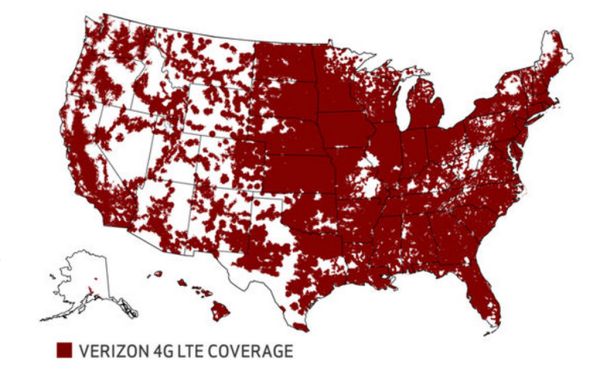
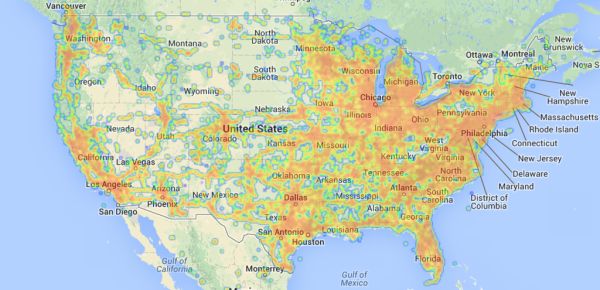
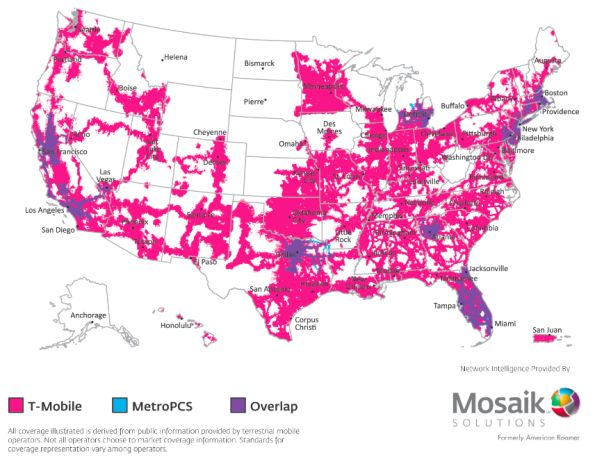
How good is AT&T iPhone 6 coverage in the U.S.? Have you tried to compare the coverage for other American carriers including T-Mobile, Sprint and Verizon? Apple is taking pre-orders for its new generation smartphones called iPhone 6 and iPhone 6 Plus beginning on September 12, and before you buy this handset you better make your choice based on coverage.

Let’s compare iPhone 6 AT&T vs T-Mobile coverage and other mobile company’s coverage within the United States to see which carrier you can trust when you are purchasing the latest gen smartphone with iOS 8 firmware and all the cool features available in 2014.

AT&T iPhone 6 vs Verizon Coverage

Unlike other carriers, Verizon claims that it is the only company that covers 100% 4G LTE network in the USA. AT&T can’t boast this as it still has 3G and even 2G speeds in some parts of the network.

Still the statistics shows 97% of network covered by Verizon. Still this company is more expensive than others to use so you can buy the new iPhone from it only if you agree to pay more for reliable wireless service.

at&t iphone 6 coverage

AT&T iPhone 6 Coverage

According to the carrier it’s 4G LTE network is the most reliable and the quickest within the U.S. The company indeed boasts a strong presence in the major areas across the country covering 300+ million Americans.

iphone 6 at&t vs t-mobile

Right now AT&T doesn’t have the 4G LTE coverage offered by Verizon but it is working on it and promises to expand its network throughout 2014.

The company says it has under 1% rate o dropped calls across the country.

AT&T iPhone 6 vs Sprint

Unlike Verizon and AT&T, Sprint doesn’t claim to be the most reliable or fastest network in the U.S. It says it is the newest network and it is mostly present in big metropolitan areas. If you live in rural areas you should better buy iPhone 6 from AT&T and unlock it it enjoy any service.

iphone 6 at&t vs verizon

iPhone 6 AT&T vs T-Mobile

The Un-carrier can’t boast the great coverage yet even though it has removed annual contracts and offers prepaid plans to users. If you want to get affordable plans for your iPhone 6 and iPhone 6 Plus and coverage doesn’t matter you can get it from T-Mobile.

at&t iphone 6 vs sprint

iPhone 6 AT&T MicroCell Fix Guide for Users Who Can’t Connect iPhone

AT&T iPhone 6 problems do exist just like issues inside other carriers’ networks and iOS 8 itself. Biggest iPhone for AT&T is iPhone 6 but if you need to make it working with AT&T MicroCell and can’t make it happen, you are not alone. Users have this issue and you can follow this instruction to fix the bug.

iphone 6 at&t microcell fix

MicroCell from AT&T is a way to get a strong cell signal on your smartphone if you don’t have one without it. Users who often experience missed and dropped calls are advised by AT&T to get the MicroCell, however some people complain that they cannot connect their smartphone to the carrier’s device. MicroCell connects to AT&T and becomes your personal mini cell tower which results in a strong singal. It routs your phone calls through Internet making you independent from the mobile company’s towers.

If your AT&T MicroCell is not working with iPhone 6 or iPhone 6 Plus, follow this instruction and fix the problem.

Step 1. In order to make your iPhone 6 and MicroCell from AT&T communicated, you have to reset the device so that it can find your new smartphone.

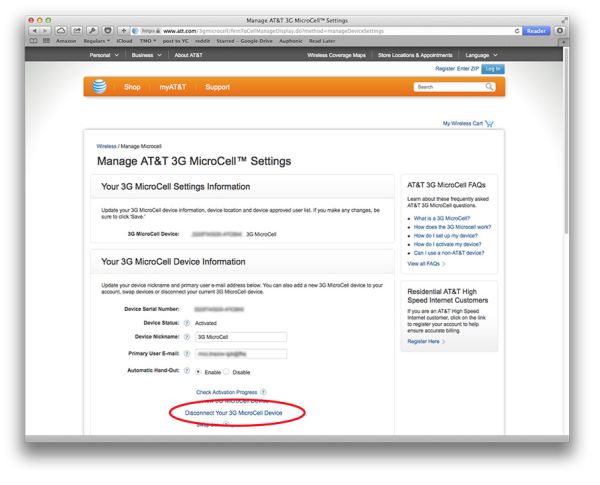
Step 2. Firstly, you have to login to AT&T. Here is how to do this: go to http://www.att.com/ and select my AT&T – Wireless – 3G MicroCell.

Step 3. You have to be on the same network as your carrier’s device. Now Disconnect 3G MicroCell gadget.

at&t iphone 6 problems

Step 4. Once you are disconnected, you should go to http://www.att.com/MicroCell.

Step 5. Select Activate option.

Step 6. You have to choose either Personal or Business account type and login once again to AT&T account.

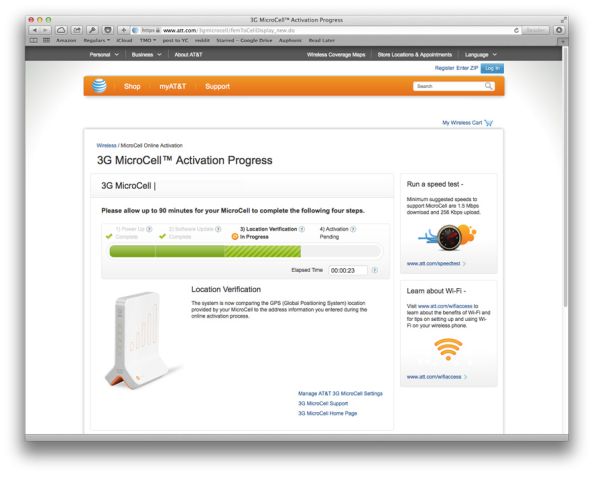
Step 7. Enter the information that is asked by AT&T in order to activated your personal mini tower MicroCell [you’ll have to enter your address and the serial number of your device] and wait till your gadget runs again.

iphone 6 working with at&t microcell

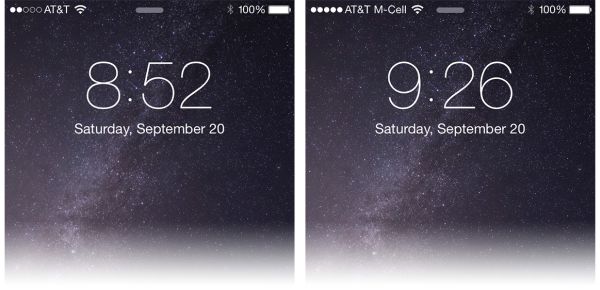
Step 8. You will receive a text message saying that your MicroCell is on again.

Step 9. You should now be able to connect your iphone 6 to AT&T MicroCell without problems.

We hope that this short iPhone 6 AT&T MicroCell fix has solved your issues.

How to Get iPhone 6 T-Mobile Unlock Free Service: DIY Simple Guide

Is there a way to get iPhone 6 T-Mobile unlock free service? You don’t even have to contact T-Mobile to perform this simple guide and become SIM free. The method hasn’t been proven to work for everyone but it might help you and you don’t take any risks trying this out. If you become successfully unlocked, you only win!

But if in case of the free unlocking failure you can always use reliable service at LetsUnlockiPhone and request T-Mobile iPhone 6 unlock providing the IMEI and email only.

To unlock TMobile iPhone 6 for free you have to own either iPhone 6 Plus or iPhone 6 that is locked by Apple. There are requirements you have to meet in order to get it done.

iphone 6 t-mobile unlock free

Who Is Eligible for Free TMobile iPhone 6 Plus Unlock and iPhone 6 Unlock

  • Users who purchased the iPhone at the full price directly from Apple
  • iPhone 6 and iPhone 6 Plus customers
  • Users who have a T-Mobile SIM card and activate their device

Free iPhone 6 Plus TMobile unlock as well as T-Mobile iPhone 6 unlock is done manually through iTunes. Here is what you have to complete:

Step 1. Have an Apple smartphone purchased from Apple and not being officially sellunlocked.

Step 2. Get a SIM card from T-Mobile and activate it.

Step 3. You will see an activation code on the SIM card. Besides you should get your SIM card serial number and iPhone 6 phone serial number. Once you have all this information you can proceed.

Step 4. Go to T-Mobile activation site and enter one of the codes you have [either serial number or activation code].

Step 5. Now as you have activated the SIM, you should connect your iPhone 6 your computer and make a backup version through iTunes or iCloud.

Step 6. You should now restore your smartphone which will erase your personal data from the iPhone 6 or iPhone 6 Plus.

Step 7. Now iTunes should tell you that you are now unlocked.

Hopefully this can give you free T-Mobile iPhone 6 / iPhone 6 Plus unlock.