AT&T iPhone 5 Unlock Official Service

Attention: Because of the new AT&T unlock iPhone 5 policy this service might be delayed. Delivery times only apply during business hours on Monday-Friday, not guaranteed turnaround time. (Business time is 9 am – 6 pm PST).
 So please don't submit your order if you need it earlier or simply can't wait.

What Do I Get Using Your Service

AT&T iPhone 5 Unlock service offers only legit and the cheapest IMEI unlock for iPhone 5 and older in contract models, for all iPhone 5 basebands and for all iOS versions from iOS 8, iOS 7 to iOS 6 / iOS 5 and lower. So don’t worry about anything because we will free your device from AT&T permanently. Do it once and forget about it forever.

Only buy an unlock service if your device can meet the service requirements. If you purchase the unlock service not supported for your device and don’t meet the service requirements, we consider that unwelcome and malicious buying with no refund available.

What Do I Need To Provide for Unlock iPhone 5 AT&T

All we need from you is IMEI number of your iPhone 5. Just type *06*# or check it in Settings -> General -> About. Then fill out the purchase form and pay for the service.

Note: You can check AT&T iPhone 5 out of contract status as well because the price is much lower for such models. If your iPhone is OUT OF CONTRACT please use this cheap unlocking service but make sure about the status of your device.

How To Make an Unlock iPhone 5 AT&T Order

These are the only steps you should follow in order to place your order:

  • Submit your iPhone 5 IMEI number and email
  • Choose the model of your iOS handset
  • Agree with Terms and Conditions
  • Click Buy Now

Wait for email from us for further instructions. If you will receive Not Found use specail package for Not Found AT&T iPhone 7 unlocking with 100% success rate.

Important Notes!

  • If you won’t see email, please check the junk / spam folder in your mail box or add contact@geo-location.site to your safe mail list.
  • This package doesn’t unlock AT&T iPhone 6S and 6. NO REFUND FOR THE WRONG SERVICE (NETWORK/MODEL) PURCHASE. Follow the link if you need to unlock such models.
  • iPhone 5 must be activated before placing an order.
  • Make sure that your iPhone 5 is locked to AT&T. No refund for the wrong carrier.
  • No cancellation can be accepted after IMEI unlock order is processed.
  • Blacklisted by AT&T iPhone 5 can’t be unlocked here. Use iPhone blacklist check because no refund if iPhone is blacklisted.
  • Read carefully Terms and Conditions before clicking the Buy Now button.
  • If your iPhone 5 has ever been sent to Apple Care / Technical Service or is a replacement unit please do not order.
  • Users or the user who plans to update iPhone 5 to iOS 7.x should first check if Find My iPhone is turn on / off otherwise you may face with iOS 7 activation lock. No refunds will be given for faulty iOS 7 Activation. Use this Find my iPhone iOS 7 Activation Lock Check Tool to check if this feature has been enabled.

*Delivery times only apply during business days and hours, not guaranteed turnaround time. (Business time is 9 am – 6 pm PST Monday-Friday). There can be delays on the weekends.
iPhone 5 Features and Specs

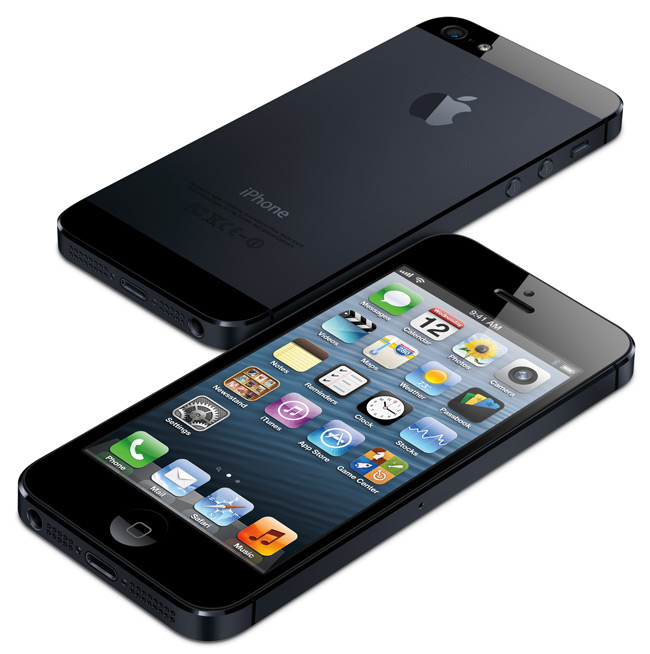
Millions of users worldwide enjoy the sixth-generation phone and want to buy iPhone 5 by Apple. This handset is the thinnest, fastest and lightest among all previous iOS smartphone models. Let’s take a look at this iPhone 5 full review to learn more about its design, features, specs and other options.

The sixth-gen model is the most anticipated iOS smartphone release after the iPhone 4 launch, as the 4S unit had only minimum changes while the iPhone 5 was redesigned and renewed with new options. Now wonder this gadget has had 2 million preorders in the first 24 hours. This record states that you truly have to consider to buy iPhone 5 after our full review, especially if you haven’t got this handset yet. Continue reading iPhone 5 Features and Specs

Buying iPhone 5 A.S.A.P. Instruction for Customers

Haven’t you pre-ordered your iPhone 5, the new Apple device which was officially presented on September 12th and went on sale last Friday? Would you like your gadget to be shipped quicker than late October as most customers who weren’t the first ones to place their order online for this smartphone will have to wait a couple of months until it is delivered?

There are so many customers who wish to buy iPhone 5 that this device pre-sale ran out in about an hour. This is just amazing. And if you wish to get your iPhone5 A.S.A.P., our instruction for customers should help you do so without staying in long lines, placing your orders to wait lists, etc.

This will especially be useful to consumers who think about getting iPhone 5 for Christmas but don’t want to wait till Black Friday. If you think of buying iPhone 5 right now it will most likely be shipped to you by the end of October.

Your Chance to Get iPhone 5. Step 1

If you were lucky to line up on the launch day, September 21st, you are probably a lucky owner of the sixth-generation smartphone by Apple. But in case you weren’t among consumers who showed up a few hours before Apple retail stores opened or found a proxy (a person who could stand in line for you), then you need to skip this step and follow our instruction.


You can also visit Apple store today and find out if you are able to purchase the iPhone 5. Keep in mind that other retailers and carriers, including Walmart, Best Buy, Verizon, AT&T and Sprint, are also selling this gadget.

Step 2. Purchase iPhone 5 Online

Some people pre-ordered the iPhone5 inorder to resale it on sites such as Craigslist and eBay. If you are about to purchase your smartphone from such a seller you should do your best to avoid risky deals as these websites have a lot of scammers. Prepare to overpay for your device or get an empty box. This can truly happen if you are not attentive or lucky enough. 

Buying iPhone 5

Step 3. Reserve Your Model from Apple

Remember that you can always reserve the sixth-gen iOS phone online from Apple and pick it up the next day at an Apple Store. You must be persistent to succeed as all reservations are provided at a first-come-first-serve basis. The best time to place your order online is 9:00 PM and the best store to choose is the less popular Apple store. This will increase your chances on buying iPhone 5 before the end of October.

How to Unlock iPhone 5S and 5C locked AT&T carrier

Unlock iPhone 5S and 5C AT&T – ready to unlock any basebands and iOS version, even iOS 7 all versions!

Finally AT&T Unlock Under-Contract iPhone: But Not for All

From now all the under-contract iPhones can AT&T unlock for free. What such changes? Let’s find out.

AT&T is definetly performing iPhone unlocks for many clients whose contracts remain effectively. Based on latest news several posters were able to unlock the gadgets after posting unlock asks to AT&T, despite the truth that some of them still had time-sometimes a number of time-left on the contracts. Continue reading Finally AT&T Unlock Under-Contract iPhone: But Not for All

Free iPhone Unlock by AT&T: Unlock Your iDevice Online

This year has brought a lot of nice surprises to iPhone users. Firstly, AT&T promised to officially unlock iPhones for free if consumers meet particular requirements set by the mobile operator. This was an amazing promise to all users who wished to use their smartphone overseas or on a different network in the USA but didn’t want to jailbreak their gadget, however the unlocking process was pretty hard since you had to call AT&T directly and request the unlock. Secondly, the carrier finally announces free iPhone unlock online and in stores. And this news is even greater since the process has been much simplified! Continue reading Free iPhone Unlock by AT&T: Unlock Your iDevice Online

How to Unlock your iPhone Locked to AT&T Network

Now it is time to get factory and permanent unlocking solution for any AT&T iPhone. There is nothing easier than that. Just provide your IMEI number and we will do everything themselves.

Here you can find instruction on how to unlock iPhone 5s AT&T  and use it with any carrier you want and in every country you live or travel.

If you still hesitate then look at the main features of factory IMEI unlock:

  • you can update your iOS and sync the iPhone with iTunes, it will still stay unlocked forever
  • chance to unlock all iPhone models
  • chance to unlock any basebands, including 06.15.00, 05.16.05, 04.11.08, 4.12.01. 4.12.02 and many others
  • chance to unlock all versions of iOS even iOS 6
  • official unlock of iPhone
  • your IMEI number stays in Apple’s whitelist database
  • it takes up 10 minutes to unlock your iPhone
  • we offer cheapest price for the service

Now you see that it is really worth it.

Attention: If you used SAM, Gevey, R-Sim, TP-Sim, Turbo SIM, CutYourSim and any other unlock exploit which spoofed your IMEI you need to activate your iPhone first with original AT&T SIM card. So your device could be recognizes be Apple database. Only than you can order iPhone unlock at our service.

Now when you decided to use our service go to how IMEI unlock works page to do everything right. And after you will receive the last email from us with instructions you will need to perform steps.

Read it carefully especially notes. Just follow our instruction to get permanent unlock for AT&T iPhone.

How to Factory Unlock iPhone Locked to AT&T

Step 1: Insert GSM SIM card of not supported carrier like T-Mobile, Orange, Vodafone and any other network in iPhone. DO NOT insert AT&T Sim card.

Step 2: Connect iPhone to the Mac or PC and open latest version of iTunes.

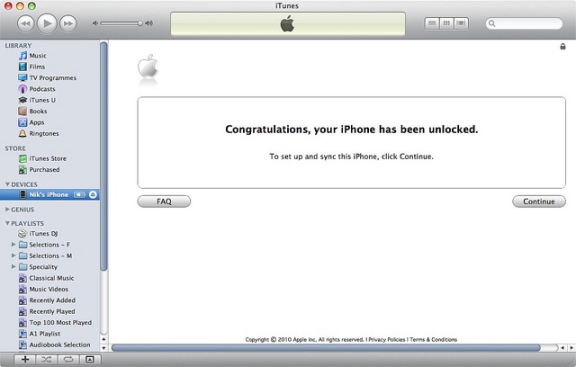
Step 3: If your iPhone is currently running iOS 6 / 6.0.1 / 6.0.2 / 6.1 disconnect device after iTunes detects it. Wait 10 seconds and connect iPhone again. Wait for Congratulation message.

factory unlock at&t iphone

Note: If something goes wrong, for example, iTunes will freeze then just disconnect your iPhone from the computer, close iTunes then connect the device again and launch iTunes. You will see that message

Note 2: Sometimes there is no Congratulations message but the network is working and iPhone is unlocked.

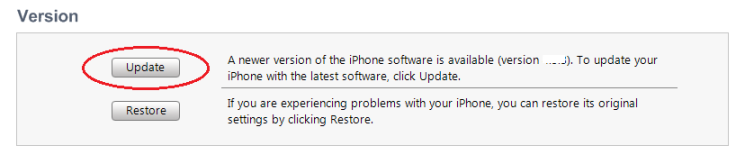
Note 3: Your iPhone still get nothing you will need to check if your iPhone is running iOS 6 or later. Only then we will successfully unlock your gadget. So if your device still running iOS 5.1.1 or lower you will need to update iPhone in iTunes first.

itunes update

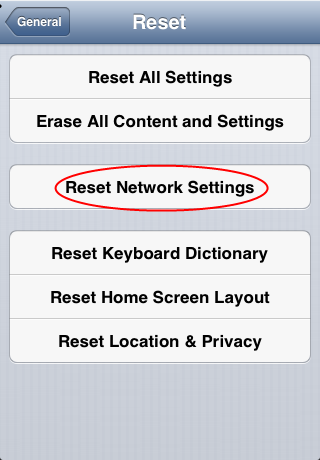
Note 4: There is one more way to complete the process. On your iPhone with NON AT&T SIM card inserted go to Settings -> General -> Reset -> Reset Network settings after which you will see your network.

reset network settings iphone

If nothing works you can try the last method to successfully complete remote iPhone unlock in iTunes. You will need to restore it.

How To Restore iPhone To Complete Remote Unlock

Step 1: Insert SIM card in iPhone (NON AT&T), connect to iTunes and Back up all your data files (contacts, photos, music and all others) using iTunes or iCloud.

Step 2: After you saved all you data click Restore button.

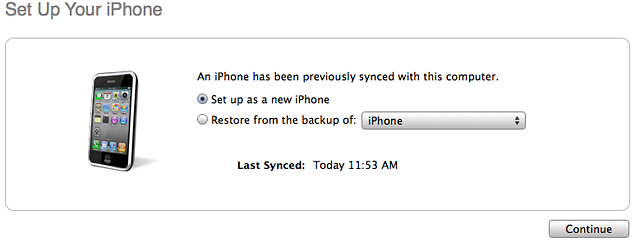
Note: Be sure that after iPhone restore you choose Set up as a new iPhone and not from a backup. This one of the most problems to complete unlock. Set up as a new.

unlock at&t iphone

Step 3. Click Continue and iTunes will activate your device. After or before which you will see Congratulations message and your iPhone will be remotely unlocked. But remember that sometimes there is no Congratulations message but the SIM card is working and iPhone is unlocked.

Note: Don’t worry about jailbreak or new iOS 6. The new iOS 6.1, 6.0.2, 6.0.1, 6 will be unlocked and you can jailbreak it any time you want.

Also If you have some issues with activation or service you can fix it using guides:

How to Activate iPhone after Factory Unlock

How to Fix No Service Issue after Factory Unlock

Contact us for any questions and factory unlock AT&T iPhone with our help and cheapest price. Also you can visit FAQs for more information.

Supported iOS For Factory AT&T Unlock

Starting from iOS 5 it became harder to unlock AT&T iPhone. With each new release of iOS from Apple becomes harder to find unlocking solution for any iPhone model. But there is the way out and every AT&T users can use it. We offer you to unlock any iOS firmware and any iPhone model.

And don’t worry about modem firmware update because we factory unlock AT&T iPhone baseband no matter what number it contains and after using our service you can forget about it forever. Continue reading Supported iOS For Factory AT&T Unlock

Unlock Any AT&T iPhone Baseband

Finally you can unlock AT&T iPhone baseband without worrying about future updates in iTunes. You can use our service and forget about modem firmware (baseband) forever because there won’t be a need to unlock them again. We unlock any AT&T iPhone baseband including 4.12.01, 2.0.12, 04.11.08, 01.59.00, 05.16.07, 06.15.00 and all others. Continue reading Unlock Any AT&T iPhone Baseband

Choose IMEI Unlock AT&T iPhone Packages

Our service offers best pricing policy on the web. You can spend your time on searching something cheaper but in the end you will fail. There is no service that offer lower price than we do, even on eBay. And be aware of scam websites and eBay offers. because you never know when you can get scammed. Continue reading Choose IMEI Unlock AT&T iPhone Packages