Streaming Audio from YouTube on the Locked iPhone: How-to Guide

Even though iPhone has iPod for streaming music a lot of users like to use YouTube on their iDevice. It becomes a frustration when your locked iPhone cuts out songs or videos you are playing via YouTube. The same thing happens when you are switching between iOS applications which can be pretty annoying as well. Luckily, you can listen to audio from YouTube on the locked iPhone.

There are a lot of great videos and songs on YouTube. Sometimes you can find interesting interviews and stories on this video channel along with useful workouts and other advice.
Stream Audio from YouTube on the Locked iPhone
Right now there is one hack you can perform in order to stream YouTube audio on a locked iPhone. It is simple yet incredible in its simplicity. Google is believed to add multitask to its popular video service in the future or introduce “Music pass” feature for YouTube fans. But right now this is just an idea that isn’t available so the hack is the good method to solve the problem and get what you want.

You will be surprised at how easy everything is. The solution was found by one user who shared his experience on Reddit. His nickname is Erjobi and here is the method that you can start using from now on till there is another solution from Google.

Step 1: Start playing any YouTube video.

Step 2: You should wait for an advertisement to end. Do not press on the “+” [plus] option. Instead just click on the Share key.

Step 3: You need to click on “Message” now and lock the iPhone.

Step 4: Music or audio will be playing on your locked smartphone.

That’s it. Of course, you can use another method and simply download the free application called Jasmine that allows streaming YouTube audio even if the phone is locked. Decide for yourself how you should act as both ways are simple.


Useful Tips on How to Save Money on iPhone Bill

It is great if your carrier provides you with unlimited data usage. Such fairy tale is just a dream for a lot of iPhone users whose mobile operators provide a particular amount of megabyte used during a month, a number of text messages and minutes for calls. Sometimes your phone bill becomes too expensive. You can cut it down by using these tips and tricks.

The best you can do in order to low down the bill on your iPhone is keeping an eye on how much data you are using. Our advice can help you avoid spending extra data you can live without. There are particular iOS applications that can easily reduce the amount of data you are using. This will not cause any pain to your normal life schedule.

Save Money on iPhone Bill
Track Data Usage Each Month

If you are running the latest iOS 7 firmware, open Settings and look under Cellular – Cellular Data Usage how much data you use. Of course, in order to avoid misunderstandings you should reset the tracker each month.

Users who are still on iOS 6 can check the same thing by going to Settings – General – Usage and looking under Cellular Usage.

Data Calculator

Most carriers let you track your data usage through alerts. They have applications that are free to download and useful to get. It doesn’t matter if you are on AT&T or Verizon. You can be using any other mobile company. Just ask them for the Data Manager program and calculate how much data you are using within one month to not overpay.

Less Background Syncing

Don’t update apps in real-time too much. There is no need in upgrading Facebook, Email and other programs in the background. Reduce the number of notifications you get and save both data and battery life. If you still like to get app updates change the settings and let these programs upgrade through Wi-Fi connection only.

More Wi-Fi Hotspots

Try to connect via Wi-Fi as often as you can. There are a lot of free Wi-Fi hotspots across the cities. Some apps [Wi-Fi Finder etc.] help you to automatically connect iPhone 5 through Wi-Fi saving on the data consumption and your money.

Preload Data

Do you like to read some stories on-the-go? Download or save the most interesting articles using Wi-Fi and read them while traveling. This does save bunch of data. If you are used to web pages only use Pocket or similar programs to save internet pages without having to connect to internet to read them later on. The similar thing can be done with Google Maps as you are able to save the area you’ll need later beforehand and use it offline.

Happy Thanksgiving Celebrate wit LetsUnlockiPhone5

Thanksgiving is here to let you spend an amazing evening with people you love! This is an incredible holiday for our dear readers, and we wish you to stay healthy and wealthy throughout the year celebrating the last Thursday of November with the biggest turkey and delicious meals.

Happy-Thanksgiving-from-The-Twinery

Make sure you call your friends from your iPhone, play some games on the iPad and watch the best family movies on the Apple TV. You do like Apple products, don’t you? So do we. We are sure that if you don’t have the latest fruit device yet you will get one, maybe tomorrow… Black Friday is a good day to make expensive purchases with huge discounts!

Let your iPhone ring all day long wishing you Happy Thanksgiving!

How to Buy Used iPhone: Painless Purchase Instruction

Before the release of iOS 7 it was much safer to purchase used iPhones. The situation is different from now on. Customers who are going to purchase this smartphone from resellers on eBay and similar platforms have to pay attention at whether find my iPhone turned on or off because if this option is on you can have a lot of problems with Activation lock.

This option has been introduced to low down the number of iPhone thefts. People like to steal the expensive smartphone and resell it. If you are not attentive enough while purchasing used devices you can get a smartphone stolen by someone or with Activation lock feature turned on. In other words, your device will be useless unless its original owner tells you his Apple ID / passcode to unlock and change the settings.

find my iphone checker
It is often difficult to contact previous owner and ask for the unlock. But you can always protect yourself BEFORE making a purchase. Here is what you must do in order to buy an activated iPhone with Find My iPhone app turned off.

Use iOS 7 Activation Lock Checker

Really, this service is superb as it can tell you for sure whether the iPhone you wish to get has Find My iPhone enabled or disabled. After you run this Activation Lock checker service you will know whether it is safe to purchase a particular handset or not.

By the way, don’t worry if you already purchased the iPhone with Find My iPhone and iOS 7 Activation lock turned one. You can bypass this lock distantly by using this service. Stay safe and enjoy using your Apple device.

How Find My iPhone Works on iOS 7

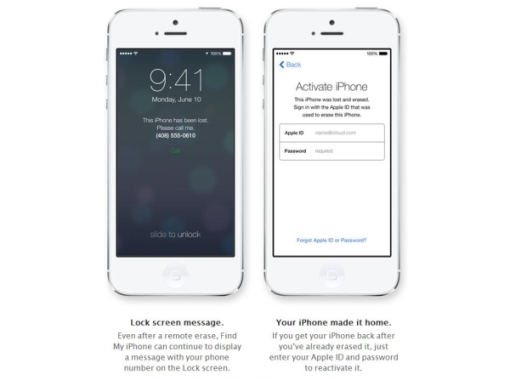
This application works in pair with Activation Lock option. If it is turned on you cannot activate your iPhone, restore it and reset if you don’t know the original ID and password of the person who set this feature on. You get a real “brick” instead of a smartphone and simply pay for nothing.

How to Disable iOS 7, iOS 8 Activation Lock Distantly

Users who have updated their Apple devices to the newest iOS 8 firmware (or iOS 7 in the past) can come up with one big problem called Activation lock. They are not able to unlock their smartphones bought from third-party resellers who activated Find My iPhone.

NOTE: Don’t forget to check if Find My iPhone turned on or off before purchasing or restoring iPhone.

It is important to understand that the new option has both cons and pros. The good side about it is the inability of strangers accessing your info without your Apple ID and passcode. The bad side is you can’t unlock the device if its previous owner didn’t turn the feature off before selling the handset to you.

find my iphone activation lock disable remote

Important Steps Before Placing iPhone Unlock Order

Find My iPhone activation lock disable remote is must-done before you order your gadget’s factory unlock by IMEI code otherwise you won’t be able to access the iPhone if you don’t know the original owner’s ID and passcode.

The feature is turned on automatically once the user turns Find My iPhone app on. You should contact the original user and ask to disable this application on iOS 8, 7 firmware. If you have got your iPhone from Apple or its official retailer you should turn Find My iPhone off yourself before you unlock your device.

Find My iPhone Activation Lock Disable Remote

Attention: Make these steps before completing unlock in iTunes after purchasing unlocking service. If you have already performed restore and stuck on activation screen asking for Apple ID and password here is a service that remotely disable Find My iPhone iOS 8 activation lock. In this case start from Step 5.

Step 1. Launch Settings on your fruit gadget.

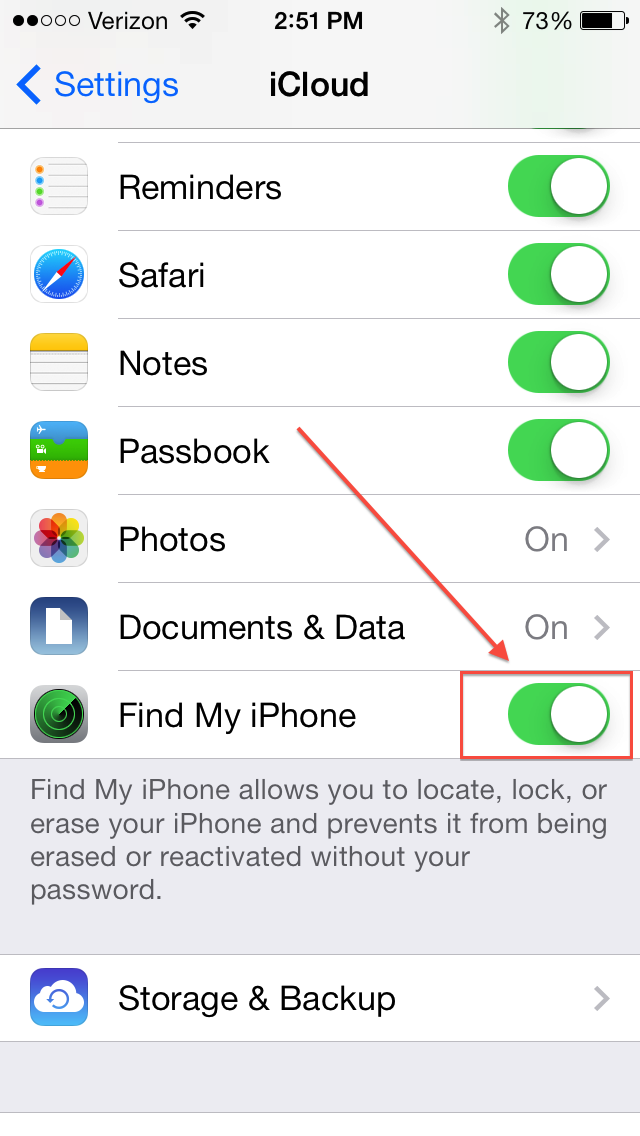
Step 2. Go to iCloud.

Step 3. User your ID to sign in or the original owner’s Apple ID to do so.

Step 4. Search for Find My iPhone to turn it off.

Step 5. Insert the SIM card [not from the original carrier you have been locked to]. Turn the handset off and back on.

Step 6. Connect to iTunes after the device is back on.

Step 7. You can restore if you wish to. If not, skip this step.

Congratulation! You are the lucky owner of an unlocked iPhone on iOS 8.

NOTE: If you are not the original owner you should contact him or her and ask to sign in to their iCloud account and delete your handset from their Find My iPhone account. You should also ask them to erase all content / settings distantly via iCloud.

iPhone 5 Not Charging after iOS 7 Update: How to Fix This Problem

Some iPhone 5 users got the problem when they tried to install the latest iOS 7 on their smartphone. They saw a message “This cable or accessory is not certified or may not work reliable with this iPhone” and got worried if everything is ok with their handset.

Is it possible to fix iOS 7 iPhone 5 not charging problem? Why does it appear? Is anything wrong with your cable or what? Here are the answers to these questions.

New iOS 7: Smart System

Apple has introduced the brand-new firmware version. It has new design and a lot of features previously unavailable to iPhone users. The company has also decided to prevent its customers from using fake cables when charging their smartphones.

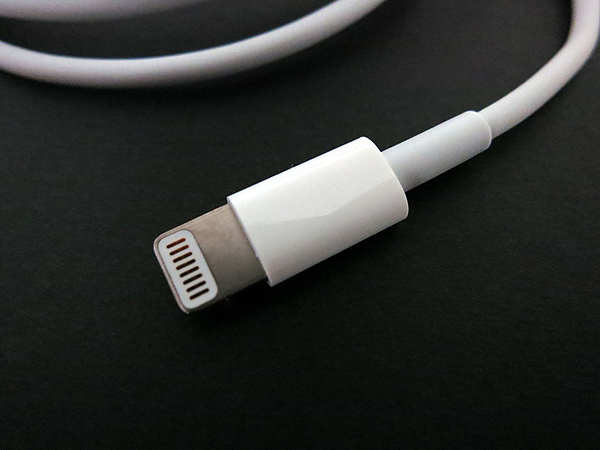
The code in iOS 7 tells this firmware when you are trying to connect using a fake lightning cable. Such accessory comes with a cracked authenticator chip which can be easily discovered by the latest operating system. It’s getting smarter and your iPhone will not be charged until you buy an original lightning cable [the certified one].

iPhone-5-Not-Charging-iOS-7-Update

It can be frustrating to some iPhone 5 owners but the Cupertino-based giant likes when its consumers purchase approved accessories and it does everything to stop fake products being used by people even though they are much cheaper compared to Apple accessories.

Luckily, there is a way to fix iOS 7 iPhone 5 not charging problem. Here is how you can do it.

How to Fix the Charging Issue on iPhone 5 with iOS 7

Users who are not afraid of using risky products and don’t want to get the genuine lightning cable for their iDevice can take the following steps.

1)      Turn on your USB power and connect your fake cable to your smartphone.

2)      Dismiss the warning message you get.

3)      The problem should be fixed and your device should be charging.

You should most likely take these steps each time you wish to charge your iPhone. Maybe manufacturers of fake accessories will soon find a way to bypass Apple’s blockage.

T-Mobile vs Verizon vs AT&T Upgrade Programs: Pros and Cons

The three U.S. carriers T-Mobile vs Verizon vs AT&T data plans comparison. Which mobile operator has the best plan? Does any of the three really save your money or not? Is there an affordable upgrade solution for customers? We are going to answer the questions that worry a lot of Americans in this post.

You can get an iPhone with a 2-year contract where you pay for both the plan and smartphone for two years or “uncarrier” program where you are charged separately for the device and data plan. In the first situation you have to pay off the fee [the price for the phone and data plan] in case you stop your plan. In the second situation you pay off the iPhone’s balance.

T-mobile vs verizon vs att

T-Mobile Upgrade Program Jump for Customers

This carrier offers JUMP program for its client that adds additional $10 to the $50 bill each month. What can you do when you are on this data plan? You are able to upgrade the device every 6 months but you must still get a 2-year installment payment plan. This can’t be possible with the T-Mobile iPhone as Apple likes to update its smartphone once a year.

tmobile
Users who actually turn in their old gadget to upgrade to the latest model should understand that their instalment payment plan will switch back to 2 years after they update. There is no termination fee if you decide to stop using the plan.

Note that T-Mobile charges users an extra deductible if the handset is broken by the owner.

Verizon Program Called Wireless Edge

This operator’s program is similar to the one offered by T-Mobile. Wireless Edge has no upgrade fees. It allows users getting a new handset after 6 months. It comes with no down payment and doesn’t offer a long-term contract.

verizon
There is one main drawback. If you wish to get a new Verizon iPhone you have to pay off 50 percent for the device before this. The same rule sticks to other popular gadgets from Samsung etc. This is very expensive.

AT&T Upgrade Program Called Next

This carrier allows its client upgrading their handset every year with the program Next. There is no down payment if you wish to turn your phone in and trade it to a newer model. There are no contract and activation fees. Also you can unlock iPhone officially by AT&T and enjoy other networks.

att_logo
Where is the catch? It exists. The plan is not affordable just like with Verizon because the subsidy is already built into it. You are paying for the service each month and charged for the device you own.

Pros and Cons of Three Plans

While T-Mobile’s program is the best one this carrier has its cons. Its coverage is great for you only if you live in T-Mobile LTE area. Besides, the signal is not too strong if you are inside the building.

AT&T and Verizon customers might like the new programs that still make you pay about 50 percent of the device’s overall cost.

iPhone Blacklist Check Free IMEI Service for iOS Users

iPhone owners who wish to unlock their gadget should first blacklist check it to be sure it is not reported as lost or stolen. Customers who purchase their iOS smartphones from third-party sellers but not official Apple retailers, need to know that everything is ok with their handset before buying it. This is a great opportunity to check whether the iPhone is barred or blacklisted, what network and contract status.

free blacklist checker

In case your iPhone is not locked to Australian carriers or Softbank from Japan or Telenor carrier from Sweden or you don’t even know the carrier to which your iPhone is locked here are a paid services that provide fast and correct results:

Why is it important to know that your handset is not blacklisted? There are a couple of reasons. In case you are about to buy a used or new device from someone on eBay or other platforms, you must be sure you will spend your money on a working iPhone. Blacklisted devices are blocked by being used on a carrier’s network. I am sure you don’t want to pay for a smartphone that becomes simply an iPod and lets you listen to music, play some games / apps but not make phone calls and exchange data.

There is another reason why you should check your iPhone status. Imagine that you have already got a handset or someone presented it to you as a gift. You wish to unlock it because you know that it is locked, but you have no idea whether your smartphone is barred or not. There is no need to spend money on factory unlock to find out later your iPhone IMEI has been blacklisted. Such unlock is useless and no one will give you money back. But still we have some IMEI unlock services available for blacklisted devices.

It’s best to simply run the blacklist checker to know for sure if your gadget is blocked / lost / barred / blacklisted or not. We offer you such service for free. It is available for particular carriers for now, so make sure you check if you are eligible before running the check.

How To Buy Verizon iPhone 5 Only For $99

Isn’t it amazing to get a new cheap iPhone 5? It is possible to get this sixth-generation smartphone made by Apple because Verizon starts to offer $99 iPhone 5. However, this offer is available to some customers.

Find out if you are eligible to purchase a low-cost iPhone from Verizon or you can purchase unlock for Verizon iPhone for the almost same price but for any Sim card. What requirements should you meet in order to buy a cheaper iOS handset? What stores offer this awesome deal? Should you get a sixth-gen smartphone now or wait till the Cupertino-based company releases the next iDevice this year? There are so many worries and doubts. We hope our post can clear them up to you.

buy verizon iphone 5

About Verizon iPhone 5 $99 Deal

The regular price for the latest Apple smartphone is $199.99. Still some visitors of the official Verizon’s site noticed this week that the iPhone 5 listed on it was offered for $99.99. Of course, this extra $100 saved on such a purchase will never be excrescent to you.

It’s not a mystery that Verizon iPhone 5 becomes less expensive. This mobile operator has already confirmed that such a deal is real. Yet it is not available to everyone. This is the promotional price that won’t last forever.

According to the U.S. carrier, it will offer the 6th generation iOS handset for $99.99 till June 30th. Only a select group of operator’s consumers can get it with a $100 discount. Verizon identifies these lucky people itself as customers who are “interested in making the transition to a smartphone.”

Each customer will get an email from Verizon with the deal described. There is no information on how you can qualify for the offer. What do you think about being able to get an iPhone 5 for 50 percent off its retail price? By the way, the next iPhone 5S is rumored to be presented in August.

Also you can order unlock iPhone 5S AT&T carrier – permanently unlock 5s models!