How to Check AT&T iPhone Contract Expiration And Perform Unlocking

Users with AT&T iPhone are now able to run new great service. Check AT&T iPhone contract status if you wish to get a fast answer whether their smartphone is still on contract or is already off. Previously it was only possible to get such information by contacting AT&T carrier for users who had AT&T account only which wasn’t actually comfortable.

Also you can use our package for out of contract AT&T iPhone unlock for much less price and faster then the SLOW one. We also create package for unlock iPhone AT&T in contract.

Place Online Order

Here is how to check AT&T iPhone out of contract status or expiration date. It is simple to place your order as checker works distantly and doesn’t require your iPhone. You just need to provide IMEI code for your smartphone along with your email address where we can send the information to.

It is simple to see your iPhone IMEI code through Settings – General –About section or by dialing *#06# on the handset.

To place an order you need to give this information:

  • Email address
  • IMEI number

Also read and agree with Terms & Conditions after which you will can click the Buy Now button. Once our team gets data on AT&T iPhone contract status you will get an email with information like IMEI out of contract or in/under contract.

Note

This service has nothing to do with iPhone unlocking. It only looks and returns that status of your iPhone contract with AT&T company. Users whose smartphone is out of contract / on contract can select one of our unlock packages:

* iPhone5 and other contract iPhones unlocking package

* iPhone 5S / 5C contract models unlock package

We highly advise you to read the messages below in order to receive successful and quick results.

Check IMEI iPhone AT&T!

  • If your iPhone is barred / blacklisted / blocked your status will be “Not Found” code.
  • If your iPhone is refurbished / replaced your contract status will be “Not Found.”
  • We give no refunds to users with “Not Found” code statuses.
  • We should note that this distant service is not instant. It usually takes us from 1 to 10 business hours to provide your information since we complete each order manually.
  • Once again, you can’t unlock iPhone using iPhone AT&T contract status checker.
  • Remember to read our Terms and Conditions and add our email contact@geo-location.site to your contacts to avoid receiving our emails through your SPAM folder.

Importance of Out of Contract AT&T iPhone Checker

With the new rules in unlocking policy introduced by AT&T in October 2013 customers got higher pricing, delays and strict rules. It has become cheaper to unlock iPhones that are out of AT&T contract. If your smartphone is already off, you won’t have to pay AT&T twice for getting this info and ordering unlock service.

RESULTS SAMPLE:

Contract ON: 163 days from purchase. (Which means that iPhone is in contract for 163 days.)

Contract OFF: means device is out of contract.

This service DOES NOT unlock or unblock iPhones. You will see only if your device is out of contract or in contract.
Unlock HTC One X / S / V / Desire / Other Models Using A Code [2012]

If you enjoy traveling and wish to take your gadget with you, you need to unlock it. This problem is simply solved. You can be locked to Vodafone, Three, Orange and any other carrier because we offer HTC phone unlock from different operators. You will be able to use different SIM cards without problems.

We provide legal unlock to most HTC phone and to most carriers worldwide. bet there are also unsupported models which you can see below. After you place your online order, we’ll send you the unlocking code. You will enter it and your handset will be officially unlocked once and forever. The whole procedure is done via IMEI code that you email us.

Note: You you got Not Found code, unlock your HTC One or other model here.

Unsupported HTC Models

ALL Network from Portugal
ALL Network from Austria
TIM Brasil
Neuf Telecom France
Tigo Spain
Telenor Norway
Claro Brazil / Argentina / Guatemala / Dominican / Puerto Rico / Republic / Chile / Peru / Nicaragua
Brasil Telecom and Vivo Brasil
Movistar Chile & Equador
KPN Netherland
Vodafone Spain
Movistar Spain
Mobinil Egypt
Digitel Venezuela
Sprint
HTC S730 from Hungary
HTC Touch Pro from Vodafone Romania
HTC S710 & Vox from SFR France and NEUF Telecom France
HTC Touch HD from Bouygues France
HTC Touch HD from Orange UK
HTC Innovation / Nikki / Dual Touch from Bouygues France
HTC Touch VIVA from Bouygues France
HTC HD from Play Poland Network
HTC S420 from Vodafone United Kingdom
SPV C100 from Orange Spain
Qtek 9100 from Movistar Mexico
X02HT from Softbank Japan
HTC HERO from Orange UK
HTC S621 Excalibur from Telcel Mexico
HTC Thunderbolt

Where to Look for IMEI Code

There are several ways how you can find your IMEI number, but the easiest thing to do is to enter *#06# and see your IMEI code displayed on the HTC One / Desire / Sensation. This number has 15 digits. Please, be attentive when you send us your code. If it is not correct we won’t be able to unlock HTC One X / V / S or Desire C for you.

Steps for Placing an Online Order for HTC Unlock

Step 1. Provide your IMEI number.

Step 2. Give us your email.

Step 3. Choose your HTC model [if it is not available contact us and we will add it manually].

Step 4. Accept our Terms and Services before purchasing our service.

Step 5. Wait for the email for your unlocking code which we generate and send you [You mostly get NCK code only, that’s completely ok].

Reasons for HTC Unlock

Our service is safe to use because:

* We offer IMEI unlock service which doesn’t affect your hardware / software

* We are legal and official company

* Your warranty is valid after unlock

* Our service is distant

* You can insert any SIM card of any carrier after unlock is complete

* Our price for HTC unlock is affordable and low compared to others

* You get permanent unlock

* You can safe on roaming fees

* The reselling value of unlocked HTC is higher than of a locked phone

* Our customer service is available 24/7 to help you

NOTE.

Our service unlocks HTC phones that was released in 2012. If you HTC models is older you can use our package for older HTC models.

The code may not work is the phone was modified from the original factory settings

Such unlocking method is official and legit. We are working legally.

It’s best if you add contact@geo-location.site, our email address to your contacts. Otherwise our emails might appear in your SPAM folder.

What Codes We Email You

There are four types of codes we send you:

• NCK code or NETWORK CODE that looks like “12345678”

• SPCK code or SERVICE PROVIDER that appears as “12345678”

• SCK code or SUBPROVIDER that is similar to “12345678”

• FREEZE / MCK codes or DEFREEZE that looks as “12345678”

Most users can complete unlock using NCK number. MCK number is working for gadgets that are hard locked.

Is My HTC Phone Unlocked?

Firstly, you should try to use non-supported SIM and see if you are able to call someone.

You can also get into your phone menu to see its Network lock status by typing *#7465625# and getting necessary info.

Cheap Unlocking for HTC Phone [2007 – 2012 All Models]

HTC devices have become pretty popular and widely used across the globe. Different mobile carriers from different countries are eagerly selling and offering deals with these handsets. It doesn’t matter what country you are from, a lot of HTC smartphones are used by your other countrymen and some of them are locked to mobile operators.

We provide legal unlock for most HTC phone locked to most carriers worldwide. After you place your online order, we’ll send you the unlocking code. You will enter it and your handset will be officially unlocked once and forever. The whole procedure is done via IMEI code that you email us.

Note: If your phone was released in 2012 you can use special package for HTC 2012.

You can use this package to unlock most HTC devices but there are some models that are unlockable yet. You can see them below:

ALL Network from Portugal
ALL Network from Austria
TIM Brasil
Neuf Telecom France
Tigo Spain
Telenor Norway
Claro Brazil / Argentina / Guatemala / Dominican / Puerto Rico / Republic / Chile / Peru / Nicaragua
Brasil Telecom and Vivo Brasil
Movistar Chile & Equador
KPN Netherland
Vodafone Spain
Movistar Spain
Mobinil Egypt
Digitel Venezuela
Sprint
HTC S730 from Hungary
HTC Touch Pro from Vodafone Romania
HTC S710 & Vox from SFR France and NEUF Telecom France
HTC Touch HD from Bouygues France
HTC Touch HD from Orange UK
HTC Innovation / Nikki / Dual Touch from Bouygues France
HTC Touch VIVA from Bouygues France
HTC HD from Play Poland Network
HTC S420 from Vodafone United Kingdom
SPV C100 from Orange Spain
Qtek 9100 from Movistar Mexico
X02HT from Softbank Japan
HTC HERO from Orange UK
HTC S621 Excalibur from Telcel Mexico
HTC Thunderbolt

Where to Look for IMEI Code

There are several ways how you can find your IMEI number, but the easiest thing to do is to enter *#06# and see your IMEI code displayed on the HTC desire. This number has 15 digits. Please, be attentive when you send us your code. If it is not correct we won’t be able to unlock HTC One S3 for you.

Steps for Placing an Online Order for HTC Unlock

Step 1. Provide your IMEI number.

Step 2. Give us your email.

Step 3. Choose your HTC model [if it is not available contact us and we will add it manually].

Step 4. Accept our Terms and Services before purchasing our service.

Step 5. Wait for the email for your unlocking code which we generate and send you [You mostly get NCK code only, that’s completely ok].

NOTE

  • Our service unlocks HTC phone models released in 2007 – 2012.
  • The code may not work is the phone was modified from the original factory settings.
  • If you will receive Not Found code find unlock here.
  • Such unlocking method is official and legit. We are working legally.
  • It’s best if you add contact@letsunlockiphone.com, our email address to your contacts. Otherwise our emails might appear in your SPAM folder.

What Codes We Email You

There are four types of codes we send you:

• NCK code or NETWORK CODE that looks like “12345678”

• SPCK code or SERVICE PROVIDER that appears as “12345678”

• SCK code or SUBPROVIDER that is similar to “12345678”

• FREEZE / MCK codes or DEFREEZE that looks as “12345678”

Most users can complete unlock using NCK number. MCK number is working for gadgets that are hard locked.

Is My HTC Phone Unlocked?

Firstly, you should try to use non-supported SIM and see if you are able to call someone.

You can also get into your phone menu to see its Network lock status by typing *#7465625# and getting necessary info.

Reasons for HTC Unlock

Our service is safe to use because:

* We offer IMEI unlock service which doesn’t affect your hardware / software

* We are legal and official company

* Your warranty is valid after unlock

* Our service is distant

* You can insert any SIM card of any carrier after unlock is complete

* Our price for HTC One unlock is affordable and low compared to others

* You get permanent unlock

* You can safe on roaming fees

* The reselling value of unlocked HTC is higher than of a locked phone

* Our customer service is available 24/7 to help you

Samsung USA Unlock Codes | New Database For Not Found Galaxy Note / S4, 3

Get Samsung unlock codes for Galaxy Note 2 and S4 / 3 / 2 models using the new database for Not Found results. If you purchased Samsung USA unlock for all models and got Not Found this package will fix this issue. The process is the same but working for the newer phone models from Samsung company.

Our service offers legal unlocking for any Samsung handset locked to any service provider in USA. We will provide unlock code and after entering that code your device becomes officially and permanently unlocked. All you need to do is to send us your IMEI number and wait for the email with a code.

How to Get the IMEI Number

The best and 100% working way is to type *#06# on your phone and you will see the digits on the screen. Please send us only the first 15 digits and triple check if the IMEI number you provide is correct. If it won’t be correct the code we send will fail to unlock your Samsung phone from USA.

How to Place an Order

  1. Enter IMEI number
  2. Enter email address
  3. Select the model of your Samsung phone (if you don’t see it contact us)
  4. Carefully read and agree with Terms and Services.

Important

This package unlocks Samsung phones locked only to US networks.

Unlocking phone with a code is a legal method. We don’t provide any illegal service here.

Make sure you are providing correct IMEI number. No refund if incorrect number was provided.

Check spam/junk folder if you don’t see email from us. Also you can add our email address to your safe contact list.

Read carefully Terms&Services before buying anything.

Usually you will receive 4 different codes:

  • NETWORK CODE also known as NCK =12345678
  • SERVICE PROVIDER also known as SPCK=12345678
  • SUBPROVIDER also known as SCK=12345678
  • DEFREEZE also known as MCK or FREEZE =12345678

In most cases you will need only the first Network Code (NCK). Only if your device is hard locked you will also need MCK (freeze/defreeze).

Note: If you will receive only one code that will be Network Code (NCK) and it is normal.

After we generate code you will receive email with a code and detailed instruction on how to use it.

How to Check if Samsung Phone Is Unlocked

Sure you can insert no-supported SIM card and make a call. But also there is other way to check if your Samsung handset is unlocked:

Step 1. Type on your phone the following:

  • *#7465625#

Step 2. You will see a menu with such info:

1. [ ] Network lock

2. [ ] Subset lock

3. [ ] SP lock

Step 3. If you see that everything is OFF you can be sure that your device is completely unlocked.

Benefits of Official Unlocking and Advantages of using Our Service

  • This is not software or hardware unlocking solution. You don’t need to install something or disassemble the phone.
  • The process is completely legal and won’t harm your device.
  • After unlocking the warranty remains valid.
  • This is a remote service. Order unlock online and receive email with the results.
  • After unlocking you can use any other (non-supported before) SIM card in any country. Do you like to travel? – This is your solution, switch SIM cards and enjoy communication.
  • We offer the cheapest price for USA Samsung phone unlocking.
  • After you enter unlock code your device will be unlocked permanently.
  • Forget about roaming or something like that. Just insert SIM card you need to use and enjoy.
  • If device is forever unlocked its selling value increases several times.
  • We have serious and really helpful customer service so you can always contact us if you will have any questions regarding unlock.

Unlock Samsung Galaxy S4 and Note 2 Locked in Europe [Not Found]

After Samsung released Galaxy S3 and Note 2 locked to European networks many unlock code buyers got Not Found results after entering a code. To avoid this you will need to use another package for Not Found results. The new code will be generated from updated Samsung Europe database and will work on Galaxy S and Note as well as on any other new Samsung phone model.

Our service offers legal unlocking for any Samsung handset locked to any service provider from Europe. We will provide unlock code and after entering that code your device becomes officially and permanently unlocked. All you need to do is to send us your IMEI number and wait for the email with a code.

How to Get the IMEI Number

The best and 100% working way is to type *#06# on your phone and you will see the digits on the screen. Please send us only the first 15 digits and triple check if the IMEI number you provide is correct. If it won’t be correct the code we send will fail to unlock your Samsung phone from Europe.

Benefits of Official Unlocking and Advantages of using Our Service

  • This is not software or hardware unlocking solution. You don’t need to install something or disassemble the phone.
  • The process is completely legal and won’t harm your device.
  • After unlocking the warranty remains valid.
  • This is a remote service. Order unlock online and receive email with the results.
  • After unlocking you can use any other (non-supported before) SIM card in any country. Do you like to travel? – This is your solution, switch SIM cards and enjoy communication.
  • We offer the cheapest price for Samsung Galaxy unlocking.
  • After you enter unlock code your device will be unlocked permanently.
  • Forget about roaming or something like that. Just insert SIM card you need to use and enjoy.
  • If device is forever unlocked its selling value increases several times.
  • We have serious and really helpful customer service so you can always contact us if you will have any questions regarding unlock.

How to Place an Order

  1. Enter IMEI number
  2. Enter email address
  3. Select the model of your Samsung phone (if you don’t see it contact us)
  4. Carefully read and agree with Terms and Services.

Important

This package unlocks Samsung phones locked only to Eoropenian networks.

Unlocking phone with a code is a legal method. We don’t provide any illegal service here.

Make sure you are providing correct IMEI number. No refund if incorrect number was provided.

Check spam/junk folder if you don’t see email from us. Also you can add our email address to your safe contact list.

Read carefully Terms&Services before buying anything.

Usually you will receive 4 different codes:

  • NETWORK CODE also known as NCK =12345678
  • SERVICE PROVIDER also known as SPCK=12345678
  • SUBPROVIDER also known as SCK=12345678
  • DEFREEZE also known as MCK or FREEZE =12345678

In most cases you will need only the first Network Code (NCK). Only if your device is hard locked you will also need MCK (freeze/defreeze).

Note: If you will receive only one code that will be Network Code (NCK) and it is normal.

After we generate code you will receive email with a code and detailed instruction on how to use it.

How to Check if Samsung Phone Is Unlocked

Sure you can insert no-supported SIM card and make a call. But also there is other way to check if your Samsung handset is unlocked:

Step 1. Type on your phone the following:

  • *#7465625#

Step 2. You will see a menu with such info:

1. [ ] Network lock

2. [ ] Subset lock

3. [ ] SP lock

Step 3. If you see that everything is OFF you can be sure that your device is completely unlocked.

Unlock Code for Not Found Samsung Phone from Canada [New Database]

Placing an order for Canadian Samsung Galaxy Note or S or any other model you can get a Not Found code. Don’t worry, it is normal and we know how to fix it. We have a new database of codes for Not Found Samsung phone locked to Canadian carriers.

This package is not only for Samsung Galaxy phones. We provides codes any Samsung phones. Get the IMEI number and place an order here to get a code.

Our service offers legal unlocking for any Samsung handset locked to any Canadian service provider if you got Not Found code. We will provide unlock code and after entering that code your device becomes officially and permanently unlocked. All you need to do is to send us your IMEI number and wait for the email with a code.

How to Get the IMEI Number

The best and 100% working way is to type *#06# on your phone and you will see the digits on the screen. Please send us only the first 15 digits and triple check if the IMEI number you provide is correct. If it won’t be correct the code we send will fail to unlock your Samsung phone from Canada.

How to Place an Order

  1. Enter IMEI number
  2. Enter email address
  3. Select the model of your Samsung phone (if you don’t see it contact us)
  4. Carefully read and agree with Terms and Services.

Benefits of Official Unlocking and Advantages of using Our Service

  • This is not software or hardware unlocking solution. You don’t need to install something or disassemble the phone.
  • The process is completely legal and won’t harm your device.
  • After unlocking the warranty remains valid.
  • This is a remote service. Order unlock online and receive email with the results.
  • After unlocking you can use any other (non-supported before) SIM card in any country. Do you like to travel? – This is your solution, switch SIM cards and enjoy communication.
  • We offer the cheapest price for Canada Not Found Samsung phone unlocking.
  • After you enter unlock code your device will be unlocked permanently.
  • Forget about roaming or something like that. Just insert SIM card you need to use and enjoy.
  • If device is forever unlocked its selling value increases several times.
  • We have serious and really helpful customer service so you can always contact us if you will have any questions regarding unlock.

Important

This package unlocks Samsung phones locked only to Canadian networks.

Unlocking phone with a code is a legal method. We don’t provide any illegal service here.

Make sure you are providing correct IMEI number. No refund if incorrect number was provided.

Check spam/junk folder if you don’t see email from us. Also you can add our email address to your safe contact list.

Read carefully Terms & Services before buying anything.

Usually you will receive 4 different codes:

  • NETWORK CODE also known as NCK =12345678
  • SERVICE PROVIDER also known as SPCK=12345678
  • SUBPROVIDER also known as SCK=12345678
  • DEFREEZE also known as MCK or FREEZE =12345678

In most cases you will need only the first Network Code (NCK). Only if your device is hard locked you will also need MCK (freeze/defreeze).

Note: If you will receive only one code that will be Network Code (NCK) and it is normal.

After we generate code you will receive email with a code and detailed instruction on how to use it.

How to Check if Samsung Phone Is Unlocked

Sure you can insert no-supported SIM card and make a call. But also there is other way to check if your Samsung handset is unlocked:

Step 1. Type on your phone the following:

  • *#7465625#

Step 2. You will see a menu with such info:

1. [ ] Network lock

2. [ ] Subset lock

3. [ ] SP lock

Step 3. If you see that everything is OFF you can be sure that your device is completely unlocked.

How to Unlock Samsung Galaxy S3 / 4, Note 1 / 2 Locked to APAC Pacific Service

Here you can purchase a code and unlock Samsung Galaxy phone locked to carriers in Pacific region. You if got Samsung locked to APAC service you can use this package and we will provide you with a code for the cheapest price.

Note: We provides unlocking codes not for Galaxy S3 / 4 or Note 2 but for any Samsung phone models. And, if your Samsung is locked to Australian carriers you can follow the link to get a code for such handsets.

Our service offers legal unlocking for any Samsung handset locked to any operator from Pacific region. We will provide unlock code and after entering that code your device becomes officially and permanently unlocked. All you need to do is to send us your IMEI number and wait for the email with a code.

How to Get the IMEI Number

The best and 100% working way is to type *#06# on your phone and you will see the digits on the screen. Please send us only the first 15 digits and triple check if the IMEI number you provide is correct. If it won’t be correct the code we send will fail to unlock your Samsung phone from Pacific region.

How to Place an Order

  1. Enter IMEI number
  2. Enter email address
  3. Select the model of your Samsung phone (if you don’t see it contact us)
  4. Carefully read and agree with Terms and Services.

Important

This package unlocks Samsung phones locked only to APAC Pacific networks.

Unlocking phone with a code is a legal method. We don’t provide any illegal service here.

Make sure you are providing correct IMEI number. No refund if incorrect number was provided.

Check spam/junk folder if you don’t see email from us. Also you can add our email address to your safe contact list.

Read carefully Terms&Services before buying anything.

Usually you will receive 4 different codes:

  • NETWORK CODE also known as NCK =12345678
  • SERVICE PROVIDER also known as SPCK=12345678
  • SUBPROVIDER also known as SCK=12345678
  • DEFREEZE also known as MCK or FREEZE =12345678

In most cases you will need only the first Network Code (NCK). Only if your device is hard locked you will also need MCK (freeze/defreeze).

Note: If you will receive only one code that will be Network Code (NCK) and it is normal.

After we generate code you will receive email with a code and detailed instruction on how to use it.

How to Check if Samsung Phone Is Unlocked

Sure you can insert no-supported SIM card and make a call. But also there is other way to check if your Samsung handset is unlocked:

Step 1. Type on your phone the following:

  • *#7465625#

Step 2. You will see a menu with such info:

1. [ ] Network lock

2. [ ] Subset lock

3. [ ] SP lock

Step 3. If you see that everything is OFF you can be sure that your device is completely unlocked.

How to Get Unlock Code for Samsung Locked to APAC Asia

Got Samsung handset locked to APAC service – get unlock code for Galaxy S 1 / 2 / 3 / 4, Note 1 / 2 and any other model providing only IMEI number. You can purchase a code for Samsung phone locked to Asian operators and after unlocking use any SIM cards worldwide. Read the description below to find out how to do it.

Our service offers legal unlocking for any Samsung handset locked to any Asian service provider. We will provide unlock code and after entering that code your device becomes officially and permanently unlocked. All you need to do is to send us your IMEI number and wait for the email with a code.

How to Get the IMEI Number

The best and 100% working way is to type *#06# on your phone and you will see the digits on the screen. Please send us only the first 15 digits and triple check if the IMEI number you provide is correct. If it won’t be correct the code we send will fail to unlock Samsung phone from APAC Asia service.

Benefits of Official Unlocking and Advantages of using Our Service

  • This is not software or hardware unlocking solution. You don’t need to install something or disassemble the phone.
  • The process is completely legal and won’t harm your device.
  • After unlocking the warranty remains valid.
  • This is a remote service. Order unlock online and receive email with the results.
  • After unlocking you can use any other (non-supported before) SIM card in any country. Do you like to travel? – This is your solution, switch SIM cards and enjoy communication.
  • We offer the cheapest price for APAC Asia Samsung phone unlocking.
  • After you enter unlock code your device will be unlocked permanently.
  • Forget about roaming or something like that. Just insert SIM card you need to use and enjoy.
  • If device is forever unlocked its selling value increases several times.
  • We have serious and really helpful customer service so you can always contact us if you will have any questions regarding unlock.

How to Place an Order

  1. Enter IMEI number
  2. Enter email address
  3. Select the model of your Samsung phone (if you don’t see it contact us)
  4. Carefully read and agree with Terms and Services.

Important

This package unlocks Samsung phones locked only to Asian networks.

Unlocking phone with a code is a legal method. We don’t provide any illegal service here.

Make sure you are providing correct IMEI number. No refund if incorrect number was provided.

Check spam/junk folder if you don’t see email from us. Also you can add our email address to your safe contact list.

Read carefully Terms&Services before buying anything.

Usually you will receive 4 different codes:

  • NETWORK CODE also known as NCK =12345678
  • SERVICE PROVIDER also known as SPCK=12345678
  • SUBPROVIDER also known as SCK=12345678
  • DEFREEZE also known as MCK or FREEZE =12345678

In most cases you will need only the first Network Code (NCK). Only if your device is hard locked you will also need MCK (freeze/defreeze).

Note: If you will receive only one code that will be Network Code (NCK) and it is normal.

After we generate code you will receive email with a code and detailed instruction on how to use it.

How to Check if Samsung Phone Is Unlocked

Sure you can insert no-supported SIM card and make a call. But also there is other way to check if your Samsung handset is unlocked:

Step 1. Type on your phone the following:

  • *#7465625#

Step 2. You will see a menu with such info:

1. [ ] Network lock

2. [ ] Subset lock

3. [ ] SP lock

Step 3. If you see that everything is OFF you can be sure that your device is completely unlocked.

How to Unlock Samsung Australian Handsets Using a Code for APAC Service

There are many Samsung phones like Galaxy S1, 2, 3, 4, Note 1, 2 and many other models are locked to APAC service. APAC is not a carrier it is a bunch of carriers from Asia, Pacific and Australia.

Here you can get unlock code for Samsung locked to Australian carriers. In other words, if you have Samsung phone from Australia you can unlock it here using a code.

Our service offers legal unlocking for any Samsung handset locked to any Australian service provider. We will provide unlock code and after entering that code your device becomes officially and permanently unlocked. All you need to do is to send us your IMEI number and wait for the email with a code.

How to Get the IMEI Number

The best and 100% working way is to type *#06# on your phone and you will see the digits on the screen. Please send us only the first 15 digits and triple check if the IMEI number you provide is correct. If it won’t be correct the code we send will fail to unlock your Samsung phone from Australia.

How to Place an Order

  1. Enter IMEI number
  2. Enter email address
  3. Select the model of your Samsung phone (if you don’t see it contact us)
  4. Carefully read and agree with Terms and Services.

Important

This package unlocks Samsung phones locked only to Australian networks (APAC).

Unlocking phone with a code is a legal method. We don’t provide any illegal service here.

Make sure you are providing correct IMEI number. No refund if incorrect number was provided.

Check spam/junk folder if you don’t see email from us. Also you can add our email address to your safe contact list.

Read carefully Terms&Services before buying anything.

Usually you will receive 4 different codes:

  • NETWORK CODE also known as NCK =12345678
  • SERVICE PROVIDER also known as SPCK=12345678
  • SUBPROVIDER also known as SCK=12345678
  • DEFREEZE also known as MCK or FREEZE =12345678

In most cases you will need only the first Network Code (NCK). Only if your device is hard locked you will also need MCK (freeze/defreeze).

Note: If you will receive only one code that will be Network Code (NCK) and it is normal.

After we generate code you will receive email with a code and detailed instruction on how to use it.

How to Check if Samsung Galaxy Or Other Model Is Unlocked

Sure you can insert no-supported SIM card and make a call. But also there is other way to check if your Samsung handset is unlocked:

Step 1. Type on your phone the following:

  • *#7465625#

Step 2. You will see a menu with such info:

1. [ ] Network lock

2. [ ] Subset lock

3. [ ] SP lock

Step 3. If you see that everything is OFF you can be sure that your device is completely unlocked.

Benefits of Official Unlocking and Advantages of using Our Service

  • This is not software or hardware unlocking solution. You don’t need to install something or disassemble the phone.
  • The process is completely legal and won’t harm your device.
  • After unlocking the warranty remains valid.
  • This is a remote service. Order unlock online and receive email with the results.
  • After unlocking you can use any other (non-supported before) SIM card in any country. Do you like to travel? – This is your solution, switch SIM cards and enjoy communication.
  • We offer the cheapest price for Australian Samsung S1/2/3/4/ Note 1/2 unlocking.
  • After you enter unlock code your device will be unlocked permanently.
  • Forget about roaming or something like that. Just insert SIM card you need to use and enjoy.
  • If device is forever unlocked its selling value increases several times.
  • We have serious and really helpful customer service so you can always contact us if you will have any questions regarding unlock.

How to Unlock iPhone with Non-Supported SIM card in iTunes

After using factory unlocking service you will need to complete iPhone unlock process in iTunes to register in Apple database already unlocked device.

Your iPhone will be putted in the white list of iTunes database as being Unlocked. As a results your phone will be open for any GSM SIM card worldwide. The same is with iOS updates. Update / sync / restore iPhone in iTunes and stay unlocked forever.

unlock iphone itunes without restore

You may read on some sources that iPhone needs to be restored after using IMEI unlocking service. Well. not always and here we wrote a guide which you can use to unlock iPhone in iTunes after restore.

You may also know that the exact code is needed to unlock mobile phone. But the situation is different with iPhone. There are no codes for iPhone and iPhone doesn’t accept any kind of codes for unlocking. All you need to have is a SIM card of a non-supported carrier.

Important note for iPhone 3GS Users

If iPad baseband is installed on your iPhone 3GS you will need to downgrade it first. Go to Settings / General / About and find Modem Firmware. If there will be 06.15.00 downgrade this iPad baseband using Redsn0w. If you will not do it you will get No Service on the status bar after inserting non-supported SIM card .

Unlock iPhone Without Restore in iTunes

Step 1: Insert non-supported SIM card in iPhone.

Step 2: Download the latest version 0f iTunes and connect to the computer your iPhone using USB wire.

Step 3: If your iPhone is still running iOS 6 – 6.1.3, disconnect iPhone after iTunes will indicate it. Wait for 10 seconds and connect iPhone to the computer again. Launch iTunes if needed.

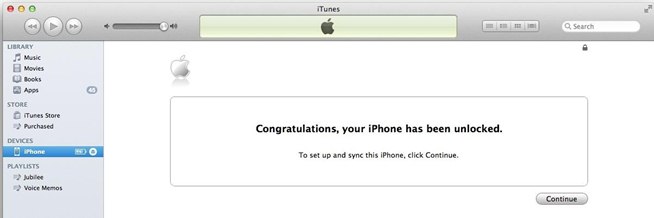
Step 4: You will see Congratulation message. Sometimes iTunes doesn’t show this message and it is normal.

unlock iphone itunes

Note: Sometimes if your iPhone is not updated to the last iOS version you will need to update your device first and unlock iPhone without restore.

That’s it Your iPhone is completely unlocked.

Restore iPhone in iTunes to Unlock It

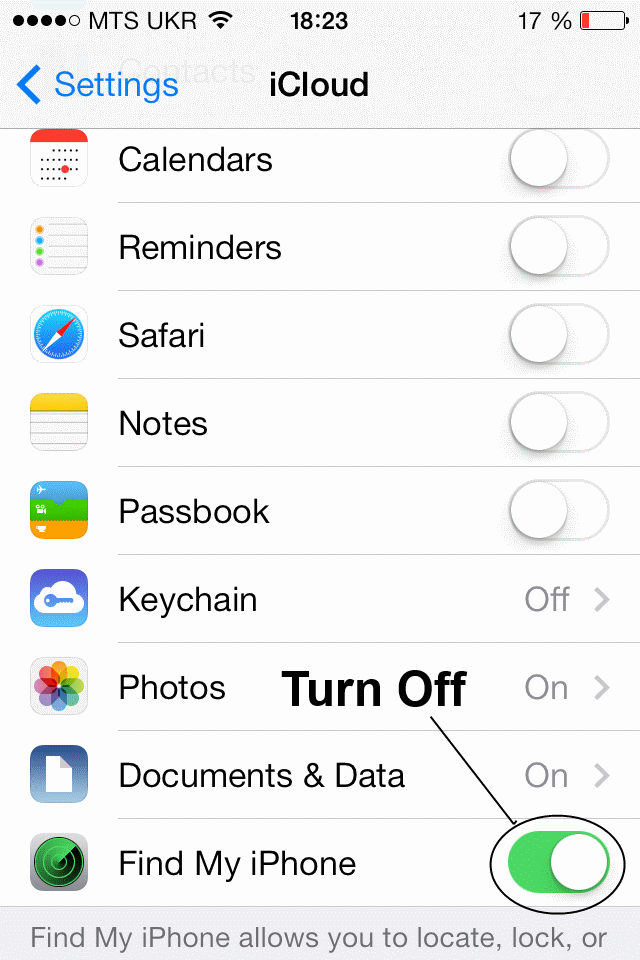
Attention: Make sure that Find My iPhone option in iCloud (Settings – iCloud) is turned off. If iCloud option is enabled after restoring process you will need Apple ID details to which iPhone is connected otherwise you won’t be able to activate the device.

icloud turn off

Step 1: Insert a SIM card of the non-supported carrier and connect iPhone to iTunes.

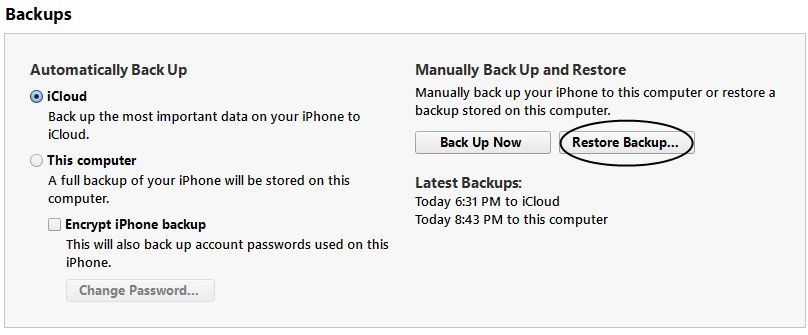
Step 2 (optional): Backup your device in iTunes or iCloud.

Step 3: After backup click the Restore button.

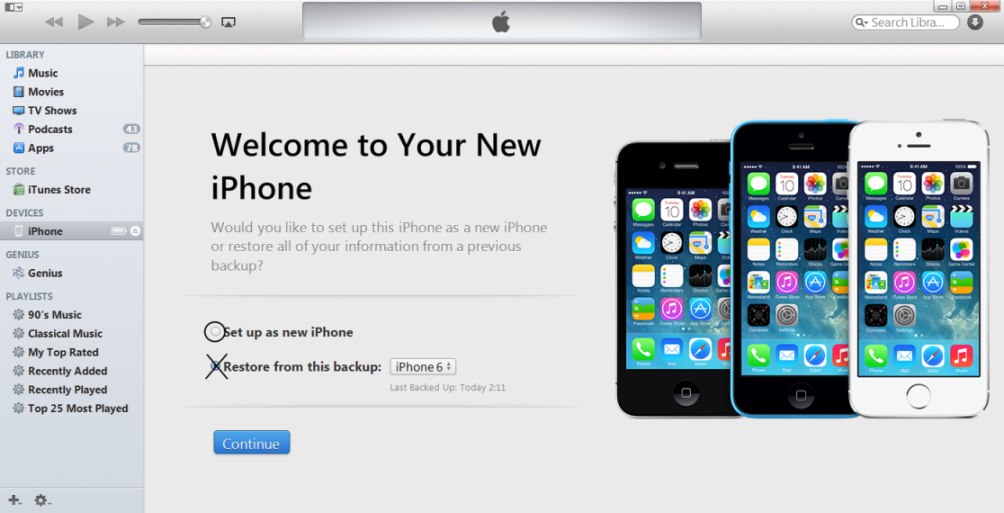
Step 4: When restoring will be completed select “Set up As a new phone” option. Not from a backup.

itunes-restore-as-new

Step 5: Click Continue and pass activation steps with non-supported SIM card.

Step 6: You will see the Congratulation message. Sometimes it doesn’t pop up, don’t worry, it is normal.

Step 7 (optional): Use “Restore from Backup” option in iTunes to recover you data.

restore from backup

Factory iPhone Unlock Troubleshooting

Fix 1: Make sure you have inserted SIM card of the carrier which is not  supported on your device whet it was locked.

Fix 2: Sometimes iPhone needs to be updated to the latest iOS version. Make sure your device is updated

Fix 3: If you don’t see the Congratulation message in iTunes just look at the status bar of iPhone and wait for the network / service

Fix 4: If iTunes will freeze then just disconnect your iPhone from USB, close iTunes program and connect your device again. Then just launch iTunes and repeat the process.

Fix 5: If after steps above you will see No Service or Searching… on the status bar you will need to do next:

  • turn on/off Air Plane mode
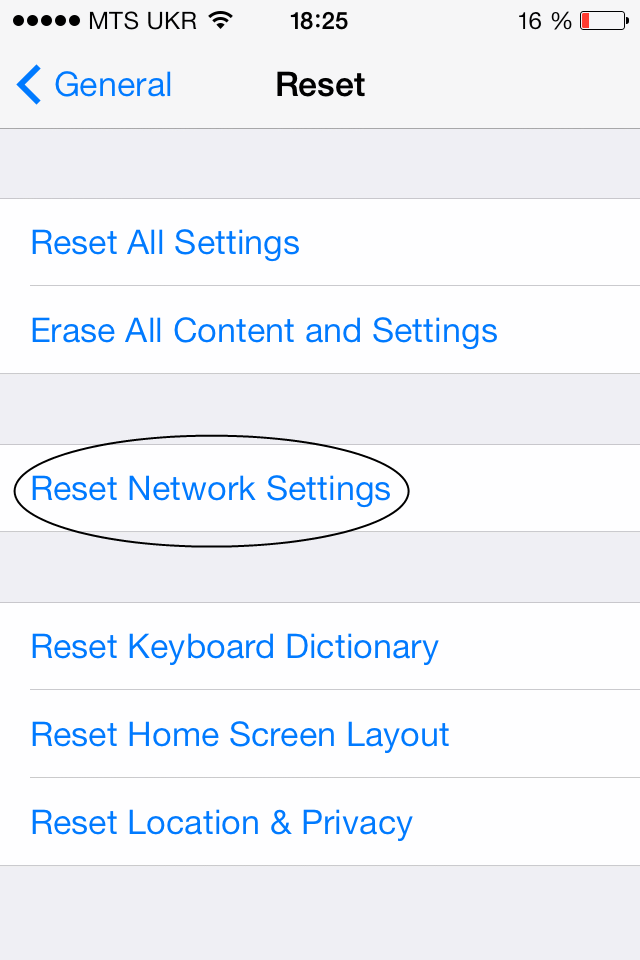
  • go to Settings -> general-> Reset -> Reset Networks

reset network settings

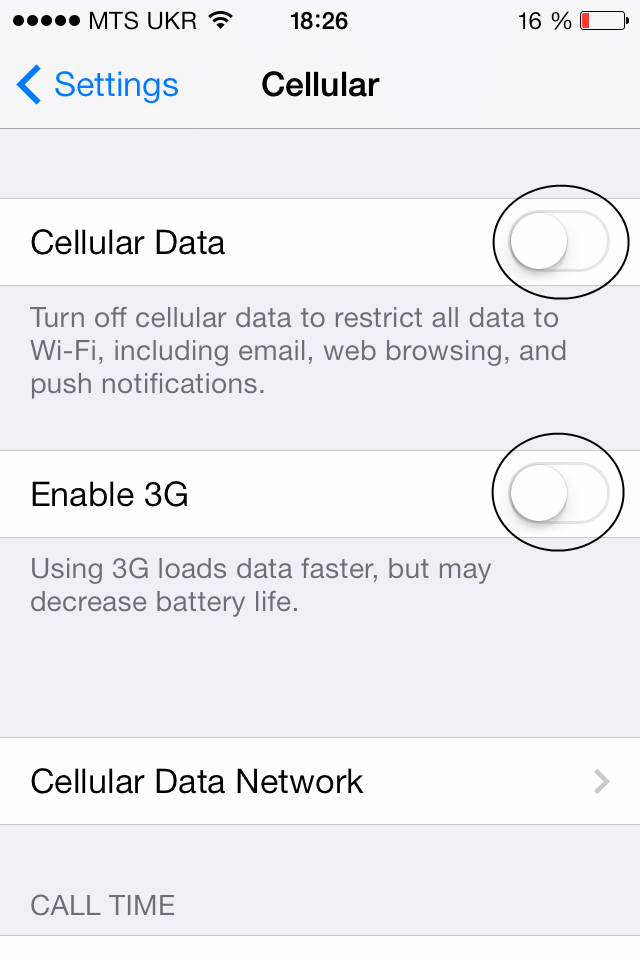
  • go to Settings -> General -> Cellular and turn off/on Cellular Data and enable/disable 3G.

enable 3GFeel free to contact our support team if you have any questions regarding iPhone unlocking. You can also visit FAQ page and find answer you are looking for.