Every new Apple handset user wonders how to check data usage on iPhone 7 or other model. We decided to mention the iPhone 7 and iPhone 7 Plus because these two models are the latest in the market. The company officially released both phones in the fall 2016 and a lot of customers expect to find one under their Christmas tree.
Why should you control data usage iPhone 7? Well, there were good old days when users enjoyed the true unlimited data. Those days are gone and although many of use still miss them you should keep a track of everything you perform with your smartphone. This includes both application and AT&T internet data usage. Learn how to save money or simply control your data on-the-go.
Let’s learn how to check data usage on iPhone 6, 7 and other models [remember to set up iPhone 7 as soon as you get it]. It’s truly doesn’t matter what Apple phone model you have. Besides, you might not even be locked to AT&T. This guide is devoted to AT&T iPhone data usage check as well as any other mobile operator in the USA or from across the world. The whole system is pretty similar anywhere you live or travel to.
Cellular Data Usage Current Period
If you need information about ‘data usage iPhone 7’ you can get it for free, especially if you are using AT&T as your mobile carrier. You don’t have to worry about your text and talk data since this is an unlimited offer by most U.S. networks. You are charged for mobile usage so this is what you should control.
Use one of the methods described below to get the information about your current billing cycle to avoid overcharges. You can check your data usage directly from your mobile device so this is fast, easy and free.
How to Check Data Usage on iPhone
Let’s start your AT&T internet data usage checking with the simplest method first. New iPhone 7 and older iPhone 6 users should take advantage of using star codes. What is this? Star code is a combination of symbols and numbers. You dial them and your smartphone quickly provides the information you seek to get.
For AT&T, you should use the special star code for iPhone data usage check. So here is what you need to do:
Step 1. Take your iPhone and make sure your carrier is AT&T. You will see AT&T icon at the left top menu of your screen.
Step 2. Launch Phone program on your handset.
Step 3. Click on your Keypad to start typing.
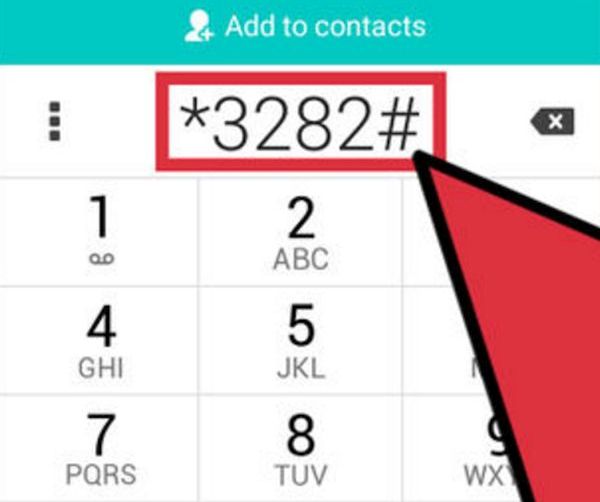
Step 4. Type in *3282# (if you need information in English) and dial it via a green Dial icon. Users who prefer to receive information in Spanish should dial a different combination of *3286# – this is also simple.
P.S. If you need to know how to translate the numbers above on your keypad: the words are DATA and DATO correspondingly.
Step 5. There will be an on-screen message with your personal data usage information.
It is also easy to learn your AT&T minutes via a similar method. The combinations are *646# for English version and *876# for users who prefer messages in Spanish.
iPhone Data Usage App for AT&T Network
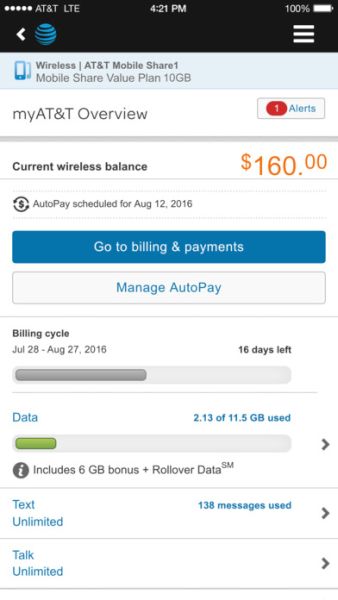
If you are not a fan of star codes but still need to control your monthly data usage with AT&T you can download and use the free myAT&T application. It is available at the App Store and it’s a no-cost program that shows your billing cycle’s usage for ‘current data’ as well as information about past cycles. You can even get details about shared usage if you have subscribed to family Mobile Share data plan.
Anyways, you need to complete some steps before you get the information:
Step 1. Download and install the free myAT&T app.
Step 2. Launch the application on your iPhone 7 or other model.
Step 3. Log in using your AT&T account login / password.
Step 4. Go to Overview – Data menu.
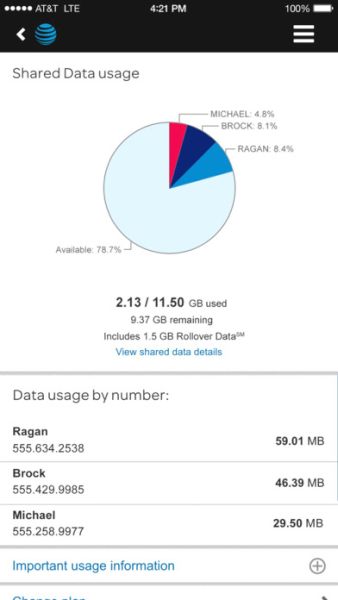
Step 5. Get the details and you’ll see your data usage. Family members can see the information broken down via a pie chart. It’s pretty simple and detailed.
By the way, AT&T users always receive message alerts (via email or SMS) when they are about to reach their data limit per month. You can also call AT&T at 800-331-0500 if you need assistance or help.
You can always factory unlock iPhone 7 from AT&T or other networks and save even more on your data plans.