iPhone 5S / 5c Holiday Discounts: Best Deals for Christmas 2013

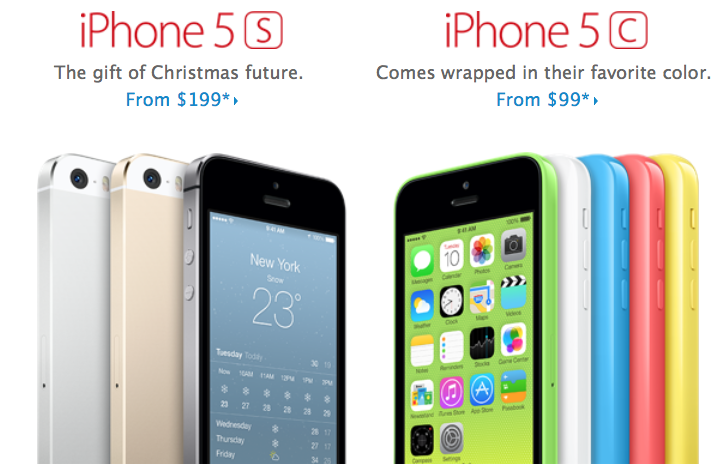
Here is our roundup of the best price on the iPhone 5S and 5c models from the U.S. stores. A lot of customers shopped on Black Friday, but the prices are being cut down closer to Christmas time. This week is probably the best time to purchase the new generation iOS handset from Apple.

A lot of retailers wish to sell as many iPhones as possible before December 24th. The discounts might even continue in January. Where is it cheaper to buy and unlock iPhone 5c / 5S this time? Let’s take the last look at the giant retailers and deals on this fruit device.

iPhone 5S-5c Holiday Discounts

Significant iPhone 5c Discounts

Customers who don’t care to get a locked iPhone 5c can go to Walmart. This store was offering this model for $99 recently but has now cut the price down to $27. You will pay as low for the 16GB model locked to Verizon, AT&T or Sprint. It’s your choice of the carrier you will have a 2-year contract with.

We don’t know how long the store would have the iPhone 5c for this price so you better hurry to get your handset now and don’t wait till December 24 [as supplies can run out quicker than Christmas 2013 arrives]. It is unfortunately impossible to order the phone online at this time.

Members of Sam’s Club can buy iPhone 5c for $25. This deal is perfect for members who are eager to stay on the two-year contract. Non-members can visit Sam’s Club on December 20-22 and get it for this low price which is cool.

If you are a fan of Best Buy you can get the 16GB smartphone 5c for $49.99.

Best iPhone 5S Pricing

Customers who dream about the iPhone 5S model can get it now at Walmart for $127. Of course, such low price means getting locked with a 2-year contract.

Once again, you can visit Sam’s Club this weekend and get iPhone 5S 16GB device for $119.

Got Locked Samsung to Brazil, Argentine, Chile Carrier Use Unlock Code Now!

It is very hard to find a service that provides unlocking code for Samsung phones locked in South America. But reading this post you can be sure that your searching was ended because only here you can get a right code to unlock Samsung cell phone from South America countries like Argentine, Brazil, Chile and other countries.

Read this description carefully and find out how to receive unlocking code and how to use it to free your Samsung device from locked carrier in South America.

Our service offers legal unlocking for any Samsung handset locked to any service provider in South America. We will provide unlock code and after entering that code your device becomes officially and permanently unlocked. All you need to do is to send us your IMEI number and wait for the email with a code.

How to Get the IMEI Number

The best and 100% working way is to type *#06# on your phone and you will see the digits on the screen. Please send us only the first 15 digits and triple check if the IMEI number you provide is correct. If it won’t be correct the code we send will fail to unlock your Samsung phone from South America.

How to Place an Order

  1. Enter IMEI number
  2. Enter email address
  3. Select the model of your Samsung phone (if you don’t see it contact us)
  4. Carefully read and agree with Terms and Services.

Important

This package unlocks Samsung phones locked only to South America networks.

If you will get Not Found for the newer models such as Note 3, S4, don’t worry and use our other package for Not Found Samsung Phone Database 2.

Unlocking phone with a code is a legal method. We don’t provide any illegal service here.

Make sure you are providing correct IMEI number. No refund if incorrect number was provided.

Check spam/junk folder if you don’t see email from us. Also you can add our email address to your safe contact list.

Read carefully Terms&Services before buying anything.

Usually you will receive 4 different codes:

  • NETWORK CODE also known as NCK =12345678
  • SERVICE PROVIDER also known as SPCK=12345678
  • SUBPROVIDER also known as SCK=12345678
  • DEFREEZE also known as MCK or FREEZE =12345678

In most cases you will need only the first Network Code (NCK). Only if your device is hard locked you will also need MCK (freeze/defreeze).

Note: If you will receive only one code that will be Network Code (NCK) and it is normal.

After we generate code you will receive email with a code and detailed instruction on how to use it.

How to Check if Samsung Phone Is Unlocked

Sure you can insert no-supported SIM card and make a call. But also there is other way to check if your Samsung handset is unlocked:

Step 1. Type on your phone the following:

  • *#7465625#

Step 2. You will see a menu with such info:

1. [ ] Network lock

2. [ ] Subset lock

3. [ ] SP lock

Step 3. If you see that everything is OFF you can be sure that your device is completely unlocked.

Benefits of Official Unlocking and Advantages of using Our Service

  • This is not software or hardware unlocking solution. You don’t need to install something or disassemble the phone.
  • The process is completely legal and won’t harm your device.
  • After unlocking the warranty remains valid.
  • This is a remote service. Order unlock online and receive email with the results.
  • After unlocking you can use any other (non-supported before) SIM card in any country. Do you like to travel? – This is your solution, switch SIM cards and enjoy communication.
  • We offer the cheapest price for South America Samsung phone unlocking.
  • After you enter unlock code your device will be unlocked permanently.
  • Forget about roaming or something like that. Just insert SIM card you need to use and enjoy.
  • If device is forever unlocked its selling value increases several times.
  • We have serious and really helpful customer service so you can always contact us if you will have any questions regarding unlock.
Use Unlock Code for Samsung Phone Locked in Canada

Many carriers in Canada offer locked Samsung phones. You can use this package to free your device from locked chains and open it for other carriers worldwide.

In case the contract with the service provider was ended or you need to sell your phone it’s highly recommended to factory unlock the device first. Why? Because after unlocking you will be able to use any GSM SIM card from other carriers and the value of Samsung phone will be much increased after unlocking.

Our service offers legal unlocking for any Samsung handset locked to any mobile service in Canada. We will provide unlock code and after entering that code your device becomes officially and permanently unlocked. All you need to do is to send us your IMEI number and wait for the email with a code.

How to Get the IMEI Number

The best and 100% working way is to type *#06# on your phone and you will see the digits on the screen. Please send us only the first 15 digits and triple check if the IMEI number you provide is correct. If it won’t be correct the code we send will fail to unlock your Samsung phone from Canada.

How to Place an Order

  1. Enter IMEI number
  2. Enter email address
  3. Select the model of your Samsung phone (if you don’t see it contact us)
  4. Carefully read and agree with Terms and Services.

Important

If you have tried a free tool or modified the phone from original factory settings before the unlocking code may not work and wont be refunded.

This package unlocks Samsung phones locked only to Canadian networks.

If you will get Not Found for the newer models such as Note 3, S4, don’t worry and use our other package for Not Found Samsung Phone Database 2.

Unlocking phone with a code is a legal method. We don’t provide any illegal service here.

Make sure you are providing correct IMEI number. No refund if incorrect number was provided.

Check spam/junk folder if you don’t see email from us. Also you can add our email address to your safe contact list.

Read carefully Terms&Services before buying anything.

Usually you will receive 4 different codes:

  • NETWORK CODE also known as NCK =12345678
  • SERVICE PROVIDER also known as SPCK=12345678
  • SUBPROVIDER also known as SCK=12345678
  • DEFREEZE also known as MCK or FREEZE =12345678

In most cases you will need only the first Network Code (NCK). Only if your device is hard locked you will also need MCK (freeze/defreeze).

Note: If you will receive only one code that will be Network Code (NCK) and it is normal.

After we generate code you will receive email with a code and detailed instruction on how to use it.

How to Check if Samsung Phone Is Unlocked

Sure you can insert no-supported SIM card and make a call. But also there is other way to check if your Samsung handset is unlocked:

Step 1. Type on your phone the following:

  • *#7465625#

Step 2. You will see a menu with such info:

1. [ ] Network lock

2. [ ] Subset lock

3. [ ] SP lock

Step 3. If you see that everything is OFF you can be sure that your device is completely unlocked.

Benefits of Official Unlocking and Advantages of using Our Service

  • This is not software or hardware unlocking solution. You don’t need to install something or disassemble the phone.
  • The process is completely legal and won’t harm your device.
  • After unlocking the warranty remains valid.
  • This is a remote service. Order unlock online and receive email with the results.
  • After unlocking you can use any other (non-supported before) SIM card in any country. Do you like to travel? – This is your solution, switch SIM cards and enjoy communication.
  • We offer the cheapest price for Canadian Samsung phone unlocking.
  • After you enter unlock code your device will be unlocked permanently.
  • Forget about roaming or something like that. Just insert SIM card you need to use and enjoy outside the Canada.
  • If device is forever unlocked its selling value increases several times.
  • We have serious and really helpful customer service so you can always contact us if you will have any questions regarding unlock.

How to Unlock Samsung Galaxy S3 / 4 / Note 2 Locked in Philippines

If you are looking to buy the phone you like the best decision would be to buy factory unlocked one. But the price of such factory unlocked phones like Samsung Galaxy in Philippines costs way too much for some people and they go to the service provider that offers Samsung phones under contract for triple cheaper price. Great, sing a contract and enjoy.

But what if you will need to use other SIM card while traveling or need to sell your Samsung handset to use outside the Philippines?

You can use our service and we will provide you with unlocking code for Samsung handset such as Galaxy s3, S4, Note 2, SGH and other models locked in Philippines.

Our service offers legal unlocking for any Samsung handset locked to any Philippines service provider. We will provide unlock code and after entering that code your device becomes officially and permanently unlocked. All you need to do is to send us your IMEI number and wait for the email with a code.

How to Get the IMEI Number

The best and 100% working way is to type *#06# on your phone and you will see the digits on the screen. Please send us only the first 15 digits and triple check if the IMEI number you provide is correct. If it won’t be correct the code we send will fail to unlock your Samsung phone from Philippines.

How to Place an Order

1.       Enter IMEI number

2.       Enter email address

3.       Select the model of your Samsung phone (if you don’t see it contact us)

4.       Carefully read and agree with Terms and Services.

Important

  • This package unlocks Samsung phones locked only to Philippines networks.
  • If you will get Not Found for the newer models such as Note 3, S4, don’t worry and use our other package for Not Found Samsung Phone Database 2.
  • Unlocking phone with a code is a legal method. We don’t provide any illegal service here.
  • Make sure you are providing correct IMEI number. No refund if incorrect number was provided.
  • Check spam/junk folder if you don’t see email from us. Also you can add our email address to your safe contact list.
  • Read carefully Terms&Services before buying anything.
  • Usually you will receive 4 different codes:

·        –  NETWORK CODE also known as NCK =12345678

·         – SERVICE PROVIDER also known as SPCK=12345678

·         – SUBPROVIDER also known as SCK=12345678

·         – DEFREEZE also known as MCK or FREEZE =12345678

  • In most cases you will need only the first Network Code (NCK). Only if your device is hard locked you will also need MCK (freeze/defreeze).

Note: If you will receive only one code that will be Network Code (NCK) and it is normal.

After we generate code you will receive email with a code and detailed instruction on how to use it.

How to Check if Samsung Phone Is Unlocked

Sure you can insert no-supported SIM card and make a call. But also there is other way to check if your Samsung handset is unlocked:

Step 1. Type on your phone the following:

·         *#7465625#

Step 2. You will see a menu with such info:

1. [ ] Network lock

2. [ ] Subset lock

3. [ ] SP lock

Step 3. If you see that everything is OFF you can be sure that your device is completely unlocked.

Benefits of Official Unlocking and Advantages of using Our Service

·         This is not software or hardware unlocking solution. You don’t need to install something or disassemble the phone.

·         The process is completely legal and won’t harm your device.

·         After unlocking the warranty remains valid.

·         This is a remote service. Order unlock online and receive email with the results.

·         After unlocking you can use any other (non-supported before) SIM card in any country. Do you like to travel? – This is your solution, switch SIM cards and enjoy communication.

·         We offer the cheapest price for Philippines Samsung phone unlocking.

·         After you enter unlock code your device will be unlocked permanently.

·         Forget about roaming or something like that. Just insert SIM card you need to use and enjoy.

·         If device is forever unlocked its selling value increases several times.

·         We have serious and really helpful customer service so you can always contact us if you will have any questions regarding unlock.

Use Unlocking Code to Unlock Samsung Phone Locked in Mexico

What if you are tired of using one network on your Samsung cell phone locked in Mexico? Normally you go to the store and buy SIM card of some other carrier. Insert it in your device and… not accepted.?

The answer is simply, your Samsung phone is locked in Mexico and you can’t use SIM cards from other carriers. Fortunately there is a simple way out. You can use our service to unlock Samsung Mexico phone including Galaxy S4 and Galaxy Note 2. We send you unlock code for Samsung phone and after unlocking this problem will be in the past forever.

Our service offers legal unlocking for any Samsung handset locked to any Mexico service provider. We will provide unlock code and after entering that code your device becomes officially and permanently unlocked. All you need to do is to send us your IMEI number and wait for the email with a code.

How to Get the IMEI Number

The best and 100% working way is to type *#06# on your phone and you will see the digits on the screen. Please send us only the first 15 digits and triple check if the IMEI number you provide is correct. If it won’t be correct the code we send will fail to unlock your Samsung phone from Mexico.

How to Place an Order

  1. Enter IMEI number
  2. Enter email address
  3. Select the model of your Samsung phone (if you don’t see it contact us)
  4. Carefully read and agree with Terms and Services.

Important

This package unlocks Samsung phones locked only to networks in Mexico.

If you will get Not Found for the newer models such as Note 3, S4, don’t worry and use our other package for Not Found Samsung Phone Database 2.

Unlocking phone with a code is a legal method. We don’t provide any illegal service here.

Make sure you are providing correct IMEI number. No refund if incorrect number was provided.

Check spam/junk folder if you don’t see email from us. Also you can add our email address to your safe contact list.

Read carefully Terms&Services before buying anything.

Usually you will receive 4 different codes:

  • NETWORK CODE also known as NCK =12345678
  • SERVICE PROVIDER also known as SPCK=12345678
  • SUBPROVIDER also known as SCK=12345678
  • DEFREEZE also known as MCK or FREEZE =12345678

In most cases you will need only the first Network Code (NCK). Only if your device is hard locked you will also need MCK (freeze/defreeze).

Note: If you will receive only one code that will be Network Code (NCK) and it is normal.

After we generate code you will receive email with a code and detailed instruction on how to use it.

How to Check if Samsung Phone Is Unlocked

Sure you can insert no-supported SIM card and make a call. But also there is other way to check if your Samsung handset is unlocked:

Step 1. Type on your phone the following:

  • *#7465625#

Step 2. You will see a menu with such info:

1. [ ] Network lock

2. [ ] Subset lock

3. [ ] SP lock

Step 3. If you see that everything is OFF you can be sure that your device is completely unlocked.

Benefits of Official Unlocking and Advantages of using Our Service

  • This is not software or hardware unlocking solution. You don’t need to install something or disassemble the phone.
  • The process is completely legal and won’t harm your device.
  • After unlocking the warranty remains valid.
  • This is a remote service. Order unlock online and receive email with the results.
  • After unlocking you can use any other (non-supported before) SIM card in any country. Do you like to travel? – This is your solution, switch SIM cards and enjoy communication.
  • We offer the cheapest price for Mexico Samsung phone unlocking.
  • After you enter unlock code your device will be unlocked permanently.
  • Forget about roaming or something like that. Just insert SIM card you need to use and enjoy.
  • If device is forever unlocked its selling value increases several times.
  • We have serious and really helpful customer service so you can always contact us if you will have any questions regarding unlock.

How to Unlock AT&T Samsung Galaxy And other Models Using Code

One of the most popular mobile networks in USA is AT&T. Not only iPhone, BlackBerry or HTC are locked to this carrier. Many others handsets are tied to AT&T and Samsung phones are not exclusion.

Here we offer cheap and working AT&T Samsung phone unlock code and you can open your device for other networks around the world. Use the IMEI number and place an order. 100% money back guarantee for the wrong unlocking code. If your device is not locked to AT&T and locked to other US carrier here is unlock guide.

Our service offers legal unlocking for any Samsung handset locked to AT&T service provider. We will provide unlock code and after entering that code your device becomes officially and permanently unlocked. All you need to do is to send us your IMEI number and wait for the email with a code.

How to Get the IMEI Number

The best and 100% working way is to type *#06# on your phone and you will see the digits on the screen. Please send us only the first 15 digits and triple check if the IMEI number you provide is correct. If it won’t be correct the code we send will fail to unlock your Samsung phone from AT&T.

How to Place an Order

  1. Enter IMEI number
  2. Enter email address
  3. Select the model of your Samsung phone (if you don’t see it contact us)
  4. Carefully read and agree with Terms and Services.

Important

This package unlocks Samsung phones locked only to AT&T carrier.

If you will get Not Found for the newer models such as Note 3, S4, don’t worry and use our other package for Not Found Samsung Phone Database 2.

Unlocking phone with a code is a legal method. We don’t provide any illegal service here.

Make sure you are providing correct IMEI number. No refund if incorrect number was provided.

Check spam/junk folder if you don’t see email from us. Also you can add our email address to your safe contact list.

Read carefully Terms&Services before buying anything.

Usually you will receive 4 different codes:

  • NETWORK CODE also known as NCK =12345678
  • SERVICE PROVIDER also known as SPCK=12345678
  • SUBPROVIDER also known as SCK=12345678
  • DEFREEZE also known as MCK or FREEZE =12345678

In most cases you will need only the first Network Code (NCK). Only if your device is hard locked you will also need MCK (freeze/defreeze).

Note: If you will receive only one code that will be Network Code (NCK) and it is normal.

After we generate code you will receive email with a code and detailed instruction on how to use it.

How to Check if Samsung Phone Is Unlocked

Sure you can insert no-supported SIM card and make a call. But also there is other way to check if your Samsung handset is unlocked:

Step 1. Type on your phone the following:

  • *#7465625#

Step 2. You will see a menu with such info:

1. [ ] Network lock

2. [ ] Subset lock

3. [ ] SP lock

Step 3. If you see that everything is OFF you can be sure that your device is completely unlocked.

Benefits of Official Unlocking and Advantages of using Our Service

  • This is not software or hardware unlocking solution. You don’t need to install something or disassemble the phone.
  • The process is completely legal and won’t harm your device.
  • After unlocking the warranty remains valid.
  • This is a remote service. Order unlock online and receive email with the results.
  • After unlocking you can use any other (non-supported before) SIM card in any country. Do you like to travel? – This is your solution, switch SIM cards and enjoy communication.
  • We offer the cheapest price for AT&T Samsung phone unlocking.
  • After you enter unlock code your device will be unlocked permanently.
  • Forget about roaming or something like that. Just insert SIM card you need to use and enjoy.
  • If device is forever unlocked its selling value increases several times.
  • We have serious and really helpful customer service so you can always contact us if you will have any questions regarding unlock.

Bought Samsung Handset in USA, Unlock It for Other Networks

Despite the competition between Apple and Samsung in USA many phones of the Korean giant are locked to US operators. We offer this package to unlock Samsung phones like Galaxy S3 / 4, Note and any older devices locked in USA.

Note: If your phone is locked to AT&T you can use this package to unlock AT&T Samsung cell phone and use it with other networks.

Our service offers legal unlocking for any Samsung handset locked to any USA service provider. We will provide unlock code and after entering that code your device becomes officially and permanently unlocked. All you need to do is to send us your IMEI number and wait for the email with a code.

Popular models:

  • ATT Galaxy S II LTE i727,
  • T-Mobile Galaxy S II,
  • T499,
  • T759,
  • Sidekick 4G T839,
  • etc

How to Get the IMEI Number

The best and 100% working way is to type *#06# on your phone and you will see the digits on the screen. Please send us only the first 15 digits and triple check if the IMEI number you provide is correct. If it won’t be correct the code we send will fail to unlock your Samsung phone from USA.

How to Place an Order

  1. Enter IMEI number
  2. Enter email address
  3. Select the model of your Samsung phone (if you don’t see it contact us)
  4. Carefully read and agree with Terms and Services.

Important

  1. This package unlocks Samsung phones locked only to US networks.
  2. In case code does not work with such Models: T959, T959V, T839 you will receive refund.
  3. If you have tried a free tool or modified the phone from original factory settings that code may not work.
  4. If you will get Not Found for the newer models such as Note 3, S4, don’t worry and use our other package for Not Found Samsung Phone USA Database 2.
  5. Unlocking phone with a code is a legal method. We don’t provide any illegal service here.
  6. Make sure you are providing correct IMEI number. No refund if incorrect number was provided.
  7. Check spam/junk folder if you don’t see email from us. Also you can add our email address to your safe contact list.
  8. Read carefully Terms&Services before buying anything.
  9. Usually you will receive 4 different codes:
  • NETWORK CODE also known as NCK =12345678
  • SERVICE PROVIDER also known as SPCK=12345678
  • SUBPROVIDER also known as SPCK=12345678

In most cases you will need only the first Network Code (NCK). Only if your device is hard locked you will also need MCK (freeze/defreeze) but T669 and T919 are not supported.

Note: If you will receive only one code that will be Network Code (NCK) and it is normal.

After we generate code you will receive email with a code and detailed instruction on how to use it.

How to Check if Samsung Phone Is Unlocked

Sure you can insert no-supported SIM card and make a call. But also there is other way to check if your Samsung handset is unlocked:

Step 1. Type on your phone the following:

  • *#7465625#

Step 2. You will see a menu with such info:

1. [ ] Network lock

2. [ ] Subset lock

3. [ ] SP lock

Step 3. If you see that everything is OFF you can be sure that your device is completely unlocked.

Benefits of Official Unlocking and Advantages of using Our Service

  • This is not software or hardware unlocking solution. You don’t need to install something or disassemble the phone.
  • The process is completely legal and won’t harm your device.
  • After unlocking the warranty remains valid.
  • This is a remote service. Order unlock online and receive email with the results.
  • After unlocking you can use any other (non-supported before) SIM card in any country. Do you like to travel? – This is your solution, switch SIM cards and enjoy communication.
  • We offer the cheapest price for USA Samsung phone unlocking.
  • After you enter unlock code your device will be unlocked permanently.
  • Forget about roaming or something like that. Just insert SIM card you need to use and enjoy.
  • If device is forever unlocked its selling value increases several times.
  • We have serious and really helpful customer service so you can always contact us if you will have any questions regarding unlock.

Don’t Let Hackers Hack into Your iPhone: How to Instruction

iPhone users who attend different public places should be aware of bad guys who can access their personal information and even eavesdrop on their phone calls. No one would love it to be hacked this way, believe us. Here is useful advice on how you can prevent hackers from breaking into the iPhone of yours.

The whole thing is done secretly without you even knowing about the hack. It happens when you are charging your iPhone via public charger in a cafe or store. Beware of this hacking scheme. It goes like this.

protect iphone from hacking
iPhone Hack via Public Phone Charger

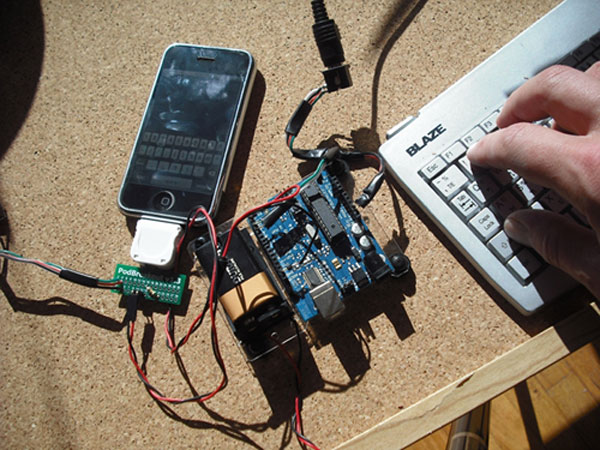
According to the information shared by Billy Lau who works for Tech Information Security Center in Georgia, hackers can use specific applications that they install on your smartphone when you don’t know about it.

For example, your battery is low and you wish to charge the iPhone with one of the borrowed charger from a stranger or in the restaurant. The charger looks like an ordinary accessory however it might be connected to the computer [you don’t see it] and not to the outlet. If you happen to unlock your iDevice, they can easily get your personal data and other phone information.

Mr. Lau advises everyone to not unlock their handset in public places while charging even for a second. Even a short moment can let attackers access your device and install the malicious program that will control your device remotely.

Protect Your iPhone from Being Accessed by Hackers

There is one tip and trick for all iPhone owners. If you don’t want hackers to access your passcodes, make phone calls behind your back, listen to your phone conversations, steal your personal data and so on you MUST NOT unlock your handset while being charged by public chargers.

This is simple yet safe. USB public charging station can become your enemy if you are not attentive enough. It’s also best not to use chargers that you can’t see clearly where there are connected.

How to Get Unlock Code for Samsung Phone from China

It is necessary to unlock Samsung phone if it is locked. There are many handsets around the world that are locked but here you can unlock any Samsung mobile phone manufactured in China. Only 5 minutes to place an order and your device will be compatible with other SIM cards around the world. Also factory unlocking will increase phone’s value.

It doesn’t matter to what carrier your handset is locked and in what country. If your device was made in China you can use this package to factory unlock your cell phone.

Our service offers legal unlocking for any Samsung handset locked to any service provider. We will provide unlock code and after entering that code your device becomes officially and permanently unlocked. All you need to do is to send us your IMEI number and wait for the email with a code.

How to Get the IMEI Number

The best and 100% working way is to type *#06# on your phone and you will see the digits on the screen. Please send us only the first 15 digits and triple check if the IMEI number you provide is correct. If it won’t be correct the code we send will fail to unlock your Samsung phone made in China.

How to Place an Order

  1. Enter IMEI number
  2. Enter email address
  3. Select the model of your Samsung phone (if you don’t see it contact us)
  4. Carefully read and agree with Terms and Services.

Important

  1. This package unlocks Samsung phones made in China only. Don’t submit IMEI if the phone was manufactured not in China.
  2. If you will get Not Found for the newer models such as Note 3, S4, don’t worry and use our other package for Not Found Samsung Phone Database 2.
  3. Unlocking phone with a code is a legal method. We don’t provide any illegal service here.
  4. Make sure you are providing correct IMEI number. No refund if incorrect number was provided.
  5. Check spam/junk folder if you don’t see email from us. Also you can add our email address to your safe contact list.
  6. Read carefully Terms&Services before buying anything.
  7. Usually you will receive 4 different codes:
  • NETWORK CODE also known as NCK =12345678
  • SERVICE PROVIDER also known as SPCK=12345678
  • SUBPROVIDER also known as SCK=12345678
  • DEFREEZE also known as MCK or FREEZE =12345678

In most cases you will need only the first Network Code (NCK). Only if your device is hard locked you will also need MCK (freeze/defreeze).

Note: If you will receive only one code that will be Network Code (NCK) and it is normal.

After we generate code you will receive email with a code and detailed instruction on how to use it.

How to Check if Samsung Phone Is Unlocked

Sure you can insert no-supported SIM card and make a call. But also there is other way to check if your Samsung handset is unlocked:

Step 1. Type on your phone the following:

  • *#7465625#

Step 2. You will see a menu with such info:

1. [ ] Network lock

2. [ ] Subset lock

3. [ ] SP lock

Step 3. If you see that everything is OFF you can be sure that your device is completely unlocked.

Benefits of Official Unlocking and Advantages of using Our Service

  • This is not software or hardware unlocking solution. You don’t need to install something or disassemble the phone.
  • The process is completely legal and won’t harm your device.
  • After unlocking the warranty remains valid.
  • This is a remote service. Order unlock online and receive email with the results.
  • After unlocking you can use any other (non-supported before) SIM card in any country. Do you like to travel? – This is your solution, switch SIM cards and enjoy communication.
  • We offer the cheapest price for China Samsung phone unlocking.
  • After you enter unlock code your device will be unlocked permanently.
  • Forget about roaming or something like that. Just insert SIM card you need to use and enjoy.
  • If device is forever unlocked its selling value increases several times.
  • We have serious and really helpful customer service so you can always contact us if you will have any questions regarding unlock.

How to Unlock Any Samsung Phone Locked to European Networks

Samsung handsets are very popular around the world and many world operators have deals with this South Korean giant.  Europe is not exclusion and many Samsung phones are locked to such European carriers as Orange, Vodafone, O2, Three, Movistar and many, many more.

But the problem is that European people like to travel very much and not only within European countries but in many other parts of our world. The problem is that if your device is locked to one mobile operator and you can’t use SIM cards of other networks which is a very big inconvenience.

Our service offers legal unlocking for any Samsung handset locked to any European service provider. If you need faster unlock code delivery service you can use it too.

We will provide unlock code and after entering that code your device becomes officially and permanently unlocked. All you need to do is to send us your IMEI number and wait for the email with a code.

How to Get the IMEI Number

The best and 100% working way is to type *#06# on your phone and you will see the digits on the screen. Please send us only the first 15 digits and triple check if the IMEI number you provide is correct. If it won’t be correct the code we send will fail to unlock your Samsung phone from Europe.

How to Place an Order

  1. Enter IMEI number
  2. Enter email address
  3. Select the model of your Samsung phone (if you don’t see it contact us)
  4. Carefully read and agree with Terms and Services.

Important

This package unlocks Samsung phones locked only to European networks.

If you will get Not Found for the newer models such as Note 3, S4, don’t worry and use our other package for Not Found Samsung Phone Database 2.

Unlocking phone with a code is a legal method. We don’t provide any illegal service here.

Make sure you are providing correct IMEI number. No refund if incorrect number was provided.

Check spam/junk folder if you don’t see email from us. Also you can add our email address to your safe contact list.

Read carefully Terms&Services before buying anything.

Usually you will receive 4 different codes:

  • NETWORK CODE also known as NCK =12345678
  • SERVICE PROVIDER also known as SPCK=12345678
  • SUBPROVIDER also known as SCK=12345678
  • DEFREEZE also known as MCK or FREEZE =12345678

In most cases you will need only the first Network Code (NCK). Only if your device is hard locked you will also need MCK (freeze/defreeze).

Note: If you will receive only one code that will be Network Code (NCK) and it is normal.

After we generate code you will receive email with a code and detailed instruction on how to use it.

How to Check if Samsung Phone Is Unlocked

Sure you can insert no-supported SIM card and make a call. But also there is other way to check if your Samsung handset is unlocked:

Step 1. Type on your phone the following:

  • *#7465625#

Step 2. You will see a menu with such info:

1. [ ] Network lock

2. [ ] Subset lock

3. [ ] SP lock

Step 3. If you see that everything is OFF you can be sure that your device is completely unlocked.

Benefits of Official Unlocking and Advantages of using Our Service

  • This is not software or hardware unlocking solution. You don’t need to install something or disassemble the phone.
  • The process is completely legal and won’t harm your device.
  • After unlocking the warranty remains valid.
  • This is a remote service. Order unlock online and receive email with the results.
  • After unlocking you can use any other (non-supported before) SIM card in any country. Do you like to travel? – This is your solution, switch SIM cards and enjoy communication.
  • We offer the cheapest price for Europe Samsung phone unlocking.
  • After you enter unlock code your device will be unlocked permanently.
  • Forget about roaming or something like that. Just insert SIM card you need to use and enjoy.
  • If device is forever unlocked its selling value increases several times.
  • We have serious and really helpful customer service so you can always contact us if you will have any questions regarding unlock.