Factory Unlock iPhone Locked to AT&T Network Free of Charge

Our company makes free AT&T iPhone unlock submission for Not Found code. but only once and only for AT&T network. If you are interested – go on reading.

If our clients receive Not Found after ordering iPhone unlock, there can be several reasons. Very often it is just a typo in IMEI number. Sometimes unlock may failed from our site.

Also sometime users didn’t check network and ordered AT&T unlock but not for iPhone locked to AT&T. In this case, according to our Refund policy, we are not obliged to refund because it is consumer’s error. But we understand that too and decided to give a second chance for our customers.

free at&t iphone unlock

How To Get AT&T iPhone Unlock for Free

In case you will receive Not Found code after ordering iPhone unlock you will have one free AT&T unlock request. To get it just register on our website using email that you used to order unlock. After registration – login and you will see the form for free iPhone unlock submission but only for AT&T network.

Attention: If you’ve submitted unlock not for AT&T network and got Not Found code you still have one free submission but only for AT&T iPhone IMEI. So, please check iPhone carrier before ordering because if you will submit non AT&T iPhone IMEI using one free submission you will receive NOT Found again and lose free unlock forever without refund.

That’s it. Just register with email you used for first unlock request, enter you account and you will see what to do next.

Also we have other free and discount offers for our loyal clients and customers who bought unlock at our site for the first time.

Here below you can find links for free unlock AT&T iPhone:
How to Get Discount or One Free Unlock for AT&T iPhone

How to Get Multiply AT&T iPhone Unlocks for Free

Benefits of Remote AT&T iPhone Unlock for All Smartphone Owners

Even if you own AT&T iPhone or Sprint iPhone or any other iOS smartphone locked to one carrier, you might consider unlocking your handset as the best thing to do. Factory  iPhone unlock has a lot of benefits. Firstly, you can get rid of any frustrations caused by one mobile carrier network. Secondly, you can save big money using different SIM cards at home or overseas.

There are a lot of other reasons why you might like to have your iPhone factory unlocked. Here is why you need it and how it can help you in the future.

Quick Remote AT&T iPhone Unlock

Anyone from the U.S. can purchase an already unlocked iPhone 5 from Verizon, Apple and other retailers. Just keep in mind that the price of such a smartphone will be full, over $600. Or you can get a cheaper AT&T model and remotely unlock iPhone through iTunes.

remote iPhone unlock

You’ll just have to contact AT&T and request unlock. It is fast and easy, legal, official and affordable. Users who have chosen to unlock iPhone via AT&T say that you must keep your case number because the carrier often forgets to send a follow-up email with unlocking instructions. If you don’t get the key email, contact the company and provide your case number to get it.

It is hard to unlock iPhone 5s AT&T for one reason. This carrier provides iPhone unlock for devices that are out of contract, and this means you should have used your device for at least two years before requesting unlock.

Here is a good advice for users who want to get a new iPhone 5 and get remote unlock at the same time. Just keep your old device and have it unlocked. Do not trade or sold it. In case you don’t have an old smartphone, buy it unlocked from eBay, Amazon or other websites. Since the new model is available in the markets today, the previous units become less expensive.

Or you can use remote AT&T iPhone unlock service for less than 10 bucks right now and enjoy any other SIM card around the world.

Once you have an unlocked handset, you can save money on data plans in the U.S. You can also use your iOS device when you travel overseas and save on roaming charges because it is possible to insert nearly any SIM card into the remotely unlocked iPhone.

Of course, when you get individual cards by country you get a new phone number, but it is cheaper to make international calls this way and most cards you get can be used forever [there are mostly no monthly fees or contract with them] so you have a win-win.

AT&T Brings Multi Window Feature on Galaxy Note II

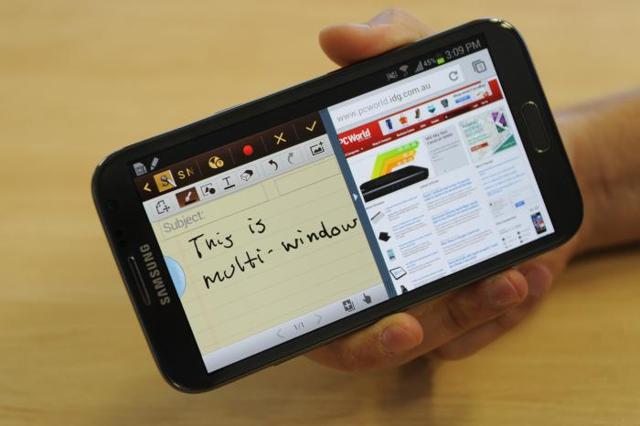
Users who have Samsung Galaxy Note II will enjoy new feature from AT&T. This carrier has decided to improve life for its customers and it now adds AT&T Galaxy Note 2 Multi Window feature. What is it? How can it make your life better?

We should be honest and mention that AT&T is the only big U.S. mobile operator that waited so long before pushing the Multi Window option to its client. Other three national carriers have given this feature to Samsung Galaxy Note II devices long time ago. Finally, it has arrived to AT&T customers as well.

AT&T Galaxy Note 2 Multi Window

About Multi Window Feature

The new AT&T Galaxy Note 2 Multi Window feature lets users enjoy 2 applications at once. It is possible thanks to a split-screen option which shows two apps at the same time on one display. As company has reported it its media statement, the new AT&T feature divides your screen into 2 active “windows” and this is how you see your split screen.

Once you updated your device, start having fun with fluid multitasking between programs. Does it sound great to you? Are you an AT&T consumer with Galaxy device? You should be happy to get this option.

According to the company, the new update becomes available since December 27th. Still as this feature rolls out, it might take some time for you to get it.

Fluid Multitasking Joy

There is no need to use your Kies desktop software in order to upgrade your Galaxy Note II and enjoy Multi Window. You can use OTA option to update your gadget. Don’t panic if you cannot update at once. You will do well eventually as the roll out has begun and it will reach each customer with AT&T Galaxy Note 2 device.

What do you think about this service? Do you like the update?

Motorola Atrix HD Owners Can Get Jelly Bean Update from AT&T

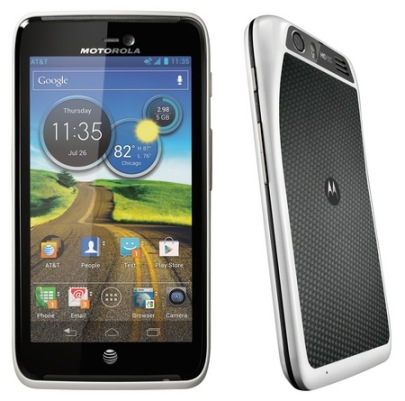
Users who have Motorola Atrix HD can get Android 4.1 upgrade from AT&T. It took the company about 5 months to offer customers Jelly Bean also known as Project Butter. If you wish to get AT&T Jelly Bean update for Motorola Atrix HD, you will be able to download it via Wi-Fi network.

The refresh will bring a lot of new options as part of the package. Besides, it will come with Quick Settings and other features that can make AT&T customers happier. In order to view this rollout, you can go to your Settings menu and choose About Phone option. While you are doing this, we will tell you more about this update. Continue reading Motorola Atrix HD Owners Can Get Jelly Bean Update from AT&T

The New Features of AT&T U-verse Update

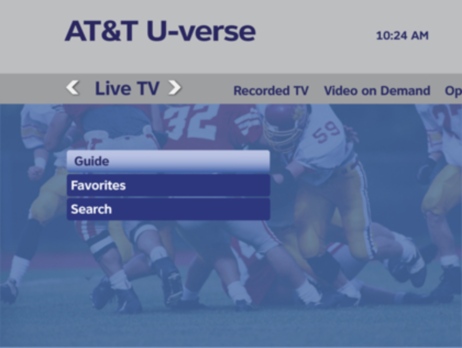
The following information should be interesting to all subscribers of AT&T U-verse and Starz Venn diagram services that now offer some new features to their users. Learn more about the recent AT&T U-verse update that made both services better and brought new options to iOS and Mac owners.

The two services now allow you accessing Movieplex Play, Encore and Starz Play features as iOS applications or on a computer [use browser to get this access on Mac and PC]. You should be a subscriber of AT&T U-verse premium channel counterparts to use the new services. Continue reading The New Features of AT&T U-verse Update

Save $100 Checking AT&T iPad Data Plan Cost [2013-2014]

What would you say if you were offered an AT&T 4G LTE iPad with a $100 discount? Would you buy such a tablet computer? AT&T customers will be able to get such a deal if they subscribe for a two-year data plan. We will tell you more about AT&T iPad data plan cost 2013-2014 and you will see if its price is affordable and can satisfy your needs.

The curious announcement by one of the biggest U.S. carriers sounds interesting. At least, at the first glance the preposition to buy iPad with a $100 discount looks delicious. Is this sale really such a nice deal? What about the price of the data contract? Continue reading Save $100 Checking AT&T iPad Data Plan Cost [2013-2014]