iOS 9 WiFi Calling Brings Support for AT&T iPhone 6 / 6S

A lot of users might have already downloaded iOS 9 beta 5 that was released in August by Apple and can be downloaded through direct no UDID links even though this testing version is meant for registered developers. This update brings AT&T WiFi calling 2015 support that was rumored to roll out and seems to be officially released soon.

iOS 9 WiFi calling has already supported T-Mobile and Sprint networks. Verizon is the only company that doesn’t hurry to support the new option. If you wish to use such an option this fall you might want to SIM unlock Verizon iPhone 6 even though this carrier also promises to offer full support sometime this year.
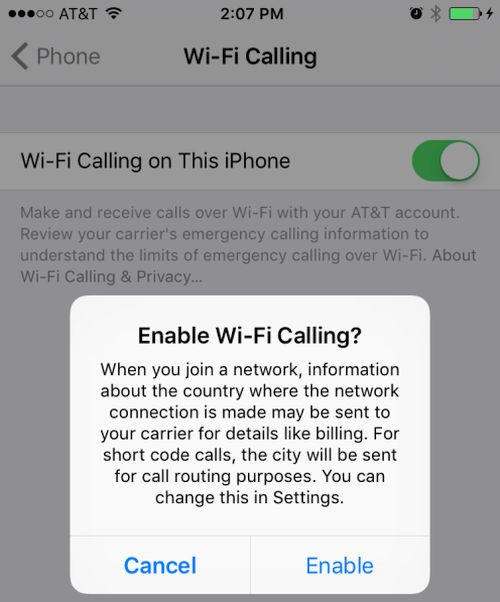
ios-9-att-wifi-calling-iphon

AT&T WiFi Calling iPhone 6 feature hasn’t been tested by users yet because it is not available to most of them. Still the new mobile platform does support the option. This means that AT&T iPhone subscribers should be able to make cellular calls using WiFi network when their cellular signal is too weak or absent.

If you have the AT&T iPhone that is running iOS 9 beta 5 you can launch Settings and take a look into your iPhone menu. You’ll find WiFi Calling feature there which you cannot enable at the moment but it should work once Apple officially presents the next operating system for mobile devices.

The U.S. carrier doesn’t say when it is going to roll out this feature. According to rumors, this should happen sometime in September however the option is already being tested in some U.S. regions. If you are lucky to live in the area where AT&T is testing WiFi Calling you might be able to actually turn it on right now even within the beta iOS 9 version.

Do you think iOS 9 will be cooler than iOS 8? We all know that Apple should still unveil iOS 8.4.1 as the company is testing this firmware along with future iOS 9.
iOS 9 Public Beta 2 Install Instruction for iPhone, iPad, iPod Touch

Unlike iOS 9 beta 2 and 3 and well as the first public beta, the latest iOS 9 public beta 2 install guide includes iPod touch 6G that was released in July. All previous firmware versions didn’t support this new model because it wasn’t unveiled yet. It is possible for users to download iOS 9 beta 4 [there are direct links without developer’s account you can find on the web] or register in Public Beta Testing Program and download all the versions Apple releases for public testers.

ios-9-public-beta-2-release

We’ll explain how to update to iOS 9 public beta 2 if you are already running the first version [you can also unlock your iPhone running iOS 9 beta]. Everything can be done within minutes. You’ll have to use your account or download the new release right from your iPhone, iPad or iPod touch.

How to Install iOS 9 Public Beta 2

Step 1. Take your iPhone or iPad and go to Settings.

Step 2. Choose General menu.

Step 3. Select Profile.

Step 4. Click on iOS 9 Beta Software Profile [all registered testers should have this option].

Step 5. Choose Delete Profile and confirm your decision by clicking on Delete.

Step 6. You’ll have to reboot now. This is important.

Step 7. Go to Settings once your iDevice is turned back on. You have nearly completed the task.

Step 8. Choose General – Software Update.

Step 9. The new iOS 9 beta should be available for download now.

Step 10. Download it and install.

Step 11. Start testing the new firmware from Apple and report any bugs and issues you’ll come across.

The guide above works for all users who are not developers and wish to test iOS 9 which should be officially unveiled in the fall 2015. It’s nice that you can SIM unlock iPhone running iOS 9 beta from any carrier. You just have to have a clean IMEI number and activated smartphone.

Has the guide helped you?