It has been discovered iOS 8.3 App Store password setting in the Settings app which will allows users to set up their iPhone, iPod touch or iPad so that downloading free iTunes apps and iTunes media bypassing an Apple ID password.
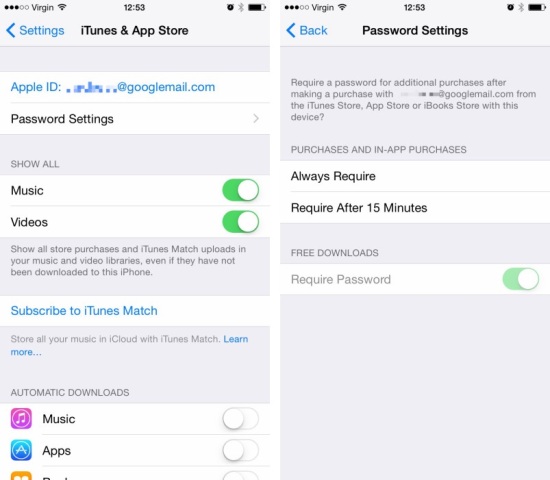
Now if someone will try the latest iOS 8.3 beta he will discover this new change in the latest software from Apple. Found within settings, and then navigating to the “iTunes & App Store” area, there’s a new option called “Password Settings.” Clicking on that will let the user to make some changes to the way that free content is accessible via the App Store and/or iTunes. This new feature will be available only when Touch ID is disabled. If Touch ID is enabled, the new option will disappear.
Located in the iTunes & App Store section in iOS 8.3’s Settings app, the ‘Password Settings’ subsection gains much welcomed changes to the way Apple treats free app and iTunes media content downloads. There, you’ll find an altogether new Require Password option.
Just move the switch to ON and the App Store and iTunes will allow you to download free apps from the App Store, free music, movies and television shows in the iTunes Store and free books from the iBooks Store bypassing your Apple ID password in App Store with iOS 8.3 update.
The new option currently is not showing up in all regions. Unfortunately, paid apps and iTunes products still need a password or Touch ID authentication.
Additionally, this section also gains another option to require a password for additional purchases (Always Require and Require After 15 Minutes), including In-App Purchases, after making a purchase with your Apple ID. In prior iOS versions, this option is available by navigating to Settings > General > Restrictions > Require Password.
The third beta of iOS 8.3 was seeded to registered iOS developers on March 12. So with iOS 8.3 App Store password not required for free download users will get new feature to use.