How to Unlock iPhone 5, 4S, 4, 3GS/G Locked to O2 Germany

Fast and cheap unlock is available for O2 iPhone 5, 4S, 4, 3GS / 3G from Germany if it is out of contract. Please make sure that your device is out of contract before using this service. Unlock will fail with no refund available if iPhone is still under contract with O2 from Germany.

After unlocking you will be able to use any SIM card not only in Germany but everywhere in the world where GSM networks are available.

Please read the description below carefully and buy cheap O2 Germany iPhone unlocking.

Unlock iPhone O2 Germany Easy

This service offers official factory unlocking for iPhone German O2. This is not jailbreak or any other hack. We are the legit service and provide only official solution.

Unlock guaranteed only if you are fine with requirements below:

  • Make sure that your iPhone 5/4S/4/3GS/3G is really locked to O2 Germany. If you are not sure about this info, use iPhone network checker because there are no refund for the wrong carrier.
  • If your iPhone 5/4S/4/3 is not O2 Germany we have also other packages for other carriers. Just select yours and unlock.
  • This package unlocks OUT OF CONTRACT iPhone only. No refund if iPhone is still under contract.
  • This unlocking package is for clean IMEI only. Before placing an order make sure that your iPhone is not blacklisted, barred or blocked.
  • Unfortunately our service can’t unlock blacklisted iPhone O2 Germany. If you are not sure about the status of your iPhone, use blacklist checking service. These results will give you info whenever your iMEI blacklisted (reported lost or stolen) or not. Save time and money. Also you will have info that will be useful in case you will plan to sell iPhone.
  • There are NO REFUND if iPhone is got blacklisted before or after placing an order.
  • The iPhone has to be activated with O2 Germany otherwise unlock will fail.
  • Read carefully our Terms and Services before making an order.

If iPhone 5, 4S, 4, 3GS IMEI is clean, activated and locked to O2 Germany you are in the right place. Let’s see what advantages you will receive after using our service.

Attention: If you have a Phone shop or a wholesaler you can register on digitlunlocking.net and run your own unlocking business.

How Does the Factory iPhone Unlock Process Works

  1. Fill in the order form with required information like IMEI, email, iPhone model, and other info like serial number if necessary.
  2. Click Buy Now button and process the payment on PayPal. If you don’t have PayPal account choose the option “I don’t have PayPal account” when you will be redirected to PayPal.
  3. After the payment your unlocking request will be automatically send to the carrier. In this case it can’t be canceled and refunded.
  4. After the payment just do your things and wait for the good news.
  5. You will receive email with detailed instructions on how to compete factory iPhone unlock in iTunes. If you don’t see email in your inbox folder, check spam/junk folder or contact us. Our support team will be always glad to help you.
  6. Official and permanent iPhone unlock only apply during business hours (9 AM – 6 PM PST, Monday-Friday). No turnaround time guaranteed.
  7. Feel free to contact us in case you have any questions regarding factory unlock iPhone O2 Germany and our company will be always glad to help you.

See the BENEFITS of iPhone IMEI unlocking from the carrier:

  • We are the only unlocking company in the market that provides professional and fast service for the cheapest prices.
  • We offer the lowest prices for permanent iPhone unlock.
  • Official unlocking iPhone O2 is lifetime and your device will never be locked again.
  • We provide really fast and 100% working official unlocking solution.
  • Money back guarantee if iPhone will be still locked to O2 Germany carrier after using our service.
  • You can switch SIM cards and enjoy any GSM carrier whenever you are in our beautiful world.
  • Forget about roaming when you are traveling. Just insert local SIM card and enjoy phone calls.
  • There is no need to go somewhere to get unlock. We offer remote service and you can finish unlock from your home (If you have internet connection).
  • The warranty and all other available services from Apple remain valid after factory unlock.
  • The process will not harm your device.
  • You don’t have to install some additional software. Only connect it to iTunes and voila.
  • It doesn’t matter what iOS version, baseband, bootloader and other stuff running on your iPhone. We unlock any.
  • You can update, sync and restore iPhone in iTunes and it will never be locked again. If Apple will release any new iOS firmware version go on and try it if you like.
  • Your apps and most preferred features as well as not most preferred will remain working as usual after unlock.
IMEI Unlock iPhone 5/4S/4/3 Blacklisted by 3 Three Australia

In case your Three iPhone from Australia is blacklisted and you are not able to use service for clean 3 Hutchison iPhone unlock you can use the package offered here.

You can use this service to unlock blacklisted Three iPhone from Australia for using iPhone with other SIM card. However you won’t be able to use any of Australian networks as after unlocking your device will be still blacklisted in Australia.

This is NOT unblocking service. This package is good to unlock iPhone 5/4S/4/3GS/3G blacklisted by 3 Three Australia network for using it with any other SIM card worldwide except Australian carriers.

Before placing an order first that you need to do is to find IMEI number:

  • Take your iPhone, open Settings, go to General – About and scroll down till you find it.
  • Open Phone app and type *#06# using keypad. You will see IMEI on the screen in a second.

This unlocking solution is absolutely legal and there is nothing to be worried about. Read important information below to successfully unlock blocked 3 Hutchison iPhone.

Important Notes and Requirements

  • Make sure that your iPhone 5, 4, 4S, 3GS, 3G is really locked to 3 Hutchison Australia. You can check iPhone carrier if you don’t have such info. There are NO REFUND if iPhone is not locked to Three AU.
  • Make sure that iPhone is really blocked by 3 Hutchison Australia carrier. You can use iPhone Australia blacklist checker and confirm the status. There are NO REFUND if iPhone is not blacklisted by Three Hutchison.
  • This service doesn’t unblock iPhones. The device will be still blocked after factory unlocking. This means that iPhone can be used on any SIM card except from Australia and in Australia.
  • Only activated iPhone can be unlocked.
  • Read carefully our Terms and Services before making an order.

If your iPhone is blocked by Hutchison you can make an order right now and we will do our best to deliver the results as soon as possible.

Attention: If you are a wholesaler or have a Phone shop you can register on digitalunlocking.net and run your own unlocking business.

How Does the Factory iPhone Unlock Process Works

  1. Fill in the order form with required information like IMEI, email, iPhone model, and other info like serial number if necessary.
  2. Click Buy Now button and process the payment on PayPal. If you don’t have PayPal account choose the option “I don’t have PayPal account” then you will be redirected to PayPal.
  3. After the payment, your unlocking request will be automatically sent to the carrier. In this case it can’t be canceled and refunded.
  4. After the payment just do your things and wait for the good news.
  5. You will receive email with detailed instructions on how to compete factory iPhone unlock in iTunes. If you don’t see email in your inbox folder, check spam/junk folder or contact us. Our support team will be always glad to help you.
  6. Official and permanent iPhone unlock only applies during business hours (9 AM – 6 PM PST, Monday-Friday). No turnaround time guaranteed.
  7. Feel free to contact us in case you have any questions regarding factory unlock blocked iPhone Hutchison and our company will be always glad to help you.

Advantages of Unlocked Blacklisted iPhone

  • We are the fastest unlocking company and we provide professional service and cheap prices.
  • Your blocked Hutchison iPhone will be unlocked permanently.
  • We offer the lowest prices for blacklisted iPhone unlock.
  • Official unlocking iPhone Three (3) is lifetime and your device will never be locked again.
  • We provide really fast and 100% working official unlocking solution.
  • Money back guarantee if iPhone will be still locked to 3 Hutchison carrier after using our service.
  • You can switch SIM cards and enjoy any GSM carrier whenever you are in our beautiful world.
  • Forget about roaming when you are traveling. Just insert local SIM card and enjoy phone calls.
  • There is no need to go somewhere to get unlock. We offer remote service and you can finish unlock from your home (If you have internet connection).
  • The warranty and all other available services from Apple remain valid after factory unlock.
  • The process will not harm your device.
  • You don’t have to install any additional software. Only connect it to iTunes and voila.
  • It doesn’t matter what iOS version, baseband, bootloader and other stuff running on your iPhone. We unlock any.
  • You can update, sync and restore iPhone in iTunes and it will never be locked again. If Apple will release any new iOS firmware version go on and try it if you like.
  • Your apps and most preferred features as well as not most preferred will remain working as usual after unlock.

Fast Unlocking for iPhone 4/4S/5/5S/5C/6/6 Plus locked to Three Australian Carrier

Find here the easy and fast way to unlock 3 Hutchison iPhone Australia with clean IMEI. Use this package for iPhone 4/4S/5/5S/5C/6/6 Plus and unlock your device officially.

This is the cheapest price you can find after browsing many professional services like here.

It is very important to read the description to this Three Australia iPhone unlock before ordering. So let’s start with IMEI number and how to find it.

How to Find IMEI

There are two ways to find IMEI number:

Go to Phone app and type *#06#. You will see 15 digits. That would be IMEI.

Go to Settings – General – About and scroll down till you see four big letters “IMEI” and 15 digits opposite it.

Unlock iPhone 3 Australia Easy

This service offers official factory unlocking for iPhone Three AU. This is not jailbreak or any other hack. We are the legit service and provide only official solution.

Unlock guaranteed only if you are fine with requirements below:

  • Make sure that your iPhone 4/4S/5/5S/5C/6/6 Plus is really locked to 3 (Three) from Australia. If you are not sure about this info, use iPhone IMEI checker because there are no refund for the wrong carrier.
  • If your iPhone 3/4/4S/5 is not Three Australia we have also other packages for other carriers. Just select yours and unlock.
  • This unlocking package is for clean IMEI only. Before placing an order make sure that your iPhone is not blacklisted, barred or blocked.
  • Unfortunately this package can’t unlock blacklisted iPhone Three Hutchison. If you are not sure about the status of your iPhone, use blacklist check service. These results will give you info whenever your IMEI blacklisted or not. Save time and money.
  • There are NO REFUND if iPhone is got blacklisted before or after placing an order. Better use unlocking package for blacklisted Hutchison AU iPhone and enjoy other networks.
  • The iPhone 5, 4S, 4, 3GS/G has to be activated with Hutchison AU otherwise unlock will fail.
  • Read carefully our Terms and Services before making an order.

If iPhone IMEI is clean, activated and locked to 3 Hutchison you are in the right place. Let’s see what advantages you will receive after using our service.

Attention: If you have a Phone shop or a wholesaler you can register on digitlunlocking.net and run your own unlocking business.

  • We are the only unlocking company in the market that provides professional and fast service for the cheapest prices.
  • We offer the lowest prices for permanent iPhone unlock.
  • Official unlocking iPhone 3 Hutchison is lifetime and your device will never be locked again.
  • We provide really fast and 100% working official unlocking solution.
  • Money back guarantee if iPhone will be still locked to Three Australia carrier after using our service.
  • You can switch SIM cards and enjoy any GSM carrier whenever you are in our beautiful world.
  • Forget about roaming when you are traveling. Just insert local SIM card and enjoy phone calls.
  • There is no need to go somewhere to get unlock. We offer remote service and you can finish unlock from your home (If you have internet connection).
  • The warranty and all other available services from Apple remain valid after factory unlock.
  • The process will not harm your device.
  • You don’t have to install some additional software. Only connect it to iTunes and voila.
  • It doesn’t matter what iOS version, baseband, bootloader and other stuff running on your iPhone. We unlock any.
  • You can update, sync and restore iPhone in iTunes and it will never be locked again. If Apple will release any new iOS firmware version go on and try it if you like.
  • Your apps and most preferred features as well as not most preferred will remain working as usual after unlock.

How Does the Factory iPhone Unlock Process Works

  1. Fill in the order form with required information like IMEI, email, iPhone model, and other info like serial number if necessary.
  2. Click Buy Now button and process the payment on PayPal. If you don’t have PayPal account choose the option “I don’t have PayPal account” when you will be redirected to PayPal.
  3. After the payment your unlocking request will be automatically send to the carrier. In this case it can’t be canceled and refunded.
  4. After the payment just do your things and wait for the good news.
  5. You will receive email with detailed instructions on how to compete factory iPhone unlock in iTunes. If you don’t see email in your inbox folder, check spam/junk folder or contact us. Our support team will be always glad to help you.
  6. Official and permanent iPhone unlock only apply during business hours (9 AM – 6 PM PST, Monday-Friday). No turnaround time guaranteed.
  7. Feel free to contact us in case you have any questions regarding factory unlock iPhone Hutchison Australia and our company will be always glad to help you.

How to Unlock iPhone 7 / 7 Plus AT&T If IMEI Is Blacklisted

Sometimes when you place your order for AT&T iPhone factory unlock you get the message that your IMEI is Not found meaning the unlock has failed. Don’t get upset yet as you can unlock iPhone 7 with not found IMEI if you do everything correctly and check your information twice BEFORE ordering this service.

If you used some unlocking service before and unlock failed this package had been offered for such AT&T iPhone.

iPhone will be still blocked/blacklisted after factory unlocking. This means that you will not be able to use iPhone in the USA. But you will be able to use local service providers in almost any country.

In other words, you need to re-order unlock for not found or blacklisted iPhone 7 / 7 Plus AT&T IMEI once again but provide the correct information that allows the unlocking company to complete your request. Why could have the iPhone IMEI not found message occurred? Unlock fails for different reasons. We’ll mention some of them here.

Reason 1. You mistyped your IMEI or made a mistake while entering it into the unlock request form. You can find this code in Settings app on your iDevice or through the combination *#06# [press call and the number will be displayed on your screen].

You will need to know your IMEI code. It is not difficult to find. You can do the following things:

* Launch Phone program and dial *#06# to have the 15-digit number displayed for you
* Open Settings and select General- About menu where you need to go down until you find the word IMEI and the number near it

Reason 2. You have provided the wrong carrier name and got unlock AT&T iPhone 7 Plus not found message. Use network checker to get the correct mobile operator name.

Reason 3. The IMEI might not be located if your IMEI is blacklisted, blocked, lost or stolen while you have ordered the unlock service for clean IMEI.

Reason 4. If your iPhone hasn’t been activated within the AT&T, the unlock fails and you might get IMEI couldn’t be located problem.

To avoid getting unlock blacklisted AT&T iPhone 6S / 5S error you need to order the correct package and provide real information about your smartphone. If you provide correct data, select the right unlock package, you will become successfully and permanently unlocked by IMEI.

How to Easily Perform iPhone Unlock AT&T Not Found

This is the legit official factory unlock for iPhone 7. Don’t mistake it with jailbreaking, hacks or other things that might hurt your device. The service is real and approved by Apple. You get the true solution and full guarantee. Surely you need to be eligible for the service by meeting requirements below:

Requirements

  • We do unlock blacklisted AT&T iPhone 7, 7 Plus but we are not able to unblacklist it. This means that you will be able to use iPhone in any country except the USA after unlocking.
  • The main requirement is to own an iPhone 7 truly locked to AT&T.
  • Make sure your iPhone is activated with AT&T in other case we will not be able to unlock it. The service will fail.
  • It is necessary to agree to the Terms and Services we have before ordering unlock.
  • Our company will provide you the top quality service only if you have clean or blacklisted IMEI for your iPhone 7 Plus that is activated and locked to AT&T.

Note. Wholesalers and phone store owners can start their unlocking business by registering at digitlunlocking.net.

Our pricing is affordable and cheap compared to other companies. We are professionals who deliver fast permanent iPhone unlock at the lowest price.

Our official unlock for iPhone AT&T is permanent. This is lifetime result that means you will never be locked again in your life.

The result is official, quick, guaranteed for users who meet all the requirements. In case the iPhone stays locked to AT&T we will refund your money back (* see exceptions above).

Being unlocked gives different benefits:

  • You can insert different SIMs and connect to all GSM mobile operators no matter what country you are in or going to. There will be no roaming charges because you’ll be able to use local SIM cards.
  • The unlocking service is provided distantly. You stay at home and order it through internet. There is no risk for your handset.
  • The warranty will be preserved. Apple services will stay valid after you unlock by IMEI code. Such service doesn’t make you install any harmful or third-party programs. The procedure is finished through iTunes.
  • Unlock is good for different firmwares, modem versions, bootloaders etc. The status will be permanent and remain even if you restore via iTunes, sync your smartphone or install new iOS version.
  • Unlock will not affect your applications. Everything will work.

About Factory Unlock for iPhone

It is simple to place your order for factory iPhone unlock. Just fill in the information about you, your device model, IMEI code, email and other information required.

Then you need to press on Buy Now option and pay via PayPal or using your credit card. You can’t cancel your order or get the refund after we send unlock request to your mobile operator.

Once you get the new unlocked status we will email you about it with the guide on how to finish the procedure using iTunes and your iPhone with a non-supported SIM.

We are processing iPhone unlock orders from 9 am till 6 pm PST five days a week, Monday through Friday. We can’t guarantee the turnaround time.

P.S. If there is no email from us in the inbox folder you should look in your spam. Maybe the letter is there. Besides you are always welcome to contact our support team if you have any questions regarding your order for factory unlock AT&T iPhone if it is blacklisted or came as Not found before.

Use Official Service to Clean Bad ESN / Meid of Verizon Device

Use this package to clean bad ESN of the device locked to Verizon USA network. If you have iPhone, iPad or Android device with the ESN/MEID that was blacklisted we are able clean it fast and officially. Provide your ESN/MEID number and we will clean bad IMEI accordingly.

This cleaning bad ESN service is only for Verizon devices with blacklisted MEID. If you are not sure if your ESN is bad or clean you can use the service and find out iPhone blacklisted status with IMEI checker

How to Find ESN/MEID

MEID is the second (newer) identification of ESN. The difference is that older models of iOS and Android devices use ESN and newer devices use MEID.

It is very easy to find ESN number. If you are iOS user (iPhone, iPad) go to Settings – General – About and find MEID (for newer devices) or ESN for older models. If you are the user of Android device just type *#06# and you will see it on the screen. By the way, this method is good for iPad or iPhone as well.

Important Notes

  • THIS IS NOT UNLOCKING SERVICE. THIS IS A CLEANING BAD ESN SERVICE FOR IOS AND ANDROID DEVICES LOCKED TO VERIZON US NETWORK. AFTER USING THIS SERVICE YOUR ESN / MEID WILL BE CLEANED FROM BLACKLIST STATUS BUT WILL STILL BE LOCKED TO VERIZON.
  • Make sure your device is locked to Verizon network. No refund if device is not locked to Verizon US carrier. If you are iPhone or iPad user use network checker service and get results in minutes.
  • For iPhone 4S or any other devices with 14 digit MEID’s submit the MEID in the Single IMEI Field.
  • For iPhone 4 or any other devices with ESN starting with a1000 etc, submit in the IMEI field as 14 0’s (example: 00000000000000) and in the notes put the ESN (example: a100001C3458BE).
  • Ensure your device has been activated with Verizon. No refund if the device is not activated.
  • Read our ‘Terms and Conditions’ prior to making any purchases.
  • Check your email’s junk/spam folder for vital correspondences regarding the status of your unlock or add contact@geo-location.site to your trusted sender list.
  • Processing times will vary based on the network carrier’s response time and only apply to business days during the hours of 9 a.m. – 6 p.m. PST.

How to Place Order

  1. First provide the MEID number or ESN according to the Important Notes
  2. Second give us your email so we will be able to deliver results to you.
  3. Read and agree with Terms and Services and click the Buy Now button.
  4. After making a payment wait for the email with the results.

Feel free to contact us if there will be any questions regarding this service and our professional support team will help you ASAP.

Unlock iPhone Barred by France SFR SIM card

It is sad if iPhone is barred. However there is a package that will help you to unlock such phone. Simply provide IMEI number and wait for the results. No need to send iPhone or go somewhere. This package supports new iPhone models like 4/ 4S/ 5/ 5C/ 5S/ 6/ 6 Plus/ 6S/ 6S Plus/ SE.

Note: This package will not unblock iPhone from SFR France. We offer unlocking services only.

Before placing an order first that you need to do is to find IMEI number:

  • Take your iPhone, open Settings, got to General – About and scroll down till you find it.
  • Open Phone app and type *#06# using keypad. You will see IMEI on the screen in a second.

This unlocking solution is legal and there is nothing to be worried about. Read important information below to successfully unlock blacklisted SFR France iPhone.

Important Notes and Requirements

  • Make sure that your iPhone is really locked to SFR France. You can check iPhone carrier if you don’t have such info. There are NO REFUND if iPhone is not locked to SFR.
  • Make sure that iPhone is really blacklisted by this French carrier. You can use iPhone blacklist checker and confirm the status. There are NO REFUND if iPhone is not blacklisted by SFR.
  • This service doesn’t unblock iPhones. The device will be still blocked after factory unlocking. This means that iPhone can be used on any SIM card except from France and in France.
  • Only activated iPhone can be unlocked.
  • Read carefully our Terms and Services before making an order.

If your iPhone is barred by SFR you can make an order right now and we will do our best to deliver results as soon as possible.

Attention: If you have a Phone shop or a wholesaler you can register on digitlunlocking.net and run your own unlocking business.

How Does the Factory iPhone Unlock Process Works

  1. Fill in the order form with required information like IMEI, email, iPhone model, and other info like serial number if necessary.
  2. Click Buy Now button and process the payment on PayPal. If you don’t have PayPal account choose the option “I don’t have PayPal account” when you will be redirected to PayPal.
  3. After the payment your unlocking request will be automatically send to the carrier. In this case it can’t be canceled and refunded.
  4. After the payment just do your things and wait for the good news.
  5. You will receive email with detailed instructions on how to compete factory iPhone unlock in iTunes. If you don’t see email in your inbox folder, check spam/junk folder or contact us. Our support team will be always glad to help you.
  6. Official and permanent iPhone unlock only apply during business hours (9 AM – 6 PM PST, Monday-Friday). No turnaround time guaranteed.
  7. Feel free to contact us in case you have any questions regarding factory unlock iPhone SFR and our company will be always glad to help you.

Advantages of Unlocked Blacklisted iPhone

  • We are the fastest unlocking company and we provide professional service and cheap prices.
  • Your blocked iPhone will be unlocked permanently.
  • We offer the lowest prices for blacklisted iPhone unlock.
  • Official unlocking iPhone SFR is lifetime and your device will never be locked again.
  • We provide really fast and 100% working official unlocking solution.
  • Money back guarantee if iPhone will be still locked to O2 carrier after using our service.
  • You can switch SIM cards and enjoy any GSM carrier whenever you are in our beautiful world.
  • Forget about roaming when you are traveling. Just insert local SIM card and enjoy phone calls.
  • There is no need to go somewhere to get unlock. We offer remote service and you can finish unlock from your home (If you have internet connection).
  • The warranty and all other available services from Apple remain valid after factory unlock.
  • The process will not harm your device.
  • You don’t have to install some additional software. Only connect it to iTunes and voila.
  • It doesn’t matter what iOS version, baseband, bootloader and other stuff running on your iPhone. We unlock any.
  • You can update, sync and restore iPhone in iTunes and it will never be locked again. If Apple will release any new iOS firmware version go on and try it if you like.
  • Your apps and most preferred features as well as not most preferred will remain working as usual after unlock.

Activation Lock Removal for iOS 9 / 8 Devices [Reliable Service]

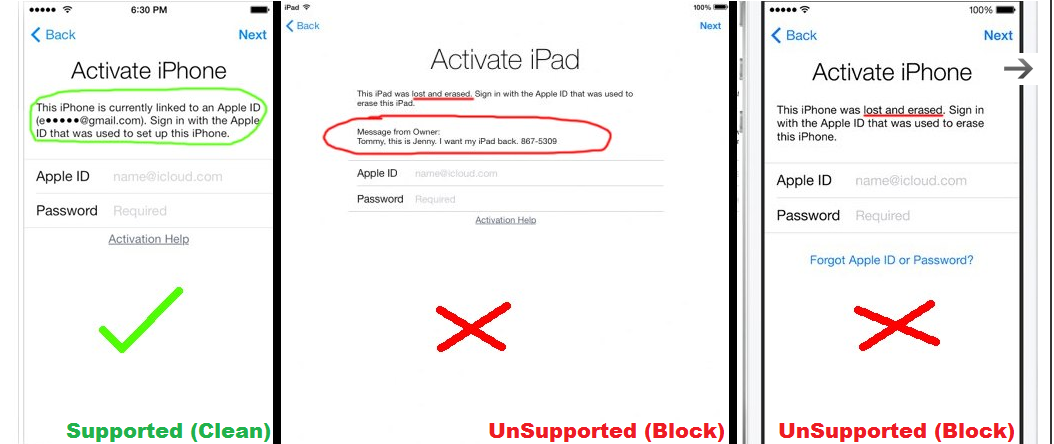
iOS 8, 9 smartphones can become useless if you get stuck on the Activation lock screen which requires the original (iCloud) Apple ID and password of the handset’s user. It is good if you are the original owner and know this information. The problem is faced by customers who purchased a used Apple iPhone 6 or other model and have no idea where to search for its original owner to ask for the ID / password and bypass iCloud activation lock.

Find my iPhone Activation lock remove is a new Apple iCloud unlock service for iPad and iPhone that helps most users to stop having headaches because of the problem with iOS 8 security system improvement and they cannot remove device from Find my iPhone. You can finally order this service and easily get Activation lock removal as soon as possible. There is no need to search for the gadget’s original owner anymore. Besides, this is iCloud best iPhone unlock solution that helps those customers who forgot their ID or password and couldn’t find it.

You can make sure that your Find My iPhone is on by using the affordable Find My iPhone check service that gives the answer what status you have. If it is on and you are running or about to update to iOS 8, wish to permanently unlock your iDevice etc. you are advised to remove Find My iPhone app.

iCloud Activation Lock Removal iPhone Service

You can now easily remove Find My iPhone along with the Activation lock feature once you order the distant service that allows bypassing the locked status. The service doesn’t unlock the handset. It cannot unblock it if the carrier has blocked your iPhone 6 Plus. But iCloud find my phone unlocking can help you get past activation error if the smartphone has clean IMEI code.

Step 1: Enter the IMEI number.

Step 2: Enter the email

Step 3: Read and agree with Terms and Services

Step 4: Click the Buy Now button and follow further instructions.

Important Notes

  • This iCloud unlock tool supports iPhone, iPad and iPod Touch.
  • Please, be attentive when you place your order online.
  • Provide us with a screenshot of the activation step where it asks for Apple ID and password:

icloud unlock service

  • It is recommended to read Terms & Conditions and agree to them.
  • You are highly advised to run the iCloud Find my Phone unlocking service mentioned above that will tell you whether your Activation Lock is enabled or disabled.
  • Make sure your IMEI is not blocked, blacklisted, stolen, lost, or barred. No refund if device is blacklisted. This package supports iPad and iPhone all versions with clean IMEI.
  • If you really need to remove Activation Lock and Find My iPhone app you can place the order. Add the company’s email to your contacts list so that the email with your results reaches you and doesn’t land in your spam folder.
  • Please, be patient if it takes a while to complete your order. Sometimes there are too many requests and Apple servers become overloaded.

Why Find My iPhone Feature is Needed?

Apple allows iPhone users to protect their gadget from being used by third-party people. But it didn’t provide the solution for owners with bad memory and used device consumers. Once you turn on Find My iPhone app in iCloud the smartphone will ask for the Apple ID and password to disable it along with the Activation lock that turns on automatically if Find My iPhone is on. If you can’t enter the original ID and password you cannot unlock iCloud and get the activation error. The similar thing happens if the app was turned in iOS 6 firmware and you update to iOS 7, 8, 9. In such case if you don’t have such info you need iCloud unlock solution.

It is required to turn Find My iPhone off so that your handset stops asking for the personal data when you wish to unlock, restore or update it. Otherwise you need this iPad and iPhone iCloud unlock fix.

Untethered iOS 7 Jailbreak Problems / Fixes [Evasi0n7 for iPhone / iPad / iPod Touch]

Not much time has come from the date of untethered iOS 7 jailbreak release for iPhone 5S, 5c, new iPad and older iPod touch models. The program contained a lot of bugs but hackers continue working on their utility and improving their jailbreak for iOS 7 devices.

Users who hurried to jailbreak their smartphone or tablet earlier this week are now left with almost no Cydia tweaks for this firmware and especially for A7 gadgets. Developers didn’t expect such soon launch of the jailbreaking tool so no one was actually ready for it. The surprise by the Evad3rs became a real Christmas gift to the jailbreaking community.
The first release installed the Chinese app store instead of Cydia so hackers had to respond to the piracy accusations. That part of the tool was quickly removed with devs’ explanation of the problem through the public letter.

jailbreak iOS 7 Problems
It’s for sure that the number of iOS 7 tweaks and programs will soon increase. Developers are expected to upgrade their apps to support 64-bit chip used in the latest iPad and iPhone models. Users with previous generation iDevices are also out of luck for now as they also see the limited number of applications they can download from third-party companies.
Mobile Substrate should become updated to the newest processor to simplify the process of making all the apps compatible with the faster processor.
Here is the list of the most common iOS 7 jailbreak issues [problems] you can face while trying to untethered your iPhone, iPad or iPod touch:

  • Apple logo boot loop is experience by a number of users after jailbreaking procedure
  • iOS 7 tweaks fail to work properly on the jailbroken devices
  • Some Mac owners can’t launch Evasi0n7 tool on their machines
  • A lot of people get stuck during the jailbreak and can’t proceed to the next step
  • iPad 2 Wi-Fi model often fails to be jailbroken

There are other problems as well. Most of them are fixed or to be fixed in the next Evasi0n 7 updates that are to follow the 1.0.1 presentation which mostly deleted the app store from China and didn’t provide other major changes.
Hackers promise soon upgrades with problems being solved.


How to Check if Your iPhone IMEI is Blacklisted or Clean

Blacklisted iPhone is a very big problem for users who purchased it from second hand (on Amazon, ebay, craiglist, etc.). Unfortunately there is no service to unblock iPhone but there is the iPhone IMEI blacklist check service that you can use to find out if iPhone is barred, blocked by such carriers as Softbank, Telus, Sprint, T-Mobile, AT&T, Verizon, O2, Koodo, FIDO, Orange. You can check IMEI status of iPhone from Australia and any other country worldwide and prevent unwanted purchase.

Here you can use cheap and affordable iPhone IMEI checker for blacklist status for any mobile operator worldwide! It is very important to perform iPhone blocked IMEI check because mostly such phones can’t be unlocked and no one can’t be unblocked (as it is illegal). If your device is barred it doesn’t allow to use any SIM card including SIM card of the original carrier.

RESULTS SAMPLE of iPhone IMEI Blocked Check:

CLEAN

IMEI: 35799305249XXXX

Model: Apple iPhone 5S (A1453)

Status: CLEAN

BLACKLISTED

IMEI: 35445206161XXXX

Model: Apple iPhone 6 Plus (A1522)

Country: United States

Status: BLACKLISTED

Blacklisted By: Verizon Wireless

Blacklisted On: 2015-06-09 03:08:02.0

Blacklisted Country: United States

BLACKLIST HISTORY

IMEI: 99000284880XXXX

Model: Apple iPhone 5 (A1429)

Status: CLEAN

Blacklisted By: Sprint

Blacklisted On: 2014-01-24 06:05:55.0

Blacklisted Country: United States

Blst. Removed By: Sprint

Blst. Removed On: 2014-01-27 06:09:30.0

Blst. Removed Country: United States

Note: This is not unlocking package. This service checks IMEI only.

If you are going to by iPhone or unlock it is highly recommended to find out, for example, to check IMEI iPhone of Softbank, AT&T or T-Mobile iPhone if blacklisted or clean. Only few networks offer unlock (not unblock) for blacklisted iPhone but for the higher price than for clean IMEI. Here are some of them:

And most networks like AT&T or Verizon don’t offer unlocking service for blacklisted iPhone and it is a big problem for users as they can’t even honestly sell such device.

In this case you can always use iPhone blacklist checker and protect yourself from buying unwanted product.

You can use iPhone clean IMEI checker any model and iOS:

  • 6S, 6S+, 6, 6+, 5S, 5C, 5, 4S, 4, 3GS, 3G

Any iOS version:

  • iOS 9.x
  • iOS 8.x
  • iOS 7.x
  • iOS 6.x
  • iOS 5.x
  • iOS 4.x

And any operator worldwide:

  • AT&T
  • Softbank
  • O2
  • Rogers
  • Bell
  • Vodafone
  • Orange
  • Virgin
  • Verizon
  • T-Mobile
  • Movistar
  • Claro
  • other networks.

Note: unlocking of the blocked iPhone doesn’t unblock it. After unlocking you will be able to use your blocked iPhone only outside the country where it was blocked. And it is good for selling blocked but unlocked iPhone to somebody outside the country.

To start first you need to provide IMEI number and email to place an order. There are several different ways to find IMEI:

  1. Open Setting – General – About and you will see it in the list.
  2. Dial *#06# and you will see iPhone IMEI on the screen.

Attention: It is important to provide correct IMEI because there will be no results and you never find out the carrier. It is easy and fast to place an order. Just provide your IMEI number and email. The complete results will be delivered to you.

Check if iPhone IMEI is clean or barred but first read important notes below:

You can use this IMEI check if iPhone is blacklist to any carrier worldwide. We also have checkers for specific regions, countries and operators and here are some of them:

The iPhone has to be activated otherwise checker results will fail.

Read carefully our Terms and Services before making an order.

How to Check if iPhone is Blocked

1. Fill in the order form with the required information like IMEI and email.

2. Click Buy Now button and process the payment on PayPal. If you don’t have PayPal account you can choose the option “I don’t have PayPal account” when you will be redirected to PayPal.

3. After the payment your request will be automatically send to the Apple server. In this case it can’t be canceled and refunded.

4. When the process will be completed you will receive email with the results.

5. If you don’t see email in your inbox folder, check spam/junk folder or contact us. Our support team will be always glad to help you.

Cheap Factory Unlock for AT&T iPhone 6, 6Plus, 5S, 5C, 5, 4S, 4

Attention: We are currently experiencing delays in AT&T unlock thus it is hard to say how quickly the result will be delivered. AT&T iPhone out of contract unlock is being less delayed.

iPhone 6 / 5S / 5C Unlock for clean device is an affordable AT&T iPhone unlock solution available in the market today. This package supports unlocks for 5, 4S, 4 running different firmware versions, smartphone models, basebands and carriers. In case of Not Found results after using unlocking service before or iPhone is blacklisted you can unlock AT&T iPhone 5S, 5C, 5, 4S, 4 using slow package.

The solution can free your device to be used with different mobile operators, including Vodafone, T-Mobile, Verizon, Orange and many others. You’ll be able to connect to them being in different countries worldwide.

AT&T’s unlocking policy is now changed. It is harder to unlock, especially if your handset is still IN Contract. The changes were added over two months ago, but we can still perform the unlock.

AT&T has changed its unlock policy making it harder to perform AT&T iPhone unlock. The stricter rules cause delays but this happens to all smartphones that are locked to this U.S. carrier.

There are no official comments on this problem but contract iPhone are the most affected by the issue. Luckily, we can still deliver the service to our customers if you meet all the requirements. The delivery time is now from 1 to 21 days from the date your order is received by us.

Details on How to Use AT&T Unlock Service

Step 1: You need to provide your IMEI code, email and iPhone model in order to place your online order for factory unlock.

Step 2: Remember to press the Buy Now option and pay for the order. You can use PayPal or other methods for paying. Just if you wish to pay with your credit card you need to choose “I do not have PayPal account” option.

Step 3: We contact AT&T and start working on your order as soon as the payment is cleared up. There is no turn back at this step so keep in mind that you are not able to cancel your order now.

Step 4: Wait for a detailed email from us. We will explain all the instructions on how to completed unlocking via iTunes.

Read! If there is no email from us look in your spam/junk folder or contact us.

Important Notes

  • Your iPhone has to be locked to AT&T. You can use iPhone carrier checker if you’re not sure to what carrier your iPhone is locked. If your iPhone isn’t AT&T we’ve also other packages for other service providers. Make sure you choose right carrier because we don’t refund if device is not locked to AT&T.
  • iPhone must be activated. Also check if Find my iPhone feature is off before ordering.
  • This package is not only for iPhone 6, 6Plus, 5S and iPhone 5C but for iPhone 5 / 4S / 4 / 3GS / 3G as well.
  • This unlocking package is perfect for clean IMEI only. Before putting in an order make certain that the iPhone isn’t blacklisted, barred or blocked.
  • Unfortunately this package doesn’t support blacklisted AT&T iPhone and there is no refund if iPhone is blacklisted by AT&T. Use the services for blacklisted iPhone offered in the begining of the description.
  • This package does not support replaced or has ever been sent to Apple Care / Technical Service devices. No refund for such orders.
  • At this moment AT&T unlocking experiences delays right now.
  • Official and permanent iPhone unlock only apply throughout business hrs (9 AM – 6 PM PST, Monday-Friday). No turnaround time guaranteed. Also as to the new changes in AT&T unlocking policy unlock may be delayed indefinitely.

What is factory AT&T iPhone unlock is easy to explain. It’s even easier when you look up this list of the pros you get once you choose to order it:

  • Factory unlock supports iPhone 3/3GS/4/4S/5/5S/5C/6/6Plus locked to AT&T mobile operator [it is located in U.S.]
  • Our price for unlock is the cheapest one you will find
  • You get fast successful results that are official and legit
  • Your iPhone is unlocked forever [permanently]
  • Unlock doesn’t void Apple warranty and other services for your iDevice
  • You will get your Money Back if we fail to unlock AT&T iPhone for you
  • No more roaming, just connect to local foreign networks and make your phone calls [save your money]
  • Factory unlock is good for all firmware versions even the future ones that aren’t released yet
  • This is not jailbreaking and no software is installed on your device during unlock [nothing does harm to your iPhone]
  • Any bootloader / baseband can be unlocked
  • You can still use AT&T SIM card after unlock along with any other carrier’s SIM
  • Our service is remote and it requires your internet connection and a PC or Mac
  • You can do anything with your iPhone after it is permanently unlocked including iTunes restore, update and sync processes
  • You can install next iOS versions brought by Apple in the future, including iOS 9, iOS 10 etc.
  • Register at digitalunlocking.net to start your personal iPhone unlocking business with us. The offer is good for all phone store owners and wholesalers

Other Useful Information to Consider

It is important to read and agree to the Terms & Services of ours before you purchase the service.