How to Unlock iPhone with Non-Supported SIM card in iTunes

After using factory unlocking service you will need to complete iPhone unlock process in iTunes to register in Apple database already unlocked device.

Your iPhone will be putted in the white list of iTunes database as being Unlocked. As a results your phone will be open for any GSM SIM card worldwide. The same is with iOS updates. Update / sync / restore iPhone in iTunes and stay unlocked forever.
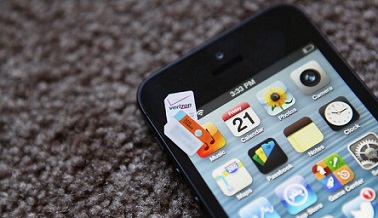
unlock iphone itunes without restore

You may read on some sources that iPhone needs to be restored after using IMEI unlocking service. Well. not always and here we wrote a guide which you can use to unlock iPhone in iTunes after restore.

You may also know that the exact code is needed to unlock mobile phone. But the situation is different with iPhone. There are no codes for iPhone and iPhone doesn’t accept any kind of codes for unlocking. All you need to have is a SIM card of a non-supported carrier.

Important note for iPhone 3GS Users

If iPad baseband is installed on your iPhone 3GS you will need to downgrade it first. Go to Settings / General / About and find Modem Firmware. If there will be 06.15.00 downgrade this iPad baseband using Redsn0w. If you will not do it you will get No Service on the status bar after inserting non-supported SIM card .

Unlock iPhone Without Restore in iTunes

Step 1: Insert non-supported SIM card in iPhone.

Step 2: Download the latest version 0f iTunes and connect to the computer your iPhone using USB wire.

Step 3: If your iPhone is still running iOS 6 – 6.1.3, disconnect iPhone after iTunes will indicate it. Wait for 10 seconds and connect iPhone to the computer again. Launch iTunes if needed.

Step 4: You will see Congratulation message. Sometimes iTunes doesn’t show this message and it is normal.
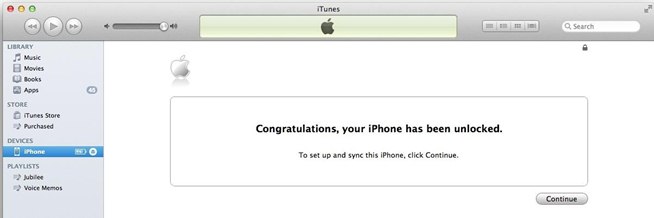
unlock iphone itunes

Note: Sometimes if your iPhone is not updated to the last iOS version you will need to update your device first and unlock iPhone without restore.

That’s it Your iPhone is completely unlocked.

Restore iPhone in iTunes to Unlock It

Attention: Make sure that Find My iPhone option in iCloud (Settings – iCloud) is turned off. If iCloud option is enabled after restoring process you will need Apple ID details to which iPhone is connected otherwise you won’t be able to activate the device.
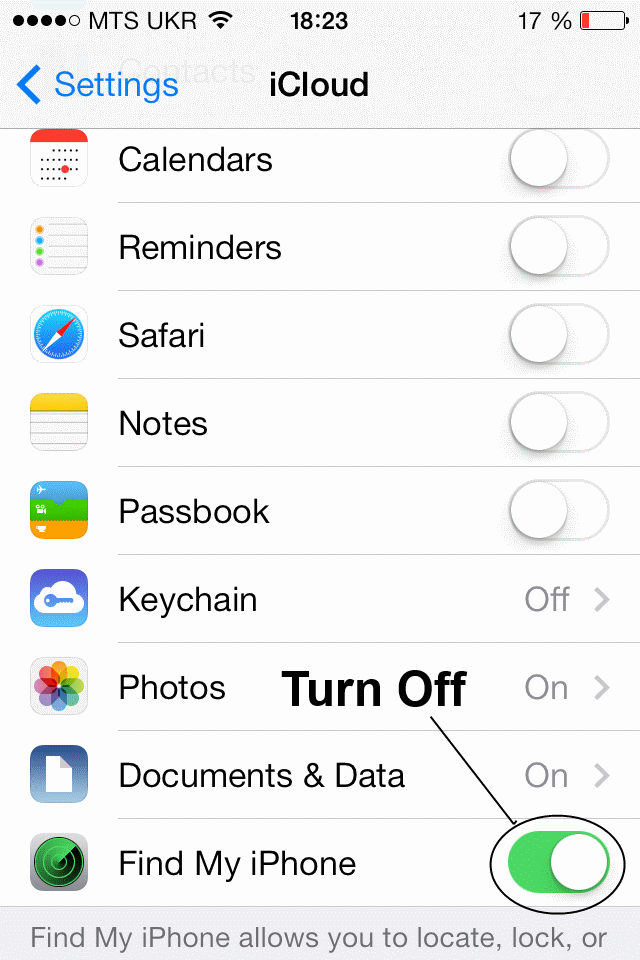
icloud turn off

Step 1: Insert a SIM card of the non-supported carrier and connect iPhone to iTunes.

Step 2 (optional): Backup your device in iTunes or iCloud.

Step 3: After backup click the Restore button.

Step 4: When restoring will be completed select “Set up As a new phone” option. Not from a backup.
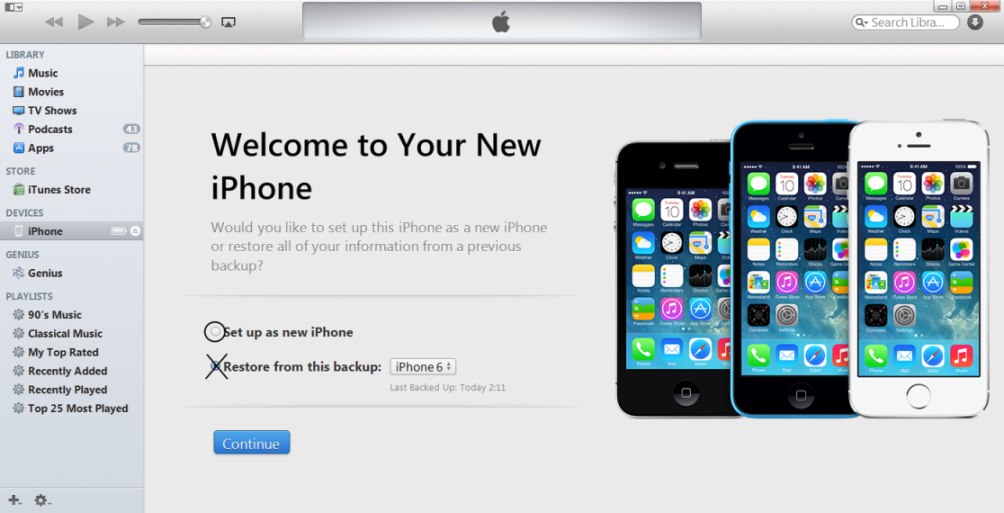
itunes-restore-as-new

Step 5: Click Continue and pass activation steps with non-supported SIM card.

Step 6: You will see the Congratulation message. Sometimes it doesn’t pop up, don’t worry, it is normal.

Step 7 (optional): Use “Restore from Backup” option in iTunes to recover you data.
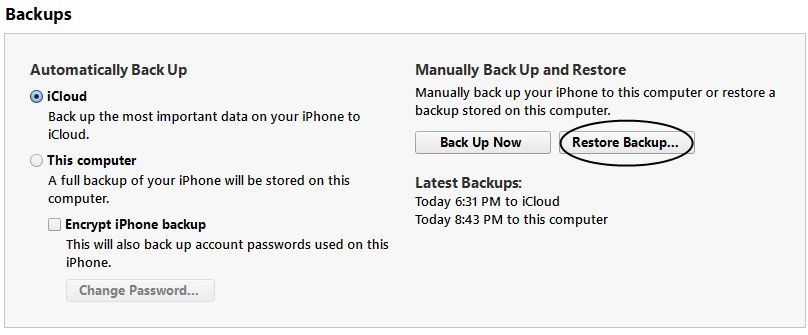
restore from backup

Factory iPhone Unlock Troubleshooting

Fix 1: Make sure you have inserted SIM card of the carrier which is not  supported on your device whet it was locked.

Fix 2: Sometimes iPhone needs to be updated to the latest iOS version. Make sure your device is updated

Fix 3: If you don’t see the Congratulation message in iTunes just look at the status bar of iPhone and wait for the network / service

Fix 4: If iTunes will freeze then just disconnect your iPhone from USB, close iTunes program and connect your device again. Then just launch iTunes and repeat the process.

Fix 5: If after steps above you will see No Service or Searching… on the status bar you will need to do next:

  • turn on/off Air Plane mode
  • go to Settings -> general-> Reset -> Reset Networks
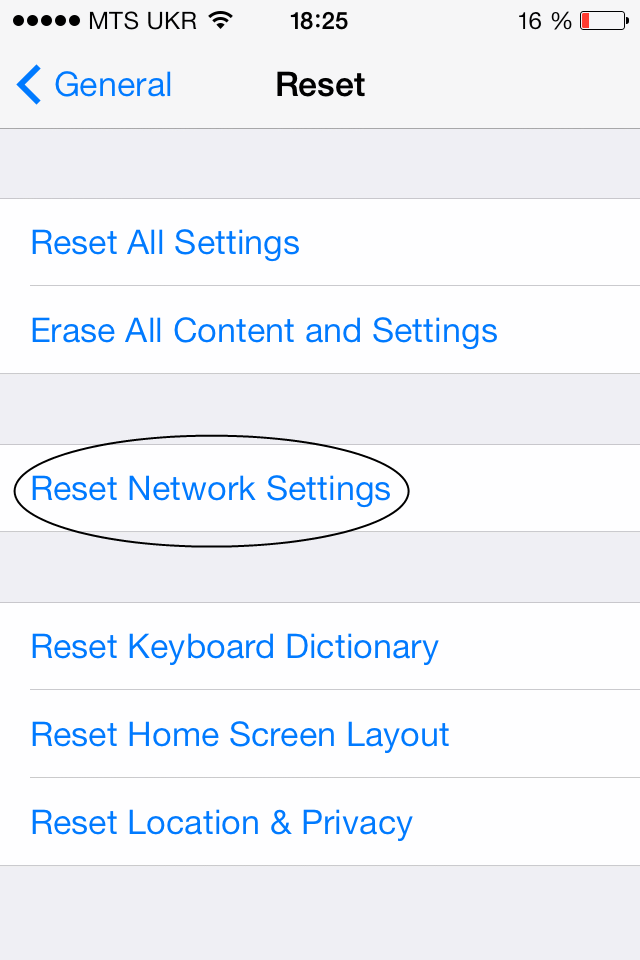
reset network settings

  • go to Settings -> General -> Cellular and turn off/on Cellular Data and enable/disable 3G.
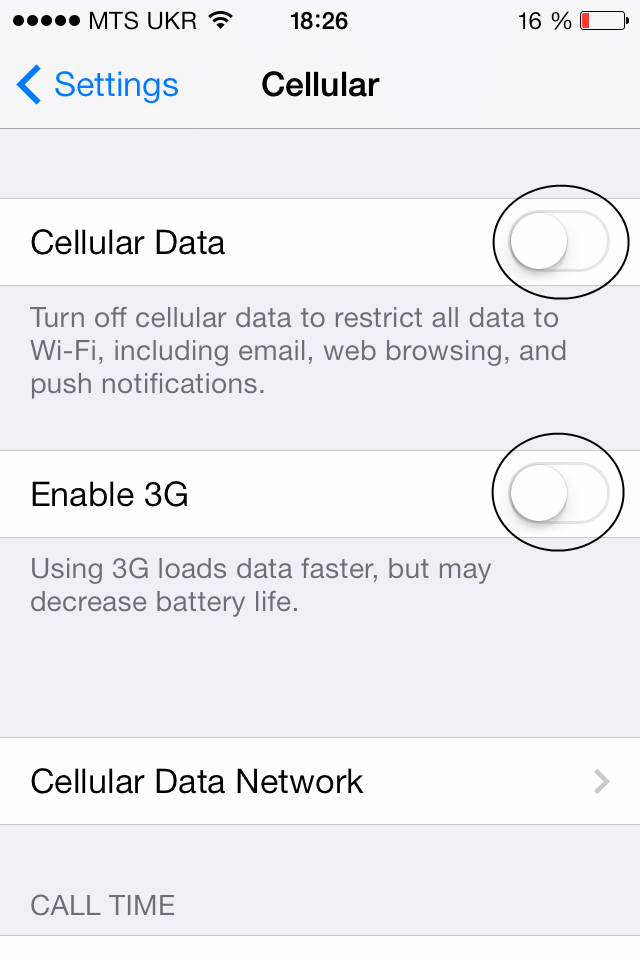
enable 3GFeel free to contact our support team if you have any questions regarding iPhone unlocking. You can also visit FAQ page and find answer you are looking for.

Movistar Venezuela Carrier Can Be Unlocked on iPhone 5 / 4S / 4 / 3GS / 3

You can find fast, easy and safe method to unlock Movistar iPhone from Venezuela here. Simply provide us with the IMEI number and email address so we can notify you when your iPhone will be unlocked from Movistar Venezuela carrier. Go on reading and find what you need for unlocking and what you will get after unlocking.

How to Find IMEI Number

You can find our IMEI code in different ways. For example, launch Settings on the iPhone and go to General – About section. You can even simplify the process and type *#06# to see this 15-digit code. You can use both methods.

Don’t look the IMEI number on the back of your device or on the SIM tray if you are not sure that they are native to iPhone.

Benefits of Unlocking iPhone Movistar Venezuela

  1. The result is lifetime, permanent, safe for the iPhone
  2. IMEI unlock doesn’t void Apple warranty
  3. You can switch carriers and update iOS without being locked ever again
  4. Your can sync, restore via iTunes without losing unlocked status
  5. You can unlock distantly [stay home, connect to the internet and place your order online]
  6. Unlock is good for any iPhone model, version of baseband / bootloader / iOS [this is a universal solution that can be used by millions of people from different countries]
  7. Stay permanently unlocked! Save money while staying abroad and choose the carriers with the best data plans
  8. Take a trip with your iPhone and forget about expensive roaming. Just insert SIM card you need and enjoy
  9. Fast and working unlocking solution for your device
  10. The unlock is 100% safe for your gadget
  11. Update your device to any new iOS and stay unlocked
  12. There is no need to install some unofficial software or open your device
  13. All your apps and games will be working after unlock as usual
  14. If you provide real information and meet requirements but we can’t unlock your iPhone, we guarantee money back

Important Note: Phone store owners and wholesalers can start their unlocking business by registering on digitalunlocking.net and working with us. Our prices are low and service is fast. We deliver unlocks during business hours five days a week.

Fast and Simple Unlock Movistar Venezuela iPhone

Don’t mistake factory iPhone unlock with jailbreak. This service is safe and doesn’t harm your device. It is official, legit and distant. It is 100% guaranteed if you meet these requirements:

  • You can unlock iPhone 5 / 4S / 4 / 3GS / 3G if it is truly locked to Movistar Venezuela. You can use iPhone carrier checker if you are not sure.
  • You can unlock iPhone if it is activated with Movistar SIM card from Venezuela.
  • Your IMEI code must be clean [we don’t unlock barred / blocked / blacklisted / lost / stolen iPhone devices].
  • Run network checker and blacklist check service to be sure your IMEI is not blacklisted / barred or blocked.
  • You should carefully read and agree to our Terms and Services [accept this document to proceed].
  • You are eager to wait for the unlock and pay for the service.
  • If your iPhone is not locked to Movistar Venezuela or not activated with this carrier, you can’t get unlock and we will not give your money back if you place such an order.

How It Works

1. If you are eligible for our distant iPhone unlock by IMEI code you can place your order online by providing us your:

  • IMEI
  • iPhone model
  • Email

2. Read and agree with Terms and Services and pay for your order. We accept PayPal payment method or payment with credit/debit card so you can select whatever suits you the best.

3. We will notify you when unlock will be completed and provide you with further instructions.

4. Connect iPhone to iTunes and complete the procedure. This takes a couple of moments. It is easy and fast. You should insert a non-supported SIM card and wait till iTunes says that you are successfully unlocked.

* Usually unlocks are provided from 9 am till 6 pm PST, Monday through Friday.

We are happy to answer any question you have about iPhone Movistar Venezuela unlock.

How to Unlock Vodafone iPhone 5 / 4S / 4 / 3GS / 3G Locked in Turkey

Turkey provides service for iPhone locked to Vodafone carrier and ere we offer to get a service from other network. Just provide the IMEI number and your Vodafone Turkey iPhone will be unlocked remotely and for the permanent use.

How to Find IMEI Number

You can find our IMEI code in different ways. For example, launch Settings on the iPhone and go to General – About section. You can even simplify the process and type *#06# to see this 15-digit code. You can use both methods.

Don’t look the IMEI number on the back of your device or on the SIM tray if you are not sure that they are native to iPhone.

Benefits of Unlocking iPhone Vodafone Turkey

  1. The result is lifetime, permanent, safe for the iPhone
  2. IMEI unlock doesn’t void Apple warranty
  3. You can switch carriers and update iOS without being locked ever again
  4. Your can sync, restore via iTunes without losing unlocked status
  5. You can unlock distantly [stay home, connect to the internet and place your order online]
  6. Unlock is good for any iPhone model, version of baseband / bootloader / iOS [this is a universal solution that can be used by millions of people from different countries]
  7. Stay permanently unlocked! Save money while staying abroad and choose the carriers with the best data plans
  8. Take a trip with your iPhone and forget about expensive roaming. Just insert SIM card you need and enjoy
  9. Fast and working unlocking solution for your device
  10. The unlock is 100% safe for your gadget
  11. Update your device to any new iOS and stay unlocked
  12. There is no need to install some unofficial software or open your device
  13. All your apps and games will be working after unlock as usual
  14. If you provide real information and meet requirements but we can’t unlock your iPhone, we guarantee money back

Important Note: Phone store owners and wholesalers can start their unlocking business by registering on digitalunlocking.net and working with us. Our prices are low and service is fast. We deliver unlocks during business hours five days a week.

Fast and Simple Unlock iPhone Vodafone Turkey

Don’t mistake factory iPhone unlock with jailbreak. This service is safe and doesn’t harm your device. It is official, legit and distant. It is 100% guaranteed if you meet these requirements:

  • You can unlock iPhone 5 / 4S / 4 / 3GS / 3G if it is truly locked to Vodafone Turkey. You can use iPhone carrier checker if you are not sure.
  • You can unlock iPhone if it is activated with Vodafone SIM card.
  • Your IMEI code must be clean [we don’t unlock barred / blocked / blacklisted / lost / stolen iPhone devices]
  • Run network checker and blacklist check service to be sure your IMEI is not blacklisted / barred or blocked.
  • You should carefully read and agree to our Terms and Services [accept this document to proceed]
  • You are eager to wait for the unlock and pay for the service
  • If your iPhone is not locked to Vodafone Turkey or not activated with this carrier, you can’t get unlock and we will not give your money back if you place such an order.

How It Works

1. If you are eligible for our distant iPhone unlock by IMEI code you can place your order online by providing us your:

  • IMEI
  • iPhone model
  • Email

2. Read and agree with Terms and Services and pay for your order. We accept PayPal payment method or payment with credit/debit card so you can select whatever suits you the best.

3. We will notify you when unlock will be completed and provide you with further instructions.

4. Connect iPhone to iTunes and complete the procedure. This takes a couple of moments. It is easy and fast. You should insert a non-supported SIM card and wait till iTunes says that you are successfully unlocked.

* Usually unlocks are provided from 9 am till 6 pm PST, Monday through Friday.

We are happy to answer any question you have about Vodafone Turkey iPhone unlock.

Official Unlocking for TurkCell iPhone 5 / 4S / 4 / 3GS / 3G

It is hard to use locked to TurkCell iPhone because you are tied only to a single carrier and can’t use other SIM cards. You device just doesn’t accept it.

Here you can get rid of the locked status permanently and enjoy any SIM card you like and everywhere you are. Provide IMEI and proceed with unlock.

How to Find IMEI Number

You can find our IMEI code in different ways. For example, launch Settings on the iPhone and go to General – About section. You can even simplify the process and type *#06# to see this 15-digit code. You can use both methods.

Don’t look the IMEI number on the back of your device or on the SIM tray if you are not sure that they are native to iPhone.

Benefits of Unlocking TurkCell iPhone

  1. The result is lifetime, permanent, safe for the iPhone
  2. IMEI unlock doesn’t void Apple warranty
  3. You can switch carriers and update iOS without being locked ever again
  4. Your can sync, restore via iTunes without losing unlocked status
  5. You can unlock distantly [stay home, connect to the internet and place your order online]
  6. Unlock is good for any iPhone model, version of baseband / bootloader / iOS [this is a universal solution that can be used by millions of people from different countries]
  7. Stay permanently unlocked! Save money while staying abroad and choose the carriers with the best data plans
  8. Take a trip with your iPhone and forget about expensive roaming. Just insert SIM card you need and enjoy
  9. Fast and working unlocking solution for your device
  10. The unlock is 100% safe for your gadget
  11. Update your device to any new iOS and stay unlocked
  12. There is no need to install some unofficial software or open your device
  13. All your apps and games will be working after unlock as usual
  14. If you provide real information and meet requirements but we can’t unlock your iPhone, we guarantee money back

Important Note: Phone store owners and wholesalers can start their unlocking business by registering on digitalunlocking.net and working with us. Our prices are low and service is fast. We deliver unlocks during business hours five days a week.

Fast and Simple Unlock TurkCell iPhone

Don’t mistake factory iPhone unlock with jailbreak. This service is safe and doesn’t harm your device. It is official, legit and distant. It is 100% guaranteed if you meet these requirements:

  • You can unlock iPhone 5 / 4S / 4 / 3GS / 3G if it is truly locked to TurkCell from Turkey. You can use iPhone carrier checker if you are not sure.
  • You can unlock iPhone if it is activated with TurkCell SIM card
  • Your IMEI code must be clean [we don’t unlock barred / blocked / blacklisted / lost / stolen iPhone devices]
  • Run network checker and blacklist check service to be sure your IMEI is not blacklisted / barred or blocked.
  • You should carefully read and agree to our Terms and Services [accept this document to proceed]
  • You are eager to wait for the unlock and pay for the service
  • If your iPhone is not locked to TurkCell or not activated with this carrier, you can’t get unlock and we will not give your money back if you place such an order.

How It Works

1. If you are eligible for our distant iPhone unlock by IMEI code you can place your order online by providing us your:

  • IMEI
  • iPhone model
  • Email

2. Read and agree with Terms and Services and pay for your order. We accept PayPal payment method or payment with credit/debit card so you can select whatever suits you the best.

3. We will notify you when unlock will be completed and provide you with further instructions.

4. Connect iPhone to iTunes and complete the procedure. This takes a couple of moments. It is easy and fast. You should insert a non-supported SIM card and wait till iTunes says that you are successfully unlocked.

* Usually unlocks are provided from 9 am till 6 pm PST, Monday through Friday.

We are happy to answer any question you have about TurkCell iPhone unlock.

Use IMEI of Avea iPhone 5 / 4S / 4 / 3GS / 3G and Unlock it to Use Not Only in Turkey

Official unlocking is very popular nowadays and it is not a secret why. It has many benefits like accepting SIM cards from other carrier, updating to any new iOS and stay be unlocked, forget about roaming and many, many more.

Read the description and you will find all information you need for successful factory Avea iPhone unlock.

How to Find IMEI Number

You can find our IMEI code in different ways. For example, launch Settings on the iPhone and go to General – About section. You can even simplify the process and type *#06# to see this 15-digit code. You can use both methods.

Don’t look the IMEI number on the back of your device or on the SIM tray if you are not sure that they are native to iPhone.

Benefits of Unlocking Avea iPhone

  1. The result is lifetime, permanent, safe for the iPhone
  2. IMEI unlock doesn’t void Apple warranty
  3. You can switch carriers and update iOS without being locked ever again
  4. Your can sync, restore via iTunes without losing unlocked status
  5. You can unlock distantly [stay home, connect to the internet and place your order online]
  6. Unlock is good for any iPhone model, version of baseband / bootloader / iOS [this is a universal solution that can be used by millions of people from different countries]
  7. Stay permanently unlocked! Save money while staying abroad and choose the carriers with the best data plans
  8. Take a trip with your iPhone and forget about expensive roaming. Just insert SIM card you need and enjoy
  9. Fast and working unlocking solution for your device
  10. The unlock is 100% safe for your gadget
  11. Update your device to any new iOS and stay unlocked
  12. There is no need to install some unofficial software or open your device
  13. All your apps and games will be working after unlock as usual
  14. If you provide real information and meet requirements but we can’t unlock your iPhone, we guarantee money back

Important Note: Phone store owners and wholesalers can start their unlocking business by registering on digitalunlocking.net and working with us. Our prices are low and service is fast. We deliver unlocks during business hours five days a week.

Fast and Simple Unlock Avea iPhone

Don’t mistake factory iPhone unlock with jailbreak. This service is safe and doesn’t harm your device. It is official, legit and distant. It is 100% guaranteed if you meet these requirements:

  • You can unlock iPhone 5 / 4S / 4 / 3GS / 3G if it is truly locked to Avea Turkey. You can use iPhone carrier checker if you are not sure.
  • You can unlock iPhone if it is activated with Avea SIM
  • Your IMEI code must be clean [we don’t unlock barred / blocked / blacklisted / lost / stolen iPhone devices]
  • Run IMEI checker and blacklist check service to be sure your IMEI is not blacklisted / barred or blocked.
  • You should carefully read and agree to our Terms and Services [accept this document to proceed]
  • You are eager to wait for the unlock and pay for the service
  • If your iPhone is not locked to Avea or not activated with this carrier, you can’t get unlock and we will not give your money back if you place such an order.

How It Works

1. If you are eligible for our distant iPhone unlock by IMEI code you can place your order online by providing us your:

  • IMEI
  • iPhone model
  • Email

2. Read and agree with Terms and Services and pay for your order. We accept PayPal payment method or payment with credit/debit card so you can select whatever suits you the best.

3. We will notify you when unlock will be completed and provide you with further instructions.

4. Connect iPhone to iTunes and complete the procedure. This takes a couple of moments. It is easy and fast. You should insert a non-supported SIM card and wait till iTunes says that you are successfully unlocked.

* Usually unlocks are provided from 9 am till 6 pm PST, Monday through Friday.

We are happy to answer any question you have about Avea Turkey iPhone unlock.

Get Official Unlocking for Telia Sweden iPhone 4 /4S /5 /5C /5S /6 /6 Plus

Come and unlock Telia iPhone locked in Sweden paying the cheapest price on the web. Get fully and official unlocked device and enjoy calls using any SIM card worldwide.

This is not hacking or iOS / baseband breaking. This service is official and confirmed by Apple and the carrier.

How to Find IMEI Number

You can find our IMEI code in different ways. For example, launch Settings on the iPhone and go to General – About section. You can even simplify the process and type *#06# to see this 15-digit code. You can use both methods.

Don’t look the IMEI number on the back of your device or on the SIM tray if you are not sure that they are native to iPhone.

Benefits of Unlocking Telia iPhone

  1. The result is lifetime, permanent, safe for the iPhone
  2. IMEI unlock doesn’t void Apple warranty
  3. You can switch carriers and update iOS without being locked ever again
  4. Your can sync, restore via iTunes without losing unlocked status
  5. You can unlock distantly [stay home, connect to the internet and place your order online]
  6. Unlock is good for any iPhone model, version of baseband / bootloader / iOS [this is a universal solution that can be used by millions of people from different countries]
  7. Stay permanently unlocked! Save money while staying abroad and choose the carriers with the best data plans
  8. Take a trip with your iPhone and forget about expensive roaming. Just insert SIM card you need and enjoy
  9. Fast and working unlocking solution for your device
  10. The unlock is 100% safe for your gadget
  11. Update your device to any new iOS and stay unlocked
  12. There is no need to install some unofficial software or open your device
  13. All your apps and games will be working after unlock as usual
  14. If you provide real information and meet requirements but we can’t unlock your iPhone, we guarantee money back

Important Note: Phone store owners and wholesalers can start their unlocking business by registering on digitalunlocking.net and working with us. Our prices are low and service is fast. We deliver unlocks during business hours five days a week.

Fast and Simple Unlock iPhone Telia Sweden

Don’t mistake factory iPhone unlock with jailbreak. This service is safe and doesn’t harm your device. It is official, legit and distant. It is 100% guaranteed if you meet these requirements:

  • You can unlock iPhone 4 /4S /5 /5C /5S /6 /6 Plus if it is truly locked to Telia Sweden. You can use iPhone carrier checker if you are not sure.
  • You can unlock iPhone if it is activated with Telia Sweden.
  • Your IMEI code must be clean [we don’t unlock barred / blocked / blacklisted / lost / stolen iPhone devices].
  • Run blacklist check service to be sure your IMEI is not blacklisted / barred or blocked.
  • You should carefully read and agree to our Terms and Services [accept this document to proceed].
  • You are eager to wait for the unlock and pay for the service.
  • If your iPhone is not locked to Telia Sweden or not activated with this carrier, you can’t get unlock and we will not give your money back if you place such an order.

How It Works

1. If you are eligible for our distant iPhone unlock by IMEI code you can place your order online by providing us your:

  • IMEI
  • iPhone model
  • Email

2. Read and agree with Terms and Services and pay for your order. We accept PayPal payment method or payment with credit/debit card so you can select whatever suits you the best.

3. We will notify you when unlock will be completed and provide you with further instructions.

4. Connect iPhone to iTunes and complete the procedure. This takes a couple of moments. It is easy and fast. You should insert a non-supported SIM card and wait till iTunes says that you are successfully unlocked.

* Usually unlocks are provided from 9 am till 6 pm PST, Monday through Friday.

We are happy to answer any question you have about Telia Sweden iPhone  unlock.

How to Unlock iPhone 4S, 4, 5C, 5S, 5 Locked to Telenor Sweden

Read the description below and find out how to unlock iPhone tied to Telenor Sweden carrier. After getting factory unlock you will have a great possibility to enjoy calls switching SIM cards “like socks”. Like traveling? – Insert SIM card of the local carrier and start talking avoiding expensive roaming. Go on reading you will find even more benefits of official unlocking.

How to Find IMEI Number

You can find our IMEI code in different ways. For example, launch Settings on the iPhone and go to General – About section. You can even simplify the process and type *#06# to see this 15-digit code. You can use both methods.

Don’t look the IMEI number on the back of your device or on the SIM tray if you are not sure that they are native to iPhone.

Benefits of Unlocking iPhone Telenor Sweden

  1. The result is lifetime, permanent, safe for the iPhone
  2. IMEI unlock doesn’t void Apple warranty
  3. You can switch carriers and update iOS without being locked ever again
  4. Your can sync, restore via iTunes without losing unlocked status
  5. You can unlock distantly [stay home, connect to the internet and place your order online]
  6. Unlock is good for any iPhone model, version of baseband / bootloader / iOS [this is a universal solution that can be used by millions of people from different countries]
  7. Stay permanently unlocked! Save money while staying abroad and choose the carriers with the best data plans
  8. Take a trip with your iPhone and forget about expensive roaming. Just insert SIM card you need and enjoy
  9. Fast and working unlocking solution for your device
  10. The unlock is 100% safe for your gadget
  11. Update your device to any new iOS and stay unlocked
  12. There is no need to install some unofficial software or open your device
  13. All your apps and games will be working after unlock as usual
  14. If you provide real information and meet requirements but we can’t unlock your iPhone, we guarantee money back

Important Note: Phone store owners and wholesalers can start their unlocking business by registering on digitalunlocking.net and working with us. Our prices are low and service is fast. We deliver unlocks during business hours five days a week.

Fast and Simple Unlock iPhone Telenor Sweden

Don’t mistake factory iPhone unlock with jailbreak. This service is safe and doesn’t harm your device. It is official, legit and distant. It is 100% guaranteed if you meet these requirements:

  • You can unlock iPhone 5S / 5C / 5 /4S / 4 / 3GS / 3G if it is truly locked to Telenor Sweden. You can use iPhone carrier checker if you are not sure.
  • You can unlock iPhone if it is activated with Telenor SIM card.
  • Your IMEI code must be clean [we don’t unlock barred / blocked / blacklisted / lost / stolen iPhone devices]
  • Run blacklist check service to be sure your IMEI is not blacklisted / barred or blocked.
  • You should carefully read and agree to our Terms and Services [accept this document to proceed]
  • You are eager to wait for the unlock and pay for the service
  • If your iPhone is not locked to Telenor Sweden or not activated with this carrier, you can’t get unlock and we will not give your money back if you place such an order.

How It Works

1. If you are eligible for our distant iPhone unlock by IMEI code you can place your order online by providing us your:

  • IMEI
  • iPhone model
  • Email

2. Read and agree with Terms and Services and pay for your order. We accept PayPal payment method or payment with credit/debit card so you can select whatever suits you the best.

3. We will notify you when unlock will be completed and provide you with further instructions.

4. Connect iPhone to iTunes and complete the procedure. This takes a couple of moments. It is easy and fast. You should insert a non-supported SIM card and wait till iTunes says that you are successfully unlocked.

* Usually unlocks are provided from 9 am till 6 pm PST, Monday through Friday.

We are happy to answer any question you have about iPhone Telenor Sweden unlock.

Official IMEI Unlocking for Tele2 Sweden iPhone 4 / 4S / 5 / 5C / 5S

Find out how to unlock Tele2 iPhone locked in Sweden and forever forget about it. Get permanent and official service for the reasonable price and complete support. You need to provide the IMEI number and email so we can use the first to unlock it and the second to notify you about the successful results.

How to Find IMEI Number

You can find our IMEI code in different ways. For example, launch Settings on the iPhone and go to General – About section. You can even simplify the process and type *#06# to see this 15-digit code. You can use both methods.

Don’t look the IMEI number on the back of your device or on the SIM tray if you are not sure that they are native to iPhone.

Benefits of Unlocking Tele2 iPhone

  1. The result is lifetime, permanent, safe for the iPhone
  2. IMEI unlock doesn’t void Apple warranty
  3. You can switch carriers and update iOS without being locked ever again
  4. Your can sync, restore via iTunes without losing unlocked status
  5. You can unlock distantly [stay home, connect to the internet and place your order online]
  6. Unlock is good for any iPhone model, version of baseband / bootloader / iOS [this is a universal solution that can be used by millions of people from different countries]
  7. Stay permanently unlocked! Save money while staying abroad and choose the carriers with the best data plans
  8. Take a trip with your iPhone and forget about expensive roaming. Just insert SIM card you need and enjoy
  9. Fast and working unlocking solution for your device
  10. The unlock is 100% safe for your gadget
  11. Update your device to any new iOS and stay unlocked
  12. There is no need to install some unofficial software or open your device
  13. All your apps and games will be working after unlock as usual
  14. If you provide real information and meet requirements but we can’t unlock your iPhone, we guarantee money back

Important Note: Phone store owners and wholesalers can start their unlocking business by registering on digitalunlocking.net and working with us. Our prices are low and service is fast. We deliver unlocks during business hours five days a week.

Fast and Simple Unlock iPhone Tele2 Sweden

Don’t mistake factory iPhone unlock with jailbreak. This service is safe and doesn’t harm your device. It is official, legit and distant. It is 100% guaranteed if you meet these requirements:

  • You can unlock iPhone 4 / 4S / 5 / 5C / 5S  if it is truly locked to Tele2 Sweden. You can use iPhone carrier checker if you are not sure.
  • You can unlock iPhone if it is activated with Tele2 SIM card.
  • Your IMEI code must be clean [we don’t unlock barred / blocked / blacklisted / lost / stolen iPhone devices].
  • Run blacklist check service to be sure your IMEI is not blacklisted / barred or blocked.
  • You should carefully read and agree to our Terms and Services [accept this document to proceed]
  • You are eager to wait for the unlock and pay for the service
  • If your iPhone is not locked to Tele2 Sweden or not activated with this carrier, you can’t get unlock and we will not give your money back if you place such an order.

How It Works

1. If you are eligible for our distant iPhone unlock by IMEI code you can place your order online by providing us your:

  • IMEI
  • iPhone model
  • Email

2. Read and agree with Terms and Services and pay for your order. We accept PayPal payment method or payment with credit/debit card so you can select whatever suits you the best.

3. We will notify you when unlock will be completed and provide you with further instructions.

4. Connect iPhone to iTunes and complete the procedure. This takes a couple of moments. It is easy and fast. You should insert a non-supported SIM card and wait till iTunes says that you are successfully unlocked.

* Usually unlocks are provided from 9 am till 6 pm PST, Monday through Friday.

We are happy to answer any question you have about iPhone Tele2 Sweden unlock.

Try 3 Hutchison Sweden Unlocking Package for iPhone 5S and iPhone 5C

Not long ago Apple released iPhone 5S and iPhone 5C and the biggest world networks started to offer locked devices. But what to do if you are looking to unlock iPhone 5S / 5C locked to Three (3) Hutchison Sweden mobile operator? – Just read the description below and you will find the answer.

How to Find IMEI Number

You can find our IMEI code in different ways. For example, launch Settings on the iPhone and go to General – About section. You can even simplify the process and type *#06# to see this 15-digit code. You can use both methods.

Don’t look the IMEI number on the back of your device or on the SIM tray if you are not sure that they are native to iPhone.

Benefits of Unlocking iPhone Three Hutchison

  1. The result is lifetime, permanent, safe for the iPhone
  2. IMEI unlock doesn’t void Apple warranty
  3. You can switch carriers and update iOS without being locked ever again
  4. Your can sync, restore via iTunes without losing unlocked status
  5. You can unlock distantly [stay home, connect to the internet and place your order online]
  6. Unlock is good for any iPhone model, version of baseband / bootloader / iOS [this is a universal solution that can be used by millions of people from different countries]
  7. Stay permanently unlocked! Save money while staying abroad and choose the carriers with the best data plans
  8. Take a trip with your iPhone and forget about expensive roaming. Just insert SIM card you need and enjoy
  9. Fast and working unlocking solution for your device
  10. The unlock is 100% safe for your gadget
  11. Update your device to any new iOS and stay unlocked
  12. There is no need to install some unofficial software or open your device
  13. All your apps and games will be working after unlock as usual
  14. If you provide real information and meet requirements but we can’t unlock your iPhone, we guarantee money back

Important Note: Phone store owners and wholesalers can start their unlocking business by registering on digitalunlocking.net and working with us. Our prices are low and service is fast. We deliver unlocks during business hours five days a week.

Fast and Simple Unlock iPhone Three 3 Hutchison

Don’t mistake factory iPhone 3 Hutchison unlock with jailbreak. This service is safe and doesn’t harm your device. It is official, legit and distant. It is 100% guaranteed if you meet these requirements:

  • You can unlock iPhone 5S / 5C if it is truly locked to Three (3) Hutchison Sweden. You can use iPhone carrier checker if you are not sure.
  • You can unlock iPhone if it is activated with Three Hutchison
  • Your IMEI code must be clean [we don’t unlock barred / blocked / blacklisted / lost / stolen iPhone devices]
  • Run blacklist check service to be sure your IMEI is not blacklisted / barred or blocked.
  • You should carefully read and agree to our Terms and Services [accept this document to proceed]
  • You are eager to wait for the unlock and pay for the service
  • If your iPhone 5S / 5C is not locked to Three 3 Hutchison Sweden or not activated with this carrier, you can’t get unlock and we will not give your money back if you place such an order.

How It Works

1. If you are eligible for our distant iPhone unlock by IMEI code you can place your order online by providing us your:

  • IMEI
  • iPhone model
  • Email

2. Read and agree with Terms and Services and pay for your order. We accept PayPal payment method or payment with credit/debit card so you can select whatever suits you the best.

3. We will notify you when unlock will be completed and provide you with further instructions.

4. Connect iPhone to iTunes and complete the procedure. This takes a couple of moments. It is easy and fast. You should insert a non-supported SIM card and wait till iTunes says that you are successfully unlocked.

* Usually unlocks are provided from 9 am till 6 pm PST, Monday through Friday.

We are happy to answer any question you have about iPhone Three 3 Hutchison unlock.

Cheap and Official 3 Hutchison Sweden iPhone 3G/3GS/4/4S/5/5C/5S Unlocking

What if iPhone is locked and you can use SIM card from one carrier only? What if you purchased 3 Hutchison iPhone locked in Swede? Don’t worry. Here is a solution for your device. Use our service to unlock iPhone 3 Hutchison Sweden and enjoy any SIM card you like while traveling.

If you would like to unlock iPhone 5S /5C locked to 3 Hutchison Sweden network you can follow this link.

How to Find IMEI Number

You can find our IMEI code in different ways. For example, launch Settings on the iPhone and go to General – About section. You can even simplify the process and type *#06# to see this 15-digit code. You can use both methods.

Don’t look the IMEI number on the back of your device or on the SIM tray if you are not sure that they are native to iPhone.

Benefits of Unlocking iPhone 3 Hutchison

  1. The result is lifetime, permanent, safe for the iPhone
  2. IMEI unlock doesn’t void Apple warranty
  3. You can switch carriers and update iOS without being locked ever again
  4. Your can sync, restore via iTunes without losing unlocked status
  5. You can unlock distantly [stay home, connect to the internet and place your order online]
  6. Unlock is good for any iPhone model, version of baseband / bootloader / iOS [this is a universal solution that can be used by millions of people from different countries]
  7. Stay permanently unlocked! Save money while staying abroad and choose the carriers with the best data plans
  8. Take a trip with your iPhone and forget about expensive roaming. Just insert SIM card you need and enjoy
  9. Fast and working unlocking solution for your device
  10. The unlock is 100% safe for your gadget
  11. Update your device to any new iOS and stay unlocked
  12. There is no need to install some unofficial software or open your device
  13. All your apps and games will be working after unlock as usual
  14. If you provide real information and meet requirements but we can’t unlock your iPhone, we guarantee money back

Important Note: Phone store owners and wholesalers can start their unlocking business by registering on digitalunlocking.net and working with us. Our prices are low and service is fast. We deliver unlocks during business hours five days a week.

Fast and Simple Unlock iPhone 3 Hutchison Sweden

Don’t mistake factory iPhone Sweden unlock with jailbreak. This service is safe and doesn’t harm your device. It is official, legit and distant. It is 100% guaranteed if you meet these requirements:

  • You can unlock iPhone 3G / 3GS / 4 / 4S / 5 / 5C / 5S if it is truly locked to 3 Hutchison Sweden. You can use iPhone carrier checker if you are not sure.
  • You can unlock iPhone if it is activated with 3 Hutchison Sweden.
  • Your IMEI code must be clean [we don’t unlock barred / blocked / blacklisted / lost / stolen iPhone devices].
  • Run IMEI checker and blacklist check service to be sure your IMEI is not blacklisted / barred or blocked.
  • You should carefully read and agree to our Terms and Services [accept this document to proceed].
  • You are eager to wait for the unlock and pay for the service.
  • If your iPhone is not locked to 3 Hutchison Sweden or not activated with this carrier, you can’t get unlock and we will not give your money back if you place such an order.

How It Works

1. If you are eligible for our distant iPhone unlock by IMEI code you can place your order online by providing us your:

  • IMEI
  • iPhone model
  • Email

2. Read and agree with Terms and Services and pay for your order. We accept PayPal payment method or payment with credit/debit card so you can select whatever suits you the best.

3. We will notify you when unlock will be completed and provide you with further instructions.

4. Connect iPhone to iTunes and complete the procedure. This takes a couple of moments. It is easy and fast. You should insert a non-supported SIM card and wait till iTunes says that you are successfully unlocked.

* Usually unlocks are provided from 9 am till 6 pm PST, Monday through Friday.

We are happy to answer any question you have about iPhone 3 Hutchison Sweden unlock.