How to Unlock Your UK iPhone for Free [O2, Vodafone, Virgin Mobile]

Before you will learn how to unlock iPhone in the UK for free and become free from your carrier you should first make sure that you are not unlocked already. Take any SIM card that doesn’t belong to your main network and insert it into your iPhone 6 or 5, 5S. Just remember that the iPhone 4S needs a MicroSIM which is bigger from what iPhone 6 Plus, 6, 5S, 5c and 5 need.

So once you are sure that you have a different SIM card [different from your mobile operator] and it is of the correct size, insert it into your SIM tray. Do you see the signal? If the signal appears you are fine and don’t even need to learn how to unlock iPhone 6 Vodafone, Virgin Mobile, O2 or any other carrier. If you are asked to insert a correct SIM or get a message about an invalid card or a card that can’t be accepted or there is no signal, you are locked to one network only.

o2-uk-unlock

How to Unlock O2 iPhone in the UK

We’ll add that it is simpler to unlock iPhone O2 UK by IMEI factory service, but we’ll still explain how you can do this directly from the carrier though it takes more time and is pretty expensive. This operator allows subscribers who are out of contract to fill an unlock form and pay either £15 [$23] or get the free unlock [which isn’t confirmed on the site].

You can give it a try and contact O2 to make sure you are eligible for direct unlocking service or just do the following thing. According to this carrier, non-O2 consumers can insert any SIM into their iPhone and connect to iTunes to become automatically unlocked. Give it a try, why not?

Just remember that you can unlock iPhone 5, 5S and earlier models through O2 and this carrier said that it had no plans for unlocking iPhone 6 Plus and 6 for a while.

virgin-mobile-uk-unlock

How to Unlock iPhone Virgin Mobile UK [Tesco Mobile]

If you have a new smartphone that was bought recently from Virgin Mobile it has to be already unlocked. According to the carrier, any older iPhone units that were locked to this network can be unlocked automatically once you update your iOS to iOS 8.1.3 which is the latest official public version of mobile firmware for Apple smartphones.

Tesco Mobile agrees to unlock only iPhones that are out of contract. You can call 0345-301-4455 to order the service directly from this carrier but first find out how much it will cost you. Remember you can order factory IMEI unlock instead.

vodafone-uk-unlock

How to Unlock iPhone Vodafone UK

If you have a Vodafone account or know the information about your iPhone previous owner who had such an account you can order unlock directly from Vodafone. The carrier promises to respond to your request within 48 hours and unlock your smartphone within the next 10 days if you are eligible.

Users who had their Vodafone data plan for over 12 months can become unlocked for free, but everyone else has to pay £19.99 [$31].

How to Complete Official Unlock iPhone in iTunes for Other Carriers

Here you will find out how to complete sim unlock iPhone (6S, 6, 5S, 5 or 4S, 4) in iTunes after factory unlocking. When you decide to order IMEI sim iPhone unlock using official service you will always need to complete it yourself with iTunes. The process is not difficult but there are few tips and tricks which could be right solution for some iDevices.

Permanent and factory iPhone unlocking is the most popular method to free iPhone from the carrier’s chains. As you may know there are millions iPhone models around the world locked to some local carrier. There is no free solutions for that models. Of course if your iPhone still running old iOS and you unlocked it using hack software or hardware like Gevey SIM you can’t update your phone because you will lose unlock.

Only IMEI unlocking will solve that problems, after which you’ll be abe not only use any SIM card while traveling but upgrade your iphone to any new iOS and still be unlocked. All you need to know is the carrier to which your iPhone is locked. You can always check network using our cheapest IMEI checker in case you don’t know the carrier and then make an order.

factory unlock iphone

There is nothing simpler that order at our service. We created tutorial guide to show you how it works, so you can use it before we start here.

How to unlock iPhone?

This guide answers the questions of “How to unlock iPhone?” and help you in further unlock any iPhone include 6S, 6, 5S, 5C, 5 and old models 4S, 4!

ATTENTION

If you use such unlocking solutions as Gevey SIM, R-Sim (and other SIM methods) or SAM unlock you will need to activate your iPhone with original SIM card first and only then order unlock here. The fact that these solutions spoof your iPhone IMEI and you need insert original SIM card into iPhone and connect it to iTunes, because only then your device will be recognized and returned to Apple database.

After you purchase factory IMEI sim unlock iPhone at our site wait for the last email with further instructions. These guidelines will help you to complete unlocking process in iTunes. But sometimes there are minor problems, so let’s go through them.

How to Unlock iPhone: Complete Factory unlock in iTunes

Because of iOS 8 bug iPhone can be relocked after update to this version. To avoid such issue please follow easy steps below:

Put GSM Sim of not supported carrier in iPhone. Don’t place original Sim card if you did not use SAM or Gevey (read Attention above).

1. After receiving email that your iOS 7 iPhone has been unlocked, you should activate new unlocked status.
2. Remember on this case use Wi-Fi iPhone activation guide not iTunes.
3. Find an active WiFi connection.
4. Take the original SIM card of the carrier your iDevice are locked to and insert other SIM that was not supported before.
5. On the screen you’ll see table “Activation Required”
6. Connect your iPhone to active WiFi network and iOS system will do all the work needed and then activate your new status.
7. After you iDevice has been activated you can install iOS 8 using WiFi or iTunes. You got rid from relocked problem.

There are two ways to complete the unlock process for your iOS 8 iPhone.

How to Unlock iPhone Without Restoring in iTunes

Step One: Connect iPhone to the computer and open iTunes (latest version).

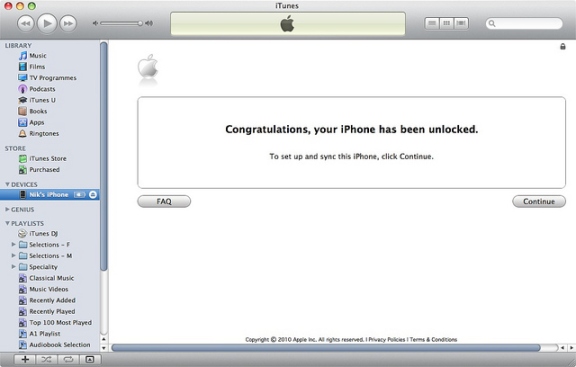
Step Two: In case your Apple iPhone presently working on iOS 8 disconnect gadget after iTunes finds it. Hang on ten seconds and connect iPhone again. You should see Congratulations message.

factory unlock iphone

Note 1: If something wrong happens, for instance, iTunes will freeze then just disconnect your iPhone from USB, close iTunes then connect the unit again and launch iTunes.

Note 2: Sometimes there’s no Congratulations message but wait for the network signal which would be mean that iPhone is factory unlocked.

Note 3: If your gadget still running iOS 7 or lower you will have to upgrade it using WiFi first.

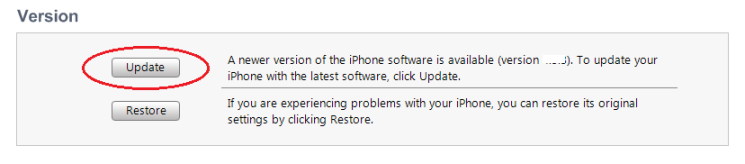
update iphone in iTunes
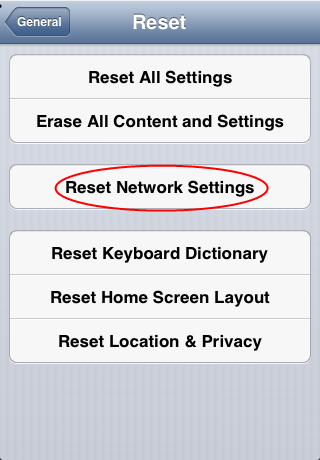
Note 4: There’s yet another method to complete the procedure. Insert SIM card of the carrier you want to use (not original) and go to Settings => general => Reset => Reset Networks. Now just wait for the signal. Also try to enable and disable Airplane mode.

reset network settings iphone
If you will fail try to restore iPhone in iTunes to complete unlock. This method almost always works.

How To Restore iPhone in iTunes to Complete Factory Unlock iPhone

Step One: Place Sim in Apple iPhone and connect it with iTunes. Backup all of your documents in iTunes or iCloud.

Step Two: After backup click Restore button.

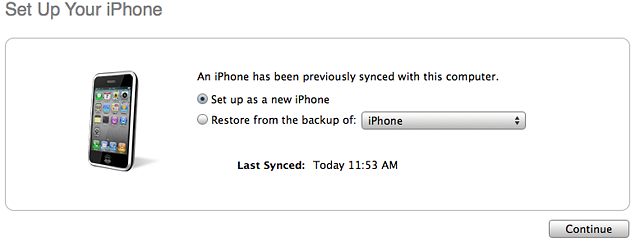
Note: Make sure that after restoring process you choose Setup as a new iPhone:

set up as a new iphone
Step Three: Click Continue and activate your gadget. You will see the Congratulations message but sometimes it is absent. Don’t worry, because when you get the signal you will be able to make calls.

Feel free to contact our support if you have any questions about how to unlock iPhone! Also visit our FAQ to get the answers.