AT&T iPhone 6 problems do exist just like issues inside other carriers’ networks and iOS 8 itself. Biggest iPhone for AT&T is iPhone 6 but if you need to make it working with AT&T MicroCell and can’t make it happen, you are not alone. Users have this issue and you can follow this instruction to fix the bug.
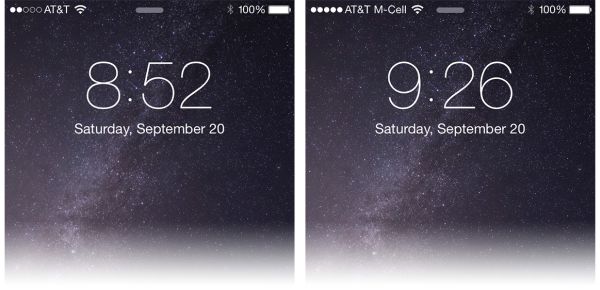
MicroCell from AT&T is a way to get a strong cell signal on your smartphone if you don’t have one without it. Users who often experience missed and dropped calls are advised by AT&T to get the MicroCell, however some people complain that they cannot connect their smartphone to the carrier’s device. MicroCell connects to AT&T and becomes your personal mini cell tower which results in a strong singal. It routs your phone calls through Internet making you independent from the mobile company’s towers.
If your AT&T MicroCell is not working with iPhone 6 or iPhone 6 Plus, follow this instruction and fix the problem.
Step 1. In order to make your iPhone 6 and MicroCell from AT&T communicated, you have to reset the device so that it can find your new smartphone.
Step 2. Firstly, you have to login to AT&T. Here is how to do this: go to http://www.att.com/ and select my AT&T – Wireless – 3G MicroCell.
Step 3. You have to be on the same network as your carrier’s device. Now Disconnect 3G MicroCell gadget.
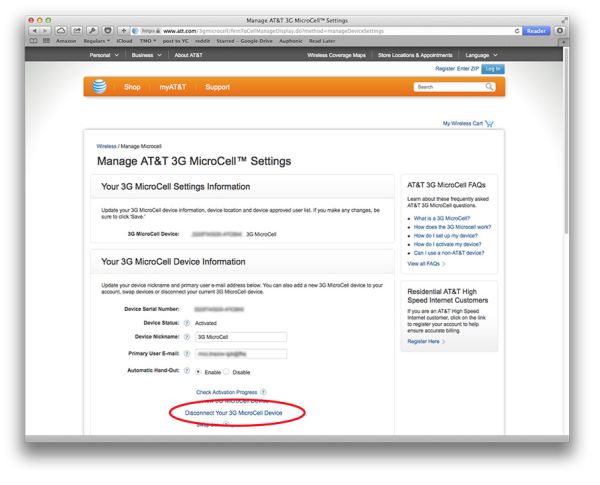
Step 4. Once you are disconnected, you should go to http://www.att.com/MicroCell.
Step 5. Select Activate option.
Step 6. You have to choose either Personal or Business account type and login once again to AT&T account.
Step 7. Enter the information that is asked by AT&T in order to activated your personal mini tower MicroCell [you’ll have to enter your address and the serial number of your device] and wait till your gadget runs again.
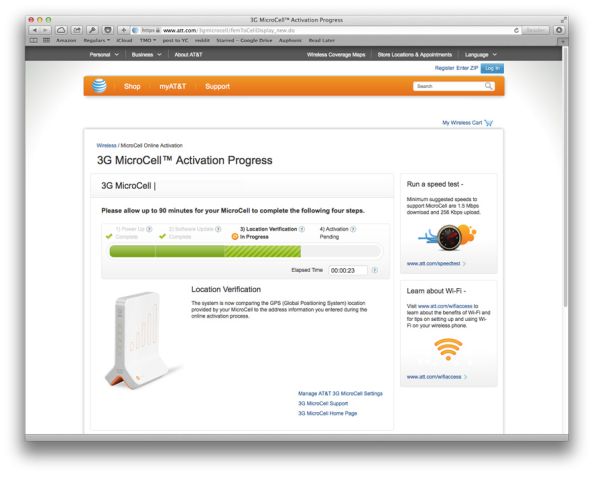
Step 8. You will receive a text message saying that your MicroCell is on again.
Step 9. You should now be able to connect your iphone 6 to AT&T MicroCell without problems.
We hope that this short iPhone 6 AT&T MicroCell fix has solved your issues.