Israel Cellcom iPhone 6/6+/5S/5C/5/4S Unlock for All IMEI

[meta_info]

Tips Before Purchase:

  • Activated iPhone only

*Your iPhone has to be activated within Cellcom Israel meaning you have to connect to your locked carrier using is SIM card at least once.

  • Unlock Success Rate: 95-100%

*Unlock success rate depends on locked network account status of each device.

[/meta_info]

[content_tab]

It is easy to unlock iPhone Cellcom Israel by IMEI if you order the service which is the reliable and quick site. Factory IMEI unlocks are permanent and affordable. You become unlocked permanently with the opportunity to update your iOS, baseband, sync and restore using iTunes etc.

Before ordering make sure your iPhone is locked to Cellcom Israel network. This package doesn’t support other networks. No refund for wrong network.

To exclude any mistypes, mistakes and errors check the information you provide before placing an order. No cancellation can be accepted after IMEI unlock order is processed.

It is advised to add contact@geo-location.site to contacts to get emails from us directly in your Inbox folder.

You can expect unlock delivery 9 am – 6 pm PST Monday – Friday.

[/content_tab]

[details_tab]

Cellcom Israel iPhone unlock works for any version of iOS you have. It also doesn’t depend on your model and baseband. IMEI factory unlock works with activated smartphones. There are two main eligible requirements you have to meet in order to unlock your cell phone for a lifetime.

Important Notes

To unlock Israel Cellcom iPhone 5 / 4S / 4 / 5S / 5c / 6+/ 6 you need to find its IMEI code by entering the combination *#06#. You can also located it under Settings – General – About section. You should also make sure it is activated with Cellcom network in Israel. If you don’t meet these requirements the unlock will fail to be delivered to you and there will be no refund.

Israel Cellcom iPhone Unlock Order

You can place your order online by providing the IMEI number and your email. It is also good to add our email address to your contacts list to avoid getting the messages in your spam folder. After you pay for your order you should check the email and follow the instruction on how to complete unlock.

To do this, you need to connect to iTunes. The program will make sure the device is unlocked allowing you using it as never-locked with different networks.

[/details_tab]
Israel Orange iPhone 6 / 6 Plus / 5S / 5C / 5 / 4S Unlock IMEI

[meta_info]

Tips Before Purchase:

  • Activated iPhone only

*Your iPhone has to be activated within locked network meaning you have to connect to your locked carrier using is SIM card at least once.

  • Unlock Success Rate: 95-100%

*Unlock success rate depends on locked network account status of each device.

[/meta_info]

[content_tab]

The unlock is fast, cheap and guaranteed to users whose smartphone is activated with Israel Orange network. Permanent unlock iPhone 6, 6 Plus, 5S, 5C, 5, 4S, 4  locked to Orange Israel network is the easy to order now. Just make sure you are eligible to use this service before you place your order and confirm it.

Check twice the info you provide for unlock to exclude any mistypes, mistakes and errors. No cancellation can be accepted after IMEI unlock order is processed

Use IMEI locked network checker if you are not sure to what network your iPhone is locked. No refund if iPhone is not locked to Orange Israel mobile operator.

To get mails in time and to the Inbox folder add contact@geo-location.site to your contact list to get our emails.

Unlock performs from 9 am – 6 pm by PST Monday – Friday and delivery time may vary.

[/content_tab]

[details_tab]

How to permanent unlock iPhone locked Orange Israel network?

We offer legit [official] unlock iPhone service and fast delivery. Unlock is permanent. It allows safe syncing with iTunes, safe updated to the newer iOS versions, safe restore processes without losing the unlocking status.

To place your order for Orange Israel iPhone 6, 6 Plus, 5S, 5C,  5, 4S, 4  unlock, you need to:

  • Step 1. Leave your IMEI number [find it by dialing *#06#].
  • Step 2. Provide your email address where the order confirmation with details will be sent to.
  • Step 3. Read and agree to Terms & Services before paying for your order.
  • Step 4. Be attentive to recheck whether you have entered the correct information.
  • Step 5. Place your order and wait till you are unlocked.
  • Step 6. Follow the instructions you will be emailed and complete unlock for iPhone 4 / 5 Orange Israel by connecting the cell phone to iTunes.

iPhone 6 / 6 Plus / 5S / 5C / 5 / 4S / 4  unlock for Israel Orange carrier as well as other models unlock guarantees the positive result if you are eligible. You must have the clean IMEI code. Your handset has to be activated with this network in Israel. You have to provide correct information.

Look how to unlock AT&T iPhone 5S – the best price for you!

[/details_tab]

Dear geo-location.site Customers!

iEaster is coming, and while throughout the U.S. kids go to sleep dreaming how they wake up on Easter morning to find sweets and Easter eggs left under their pillows by the Easter Bunny, Apple fans also deserve on nice dreams.

We wish that the Easter Bunny gives each one of you the iPhone 5, iPod touch, iPad or mini tablet computer from the Cupertino-based company. Maybe Apple will offer some additional discounts this weekend. Even if it doesn’t, it has already made a little gift by promising the next-day free shipping with any iPhone order placed online within its stores. So if you will get new iPhone you can free it from the carrier’s chains and enjoy any Sim card around the world. That will be the best gift for Easter.

easter on iphone

The new life is coming, so have a Good Friday and Happy Easter!

geo-location.site team

Mexico Telcel Unlock iPhone 6/6Plus/5S/5C/4S [Blocked/Blocked]

[meta_info]

Tips Before Purchase:

  • Activated iPhone only

*Your iPhone has to be activated within Mexico Telcel meaning you have to connect to your locked carrier using is SIM card at least once.

  • Unlock Success Rate: 95-100%

*Unlock success rate depends on Mexico Telcel account status of each device.

[/meta_info]

[content_tab]

If you happen to own iPhone  6, 6 Plus, 5S, 5C, 5, 4S models locked to Mexico Telcel network, you can factory unlock these two devices using IMEI unlocking service. Such Mexico Telcel iPhone unlock is official, real, legit and safe to order form us.

You can place an order when you are sure that iPhone is locked to Mexico Telcel carrier and iPhone is not blacklisted. Note that there is no refund for bad requests.

Try to do not make mistakes and mistypes when placing an order. Check twice all info you provide to get successful results. No cancellation can be proceeded when your order was accepted for the unlock.

Delivery time only apply throughout business hrs, not guaranteed turnaround time. (Business time is 9 am – 6 pm PST).

Check the junk/spam folder inside your mail box or add contact@geo-location.site for your safe mail list.

[/content_tab]

[details_tab]

You need to make sure that you are eligible for Telcel unlock for iPhone 6 / 5S / 5C / 5 / 4S:

  • Make sure that your iPhone is locked to Telcel Mexico carrier
  • Make sure your device is activated with your original carrier

It is highly important to check your IMEI before ordering. There are no refunds for incorrect orders. You must be activated otherwise the service will fail to be delivered to you.

Now you can place your order for Telcel unlock iPhone 5S and 6 Plus. Here is how you can factory unlock your iPhone Telcel Mexico smartphone:

Step 1. Enter the clean IMEI code [you can find this number by dialing *#06#].

Step 2. Provide your email address.

Step 3. Read Terms & Services before ordering the service.

Telcel Mexico unlock for iPhone 6, 6+ 5S, 5C, 5, 4S will be done through Apple server. Your IMEI will be unlocked.

[/details_tab]

Activate iPhone Using Zip Code and SSN

[meta_info]

Tips Before Purchase:

*Use network checker if you are not sure what carrier your iPhone is locked to.

  • Unlock Success Rate: 80-100%

*Unlock success rate depends on AT&T account status of each device.

[/meta_info]

[content_tab]

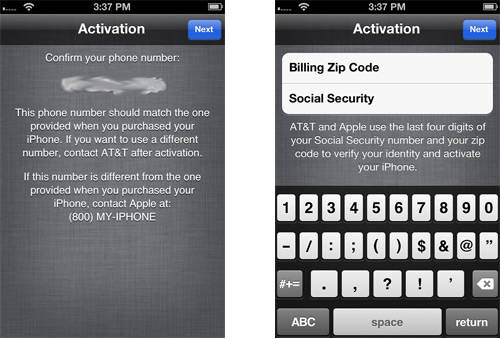
Many AT&T iPhone customers have activation problems, despite using factory unlock iPhone service you cannot activate your device without ZIP code and SSN.

Throughout activation steps you stuck on screen which insists upon enter Billing Zip code and also the last 4 numbers of SSN (Social Security Number).

Here we will help you to activate AT&T iPhone for normal using.

You can place an order when you are sure that iPhone is locked to AT&T carrier. No refund if iPhone is not locked to AT&T.

Try to do not make mistakes and mistypes when placing an order. Check twice all info you provide to get successful results. No cancellation can be proceeded when your order was accepted for the unlock.

Delivery only throughout business hrs, not guaranteed turnaround time. (Business time is 9 am – 6 pm PST).

If you will not see email, go to the junk / junk e-mail folder or add contact@letsunlockiphone.info for your safe mail list.

[/content_tab]

[details_tab]

This task is required for identification the initial who owns iPhone locked to AT&T carrier. If you’re this individual – no problems just enter required info and click Next.

activate iPhone zip code ssn
But you will find lots who bought in-contract iPhone 5S, 5С, 5, 4S, 4, 3gS, 3G on eBay or any other third-party hands. If you’re one of these buyers and see such screen, you have to put information which signifies the initial owner.

Note: You cannot provide Zip code and SSN that differ from original info. Restore and various Sim cards don’t help too.

Sure you can get required information of the previous owner but many people don’t want to provide such information as ZIP Code and SSN (even only last 4 digits).

Important Notes

  • It is strongly recommended that you have an original Sim.  It’s not necessarily needed. But sometimes you need to insert original SIM even if we provided ZIP code and SSN.
  • We activate AT&T iPhone only that asks for Billing Zip Code and Social Security number during activation. In other case we don’t activate iPhones.
  • After you activate iPhone you can factory unlock it for other carriers.
  • Read carefully Terms & Conditions before clicking the Buy Now button.

Activate iPhone Using Zip Code and SSN Without Contacting the Original

Fortunately there’s one particular method. There’s no requirement for you to definitely search for billing zip code and last 4 numbers of SSN.

Awareness: It Is Not Find my iPhone iOS 7 activation lock service. Place an order only if the iPhone requires Billing ZIP code and SSN (last four digits). NO Reimbursement if the service was bought to avoid Find my iPhone and for gadget that isn’t locked to AT&T US carrier.

Steps to Make A Purchase

1. Enter IMEI # (General – Configurations – About).

2. Enter Email.

3. Go into the original telephone number that was tied following the first purchase.

4. Accept Conditions and terms.

5. Click Buy Now.

Once you effectively provide all needed info wait for the email from us for more instructions.

[/details_tab]

EMEA Unlock iPhone 5S, 5C, 5, 4, 4S [Not Found Supported]

[meta_info]

Tips Before Purchase:

*Use network checker if you are not sure what carrier your iPhone is locked to.

  • Clean (not blacklisted) iPhone only [Check it]

*Use blacklist checker if you are not sure if your iPhone IMEI is clean or barred / blocked / blacklisted.

  • Activated iPhone only

*Your iPhone has to be activated within EMEA network meaning you have to connect to EMEA using its SIM card at least once.

  • Unlock Success Rate: 100%

*Unlock success rate depends on EMEA account status of each device.

[/meta_info]

[content_tab]

Use our service to unlock EMEA iPhone 5S and all lower models for international use. We provide factory unlock which is permanent and gives the possibility to enjoy any SIM card around the world. This package is special as it supports iPhone 5S, 5C. Also it will unlock your phone if you got Not Found results from the previous orders.

There are two things that are most important for successful unlock. Firstly you need to be sure that your iPhone is locked to EMEA, if you don’t know such info please use IMEI carrier checker. Secondly, make sure that your device is not blocked (blacklisted, barred) and your account has not unpaid bills. It is important as there is no refund if iPhone is blocked or not locked to EMEA.

Check twice all the information you provide to avoid any errors and mistakes, mistypes before confirming your order. No cancellation can be accepted after IMEI unlock order is processed.

Is there no email from us in your mailbox? Search in SPAM or, please, add contact@geo-location.site to your contacts. You can expect unlock delivery from 9 am till 6 pm PST, Monday through Friday.

[/content_tab]

[details_tab]

Fast and cheap EMEA factory unlock iPhone 4, 4S 5, 5S, 5C with Not Found status. If unlock was failed after purchasing out of contract EMEA package better use the package here. We offer you affordable EMEA iPhone 5S / 5C /  4 / 4S / 5 Not found IMEI unlock. How you benefit ordering factory unlock from us:

  • safe quick service
  • distant unlock
  • no jailbreak needed
  • Apple warranty is preserved
  • safe update to iOS / baseband
  • ability to switch between carriers

How to Place IMEI Unlock Order Online

  1. Run IMEI checker to be sure you are not in the blacklist
  2. Recheck your carrier name to be sure it is EMEA Service
  3. Fill out the form: type IMEI code, email and iPhone model
  4. Pay for the service
  5. Wait till your device is unlocked
  6. Finish the unlock through iTunes [you will get email instruction]

How to Get IMEI Code

* Launch Settings and look in “About” under General section
* Dial *#06# to see IMEI on your screen

Notes

iPhone Network Check results must show “EMEA Service”.

iPhone has to be activated. No refund iPhone is not activated.

Before ordering, read Conditions and Terms.

Blacklisted IMEI code are not unlocked by us, and we offer no refunds for such orders. You can use iPhone blacklist checker to find out if your device is clean.

Planning to install iOS 7, 8 or already running it? Turn off Find My iPhone to avoid Activation lock problem.

[/details_tab]

Norway Telenor Unlock Blacklisted iPhone 5S/5C/5/4S

[meta_info]

Tips Before Purchase:

*Use network checker if you are not sure what carrier your iPhone is locked to.

  • Activated iPhone only

*Your iPhone has to be activated within Telenot network meaning you have to connect to Telenor using its SIM card at least once.

  • Unlock Success Rate: 90-100%

*Unlock success rate depends on Telenor account status of each device.

[/meta_info]

[content_tab]

Telenor iPhone Norway free unlock is not possible for blocked smartphones. Such devices can either stay blacklisted [meaning you can’t use them with any network at all] or be factory unlocked by factory unlock service at an affordable price.

Note that your barred handset will not be unblocked by this service. Telenor iPhone unlock for blocked gadget makes it unlocked for being used in foreign countries outside Norway. Even unlocked, it will be remain blacklisted with Norway carriers.

You can place an order when you are sure that iPhone is locked to Tele2 Norway carrier and iPhone is not blacklisted. Note that there is no refund for bad requests.

Try to do not make mistakes and mistypes when placing an order. Check twice all info you provide to get successful results. No cancellation can be proceeded when your order was accepted for the unlock.

Processing times will vary based on the network carrier’s response time and only apply to business days during the hours of 9 a.m. – 6 p.m. PST.

Check your email’s junk/spam folder for vital correspondences regarding the status of your unlock or add contact@geo-location.site to your trusted sender list.

[/content_tab]

[details_tab]

How to factory unlock iPhone 5S, 5C, 5, 4S, 4  locked Telenor Norway Blocked?

The method is good for users who live outside this country and wish to connect to their local networks in U.S., Canada, the UK, different European, Asian countries etc. If you have not blacklisted device you can unlock Telenor iPhone Norway with clean IMEI.

Blacklisted iPhone unlock for Norway Telenor mobile operator is possible for activated smartphones only. Make sure your gadget is activated. You should also make sure that your device isn’t reported as stolen or lost otherwise unlock is impossible and no refunds are made.

To order Norway Telenor unlock for blacklisted iPhone:

Step 1. Provide its IMEI number.
Step 2. Leave your email.
Step 3. Read our Terms & Services, agree to them and pay for your order.
Step 4. Check the email.
Step 5. Complete unlock by following the instruction we will email you.

You should add our email to your contacts to avoid getting our letters in your spam folder. Make sure you provide correct data about your gadget. Find your IMEI in Settings – General – About or through calling to number *#06#.

This procedure is safe. It doesn’t void Apple warranty. It makes your unlocked forever with capability of endless updates, upgrades, syncing and restoring.

[/details_tab]

EMEA Unlock Out Of Contract iPhone

[meta_info]

Tips Before Purchase:

*Use network checker if you are not sure what carrier your iPhone is locked to.

  • Out of Contract iPhone only [Check it]

*Use contract checker if you are not sure if your iPhone is still on or already out of contract.

  • Clean (not blacklisted) iPhone only [Check it]

*Use blacklist checker if you are not sure if your iPhone IMEI is clean or barred / blocked / blacklisted.

  • Activated iPhone only

*Your iPhone has to be activated within EMEA network meaning you have to connect to EMEA using its SIM card at least once.

  • Unlock Success Rate: 100%

*Unlock success rate depends on EMEA account status of each device.

[/meta_info]

[content_tab]

The best service for iPhone EMEA network out of contact devices. iPhone Network Check results must show “EMEA Service”. You can easily unlock EMEA iPhone 5, 4S, 4 and 3 by IMEI code. Our service is affordable, fast and reliable.

Enjoy any SIM card and any iOS version supported by your device after unlocking. Forget about roaming and relocked as the solution is official and permanent.

Attention: This package supports Out of Contract EMEA iPhone models only. If your device is still in contract unlock results will come as Not Found.

This package supports EMEA Service network results only. If your iPhone is not locked to EMEA unlock will not be successful. There is no Refund for the wrong network service purchase.

To avoid any errors and mistakes, mistypes check all information you provide before placing an order. No cancellation can be accepted after IMEI unlock order is processed.

Add contact@geo-location.site to your contacts if there is no email from us in your mailbox [check in SPAM folder as well].

Delivery time only apply throughout business hrs, not guaranteed turnaround time. (Business time is 9 am – 6 pm PST).


[/content_tab]

[details_tab]

iPhone has to be OUT OF CONTRACT before placing an order. If Not Found – use EMEA Not Found package.

Notes

  • Agree to Conditions and Terms and then place your order.
  • iPhone has to be activated. No refund if iPhone is not activated.
  • iPhone has to be OUT OF CONTRACT. No refund if iPhone is IN CONTRACT.
  • We don’t unlock blacklisted iPhones. Check the blacklist status before ordering. Nor refund if blacklisted.
  • The new iOS 7 can be problematic to use if you don’t turn off Find My iPhone. If you get stuck on Activation lock, we don’t refund your order.

Get IMEI Number

You can look it up in Settings – General – About. You can display it on your screen by dialling *#06#

Place Your Order

It is easy to order EMEA service iPhone unlock from us. To do so:

  1. Make sure you are locked to this carrier
  2. Check IMEI to be sure it is not added to the blacklist by Apple
  3. Give us your IMEI code and iPhone model
  4. Pay for the service
  5. Wait for approximately 24 hours till we change your status to “unlocked”
  6. Complete your unlock via iTunes [we will email you further instructions]
  7. Enjoy being unlocked
  8. We offer delivery 9 am – 6 pm PST, Monday through Friday.

[/details_tab]

Canada Bell Unlock iPhone 5S, 5C, 5, 4S, 4 [Clean IMEI Only]

[meta_info]

Tips Before Purchase:

*Use network checker if you are not sure what carrier your iPhone is locked to.

  • Clean (not blacklisted) iPhone only [Check it]

*Use blacklist checker if you are not sure if your iPhone IMEI is clean or barred / blocked / blacklisted.

  • Activated iPhone only

*Your iPhone has to be activated within Bell network meaning you have to connect to Bell using its SIM card at least once.

  • Unlock Success Rate: 95-100%

*Unlock success rate depends on Bell account status of each device.

[/meta_info]
[content_tab]

Now our users can unlock iPhone lock Bell Canada carrier! You will be able to use your iPhone 5S, 5C, 4S, 4, 3GS, 3G with other networks not only in Canada but  any where in the world with supported SIM cards and carriers. Only few days and you will be able to use other  Sim cards and any iOS from Apple.

From now enjoy the new unlocking solution from Bell network to unlock iPhone 5, 5C, 5S and all other models. The service is official confirmed by Apple and Bell. Fast delivery and easy-to-finish instructions will come to the email address you provided. Make sure email address is correct and active.

IMEI number has to be correct and locked to Bell Canadian carrier. No cancellation can be accepted after IMEI unlock order is processed.

This package does not supports blacklisted iPhones. Unfortunately we are not able to refund if iPhone is blacklisted or it does not locked to Bell network.

Make sure your iPhone is eligible and ready for unlock. If your iPhone is eligible for unlock you can place an order right now.

Note that we work during business hours 9 AM – 6 PM PST from Monday to Friday.

[/content_tab]

[details_tab]

How to factory unlock iPhone 5S, 5C, 5, 4S, 4, 3GS, 3G locked to Bell Canada carrier?

Firstly Find IMEI Number 

  • To locate IMEI just take iPhone and open Settings – General – About, now just scroll down and you will see IMEI and 15 digits of it.
  • Also you can just type *#06# and you will see the 15 digits of your IMEI number.

Note: unlock iPhone 5s at&t – best choice ATT locked iPhone owners!

Important Notes for successful permanent Bell Canada unlock iPhone 5S, 5C, 5, 4S, 4 

  • All iPhone models are supported.
  • Your iPhone need to be activated with Bell before making and order. No refund if iPhone is not activated.
  • Check if your iPhone is really locked to Bell Canada using iPhone operator checker. If not, unlock will fail and no refunds for the wrong network.
  • We don’t unlock blacklisted Bell and there is no refund if iPhone is blacklisted. Use iPhone barred status checker to find out./
  • Read carefully Terms and Conditions before clicking the Buy Now button.
  • Delivery time only apply throughout business hrs, not guaranteed turnaround time.

iOS Versions We Unlock

  • we unlock all iOS versions

All Baseband Supported

  • 2.18.02
  • 1.03.02
  • 1.03.01
  • 1.02.02
  • 1.00.06
  • 7.03.00
  • 6.02.00
  • 5.02.00
  • 5.00.01
  • 3.11.00
  • 3.04.25
  • 1.01.00
  • 1.00.16
  • 5.4.00
  • 5.2.00
  • 5.0.02
  • 5.0.00
  • 3.4.03
  • 3.4.02
  • 3.4.01
  • 3.0.04
  • and all others

Find IMEI and go order Bell permanent imei unlock for iPhone 

To locate IMEI just take iPhone and open Settings – General – About, now just scroll down and you will see IMEI and 15 digits of it.

Also you can just type *#06# and you will see the 15 digits of your IMEI number.

[/details_tab]

Switzerland Orange Unlock iPhone 4/4S/5 Out Of Contract

ora[meta_info]

Tips Before Purchase:

  • Orange Switzerland locked iPhone only [Check it]

*Use network checker if you are not sure what carrier your iPhone is locked to.

  • Out of Contract iPhone only [Check it]

*Use contract checker if you are not sure if your iPhone is still on or already out of contract.

  • Clean (not blacklisted) iPhone only [Check it]

*Use blacklist checker if you are not sure if your iPhone IMEI is clean or barred / blocked / blacklisted.

  • Activated iPhone only

*Your iPhone has to be activated within Orange network meaning you have to connect to Orange using its SIM card at least once.

  • Unlock Success Rate: 100%

*Unlock success rate depends on Orange account status of each device.

[/meta_info]

[content_tab]

You can easily unlock Orange Switzerland iPhone when contract is off using the quick, trusted, guaranteed, safe and permanent service offered at the affordable price. This method supports iPhone 5, 4S, 4 models locked to Orange in Switzerland and out of contract.

Switzerland Orange iPhone unlock is permanent. It will never be gone once you are unlocked because your IMEI will be added to Apple’s database as unlocked IMEI. The service is legit and fast. The result is guaranteed if you meet all the requirements.

To get fast and successful results provide correct info in the ordering form. Check it twice to exclude any mistypes, mistakes and errors. No cancellation can be accepted after IMEI unlock order is processed and no refund if the wrong info was provided.

Also we are not able to refund if the wrong network service was purchased. Use iPhone network checker before ordering if you are not sure to network your iPhone is locked.

This package supports clean IMEI only. If your iPhone is blacklisted, blocked or barred by the carrier don’t use this package as there will be no refund if iPhone is in the black list.

Unlock performs from 9 am – 6 pm by PST Monday – Friday and delivery time may vary.

Check your email’s junk/spam folder for vital correspondences regarding the status of your unlock, or add contact@geo-location.site to your trusted sender list.

[/content_tab]

[details_tab]

How to Factory Unlock iPhone 5, 4S, 4, 3GS Switzerland Orange

If you wish to unlock your handset, you should make sure you’re eligible for the service:

  • You have iPhone 3G, 3GS, 4, 4S, 4. If your iPhone is not out of contract unlock Swisscom iPhone 5S, 5C, 5 using another package.
  • iPhone has to be out of contract.
  • Your handset is locked to Orange Switzerland
  • Your IMEI is not blacklisted or barred
  • Your iPhone is not lost or stolen
  • Your cell phone is activated with the network it is locked to

To unlock iPhone 4S, 4 Orange Switzerland, you need to provide the IMEI code and email. Find the 15-digit IMEI number in Settings application or by using *#06# combination.

Note that there are no refunds for users who provide incorrect information, make a mistake or have blacklisted IMEI. Read our Terms & Services before you place your order.

Stay unlocked and feel free to switch SIM cards, update your baseband, sync, upgrade to newer iOS, restore etc.

[/details_tab]