Selvies are so popular nowadays that Apple added iPhone 6s Live Selfies feature to its new smartphone lineup. iPhone Selfies Flash option is available through Retina Flash and you can easily learn how to use this iOS 9 addition on your new gen smartphone from the famous ‘fruit’ company.
Millions of users take selfies every day.When you launch iOS 9 Photos app you’ll find the Selfie album inside. The company introduced some fun ‘Live’ options and Live Selfies along with Live Photos are present.
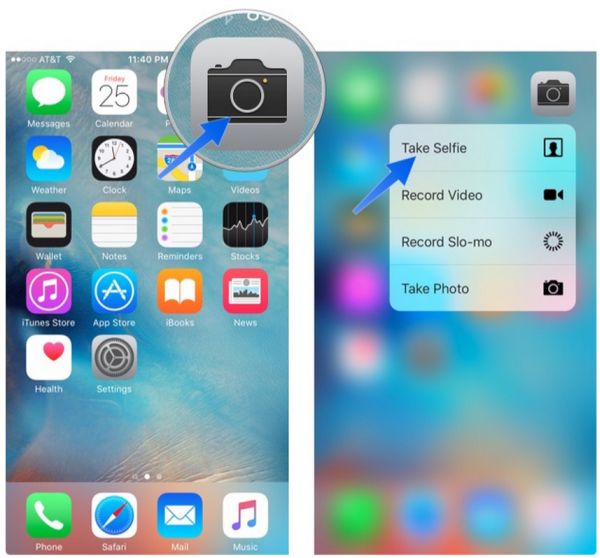
How to Take Selfies with iPhone 6s
Step 1. If you need to quickly get to your Camera on iPhone 6s you can slide up from your Lock Screen. You an also use Quick Actions with 3D Force Touch feature or ask Siri to help you create the quick selfie. Remember to turn on Live Photo option. When your front camera is on you can start taking the Live Selfie on your iPhone. Don’t stay still as the animation always looks better when you wink, smile or do something else.
Step 2. When your Selfie has been taken you might want to view it. Since your Live Selfie if your Live Photo you should launch Photos application and search for the image you want.
Step 3. You can animate your Live Selfie by pressing firmly on the photograph. This is not only possible on the phones that support 3D Touch feature: iPhone 6s and iPhone 6s Plus – but is also available on some earlier models where you have to click-hold the image to animate it [remember to update to iOS 9 as this feature is not supported by iOS 8 or iOS 7].
Step 4. It is possible to share your selfies through Share option.
Now you know how to take and share iOS 9 Live Selfies on iPhone 6s and iPhone 6s Plus. This is fun, fast and awesome!