Apple fans who are new to the iPhone might like to learn how to activate Verizon iPhone 6 or iPhone 6 Plus. After you activate your device you can easily factory unlock Verizon iPhone 6 or 6 Plus using a special package for that.
These are the most popular handsets in 2014 as Apple has sold over 10 million of them after official release in September 2014. Customers whose device is still being shipped can read this guide and prepare for iPhone 6 Verizon activation which is must do in order to use your gadget for calls and messages.
You can activate everything at home. There is no need to take your brand new iPhone 6 to Verizon stores as the instruction is simple and can be performed distantly. This is handy for consumers who prefer their purchase being delivered to their front doorstep.
How to Activate iPhone 6 Verizon Online
The instruction on full iPhone 6 activation including Verizon LTE Wireless is very easy to follow.
Step 1. Turn on your new iPhone 6 or iPhone 6 Plus.
Step 2. Set up your new device. Your assistant will guide you through this procedure. You’ll have to choose your language, country and some other things.
Step 3. When you see the screen with your cell phone number, you should re-check the number and once you are sure it yours, click Next option.
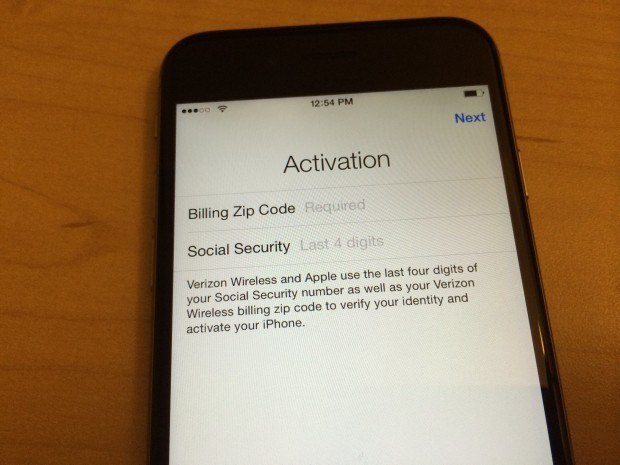
Step 4. You can now enter the billing ZIP code for your account with Verizon Wireless and the last 4 digits of SSN. Click Next to continue.
Step 5. You will have to agree to the carrier’s Terms and Conditions.
Step 6. The new iPhone 6 Verizon or 6 Plus will start the activation procedure. You will see this happening and it can take a couple of minutes.
Step 7. Once your iPhone has been activated in Verizon network, your iOS 8 Setup Assistant will allow you finishing the setup process. You’ll have to enter your Apple ID, choose which features to turn on and which ones to disable, etc.