Use iPhone Safari tips to get more out of your smartphone. It is easier to surf the web if you know some secrets as this way you can get rid of any possible frustration. iOS 9 system offers different features you can take advantage of [for example, you can hide apps to invisible folder on iPhone] but you can improve this experience even more if you follow this short guide.
iOS 9 Safari Secrets for iPhone
*Private browsing is available to users who turn it on through Private menu. You can find it in the bottom of your iOS 9 browser.
*View recently closed tabs by clicking on the Tab icon. You will then need to hold the ‘+’ and all the tabs will appear in the list. You can now launch any link by clicking on it. This is a very useful option that comes handy once in a while.
*Our top Safari tips include the possibility to Request desktop site version which is available in iOS 9 [if you get iOS 9 iCloud error you can fix ‘backup could not be completed’ issue]. You can enable this feature through Refresh – Request Desktop Site menu in Safari browser on iPhone.
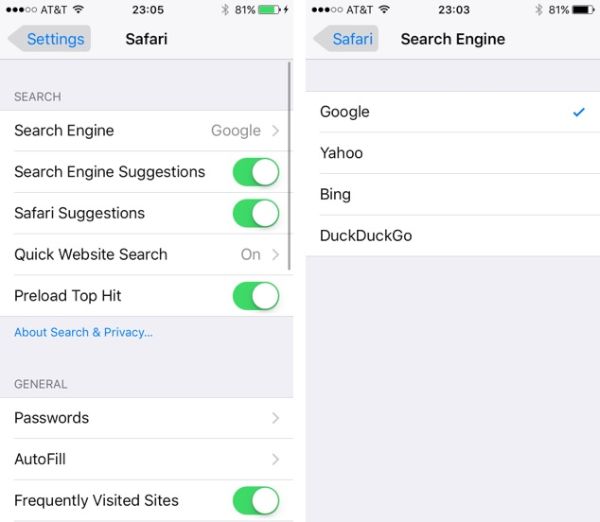
*You can select different Search Engine in Settings – Safari. Find this option under Search menu. Choose between Yahoo, Bing, Google and DuckDuckGo. It is also possible to use Smart Search option.
*Use Offline reading option or Reader view as both options are present in iOS 9 iPhone Safari.
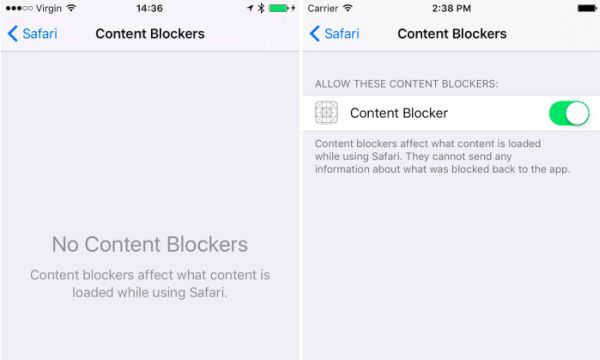
*Block ads if you are tired of mobile advertisements on iPhone. Go to Settings and choose Safari – Content Blockers to turn on this feature.
*If you wish to switch between pages – swipe right or left to go left – right. There is no need to click on the back option in the bottom every time you wish to perform this task.