If you want to add some extra options to your iPhone, you can use this guide and make your iPhone use flash as LED notification. It is simple to add these changes with the help of different Accessibility features. This can turn your smartphone into a device with the LED notification light.
Follow this simple guide and get flash LED phone in a few steps. Once you complete this instruction, your fruit device will light up whenever you get a notification alert. This is handy, especially if your sound is turned off but you are waiting for an important message from someone.
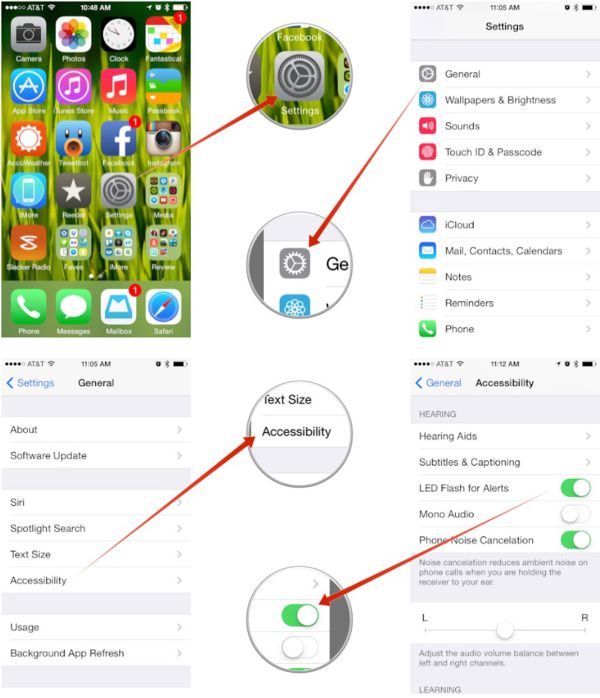
Step 1. Open Settings application. This program has a lot of different options for various changes.
Step 2. Go to General menu.
Step 3. Now you need to get to Accessibility menu.
Step 4. We are almost done. Scroll down till you find the Hearing option.
Step 5. Go to this Hearing section and make your camera LED flash notification work by enabling LED Flash for Alerts. Just toggle it on.
Step 6. You have successfully asked your iPhone to light its LED flash up for different notifications.
Apple’s handset offers various options to users even if it is not jailbroken. Some users who wish to get more features prefer jailbreaking their cell phone as this adds Cydia store to your Home screen where you can download different apps and jailbreak tweaks.